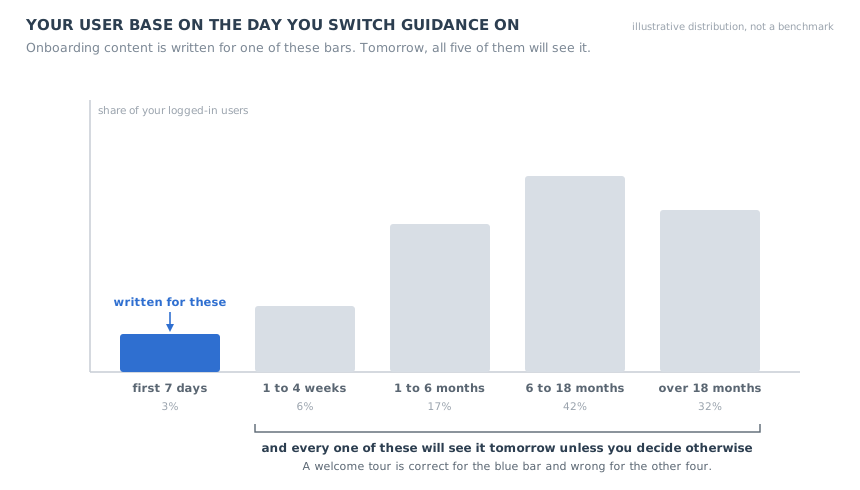
You have just finished building your first real onboarding flow. It is good. It opens on the empty workspace, it explains the three things a new customer has to do before the product does anything for them, and it ends on a completed piece of work. Everyone who has seen it agrees it is a clear improvement on what was there before, which was nothing.
Then somebody asks the only question that matters, and the room goes quiet: who sees it?
The honest answer is that the flow was written for a person who signed up ninety seconds ago, and that person is a rounding error in your database. Everybody else got in before the flow existed. Some of them have been paying you for two years. Some signed up eight months ago, never got anywhere, and have logged in twice since. Some use three screens brilliantly and have never opened the other eleven. All of them will load your product tomorrow, and unless you decide otherwise, all of them will be welcomed to a product they already own.
This is the rollout problem that no onboarding guide covers, because every onboarding guide quietly assumes a greenfield user who arrives after the system is already running. This one is about the other situation, which is the situation almost every team is actually in: you are onboarding existing users, and the content you have was not written for them.
Key takeaways
- On launch day your user base is not a cohort, it is a tenure distribution. Your onboarding content is correct for one slice of it and wrong for the rest.
- A guidance launch is two jobs: a finite campaign that clears the backlog of people who got in without guidance, and a permanent system that catches everyone who signs up from now on. Only one of them has an end date.
- Long-tenured users are not missing orientation, they are missing inventory: capability they never found, workarounds they froze into habits, and a mental model of a version of your product that no longer exists.
- Behaviour outranks tenure. Never teach someone a thing they have already done, whatever their signup date says.
- Release the backlog in waves, not all at once, so support is not flooded and each wave is readable on its own.
- Launch week cannot be your baseline. It contains a one-time clearing and a steady-state system in the same number, and that blend can never happen again.
- Three of the four routing questions you have to answer end in showing less, not more. That is the real difference between onboarding a new user and onboarding an existing one.
What Onboarding Existing Users Actually Means
Onboarding existing users: definition
Onboarding existing users is the work of rolling in-app guidance out to people who signed up before that guidance existed. It has two halves that are easy to confuse: deciding what each tenure group should be shown now, and deciding what the permanent system does with everybody who arrives later. It is sometimes called backfilling onboarding, because the people it serves got through the door while the door had no sign on it.
The phrase gets used loosely, and three neighbouring problems get collapsed into it. Keeping them apart is most of the work, because each one has a different trigger, a different audience and a different success measure.
-
It is not re-onboarding
Re-onboarding is what you do for a user who has been away and has come back: the product is the same, the person has simply forgotten it. The trigger is a gap in their sessions. Onboarding existing users is triggered by you shipping something, and the audience includes people who never left. Our re-onboarding guide covers the returning-user case properly, including how long a gap has to be before it matters.
-
It is not re-engagement
If somebody has not logged in for two months, no in-product guide will reach them, because in-product guides require them to be in the product. That is a reach problem, and it belongs to a different playbook. Our user re-engagement guide covers slipping, dormant and churned users and what to send for each. In this guide, dormant accounts are explicitly handed off rather than targeted.
-
It is not a redesign migration
When the interface itself changes under people, the job is to show them where things went. That is a specific and well-understood piece of work with its own rollout shape, covered in our product redesign rollout guide. The situation here is harder in one respect: nothing visible has changed, so you have no natural excuse for interrupting anybody, and no sympathy if the interruption is pointless.
What makes this its own problem is the mix. A re-onboarding trigger fires for one person at a time. A redesign lands on everyone at once but everyone is equally affected. A guidance rollout lands on everyone at once while the right answer differs wildly from person to person, and the difference is invisible in the interface. That is why so many of these rollouts go badly: the decision is a segmentation decision wearing the costume of a content decision.
Your Launch Day Is a Tenure Distribution, Not a Cohort
Open your database and group every logged-in user by how long they have had an account. You will get a shape, and the shape is the single most useful artefact in this whole exercise, because it tells you immediately how wrong your content is about to be.
Take an illustrative example, and treat the numbers as arithmetic rather than as a benchmark, because the shape depends entirely on how fast you are growing. Suppose you have 10,000 users who logged in this month. Three per cent of them signed up in the last week. Six per cent in the last month. Forty per cent have been with you for more than six months, and a third for more than eighteen. Your onboarding flow, the one that opens with a welcome and explains what a workspace is, is correct for roughly 300 people and incorrect for roughly 9,700.
Nobody writes it down that way, which is why the mistake is so common. The flow gets built, it gets tested on a fresh account, it works beautifully on that fresh account, and then it gets switched on for everybody because switching it on for everybody is the default setting of every tool that has ever existed. The next morning a customer who has been with you since 2024 is being told, in a modal, what the dashboard is for.
That modal costs you more than it looks like it costs. A new user who sees irrelevant guidance thinks the product is trying to help. A two-year customer who sees it concludes something much more expensive: that you do not know who they are. Every piece of guidance you show carries an implicit claim that you understood their situation well enough to interrupt them, and when the claim is visibly false, the next interruption gets dismissed before it is read.
The second-order effect is worse than the irritation. Dismissal is a learned habit, and it generalises. Once a user has trained themselves to close your blue boxes without reading them, the genuinely important announcement you send in March lands on a person who no longer reads announcements. Our banner blindness guide covers how quickly that habit forms. Launch day is where most teams accidentally teach it.
So the first move is not to pick what to show. It is to accept that you are running one launch against at least four different audiences, and to notice that for most of them the correct amount of guidance is nearly zero.
The Two Jobs, and Why Teams Collapse Them Into One
Underneath the segmentation question sits a structural one that is easier to get right and almost never stated out loud. A guidance launch is two jobs, and they have different shapes, different owners and different end dates.
The backlog clearing is a campaign: it has a last day, and after that day it should not exist. The steady-state system has no last day. The shaded overlap is the only period in which one number contains both.
Job one is the steady state. From today, every person who signs up should meet the right guidance at the right moment without anybody doing anything. This is a product change. It is permanent, it is boring, it is the thing you are actually building, and it is correctly judged by a rate: of the people who signed up this week, what share got to their first real outcome.
Job two is the backlog clearing. There is a finite population of people who got in before the system existed, and you have one opportunity to reach them inside the product. This is a campaign. It has a start, a shape, a last day and a fixed denominator, and it is correctly judged by coverage: of the people who were eligible, what share saw it and acted.
Teams collapse these two into one launch, and both jobs get damaged by the merge. The campaign damages the system, because campaign-shaped content ("here is everything new since you joined") gets left switched on forever and becomes furniture that new users also see, out of context. And the system damages the campaign, because campaign results get read as if they were steady-state results, which sets a baseline nobody can ever hit again.
The cleanest test of whether you have separated them: can you name the date the backlog campaign stops? If you cannot, you have not built a campaign, you have added a permanent feature whose audience was defined by an accident of when you happened to ship.
There is a useful consequence of the split. The steady-state job should be designed first, even though the backlog is the part everyone is excited about, because the steady state defines the content. Once you know what a new user is shown at each moment, the backlog campaign is a question of which of those moments to offer to which existing group, and which to withhold. Designing the campaign first produces content that only makes sense once, which you then have to rewrite.
The Four Tenure Tiers and What Each One Should Get
Tenure alone is a weak segment, as the next section argues, but it is the right first cut because it maps onto four genuinely different situations. Almost every existing user is in one of these four, and what each needs is not a matter of degree. It is categorically different.
They created an account weeks or months ago and never reached a first real outcome. They are not experienced users with an old account; functionally they are new users with a stale signup date. They should get the full onboarding flow, unchanged, and they are the most valuable group in the whole backlog because the work is already paid for.
They log in, they get value, and they use a fraction of what they are entitled to. They need no orientation whatsoever and they need no welcome. They need to know that the three things they do by hand every week have a button, and they need to be told that at the moment they are doing them by hand.
They move faster through your product than your own team does. Guidance for this group is almost always a net negative, with two exceptions: things that genuinely changed, and anything they can choose to open themselves. Default them out of everything and treat an interruption to them as a cost you have to justify.
No session in weeks. Nothing you put inside the product will reach them, so including them in a guidance campaign inflates your denominator and teaches you nothing. Hand them off, and keep them out of the coverage calculation rather than quietly failing at them.
Written as a table, the thing worth noticing is the right-hand column. For three of the four tiers there is a specific piece of content that is actively damaging, and it is usually the piece of content you have just finished building.
| Tier | How to identify it | What it should get | What it must never get |
|---|---|---|---|
| Stalled | Account exists, first-value milestone never reached, at least one session in the last month | The full onboarding flow, plus a checklist that survives between sessions | Anything that assumes competence, including feature announcements |
| Narrow | Regular sessions, value reached, usage concentrated in a few screens or one workflow | Contextual hints at the point of manual effort, one capability at a time | Welcome content, product tours of the basics, progress bars about setup |
| Fluent | Broad feature usage, high session frequency, often the account admin | Change notices they can read on their own schedule, and an opt-in way back in | Any interruption that teaches something they demonstrably already do |
| Quiet | No session in several weeks, whatever their entitlement says | Nothing in-product; they belong to a reach channel | A place in your coverage denominator |
Two notes on building these tiers. First, the stalled tier is where the return is, and it is routinely forgotten because it looks like churn. These are people who told you they had the problem, got as far as creating an account, and then hit something they could not get past. Our guide to increasing user activation covers what to do with them once you have found them. Second, the fluent tier contains the people who will advocate for you internally, so the cost of annoying them is not symmetrical with the others; our power users guide covers identifying them.
Existing Users Are Missing Inventory, Not Orientation
Here is the substitution that makes the content question tractable. New users need orientation: where am I, what is this screen, what do I do first. Existing users have all of that. What they are missing is an inventory of what they own, and inventory is a completely different kind of content with a completely different delivery.
Three things accumulate in a long-lived account, and each one has a distinct remedy.
-
Capability they never found
Everything you shipped after the week they learned the product is, to them, invisible. They are not resisting it; they do not know it is there. This is the largest of the three by a wide margin, and it is a discovery problem rather than a teaching problem. Our feature discovery guide covers the mechanics of getting a feature noticed, and our feature bloat guide covers the uncomfortable alternative, which is that some of it should be retired rather than announced.
What they get: an announcement they can read on their own schedule, plus one hint at the place in the interface where the capability would have helped.
-
Workarounds that hardened into habits
Early on, something was missing, so they invented a way round it: a spreadsheet beside your product, a naming convention, twelve clicks where there is now one. You later shipped the proper solution and nothing happened, because the workaround works and it is already in their fingers. A habit is not displaced by information about a better option; it is displaced at the moment the habit fires. Our UX debt guide covers what these workarounds cost you.
What they get: one contextual prompt, on the screen where the manual version happens, at the moment they are doing it the slow way.
-
A mental model of a product that no longer exists
They learned your product in a particular state and their internal map froze there. Where the map and the product disagree, they will trust the map and conclude the product is broken. This is the only one of the three where a long-tenured user genuinely needs correcting rather than informing, and it is also the one most likely to be generating support tickets you have misfiled as bugs. Our mental models guide covers the mismatch.
What they get: a short map of what moved and what it is called now, offered once, never a tutorial on the underlying task.
Notice that none of the three remedies is a tour of the product. Two of them are a single hint, and the third is a notice. Inventory content is short by nature, because the reader already has the context that makes it legible, and the fastest way to waste it is to wrap it in the orientation they do not need.
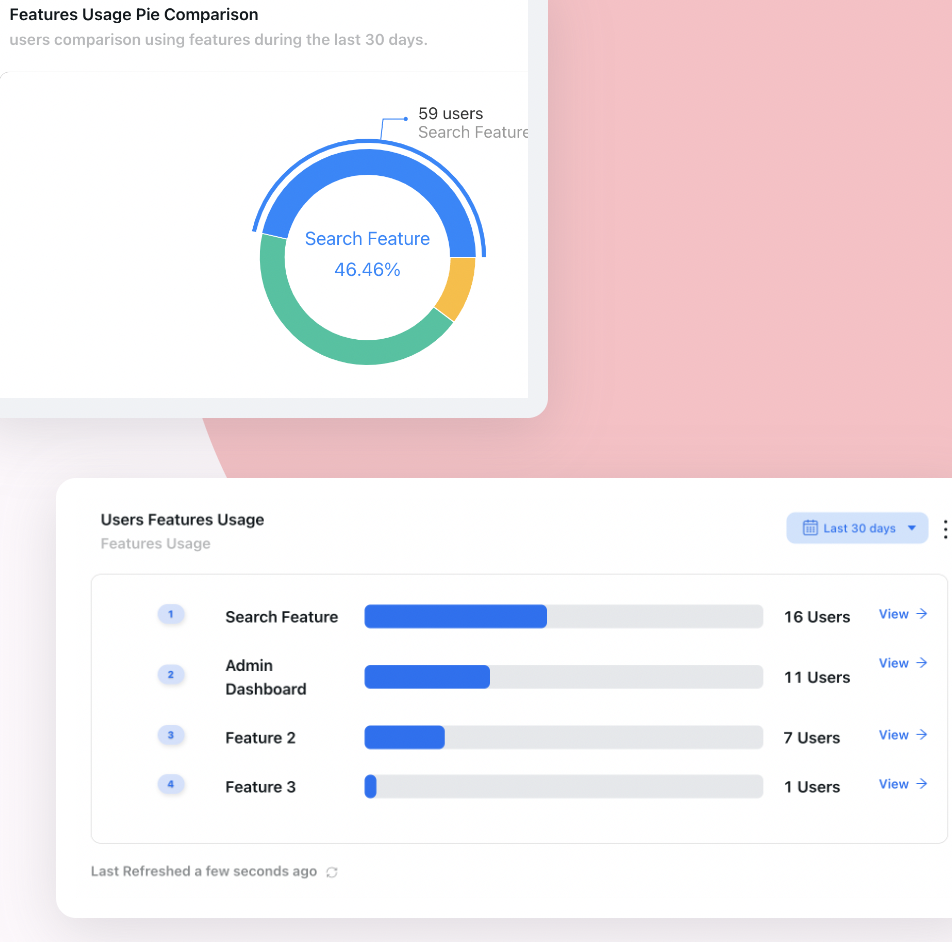
The inventory gap is visible in a feature usage report before you write a single word of content: the features with a thin bar and a healthy reason to exist are the ones your long-tenured users never found.
Write the Exclusion Rules Before You Switch Anything On
The instinct on a rollout is to define who should see each guide. Invert it. Define who must never see it, because the exclusions are where the damage is, and they are also the part you cannot retrofit: a guide shown once to the wrong person has already been shown.
One rule carries most of the weight.
Behaviour outranks tenure. Never teach a user something they have already done. A person who created their first project eighteen months ago should never be told how to create a project, and a person who created one yesterday should not be told either. The signup date is a proxy for competence; the completed action is evidence of it, and when the proxy and the evidence disagree, the evidence wins.
This matters because tenure-only rules fail in both directions, and both failures are expensive. Long tenure does not imply competence: the stalled tier is full of old accounts that never arrived, and excluding them by date is excluding exactly the people the work was for. Short tenure does not imply ignorance either, because switchers arrive already fluent in the category, as our switcher onboarding guide covers. Tenure is a useful way to order the waves. It is a poor way to decide what somebody knows.
Four questions, asked in this order, resolve almost every case. The order is doing real work: putting the exclusions first means the expensive mistakes are caught before anybody gets to the interesting argument about content.
The router, written as rules before the launch rather than as decisions during it. Three of the four questions end in showing less.
Two practical additions to the router. First, run a vocabulary audit over the content you already have: any sentence containing "welcome", "let's get you set up", "first" or "to get started" was written for a brand-new user and will read as an insult to anyone else. That is a find-and-replace job, not a rewrite, and it takes an hour. Our UX microcopy guide covers the wording itself.
Second, give every guide in the campaign a hard stop: one appearance, one dismissal honoured, and an end date on the whole campaign. The frequency and conflict rules that make this behave sensibly across several guides are covered in our onboarding triggers guide, which is about which trigger fires a guide and when; this guide is about which population it should fire for on the day you turn it on.
How to Roll Onboarding Out to Existing Users in Seven Steps
The sequence below is deliberately conservative, because the failure mode is not moving too slowly. It is spending your one chance at everybody's attention on a launch you had not finished thinking about.
- Pick one flow, not the whole programme.
- Design the steady state first and ship it.
- Segment the backlog by behaviour, then order it by tenure.
- Rewrite the copy for people who are not new.
- Put an end date on the campaign before it starts.
- Release in waves and read each wave.
- Retire the campaign and keep the system.
1. Pick one flow, not the whole programme
The temptation is to roll out everything you have built at once, because it is all finished and it is all good. Resist it: a rollout that touches six guides cannot be diagnosed, because any problem you see could have come from any of them, and the reaction you get is to the aggregate volume rather than to any one piece. Choose the single flow with the clearest outcome, usually the one that ends at the activation milestone you already measure. One flow also means one conversation with support rather than six.
2. Design the steady state first and ship it
Turn the system on for new signups only and leave it there for a week or two. This gives you three things that are very hard to get later: content proven on the audience it was written for, a clean per-cohort number that is not contaminated by the backlog, and a set of rules you have watched behave in production before you point them at ten thousand people. If the flow does not work on brand-new users, it will not work better on a two-year customer.
3. Segment the backlog by behaviour, then order it by tenure
Build the four tiers from what people have actually done: first-value milestone reached or not, which capabilities they have used, last session date. Then use tenure only to sequence the waves. The combination matters because it gives every user in the backlog exactly one label, and because it makes the eligible population a number you can write down, which is what turns the campaign into something measurable. Our user segmentation guide covers building the segments themselves.
4. Rewrite the copy for people who are not new
Take the steady-state content and produce a second version for each tier that needs one. For the narrow tier this usually means cutting a five-step tour down to a single hint and deleting every sentence that explains something they use daily. For the fluent tier it means converting the whole thing into a notice they can open or ignore. The rule of thumb: if a tier's version of the content is not noticeably shorter than the original, you have not finished rewriting it.
5. Put an end date on the campaign before it starts
Write the date in the launch document, agree who turns it off, and decide in advance what happens to the content afterwards: it either becomes part of the steady-state system for new users, or it is deleted. "We will see how it goes" produces a third outcome, which is that it stays on forever, gradually stops matching the product, and ends up in the pile of stale guidance described in our guide to why product tours break.
6. Release in waves and read each wave
Take the backlog in slices, smallest-risk first: stalled users, then the narrow tier by tenure band, then anything aimed at fluent users last. Waves buy you three things. Support is never hit by the whole base at once. Each wave is a readable sample, so a problem in wave one costs you five per cent of your attention budget instead of all of it. And the wording you fix after wave one is fixed for the ninety per cent of people who have not seen it yet.
7. Retire the campaign and keep the system
On the date you wrote down, turn the backlog campaign off and confirm that the steady-state system is still running for new signups, which is easy to break in the switch-off. Then re-run your segment query: whoever is still in the stalled tier did not respond to in-product guidance, and that is a real finding rather than a failure. Those accounts are now a customer-success question, not a guidance one.
Seven Examples: What to Show Each Kind of Existing User
Generic rules get persuasive when you put them against real situations. Each of these is a case where the obvious move and the correct move are different.
-
The two-year admin who never connected the integration
They run their whole team on you and have never linked the system that would remove half their manual work. The obvious move is a tour of the integrations page. They do not need a tour of a page they could find in four seconds.
What they get: an announcement naming the specific outcome, and one hint on the screen where the manual version of that work happens. See our integration onboarding guide for the connect step itself.
-
The team that still imports by hand every month
Bulk import shipped a year ago. They have a hardened habit and a spreadsheet. An announcement about bulk import will be read and then not acted on, because the habit does not fire while they are reading announcements.
What they get: one hint on the manual entry screen, triggered after a few repetitions in a single session, which is the moment the habit is actually running.
-
The account created eight months ago that never produced anything
It looks like a dead account and it is usually treated as one. It is the highest-value row in the backlog: the intent was real enough to sign up, and the blocker is probably still the blocker.
What they get: the full onboarding flow exactly as a new user sees it, plus a persistent onboarding checklist so progress survives between their infrequent sessions.
-
The power user who is about to be your reference customer
They know the product better than most of your team. Any guidance you push at them is a small tax on the relationship, and the obvious move, including them in the rollout "for completeness", is pure cost.
What they get: excluded by default from everything in the campaign, with change notices and early access as the only exceptions.
-
The account where one person does everything
Ten seats, one active user. Guidance aimed at the person who already does the work changes nothing, because they are not the bottleneck; the nine people who never log in are.
What they get: nothing aimed at the active user. The campaign targets the second seat instead, which is the subject of our license utilization guide.
-
The user who learned the old navigation
They are hunting for a button that moved last quarter, and they are generating tickets that your team has logged as confusion rather than as a mental-model mismatch. A beginner tour will be dismissed, correctly, as insulting.
What they get: a short map of what moved and what it is called now, once, with no instruction about the underlying task.
-
The user who comes back every quarter
They are not a backlog problem at all. Their gap is structural: the work only happens four times a year, so they will always arrive having forgotten, and no one-time campaign fixes that.
What they get: handed to the permanent returning-user trigger in our re-onboarding guide, and kept out of this campaign entirely.
Why Launch Week Cannot Be Your Baseline
There is one measurement trap here that is almost impossible to avoid by accident, and it has sunk more of these rollouts than any content decision.
In the first week, two populations are flowing through the same guide: the backlog, which is enormous and one-time, and the week's new signups, which are few and recurring. Your completion rate for that week is a weighted average of the two, dominated by the backlog, and it is a number that can never occur again because the backlog is consumed by being cleared. If somebody writes it on a slide as the new baseline, every subsequent week will look like a decline, and the team will spend a quarter fixing a decline that is an artefact of arithmetic.
The backlog also behaves differently from a new cohort while it is passing through. Long-tenured users move faster, because they already know the interface and are reading only the one sentence that is new to them. They complete more and read less. That inflates completion and deflates anything you infer about comprehension, in the same breath.
Quote three separate numbers and never average them: campaign coverage (share of the eligible backlog reached, per wave), campaign action rate (share of those reached who did the thing), and the steady-state rate for new signups only. The first two go to zero on purpose when the campaign ends. Only the third is a baseline.
The same bias runs through anything you try to test during the rollout. An existing user reacting to a guide is reacting partly to the novelty of being guided at all, which is a short-lived effect in both directions, and our novelty effect guide covers why a launch chart is unreadable for several weeks and what to subtract from it. If you want a real result from the flow itself, test it on new users, where there is no prior version to react to; our A/B testing onboarding guide covers the sizing.
One more expected signal that gets misread: support contacts usually rise in the first wave and then fall back. Guidance makes people aware of capability, and awareness produces questions. A rise in wave one is evidence that the content was noticed, not that it failed; the number to watch is whether wave three is still producing the same rise after you fixed the wording from wave one.
What to Measure for Each of the Two Jobs
You almost certainly do not need new metrics for this. You need to put the metrics you already have on the correct side of the line, because the great majority of reporting mistakes in a guidance rollout are a campaign number being read as a system number. Our user onboarding metrics guide covers the definitions themselves; the table below is only about which job each one belongs to.
| Job | The question | What to look at | The shape to expect | The trap |
|---|---|---|---|---|
| Backlog | Did we reach the people who were already here? | Coverage: share of the eligible, defined backlog that saw the guide, per wave | Rises to a ceiling, then stops forever | Counting dormant accounts as eligible, which caps coverage at a number you cannot move |
| Backlog | Did reaching them change anything? | Action rate: share of those reached who completed the specific outcome | Highest in wave one, lower in later waves | Reporting the aggregate across waves, which hides a wording problem introduced mid-campaign |
| Backlog | Is it costing us goodwill? | Dismissal speed and support contacts, per tier, per wave | Flat if the targeting is right; spikes in one tier if it is not | Watching the average across tiers, where the fluent tier's irritation is invisible |
| Steady state | Are new users arriving? | Activation rate and time to first value, by signup cohort | A stable rate, moving slowly | Including the launch week, which contains the backlog and distorts the whole series |
| Steady state | Is the guidance itself working? | Per-step completion and drop-off for new-signup cohorts only | Consistent between cohorts | Comparing a new cohort against the backlog's numbers, which were always going to be higher |
| Steady state | Did adoption actually stick? | Whether people who acted came back and used the capability again | Visible only after several weeks | Declaring success on first use, which a campaign reliably produces and a product may not |
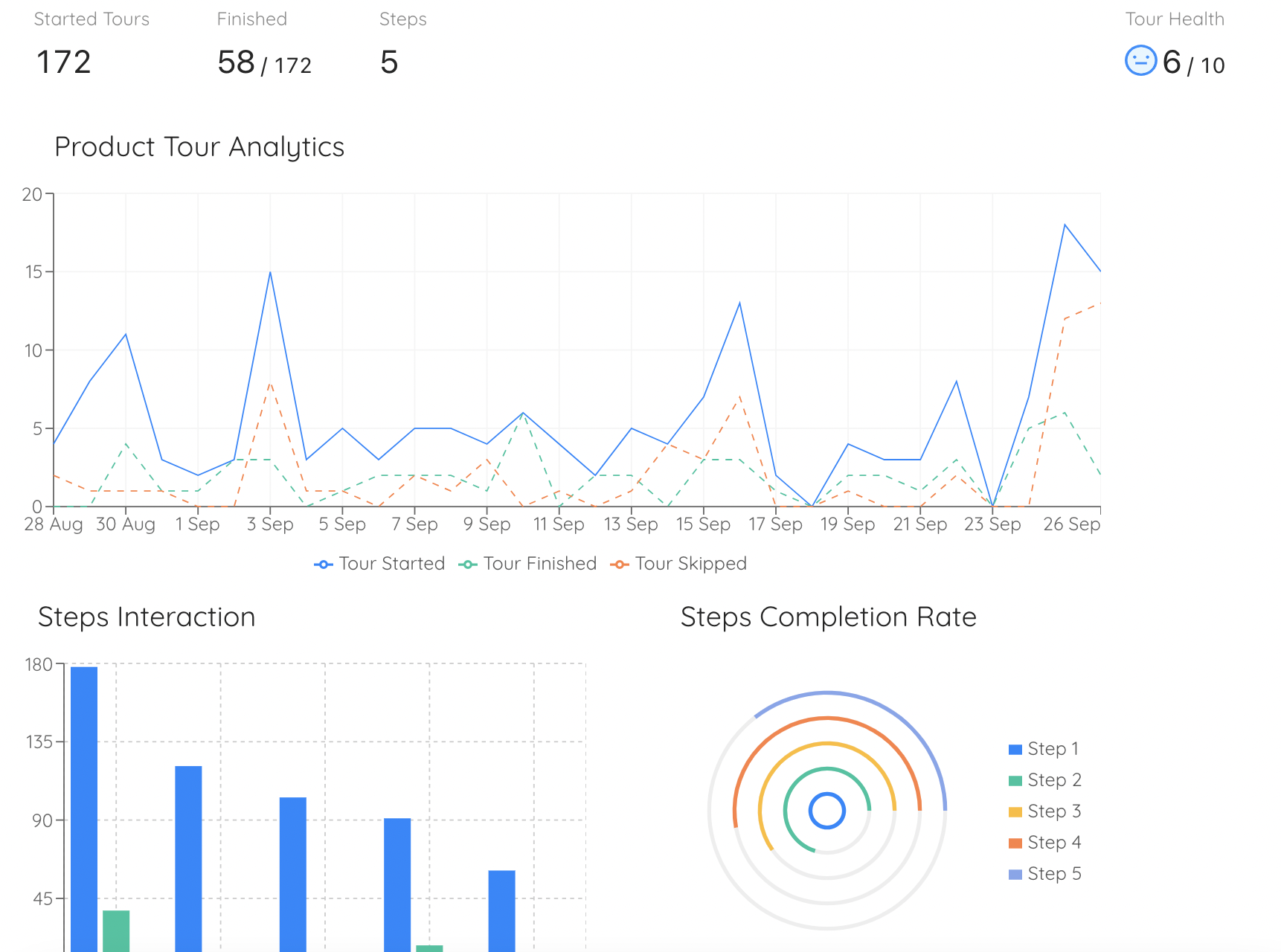
Per-step completion read wave by wave is what separates a targeting problem from a content problem: the same guide dropping off at step two for the narrow tier and completing cleanly for the stalled tier is a segmentation finding, not a copywriting one.
Six Ways Rolling Onboarding Out to Existing Users Goes Wrong
The default setting of every tool, and the single most expensive mistake available. It trains your most valuable users to dismiss your guidance unread, and that training does not expire when the campaign does.
The opposite error, and it is not safe, it is just invisible. The backlog is where most of the unrealised value sits, and a rollout that touches nobody who is already paying you will not move any number worth reporting.
Six guides to the whole base on a Tuesday. Support takes the hit in one day, no individual guide can be evaluated, and the volume of interruption rather than the content becomes the thing people remember.
Tenure is a proxy and it is wrong in both directions: old accounts that never activated get excluded, experienced switchers get taught the basics. Behaviour is usually already in your analytics.
Backlog content left running quietly stops matching the product, keeps appearing to new users who have no idea what it is referring to, and nobody feels authorised to delete it because nobody remembers why it exists.
One completion rate covering the backlog and new signups together. It looks excellent in week one, declines every week afterwards by construction, and sends a team off to fix a problem that does not exist.
If you are rolling guidance out across a base that is already large, the structural version of this problem is covered in our guide to scaling user onboarding, and the question of what to audit before you start is covered in our user onboarding audit guide.
Rolling It Out to Existing Users With Kompassify
Everything above is a targeting and sequencing problem, which is exactly the part that is painful when guidance is hard-coded and cheap when it is not. With Kompassify the whole rollout is configuration rather than a release cycle, which matters here more than usual: you will change your segment rules after wave one, and you want that to cost an afternoon rather than a sprint.
-
Decide who sees each guide with segments and page targeting
Segment and page targeting is what turns the four tiers from a diagram into a running rule, so the stalled tier gets the full flow, the narrow tier gets one hint on the screen where it matters, and the fluent tier is excluded by default rather than by hand.
-
Build the tiers out of behaviour you already track
No-code product analytics gives you activation and milestone reports, a feature usage report and user flows, which is where the stalled and narrow tiers come from. The feature usage report is also how you find the capability your long-tenured users never discovered, before you decide what to announce.
-
Reach fluent users without interrupting them
The announcements widget puts a "what's new" panel behind a bell, which is the one delivery an experienced user can take on their own schedule. An announcement can launch a tour for the people who want the detail and collect feedback from the people who do not, so one piece of content serves both.
-
Give the stalled tier something that survives between sessions
An onboarding checklist holds progress for users who log in rarely, and a checklist item can redirect to the right page, open a new tab or start a product tour, which is how you offer the full flow without forcing it on anybody.
-
Use the lightest pattern that does the job
Tooltips and hotspots sit beside the element they refer to and wait, which is the right weight for the narrow tier: a hint at the point of manual effort rather than a flow that takes the screen. Our hotspot UX guide and tooltip guide cover when each one fits.
-
Read each wave separately
Per-step tour analytics show completion and drop-off for each guide, so a wave can be read on its own instead of being averaged into the launch. That is what lets you tell a wording problem from a targeting problem while you still have ninety per cent of the backlog left to reach.
-
Ask before you guess which tier someone is in
Multi-choice onboarding lets a user say what they are trying to do, which is the cheapest routing signal there is when your behavioural data is thin. Our welcome survey guide covers writing questions that route rather than questions that interrogate.
Roll guidance out to the users you already have
Target each tenure group separately, exclude the people who already know, release in waves and read every wave in real analytics. No code required. Free up to 100 monthly active users, plans from $129/month, GDPR-compliant and EU-hosted.
Start for free →For the content itself, our guide to creating a product tour that converts covers the flow you will be rolling out, and announcing a new feature covers the notice the fluent tier should get instead of a tour.
Onboarding Existing Users: Do vs Don't
✅ Do
- Plot your user base by tenure before you decide anything.
- Ship the steady-state system for new signups first, on its own.
- Write the exclusion rules before the targeting rules.
- Exclude anyone who has already completed the action the guide teaches.
- Give the stalled tier the full flow; they are functionally new.
- Release the backlog in waves and fix the wording between them.
- Put an end date on the campaign in writing, with an owner.
- Report coverage, action rate and the steady-state rate as three numbers.
❌ Don't
- Show a welcome flow to your whole base because that is the default.
- Exclude every existing user and call the rollout finished.
- Segment on signup date when the completed action is available.
- Teach a two-year customer what one of your core screens is for.
- Put dormant accounts in the denominator of a coverage number.
- Quote launch week as the baseline for anything.
- Leave backlog content running after its audience is cleared.
- Roll out six guides on the same day and expect to learn which one worked.
The One-Paragraph Version
On the day you switch in-app guidance on, your user base is a tenure distribution and your content was written for the thinnest slice of it, so the default setting, show it to everybody, is wrong for almost everybody. Split the launch into the two jobs it really is: a permanent system that catches every future signup, which you should ship first and judge as a rate, and a finite campaign that clears the backlog of people who got in before the system existed, which you should run in waves and judge as coverage. Sort that backlog by what people have done rather than when they joined, because long tenure does not mean competence and short tenure does not mean ignorance, and the one unbreakable rule is never to teach somebody a thing they have already done. Long-tenured users are not short of orientation; they are short of inventory, so what they need is a notice and a single hint at the point of manual effort, not a tour of a product they know. Give the campaign an end date and an owner before it starts, keep its numbers in separate sentences from the system's, and remember that the first week contains both at once and can therefore never be your baseline.
Frequently Asked Questions
What does onboarding existing users mean?
It means rolling in-app guidance out to people who signed up before that guidance existed. It is sometimes called backfilling onboarding, because the people it serves got through the door while the door had no sign on it. The work has two halves that are easy to confuse: a finite campaign that clears the backlog of users who are already inside your product, and the permanent system that will catch everybody who signs up from now on. The campaign has a last day and is judged by coverage of a fixed population. The system has no last day and is judged by a rate per signup cohort. Collapsing the two into one launch is the most common way the rollout goes wrong.
Should existing users see your product tour?
Most of them should not. A product tour that explains your core screens is correct for somebody who arrived minutes ago and insulting to a customer of two years, and the cost is not just the irritation: a user who learns to dismiss your guidance unread will also dismiss the announcement that actually matters six months later. The exception is the group that signed up long ago and never reached a first real outcome. They have an old account and a new user's problem, so they should get the full flow exactly as a new user sees it. For everyone else, replace the tour with a notice they can open on their own schedule plus one hint at the place in the interface where the capability would have helped.
How do you stop a guide showing to users who already know the feature?
Exclude on behaviour rather than on tenure. The rule is to never teach a user something they have already done, so the condition on each guide should be the completed action it teaches rather than the signup date of the person seeing it. A user who created their first project eighteen months ago should never be shown how to create a project, and the same condition correctly excludes somebody who did it yesterday. Signup date is only a proxy for competence, and it fails in both directions: old accounts that never activated get wrongly excluded, and experienced people arriving from a competing product get wrongly taught the basics. Use tenure to order the waves of a rollout, not to decide what anybody knows.
Is onboarding existing users the same as re-onboarding?
No, and the difference is what triggers the work. Re-onboarding is triggered by the user: they have been away long enough to forget, they come back, and something has to reorient them. Onboarding existing users is triggered by you: you have shipped guidance, or a capability, and you now have to decide what to do about the population that was already inside without it. The audiences overlap but are not the same, because most of the people in a guidance backlog never left at all. In practice, seasonal and occasional users should be handed to a permanent returning-user trigger and kept out of a one-time backlog campaign entirely, because their gap is structural and no campaign will fix it.
How do you segment existing users for an onboarding rollout?
Build the segments from behaviour, then order them by tenure. Four tiers cover almost everybody. Stalled users have an account, at least one recent session and no first-value milestone, and they get the full onboarding flow. Narrow users are active and get value from a slice of the product, and they get contextual hints at the point of manual effort, one capability at a time. Fluent users move faster than your own team, and they get change notices and an opt-in route back in, nothing else. Quiet accounts with no session for weeks cannot be reached in-product at all, so they belong to a reach channel and should be kept out of your coverage denominator rather than quietly failed at.
How long should a backlog onboarding campaign run?
Long enough for every eligible user to have had a few sessions, and no longer. For a product people open daily that is usually a small number of weeks; for one they open monthly it is longer, because coverage depends on them showing up rather than on the calendar. The more important point is that the date should be written down before the campaign starts, with a named owner for turning it off and an explicit decision about what happens to the content afterwards: it either becomes part of the system for new users, or it is deleted. Without that date the campaign does not end, it becomes permanent furniture that slowly stops matching the product.
Why did our onboarding completion rate drop after the first week?
Because the first week was not measuring the same thing as the weeks that followed. In week one, a large one-time backlog of existing users flowed through the guide alongside that week's handful of new signups, and existing users complete faster because they are reading only the sentence that is new to them. The result is a blended number dominated by a population that is consumed by being cleared, so it can never recur. The fix is to stop averaging: report campaign coverage and campaign action rate for the backlog, and report activation separately for new-signup cohorts only. The steady-state number is the only one that can be a baseline.
Can you roll out onboarding to existing users without engineering time?
Yes, and this is the part of the work where no-code tooling pays for itself most clearly, because the thing you will change repeatedly is not the content but the targeting. A no-code platform like Kompassify lets you define segments and page rules, point different content at each tenure tier, exclude the people who have already completed the action, release in waves and read per-step completion for each wave, all as configuration rather than as a release. That matters because you will rewrite your segment rules after the first wave, and the difference between that costing an afternoon and costing a sprint usually decides whether the rollout gets finished at all.
What should you never show an existing user?
Anything that teaches them something they demonstrably already do, and anything whose wording assumes they just arrived. Run a vocabulary audit over your content before launch: sentences containing welcome, let us get you set up, first, or to get started were written for a brand-new user and will read as evidence that you do not know who you are talking to. Beyond the wording, three things are reliably wrong for a long-tenured user: a tour of your core screens, a setup progress bar about work they finished long ago, and any guide that cannot be dismissed permanently. If a tier's version of your content is not noticeably shorter than the original, it has not been rewritten for that tier yet.