
You shipped the feature. The design was clean, the engineering was solid, the release notes went out. Weeks later you check the analytics and almost no one is using it. The feature is not broken and it is not unwanted, it is simply invisible. Your users never found it.
This is the quiet gap between building and value: feature discovery. It is the process by which users find, understand, and start using what your product can do, and it is where a huge amount of the value you build either gets unlocked or quietly wasted. A feature no one discovers might as well not exist.
The good news is that feature discovery is a solvable design problem, not a matter of luck. This guide walks through exactly what feature discovery means, why users miss features in the first place, the in-app patterns that reliably surface them, and how to measure whether any of it is working, using the same techniques the best product-led companies use to make sure the features they build actually get used.
Key Takeaways
- Feature discovery is finding and understanding a feature. It is the step between building a capability and getting users to use it. No discovery, no adoption, no value.
- Users do not explore, they satisfice. People learn the shortest path to their goal and stop. Any feature off that path stays invisible unless you deliberately surface it.
- Context beats documentation. Features surface best in-app, at the moment they become relevant, not in an email, a changelog, or a help center the user never opens.
- Discovery is not one pattern, it is a toolkit. Tooltips, hotspots, product tours, checklists, announcements, and empty states each fit a different moment. Match the pattern to the moment.
- New features need discovery too. Every release is a fresh discovery challenge for your existing users, not just a technical launch.
- If you don't measure it, you're guessing. Track the share of relevant users who discover each feature, and the fastest adoption wins usually hide in features that are built but undiscovered.
What Is Feature Discovery?
Feature discovery is the process by which users find, understand, and begin using the features of your product. It spans the whole journey, from a brand-new user noticing a capability during onboarding, to a long-time user learning about a feature you just shipped, to someone stumbling onto an advanced option exactly when they need it.
Feature discovery, defined: the process of helping users become aware of, understand, and start using the features of a product, ideally in context and at the moment each feature is relevant. It is the bridge between shipping a feature and getting real value from it, a feature users never discover delivers nothing, no matter how well it is built.
The critical word in that definition is in context. Discovery is not about listing every feature somewhere and hoping users read the list. It is about surfacing the right feature to the right user at the moment it can help them. A user knee-deep in building a report does not need a tour of your billing settings, they need to know that the export button they are looking for exists, right where they are looking.
It helps to think of feature discovery as one link in a chain. A user has to discover a feature before they can try it, try it before they adopt it, and adopt it before it contributes to their ongoing engagement and, eventually, retention. Break the first link and the whole chain never forms. This is why feature discovery, unglamorous as it sounds, quietly determines how much of your product actually gets used.
The feature value chain: a feature must be discovered before it can be tried, tried before it is adopted, and adopted before it drives engagement and retention.
Why Feature Discovery Matters
Every feature you build is an investment, in design time, engineering time, and ongoing maintenance. Feature discovery is what determines the return on that investment. When discovery is poor, you keep paying to build capabilities that sit unused, and you keep hearing feature requests for things you already shipped.
Here is why it deserves a place at the center of your product strategy.
- It protects your build investment. The cost of a feature is sunk the moment you ship it. Discovery is the only thing that turns that cost into value. An undiscovered feature is pure waste, no matter how good it is.
- It drives adoption and expansion. Users cannot adopt, upgrade for, or fall in love with features they never find. Many of the capabilities that justify a higher plan are exactly the ones buried deepest, discovery is what surfaces them.
- It reduces support load. A large share of support tickets are "how do I..." or "can your product do..." questions about features that already exist. Better discovery answers those questions before they are ever asked.
- It sharpens your roadmap. When you can see which features are discovered and which are not, you stop confusing "unwanted" with "unfound", and you stop rebuilding things users simply never noticed.
- It compounds over time. Your feature set only grows. Without a deliberate discovery strategy, each new release makes your product harder to fully use, not easier, as value gets buried under value.
The "ghost feature" problem. Teams routinely ship features, announce them once, and move on, only to find months later that adoption is near zero. The instinct is to assume the feature was a bad idea. Often the truth is simpler and more fixable: users never discovered it. Before you deprecate or rebuild anything, check whether the people it was built for even know it exists. The cheapest adoption win in most products is surfacing a good feature that is already there.
Feature Discovery vs. Feature Adoption vs. Discoverability
These three terms get used interchangeably, and that fuzziness leads teams to measure the wrong thing. They are related but distinct, and separating them sharpens every decision you make.
| Feature Discovery | Feature Adoption | Feature Discoverability | |
|---|---|---|---|
| What it describes | The user finding and understanding a feature | The user regularly using a feature in their workflow | How easy the interface makes a feature to find |
| Question it answers | Do users know this feature exists? | Do users actually use it, and keep using it? | Is this feature findable by design? |
| Time frame | The first encounter and first try | Ongoing, repeated use | A property of the UI at all times |
| Role | The prerequisite | The outcome you want | The foundation that makes discovery possible |
The simplest way to hold them together: discoverability is whether a feature can be found (a UI property), discovery is a user actually finding and understanding it (an event), and adoption is that user coming back to use it (a habit). You need good discoverability as the foundation, deliberate discovery to trigger the first encounter, and value-in-use to convert discovery into adoption. Most "low adoption" problems are really discovery problems in disguise.
Why the distinction matters: if you only track adoption, a feature with 3% usage looks like a failure. Split the funnel and you might find that only 5% of users ever discovered it, but 60% of those who did adopted it. That is not a bad feature, it is a great feature with a discovery problem, and the fix is surfacing it, not rebuilding it.
Splitting the funnel: a feature with 3% overall usage looks like a failure, until you see that only 5% of users ever discovered it, and 60% of those who did adopted it.
Why Users Miss Features
To fix discovery, you have to understand why features go unnoticed in the first place. It is almost never because users are careless. It is because of how people actually use software, combined with a few common product mistakes.
Users satisfice, they don't explore
People do not read software like a manual. They learn the shortest path that gets their job done and then stop looking, a behavior researchers call satisficing. Once a user has a working route to their goal, every feature outside that route is effectively invisible. This is normal and rational, and no amount of "users should just explore more" will change it. Your product has to bring relevant features to them.
The most common reasons a feature goes undiscovered
- It's buried in a menu. A powerful feature three clicks deep in a settings sub-tab is, for practical purposes, hidden from anyone not already looking for it.
- It launched with an email or changelog only. Most users never read release emails or changelogs. A launch that lives entirely outside the product reaches almost no one inside it.
- It appeared at the wrong moment. A tooltip about advanced exports shown to a user on day one, before they have any data to export, is noise. Relevance is timing as much as content.
- Onboarding front-loaded everything. A first-run tour that crams fifteen features into one sitting overwhelms users, so they skip it, and discover nothing. Too much at once is the same as nothing at all.
- It has no visual affordance. A clickable element that looks like plain text, an icon with no label, a gesture with no hint, users cannot discover what does not look interactive.
- Banner blindness. Users have learned to ignore anything that looks like an ad or a generic banner. A discovery prompt that looks like marketing gets tuned out with everything else.
Feature Discovery Patterns
There is no single "discovery feature" you can bolt on. Discovery is a toolkit of patterns, each suited to a different moment and a different kind of feature. The best products combine several, matched to context, rather than leaning on one.
-
Tooltips and beacons
A small, contextual hint attached to a specific control, revealing what it does the moment a user hovers or lands nearby. Ideal for surfacing a single feature without interrupting the flow. See our guide to creating an onboarding tooltip and a roundup of tooltip examples.
-
Hotspots and pulsing dots
A subtle animated indicator that invites a click without blocking anything. Perfect for a quieter "there's something here" nudge on a newly added control, discoverable but never in the way.
-
Contextual product tours
A short, guided walkthrough of a workflow, triggered when the user reaches the relevant part of the product. The workhorse of discovery for multi-step features. See how to build a product tour that converts and real product tour examples.
-
Onboarding checklists
A short list of getting-started tasks that deliberately routes new users through your highest-value features. The visible progress pulls users forward and guarantees they encounter the features that matter. See how to create an onboarding checklist.
-
In-app announcements and what's-new
Modals, banners, and a notification widget that reveal newly shipped features to existing users, inside the product where they'll actually see them. The right way to launch, not an email nobody opens. See how to announce a new product feature.
-
Empty states with a call to action
An empty screen is prime real estate for discovery. Instead of a blank panel, show what the feature does and a button to try it, turning a dead end into an invitation.
-
Progressive disclosure
Reveal advanced features as users grow ready for them, rather than all at once. Keeps the interface calm for new users while surfacing depth exactly when it becomes relevant.
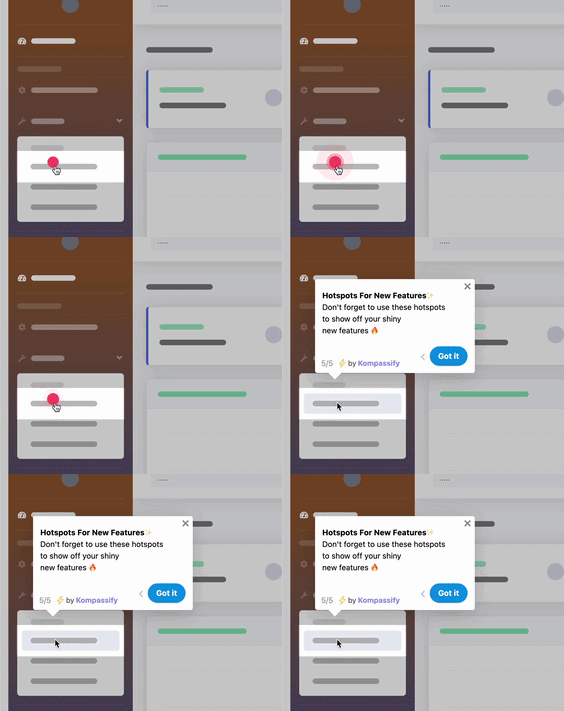
A hotspot beacon is a classic feature discovery pattern, an ambient, non-blocking nudge that draws the eye to a control the user hasn't found yet.
How to Improve Feature Discovery
Improving discovery comes down to one principle: stop expecting users to find features, and start bringing features to users, in context, at the right moment, for the right person. Here is how to put that into practice.
1. Map your features to the moments they matter
Before touching any UI, list your key features and, for each, the exact moment in the user's workflow when it becomes useful. A feature is discoverable when it appears at that moment, not before, not buried elsewhere. This map is the backbone of every tour, tooltip, and prompt you'll build.
2. Guide the first sessions with a checklist and a tour
Do not leave first-time discovery to chance. An onboarding checklist routes new users through your three to five highest-value features, and a short product tour walks them through the core workflow. Together they guarantee that the features that matter most get discovered first.
3. Surface single features with tooltips and hotspots
For individual features that don't warrant a full tour, attach a tooltip or a hotspot to the control itself. Triggered by context, hovering near it, landing on the relevant page, they draw the eye to one capability without hijacking the whole screen. Reserve interruptive patterns for high-value features and keep the ambient ones subtle.
4. Announce new features inside the product
When you ship something, reveal it where users already are. Use in-app announcements and a notification widget to surface the release to the specific users it helps, not a blanket email blast. A targeted "you do X a lot, here's a faster way" beats a generic changelog every time.
5. Segment so users only see relevant features
A marketer and a developer need to discover completely different features. Ask a question or two at sign-up, role, goal, use case, and use the answers to tailor which features you surface. A simple welcome segmentation step cuts the noise so each user discovers the features that matter to them.
6. Turn empty states into invitations
Every empty screen, no reports yet, no integrations connected, no team invited, is a discovery opportunity. Replace the blank panel with a short explanation of the feature and a button to start using it. You convert a moment of confusion into a moment of discovery.
7. Measure discovery and close the loop
Treat discovery as something you measure, not assume. Track which features get discovered by which users, spot the ones that are built but unfound, and A/B the effect of adding a tour or tooltip. Kompassify's no-code product analytics let you see feature usage by cohort, plan, and role, so you always know which feature to surface next.
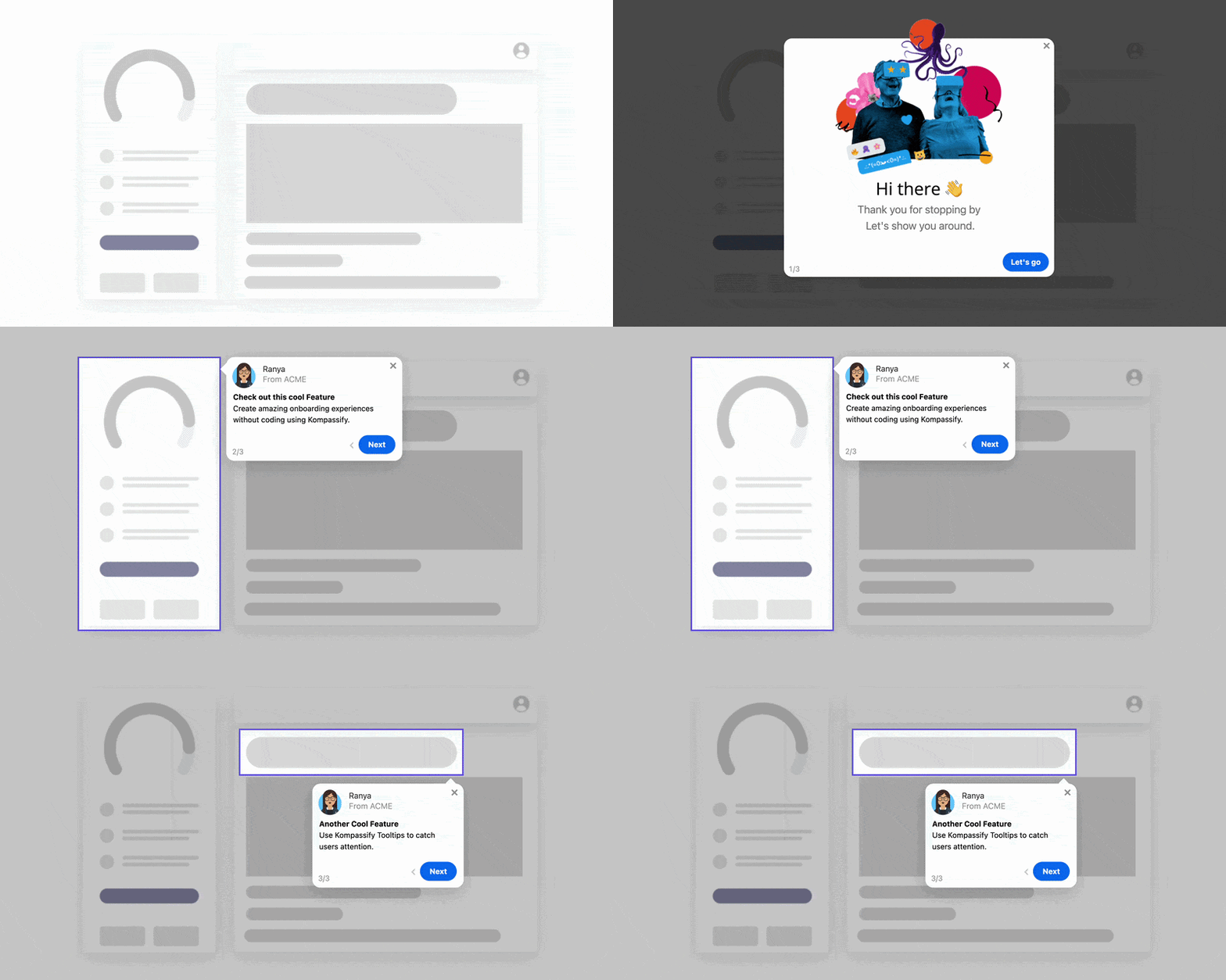
Contextual tours and tooltips surface a feature at the exact moment it's relevant, the single most reliable way to drive discovery.
Feature Discovery: Do vs. Don't
A quick reference for what drives discovery and what quietly buries it.
✅ Do
- Surface features in context, at the moment they're useful
- Route new users to high-value features with a checklist
- Use short, single-feature tooltips and hotspots
- Announce new features in-app, targeted to who they help
- Segment so each user sees only relevant features
- Turn empty states into calls to action
- Measure which features get discovered, by whom
- Reveal depth progressively as users are ready
❌ Don't
- Bury important features three menus deep
- Launch a feature with only an email or changelog
- Cram every feature into one first-run tour
- Show advanced features before they're relevant
- Rely on users to explore and find things themselves
- Make discovery prompts look like ads (banner blindness)
- Assume low adoption means the feature is unwanted
- Ship and move on without measuring discovery
Feature Discovery Best Practices for 2026
These principles hold whether you're a small startup or a scaling SaaS company. They're simple to state and easy to get wrong.
Relevance over exposure
The goal is not to show every user every feature, that just recreates the overwhelm you're trying to solve. The goal is to show the right user the right feature at the right time. One perfectly-timed tooltip beats ten generic ones. Discovery is a targeting problem before it is a UI problem.
Meet users in the product, not the inbox
In-app, in-context prompts consistently beat email and documentation for driving discovery. A hint at the moment of need reaches a user while they're engaged; an email reaches them hours later when the moment has passed, if it reaches them at all.
Treat every release as a discovery project
Shipping is the start of discovery, not the end of it. Build the announcement, the in-app surfacing, and the success metric into the release itself, so a new feature launches with a plan for getting found, not just a plan for getting deployed.
Respect attention as a budget
Every prompt spends a little of your users' patience. Overspend and they mute, dismiss, and tune out everything, including the prompt that would have mattered. Use interruptive discovery sparingly and ambient discovery generously.
Make discovery measurable
If you cannot see which features are discovered, you're guessing. Instrument discovery the way you instrument adoption, so you can tell a bad feature from a well-hidden good one and act on the difference.
Feature Discovery Examples
The best way to understand discovery is to see how strong products design for it. A few well-known patterns:
-
The "new" badge and pulsing dot
Notion, Figma, and countless others attach a small "New" label or a pulsing dot to a freshly added control. It's ambient and non-blocking, but it reliably pulls the eye and invites the first click, discovery without interruption.
-
Contextual first-use tours
Canva introduces features exactly when a user reaches the relevant editor, not all at once at sign-up. Each feature is discovered at the moment it becomes useful, which is why it sticks instead of getting skipped.
-
In-app what's-new feeds
Slack and Linear surface new capabilities through an in-product changelog and targeted announcements, reaching engaged users inside the app rather than hoping they read a marketing email.
-
Empty states that teach
Airtable and many SaaS tools turn "you haven't created anything yet" screens into guided invitations, explaining the feature and offering a one-click way to start, so the emptiest moment becomes a discovery moment.
The common thread is that none of these leave discovery to chance. Each is a deliberate design choice that surfaces the right feature at the right time. For more patterns you can adapt, see our roundup of great user onboarding examples.
Your Feature Discovery Checklist
Use this as a practical checklist for any feature discovery project.
Map & Prioritize
- List your key features and the moment each becomes relevant to the user
- Identify your highest-value features that new users must discover first
- Audit your current UI for features buried in menus or lacking visual affordance
- Pull feature-usage data to find features that are built but undiscovered
Surface in Context
- Route new users to top features with an onboarding checklist
- Add a product tour for each core multi-step workflow
- Attach tooltips or hotspots to individual high-value controls
- Turn empty states into calls to action for the relevant feature
- Segment surfacing by role and goal with a welcome step
Launch & Measure
- Announce every new feature in-app with announcements, targeted to who it helps
- Track the share of relevant users who discover each feature
- A/B test the effect of adding a tour, tooltip, or announcement
- Review discovery data by cohort and fix the biggest gap each sprint
What Helps vs. What Hurts Feature Discovery
Not everything that looks like discovery work actually drives it. Here's a direct comparison.
| ✅ Helps Discovery | ❌ Hurts Discovery |
|---|---|
| Surfacing a feature at the moment it becomes relevant | Hiding features in nested menus and hoping users dig |
| A short checklist that routes users to key features | A first-run tour that crams in every feature at once |
| Single-feature tooltips and subtle hotspots | Constant interruptive modals that users learn to dismiss |
| In-app announcements targeted to who a feature helps | Launching a feature with only an email or changelog |
| Segmenting so each user sees relevant features | Showing every feature to every user regardless of role |
| Empty states that explain and invite a first use | Blank screens that leave users with no next step |
| Measuring discovery and acting on the gaps | Assuming low adoption means a feature is unwanted |
| Progressive disclosure of depth as users are ready | Overwhelming new users with advanced options on day one |
Ready to Get Your Features Discovered?
Kompassify gives you product tours, tooltips, hotspots, onboarding checklists, and in-app announcements: everything you need to surface the right feature to the right user at the right moment, plus built-in analytics to measure what gets discovered, without writing a single line of code. Free for up to 100 monthly active users, GDPR-compliant, and EU-hosted.
Start for Free →Frequently Asked Questions
What is feature discovery?
Feature discovery is the process by which users find, understand, and start using the features of a product. It covers everything from a new user noticing a capability during onboarding to an existing user learning about a feature you just shipped. Good feature discovery happens in context, at the moment a feature is relevant, rather than relying on the user to hunt through menus or read documentation. It is the bridge between building a feature and getting people to use it, a feature no one discovers delivers no value, no matter how well it's built.
What is the difference between feature discovery and feature adoption?
Feature discovery is when a user first finds and understands a feature. Feature adoption is when they actually start using it regularly as part of their workflow. Discovery comes first and adoption follows, you cannot adopt a feature you never discovered. Discovery is about awareness and the first try; adoption is about repeated, habitual use. Many teams track adoption while ignoring discovery, then wonder why adoption is low, when the real problem is that users never found the feature.
Why do users miss features in a product?
Users miss features because the feature is hidden in a menu they never open, because it launched with only an email or changelog they never read, because it appeared when it wasn't relevant to their task, or because onboarding front-loaded too many features and they tuned out. Users don't explore software exhaustively, they learn the minimum path to their goal and stop. Any feature outside that path stays invisible unless the product deliberately surfaces it in context, at the right moment, for the right user.
How do you improve feature discovery?
Surface features in context rather than expecting users to find them. The most effective tactics are contextual product tours for core workflows, tooltips and hotspots that highlight a feature when it's useful, onboarding checklists that guide users to high-value features, in-app announcements for new releases targeted to the users they help, and empty states that point to the relevant capability. Segmenting by role and measuring which features get discovered closes the loop.
What are feature discovery patterns?
Feature discovery patterns are the recurring techniques used to help users find features: tooltips and beacons that highlight a control, hotspots or pulsing dots that invite a click, contextual product tours that walk through a workflow, onboarding checklists that lead to key features, in-app announcement modals and notification widgets for new releases, changelogs and what's-new pages, empty states with a call to action, and progressive disclosure that reveals advanced features as users are ready. The best products combine several, matched to the moment and the user.
How do you measure feature discovery?
Measure feature discovery by tracking, for each feature, the percentage of relevant users who have seen or interacted with it, how quickly new users reach it, and the drop-off between discovering a feature and using it again. Compare a feature's discovery rate before and after adding a tour, tooltip, or announcement to see whether your surfacing works. Product analytics that show feature usage by cohort, plan, and role let you spot features that are built but undiscovered, which is where the fastest adoption wins usually hide.
What tools help with feature discovery?
Kompassify provides everything in one no-code platform: contextual product tours and tooltips to surface features at the moment of need, onboarding checklists to guide users to high-value features, announcement widgets to reveal new features to the users they help, and built-in analytics to measure which features get discovered, without writing code or sending data to a third-party tool. It's free for up to 100 monthly active users and GDPR-compliant with EU-based data hosting.