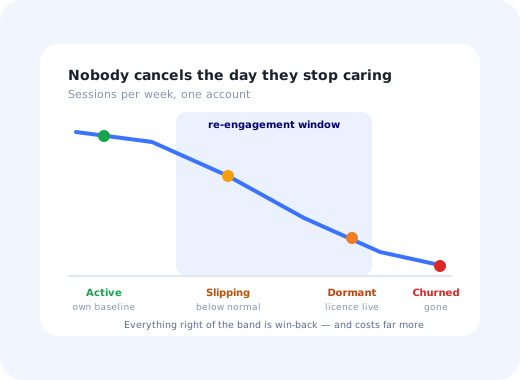
Churn does not arrive as an event. It arrives as a gradient: a user who logged in every morning starts logging in twice a week, then once, then only when someone else shares something with them, and then not at all. By the time the cancellation lands in your inbox, the decision was made weeks earlier, quietly, without anybody involved thinking of it as a decision.
User re-engagement is the work you do inside that gradient. It is not engagement; that is the ongoing job of making an active product worth using. It is not churn recovery; that is the much harder job of winning back someone who has already left, exported their data and set up somewhere else. Re-engagement occupies the specific, valuable middle: the user still has an account, the licence is still being paid for, their data is still there, and they are one good reason away from opening the tab again.
That middle is where the economics are best and where the least effort goes. Most companies run engagement programs for their active users, retention plays for their at-risk accounts, and win-back campaigns for their churned ones, while the largest group (quietly slipping, still paying, entirely reachable) receives the same product newsletter as everyone else.
This guide covers what re-engagement means precisely, how to define slipping, dormant and churned in a way your own product data supports, the five underlying causes of disengagement and the different response each one needs, the early warning signals worth alerting on, a six-step campaign structure, what to actually send, and the two-number test that separates a real reactivation from a click.
Key Takeaways
- Re-engagement has a deadline. It works on users who still have an account and a licence; after that it becomes win-back, which costs far more and succeeds far less.
- Define dormancy from your product's rhythm, not from a round number of days. Roughly three times the median gap between sessions is a defensible starting threshold.
- Segment by cause, not by silence. Someone who never reached value and someone whose champion left need opposite messages; sending both the same one is why campaigns convert badly.
- Watch the user against their own baseline. Absolute thresholds miss the weekly user who dropped to monthly, the single most predictive change most products can see.
- In-app beats email for anyone who still logs in at all, because it arrives in context and can point at the exact feature that was abandoned.
- One return is not a result. Measure sustained reactivation two or three cycles later; the gap between first return and second is the honest verdict.
What Is User Re-Engagement?
User re-engagement: definition
User re-engagement is the practice of bringing back users who have stopped using a product but have not yet cancelled it. It targets a defined window (after ordinary engagement has failed for that individual, and before churn has been formalised) and it succeeds by giving a specific, previously valuable job a reason to be done again, rather than by advertising the product to someone who already owns it.
The reason this deserves its own discipline, rather than being folded into user engagement generally, is that the audience is different in a way that changes everything about the message. An active user needs a reason to go deeper. A disengaged user has already formed an opinion, usually "this was useful once and then became work", and every message that ignores that opinion reads as noise. Re-engagement messages have to acknowledge the gap, not paper over it.
It is also different from churn work in a practical sense: nobody has escalated, nothing is on fire, and no CSM has this account on a list. That invisibility is exactly what makes it a systems problem rather than a relationship one. If you do not detect disengagement automatically, you do not detect it at all.
Slipping, Dormant, Churned: Getting the Definitions Right
Most re-engagement programs fail at the definition stage, because someone picks "30 days inactive" out of the air. Thirty days is meaningless for a product used daily and aggressive for one used at month-end close. The threshold has to come from your own usage rhythm.
| State | How to define it | What is still true | The right move |
|---|---|---|---|
| Slipping | Session frequency below that user's own 8-week baseline, or a habitual action skipped twice | They still log in; the habit is weakening, not gone | In-app nudge attached to the abandoned job |
| Dormant | No meaningful session for roughly 3× the median gap between sessions | Account, data and licence all still live | Targeted email to a specific screen, plus an in-app welcome-back path |
| At-risk account | Dormancy plus a renewal date inside 90 days, or the admin gone quiet | Money is about to be decided | Human contact: this has stopped being a campaign |
| Churned | Cancelled, downgraded, or licence lapsed | Usually nothing but the data export | Win-back, on a different budget and a longer horizon |
The "meaningful session" clause matters. A user who opens the app because a notification told them to, glances at it and closes it is not active. Define your dormancy threshold on sessions that contain a real action (created, edited, exported, shared) or your dashboard will show a healthy base that is quietly leaving.
Why Users Go Quiet: Five Causes
These are the five patterns worth building segments around. Each one requires a different message, and treating them as one audience is the single largest cause of poor re-engagement results.
-
1
They never reached value
The largest group and the least visible. They signed up, hit the setup step that needed a decision they were not ready to make, and never came back. There is no habit to revive because there was never a habit, which means a "we miss you" message is nonsense to them.
The fix: re-onboard rather than re-engage. Send them back into a short, guided onboarding checklist that gets them to one concrete outcome, and shorten time to value for the next cohort so this group stops being created. -
2
They got value once, but no habit formed
The product did something useful in week one and then had no reason to be opened in week three. Common in products whose value is real but occasional (reporting, planning, onboarding tools) where nothing in the product creates its own trigger.
The fix: supply the trigger. A recurring reason to return (a weekly digest, a scheduled report, a teammate's activity) is worth more than any persuasive copy. See the Hook Model for how triggers, action and investment compound. -
3
Their job or process changed
They moved teams, the workflow moved to a different tool, the project ended, the quarter changed. Nothing is wrong with your product; it simply stopped being adjacent to their work. This group is the least persuadable and the easiest to identify, because their usage stops cleanly rather than fading.
The fix: stop selling the old use case and offer a different one, once. If there is no second use case for them, spend the effort on the other four causes, and make sure the seat gets reassigned rather than quietly renewed. -
4
Something broke and they gave up quietly
A failed import, a permission they could not grant themselves, an integration that silently disconnected, an invoice that bounced. Very few users open a ticket; most conclude the product is fragile and stop. This is the cause with the highest recovery rate and the lowest detection rate.
The fix: detect the error state, not the silence. Anyone whose last session ended on a failure deserves a message that names the failure, says it is fixed or fixable, and links straight to it, not a general re-engagement email. -
5
The champion left
The person who bought it, configured it and taught everyone else has changed jobs. Usage across the whole account decays over the following two months, and nobody remaining knows why the tool is there. This is an account-level failure disguised as a set of individual ones.
The fix: re-onboard the account, not the user. Identify the most active remaining seat, give them an admin-level walkthrough, and treat single-champion accounts as a standing risk to be designed out, a lesson our customer health score guide covers in depth.
How to Detect Disengagement Early
The signals below are ordered by how much warning they typically give. None of them is conclusive alone; the value is in two or three appearing together and persisting for a couple of weeks.
The word doing the work in the first two rows is own. A user who logs in twice a week looks perfectly healthy on an absolute threshold, unless they used to log in every day, in which case they have halved and nobody noticed. Comparing each user to their own eight-week baseline is more work to set up and dramatically more predictive, and it is the reason behavioural segmentation belongs at the centre of a re-engagement program rather than at the edge of it.
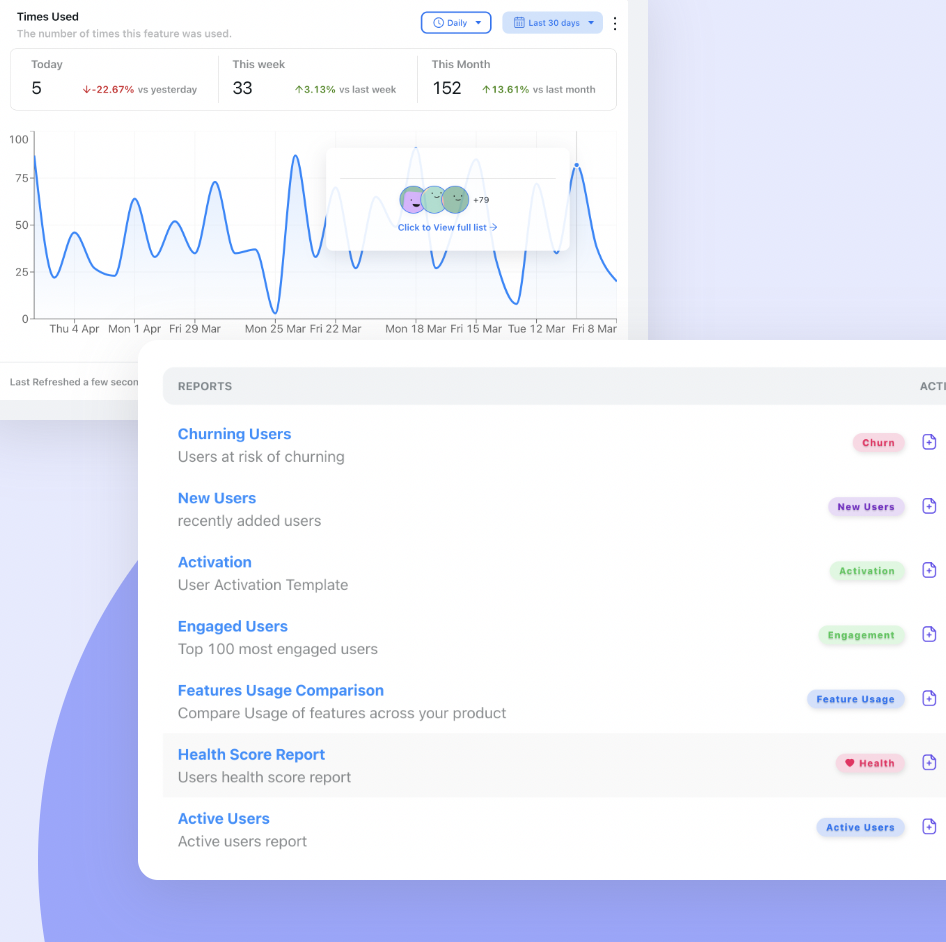
Do not alert on the whole list. A disengagement signal that fires for fifteen percent of your base every week is a spam generator. Set the threshold so that the alert list is small enough that a human could, in principle, read it; then automate the response for the ones nobody will get to.
How to Run a Re-Engagement Campaign in 6 Steps
- Define slipping and dormant against your product's real rhythm
- Segment the quiet users by cause, not by duration of silence
- Pick one specific job you want each segment to come back and do
- Choose the channel by whether they still open the product
- Remove the obstacle instead of describing the product
- Measure the second return, not the first
1. Define slipping and dormant against your product's real rhythm
Take the median gap between meaningful sessions for your active users and use it as the unit. Slipping is a sustained fall below an individual's own baseline; dormant is roughly three of those gaps with nothing in between. Write the definitions down and freeze them for a quarter, because a re-engagement program whose population definition drifts cannot be evaluated at all.
2. Segment the quiet users by cause, not by duration of silence
Use the five causes from the previous section as your segments. Most of them are derivable from data you already hold: never-activated users are the ones who never completed a key action; error-abandoners are the ones whose last event was a failure; champion-loss accounts are the ones where admin activity stopped first. Duration of silence is a filter, not a segment; it tells you when to act, never what to say.
3. Pick one specific job you want each segment to come back and do
"Come back and see what's new" is not a job. "Your three saved reports have new data: open this one" is a job. The message needs to point at a single screen, with a single action, that delivers value within a minute of arrival. If you cannot name that action for a segment, the problem is not the campaign; it is that you do not yet know what that segment ever valued.
4. Choose the channel by whether they still open the product
Split the audience in two. Anyone who still logs in occasionally gets an in-app message on their next visit: in context, on the right screen, pointing at the abandoned feature. Only the genuinely absent get email, and that email's single job is to land them on a specific screen, never a marketing homepage. Products with a strong in-app half consistently outperform those running re-engagement out of an email tool alone, because context beats persuasion.
5. Remove the obstacle instead of describing the product
This is where campaigns are won. If they abandoned during setup, do the setup for them or reduce it to one field. If the import failed, re-run it and tell them it worked. If they never understood the feature, attach a two-step product tour to the return path rather than a link to documentation. Every sentence that explains why the product is good is a sentence not spent removing the reason they left.
6. Measure the second return, not the first
A curious click is trivially easy to generate and means nothing. The metric that matters is whether the reactivated user was still active two or three cycles later. Report both numbers side by side, first return and sustained return, and treat a large gap as a signal that you brought people back to a product that still had the original problem in it.
Re-Engagement Examples: What to Send for Each Cause
| Cause | Channel | The message | The action attached |
|---|---|---|---|
| Never reached value | In-app on return, email if absent | Skip the tour: here is the one thing this does for you | A three-step checklist ending in a real output |
| No habit formed | Email with in-app follow-up | Your data changed since you last looked | Deep link to their own updated view; offer a recurring digest |
| Process changed | Email, once | A second use case, named specifically | One relevant template or example, then stop |
| Something broke | Email immediately, in-app on return | The import failed. It has been re-run: here is the result | Direct link to the fixed object, no login wall in between |
| Champion left | Human outreach plus in-app | Addressed to the most active remaining seat | Admin walkthrough and a handover of the existing setup |
Two things are absent from that table on purpose. There is no discount, because a price cut sent to a user who stopped getting value teaches them the value was always the price. And there is no "we miss you", a phrase that puts the company's feelings at the centre of a message that should be entirely about the user's unfinished work.
What to Measure
| Metric | How to calculate it | What it tells you |
|---|---|---|
| Dormancy rate | Dormant users ÷ all licensed users | The size of the opportunity, and, if it is rising, an upstream activation problem |
| Reactivation rate | Targeted users who returned and completed the asked-for job ÷ users targeted | Whether the message and the offer work at all |
| Sustained reactivation rate | Reactivated users still active 2–3 cycles later ÷ reactivated users | The only honest verdict; a big gap means the product problem is unfixed |
| Time to reactivation | Median days from message to qualifying return | How long to wait before escalating channel or giving up |
| Retained revenue | Renewal value of accounts with a reactivated primary user | The number that funds the program next year |
| Opt-out and dismissal rate | Unsubscribes and message dismissals ÷ messages delivered | The cost side, where over-messaging shows up first |
Keep an eye on the last row. Re-engagement is the easiest program in a SaaS company to overdo, because the audience is quiet and cannot argue back until they unsubscribe. If dismissal rates climb while reactivation stays flat, you are not being persistent, you are being ignored more expensively.
User Re-Engagement: Do vs. Don't
✅ Do
- Compare each user to their own baseline, not a global threshold
- Segment by why they went quiet, then choose the message
- Point at one screen and one action
- Use in-app for anyone who still logs in occasionally
- Fix the thing that broke before asking them to return
- Cap frequency and honour dismissals
- Report sustained reactivation next to first return
- Feed what you learn back into onboarding, so fewer users go quiet
❌ Don't
- Use a round number of days as your dormancy definition
- Send one campaign to every inactive user
- Say "we miss you": centre the message on their work, not your feelings
- Link to the homepage or a generic dashboard
- Lead with a discount for a value problem
- Count a login with no action as a reactivation
- Keep messaging an account after the champion has clearly left: call instead
- Run re-engagement forever on users whose job genuinely changed
Running Re-Engagement With Kompassify
The email half of re-engagement is a solved problem in most companies. The in-app half (the half that reaches users while they are actually in the product, on the screen where they gave up) normally needs engineering time for every variation. Kompassify removes that dependency:
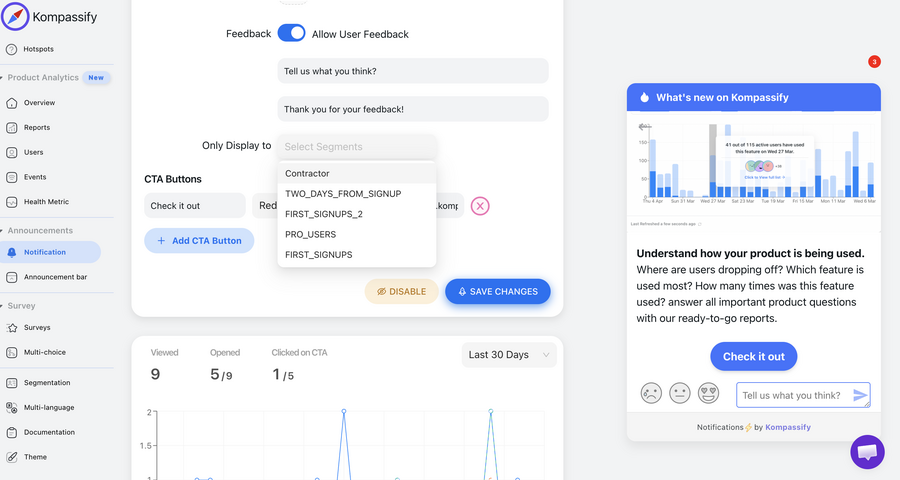
- Segment on real behaviour. Target users by what they have and have not done in the product (never completed setup, stopped using a feature, admin gone quiet) so each of the five causes gets its own audience.
- Catch slipping users on their next visit. Show a single in-app message or modal on the screen they abandoned, with one action, instead of hoping an email survives the inbox.
- Re-onboard without starting over. Attach a short checklist or product tour to the return path so a user who never reached value gets there in three steps rather than being handed documentation.
- Point at the feature, not the product. A hotspot or tooltip on the exact control they stopped using does more than a paragraph of copy about the product's benefits.
- Ask why, in one question. A one-click in-app survey shown to returning dormant users is the cheapest source of cause data you will ever get.
- Measure per segment. Built-in analytics show which cause segment actually came back, so you can retire the messages that only generate dismissals.
Kompassify is GDPR compliant and EU-hosted, free for under 100 monthly active users, with paid plans from $129/month.
Reach Quiet Users Where They Actually Are
Kompassify lets you segment users by real product behaviour and show a targeted in-app message, tour or checklist on their next visit, on the screen they abandoned, with one action attached. No code, no release cycle. GDPR compliant, EU-hosted, and free for under 100 monthly active users.
Start for Free →Frequently Asked Questions
What is user re-engagement?
User re-engagement is the practice of bringing back users who have stopped using your product but have not yet cancelled. It sits in a specific window: after normal engagement work has failed for that person, and before churn has been formalised by a cancellation. The distinction matters operationally, because a user who still has an account, still has their data, and still has a licence is enormously cheaper to bring back than one who has left, exported everything and started paying someone else. Re-engagement is therefore less a marketing campaign than a retention intervention with a deadline.
What is the difference between an inactive user, a dormant user and a churned user?
Set the thresholds against your product's natural usage rhythm rather than a calendar. A slipping user is still active but below their own baseline: fewer sessions, narrower feature use, a week they would normally not have missed. A dormant user has had no meaningful session for one to three of your product's natural cycles, but the account and the licence are still live. A churned user has cancelled, downgraded, or passed the point where the account is being paid for. The practical rule: define dormancy as roughly three times the median gap between sessions for an active user, and anything shorter as slipping.
Why do users stop using a product?
Five causes account for most disengagement, and each needs a different response. They never reached value in the first place, so there is nothing to come back for. They reached value once and never built a habit around it. Their job or their process changed and the product no longer fits it. Something broke: a failed import, a permissions wall, a bill, and they quietly gave up. Or the person who championed it left the company and nobody inherited the workflow. Sending the same re-engagement message to all five is why most campaigns convert badly.
How do you detect disengagement before a user churns?
Watch changes in a user's own pattern rather than absolute thresholds. The reliable early signals are a falling session frequency against that account's own baseline, a narrowing of the features they touch, the disappearance of a habitual weekly action, admin activity stopping while end-user activity continues, and seats going unused after a team change. Individually these are noise; two or three together, sustained for a couple of weeks, are the strongest churn predictor most SaaS products have, and they usually appear four to eight weeks before anyone thinks about cancelling.
How do you run a re-engagement campaign?
Define dormancy for your product, segment dormant users by the cause of their disengagement rather than by how long they have been quiet, choose a single job you want each segment to return to do, deliver the message where they will actually see it: in-app for anyone who still opens the product at all, email only for those who do not, remove the obstacle rather than merely advertising the product, and measure whether they came back twice, not once. The step teams skip is the third: a re-engagement message with no specific job attached is an advertisement, and it performs like one.
Should re-engagement be done by email or in-app?
Both, split by whether the user still opens the product. Email is the only channel available for someone who has genuinely stopped logging in, and its entire job is to get them back to a specific screen, never to a generic homepage. But a large share of quietly disengaging users still log in occasionally out of habit, and for them an in-app message is far stronger: it arrives in context, it can point at the exact feature they abandoned, and it does not have to survive an inbox. As a rule, in-app for slipping users, email for dormant ones, and both for the transition.
How do you measure the success of a re-engagement campaign?
One return visit is not a result. Measure reactivation rate, the share of targeted dormant users who came back and completed the specific job you asked for, and then measure sustained reactivation: how many of those were still active two or three cycles later. The gap between the two numbers is the honest verdict on the campaign. Add retained revenue from reactivated accounts, and the negative metric that keeps you honest: unsubscribe and message-dismissal rates, which is where an over-aggressive campaign shows up first.
Can you run re-engagement without engineering time?
Yes for the in-app half, which is the half that matters most. With a no-code platform like Kompassify you can segment users on real product behaviour, show a targeted in-app message or modal to people whose usage has slipped, and attach a short product tour or checklist that walks them back through the feature they abandoned, all built on top of your live product without a release cycle. Kompassify is GDPR compliant and EU-hosted, free for under 100 monthly active users, with paid plans from $129/month.