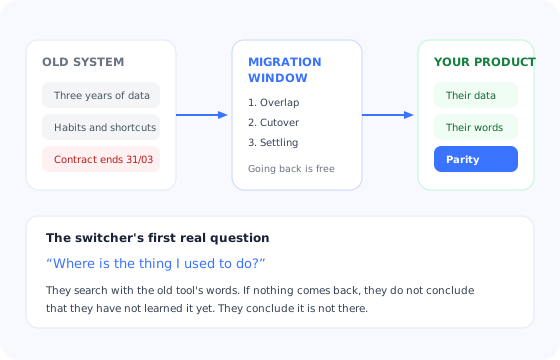
There is a category of customer that most onboarding is quietly bad at: the one who already had a system that worked. They evaluated, they negotiated internally, they got approval to change something that was not broken, and they arrive on day one carrying three years of records, a set of habits that will now betray them, and a date circled on a calendar because someone else's contract expires on it.
Standard onboarding greets this person as a beginner. It explains what the category is for. It celebrates their first item as though it were an achievement. Meanwhile the thing they actually need, which is to reproduce a report they used to build in four clicks, is somewhere behind a menu whose label means nothing to them.
This guide is about that path: what a switching customer brings with them, what parity means and why it is the milestone that matters, how to build the vocabulary map that removes half the friction, and how to run the weeks before the old system is switched off, which is where switchers are lost.
Key Takeaways
- Parity is the milestone, not activation. A switcher is not successful when they complete a setup step; they are successful when they can produce what they used to produce.
- Their vocabulary is the first barrier. They search for their old words, find nothing, and conclude the feature is missing.
- The deadline is not yours. The old contract's end date sets the whole plan, and it is rarely negotiable.
- Disclose gaps early. A missing feature named in week one is a trade-off; the same gap found in week three feels like concealment.
- The risk window is before the cutover. While the old system still works, going back is free. After it is gone, it is not.
- Split the flow. Switchers need import, translation and differences, not an introduction to the category.
Why a Switcher Is Not a New User
Switcher onboarding: definition
Switcher onboarding is the path built for customers replacing a working tool rather than adopting one for the first time. Its goal is parity: returning the customer to the capability they already had, in your product, before the old system is switched off. Everything new comes after that, not before.
The difference is not experience level. Switchers are often more sophisticated than your average new signup: they know the category, they know what they want, and they have opinions about how it should work. The difference is that they are measuring you against something specific, continuously, from the first screen.
That comparison runs in the background of every interaction. A first-time user who cannot find something assumes they have not learned it yet. A switcher who cannot find something concludes it is not there, and they have a working alternative in mind to compare it against while they decide how they feel about that.
| First-time customer | Switching customer | |
|---|---|---|
| Starting state | Empty product, empty expectations | Data to import, fixed expectations |
| Success milestone | First real outcome produced | Parity with what they produced before |
| Vocabulary | Learns yours, has no alternative | Has one already, and it is not yours |
| Deadline | Soft, internal, often none | Hard, external, set by a renewal date |
| Interpretation of friction | “I have not learned this yet” | “This is worse than what we had” |
| Fallback | None, or a spreadsheet | A working system, still paid for |
| Political exposure | Low, nobody chose against anything | High, someone championed this change |
That last row deserves attention. Inside the customer's company, somebody argued for this switch, and colleagues who preferred the old system are watching. Your onboarding is not only being judged by the person using it; it is being reported on. Making the champion look right in the first two weeks is a real onboarding objective, not a soft one. The enterprise onboarding guide covers how those internal dynamics shape a rollout.
The Three Things Every Switcher Brings
Their data, in a shape that does not fit
Exports rarely map cleanly. Fields that were free text in the old system are structured in yours, statuses do not correspond one to one, and there is always a category of record that has no equivalent. The customer does not experience this as a data problem; they experience it as the moment they realise this will take longer than they were told. Sizing the import honestly, before it is scheduled, is worth more than any speed claim.
Their habits, which now produce the wrong result
Muscle memory is an asset in the old tool and a liability in yours. The keyboard shortcut that published something now archives it. The workflow they ran weekly has four steps here instead of two, or two instead of four in a way that skips a confirmation they relied on. Unlearning is slower than learning, and it is invisible in your analytics because it looks like ordinary usage until something goes wrong.
A deadline nobody asked you about
The old contract ends on a date. Between now and then the customer is paying for two systems, which their finance team has noticed. That date, not your onboarding plan, sets the sequence: what must work before cutover, what can wait until after, and what will simply not be migrated. Ask for it in the first conversation and build backwards from it, the same way a good sales to onboarding handoff captures the driving date before anyone starts work.
The Question Your Onboarding Does Not Answer
Almost every switcher has the same first real question, and it is not one that beginner onboarding is designed to handle: where is the thing I used to do?
They will look for it using the only words they have, which are the previous tool's words. Your search returns nothing. Your help centre, organised around your own concepts, returns nothing. At that point the switcher makes one of two assumptions, and both are expensive: either the feature does not exist, or it exists and your product is bad at being found. The first produces a support ticket at best and a cancellation conversation at worst. The second erodes confidence in everything else they have not yet looked for.
The fix is a vocabulary map: a short, blunt table that translates their old words into yours and says where each thing lives. It is not documentation, it is a translation layer, and it belongs in the product rather than in a knowledge base article nobody will find.
Three columns and one honest row. The fourth row is the one that protects the relationship.
Two implementation details make the difference between a map that works and a document nobody opens. First, teach your search to accept the old vocabulary as synonyms, so the customer's instinct returns something rather than nothing. Second, surface the relevant row of the map in context, on the screen where the old habit would have fired, rather than in a single page they have to remember exists.
The Migration Window
Switcher onboarding has a shape that first-time onboarding does not: it runs against a countdown, and it has a point of no return. Three phases, each with a different job.
1. Overlap: both systems running
The customer is paying twice and comparing constantly. This is when data moves, when the vocabulary map matters most, and when going back costs nothing. Everything in this phase should be aimed at one milestone: producing, in your product, something they currently produce in the old one. Not a demo version of it. The real thing, with their real data, by the person who normally does it.
2. Cutover: the old system is switched off
The riskiest day in the relationship, and one you should know the date of. Anything that has not been migrated by now will be discovered as missing by someone who did not attend any of your calls. A short pre-cutover checklist inside the product, owned by the customer's admin, catches most of it: every user invited and logged in at least once, every recurring workflow reproduced, every report rebuilt, integrations reconnected.
3. Settling: the first month alone
The fallback is gone, so the failure mode changes. Users stop comparing and start coping, which often means quietly building workarounds outside the product. This is the phase where support volume tells you what parity you missed, and where a structured check of what people are actually doing beats asking them whether they are happy.
Watch the gap between the champion and everyone else. The person who chose you will be fine, because they have been in the product for weeks. The rest of the team meets it on cutover day. If your only measure of progress is the champion's usage, you will be surprised on exactly the day you cannot afford to be.
Six Moves That Get a Switcher to Parity
1. Ask one question at signup and branch on it
“Are you moving from another tool?” is enough to select a different path. A welcome survey that captures it costs the user four seconds and lets you skip the entire category explanation for people who do not need it.
2. Put the import first, not third
An empty product is the worst place for a switcher to learn anything, because none of it looks like their work. Bringing their data in before the walkthrough means every subsequent step is happening on records they recognise, which is the difference between a tour and a rehearsal.
3. Rebuild one real thing in the first session
Pick the artefact they mentioned during the sale, the weekly report, the shared view, the recurring task, and rebuild that one specific thing while you are still together. It converts an abstract migration into a proof, and it gives the champion something to show colleagues immediately.
4. Name the three differences that will annoy them
Every product has them: something that takes an extra step, something structured differently, something the old tool did automatically. Say all three out loud in week one, with the reason. Users forgive design decisions they understand and resent ones they discover.
5. Guide the second wave, not just the champion
The colleagues arriving at cutover have none of the context and did not choose this. They need in-product guidance on their first login, in their own screens, not a forwarded email from the champion. This is the largest single source of post-cutover complaints and the easiest to prevent.
6. Hold the new features until after parity
Everything you are proud of that the old tool did not have is noise until the customer can do their job. Once parity lands, the same features become the reason the switch was worth it. Sequence them deliberately, the way progressive onboarding stages anything else.
What to Measure for Switching Accounts
- Days to parity. From first login to the day the account produces the equivalent of what they produced in the old tool. Define the artefact per account during onboarding so this is a real date and not a judgement call.
- Import completion. Not whether an import ran, but whether the records people actually work with arrived and are usable. Half-finished imports are a leading indicator of a stalled migration.
- Old-vocabulary searches. In-product searches using the previous tool's terms are a free, precise list of the translations your map is missing. Review it monthly.
- Seat readiness before cutover. The share of invited users who have logged in and completed their first task before the old system goes away. This is the number that predicts how cutover week will feel.
- Switcher retention against first-time retention. Compare cohorts at equal tenure using a cohort table. A gap that opens in the first two months is almost always a parity problem, not a product one.
Switcher Onboarding: Do vs. Don't
Do
- Ask whether they are switching, and branch the flow on the answer.
- Get the cutover date in the first conversation and plan backwards from it.
- Publish a vocabulary map in the product and accept old terms in search.
- Import data before teaching anything.
- Disclose the gaps and the annoyances in week one.
- Guide the colleagues who arrive at cutover, not only the champion.
Don't
- Run switchers through the beginner tour that explains the category.
- Celebrate their first record as though it were their first ever.
- Let a missing feature be discovered rather than disclosed.
- Show off new capabilities before the customer can do their job.
- Treat champion usage as evidence the team is ready.
- Promise a migration timeline before the export has been looked at.
Running Switcher Onboarding With Kompassify
Switcher onboarding is a second path through the same product, which is exactly the kind of thing that never gets built when it requires engineering time. In Kompassify it is configuration.
Ask the switching question in a welcome survey and use the answer to segment the account. Serve that segment a migration checklist instead of the standard one: import your data, rebuild your weekly report, invite the team, reconnect integrations, confirm before cutover. Place tooltips on the three screens where old habits misfire, written in the customer's previous vocabulary rather than yours. Use an in-app banner to hold the countdown to their cutover date in front of the admin, and target a separate short tour at the colleagues who log in for the first time that week, since they need the basics the champion no longer does.
All of it is built in a visual editor, targeted by segment, and measured per user, so you can see which accounts reached parity and which ones stalled while the old system was still running, which is the only time you can still do something about it.
Give switchers their own path, without an engineering ticket
Segment switching accounts, run a migration checklist, translate their old vocabulary with contextual tooltips, and see who reached parity before cutover. Free up to 100 monthly active users, plans from $129/month, GDPR-compliant and EU-hosted.
Start for free →The One-Paragraph Version
A switching customer is not a beginner, they are an expert in something else, and everything they know is now slightly wrong. Their milestone is parity, not activation: the day they can produce what they used to produce. Get the cutover date early and plan backwards from it, import before you teach, translate their vocabulary inside the product, disclose the gaps and annoyances in week one rather than letting them be discovered, and guide the colleagues who arrive on cutover day with none of the context. Hold everything new until parity lands, then use it to prove the switch was worth making. The risk window is the period when the old system still works, because going back is free; measure days to parity and seat readiness while you can still change the outcome.
Frequently Asked Questions
What is switcher onboarding?
Switcher onboarding is the onboarding path built for customers who are replacing a working tool rather than adopting software for the first time. It differs from standard onboarding in three ways: the customer has data that has to move, they have habits and vocabulary from the previous system that no longer map cleanly, and they usually have a hard deadline because the old contract ends on a known date. The goal is not to teach the product from first principles; it is to get the customer back to the level of capability they already had, as fast as possible, and only then show them what is new.
Why do switching customers churn more in the first months?
Because they have a working alternative in living memory and, for a period, a live fallback they can return to. A first-time buyer who struggles concludes the task is hard; a switcher who struggles concludes your product is worse than what they had. The risk concentrates in the window between the first login and the day the old system is switched off, and it drops sharply once the old tool is gone and the team has produced real work in the new one. Getting to parity before the cutover date is the single most protective thing you can do.
What is a vocabulary map and why does it matter?
A vocabulary map is a short table matching what the customer called things in their old system to what those things are called in yours, plus where each one lives. Switchers do not search your product for your words; they search for theirs, find nothing, and conclude the capability is missing. Publishing the mapping in-app, and accepting the old terms in your search, removes an entire class of support ticket and prevents the most damaging switcher conclusion, which is that a feature they rely on does not exist.
Should switchers get a different onboarding flow?
Yes, and it is one of the highest-return segments to split out. A switcher does not need an explanation of why the category exists; they need the import, the vocabulary map, the differences that will surprise them, and a route back to the capability they already had. Running them through the standard beginner tour wastes the goodwill they arrived with and delays the parity milestone. If you capture acquisition source or ask a single question at signup, the split costs very little to build.
How do we handle features the previous tool had that we do not?
Name them early and plainly, ideally during onboarding rather than at the moment of discovery. A gap the customer finds themselves in week three feels like something you hid; the same gap disclosed in week one is a trade-off they already accepted when they signed. Where a workaround exists, show it in the product at the point they would have used the old feature. Where it does not, say so and say whether it is planned, without inventing a date.
What should we measure for switching customers?
Track the parity date (the day the account produces the same output they produced in the old tool), import completion rate, in-product searches that use the previous tool's vocabulary, and the share of invited team members who have logged in before the cutover date. Compare retention for switchers against first-time customers at the same tenure. If switchers retain worse, the problem is almost always concentrated in the weeks before the old system was switched off.