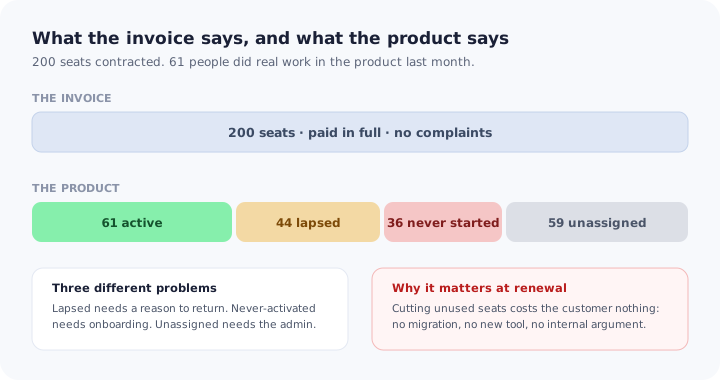
The account is one of your better ones. Two hundred seats, renewed once already, invoices paid without a reminder, a champion who answers emails within the hour. The health score is green because the champion is engaged and the support history is clean.
Sixty-one people used the product last month.
Nothing about that is visible in the commercial relationship, which is exactly the problem. A customer can pay in full for a year while three quarters of what they bought sits unopened, and the first time anyone says so out loud is when procurement builds the renewal case. At that point the conversation is not about value; it is about which seats to remove. This guide covers how to measure license utilization honestly, the three quite different populations hiding inside the unused portion, how to diagnose which one an account has, how to raise it with an administrator without inviting a downgrade, and what to do inside the product to lift it.
Key Takeaways
- Measure against seats contracted, not seats provisioned. The licences never handed out are often the largest group and the easiest to hide.
- Unused seats are three problems, not one. Unassigned, never activated and lapsed need different owners and different fixes.
- Low utilization contracts renewals rather than ending them, which is why it can erode revenue without ever appearing as churn.
- Cutting a seat costs a customer nothing. No migration, no new tool, no internal debate — which is what makes it the first line cut.
- Raise it early and frame it as access, not defence. A seat review nine months out produces activations; the same review at renewal produces reductions.
What License Utilization Measures
License utilization, in one paragraph
License utilization is the share of the seats a customer has paid for that are genuinely in use, over a defined period. It is not a login rate and it is not engagement: it is usage measured against the commercial commitment, which is what makes it the number most closely related to what a customer will agree to pay for next time. An account can be delighted, engaged and at fifty per cent utilization, and the second fact will outweigh the first when the contract is rebuilt.
Two decisions determine whether your number tells the truth.
The denominator must be seats contracted. It is common to calculate against provisioned seats, because that is the number the product knows. But the difference between contracted and provisioned is precisely the population that nobody owns: licences bought for a team that was going to expand, or for phase three of a rollout that stopped after phase two. Measuring against provisioned seats makes that group disappear from your reporting while remaining perfectly visible on the customer’s invoice.
The activity bar must mean something. A login is a weak bar: a user who opens the product, looks at a dashboard someone shared and leaves has not used a seat in any sense a finance team would recognise. Pick a bar that corresponds to the product doing its job — a record created, a report run, a task completed — and hold it constant. If you are not sure what that action is, the definition work in our guide to user activation is the same exercise.
A quick sanity check. Take your three largest accounts and compute active users over contracted seats for last month, with a real activity bar. Most teams doing this for the first time find at least one number they did not expect, on an account with a green health score.
The Three Populations Inside an Unused Seat
Treating unused seats as a single problem produces a single intervention, usually an email campaign, which works on about a third of the population and annoys the rest. The unused portion is really three groups with different causes, different owners and different fixes.
The split matters because only one of the three is yours to fix directly.
Seats never assigned to anyone. Nobody has these licences. They were bought ahead of a hire plan, for a rollout phase that was postponed, or to reach a volume price. You cannot onboard a seat that has no person attached, and no amount of in-product work touches this group. What helps is making the unassigned count visible to the administrator with a list of candidate teams, because it is entirely an administrative decision and the administrator usually does not know the number either.
Seats assigned to people who never reached first value. A real person was given access, logged in once or twice, did not find an obvious first step, and stopped. This is the group most often mistaken for disinterest and it is the one fully within your control. It is an onboarding failure occurring months after the account was onboarded, which is why the original implementation never catches it.
Seats that were active and lapsed. These users got value at some point and stopped, because their role changed, because the work moved elsewhere, or because the habit never formed around an occasional task. They are the most promising group for reactivation and the one that needs a genuine reason to return — not a reminder that they have a licence. The mechanics are covered in our guide to user re-engagement; what is different here is that you can quantify exactly what the lapse is costing the customer.
Diagnosing an Account in Twenty Minutes
The composition is more actionable than the headline number, and it can be assembled quickly.
| What you see | Most likely cause | First move |
|---|---|---|
| Large gap between contracted and provisioned | Seats bought ahead of a rollout that stalled | Give the admin the unassigned number and a candidate list |
| Most assigned users have one or two sessions, ever | No guided first step for people who joined later | Put a welcome flow and checklist on first entry |
| Usage concentrated in one team, flat elsewhere | The rollout never crossed a departmental boundary | Find the sponsor in the untouched team, not more users |
| Steady decline across previously active users | A workflow moved, or a champion left | Ask what changed; this is rarely a product problem |
| Spike at month-end, silence otherwise | Occasional-use product, habit never formed | Guidance timed to the cycle, not to the calendar month |
Splitting the unused portion is a reporting job first: activation, active and lapsed each point at a different owner.
One caution on the fourth row. A decline that begins sharply on a particular week usually has an organisational cause, not a product one, and the single most common is that the person who held the knowledge moved on. That handover is worth treating as an event in its own right, along the lines described in our guide to re-onboarding.
The Seat Review Conversation
Most teams avoid this conversation, for an understandable reason: naming the unused seats out loud feels like handing the customer an argument for a smaller contract. In practice the customer will arrive at the number anyway, usually during the renewal review, usually from procurement, and usually with less time available to change anything.
What determines the outcome is timing and framing.
Timing. Nine months before renewal, a seat review is a project. Six weeks before renewal, it is a negotiation. The same data produces activations in the first case and reductions in the second, because in the first there is still time for people to start using the product.
Framing. The conversation should be about access and blockers rather than about the contract. Fifty-nine of your seats are not assigned to anyone — which teams were they meant for, and what stopped the rollout? is a question an administrator can answer and act on. You are only using thirty per cent of what you bought is a statement that invites one response. The first version regularly produces a list of names to activate; the second produces a request to reduce.
Bring three things: the unassigned count with candidate teams, the list of assigned users who never got started, and one concrete offer of help — a session for a specific team, a guided path enabled for new users, a check on whether permissions are blocking anyone. Leave with an owner and a date on each.
Expect the honest answer sometimes. Occasionally the seats were genuinely over-bought and the right outcome is a smaller, healthier contract that renews for years. That is a better result than a large contract that is cancelled entirely, and it is only available to you if you started the conversation early enough to shape it.
What Actually Lifts Utilization
Two of the three populations are reached inside the product, and the interventions are specific to the population rather than general encouragement.
1. Guide the seat, not the account
A user who received a licence in month seven never saw the implementation, the kick-off or the training. They arrive at a configured, populated product with no idea what they are meant to do first, which is a harder starting position than a new customer faces. A short welcome flow and an onboarding checklist scoped to their role converts far more of this group than any email, because it arrives at the only moment they are actually present.
2. Make the first outcome small and role-specific
The seat was bought so that a person could do one thing. Aim the first session at that thing rather than at a tour of the product. Utilization work fails when the newly activated user is shown the full capability of a platform they were given for a single task.
3. Catch the stall where it happens
Users who never activate usually stop at the same one or two screens: a permission they do not have, an empty state with no obvious next action, a configuration step that belongs to someone else. Contextual help at those points, as described in our guide to contextual help, removes the blocker at the moment it occurs rather than a week later in a digest.
4. Give lapsed users a reason, not a reminder
A returning user needs to see that something is different: a capability that did not exist when they left, work waiting for them, a faster path to the thing they used to do manually. An in-app message tied to a genuine change performs; a notification saying they have not visited in a while does not.
5. Give the admin a reason to assign the rest
The unassigned group is the administrator’s decision, and administrators act when the action is small and specific. A prompt in the admin area showing unassigned seats with a one-click path to invite a named team is worth more than a quarterly slide, because it appears where the change is actually made.
Four Numbers to Track
1. Utilization against contracted seats
The headline, calculated monthly, with a real activity bar. Track the trend per account rather than a portfolio average, because averages conceal exactly the accounts you need to see.
2. Composition of the unused portion
The split across unassigned, never activated and lapsed. This is what turns a number into an action, and it changes which team owns the account this quarter.
3. Activation rate for late-arriving seats
Of the users given a seat in the last ninety days, how many reached first value. This is the single best measure of whether your product guides people who missed the implementation, and it is invisible in any metric grouped by account rather than by join date. The framing in our guide to user onboarding metrics applies directly.
4. Seat change at renewal
Seats renewed versus seats contracted previously, per account. This is where low utilization eventually shows up, and reading it backwards against utilization twelve months earlier tells you how much warning you actually had. It is also the mechanism by which an account with no churn quietly reduces net revenue retention.
Utilization Comes Before Expansion
There is a natural temptation to run expansion motions on large accounts, because that is where the money is. Expansion offered into an account with poor utilization tends to land badly, and for a rational reason: from the customer’s side, being asked to buy more of something they are not using reads as a vendor who is not paying attention.
The sequence that works is utilization first, expansion second. An account that has grown from sixty-one active users to a hundred and forty on the same contract has built its own case for more seats, and the conversation about upgrading becomes a request rather than a pitch. It also changes who raises it: administrators ask for more licences when they are running out, which never happens at fifty per cent utilization.
License Utilization: Do vs. Don’t
✅ Do
- Measure against seats contracted, with a meaningful activity bar
- Split the unused portion into its three populations first
- Give administrators the unassigned number and a candidate list
- Guide every seat that arrives after the implementation
- Aim the first session at the one job the seat was bought for
- Start the seat review three quarters before renewal
- Track activation for seats granted in the last ninety days
- Fix utilization before proposing expansion
❌ Don’t
- Calculate against provisioned seats and call it utilization
- Count a login as use of a licence
- Send one reactivation campaign to all three populations
- Assume a late-arriving user was onboarded by someone
- Raise unused seats for the first time at renewal
- Frame the review as a defence of the contract
- Let a green health score stand in for usage data
- Report a portfolio average and stop there
Lifting Utilization With Kompassify
Two of the three populations are reachable only inside the product, at moments nobody is present for: a user opening a configured account for the first time in month seven, or returning after a four-month absence.
With Kompassify you can build for exactly those moments without engineering work. Trigger a welcome flow for any user entering the account for the first time, however long after the implementation they arrive. Run a role-specific checklist that goes to the one job their seat was bought for, with progress that persists between sessions. Put contextual help on the screens where people stall, and show returning users a short message about what changed while they were away. Because flows are segment-targeted, a newly assigned seat can receive full first-time guidance in an account where everyone else sees nothing.
The measurement side closes the loop: per-step completion for late-arriving seats tells you whether the guidance is working long before the renewal calendar starts, which is the difference between a seat review that produces activations and one that produces reductions.
Turn unused seats into active users
Guide every seat that arrives after the implementation, catch the stall where it happens, and see which newly assigned users reached first value. No code required. Free up to 100 monthly active users, plans from $129/month, GDPR-compliant and EU-hosted.
Start for free →The One-Paragraph Version
License utilization is active users divided by seats contracted, and it is uncomfortable precisely because it measures usage against the commercial commitment rather than against whoever happens to be provisioned. Calculate it with a real activity bar, then split the unused portion into its three populations, because they need different owners: seats never assigned to anyone are the administrator’s decision, seats assigned to people who never reached first value are an onboarding failure occurring months after the implementation, and lapsed seats need a genuine reason to return rather than a reminder. Diagnose the composition before acting, since a single campaign to all three solves the smallest group and irritates the rest. Raise the review three quarters before renewal and frame it as access and blockers rather than a defence of the contract, because the same data produces activations early and reductions late. Guide every seat that arrives after the implementation, aim it at the one job that seat was bought for, and fix utilization before proposing expansion — an account running out of licences asks for more on its own.
Frequently Asked Questions
What is license utilization?
License utilization is the share of the seats a customer has paid for that are genuinely being used, usually expressed as active users divided by purchased seats over a defined period. It differs from a login rate because it is measured against what was bought rather than against who happens to be provisioned, which is what makes it uncomfortable and useful. An account can pay every invoice on time and run at a third of the seats it purchased, and utilization is the only routine measurement that surfaces this before the renewal conversation does.
How do you calculate seat utilization?
Divide the number of seats that met a meaningful activity bar in the period by the number of seats contracted, not by the number provisioned. Two choices decide whether the number is honest. The first is the activity bar: a login is too weak, because a user who opens the product and does nothing has not used the seat. The second is the denominator: measuring against provisioned seats hides the licences the customer bought and never handed out, which is frequently the largest single group.
What is a good license utilization rate?
There is no universal benchmark worth quoting, because it depends on how the product is sold and whether seats are bought in anticipation of a rollout. The useful comparison is against the same account over time and against similar accounts in your own base. What matters more than the level is the trend and the composition: an account at fifty per cent and climbing after a phased rollout is healthy, while an account at fifty per cent and flat six months after purchase has a rollout that stopped.
Why do customers buy seats they never use?
Usually for reasons that were sensible at the time. Seats are bought for a team that was about to expand, for a phased rollout whose later phases slipped, at a volume tier that made the price per seat attractive, or to cover a department that turned out to have its own tool. None of these are bad-faith purchases, and treating them as such is why seat conversations go badly. They do all produce the same outcome: a line item with no users attached to defend it at renewal.
Is low license utilization a renewal risk?
Yes, and it is one of the earliest visible ones. The seats nobody uses are the easiest thing for a finance or procurement team to remove, because removing them requires no migration, no change of tool and no internal argument. Accounts often renew at a reduced seat count rather than churning outright, which means low utilization shows up as contraction rather than as logo churn and can pass unnoticed in a headline retention figure while steadily eroding net revenue retention.
Should you tell a customer their licences are unused?
Yes, and it is better coming from you than from their procurement team during a renewal review. The conversation goes badly only when it is framed as a defence of the contract. Framed as a review of who should have access and what is blocking them, it usually produces a list of people to activate rather than a request to reduce. The risk of raising it is a smaller renewal; the risk of not raising it is the same smaller renewal, arrived at without your involvement and with less time to change it.
How can you increase license utilization?
Diagnose before acting, because the three causes need different responses. Seats never assigned to anyone are an administrative problem that only the customer's admin can solve, so the work is making the unassigned list visible and easy to act on. Seats assigned to people who never reached first value are an onboarding problem, solved with guidance at the point of entry rather than with reminder emails. Seats that were active and lapsed are a re-engagement problem, and need a reason to return tied to something that changed.