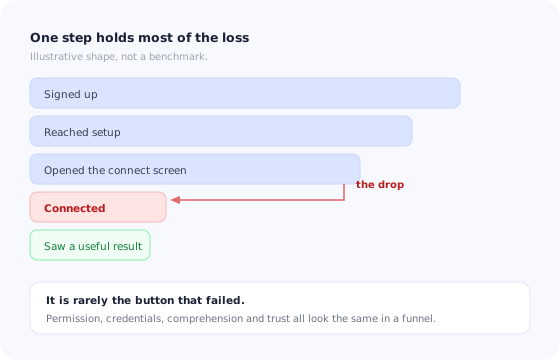
There is a shape that shows up in the activation data of a great many B2B products. The signup flow performs well. The first screens perform well. Then there is one step where the line falls off a cliff, and after it everything is healthy again, because the small number of people who got through are exactly the people who were going to succeed anyway.
That step is almost always the one where the product asks the user to connect something: a CRM, a calendar, an ad account, an accounting system, a data warehouse, a code repository, a bank feed. And the reason it behaves differently from every other step is that it is the only one where the user's success depends on something outside your product and outside their control.
This guide is about that step. It covers why the loss concentrates there, the four blockers behind it and why only one is a design problem, how to sequence connections so the hardest is never first, what to do when the person in your product is not the person with the keys, how to design the connect screen and the wait that follows, how connections break silently months later, and which four numbers tell you which blocker you actually have.
Key Takeaways
- Four different blockers produce one identical drop-off. Permission, credentials, comprehension and trust need four different responses.
- Never lead with the integration you need most. Lead with the one the user can complete alone in under a minute.
- Design for the handoff. In many accounts the person who signed up cannot authorise anything, and hoping otherwise costs you the account.
- The wait after authorisation is part of the step. A silent sync loses people who have already done the hard part.
- Connections break quietly. A token expires, nobody is told, and the product goes stale while the user assumes it is working.
Why the Connect Step Is Where Activation Dies
Every other onboarding step asks the user to do something inside your product, where you control the interface, the wording and the outcome. The connect step asks them to leave, authenticate somewhere else, grant access on behalf of their employer, and come back. You control almost none of that.
It also changes the nature of the request. Up to that point you have asked for attention. Now you are asking for access to a system that holds their company's customers, money or code. The person deciding may be evaluating your product casually and is being asked to make a decision that is not casual at all.
And it is a hard gate rather than a soft one. A user who skips a tour can still succeed. A user who does not connect their data source usually cannot: the product has nothing to work with, so the dashboards are empty, the automations have no trigger and the value proposition is theoretical. This is why the connect step deserves more design attention than the signup form that precedes it, and usually gets less. If activation is the metric you are trying to move, our guide to increasing user activation gives the broader frame; this article is about the single step that most often decides it.
The Four Blockers, and Why Only One Is a UX Problem
In a funnel, everyone who abandons the connect step looks the same. They are not. Four distinct situations produce that identical line, and the fixes have nothing in common.
The first two are organisational, the third is editorial and only the fourth is really about your reputation. None of them is the colour of the button.
The distinction matters because teams instinctively treat the connect step as a conversion-rate problem and start rewriting the headline. If your dominant blocker is permission, no headline will help; you need a handoff. If it is trust, a more enthusiastic headline actively hurts. Diagnosing which one you have is the subject of the metrics section below, and it should precede any redesign.
Sequence: Never Lead With the Integration You Need Most
Most products have a hierarchy of integrations. There is the one that makes the product genuinely valuable — the CRM, the warehouse, the billing system — and there are the easy ones: a calendar, a chat tool, a personal account the user controls alone.
The instinct is to ask for the important one first, because it unlocks the most. The instinct is wrong, for two reasons. The important integration is almost always the one with the strictest permissions, so it has the highest chance of hitting the permission blocker at the exact moment the user's investment in you is lowest. And an early connection of any kind changes the relationship: a user who has successfully connected something has seen your product read real data, produce a real result, and not do anything alarming.
Order integrations by who can complete them alone. First the ones the user personally controls, then the ones a team lead can approve, then the ones that need IT. This ordering also tends to sort by the size of the request, which means every step earns the right to the next one.
This is a specific case of the general principle behind progressive onboarding: teach and ask in the order the user can absorb, not in the order your architecture prefers. For products where setup is genuinely long and multi-part, the wider treatment is in the guide to onboarding for complex products.
The Wrong Person Problem
In a meaningful share of B2B accounts, the person who signs up is not the person who can authorise the connection. A marketer signs up and the ad account is owned by an agency. An analyst signs up and the warehouse credentials sit with data engineering. A team lead signs up and the CRM has three administrators, none of them on this team.
Products handle this badly in a very consistent way: they send the user to an authorisation screen, the screen rejects them or shows an unfamiliar error, and the user concludes that the product does not work. Nothing in the experience acknowledges that the most likely explanation is organisational.
1. Ask before you send
A single question during setup — who administers your CRM? — routes people correctly before anyone hits an error. Users who answer “someone else” go down the handoff path immediately instead of discovering it through failure. This is the same routing logic that makes welcome surveys useful: one question that changes what happens next earns its place.
2. Make the request forwardable
What the user needs is something they can paste into a message to a colleague: what is being connected, which permissions are requested and why, what it will and will not do, and a direct link that lands the administrator on the right screen. If that message does not exist, the user has to write it themselves, and most will not.
3. Hold the place
The waiting user should not be stranded. Keep the setup checklist visible with the connection marked as pending, let them continue with everything that does not depend on it, and tell them the moment it completes. A pending state that is visible and explained is a very different experience from a flow that simply stopped.
4. Give the administrator their own miniature onboarding
The person who arrives to grant access has no context: they did not sign up, they may not know what your product is, and they were asked a favour. A page that explains in three lines who requested this, what access is being granted and how to revoke it converts far better than an unadorned OAuth screen. This is the multi-stakeholder pattern described in the enterprise onboarding guide, applied to a single step.
Designing the Connect Screen
The screen immediately before the authorisation handoff carries more weight than any other page in onboarding, because it is the last thing you control before the user makes a decision on somebody else's platform. Four things belong on it.
The specific benefit, not the category benefit
“Connect your CRM to unlock powerful insights” is a category benefit and it persuades nobody. “Connect HubSpot and we will show which of your open deals have gone quiet” is a specific one. If you cannot write the specific sentence, that is a signal the integration is not ready to be requested this early.
Scope, in plain language, before the OAuth screen
Permission screens are written by the platform, not by you, and they are usually alarming: broad scope names, no explanation, no context. Pre-empt them. State which data is read, whether anything is written back, and what is never touched. A user who has read your version is far less likely to abandon on theirs.
Read-only first
If your product can deliver its first useful result with read access, ask for read access. Requesting write permissions you will not use for weeks in order to avoid a second authorisation later is a trade that consistently loses more users than it saves clicks.
What happens next, including the wait
Say what the user will see after they approve and roughly how long it takes. “We will import the last 90 days — usually about two minutes — and take you to your first report” sets an expectation that a spinner cannot. The microcopy guide has formulas for this kind of sentence.
The Gap Between Connecting and Value
Authorisation is not the finish line, and teams that measure only the connect rate miss a second, quieter loss. The user comes back from the permission screen and lands in a product that is still empty, because the data is on its way.
How long that takes varies from seconds to hours, and the experience needs to differ accordingly.
| Sync duration | What the user should see | What loses them |
|---|---|---|
| Under 10 seconds | A determinate progress indicator, then the result | A full-page block with no indication anything is happening |
| 10 seconds to 2 minutes | Items appearing as they arrive, plus a next step that does not need them | An indeterminate spinner with no counter |
| Longer than 2 minutes | A partial view of what has landed, and a notification when it is complete | Asking the user to keep the tab open and wait |
| Hours, or overnight | An explicit “we will email you”, plus something useful to do today | Silence, which the user reads as failure |
Two details matter more than they look. Show real counts as records arrive rather than a generic animation, because a number that moves is proof of life. And make the first thing the user sees after the sync a result rather than a settings page: the reason they granted access was to see something, so show that something immediately. The broader patterns for both are in the guides to loading states and empty states.
When the Connection Breaks
Integrations are the only part of onboarding that can un-happen. A token expires, a password changes, an admin revokes an app, a scope is tightened, an API version is retired. The connection stops, and in most products absolutely nothing visible occurs.
This is worse than a failure at setup, because the user has stopped watching. They believe the product is working. They may make decisions on data that stopped updating three weeks ago, and the discovery moment — when they notice their dashboard is stale — is the sort of thing that ends renewals.
Treat a broken connection as an onboarding event, not an error. The user has to do the same authorisation again, possibly with the same permission problem and the same absent administrator. That deserves the same guidance you built the first time: an in-product banner that says what stopped and since when, a one-click reconnect, and the same forwardable message if the person who has to fix it is not the person looking at the screen.
Silent failure is a general property of guidance layers as well as of integrations, and the diagnostic habits are the same ones described in why product tours break: assume anything that depends on a system you do not own will eventually stop, and instrument for its absence rather than only for its errors.
Measuring Integration Onboarding
One number — connect rate — hides everything useful. Split the step into four measurements and the shape of the gaps tells you which blocker you have.
- Reached the connect screen. Did users even arrive? If this is low, the problem is upstream and this article is not your problem.
- Started authorisation. Clicked through to the external permission screen. Loss here is comprehension or trust: they read what you asked and chose not to.
- Completed authorisation. Came back successfully. Loss between starting and completing is dominated by permissions and by scary scope screens.
- Reached a result. Saw something in the product that used the connected data. Loss here means the payoff is invisible or the sync experience is failing.
Two more are worth watching over time: time to first successful connection, measured from signup, which reveals handoff delays that a rate cannot; and reconnection rate, the share of broken connections restored within a week, which tells you whether anyone notices the breakage described above. Where these sit among the other numbers you follow is covered in the onboarding metrics guide.
Segment by account, not just by user. When the person who signed up hands off to an administrator, the user-level funnel shows an abandonment and the account-level funnel shows a success. If you only look at users, the handoff pattern is invisible — and the handoff pattern is the one you most need to see.
Running Integration Onboarding With Kompassify
Almost everything in this guide is a guidance layer on top of screens you already have. The authorisation itself is engineering work; the routing question, the explanation before the permission screen, the pending state, the forwardable instructions, the nudge to the colleague and the banner when a connection breaks are all content shown to the right person at the right moment.
With Kompassify you can ask the routing question in a one-question in-app survey and branch on the answer, put a short walkthrough on the connect screen that explains scope in your own words, keep a persistent onboarding checklist that shows the connection as pending while a colleague completes it, target a different message at administrators than at the user who invited them, and raise an in-app banner to the right segment when a connection has stopped. Because it is no-code and targeted by segment, the person who owns activation can change any of it the same day they see the drop-off, without a release.
Guide users through the step that decides activation
Explain the connection before the permission screen, route users who cannot authorise, keep the checklist alive while they wait, and catch broken connections with a targeted banner. Free up to 100 monthly active users, plans from $129/month, GDPR-compliant and EU-hosted.
Start for free →The One-Paragraph Version
The connect step concentrates more activation loss than any other because it is the only step whose outcome depends on a system you do not own and a permission the user may not hold. Split the drop-off into its four causes — permission, credentials, comprehension, trust — because each needs a different response and only one of them is a writing problem. Sequence integrations by who can complete them alone, so the hardest connection is never the first request. Assume the person in front of you cannot authorise it, and build the handoff: a routing question, a forwardable explanation, a held place, and a small onboarding for the administrator who arrives. Treat the wait after authorisation as part of the step, and the eventual silent breakage as an onboarding event rather than an error. Measure four points rather than one, at the account level as well as the user level, and you will know which of the four blockers you are actually fixing.
Frequently Asked Questions
What is integration onboarding?
Integration onboarding is the part of a product's first-run experience that gets a user to connect an external system, such as a CRM, calendar, accounting tool, ad account, data warehouse or code repository, and to reach a useful result from that connection. It matters more than other onboarding steps because for many B2B products nothing in the product is genuinely useful until data flows in, which makes the connection an activation gate rather than a feature.
Why do users abandon at the integration step?
For four distinct reasons that look identical in a funnel chart. They may not have permission to authorise the connection, they may not have the credentials to hand, they may not understand what the connection will do or take, or they may not trust the access being requested. Only the third is a design problem in the usual sense. Treating all four as a copywriting exercise is why so many teams rewrite the connect screen repeatedly and see the same drop-off.
Should I ask users to connect an integration during signup?
Only if the connection is genuinely the shortest route to the first useful result, and even then, show value first. A connect request that arrives before the user understands what the product does is asking for access to their company's data in exchange for a promise. The stronger pattern is to let a user reach one real outcome with sample or manual data, and to place the connection at the moment its benefit is obvious and specific.
What should I show while the first sync is running?
Progress that is real, an expectation of duration, and something to do meanwhile. A long silent spinner after an authorisation is one of the most reliable ways to lose a user who has already done the hard part. Say roughly how long it takes, show items arriving as they arrive rather than a single indeterminate state, offer a useful next step that does not depend on the sync, and notify the user when the data is ready if the wait is long enough that they will leave the tab.
How do I get the right person to connect an integration when they are not the one who signed up?
Design for the handoff instead of pretending it will not happen. Detect the failure early by asking who administers the system before sending anyone to an authorisation screen, then give the signed-up user something concrete to forward: a short explanation of what is being requested, which permissions and why, and a direct link that lands the administrator on the connect screen. Keep the original user's progress visible while they wait, and tell them the moment the connection succeeds.
How do I measure integration onboarding?
Split the step into four measurements rather than one. Track how many users reach the connect screen, how many start authorisation, how many complete it, and how many reach a useful result afterwards. The gaps between these numbers identify the blocker: a large loss before starting means comprehension or trust, a large loss during authorisation usually means permissions, and a large loss after a successful connection means the payoff is not visible enough or the sync experience is failing.