Most onboarding advice assumes a product people open every day. Under that assumption, the first session is the only hard one: teach it well, and habit takes over. It is good advice, and for a large category of software it is simply the wrong model.
Plenty of valuable products are not daily. A budgeting tool is opened at quarter end. A tax or payroll system has a season. An incident tool is opened when something breaks. A benefits portal is used twice a year, urgently, by someone who does not want to be there. The users of these products are not disengaged, and they are not churning. They are behaving exactly as intended, and they arrive back having forgotten where everything is.
Treating that as a re-engagement problem produces a win-back email to a happy customer. Treating it as an onboarding problem produces a full tour for someone who has been a user for three years. Neither is right. What is needed is a third thing: a short, targeted refresher, triggered by absence rather than by novelty.
Key Takeaways
- Returning is not re-engaging. These users came back on their own; the job is to make the return efficient, not to persuade them.
- Location and vocabulary decay first. Confidence decays with them, which is why returning users move slowly even when they know what they want.
- Trigger on the gap since a user's last session, per user, never on an account-level last-seen value or a calendar date.
- Find your threshold from data: the gap length at which time to first meaningful action starts rising.
- Serve today's task first. New features can wait for a digest; the user logged in with a deadline.
- Daily users should never see it. If they do, the trigger is wrong, not the idea.
What Re-Onboarding Is
Re-onboarding: definition
Re-onboarding is guidance shown to an existing user returning after an absence long enough for their working knowledge to have decayed. It restores orientation rather than teaching the product: where things live, what they are called, what order the steps go in, and what has changed since the user was last here.
The clearest way to hold the distinction is by who initiates the return and why they are struggling.
| Onboarding | Re-engagement | Re-onboarding | |
|---|---|---|---|
| Who is it for | A new user | A user who stopped | A user who returned on schedule |
| The problem | They do not know the product | They stopped seeing value | They forgot the details |
| Where it happens | In the product, first sessions | Email, push, outbound | In the product, on return |
| Tone | Teaching | Persuading | Reminding |
| Length | Multi-session | A campaign | Seconds, not minutes |
| Success looks like | First real outcome | A session at all | Fast completion of today's task |
If a user needs persuading, that is user re-engagement and the tactics are different. Re-onboarding starts after they are already here.
The Four Product Shapes That Need It
-
Cyclical
Used at a fixed point in a business cycle: quarter-end reporting, annual planning, monthly reconciliation. Usage is concentrated into short, high-stakes bursts with weeks of silence in between, and the burst is always under time pressure.
-
Seasonal
A busy period and a quiet one: tax, enrolment, harvest, retail peak, academic terms. Often the team changes between seasons too, so part of the returning population is genuinely new while the rest are veterans who have not logged in for months.
-
Event-driven
Opened only when something happens: an incident, a claim, an audit, a complaint, a request for time off. Nobody practises. The first action after a long gap is usually the urgent one, which is the worst possible moment to be relearning where a button is.
-
Role-occasional
The product is used daily by some people and rarely by others in the same account. Approvers, reviewers and executives touch one screen twice a month. They are frequently the most senior users and the least practised, which is a bad combination for a support queue.
One product often has several of these at once. A workforce system may be daily for schedulers, weekly for managers, and twice-yearly for employees choosing benefits. Re-onboarding is therefore not a product-level setting but a per-user, per-feature condition, which is exactly why account-level activity data is the wrong input.
What Actually Decays Between Sessions
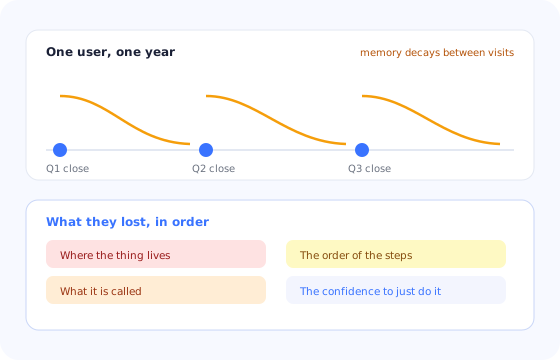
Returning users have not forgotten the product's purpose. They forget four smaller things, and each one has a different remedy, which is why a generic “welcome back” tour helps so little.
Bar length shows how much survives an absence. Location goes first; purpose barely moves.
The confidence band is the part teams underestimate. A returning user is often correct about what to do and still hesitates, because they remember that something in this flow was easy to get wrong and cannot remember what. In products where mistakes are expensive, hesitation shows up as abandoned sessions and as support contacts that read as questions but are really requests for reassurance.
The Absence Test: When Is a Gap Long Enough?
The temptation is to pick a round number. Thirty days sounds reasonable, so thirty days it is. The problem is that the right threshold depends entirely on how complex your core task is, and you already have the data to find it.
Take your users' sessions, group them by how long the gap was before that session, and measure time to first meaningful action in each group. Plot it. In most products the line is flat for a while and then starts climbing at a specific gap length. That inflection is your threshold: the point at which absence starts costing the user real time.
A shortcut if you have no analytics. Look at your support queue and group tickets by how long the requester had been away. If a disproportionate share come from people returning after a gap, you have both your threshold and your list of what the refresher should cover, written in the users' own words.
Two refinements are worth making once the basic threshold works. First, make it per feature rather than per product: a user who logs in weekly but has not touched the reporting section since last quarter needs a refresher there and nowhere else. Second, shorten the threshold for high-stakes flows, since the cost of a hesitant, error-prone attempt is higher than the cost of a reminder nobody needed.
Five Re-Onboarding Patterns That Work
1. The welcome-back summary
A single card on the first screen: how long it has been, what changed that affects them, and one button that goes to the thing they most likely came for. Three lines, dismissible, gone once acknowledged. Its job is orientation, not education, and it should be readable in about five seconds.
2. The refresher checklist
For cyclical and seasonal products, a short checklist of the steps in this cycle's run, in order, with progress preserved. It solves the sequence problem directly and doubles as a place to mark what is already done, which matters when several people work the same cycle.
3. Re-armed just-in-time tooltips
Tooltips that were dismissed long ago can be made eligible again for users past the absence threshold, so the hint appears on the screen where it is needed rather than in a summary at login. This is the highest-value pattern for role-occasional users, who need one screen explained and nothing else.
4. The changed-since-you-left digest
Users returning after months have missed several releases, and reading a release note per update is not realistic. One consolidated digest, filtered to changes that affect what this user actually does, is both shorter and more useful than the full changelog.
5. The season opener
For seasonal products, a guided walkthrough published deliberately at the start of the busy period, treating the season as a launch. It reaches returning veterans and genuinely new colleagues in the same wave, which is convenient, because in most seasonal teams both are present and nobody knows which is which.
Detecting a Returning User Correctly
Three implementation details separate re-onboarding that feels thoughtful from re-onboarding that feels broken.
- Measure the gap per user, not per account. An account-level last-seen date is an average over people with completely different rhythms. Using it shows refreshers to daily users because a colleague was on leave, which is the fastest way to make the whole mechanism unwelcome.
- Measure per feature where it matters. Presence in the product is not presence in the part of it they are about to use. See our event tracking guide for how to keep a last-used timestamp per meaningful action without instrumenting everything.
- Evaluate on entry, then stop. The refresher decision is made once, when the session starts. Re-evaluating mid-session produces guidance appearing behind a user who is already working, which is worse than showing nothing.
Do not re-run the original tour. A returning user of three years who is shown the new-user walkthrough reads it as the product not knowing who they are. Re-onboarding should always be visibly shorter than onboarding, and it should say why it is appearing: because they have been away, not because they are new.
What to Measure
- Time to first meaningful action, split by gap length. The metric that defined the threshold is also the metric that proves the refresher worked. Compare returning users who saw it against those who did not, at the same gap length.
- Support contacts per return. Tickets from returning users, as a share of returning sessions. In cyclical products this is often the largest single support driver and the easiest to reduce.
- Refresher completion and dismissal. High immediate dismissal means it is arriving at the wrong moment or is too long. Low engagement with a high task-completion rate means it was not needed, so the threshold is too short.
- Cycle-over-cycle completion. For seasonal and cyclical products, whether the same user gets through this cycle faster than the last one. That is the number that shows the product is getting easier to come back to, which our onboarding metrics guide covers alongside the rest of the funnel.
Re-Onboarding: Do vs. Don't
Do
- Trigger on the per-user gap since the last session.
- Derive the threshold from where time-to-action starts rising.
- Lead with what changed and where their task now lives.
- Keep refreshers visibly shorter than onboarding.
- Track last use per feature for role-occasional users.
- Treat the start of a season as a launch.
Don't
- Send win-back campaigns to users behaving exactly as expected.
- Use an account-level last-seen date as the trigger.
- Replay the original new-user tour.
- Open with new features when they arrived with a deadline.
- Re-evaluate the trigger mid-session.
- Pick thirty days because it sounds about right.
Building Re-Onboarding With Kompassify
Re-onboarding is a targeting problem more than a content problem. The material is short and easy to write; the difficulty is showing it only to the users who have been away, and only about the parts they have been away from.
In Kompassify you build the refresher once and control who sees it with segments and trigger rules: a welcome-back message for users whose gap crosses your threshold, a refresher checklist that opens with the cycle, and tooltips that become eligible again for people who have not visited a screen in months while staying hidden from everyone who has. Because guides can be set to show once or to repeat under a condition, the same content can serve a first-timer and a returning veteran without either seeing the other's version.
The seasonal case is where the no-code part earns its keep. The team that needs to publish a season opener the week before the busy period starts is not the team that can book engineering time in that week. Building it in a visual editor, targeting the returning segment, and measuring completion per user means the refresher ships when the season does.
Guide the users who come back, not just the ones who arrive
Target guidance by how long a user has been away, refresh only the screens they have not used, and measure whether returning sessions get faster. Free up to 100 monthly active users, plans from $129/month, GDPR-compliant and EU-hosted.
Start for free →The One-Paragraph Version
In products used on a cycle rather than daily, the hard session is not the first one, it is the one after a long gap. Those users are not churning and do not need persuading; they need orientation, because location and vocabulary decay long before purpose does, and confidence decays with them. Find your absence threshold by looking at where time to first action starts rising, trigger per user and per feature rather than per account, and serve today's task before anything new. Keep the refresher visibly shorter than onboarding, treat the start of a season as a launch, and judge it by whether returning sessions get faster and support contacts per return go down.
Frequently Asked Questions
What is re-onboarding?
Re-onboarding is guidance shown to an existing user who is returning after a long enough absence that their working knowledge of the product has decayed. It is not a repeat of the original onboarding. It is a shorter, targeted refresher that restores the specific things that fade first: where a feature lives, what it is called, the order of a multi-step task, and the user's own confidence that they are doing it right. It matters most in products used on a cycle rather than daily, such as quarterly reporting tools, seasonal systems, and anything opened only when a particular event happens.
How is re-onboarding different from re-engagement?
Re-engagement targets users who stopped using a product you expected them to use, and its job is to bring them back. Re-onboarding targets users who came back on their own, exactly as expected, and its job is to make the return efficient. The distinction matters because the tactics are opposites: re-engagement is outbound and persuasive, while re-onboarding is in-product and purely practical. Sending a win-back campaign to a user whose product cycle is quarterly is a good way to annoy a perfectly healthy customer.
How long an absence should trigger re-onboarding?
Set the threshold from your own data rather than a fixed number of days. Look at how long a returning user takes to complete their first meaningful task, grouped by how long they were away. There is usually a gap length beyond which that time rises noticeably, and that is your threshold. As a starting point, products with a simple core task can wait for gaps of a month or more, while products with multi-step configuration often need a refresher after two or three weeks.
Will refreshers annoy my daily users?
Only if you trigger on the wrong thing. Re-onboarding should be triggered by the gap since a user's last session, evaluated per user, not by a date on a calendar and not by an account-level last-seen value. A daily user never crosses the threshold and therefore never sees it. The common mistake is triggering at the account level, which shows a refresher to a whole team because one dormant colleague pulled the account average down.
What should a re-onboarding message actually contain?
Three things, in this order: what changed since they were last here, where the thing they came to do now lives, and one route to more help. Keep it to what serves this visit. A returning user has arrived with a task and a deadline, so a refresher that opens with a tour of new features is competing with the reason they logged in. Anything not needed for today's task belongs in a digest they can read later, not in the way.
Which products need re-onboarding most?
Four shapes need it consistently: cyclical products used at quarter or year end, seasonal products with a busy period and a quiet one, event-driven products opened only when something happens such as an incident or a claim, and products where a role uses only one part occasionally, such as an approver who signs off twice a month. In all four cases the user is valuable and engaged, and their difficulty on return is a memory problem rather than a motivation problem.