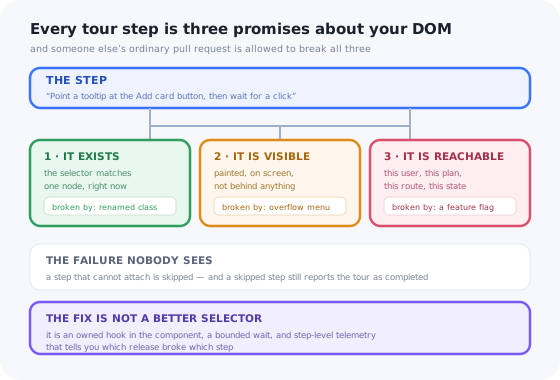
A product tour is written once and then judged forever. It ships on a Tuesday, it works, the activation number moves, and everyone stops thinking about it. Six months later it is pointing at a button that moved into an overflow menu in March, and the only reason you know is that a customer mentioned it in passing.
This is the part of in-app onboarding nobody plans for. There is a great deal of writing about how to design a tour that converts and almost none about what happens to it afterwards, which is strange, because a tour is one of the few pieces of content that can be broken by a change nobody made to it.
The reason is structural, and it is worth saying plainly before the failure modes: a tour step is not a document. It is an assertion about a running application.
Key Takeaways
- A step is a contract with the DOM: it exists, it is visible, it is reachable. Every one of those can be broken by a normal pull request.
- It is almost always the selector. Class names and positions belong to whoever is restyling the page; they are not yours to depend on.
- Give guided elements an owned hook,
data-tour="...", and enforce it in CI, so the break lands on the pull request instead of on the user. - Broken steps fail silently. A skipped step still counts as a completed tour, so your dashboard says everything is fine.
- Bounded waits, not infinite ones. A step that waits forever hangs; a step that gives up instantly lies. Wait with a budget, then report.
- Tours need owners and end dates, or you accumulate correct guidance that nobody needs and nobody feels allowed to delete.
A Tour Step Is a Contract With the DOM
A help-centre article makes no claims about your application. You can rename every class in the codebase and the article is exactly as correct as it was yesterday; it might be out of date, but it cannot be broken. A tour step is the opposite: it is a small program that runs inside your product and asserts three things before it can render at all.
| Help article | Video walkthrough | Tour step | |
|---|---|---|---|
| Depends on | Nothing at runtime | Nothing at runtime | A live element, right now |
| Goes stale by | Becoming inaccurate | Becoming inaccurate | Becoming inaccurate or failing outright |
| Fails | Visibly: the reader disagrees | Visibly: the screen looks different | Invisibly: the step just does not appear |
| Broken by | A product change | A UI change | A product change, a CSS change, a route change, a flag |
| Detected by | Support tickets | Support tickets | Step-level telemetry, or nothing |
That last row is the whole problem. Documentation decays loudly: someone follows it, it does not match, they complain. Tours decay quietly, because the failure mode of “I could not find the element” is almost always skip the step and carry on. The user sees a shorter tour. Your analytics see a completed tour. Nobody sees a bug.
The rule of thumb: if your tour completion rate has never moved and your product has shipped fifty releases, that is not stability. That is a metric that cannot detect the thing you want it to detect.
The Nine Ways a Tour Breaks
These are ordered roughly by how often they show up in practice. None of them are exotic; all of them are somebody doing normal, correct work on the application.
| Failure | What actually happened | What the user sees |
|---|---|---|
| 1. Selector drift | A class name changed: a refactor, a CSS-module hash, a utility-class rewrite, a component library upgrade | The step never appears |
| 2. Present but hidden | The element moved into an overflow menu, a collapsed sidebar, a closed accordion or a non-active tab | A tooltip anchored to nothing, or nothing at all |
| 3. The render race | A skeleton or a data fetch was added, so the element now arrives after the tour looked for it | Works locally, fails on slow connections |
| 4. The route change | pushState swapped the view with no page load, so nothing re-evaluated |
The tour keeps running on the wrong screen |
| 5. Conditional UI | The target is behind a role, a plan, a permission or a feature flag the user does not have | Breaks for one segment only, usually the biggest one |
| 6. Empty vs. populated | The step targets an empty-state card that disappears the moment the user has one row | Works for new accounts, fails on the second run |
| 7. Scroll containers | The element is inside an inner scrolling panel, not the page, so scrolling the window does not reveal it | A highlight for something off-screen |
| 8. Stacking contexts | A new sticky header, a transform on an ancestor or a portal changed who paints
on top |
The highlight sits under the header; the backdrop covers the button |
| 9. Boundaries | The target moved into a shadow root, an iframe or a virtualised list where the node does not exist until scrolled to | Selector looks correct, matches nothing |
Numbers 1, 3 and 4 account for most of what teams actually experience. They also have something in common that suggests the fix: in all three, the tour is right about what it wants and wrong about how or when it asked for it.
Why It Is Almost Always the Selector
Ask five teams how their tours target elements and you will get five answers, four of which are borrowed from something else. That is the root cause: the selector is usually inherited from CSS or from a test suite, and both of those have different owners and different rates of change.
| Target strategy | Survives a restyle? | Survives a re-nest? | Verdict |
|---|---|---|---|
.btn-primary.is-large |
No | No | The most common, the most fragile |
div > div:nth-child(3) button |
Yes | No | Breaks on any wrapper anyone adds |
| Match on visible text | Yes | Yes | Breaks on copy edits and in every other language |
#add-card |
Yes | Yes | Good, if ids are stable and unique: often neither |
[data-tour="billing-add-card"] |
Yes | Yes | The contract. Exists only for guidance, so nothing else may change it |
The argument for a dedicated attribute is not that it is technically superior; an id works just
as well mechanically. It is that it is self-documenting and enforceable. A developer who opens
a component and sees data-tour="billing-add-card" knows something depends on that node.
A developer who sees className="btn btn-primary" knows nothing, and will happily rename it.
And because the attribute is a single well-known token, you can test it. The following is the whole idea: keep the list of hooks a tour depends on somewhere machine-readable, and fail the build when the application stops rendering one.
It is twenty lines and a text search. It will not catch a hook that moved behind a feature flag, and it cannot tell you the element is invisible, but it catches the single most common failure, on the pull request that causes it, with a message that names the tour. That is a good trade for an afternoon.
If you already have end-to-end tests, you have most of this infrastructure. Do not
reuse the test selectors themselves, though: data-testid is owned by whoever is
rewriting the tests, and the day someone deletes a flaky spec they will delete its hook too. Separate
attribute, separate owner, separate reason to exist.
Timing: The Element That Is Not There Yet
The second big family of breakage has nothing to do with selectors and everything to do with when you asked. Modern applications paint in stages, and the tour usually attaches at the earliest of them.
The naive attach happens before the view exists. A bounded wait resolves whenever the element lands, and, crucially, tells you when it never does.
The correct shape is a wait with three outcomes, not two. Resolve when the element appears. Give up when the budget expires. And, the part almost everyone omits, report the give-up, because that report is the only evidence you will ever get that a step is broken.
Two details matter more than they look. Observe document.body with
subtree: true rather than a container, because the container may itself be replaced on a
route change. And check once synchronously before observing, or you will miss elements that were
already there and wait the full budget for nothing.
An element that exists is still not necessarily an element you can point at. Before anchoring, check
that it has a box: getBoundingClientRect() returning zero width and height is the classic
signature of a target inside a collapsed panel or a display-none tab, and anchoring to it produces a
tooltip pinned to the top-left corner of the window, the visual glitch every team recognises and
nobody can reproduce.
Routing: Tours and the Single-Page Application
On a classic multi-page site, a tour gets a free re-initialisation on every navigation. The document unloads, the script boots again, the URL rules are re-read, the DOM is queried fresh. Nothing is remembered, which sounds like a limitation and is actually a guarantee.
A single-page app removes that guarantee. history.pushState() changes the URL without a
load event, swaps part of the tree, and moves on. Three consequences follow, and they are the three
hardest tour bugs to reproduce:
1. The tour outlives the page it was scoped to
Your rule says “show this tour on /projects”. The user starts there, clicks
through to /settings/billing, and the tour is still running, because the rule was
evaluated once, at boot, and nothing has re-evaluated it since. The fix is to re-run URL matching on
every history change, not only at start-up: patch pushState and
replaceState, listen for popstate, and treat all three as navigation.
2. The next step queries a view that has not rendered
The user clicks a link, the router updates the URL immediately, and the target view mounts a frame or two later, longer if it is code-split or waiting on data. A step that queries the DOM on the route event finds the old view or an empty shell. This is the render race from the previous section, arriving through a different door: the same bounded wait fixes it, and the same missing telemetry hides it.
3. Resume re-enters at a step that no longer matches the page
Tours that survive a reload store a step index. On resume, the naive implementation restores step 4 and renders it. But step 4 belonged to a screen the user is no longer on, and the saved index says nothing about that. Resume has to run the same checks as a cold start (URL rules, audience rules, element discovery) and be willing to hold the tour rather than render a step that cannot attach. A resume path that skips the checks a fresh start performs is the single most reliable way to produce a tour that behaves differently on the second visit.
The reproduction trick: nearly all of these appear only on the second navigation. When you test a tour, never test it by loading the page it starts on: load a different page, navigate to it in-app, then reload mid-tour and continue. That three-step ritual finds route bugs in a minute that would otherwise take a support thread.
The framework-specific mechanics of all this (where to hook the router, how to survive re-renders and unmounts) are covered in the build guides for React, Vue and Angular. The maintenance argument here applies whichever of those you are in, and whether the tour is code you own or configuration in a tool.
The Failure You Cannot See
Here is the uncomfortable part. Most teams measure tours at the tour level: started, completed, completion rate. Every one of those numbers is compatible with a badly broken tour, because the standard behaviour when a step cannot attach is to skip it, and a tour that skipped three of its six steps still fires “completed”.
Step-level events fix this, and you need four of them: shown, advanced, dismissed, and target-not-found. With those, three signals become visible.
| Signal | How to compute it | What it means |
|---|---|---|
| The ghost step | shown(step n) far below advanced(step n−1) |
The step is not attaching at all: selector or timing |
| The cliff | Advance rate for one step drops sharply on a specific date | Something shipped that day; the release tells you which pull request |
| The blink | Median display time near zero | Code is skipping it, not people reading it |
| The segment split | Ghost-step rate differs by plan, role or locale | Conditional UI: the element only exists for some users |
Note what the second row implies about process: the useful comparison is not step-to-step, it is before-and-after a release. If you can overlay deploys on step-level charts, the mean time to noticing a broken tour drops from “a customer mentioned it” to the same afternoon. This is the same drop-off arithmetic used in onboarding funnel analysis, applied one level down, and when a signal is ambiguous, session replay on the affected step settles it in a couple of minutes.
Triage: A Broken Step in Ten Minutes
When a report does arrive, the useful thing is a fixed order of questions, because each one eliminates a whole family of causes. Work down it and stop at the first “no”.
Each question eliminates a family of causes, which is why the order matters more than the individual checks.
Question four deserves a note, because it is the one that wastes the most time. A large share of “the tour is broken” reports are not breakage at all: the tour is set to show once, the person reporting it has already seen it, and that state lives in their browser. Before you read a single line of code, open a fresh profile or a private window. It is embarrassing how often that is the entire investigation, and it is why anyone maintaining tours should know exactly how their trigger and frequency rules are stored.
A Maintenance System, Not a One-Off Fix
Fixing the broken step is the easy half. Not accumulating twelve more is the part that needs a system, and it is smaller than it sounds: six habits, none of which takes a project.
1. Every guided element gets an owned hook
One attribute, one naming convention, added in the same commit as the tour. Name it for the
job, not the appearance: data-tour="invite-teammate" survives the button
becoming a link, whereas data-tour="blue-button-top-right" does not.
2. Hooks go in the pull-request checklist
Next to “did you add translation keys”, add “did you move or remove a
data-tour hook”. It costs a line in a template and moves the discovery of the
break from production to review. The CI check from earlier is the belt to that pair of braces.
3. Inventory tours by screen, not by name
A list of tours tells you nothing at review time. A list of screens, each with the tours and hooks that depend on it, means the person changing the billing page can see in five seconds that three tours touch it. This inventory is also what makes an onboarding audit a half-day job rather than a fortnight.
4. Re-run affected tours as part of the release
Not all of them: the ones whose screens the release touched, which the inventory gives you for free. Ten minutes of clicking, on the release candidate, in a fresh profile, with the network throttled. If you would rather automate it, the end-to-end suite can drive the tour and assert that each step attaches; the value is not the assertions, it is that the failure lands before the deploy.
5. Alert on the ghost-step signal
One alert is enough to change the whole dynamic: any step whose shown-count falls below 70% of the previous step’s advanced-count, over a day, in a tour that is live. That single rule catches selector drift, render races and conditional-UI breakage, without you having to guess which one happened.
6. Give every tour an owner and an end condition
At creation time, write down who owns it and when it stops: a date, a target, or the release it was explaining. Most onboarding debt is not broken tours. It is correct tours that stopped being necessary, still firing at people who do not need them, which nobody deletes because nobody is sure they are allowed to. An end condition written on day one is permission granted in advance.
Tours you can fix without a release
Most tour maintenance is content work: a moved element, a copy edit, a step that should not run for one segment any more. Kompassify lets product and support teams edit, re-target and retire in-app tours, tooltips, checklists and announcements without shipping code, with step-level adoption data on each one so a break shows up as a number rather than a support thread. Free up to 100 monthly active users, plans from $129/month, GDPR-compliant and EU-hosted.
Start for free →Maintenance: Do vs. Don’t
Do
- Target a dedicated attribute the application deliberately renders for guidance.
- Wait for the element with a budget, and emit an event when the budget expires.
- Re-evaluate URL and audience rules on every history change, including on resume.
- Measure per step, not per tour, and overlay your deploys on the chart.
- Keep an inventory keyed by screen so releases know what they touch.
- Test with a fresh profile and a throttled network, the two conditions your laptop never has.
Don’t
- Target class names,
nth-childpositions or visible text. - Reuse
data-testid: different owner, different lifecycle, deleted with the spec. - Let a missing element fail silently and still report the tour as completed.
- Poll forever waiting for a node; a hung tour is worse than an absent one.
- Trust a saved step index on resume without re-checking the page it belongs to.
- Judge tour health by completion rate alone; it is the one number a broken tour cannot move.
Where the Tour Should Live
The maintenance argument has a bearing on the old build-or-buy question, and it is not the one people usually reach for. It is not about how hard a tooltip is to render; it is about matching the change rate of the content to the change rate of the container.
| Tours in application code | Tours in a guidance layer | |
|---|---|---|
| Copy fix | A pull request and a deploy | An edit |
| Turn one off mid-incident | A revert, or a flag if you planned one | A toggle |
| Retarget after a redesign | Code change, but you are in there anyway | Config change, once the hook exists |
| Deep app state | Native access to everything | Needs an event or an attribute exposed to it |
| Who can fix a break | Whoever is free in the sprint | The person who noticed |
| Failure mode | Stale, because the fix needs a release slot | Stale, because nobody owns it, hence rule 6 |
Neither column is free of maintenance; they fail differently. Code tours go stale because the fix competes with feature work for a release slot. Configured tours go stale because editing is so cheap that nobody treats the collection as an asset. The habits above (hooks, inventory, alerts, owners, end dates) are what actually decide it, and they are the same either way. If you are weighing the wider version of this decision, the build vs. buy comparison and the no-code onboarding guide cover the rest of it.
The One-Paragraph Version
Product tours break because they are the only onboarding content that makes runtime claims about your application, and those claims are held together by selectors and timing that nobody else on the team knows they must preserve. Make the dependency explicit with an owned attribute the application renders on purpose; wait for elements with a budget instead of guessing; re-check URL and audience rules on every route change and on resume; measure per step so a break is a number instead of a rumour; and give every tour an owner and an end date so the collection stays small enough to maintain. Do those six things and tours stop being a thing you launch and start being a thing you run, which is what they were always going to be.
Frequently Asked Questions
Why do product tours stop working?
Because a tour step is not a document, it is an assertion about the running application: that a specific element exists in the DOM, that it is visible, and that the user can reach it at that moment. Ordinary work breaks those assertions. A CSS module or utility-first build changes the generated class name, so a class-based selector matches nothing. A redesign moves the button into an overflow menu, so the element exists but is hidden. A new loading state means the element arrives 400ms after the tour looks for it. A route change in a single-page app never triggers a page load, so the tour never re-evaluates where it is. None of those are bugs in the app; they are normal changes that the tour was silently depending on.
How do you stop a tour step from breaking when the CSS changes?
Stop selecting on things the CSS owns. Class names, nth-child positions and element paths are all owned by whoever is styling and refactoring the page, and they change without anyone thinking about onboarding. Instead give every guided element an explicit, purpose-named hook that exists only for guidance, a data attribute such as data-tour="billing-add-card", and treat that attribute as public API for the tour. It is one line in the component, it survives restyles and DOM re-nesting, it makes the dependency visible to the next developer who opens the file, and it can be enforced: a test that asserts every attribute referenced by a live tour is still rendered somewhere in the app will fail in CI on the pull request that removes one, rather than in production a week later.
Why does a tour break on a single-page app but work on a normal site?
Because there is no page load to hang off. On a multi-page site every step boundary is a fresh document, so the tour re-initialises, re-reads the URL and re-queries the DOM automatically. In a single-page app, pushState changes the URL and swaps part of the tree without any navigation event the tour would notice by default, so three things go wrong: the tour keeps running on a page its rules would have excluded, the next step queries the DOM before the new view has rendered, and a tour resumed mid-flow re-enters at a step whose page is not the page the user is on. The fix is to treat every history change as a navigation: re-evaluate the URL rules, re-run element discovery with a bounded wait, and make the resume path run exactly the same checks as a cold start rather than trusting the saved step index.
How do I know a tour step is broken if nobody reports it?
You will not hear about it, because a broken step usually fails quietly: it is skipped, or it stalls, and the user closes the tour and gets on with their day. Instrument at the step level rather than the tour level: emit an event when a step is shown, when it is advanced, when it is dismissed and when the target could not be found within the wait budget. Then watch three signals. A step whose shown-count is far below the previous step advanced-count is failing to attach. A step with a sharp drop in advance rate that starts on a specific date is pointing at something that moved. A step with a near-zero median display time is being skipped by code, not read by people. Any one of those changing after a release is a broken step, and the release date tells you which pull request to look at.
Should product tours live in the code or in a tool?
The rendering can live wherever you like; the maintenance question is what decides. Content that changes on a marketing or support cadence, copy, ordering, which segment sees what, translations, turning a tour off during an incident, should not require a release, because a release cycle is slower than the reason for the change and the tour will simply go stale instead. Anything that needs deep access to app internals, a step that must wait on your own state machine, a highlight inside a canvas or a virtualised list, is easier in code. Most teams end up split: the guidance layer is configured outside the release cycle, and the application takes on one obligation, which is to render stable hooks on the elements the guidance targets.
How often should in-app tours be reviewed?
Tie the review to releases rather than to the calendar. Every release that touches a screen a tour runs on should re-run that tour, which is cheap if the tours are inventoried by screen; a quarterly full pass catches drift on screens nobody edited. Just as important is a sunset rule: give every tour an owner and an end condition when it is created, a date, a completion target, or the release it was explaining, because most onboarding debt is not broken tours, it is correct tours that stopped being relevant and that nobody feels entitled to delete.