
SaaS teams ship features constantly. A new integration drops on Tuesday. A long-awaited workflow redesign goes live on Thursday. The product manager writes a Slack message, the developer closes the Jira ticket, and everyone moves on to the next sprint.
Two weeks later, usage data shows the new feature is barely touched. Sound familiar?
The problem is rarely the feature itself. It is the gap between shipping something and making sure users actually discover, understand, and adopt it. According to research cited by Hopscotch, up to 64% of features in software products go unused often simply because users never knew about it.
Key Takeaways
- Features don't announce themselves. Up to 64% of software features go unused because users simply aren't aware of them. The announcement is as important as the feature itself.
- In-app is your highest-leverage channel. Meeting users where they already are (inside your product) consistently drives better adoption than email alone.
- Segment before you send. Not every feature is relevant to every user. Targeted announcements get higher engagement and create less noise for the users who don't need to know.
- Usage ≠ adoption. A user clicking a feature once is not adoption. Track retention and repeat use to understand whether the feature has truly earned a place in your users' workflows.
- Collect feedback in context. The best time to ask users how they feel about a new feature is right after they've used it not three days later in an email.
- Treat the announcement as a launch, not a footnote. Plan it, measure it, and iterate on it the same way you would iterate on the feature itself.
Why announce a new feature?
Users do not have the same relationship with your product that your team does. They are not watching your release notes, or noticing when a new button appears in the sidebar. They are focused on getting their
own work done.
A feature announcement is not a nice-to-have in a SaaS product. It is a critical part of the SaaS product development
cycle. Done right, it turns a shipped feature into adopted habits. Done poorly, it turns months of
dev work into a ghost feature that lives forever in your changelog.
- Higher feature adoption. Users can't adopt a feature they don't know exists. An announcement creates the awareness that makes adoption possible.
- Reduced churn. Users who feel like they're getting more value over time are less likely to leave. A timely announcement can re-engage someone who was quietly drifting toward cancellation.
- Stronger loyalty. When users recognise that a new feature addresses a pain they had, it closes the loop between their feedback and your product's evolution. Users who feel heard stay.
- Visible momentum. Consistent, clear product communication signals that your team is listening and shipping. That perception of progress is a retention driver in its own right.
- Better ROI on engineering. Every unannounced feature is a write-off of the design, development, and QA time that went into it. An announcement converts that investment into actual user value.
Step-by-step Feature Announcement Playbook
Shipping a feature without a plan is how you end up with low adoption, confused users, and support tickets that should never have existed. A repeatable announcement process changes that. Here are the steps that turn a feature release into a feature launch.
-
Define your goal and success metrics
-
Identify and segment your target audience
-
Prepare your onboarding & support material for the new feature
-
Write your announcement copy
-
Choose your channels and launch
-
Measure, collect feedback, and iterate
1. Define your goal and success metrics
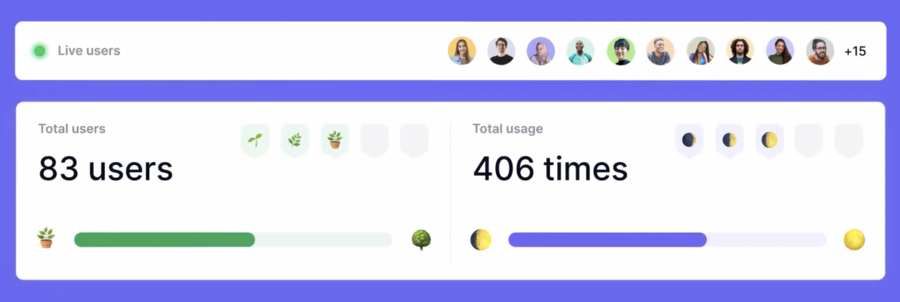
A feature announcement without a goal is a communication exercise. An announcement with a goal is a launch. Before you write a word of copy or choose a channel, decide what success looks like.
Are you trying to drive adoption among all active users within 30 days?
Re-engage a segment that has been underusing the product?
Reduce a specific category of support tickets?
Pick one or two metrics that will tell you whether the announcement worked, and make those your north stars throughout the process.
2. Identify and segment your target audience
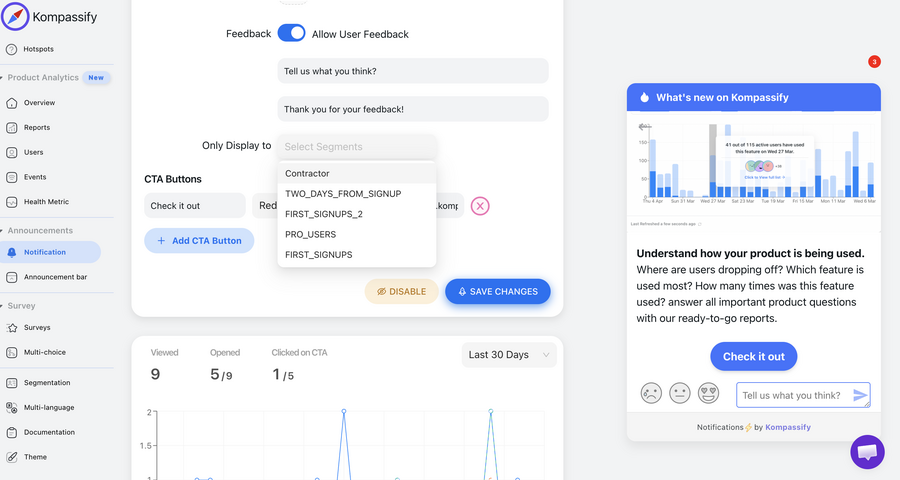
Who will actually benefit from this feature? Think carefully about roles, plan tiers, usage patterns, and the part of the product the feature lives in.
A feature designed for team admins is not relevant to individual contributors. An advanced integration built for enterprise customers does not need to go to your free tier.
Sending announcements to users who have no reason to care trains them to ignore everything you send. Define your segment clearly, then target only those users.
3. Prepare your onboarding & support material for the new feature
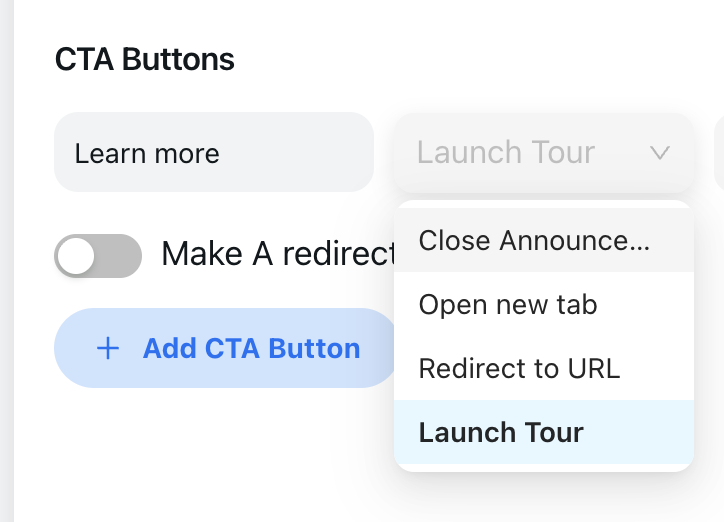
For any feature with a learning curve, this is also the right moment to write an article in your knowledge center, to build an onboarding product tour or even an onboarding checklist. Rather than leaving users to figure things out on their own after they click your CTA, a tour walks them through the feature step by step, directly inside the product, at the exact moment they first encounter it.
And with Kompassify you have the possiblity to launch product tours directly from the announcement widget CTA
4. Write your announcement copy
Lead with the benefit, not the feature name. One clear headline, one or two sentences of context, one CTA. Keep it short enough to skim and compelling enough to click. For the detail on how to write this well, see the next section.
5. Choose your Distribution channels and launch
Not every release deserves the same megaphone. Match your channel to the size of the update and where your audience is most likely to pay attention.
-
In-app announcements (a notification widget): In-app is your highest-leverage channel. Meeting users where they already are (inside your product) consistently drives better adoption than email alone.
-
Email: Email is best for big releases that deserve their own moment. A new plan, a flagship feature, or anything that changes the way people use your product. Don't email for every update. If you do, users will stop paying attention when it actually matters.
-
An announcement bar: An announcement bar sits at the top or bottom of your UI and stays visible without getting in the way. Use it for time-sensitive news like a limited beta, an upcoming deprecation, or an important deadline.
-
A modal for major launches: A modal interrupts the user on purpose, so save it for moments that earn that attention a redesigned workflow, a new pricing tier, or a critical change everyone needs to know about. Use it too often and people will start closing it without reading.
-
Blog post or changelog entry: A blog post or changelog entry is something users can find on their own when they want to know what changed. It's also good for SEO and gives your team a clear record of what shipped and why. Use it for every release, big or small.
6. Measure, collect feedback, and iterate
The launch is not the end of the process. Once your feature is live, you need to know if it is actually working, not just whether people saw the announcement, but whether they used the feature and kept using it.
Start by tracking the basics:
-
Reach: How many users saw the announcement?
-
Engagement: How many clicked through or interacted with it?
-
Adoption: How many went on to actually use the feature?
-
Retention: How many came back and used it again?
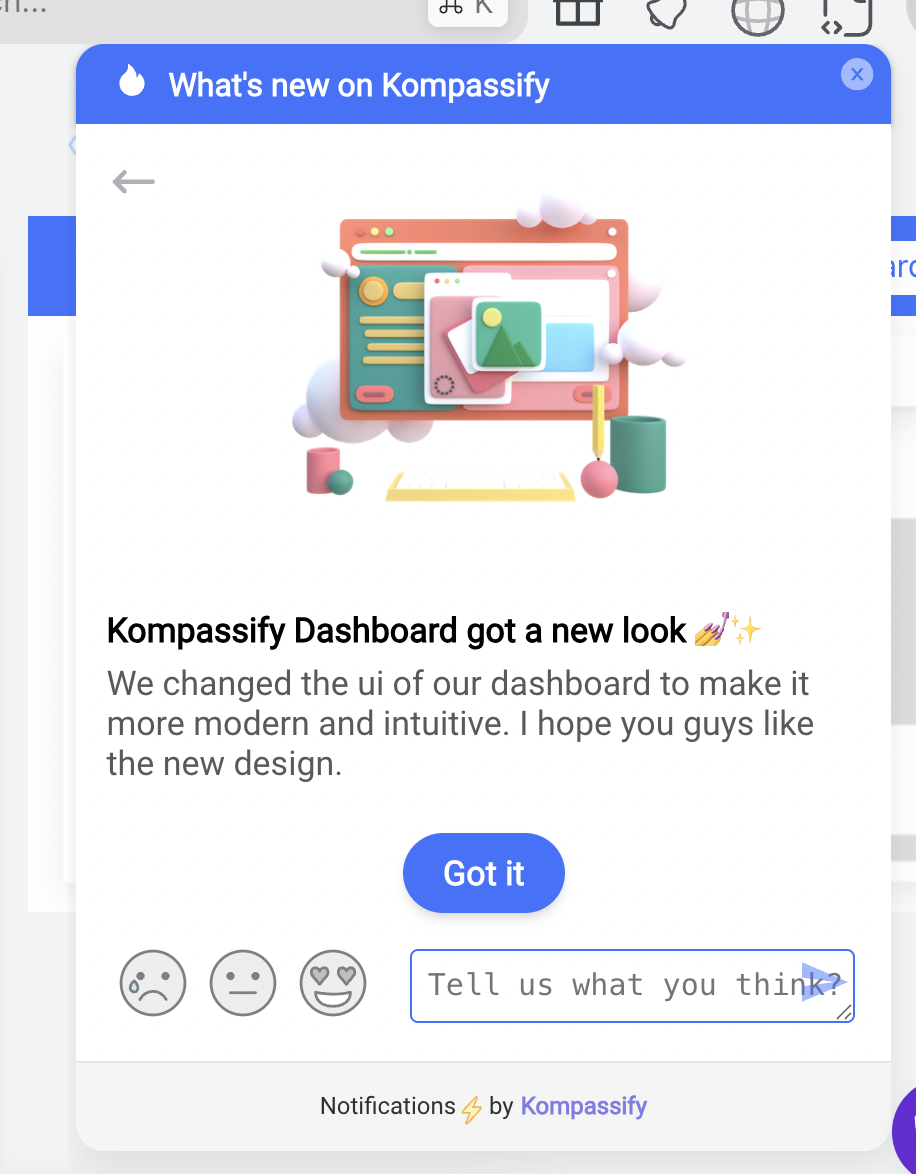
These four numbers tell you a lot. If reach is high but adoption is low, your announcement landed but the feature did not. If adoption is high but retention drops off, users tried it once and did not see enough value to come back. Each gap points to a different problem to fix.
Feedback works the same way. The best time to ask for it is right after someone uses the feature for the first time, not three days later in a follow-up email. An in-app prompt at the right moment will always get you more honest and useful responses than a survey sent out of context.
Then use what you learn. Update the onboarding tooltip if users are confused about the first step. Rewrite the announcement if people are not clicking through. Adjust the feature itself if the feedback points to a real usability problem. The teams that treat a feature launch as a starting point, not a finish line, are the ones that see better adoption over time.
How to Write a Feature Announcement Message
The copy you write for a feature announcement will be read in seconds, skimmed faster than that, and judged almost immediately. Here is how to make every word count.
Start with a headline that states the benefit
Tell users what they can do now, not what you built. "Export any report in one click" beats "CSV export module now available." Answer the silent question: "What's in this for me?"
Add one or two sentences of context
What problem does it solve? What friction does it remove? Two sentences max. If you're writing more, you're leading with features instead of outcomes.
Write the way a smart colleague would talk, not the way a press release reads
Read your copy aloud. If it sounds stiff, rewrite it. "We've implemented an enhanced workflow automation engine" tells users nothing. "Build approval workflows in minutes, without asking a developer" does. Use plain language, avoid passive voice, and say "you can now" instead of "it is now possible to."
Use one clear CTA
One action, worded to describe exactly what happens when users click: "Try it now," "Take the tour," "Open the dashboard." Take them directly to the feature not a homepage. The shorter the path to value, the higher your adoption rate.
Include a visual whenever possible
A screenshot, GIF, or short screen recording does more than any amount of copy. Visuals let users see what they're getting before they click, reducing friction and lowering the activation barrier.
One message, one feature: resist the temptation to bundle multiple updates into a single announcement. When you announce three things at once, users absorb none of them clearly, the CTA becomes ambiguous, and you lose the ability to measure the impact of any individual release. Save bundled updates for a quarterly changelog or a "what's new" roundup post. For your in-app announcements, one feature, one message, one action.
Tailor the tone to your audience
Developer tools can be concise and technical. Consumer products can be warmer. A breaking change needs to lead with reassurance. Write for your specific user not a generic audience.
A quick template to start from: [Headline: what users can do now] + [One sentence: why it matters / what problem it solves] + [Visual: screenshot or GIF of the feature] + [CTA: one specific action that takes them directly to the feature]. That is a complete announcement. Everything else is optional.
The template, filled in
Here is what that looks like applied to a realistic release, an approval workflow feature in a project management tool:
Headline: "Approve requests without leaving your board"
Context: "No more chasing sign-offs over email: add an approval step to any task and reviewers get notified in-app."
Visual: a ten-second GIF of a task moving through the new approval step
CTA: "Add an approval step", linking straight into the workflow editor, not to a homepage or help article.
Notice what is missing: no feature name in the headline, no paragraph about how long it took to build, no second CTA. Every element earns its place by moving the user closer to trying the feature.
Best Practices for Announcing a New Feature
What separates high-adoption announcements from ones that get ignored.
Lead with the user's outcome, not your engineering effort
"You can now build automated approval workflows in minutes" is an announcement. "We've added a new workflow automation engine with conditional branching logic" is a changelog entry nobody asked for. Write for the user's perspective, not yours.
Segment your audience before announcing
Sending a developer-focused API update to non-technical users trains them to ignore everything you send. Segment by role, plan tier, or usage pattern and target only the users who actually need to know.
Make sure the feature is actually ready before you announce it
QA the feature, update your help docs, and brief support before you send anything. A user who clicks through and hits a bug or a missing help article won't just abandon the feature they'll trust your product less.
Time your announcement for maximum engagement
Mid-week mornings (Tue–Thu, 9–11am in your users' timezone) consistently outperform other slots. Avoid Mondays, Fridays, and holidays. For global products, stagger by region.
Always include a clear next action
One CTA, specific and direct: "Try it now," "Take the tour," "Open the dashboard." Take users straight to the feature not a homepage. Fewer clicks = higher adoption.
Keep it short
Users skim. A headline, one sentence of context, and a CTA is enough for most features. If you need more than two sentences to explain the benefit, the problem is the framing not the length.
What NOT to Do When Announcing a New Feature
The mistakes below are common, costly, and entirely avoidable. Most of them stem from treating the announcement as a formality rather than as a critical part of the product launch.
✅ Do
- Lead with the user's benefit, not the feature name
- Segment your audience and target relevant users only
- Use in-app channels for active users
- Include a single, specific CTA per announcement
- Time announcements for peak engagement windows
- Offer an interactive tour for complex features
- Collect feedback immediately after the user engages
- Track adoption metrics and iterate on poor performers
- Ensure documentation and support are ready before going live
❌ Don't
- Announce to your entire user base regardless of relevance
- Use passive, feature-first copy ("we've added…")
- Rely on a single email and nothing else
- Skip the announcement because the feature "speaks for itself"
- Announce before documentation and support are ready
- Use a full-screen modal for every release, big and small
- Ignore drop-off and adoption data after launch
- Wait weeks before collecting user feedback
- Treat the announcement as a one-time event with no follow-up
The silent killer: The most damaging mistake is not a bad announcement; it is no announcement at all. Every feature that ships without being communicated to users is a feature that fails to deliver its potential value, no matter how well it was built.
3 Real-World Feature Announcement Examples (And What Makes Each One Work)
The best way to understand what a great feature announcement looks like is to study the companies that do it consistently well. These three examples span different product types, different announcement formats, and different levels of release complexity, but each one demonstrates a specific principle worth stealing.
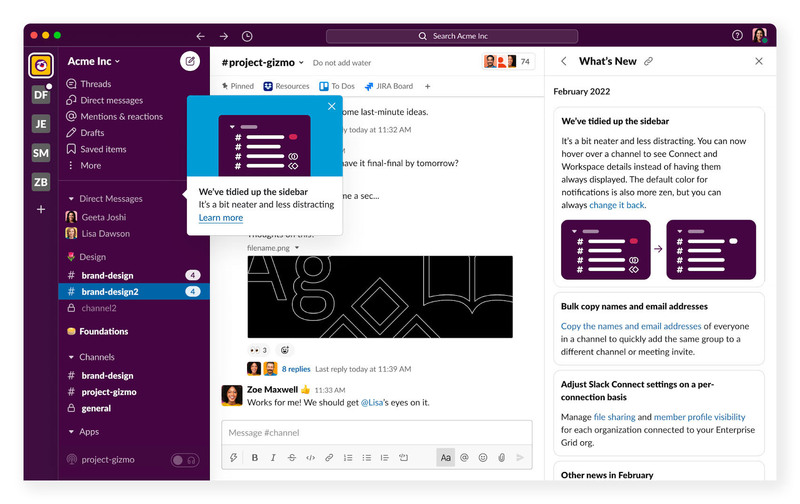
When Slack quietly redesigned its sidebar layout, it did not interrupt users with a full-screen modal. Instead, it surfaced a small tooltip anchored directly to the updated sidebar, reading "We've tidied up the sidebar; it's a bit neater and less distracting." A single "Learn more" link was the only action available.
What makes it work:
- Contextual placement. The tooltip appears right next to the element that changed. Users do not have to read about the sidebar update in the abstract; they see it happening while the message explains it. Context and content are perfectly aligned.
- Minimal, non-blocking format. A tooltip requires zero commitment. Users can read it in two seconds and carry on with whatever they were doing. There is no forced interaction, no button to click, no flow to complete. The announcement respects the user's current task.
- Benefit-led copy. "Neater and less distracting" speaks directly to why the change was made, not what was technically altered. Users immediately understand what they gain, rather than having to infer it.
- A single optional CTA. "Learn more" is available for users who want the full picture, but it is never forced. Those who are satisfied with the tooltip summary can simply close it and move on.
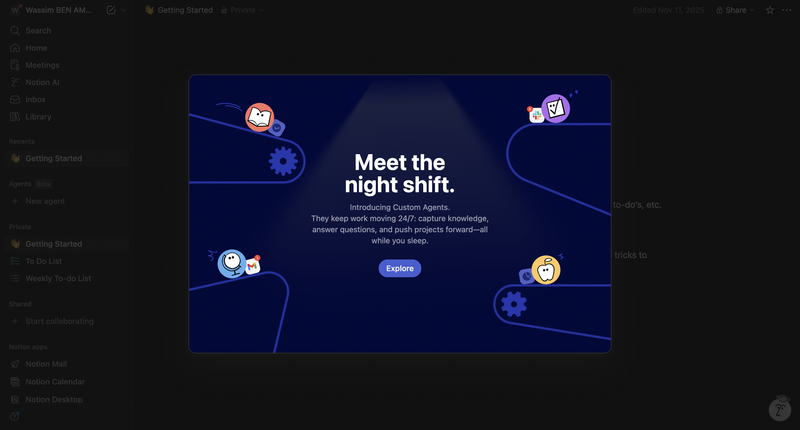
When Notion launched Custom Agents, AI agents that work autonomously in the background, it could have announced the feature with a simple banner or a changelog entry. Instead, it went all-in on a cinematic full-screen modal headlined "Meet the night shift." The visual: a dark, animated conveyor belt of app icons flowing through a spotlight, suggesting work happening quietly while you're away.
What makes it work:
- A headline that sells the feeling, not the feature. "Meet the night shift" evokes productivity happening while you sleep: autonomy, peace of mind, progress without effort. It does not say "Introducing Custom Agents." It makes you feel what the feature does before explaining what it is.
- Immersive visual storytelling. The full-screen dark background with animated app icons on a conveyor belt is not decoration; it is the announcement. Users immediately grasp the concept of agents working on tasks across different tools, without reading a word of copy.
- Concise, benefit-led subtext. The supporting copy ("They keep work moving 24/7: capture knowledge, answer questions, and push projects forward, all while you sleep") lands three concrete use cases in one sentence. Efficient and scannable.
- A single, friction-free CTA. One button: "Explore." No secondary option, no dismissal link buried in the corner. The entire announcement funnels users toward one action, making the next step impossible to miss.
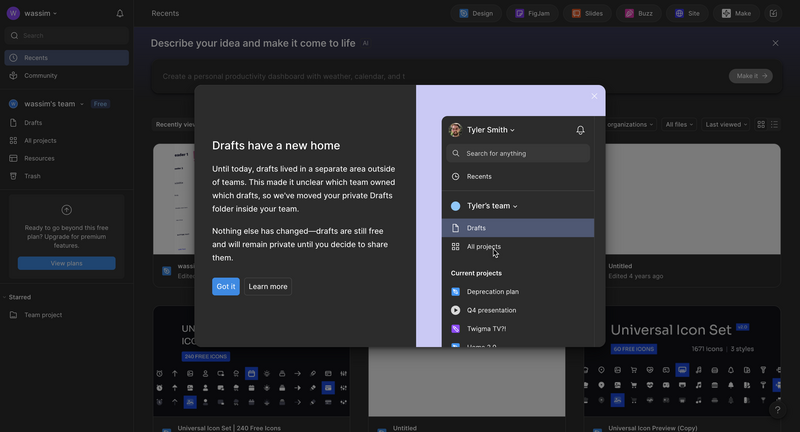
When Figma moved users' private Drafts folder inside their team workspace, it was the kind of structural change that could easily confuse or alarm people: a folder they relied on had physically moved. Rather than letting users stumble upon the change, Figma surfaced a two-panel full-screen modal titled "Drafts have a new home", pairing a clear written explanation on the left with a live visual preview of the new sidebar structure on the right.
What makes it work:
- Reassurance before explanation. The copy leads with context, why the change was made ("it was unclear which team owned which drafts"), before describing what moved. Users understand the rationale immediately, which converts potential frustration into acceptance.
- Proactive anxiety management. The second paragraph explicitly addresses the fear most users would have: "Nothing else has changed; drafts are still free and will remain private until you decide to share them." Anticipating and neutralising that concern before the user has to ask is the mark of user-centric announcement writing.
- A split-panel layout that shows, not just tells. The right side of the modal displays the actual updated sidebar with Drafts nested inside the team, exactly where users will find it after dismissing the modal. There is zero gap between the announcement and reality.
- Dual CTAs that respect different user types. "Got it" for users who are satisfied and ready to move on; "Learn more" for those who want full documentation. Both options feel low-pressure and neither blocks the user from proceeding.
The pattern across all three examples: every great feature announcement leads with user benefit, respects user autonomy (nobody is forced through anything), and makes the distance between reading the announcement and experiencing the feature value as short as possible. The format differs (tooltips, full-screen modals, dual CTAs), but the underlying principle is the same.
How to Measure Feature Adoption After an Announcement
There is an important distinction that many product teams miss: feature usage is not the same as feature adoption. A user who clicks a feature once because they saw an announcement has used it. A user who returns to it repeatedly because it genuinely helps them do their job has adopted it. Adoption is the metric that drives retention. Usage is just a precursor.
Measuring feature adoption requires looking at behavior over time, not just in the first 24 hours after an announcement. Here are the metrics that matter.
| Metric | What It Measures | How to Interpret It |
|---|---|---|
| Feature Adoption Rate | Percentage of target users who use the feature at least once within a defined period | Low adoption rate after a well-distributed announcement often signals a value clarity problem: users saw it but were not convinced to try it |
| Feature Retention Rate | Percentage of users who return to use the feature in a second session after their first interaction | This is the truest measure of adoption. Low retention means users tried it but did not find enough value to come back |
| Time to First Use | How long it takes a user to use the feature after seeing the announcement | Long lag between announcement and first use suggests the CTA or onboarding is creating friction |
| Frequency of Use | How often active users engage with the feature per week or month | Features with high initial adoption but low frequency often become "nice to have" rather than core to the workflow |
| Announcement Click-Through Rate | Percentage of users who saw the announcement and clicked the CTA | Low CTR points to a copy or targeting issue: users are not compelled by the message or it is not relevant to them |
| Support Ticket Volume | Number of support queries related to the new feature | A spike in tickets suggests the feature is being discovered but not understood: invest in better in-app guidance |
Building an adoption funnel
Think of feature adoption as a funnel with four stages: Awareness (did the user see the announcement?), Activation (did the user try the feature?), Retention (did the user come back to use it again?), and Integration (is the feature now a regular part of the user's workflow?).
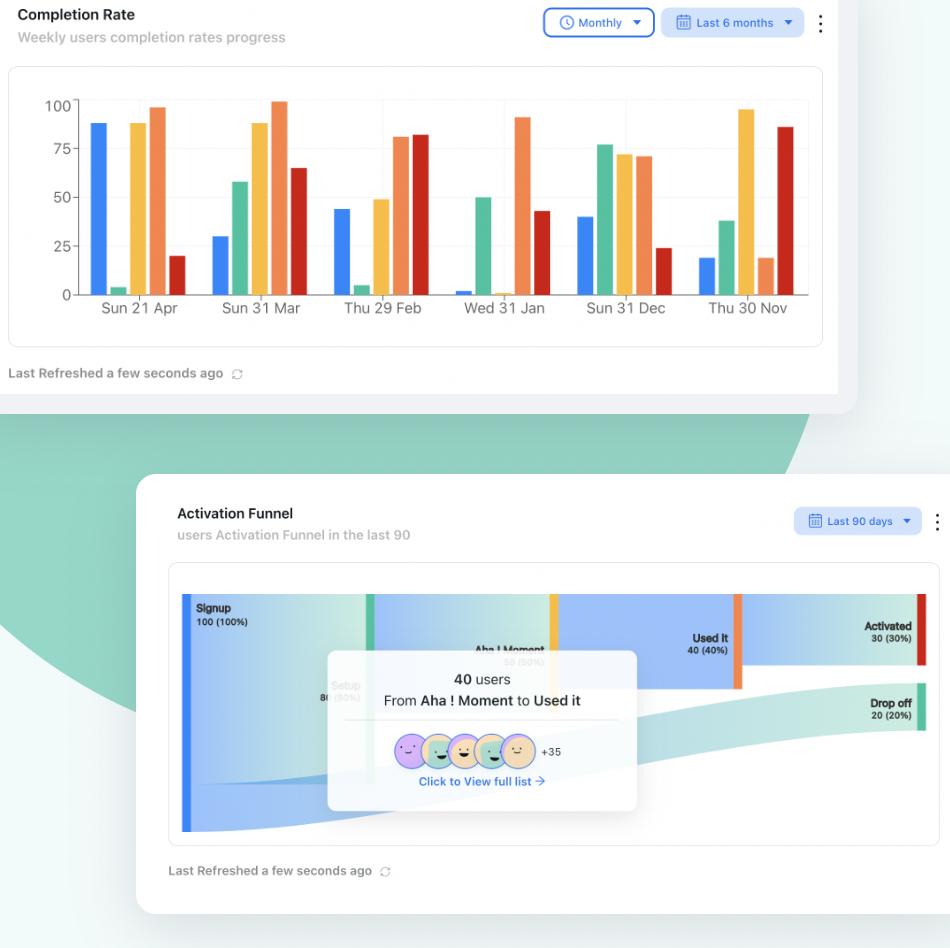
Each stage can leak users. High awareness with low activation means your announcement is reaching users but not motivating them to try the feature. High activation with low retention means the feature is being tried but not delivering enough value to earn a second visit. Mapping your funnel lets you pinpoint exactly which stage to fix.
Kompassify's product analytics lets you track user interactions with specific features, build custom funnels, and measure adoption rates directly within your app, without needing to pipe data through a separate analytics platform. You can see at a glance which user segments are adopting a feature and which are not, and use that data to trigger targeted follow-up announcements or guided tours for the groups that need more encouragement.
How to Collect User Feedback on a New Feature
Adoption metrics tell you what users are doing with a new feature. Feedback tells you why. Both are essential. A feature with high adoption but low satisfaction scores has a quality or UX problem that will eventually surface as churn. A feature with low adoption might need a better announcement strategy, or it might need to be fundamentally rethought.
Collect feedback in context, not after the fact
The best time to ask a user how they feel about a new feature is immediately after they have used it for the first time. At that moment, the experience is fresh, their impressions are vivid, and the question feels natural. An email survey that arrives three days later asking about their experience will get a fraction of the responses, and the quality of the feedback will be lower.
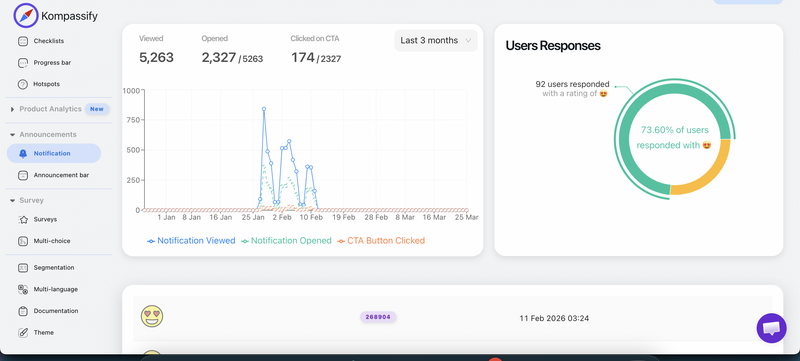
Kompassify's notification widget supports in-announcement feedback collection, so you can embed a simple reaction picker, a thumbs-up/thumbs-down prompt, or a short open-ended question directly within the announcement itself. Users respond without leaving the product, which dramatically increases response rates and the quality of the data you collect.
Use micro-surveys for specific questions
A micro-survey is a one or two-question prompt that appears in-app after a user has completed a specific action. For feature feedback, the most useful questions are typically: "How useful was this feature to you?" (scored 1–5), "What would make this feature more useful?" (open text), or a simple thumbs-up/thumbs-down followed by "Tell us why." Keep it to one question per prompt: the moment a survey starts to feel like a commitment, users abandon it.
Track feature-specific NPS and CSAT
Net Promoter Score (NPS) and Customer Satisfaction Score (CSAT) measured at the feature level (rather than across the product as a whole) give you a precise signal about whether a specific capability is delighting or disappointing your users. (New to the metric? Our complete guide to Net Promoter Score covers the formula, benchmarks, and survey best practices.) Track these over time, especially in the first 30 to 90 days after a launch. A feature whose CSAT score improves over successive iterations is a healthy sign. One whose score stays flat or declines despite changes is a signal that the core value proposition may need rethinking.
Watch support tickets as a passive feedback channel
Support queries are one of the most honest forms of user feedback available: they represent the moments when the product failed to be self-explanatory. A surge in tickets related to a new feature is not just a support burden. It is a detailed map of where users are confused, what they expected but did not find, and where your in-app guidance needs to improve. Review the first week's tickets from any major feature launch as part of your post-launch analysis.
Putting It All Together: Your Feature Announcement Checklist
Use this checklist for every major feature launch. Adapt the scope to the size of the release: a minor improvement might only need a notification widget entry and an email to inactive users, while a major new capability deserves the full playbook.
Pre-Launch
- Define your adoption goal and one or two success metrics
- Segment your target audience (role, plan, usage pattern)
- QA the feature: ensure it is stable, tested, and production-ready
- Update help documentation with a dedicated article on the new feature
- Brief support team on common questions they will receive
- Build a product tour for complex features using Kompassify
- Write announcement copy (benefit-first, short, single CTA)
Launch
- Publish in-app announcement via notification widget and/or announcement bar
- Trigger product tour for users entering the feature area for the first time
- Send email to inactive/infrequent users who would benefit from the feature
- Publish changelog or blog post
- Share on social media (especially for major releases)
- Confirm product analytics tracking is active for the new feature
Post-Launch (Days 7–30)
- Review adoption funnel: awareness → activation → retention
- Collect and review in-app feedback from the notification widget
- Analyse support ticket volume for the new feature
- Send follow-up nudge to users who saw the announcement but did not try the feature
- Iterate on announcement copy or tour steps based on drop-off data
- Document learnings for the next feature launch
Ready to Launch Features That Actually Get Adopted?
Kompassify gives you in-app product tours, notification widgets, announcement bars, feedback collection, and product analytics, everything you need to announce new features and measure their success, without writing a single line of code.
Start for Free →Frequently Asked Questions
Why is it important to announce a new feature?
Without a proper announcement, new features go unnoticed. Research suggests that up to 64% of software features go unused, often because users simply do not know they exist. A well-crafted feature announcement drives discovery, increases adoption, reduces churn, and demonstrates to users that your product is actively improving, all of which contribute directly to retention and long-term revenue.
What channels should I use to announce a new feature?
The most effective approach is multi-channel. In-app announcements (notification widgets, announcement bars, modals) reach active users in context and consistently drive the highest adoption rates. Email reaches inactive or less frequent users. Blog posts and social media expand visibility and support SEO. For major releases, a live demo or webinar deepens engagement with your most valuable customers.
What is the difference between feature usage and feature adoption?
Feature usage measures any recorded interaction, including one-time clicks. Feature adoption measures whether a feature becomes a regular, repeated part of a user's workflow. A feature can show healthy usage numbers while never being truly adopted. Adoption is the metric that matters for long-term retention, as it signals that the feature has earned a lasting place in how users actually work.
How do I measure feature adoption after an announcement?
The key metrics to track are: feature adoption rate (percentage of target users who use the feature at least once), feature retention rate (percentage who return to use it in a second session), time to first use, and frequency of use per active user. Kompassify's product analytics lets you track all of these directly inside your app, build adoption funnels, and segment results by user cohort, without sending data to a separate analytics platform.
How do I collect feedback on a new feature?
The most effective method is to collect feedback in context, immediately after the user has interacted with the new feature. Kompassify's notification widget supports embedded feedback collection directly within announcements, so users can react, rate, or leave a short comment without leaving the product. This dramatically increases response rates compared to follow-up email surveys. For deeper qualitative insight, short in-app micro-surveys (one or two questions) triggered after the first use of a feature work extremely well.
When is the right time to announce a new feature?
Announce when the feature is stable, tested, and fully documented. For timing within the week, mid-week mornings (Tuesday to Thursday) consistently generate higher engagement. Avoid Mondays, Fridays, and public holidays. For global products, consider staggering your announcement by time zone. Most importantly: do not announce before the feature is genuinely ready. A buggy or undocumented first impression damages user trust far more than a delayed launch would.
Do I need to announce minor updates and bug fixes?
Minor bug fixes generally do not warrant a full announcement campaign, but they should appear in your changelog or notification widget feed. Users who experience a persistent issue and later see that it was fixed will appreciate knowing. For minor improvements that subtly change an existing workflow, a brief notification widget entry is usually enough; reserve modals and emails for genuinely significant feature launches.