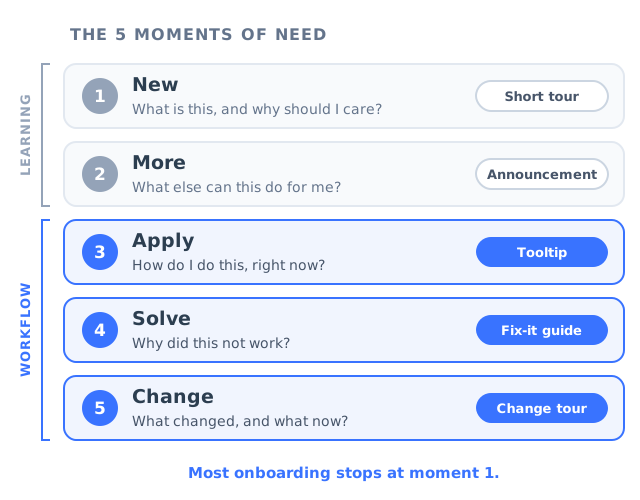
Think about the last time you got stuck in a piece of software you use every week. It was probably not on the first day. On the first day somebody showed you around: a welcome tour, a setup checklist, maybe a short video. You got stuck three weeks later, on an ordinary afternoon, halfway through a real piece of work, trying to remember which menu held the export settings. The tour was long gone. The help center opened in a new tab and asked you to search for a word you did not know. You ended up asking a colleague, or you gave up and did it the slow way.
That gap has a name. Learning specialists Conrad Gottfredson and Bob Mosher described five distinct moments at which people need help, and pointed out that most training effort goes into the first one or two while most of the need sits in the other three. Their framework, the 5 Moments of Need, was written for workplace learning, but it describes SaaS onboarding almost perfectly. Product teams pour their effort into the first encounter, a welcome tour for new sign-ups, and leave the moments where users actually spend their time (applying the product to real work, recovering when something goes wrong, relearning after a release) to support tickets and guesswork.
This guide covers what the 5 moments of need are, why the split between learning moments and workflow moments changes how you should design in-app help, each moment in detail with the guidance format that fits it, a map you can use to plan coverage, a step-by-step audit of the guidance you already have, the mistakes that come up most often, and how to measure each moment on its own terms.
Key takeaways
- The 5 Moments of Need are New, More, Apply, Solve and Change: learning something for the first time, learning more of it, using it on real work, fixing it when it goes wrong, and relearning it when it changes.
- New and More are learning moments, served by teaching. Apply, Solve and Change are workflow moments, served by help that is available at the point of work without leaving it.
- A user meets each feature as New once. They meet it as Apply every time they use it. Most onboarding effort is distributed the other way round.
- Each moment needs a different format: a short tour for New, a targeted announcement for More, a tooltip or checklist for Apply, a fix-it walkthrough for Solve, and a change tour for Change.
- Audit your guidance by tagging every item with the moment it serves. The gaps are usually in Solve and Change, and your support queue tells you which one to fill first.
What Are the 5 Moments of Need? (Framework and Definition)
The 5 Moments of Need: definition
The 5 Moments of Need is a framework describing the five situations in which people need to learn or get help: when they learn something for the first time (New), when they want to learn more about it (More), when they need to act on what they learned (Apply), when something goes wrong (Solve), and when the way things work changes (Change). It is used to decide which kind of support to provide at which moment, instead of treating every learning need as a training problem.
The framework was developed by Conrad Gottfredson and Bob Mosher, two practitioners in performance support, the discipline concerned with helping people while they work rather than before they start. Its starting observation is simple. Training programmes were designed almost entirely around the first two moments: the classroom, the course, the onboarding session. The problems that actually cost organisations time appeared later, on the job, when people were trying to do the work and could not remember a step, could not adapt what they had learned to the case in front of them, or hit a situation the course never covered.
Here are the five moments, in the order a user usually meets them.
-
1. New: learning something for the first time
The user has no prior knowledge of the product or the feature and is deciding whether it deserves their attention. They can be taught, briefly, because they came to find out.
-
2. More: expanding on what they already know
The basics are in place and the user is ready for depth: a second feature, a faster way of doing the same job, an advanced setting they did not need in week one.
-
3. Apply: acting on what they learned
The user is doing real work with the product. This includes remembering how something works days or weeks after they learned it, and adapting it to a case the tour or the training never showed.
-
4. Solve: fixing something that went wrong
Something did not work as expected. The user is mid-task, often frustrated, and needs a specific answer fast, without abandoning the work they were doing.
-
5. Change: adapting when the way it works changes
A redesign, a new workflow, a moved setting, a renamed object. The user has to learn the new way and also let go of a habit built around the old one.
Two details about the framework matter more than the list itself. The five moments fall into two groups that need very different kinds of help, and they are nowhere near equally frequent. Both details are covered in the next section, and together they turn a tidy taxonomy into a way of deciding where your guidance effort should go.
Learning Moments vs Workflow Moments
New and More are learning moments. The user is, in some sense, setting time aside to learn. They have just signed up, or opened a feature they never touched, or clicked on an announcement because they were curious. They will tolerate a short sequence, a few steps of explanation, a thirty-second video. Teaching works here because attention is available.
Apply, Solve and Change are workflow moments. The user is not trying to learn anything. They are trying to finish a task, usually with someone waiting on the result, and they need one answer to one question without leaving the screen they are on. Attention is scarce, patience is thin, and anything that looks like a lesson gets dismissed. Performance support exists for exactly these moments: help that sits inside the work instead of in front of it, sometimes described as learning in the flow of work.
| Learning moments (New, More) | Workflow moments (Apply, Solve, Change) | |
|---|---|---|
| The user’s goal | Understand what this is and whether it is worth it | Finish the task in front of them |
| How help arrives | Pushed: the product offers it at the right time | Pulled by the user, or shown on a precise trigger |
| Tolerable length | Several steps, a short sequence | One sentence, one step, one answer |
| Where it lives | A tour, a welcome flow, an announcement | On the element, in the flow, one click away |
| What success feels like | “Now I see how this fits together” | “Done, and I never left the page” |
| What failure looks like | A skipped tour and no second visit | A ticket, a workaround, an interrupted colleague |
The second detail is frequency, and it is the part most product teams have never looked at. A user meets each feature as New exactly once. They meet it as More a handful of times, when they are ready for depth. They meet it as Apply every time they use it, which for a core feature can mean every working day. They meet it as Solve whenever something goes wrong, which is unpredictable but never zero. And they meet it as Change every time you ship something that alters how it works.
New happens in a burst at the start. Apply happens all year. Solve clusters after releases, and Change is the only moment you can schedule, because you cause it.
Now compare that with where the guidance effort in a typical SaaS product goes. The welcome tour, the setup checklist, the first-run modal and the onboarding emails all aim at the cluster of New moments in the first week. That is the right place to start, because a user who never activates never reaches the other four moments at all. But it means the moments that repeat hundreds of times over a customer’s life are often served by nothing more than a link to the help center.
Why Most SaaS Onboarding Only Serves the First Moment
No team decides to ignore four fifths of the framework. The imbalance happens for understandable reasons, and naming them makes it easier to correct.
-
The first moment is visible
Every new sign-up passes through it, it can be demoed in a meeting, and a welcome tour is a single, finished object you can point to. Solve moments are scattered across hundreds of screens and thousands of sessions, and nobody sees them all at once.
-
The first moment is easy to measure
Tour completion is a clean number with an obvious owner. The cost of an unsupported Apply moment shows up somewhere else entirely: in support volume, in a renewal conversation, in a feature that looks unpopular because people could not remember how to use it.
-
Workflow moments look like support’s problem
When a user is stuck on day forty, the question lands with the support team, who answer it one conversation at a time. The product team rarely sees the pattern, and the answer never makes its way back into the product.
-
Teaching feels like the job
Onboarding is usually framed as teaching, so the reflex when users struggle is to teach more: a longer tour, another video, a webinar. None of those helps someone in the middle of a task who needs one answer now.
The result is a recognisable pattern, and you can usually spot it in data you already have.
Users relaunch the welcome tour weeks after sign-up to find a single step. They are using a New tool to solve an Apply problem.
Support gets “how do I” questions about features that already have a tour. The tour taught it once; nobody could find the answer the second time.
Help or in-product searches with zero results, phrased in the user’s words rather than yours. Each one is a Solve moment with no answer attached.
Each release is followed by a wave of questions about things that moved. That is a Change moment handled with a release note and nothing else.
Users export data to do something your product already does. They learned the feature once and could not apply it when it mattered.
Low usage on a feature customers asked for. Sometimes it is a More problem (nobody knows it exists), sometimes it is Apply (they tried once and could not do it again).
The last signal deserves care, because the two causes need different fixes. If people never opened the feature, the problem is discovery, which our feature discovery guide covers in depth. If they opened it, used it once and never came back, the problem sits in the Apply moment, and louder announcements will not help.
The 5 Moments of Need, One by One
Each moment comes with a different question in the user’s head, a different typical failure, and a different guidance format that fits it. The formats below are starting points rather than rules, but they share one principle: each is the smallest intervention that answers the question the user actually has at that moment.
1. New: learning something for the first time
The user has just arrived, either at the product or at a feature they have never opened. Their question is “What is this, and is it worth my time?” They have some attention to spend, but not much, and they stop giving it the moment the explanation stops being about their goal.
What fails here is scope. Teams treat New as their one chance to explain everything, and build a twelve-step tour that covers every button on the screen. Users skip it, or finish it and remember none of it, because nothing in it was attached to a task they were actually doing.
The right format is a short product tour that drives one task to one visible result: three to five steps, triggered on the first visit to the screen rather than on login. Pair it with an instructive empty state on screens that start blank, and let everything else wait for a later moment. Our guides to product tours that convert and empty states go deeper on both.
Signal it worked: the first key action is completed in the first session, not just the tour.2. More: going deeper
The user has the basics and uses the product regularly. Their question is “What else can this do for me?”, although they rarely ask it out loud, because they do not know what they do not know. More is the moment a user is ready for a second feature, a shortcut, an advanced setting, or a workflow that saves them an hour a week.
What fails here is timing. More content delivered too early, inside the welcome tour or the first-week emails, is noise. Delivered too late, it never lands, because the user has already built a habit around the slower way. The other common failure is broadcasting every new capability to every user, so the few announcements that matter to a given person drown among the ones that do not.
The right format is a targeted nudge triggered by behaviour: a hotspot on the feature once the user has done the core task several times, an announcement shown only to the segment it is relevant to, a short “next level” checklist for users who have finished setup. See how to announce a new feature for the announcement side and progressive onboarding for the timing side.
Signal it worked: adoption of the second feature is higher among users who saw the nudge than among a similar group who did not.3. Apply: doing it on real work
Apply is where most of the need sits, and it is the moment SaaS teams most often leave empty. The user learned the feature at some point. Now they need to use it on their own data, under their own constraints, possibly weeks after they last touched it. Their question is “How do I do this again, right now?” or “How does this work for my case?”
Apply has two parts that are easy to miss. The first is remembering. Software knowledge is procedural, and procedures fade quickly when they are not repeated, which is why a user who completed your tour perfectly can still be lost three weeks later. Our guide to training employees on new software calls this the forgetting problem. The second part is adapting. The tour showed a clean example; the user’s case has an extra condition, a different file format, a permission they do not have.
What fails is distance. The answer exists somewhere (in a tour that cannot be relaunched, in a help article in another tab, in a webinar recording), but getting to it costs more than asking a colleague or guessing.
The right format is help attached to the exact element where the question comes up: a tooltip that explains a field in the user’s words, a persistent checklist when the task is a sequence they repeat, a short walkthrough they can launch from where they stand. The best Apply support also fades as competence grows: full guidance the first time, a hint the next few times, nothing once the task is routine. Our guide to learnability explains how to measure when a task has become routine.
Signal it worked: the time to complete the task falls with each repetition, and how-to tickets about that task drop.4. Solve: when something goes wrong
Something did not work. An import failed, a report shows the wrong numbers, a button is greyed out and the user does not know why. Their question is “Why did this happen, and how do I fix it?” This is the most emotional of the five moments. The user is mid-task, often under time pressure, and every second spent looking for help is a second spent blaming the product.
What fails here is location. Solve content usually lives in the help center, organised by feature and written in the product’s own vocabulary, a click and a search away from the problem. The user does not know what the feature is called, does not know which article applies, and has to leave the screen where the problem is visible in order to look for the answer.
The right format puts the answer where the failure is visible: an explanation on the disabled button that says why it is disabled and what unlocks it, a walkthrough that starts from the error state and guides the fix on the user’s own data, a tooltip on the field that most often causes the problem, and help triggered for users who reach a specific state, such as a failed import or a setup left half finished. Our guides to in-app support and contextual help cover the patterns in detail.
Signal it worked: tickets about that failure fall, and users who saw the help go on to complete the task instead of abandoning it.5. Change: when the way it works changes
You shipped a redesign, moved a setting, replaced a workflow or renamed an object. The user’s question is “What changed, and what do I do now?”, but the harder part is the one they do not ask. They have a habit built around the old way, and habits do not update because a release note says so. Change is the only moment that requires unlearning as well as learning.
What fails is announcing without guiding. A changelog entry or an email explains that something changed. Then the user arrives at the screen, reaches for the button where it used to be, and finds nothing. The information existed; it was simply delivered somewhere other than the place where the old habit fires.
The right format is guidance at the point where the old habit breaks: a short change tour on the first visit to the redesigned screen, a hotspot on the new location of a moved control, an announcement targeted at the users who actually used the old version, and, for a bigger change, a temporary checklist of what to set up again. Our guide to rolling out a product redesign walks through a full change plan.
Signal it worked: usage of the changed feature returns to its pre-release level within a few weeks, and the post-release ticket spike is smaller than the last one.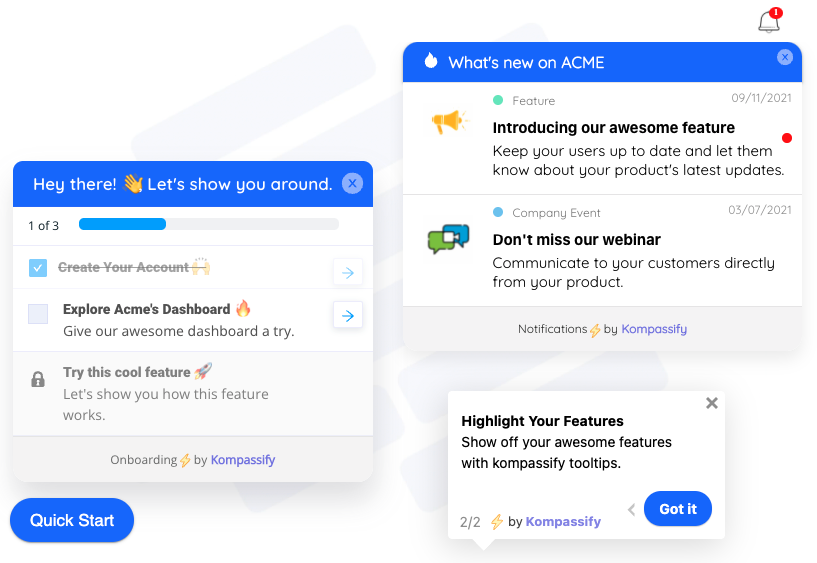
One product, several moments at once: a checklist for a task users repeat, an announcement for what is new, and a tooltip on the element where the question comes up.
The Moments of Need Map: Which Guidance Fits Which Moment
Put together, the five moments give you a planning grid. For any task that matters to activation or retention, you can ask the same five questions and decide what, if anything, each moment needs.
| Moment | The user’s question | Typical trigger | Best in-app format | Success signal |
|---|---|---|---|---|
| New | What is this, and why should I care? | First visit to the product or the feature | Short tour to one result; instructive empty state | First key action completed |
| More | What else can this do for me? | Core task repeated; a role or plan change; a relevant release | Targeted announcement; hotspot; next-step checklist | Second-feature adoption in the target segment |
| Apply | How do I do this again, for my case? | Opening the screen where the task happens | Tooltip on the field; persistent checklist; launchable walkthrough | Faster completion on each repetition; fewer how-to tickets |
| Solve | Why did this not work? | An error, a disabled control, a stuck or abandoned state | Explanation at the failure point; fix-it walkthrough; triggered help | Fewer tickets on that failure; task completed after help |
| Change | What changed, and what now? | First visit after a release that altered the workflow | Change tour; hotspot on moved controls; targeted announcement | Usage back to baseline; smaller post-release ticket spike |
Not every cell needs filling. A simple feature used once a year may need nothing beyond a clear label. A core workflow used daily by every account probably needs all five. The point of the map is to make the decision deliberately instead of by default, which in most products means building for New and hoping for the rest.
It also helps to notice that the formats overlap. A tooltip can serve New on the first visit and Apply on every visit after that. A checklist can hold the setup tasks for New and the fix-it walkthroughs for Solve. What changes between moments is less the component than the trigger, the length and the wording: who sees it, when, and whether it teaches or simply answers.
How to Audit Your In-App Guidance Against the 5 Moments
You do not need a research project to find out which moments your product covers. You need a short list of your most important tasks, a list of every piece of guidance you already have, and your support queue. For most products the whole audit fits in an afternoon.
- Pick the five to ten tasks that matter.
- Tag every existing guidance item with its moment.
- Draw the grid and look for the empty columns.
- Rank the gaps with your support tickets.
- Build the smallest fix for the top gap.
- Make Change a step in every release.
1. Pick the five to ten tasks that matter
Start from outcomes, not screens. List the tasks that define an activated, retained customer: creating the first project, inviting a teammate, building the report they bought the product for, connecting the integration that makes it useful. Five to ten is enough. A longer list turns the audit into a content inventory, and nobody finishes a content inventory.
2. Tag every existing guidance item with its moment
Go through every tour, tooltip, checklist, announcement, empty state, help article and onboarding email you have. For each one, write down which task it serves and which of the five moments it is built for. Be strict: a welcome tour that mentions an advanced setting in step nine is still a New item, because New is the moment in which it is delivered. Anything you cannot tie to a task is a candidate for retirement.
3. Draw the grid and look for the empty columns
Put tasks in rows and moments in columns, and mark each cell as covered, partial or empty. The typical result has a full New column, a patchy More column, and Apply, Solve and Change columns that are mostly blank.
The shape to expect: coverage piles up in the New column. Your support queue decides which empty cell to fill first.
4. Rank the gaps with your support tickets
There are too many empty cells to fill at once, so let the queue decide. Tag a month of tickets and chats by task and by moment. A “how do I” question about a feature the user has used before is Apply. An error, a greyed-out button or “this is not working” is Solve. Anything that mentions where something used to be is Change. The cell with the most tickets is your first build. Zero-result searches in your help center or product are a useful second source, because they are Solve moments phrased in the user’s own words.
5. Build the smallest fix for the top gap
Resist the urge to fill the whole column. Take the single highest-volume cell and ship the smallest piece of guidance that answers it: one tooltip, one explanation on one disabled button, one three-step walkthrough the user can launch from the screen. Watch the ticket count for that cell for two to four weeks. If it falls, move to the next cell. If it does not, the problem is probably in the product rather than in the guidance, and the audit has just told you something worth passing to the product team.
6. Make Change a step in every release
Change is the one moment you can predict exactly, because you cause it. Add one question to your release checklist: does this release move, rename or alter anything an existing user does regularly? If the answer is yes, the change guidance ships with the release, targeted at the users of the old version, instead of arriving after the ticket spike.
How to Design Help for the Workflow Moments
Guidance for Apply, Solve and Change works differently from onboarding content, and teams that carry their onboarding habits over usually end up with long tours nobody asked for. Six principles keep workflow help useful.
Workflow help should be available when the user reaches for it, or appear on a precise trigger such as an error or the first visit after a change. A tour that pops up while someone is working interrupts the very task you are trying to support.
Each piece of help answers one question. If an item needs to explain two things, it should probably be two items on two elements, each shown when its own question arises.
The answer belongs on the field, button or state that raised the question. Every click between the problem and the answer is another chance for the user to give up.
Workflow help says what to do, not what the feature is. “Pick the column that holds your email addresses” beats a paragraph about how the import engine works.
Anything a user might need twice should be launchable again, from the screen where they need it, without restarting the whole onboarding flow.
Full guidance the first time, a lighter hint for the next few repetitions, nothing once the task is routine. Help that never fades becomes clutter that users learn to ignore.
The last principle matters more than it looks. Guidance that keeps appearing after it stopped being useful trains users to dismiss everything, including the one message that matters, a pattern our guide to banner blindness describes in detail.
Common Mistakes When Applying the 5 Moments of Need
1. Treating every moment as New
When users struggle later, the reflex is to send them back to the beginning: replay the welcome tour, watch the onboarding webinar. A user in an Apply or Solve moment needs one answer, not the whole course again, and sending them back teaches them that asking a colleague is faster.
2. Pushing More before Apply is solid
Promoting advanced features to users who have not yet made the basics routine adds load without adding value. Trigger More content on evidence of competence, such as the core task completed several times, rather than on the calendar.
3. Leaving Solve in the help center
A knowledge base is a good home for depth and a poor first responder. If the only answer to an error message is a search box in another tab, the Solve moment is not covered. Keep the article, and put a one-line answer and a link to it where the error appears.
4. Handling Change with a release note alone
Release notes inform the users who read them. Change guidance intercepts the old habit at the place where it fires. You need both, and only the second one shrinks the ticket spike.
5. Building one tour for every audience
Administrators, occasional users and daily users meet the same feature in different moments. After a redesign, a new admin is in New while a long-time daily user is in Change. Target guidance by role and behaviour, not only by page; our guide to user segmentation covers how to split them.
6. Measuring completion instead of the task
Tour completion tells you a user clicked Next enough times. It says nothing about whether they could do the task a week later. Measure the outcome each moment is supposed to produce, which is different for every moment.
7. Never retiring anything
Every item you add should have an owner and a review date. Change guidance is the most perishable of all: three months after a redesign, the change tour is explaining a difference nobody remembers, to users who never saw the old version.
How to Measure Each Moment of Need
Each moment produces a different outcome, so each needs its own measure. Tracking only onboarding completion covers one fifth of the framework and tells you nothing about the other four.
| Moment | Primary metric | Where the data comes from | Warning sign |
|---|---|---|---|
| New | Share of new users completing the first key action in their first session | Product analytics, tour analytics | High tour completion with a low first-action rate |
| More | Adoption of the target feature in the nudged segment vs a similar group that was not nudged | Product analytics by segment | Clicks on the announcement, no use of the feature |
| Apply | Time to complete the task on repeat occurrences; how-to tickets per active account | Product analytics, support tags | Time per task that stops falling after the third attempt |
| Solve | Tickets per failure type; task completion after help was shown | Support tags, help views | Help views rising while tickets on the same issue stay flat |
| Change | Usage of the changed feature vs its pre-release baseline; post-release ticket volume | Product analytics, support tags | Usage still below baseline a month after release |
Two practical notes. First, tag your support queue by moment as well as by feature, even crudely; it is the only data source that sees all five moments at once. Second, when you ship guidance for a moment, compare the users who saw it with a similar group who did not, otherwise any improvement is indistinguishable from a quiet week. Our guides to onboarding metrics and A/B testing onboarding cover the mechanics.
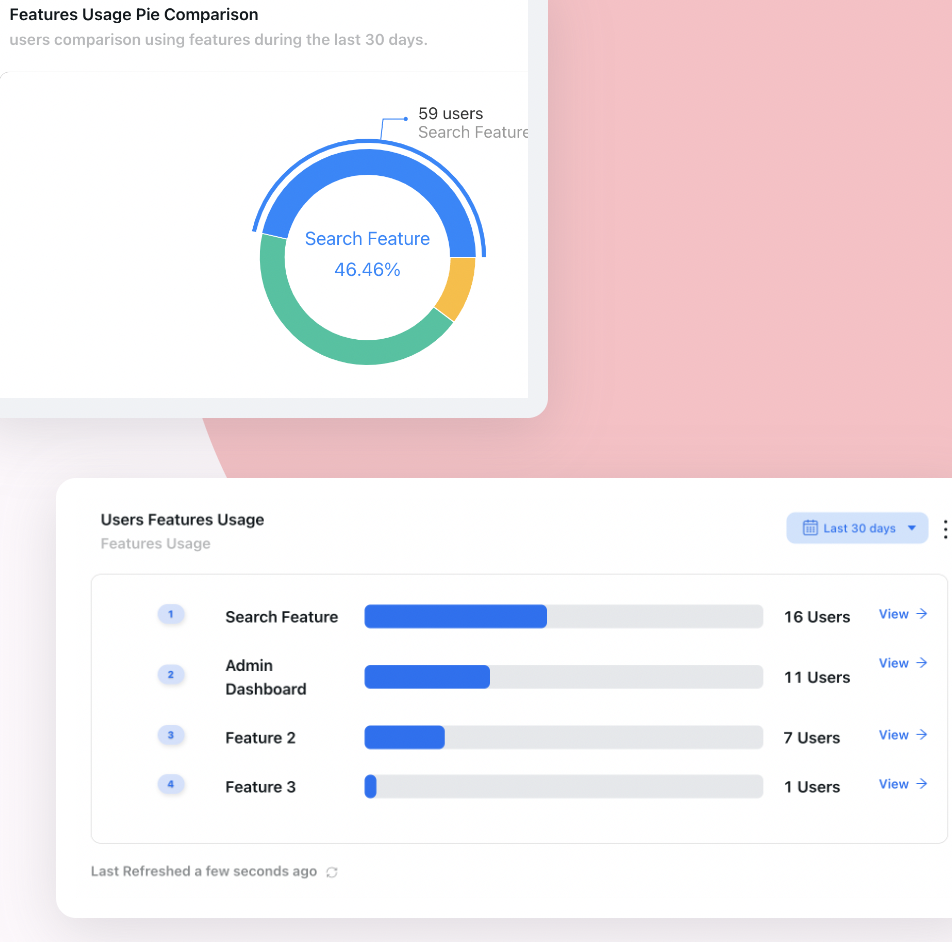
Measure the behaviour each moment should change, such as feature usage after a More nudge, rather than how many people clicked through the guidance.
The 5 Moments of Need for Employee Software Rollouts
The framework was born in workplace learning, so it applies just as well when the users are your own employees and the software is a new CRM, HR system or internal tool. The mapping is the same, and so is the imbalance: rollout budgets go into training sessions before go-live (New), while the weeks after go-live, when people are applying the system to real work and hitting real problems, are left to a stretched support desk.
Three adjustments help. Plan the Apply and Solve layer before go-live, based on the tasks each role performs most often, rather than waiting for the ticket queue to reveal them. Treat the first weeks after launch as a phase of their own, which is what a hypercare period is for. And treat every later configuration change as a Change moment for the people it affects. Our guide to rolling out new software to employees covers the full plan.
5 Moments of Need: Do vs. Don’t
✅ Do
- Tag every piece of guidance with the moment it serves.
- Keep New guidance short and tied to one first result.
- Trigger More content on evidence of competence, for the segment it fits.
- Put Apply help on the element where the task happens.
- Put Solve help where the failure is visible.
- Ship change guidance with the release, aimed at users of the old version.
- Measure the outcome of each moment separately.
❌ Don’t
- Send users back to the welcome tour to find one answer.
- Announce every feature to every user.
- Rely on a help center search as the only answer to an error.
- Treat a release note as change management.
- Measure tour completion and call it adoption.
- Keep guidance running after its moment has passed.
- Build every item for one audience and one page.
Covering All Five Moments With Kompassify
Most teams already have something for New. The gap is the other four moments, and the reason they stay empty is practical: every tooltip, walkthrough and change tour is a small piece of frontend work that loses to roadmap features in every planning meeting. When each item needs an engineering ticket, only the first moment ever gets built.
Kompassify lets a product, onboarding or customer success team publish guidance for every moment on a live product without writing code, and target each item by page, segment and behaviour:
- New: a short product tour that drives a new user to their first result, built by selecting elements on your own interface, with per-step analytics that show where it loses people.
- More: an announcements widget for feature news, which can launch a product tour for the new feature straight from the announcement and collect feedback on it, plus hotspots on features users have not found yet.
- Apply: tooltips on the fields and controls that generate questions, and checklists that persist between sessions for tasks users perform as a sequence.
- Solve: checklist items that launch a walkthrough, open a page or redirect the user, so a fix-it flow is one click from the screen where the problem shows up, and guidance targeted at the segment that hit the problem.
- Change: a change tour and hotspots targeted at users of the old version, and a multi-choice question that routes each role to the guidance that fits it.
- Measurement: product analytics and tour analytics to check whether each item changed what users do.
Kompassify is GDPR compliant and EU-hosted, free for up to 100 monthly active users, with paid plans from $129/month.
Guide users in all five moments, not just the first
Publish tours, tooltips, hotspots, checklists and announcements on your live product, target each one to the moment and the segment it serves, and see in analytics whether it worked. No code required. Free up to 100 monthly active users, plans from $129/month, GDPR-compliant and EU-hosted.
Start for free →The One-Paragraph Version
The 5 Moments of Need framework says people need help in five situations: when something is New, when they want More, when they Apply it to real work, when they need to Solve a problem, and when things Change. The first two are learning moments and can be served by teaching; the last three happen in the middle of work and need help that is available on the spot, without leaving the task. Users meet each feature as New once and as Apply every time they use it, yet most SaaS guidance is built for the first week and little else. Audit your guidance by tagging each item with its moment, find the empty cells in Apply, Solve and Change, rank them by the support tickets they generate, and fill the top one with the smallest possible piece of help. Then make change guidance part of every release, and measure each moment by the outcome it should produce rather than by how many people clicked Next.
Frequently Asked Questions
What are the 5 moments of need?
The 5 moments of need are New (learning something for the first time), More (expanding on what you already know), Apply (using what you learned on real work, including remembering it and adapting it to your case), Solve (fixing a problem when something goes wrong) and Change (adapting when the way something works changes). The framework, developed by Conrad Gottfredson and Bob Mosher, is used to decide which kind of learning or support to provide at each moment instead of treating every need as a training problem.
Who created the 5 moments of need framework?
The framework was developed by Conrad Gottfredson and Bob Mosher, practitioners in the field of performance support. It was designed for workplace learning, to show that training effort concentrated on the first two moments while most of the real need occurred later, in the flow of work. The same logic applies to SaaS products, where onboarding effort usually concentrates on the first encounter with the product.
What is the difference between learning moments and workflow moments?
New and More are learning moments: the user has some attention available and can be taught through a short sequence such as a product tour or a course. Apply, Solve and Change are workflow moments: the user is trying to finish a task and needs a specific answer without leaving it. Learning moments suit pushed, multi-step guidance; workflow moments suit short help that the user pulls when needed, or that appears on a precise trigger, attached to the exact element or state where the question arises.
Which moment of need is the most important?
Apply is usually the most important, because it recurs every time a user performs a task, while New happens only once per feature. It is also the most neglected in SaaS products, where it is often served by nothing more than a link to the help center. Solve comes close behind, because every unresolved Solve moment turns directly into a support ticket, a workaround or a frustrated user.
How do the 5 moments of need apply to user onboarding?
They show that onboarding is not a single event. The welcome tour covers the New moment; targeted announcements and hotspots cover More; tooltips and checklists on the screens where work happens cover Apply; help placed at errors and disabled controls covers Solve; and change tours after releases cover Change. Planning onboarding against all five moments spreads guidance across the whole customer lifecycle instead of the first week.
What is performance support?
Performance support is help delivered at the moment of work, inside the workflow, rather than training delivered beforehand. In software, examples include tooltips, checklists, step-by-step walkthroughs the user can launch on demand, and explanations placed on the screen where a task happens. It is the approach the 5 moments of need framework recommends for the Apply, Solve and Change moments.
How do you measure the 5 moments of need?
Measure each moment by its own outcome: the first key action completed for New, adoption of the target feature in the nudged segment for More, time per task and how-to tickets for Apply, tickets per failure type and task completion after help for Solve, and usage compared with the pre-release baseline for Change. Tagging support tickets by moment as well as by feature is the simplest way to see all five moments in one data source.
Can the 5 moments of need be used for employee software training?
Yes, that is where the framework comes from. In an internal software rollout, training sessions before go-live cover the New moment, while the weeks after go-live are dominated by Apply and Solve moments. Plan in-app help for each role's most frequent tasks before launch, staff the first weeks as a dedicated support phase, and treat later configuration changes as Change moments for the people they affect.