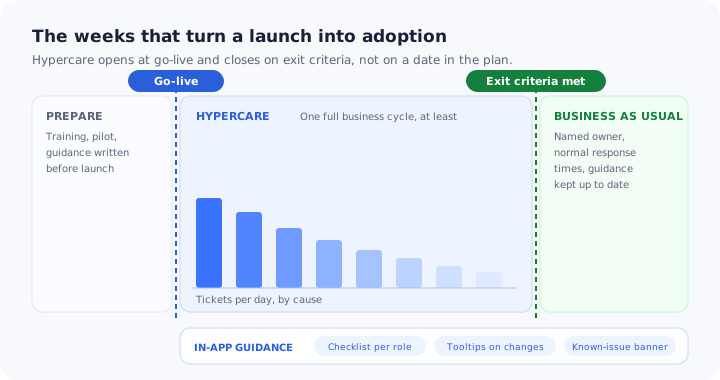
Most implementation plans end at go-live. The Gantt chart stops, the project channel goes quiet, and the team that spent six months building the thing gets reassigned. Meanwhile, on Monday morning, four hundred people open a system they saw once in a training session three weeks ago, and every gap between that session and their actual job arrives at the service desk inside the same hour.
Hypercare is the name for what happens next: a short, deliberately over-staffed period in which the implementation team stays close to real users, fixes what breaks, answers what nobody thought to write down, and watches whether the software is genuinely being used. It is the difference between a system that went live and a system that got adopted. Run it well and habits form around the new way of working. Run it badly and it either ends on a calendar date while half the users quietly go back to the spreadsheet, or it never ends at all and becomes a permanent second support tier nobody budgeted for.
This guide covers what hypercare means and how it differs from normal support, how long it should last and what decides that, what the team actually does each day, why most hypercare tickets are not defects, how to cut the queue before go-live using guidance inside the product, what to measure, and the exit criteria that let you close the window on evidence instead of on a date.
Key Takeaways
- Hypercare is a window, not a team. It is the time-boxed period right after go-live with its own owners, response times, triage rhythm and exit criteria.
- Size it to one full business cycle. A month-end close, a full pay run or a complete shift rotation exposes problems that a quiet first week never will.
- Most hypercare tickets are not bugs. They are configuration gaps, data surprises and people who simply cannot find the button.
- Guidance inside the product is the only lever that scales. A person answers one question once; a tooltip on the screen answers the same question for everyone who arrives after.
- Exit on evidence, not on a date. A falling ticket rate, no open severity-one issues, adoption in every role, and a named owner who inherits the guidance layer.
What Is Hypercare?
Hypercare: definition
Hypercare is a time-boxed period immediately after a software go-live in which the implementation team provides elevated support: more people, faster response times, daily triage, and direct contact with the people actually using the system. It exists to stabilise the software and to establish adoption while habits are still forming, and it ends when agreed exit criteria are met and ownership passes to the normal support organisation.
The term comes from large enterprise implementations, where a resource planning or core banking system goes live across thousands of users on a single weekend and the vendor or systems integrator commits to an intense support window afterwards. The idea travels well beyond that. A software vendor rolling a large account onto a new platform runs hypercare. An internal IT team deploying a new expenses tool to every employee runs hypercare, whether or not anyone calls it that. A product team pushing a major redesign to its whole user base is running hypercare too, just with a support queue made of in-app messages rather than phone calls.
What makes it a distinct phase is not the intensity alone. It is that hypercare has different rules from both the project that preceded it and the support function that follows it: different response commitments, a different decision path for shipping changes, and a defined end.
| Hypercare | Business as usual support | Warranty period | |
|---|---|---|---|
| Purpose | Stabilise the system and establish adoption | Keep a working system working | Fix defects the vendor is contractually liable for |
| Who answers | Implementation team, config owners, champions, service desk together | Service desk, escalating to specialists | The vendor or integrator |
| Rhythm | Daily triage, same-day changes, proactive outreach to quiet teams | Ticket queue, standard response targets | Defect log and release cycle |
| Scope of a valid ticket | Anything blocking a user, including “I do not know how” | Incidents and requests within the service catalogue | Only things that fail against the specification |
| How it ends | Agreed exit criteria are met | It does not | The contractual date passes |
Hypercare and warranty are not the same thing, and confusing them is expensive. A warranty window is about liability: it covers things that are broken against a specification. Hypercare is about adoption: most of what arrives during it is not broken at all. If your only post-go-live agreement is a warranty clause, nobody owns the largest category of problem you are about to have.
Hypercare sits at the end of a rollout, so it inherits whatever the rollout did or did not do. If you are still planning the launch itself, start with our software rollout plan, and treat this guide as the chapter that begins the moment the switch is thrown.
Why the Hypercare Window Decides Whether a Rollout Sticks
There is a temptation to treat the weeks after go-live as cleanup. They are not. They are the period in which the organisation decides, mostly unconsciously, how it is going to work with this software for the next several years.
-
Habits set in the first fortnight
Whatever people do in week one is largely what they will still be doing in month six, including the workaround they invented on day two because nobody was available to answer a question. Habits are cheap to shape now and expensive to change later.
-
The productivity dip is at its deepest
Right after a change, the old fluency is gone and the new one has not arrived. People are slower at their own jobs and they know it, which is exactly when frustration converts into resistance. The change curve is not a metaphor here; it is the shape of your ticket queue.
-
Every unanswered question becomes a private workaround
Shadow spreadsheets, one person in the team doing the tricky step for everyone else, screenshots pasted into chat as unofficial documentation. These are not signs of bad users. They are what capable people do when the official answer is slower than the deadline.
-
Credibility is spent or earned here
If the first week feels abandoned, the next training invitation goes unopened and the next rollout starts from a deficit. The soft side of adoption is covered in our guide to change management for software adoption, and hypercare is where all of it is tested in public.
The quiet team is the risk, not the loud one. A department filing twenty tickets is using the system. A department filing none, three weeks in, has either mastered it or stopped trying. Usage data tells you which, and it is the reason hypercare needs numbers and not just a queue.
How Long Should Hypercare Last?
The length of hypercare is an output, not an input. You plan a window so people can be rostered and budgets approved, then you close it on criteria. The planning question worth asking is not “how many weeks?” but “what has to have happened at least once before we can judge this?”
The most useful rule is to cover one full business cycle of whatever the software touches. A finance system has not been tested until the first month-end close. A payroll system needs a complete pay run, including the corrections that follow it. A warehouse system needs a full shift rotation, nights and weekend included, because the night shift has different habits and less support. A subscription product with a monthly reporting ritual needs the first reporting week. Anything less and you are closing the window before the hardest day has happened.
Four things stretch the window, and they are worth naming before anyone commits to a date:
Every role has its own first-time-ever moment, and they do not happen on the same day. An approver may not touch the system until somebody else submits something.
Money moved, stock picked, a patient record updated. Where mistakes are costly, people need to be confident before they act, so adoption is slower and support is needed for longer.
Data problems do not appear at cutover. They appear when somebody opens a record they care about and finds it wrong, which can be weeks later.
A phased rollout resets part of the clock for each wave. Wave three gets a better product and a tireder team, so plan the hypercare effort per wave, not once for the programme.
If you are running waves rather than a single cutover, decide in advance whether hypercare for wave one closes before wave two opens, or whether you deliberately overlap them. Both are defensible. Drifting into an overlap without deciding is what burns people out.
Two failure modes, and they are opposites. The first is ending on the planned date while the ticket rate is still climbing, which converts a support problem into an adoption problem quietly and permanently. The second is never ending: hypercare becomes an informal second support tier, the business learns to route around the service desk, and the people who were meant to move on to the next project never do.
What a Hypercare Team Actually Does
Hypercare is often described as “extra support”, which undersells it and leads to it being staffed as a bigger queue. It is five workstreams running at once, and only one of them is answering tickets.
-
Triage
One queue, one short meeting every morning, and a severity scale agreed before go-live rather than argued about at 9am on day two. The output is not a list of tickets; it is a decision about which of today’s problems gets fixed, configured, communicated or taught.
-
Fix
A fast lane with a pre-agreed rule about what may ship the same day and what waits. Without that rule, either everything waits for the next release train or everything ships and the system becomes unstable in week two.
-
Communicate
Known issues, workarounds and fixes have to reach people where they are working. An email about a broken field reaches roughly the people who were not going to hit it; a banner on the screen that contains the field reaches the ones who were.
-
Teach
Answer the question, then remove the question. Every repeated answer during hypercare is a piece of missing guidance, and the team that only answers is signing up to answer it forever.
-
Measure
Ticket volume tells you about the loud users. Usage data tells you about everyone, including the team that has not logged in since the training session.
The roles below are responsibilities, not headcount. In a small rollout one person holds three of them. What matters is that each is held by somebody named, and that the hypercare lead is not doing it on top of a full-time job somewhere else.
| Role | Owns | Common failure |
|---|---|---|
| Hypercare lead | The daily triage, the severity calls, and the exit decision | Being the project manager’s side task, so nothing is decided before lunch |
| Service desk / first line | Intake, tagging by cause, and the top-twenty answer list | Escalating everything because nobody wrote down the answers |
| Application or config owner | Settings, permissions, templates, workflow rules | Fixing one team’s config in a way that breaks another’s |
| Data owner | Migrated records, duplicates, reconciliation questions | Disbanding at cutover, just before the data questions start |
| Champions per team | First-line answers in the room, and a feel for what is really happening | Being volunteered without time, training or a way to escalate |
| Adoption or guidance owner | The in-product guidance layer and the usage numbers | Not existing, so no repeated question ever gets answered permanently |
Champions deserve more than a mention on a slide. They absorb a large share of hypercare demand before it ever becomes a ticket, and they need to be prepared deliberately: see our guide to train-the-trainer programmes for how to set that up rather than hope for it.
The Four Kinds of Hypercare Ticket (and Why Most Are Not Bugs)
If you tag hypercare tickets by cause rather than only by severity, the queue separates into four piles with completely different owners and completely different economics.
Tag by cause on day one. Severity tells you what to do this morning; cause tells you what to build so that tomorrow is quieter.
1. Defects
The software genuinely does not do what it is supposed to do. This is the pile everyone plans for, and in most rollouts it is the smallest of the four, because the functionality was tested. It goes to the engineering queue and it shrinks as fixes ship.
2. Configuration gaps
The software works exactly as built, and it was built for a case nobody described during design. An approval threshold that does not match how one region actually works, a required field that a whole department cannot populate, a template missing for the busiest document type. These arrive in a burst as real work meets the configuration for the first time, and they go to the configuration owner rather than to engineering.
3. Data problems
Migrated records are missing, duplicated, truncated or in the wrong shape. Data problems have a delayed fuse: they surface when somebody opens a record they personally care about, which can be a fortnight after cutover. They are also the most corrosive to trust, because a user who finds one wrong record starts checking everything by hand, and that habit outlasts the fix.
4. “I do not know how”
The software works, the configuration is right, the data is correct, and the person in front of the screen cannot find the button, does not know which of two similar fields to use, or does not realise the task they used to do in three clicks now happens somewhere else entirely. In most rollouts this is the largest pile by a distance.
It is also the only one of the four that a support process cannot shrink. Piles one to three shrink because somebody fixes something once and it stays fixed for everyone. Pile four does not: each answer is consumed by exactly one person, and the next person asks the same question tomorrow. Adding support capacity moves that pile faster without ever making it smaller.
The only way to shrink pile four is to move the answer to where the question is asked. A tooltip on the field people get wrong, a short tour of the three screens that changed, a checklist holding the first task each role has to complete. That is not documentation and it is not training. It is the answer, placed on the screen where the question occurs, available to everyone who arrives after.
This is also why hypercare reporting that shows only ticket counts is close to useless. “Lots of tickets, then fewer” tells you nothing about whether to ship code, change configuration, clean data or add guidance. Add a cause field to the ticket form before go-live, keep it to four or five options so first line will actually use it, and review the split at every triage meeting.
How to Cut Hypercare Ticket Volume Before Go-Live
Everything in this section happens before the switch is thrown, and all of it targets pile four. The goal is not to prevent questions. It is to make sure the answer is already standing next to the question when it gets asked.
- Write down the questions you already know are coming
- Put the first task in front of each role, not the whole manual
- Anchor a short tour to the screens that actually changed
- Label the two or three fields people will get wrong
- Publish known issues where the work happens
- Give every screen a way to ask for help without leaving it
- Rehearse day one with real accounts, real data and real permissions
- Give champions something to hand out
1. Write down the questions you already know are coming
By go-live you are not guessing. Testing, the pilot and the training sessions have already produced a list of the things people stumble over, and your integration partner has seen the rest before. Pull the questions out of the pilot notes and the training chat and rank them by how many people will hit them. The top ten are your guidance backlog, and they are worth more than another round of slides.
Removes from the queue: the predictable questions, before anyone has to ask one.2. Put the first task in front of each role, not the whole manual
On day one a user does not need to understand the system. They need to complete the one task their job now depends on: submit the timesheet, raise the order, log the visit. A short onboarding checklist per role, with three to five items and a button that opens each one, converts a vague “go and use the new system” into something a person can finish before their first coffee.
Removes from the queue: “where do I even start?”, which is the single most common hypercare question.3. Anchor a short tour to the screens that actually changed
Nobody wants a guided tour of a system they have to use all day. They want to know what moved. Build a tour of four or five steps covering only the screens where behaviour changed, and trigger it on first visit to those screens rather than at login. If you are replacing a familiar tool, name the old thing and the new place in the same sentence, the way a switcher needs to hear it.
Removes from the queue: the “it used to be here” tickets, which peak in the first three days.4. Label the two or three fields people will get wrong
Every system has a handful of fields that cause rework: the one with two plausible meanings, the one that must match a code in another system, the one where the wrong choice is only discovered at approval. Attach an onboarding tooltip to each, written as the answer to the question people ask, not as a definition of the field.
Removes from the queue: rework tickets, which cost far more than the question that caused them.5. Publish known issues where the work happens
During hypercare there will be a broken thing, a slow thing and a workaround. Announcing those by email reaches the people who were not going to hit them. A dismissible in-app banner on the affected screen reaches the people who were, and it can be removed the moment the fix lands. Keep one banner at a time and take it down promptly, or people stop reading them.
Removes from the queue: the duplicate reports of an issue you already know about.6. Give every screen a way to ask for help without leaving it
If asking for help means finding an intranet page, searching a portal and filling in a form, most people will ask a colleague instead, and you will never see the question. A help launcher that sits on the page, offers the two or three articles relevant to that screen and opens a ticket as a last resort, converts invisible confusion into either a self-serve answer or a ticket you can learn from. Our guide to in-app support covers how to structure that layer.
Removes from the queue: nothing at first. It makes hidden demand visible, then removes it.7. Rehearse day one with real accounts, real data and real permissions
Most first-morning tickets are not about features. They are about access: the wrong role, a missing permission, a licence that was never assigned, single sign-on behaving differently from the test tenant. Run a rehearsal with a handful of real users on real accounts, in the environment they will actually use, and fix what that surfaces while it is still cheap.
Removes from the queue: the access wave, which otherwise arrives in one indivisible lump at 9am.8. Give champions something to hand out
A champion who can say “open the checklist on that screen, it walks you through it” scales. A champion who has to demonstrate it personally, desk by desk, does not. Make sure the people helping in the room are pointing at the same guidance the rest of the organisation sees, so there is one answer rather than a dozen local variants.
Removes from the queue: the second and third versions of the truth.None of this survives being written once. The guidance you prepared before go-live was based on what you thought people would struggle with. By day three you will know what they actually struggle with, and the value of the whole layer depends on being able to change it that afternoon. If editing a tooltip needs a developer and a release, it will not happen during the only weeks when it matters.
What to Measure During Hypercare
Hypercare reporting usually shows one line: tickets per day, going down. That line can fall for two very different reasons, and only one of them is good news. Measure enough to tell them apart.
| Measure | What it tells you |
|---|---|
| Tickets per active user per day, split by cause | Whether the curve is bending, and which of the four levers to pull next |
| Time to first response and time to resolve | Whether the extra staffing is actually reaching people, or just sitting in a queue |
| Adoption depth by role | Whether every role has done the thing their job now depends on, not just the keen ones |
| First-task completion per user | Who is stuck at step one and has stopped asking |
| Repeat askers and repeated questions | Where an answer was given but never landed anywhere permanent |
| Workaround signals | Exports, manual entries, logins to the old system if it is still open: users routing around the software |
| Guidance completion, step by step | Where the guidance itself loses people, which is fixable the same day |
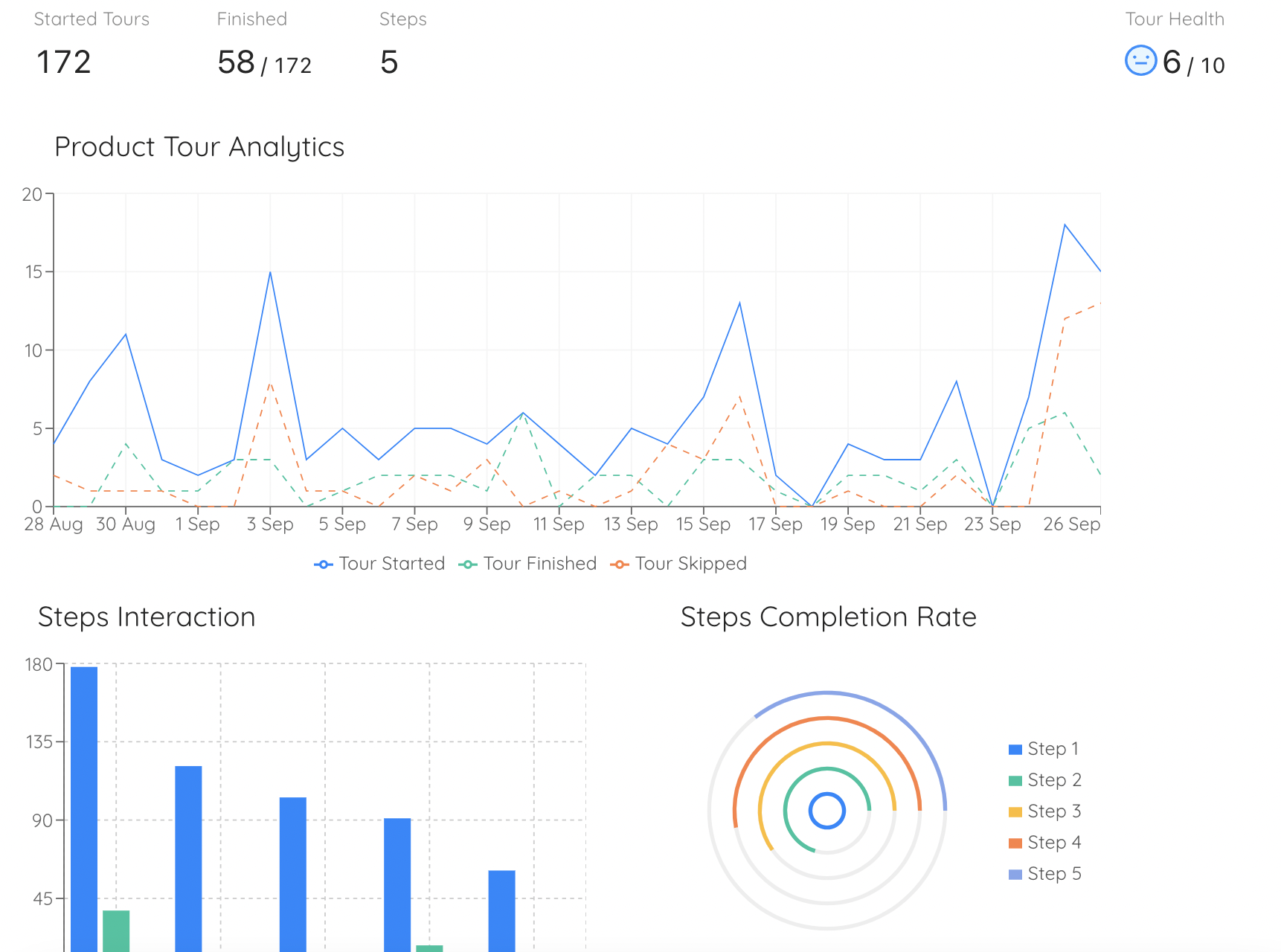
Per-step completion turns “people are confused” into “people stop at step three”, which is a problem you can fix before lunch.
Two of these deserve a comment. Adoption depth by role is the measure that catches the quiet department: a role with high login counts and no completed core tasks is a role that is opening the system, looking at it and doing the work somewhere else. And workaround signals are usually already in your data if you look for them, because the old habit leaves a trace: a spike in exports, a sudden appetite for bulk edit, an old system that nobody will agree to switch off.
For the full set of measures across a rollout rather than this window alone, see user onboarding metrics, and for the organisation-level view of how adoption is tracked over time, our guide to digital adoption.
Hypercare Exit Criteria: Ending It on Evidence, Not a Date
Exit criteria have to be written before go-live, because after go-live everybody has an interest in the answer. Write five conditions, make them observable, and agree that all five must be true at the same time. A date in the plan is a budgeting device, not a criterion.
Exit is a gate with one door. A date on the calendar does not open it, and neither does four conditions out of five.
1. The ticket rate has fallen and stayed down
Not one quiet day: a sustained fall across a representative period. A calm week that happens to be a holiday week, or the week before month-end rather than during it, is not evidence. Look at the split by cause as well as the total, because a falling total made entirely of pile four is people giving up.
2. No open severity-one issues, and every severity-two has an owner and a date
This is the only criterion most projects actually write down, and on its own it is the reason so many hypercare periods end too early. A system with no critical defects can still be a system nobody knows how to use.
3. Every affected role has completed its core task at least once
Per role, not in aggregate. The aggregate is dominated by the largest and most enthusiastic group, and it will happily hide the fact that no approver has ever approved anything. This is the criterion that separates a live system from an adopted one.
4. Recurring questions have a permanent answer
Take the top twenty questions from the queue and check that each one is answered somewhere durable: in the product as a tooltip or a checklist step, in the knowledge base, or by a configuration change that removed the question entirely. Anything still answered only by a person is a ticket you have agreed to receive forever.
5. Business as usual support can answer without escalating
The service desk should be able to handle the top twenty unaided, and there should be a named owner for the guidance layer after the project team disbands. If nobody owns it, the tours and tooltips slowly drift out of date, which is its own failure mode: see why product tours break for what that looks like six months later.
What business as usual actually inherits
Handover is usually treated as a meeting. It is really a list of things that now need an owner, and every one of them will be neglected if it is not named:
- The ticket taxonomy and the reporting built on it, so the cause split keeps being visible
- The known-issues process, including who is allowed to publish a banner and who takes it down
- The in-product guidance layer, with a person who can edit it and a review cadence
- The champions, who lose their purpose the moment the project ends unless somebody keeps the group alive
- The adoption measures, which should survive into normal reporting rather than stopping with the project
New joiners never had hypercare. Three months after exit, everyone hired since go-live is learning the system with none of the support the original users got. The guidance layer you built during hypercare is what they inherit instead, which is a good reason to keep it rather than switch it off once the queue goes quiet. Our guide to training employees on new software covers what that ongoing layer looks like.
Hypercare: Do vs. Don’t
✅ Do
- Write exit criteria before go-live
- Tag every ticket by cause, not just severity
- Cover one full business cycle
- Staff a named lead with nothing else to do
- Answer in the product, then close the ticket
- Watch the silent teams, not just the queue
- Let guidance change the same day
- Name an owner for the guidance after handover
❌ Don’t
- Treat hypercare as a bigger support queue
- End it because the calendar says so
- Report ticket counts with no cause split
- Announce known issues only by email
- Let one team’s config fix break another’s
- Volunteer champions without time or training
- Route every guidance edit through a release
- Switch off the guidance once the queue is quiet
Running Hypercare With Kompassify
The part of hypercare that has to move fastest is the guidance layer, and in most organisations it is the part that moves slowest, because changing anything on a screen means a ticket, a sprint and a release. By the time the tooltip ships, the window is closed.
Kompassify sits on top of the application you have already deployed and lets a non-developer change that layer the same day. Build a short product tour of the screens that changed and trigger it on first visit. Attach tooltips to the fields that cause rework. Give each role its own onboarding checklist holding the first task that role has to complete, with a button that opens the right screen. Publish a known-issue announcement in the morning and take it down in the afternoon when the fix lands. Ask a multi-choice question on first login so people see the guidance for their role rather than everyone else’s.
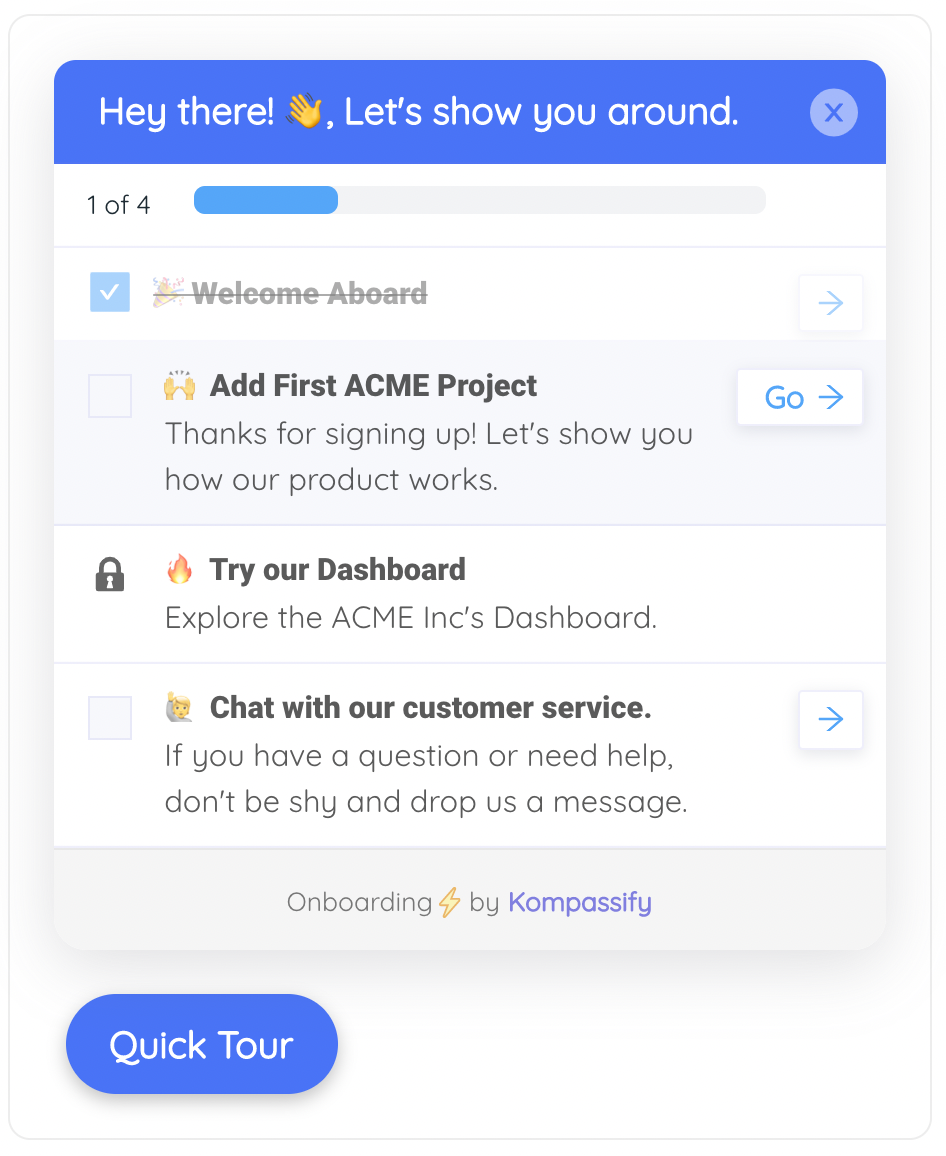
The day-one checklist for a role: three or four items, each one a door rather than a description, with progress visible so people know they are nearly through.
Targeting is what keeps it from becoming noise. Each guide can be aimed at a page and a segment, so the warehouse team sees warehouse guidance and the finance team never does, and product analytics shows completion step by step, which is how you find out that half the people are stopping on step three before anyone files a ticket about it. Because nothing here touches your codebase, the same layer keeps working after handover, which matters most for everyone who joins after go-live.
Shrink the hypercare queue with answers inside the product
Add tours, tooltips, checklists and known-issue announcements to your live application, target them by role and screen, and publish changes the same day you decide to make them. No code required. Free up to 100 monthly active users, plans from $129/month, GDPR-compliant and EU-hosted.
Start for free →The One-Paragraph Version
Hypercare is the time-boxed period right after a software go-live in which the implementation team provides elevated support with faster response times, daily triage and direct contact with users, and it ends when agreed exit criteria are met rather than when a date passes. Size the window to cover one full business cycle of whatever the software touches, and expect it to stretch with the number of roles, how irreversible the work is, how much data was migrated and how the rollout was phased. The team runs five workstreams at once: triage, fix, communicate, teach and measure. Tag tickets by cause and the queue splits into defects, configuration gaps, data problems and people who cannot find the button, and that last pile is usually the largest and the only one support capacity cannot shrink, because each answer reaches exactly one person. Shrink it by moving answers into the product before go-live as checklists, short tours, field tooltips and known-issue banners, measure adoption by role rather than ticket counts alone, and exit on five observable conditions with a named owner inheriting the guidance layer.
Frequently Asked Questions
What is hypercare?
Hypercare is a time-boxed period immediately after a software go-live during which the implementation team provides elevated support: more people, faster response times, daily triage and direct contact with end users. Its purpose is to stabilise the system and to establish adoption while habits are still forming, and it ends when agreed exit criteria are met and ownership transfers to the normal support organisation.
How long does hypercare last?
There is no standard number of weeks, and picking one is the most common mistake. Size the window so it covers at least one full business cycle of whatever the software touches: the first month-end close for a finance system, a complete pay run for payroll, a full shift rotation including nights for a warehouse system. The number of affected roles, how irreversible the work is, how much data was migrated and whether the rollout is phased all stretch it further. Plan a window so people can be rostered, then close it on exit criteria rather than on the date.
What is the difference between hypercare and business as usual support?
Hypercare is temporary, more heavily staffed and aimed at adoption as well as stability. It runs daily triage, allows same-day changes, reaches out proactively to teams that have gone quiet, and treats a question like where do I find this as a valid ticket. Business as usual support is permanent, works to standard response targets and handles incidents and requests rather than teaching people how to work. Hypercare also has a defined end, and business as usual does not.
What should a hypercare plan include?
A hypercare plan should name the window and what it has to cover, the lead and the owners for configuration, data, first line and guidance, the severity scale and the daily triage time, the rule for what may ship the same day, how known issues will be published to users, what will be measured beyond ticket counts, the exit criteria, and who inherits each responsibility at handover. Agree all of it before go-live, because afterwards everybody has an interest in the answers.
Who is in a hypercare team?
At minimum a hypercare lead with no competing full-time job, a first line that tags tickets by cause, an application or configuration owner, a data owner who does not disband at cutover, champions inside each affected team, and an adoption owner who holds the in-product guidance layer and the usage numbers. In a small rollout one person holds several of these, but every responsibility needs a name against it.
What are good hypercare exit criteria?
Five conditions, all true at the same time: the ticket rate has fallen and stayed down across a representative period, no severity-one issues are open and every severity-two has an owner and a date, every affected role has completed its core task at least once rather than the aggregate merely looking healthy, the top recurring questions have a permanent answer in the product or the knowledge base, and business as usual support can answer the top twenty questions without escalating, with a named owner for the guidance layer after handover.
How do you reduce hypercare tickets?
Most hypercare tickets are not defects. They are people who cannot find the button, and adding support capacity moves that pile faster without making it smaller. The lever that shrinks it is putting the answer where the question is asked: a checklist holding the first task for each role, a short tour of the screens that actually changed, tooltips on the two or three fields that cause rework, known-issue banners on the affected screen instead of an email, and a help launcher on every page. Prepare them before go-live from the questions the pilot and the training already surfaced, then change them daily as the real questions arrive.