Somewhere on your site there is a changelog page. It has a date, a version number, and eleven bullet points beginning with verbs like "refactored" and "updated". It is technically accurate, it took someone forty minutes to assemble, and roughly nobody has read it. Meanwhile, the feature buried in bullet seven, the one three customers asked for last quarter, is still unused, because the people who asked never found out it shipped.
Release notes are the most under-used adoption channel in most SaaS products. They're written by the team that knows the product best, published on a schedule, and read by exactly the users most likely to act on them. The problem is almost never effort; it's shape. A changelog written as a record of engineering work will be read like one; a changelog written as an answer to "what's in this for me?" gets clicked.
This guide covers what release notes are and how they differ from a feature announcement, the five-part anatomy of an entry, what to include and what to leave out, five templates you can copy, tone and formatting rules, how often to publish, where to surface notes so users actually see them, and how to tell whether any of it worked.
Key Takeaways
- Release notes are user documentation, not a sprint summary. If an entry reads like a ticket title, it will be skipped like one.
- Every entry needs five parts: date/version, a type label, an outcome-shaped title, two or three sentences of what and why, and a way to act.
- Notes cover everything; announcements cover the few. Publish all changes to the changelog, and reserve in-app announcements for the ones that change how someone works.
- Predictable beats frequent. A reliable weekly entry builds a reading habit; twenty micro-posts a day trains people to ignore the feed.
- In-app is where adoption happens. A public changelog page serves search and support; a notification widget inside the product reaches the users who can act in one click.
- Measure the click-through, not the publish count. An entry that nobody clicks is a note that didn't work, which is information, not failure.
What Are Release Notes? (And What They're Not)
Release notes are the ongoing, dated record of what changed in a product, written for the people who use it. They tell a customer what is new, what got better, what was fixed, and what they may need to do about it. They are documentation with a heartbeat: cumulative, chronological, and permanently linkable.
Release notes, defined. A published record of product changes described in terms of user outcomes, organised by date or version, covering new features, improvements, fixes, deprecations and breaking changes. The test of a good entry: a customer who has never seen your roadmap can read it and know whether it affects them.
They are frequently confused with three adjacent things, and the confusion is what produces bad changelogs:
| Artifact | Audience | Covers | Its job |
|---|---|---|---|
| Release notes | All users, on demand | Everything that shipped | Keep a complete, scannable record |
| Feature announcement | A targeted segment, pushed | One significant change | Drive adoption of that change |
| Commit log | Your engineers | Every code change | Explain the diff |
| Product docs | Users solving a problem | The current state of things | Explain how to use what exists now |
Most weak changelogs are commit logs wearing a release-note costume. The tell is the verb: entries that start with "refactored", "migrated", "bumped" or "updated the X component" are describing work, not change. Users don't buy work.
Why Release Notes Are Worth Doing Properly
-
They convert shipped into used
The gap between released and adopted is where product value quietly evaporates. A note that names the outcome and links straight into the feature closes that gap for the users already inclined to care, the cheapest adoption you will ever buy.
-
They prove the product is alive
Prospects check changelogs before buying, and existing customers read them as evidence that their renewal is going somewhere. A page with regular, substantive entries is a stronger trust signal than any "trusted by" logo wall.
-
They close the loop on feedback
Every fix that came from a support ticket or an in-app survey is an opportunity to show that answering was worth it. "You asked, we shipped" published consistently is the single best way to keep feedback flowing.
-
They reduce support load
"Has this been fixed?" and "did something change?" are two of the most common ticket shapes, and a searchable, well-written changelog answers both before anyone types them. Support teams that can link an entry instead of writing an explanation get hours back every week.
-
They keep your own team honest
Writing a user-facing sentence about every change is a quiet forcing function: if nobody can describe the benefit in one line, that's worth knowing before the release, not after.
The Anatomy of a Release Note Entry
Five parts. Miss one and the entry loses either scannability or usefulness:
Date, type label, outcome-shaped title, a short what-and-who, and one clear way to act: the five parts every entry needs.
1. The date or version: make it citable
Every entry needs a stable anchor so support can link to it, customers can reference it, and search engines can index it. Dates are friendlier than semantic versions for most SaaS products; if you use both, lead with the date.
2. The type label: let people scan
Four labels cover almost everything: New, Improved, Fixed, Deprecated (with Breaking reserved for changes that require action). Labels turn a wall of text into something a busy reader can filter in two seconds, and they force you to classify each change honestly; a "new" that's really an improvement gets caught here.
3. The title: write the outcome
"Export reports to Google Sheets" beats "Add Sheets integration"; "Reports with 10,000+ rows now load in under a second" beats "Query performance improvements". The title is the only part most people read, so it has to carry the whole point of the entry on its own. Same discipline as good UX microcopy: name what the reader gets.
4. The body: what changed, who it affects, why it matters
Two or three sentences, no more. Say what's different, name the users it applies to ("workspace admins", "anyone using the API"), and give the reason if it isn't obvious. If a change only affects one plan or one region, say so in the first sentence; nothing wastes a reader's time like discovering at the end that it wasn't for them.
5. The way to act: a link, a visual, and steps if needed
Every entry that describes something usable should link directly into the product at the place the change lives, not to the homepage, not to a doc index. Add a screenshot or a short clip for anything visual; a 10-second GIF communicates a UI change faster than any paragraph. For breaking changes, add the migration steps and a deadline in the entry itself.
Release Note Examples: Before and After
The same release, written twice:
- Added Sheets integration (PROD-2841)
- Refactored report serializer
- Updated dependencies
- Fixed nil pointer on export
- Improved query performance
- Misc UI tweaks
The left version contains more information and communicates less. It hides the one change customers asked for inside a list of internal work, gives no way to act, and asks the reader to translate ticket language into personal relevance. The right version does the translation for them, and links to the thing.
5 Release Note Templates You Can Copy
1. New feature
[Outcome-shaped title]
You can now [do the thing], [the benefit in the user's terms]. [Who it's for and any plan/permission requirement.]
[Screenshot or 10-second clip]
[Deep link: "Try it →"]
2. Improvement
[What is now better, measurably if possible]
[What changed and what it means in practice: "reports above 10,000 rows now load in under a second, down from about eight."] No action needed; the change is live for everyone.
[Deep link, if there's somewhere to look]
3. Bug fix
Fixed
• [User-visible symptom, in their words], now resolved.
• [Second symptom], resolved for all workspaces.
Thanks to everyone who reported these.
4. Breaking change
⚠️ Breaking: [what changes], action needed by [date]
[What is changing and why.] This affects [precisely who]. If you [condition], you'll need to [step 1], then [step 2] before [date]. Nothing changes for anyone else.
[Link: migration guide] · [Link: contact support]
5. Deprecation
[Feature] is being retired on [date]
We're removing [feature] because [honest reason]. [What to use instead] does the same job and adds [difference]. Existing [data/configs] will [what happens to them].
[Link: how to move across]
Two rules that apply to all five: never bury a breaking change inside a list of features, and never publish a deprecation without naming the replacement and the date in the first two lines.
Tone, Formatting and Cadence
Write like a colleague explaining, not a system reporting
Plain language, active voice, present tense: "You can now export to Sheets", not "Sheets export has been implemented". Skip the celebration adjectives: "exciting", "game-changing", "revolutionary"; they cost credibility every time the change turns out to be ordinary. Enthusiasm belongs in the substance, not the adverbs.
Format for scanning, because that's what happens
Bold outcome titles, type labels, short paragraphs, generous whitespace, one idea per entry. Group multiple changes under headings (New / Improved / Fixed) rather than one long list. And keep entries visually consistent, so a returning reader knows exactly where to look for the part they care about.
Publish on a rhythm people can rely on
Weekly or bi-weekly works for most SaaS teams shipping continuously; per-release works for slower cycles. What matters is predictability: a changelog that appears every Thursday builds a habit, one that appears whenever someone remembers does not. Batch small changes into a single dated entry rather than posting each one.
Keep internal work out
Refactors, dependency bumps, test coverage, infrastructure moves: invisible to users, so they don't belong in user-facing notes. The exception is when internal work produced a visible outcome; then write the outcome ("uploads are roughly twice as fast"), not the mechanism.
Be honest about the bad news
Deprecations, price changes, limits, features that didn't work out. Publishing these plainly in the same place as the good news is what makes the good news believable, and users find out either way, so the only variable is whether they hear it from you first.
Where to Publish So People Actually See Them
A changelog page alone reaches the small group who go looking. Coverage comes from layering surfaces, each doing a different job:
| Surface | Reaches | Best for |
|---|---|---|
| Public changelog page | Prospects, support, people searching | The complete, permanent, linkable record |
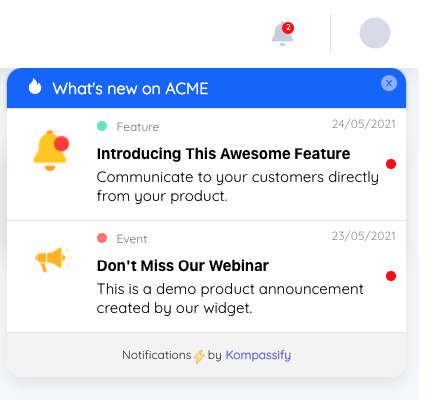
| In-app notification widget | Active users, inside the product | Driving adoption, one click to the feature |
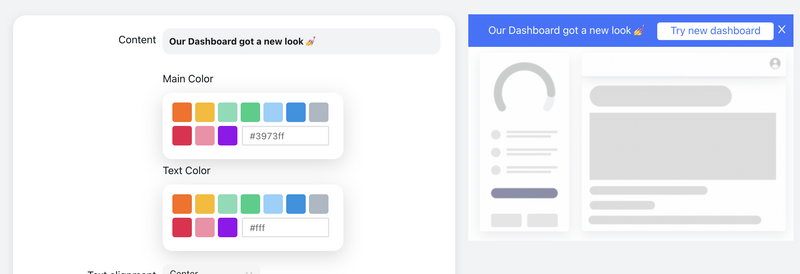
| Announcement bar or modal | A targeted segment, immediately | The few changes that alter how someone works |
| Email digest | Users who aren't logging in | Monthly roundups and win-back |
| A short product tour | Users on the relevant screen | Complex changes that need walking through |
The in-app row is the one most teams under-invest in and the one that moves adoption. A user reading about a new export option while sitting in the product is one click from using it; the same person reading the same words in an email on Sunday is not. For the small number of changes that genuinely change a workflow, escalate: pair the note with a targeted announcement and, where it's genuinely complex, a short product tour that walks users into the change instead of describing it.
Segment ruthlessly while you're at it. A note about an admin-only integration shown to every seat-level user is noise that costs you attention on the next entry; the same note shown only to admins is useful. The same segmentation that makes onboarding relevant makes release notes readable.
How to Tell If Your Release Notes Are Working
"We published on time" is an output, not an outcome. Four numbers tell you whether the notes did anything:
- Read rate: of users who saw the in-app entry, how many opened it. Falling read rates usually mean you're publishing too much, too broadly, or too enthusiastically.
- Click-through to the feature: the number that matters most. An entry read by many and clicked by none has a title problem or a relevance problem.
- Feature adoption after publishing: usage of the specific capability in the week following, compared with the week before. This is the actual point of the exercise.
- Support ticket deflection: tickets about "did this change?" or "is this fixed?" should fall as your changelog gets more useful and more findable.
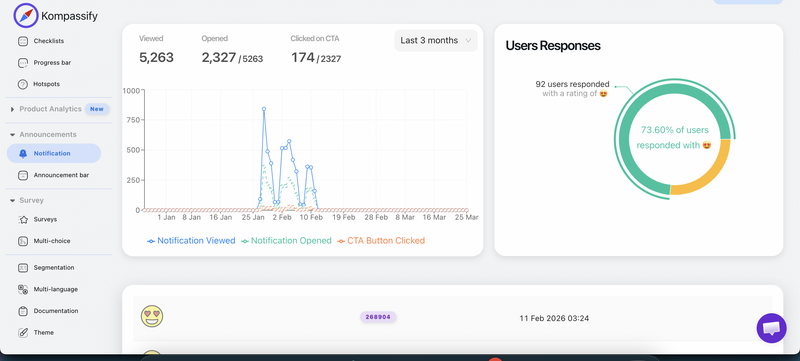
Watch for changelog fatigue. If read rates decline steadily while your publishing volume stays flat, you're spending attention faster than you're earning it, usually by announcing everything at the same intensity. The fix is triage, not more exclamation marks: most changes deserve a line in the notes, a few deserve an in-app announcement, and one or two per quarter deserve a tour.
Release Notes: Do vs. Don't
✅ Do
- Title every entry with the user-visible outcome
- Label changes as New / Improved / Fixed / Deprecated
- Name exactly who each change affects
- Link straight into the feature, not the homepage
- Add a screenshot or short clip for visual changes
- Publish on a predictable rhythm
- Surface notes in-app, not only on a web page
- Track click-through and adoption per entry
❌ Don't
- Paste ticket titles or commit messages
- List internal refactors and dependency bumps
- Bury a breaking change inside a feature list
- Publish a deprecation without a date and an alternative
- Call every change exciting or game-changing
- Send every entry to every user regardless of plan
- Post twenty micro-entries in a single day
- Measure success by how many notes you published
Publishing In-App Release Notes Without Engineering Time
The public changelog page is usually easy; the in-app half (a notification widget, targeted announcements, per-user read state, click tracking) is where teams stall, because it's frontend work that never quite outranks the roadmap. With Kompassify that layer runs on top of your existing product with no code:
- Publish entries to an in-app widget. Write the note, attach a screenshot or clip, and it appears inside your product for logged-in users, no release needed.
- Escalate the ones that matter. Turn a single entry into an announcement bar or modal for the change that deserves attention, and leave the rest quietly in the feed.
- Target by segment. Admin-only changes to admins, plan-specific changes to that plan, so nobody learns to ignore your updates.
- Launch a tour from an entry. For a change that needs walking through, link the note straight into a product tour that shows it in place.
- See what worked. Views and click-throughs per entry, next to your tours and checklists, so the changelog gets edited on evidence.
Kompassify is GDPR compliant and EU-hosted, free for under 100 monthly active users, with paid plans from $129/month.
Turn Your Changelog Into Adoption
Kompassify lets you publish release notes inside your product, escalate the important ones into targeted announcements, and launch a product tour straight from an entry, no code, no release cycle. See which notes get read and which drive real usage. GDPR compliant, EU-hosted, and free for under 100 monthly active users.
Start for Free →Frequently Asked Questions
What are release notes?
Release notes are the running record of what changed in a product and what it means for the people who use it, published each time you ship, usually as a dated changelog entry. They cover new features, improvements, fixes, breaking changes and deprecations. The distinction that matters: release notes are documentation written for users, not a summary of your sprint. A list of merged tickets is a commit log; release notes translate those changes into outcomes a customer can recognise.
What is the difference between release notes and a feature announcement?
Reach and intent. Release notes are the complete, ongoing record: everything that shipped, including the small fixes, published on a predictable cadence for people who want to know. A feature announcement is a campaign around one significant change, designed to reach users who are not looking for it: an in-app modal, an email, a tour that walks people into the new capability. Every announcement should have a release note behind it; most release notes do not deserve an announcement. Use notes for coverage and announcements for the few changes that genuinely change someone's workflow.
What should be included in a release note?
Five things: a date or version so entries can be referenced; a type label (new, improved, fixed, deprecated) so readers can scan; a plain-language title naming the user-visible outcome; two or three sentences on what changed, who it affects and why it matters; and a way to act: a link straight to the feature, a screenshot or short clip, and migration steps if anything breaks. Anything that doesn't help a user decide whether to care belongs in your internal tracker, not the changelog.
How often should you publish release notes?
On a predictable rhythm rather than on every deploy. Teams shipping continuously usually batch into a weekly or bi-weekly entry; slower cycles publish per release. Predictability matters more than frequency: readers only build the habit of checking if entries appear when they expect them. If you ship many small things, group them under one dated entry with sections: twenty micro-entries in a day trains people to ignore the feed.
Should release notes include bug fixes?
Yes, but summarised and separated. Users who hit a bug want proof it was fixed, and a visible fixes section builds real credibility. What doesn't belong is the raw list: 'fixed nil pointer in report serializer' means nothing outside your team. Group them under a Fixed heading, describe them in user terms ('Reports with more than 10,000 rows no longer time out'), and keep internal refactors, dependency bumps and test changes out entirely.
Where should release notes be published?
In at least two places: a public, linkable changelog page for search, support and prospects, and an in-app surface so existing users encounter the news where they already are, usually a notification widget or 'what's new' panel. The in-app copy is what actually drives adoption, because it reaches people inside the product with one click to the feature. For the small number of changes that alter how someone works, add a targeted announcement or a short tour on top.
How do you publish release notes inside your app without engineering time?
With a no-code platform like Kompassify you can run the in-app side of your changelog yourself: publish entries to a notification widget, add an announcement bar or modal for the changes that deserve one, target them by user segment so people only see what applies to them, and launch a product tour straight from an entry to walk users into the new feature. Built-in analytics show who read and who clicked through, so you can tell which notes drove adoption. Kompassify is GDPR compliant and EU-hosted, free for under 100 monthly active users, with paid plans from $129/month.