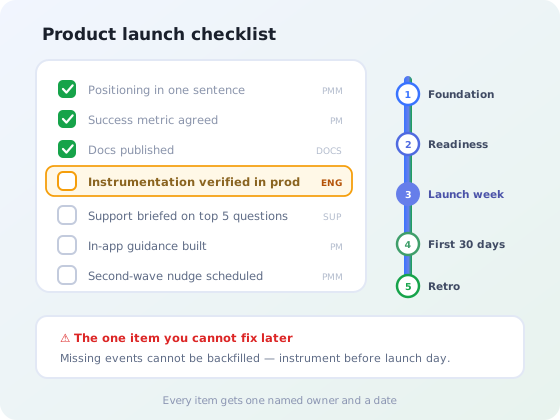
Launch day is the wrong time to discover that support has never seen the feature, that the documentation link in the announcement 404s, or that nobody added the event that would tell you whether anyone used it.
None of those are launch-day problems. They are preparation problems that only become visible on launch day, which is why launches benefit disproportionately from a checklist. The work is not complicated; it is just spread across five teams and easy to drop between them.
This guide covers how to size a launch so a small release does not inherit a large release's process, the five phases with forty-one concrete items and their owners, and how to tell afterwards whether the launch actually worked.
One scoping note before we start: this is the checklist for the whole cross-functional operation. If what you need is specifically the communication, the copy, the channels, the timing of the message itself, that is covered in detail in our guide to announcing a new feature, which handles one component of phase three below.
Key takeaways
- Tier the launch first. Applying a six-week process to a minor release is as wasteful as under-launching a major one.
- Every item needs a named owner and a date; items that belong to "the team" are the ones that get dropped.
- Instrumentation goes in before launch, not after. You cannot retroactively measure a week you did not track.
- Enablement is the most commonly skipped phase and the most damaging: support learning from customers is a bad first impression.
- A launch that ends at the announcement reaches only the users who happened to be active that day.
- Measure adoption, not opens. Delivery of a message is not evidence of use.
First, size the launch
The single most useful thing a team can do about launches is agree, in advance, that not every release gets the same treatment. Without tiers, one of two things happens: everything gets the full process and the process gets abandoned within a quarter, or everything gets a Slack message and the significant releases land silently.
| Tier | What qualifies | Runway | What it gets |
|---|---|---|---|
| Tier 1 Major |
Changes how the product is positioned, priced or sold. New product line, new plan, new category of capability. | 4–6 weeks | Everything below, plus pricing page updates, sales enablement, external comms, a named launch owner and a go/no-go review |
| Tier 2 Standard |
A meaningful feature existing users should be told about and shown how to use. | 1–2 weeks | Docs, support enablement, in-app announcement and guidance, instrumentation, 30-day adoption review |
| Tier 3 Minor |
An improvement or fix that changes nothing about how the product is understood. | Same day | A changelog or release-notes entry, and a support note if it changes an existing behaviour |
Decide the tier when the feature is prioritized, not when it is finished. Tier one launches need work that runs in parallel with the build (pricing decisions, enablement material, positioning research) and none of that can be compressed into the week after code freeze. Doing this at prioritization time also makes the true cost of a feature visible, since a tier one launch is real effort that belongs in the estimate.
Launch day sits in the middle, not at the end. More than half the work happens after it.
Phase 1: Foundation (4–6 weeks out)
Everything downstream inherits the decisions made here. Skipping this phase does not save time; it moves the argument to launch week, when there is no room for it.
- Name the target segment. Not "our users": which segment, and roughly how many of them. This number becomes the denominator for every adoption metric later. Owner: product
- Write the positioning in one sentence. What it does, who for, and what it replaces. If three people write three different sentences, the launch is not ready to proceed. Owner: product marketing
- Decide the success metric and the threshold. "40% of the target segment uses it twice within 30 days", agreed now, before anyone is invested in the answer. Owner: product
- Confirm the pricing and packaging implications. Which plans get it, whether it changes any limit, whether existing customers gain it automatically. Owner: product marketing
- Assign the launch tier and a single launch owner. One name, not a team. Owner: product
- Identify five customers for early access. Real users from the target segment, ideally ones who asked for this. Their reaction is the last cheap warning you will get. Owner: customer success
- Agree what would make you delay. Writing the no-go conditions down while everyone is calm is the only way they get honoured under pressure. Owner: launch owner
- Check the competitive and legal ground. Claims you plan to make, terms that need updating, anything region-specific. Owner: product marketing
Phase 2: Readiness (2 weeks out to the day before)
This is the phase that gets compressed when the build runs late, and it is the phase whose omissions are most visible to customers. A feature that arrives with no documentation and an unbriefed support team makes a worse impression than one that arrives a week later.
- Publish the documentation before launch, not with it. Live, linked, and actually read by someone who did not build the feature. See the knowledge base guide for structure. Owner: docs / product
- Brief support with the five questions they will actually get. Not a feature overview: the specific edge cases, the limits, and what to say when someone asks why it is not on their plan. Owner: support lead
- Add a canned response and an internal FAQ. The first support answers set the tone; they should not be improvised at 9am on launch day. Owner: support lead
- Enable sales and customer success (tier 1). A demo they have personally performed, an objection sheet, and clarity on which accounts it changes the conversation for. Owner: product marketing
- Instrument the feature. Events for first use, repeat use and completion, deployed and verified in production before launch. This is the item most often deferred and the only one that cannot be recovered afterwards. Owner: engineering
- Build the in-app guidance. A tooltip or short product tour at the point of use, targeted at the segment from phase one, not a global modal for everyone. Owner: product
- Prepare the in-app announcement. Written, targeted and scheduled, with the documentation link tested. Owner: product marketing
- Write the release notes entry. See how to write release notes for the format that people actually read. Owner: product
- Draft the email for inactive users. The users who most need to hear about it are the ones who will not be in the app to see the in-app message. Owner: lifecycle marketing
- Update the pricing and features pages (tier 1). Including the comparison table; see pricing page best practices. Owner: product marketing
- Run a dry run on a real account. Follow the path a customer will take, from announcement through documentation to first use, on production. Broken links are found here or by customers. Owner: launch owner
- Confirm the rollback plan. Feature flag, kill switch, or the honest answer that there isn't one. Owner: engineering
The instrumentation item deserves special attention. Every other item on this list can be fixed after launch: late documentation can be published, a missed announcement can be resent. Missing events cannot be backfilled. If you launch untracked, the first two weeks of behaviour, which are the most informative two weeks the feature will ever have, are simply gone.
Phase 3: Launch week
The work here is sequencing, not volume. Everything going out at once means no signal about what worked, and it means a bad surprise reaches everyone simultaneously.
- Turn it on for early-access customers first. A day ahead, with a direct line for feedback. Owner: customer success
- Publish the release notes and changelog entry. The permanent record the announcement will link to. Owner: product
- Trigger the in-app announcement to the target segment. Segment-targeted, and dismissible. An announcement widget keeps it available to users who dismiss it or log in later, which a one-off modal does not. Owner: product marketing
- Activate the in-app guidance. Contextual help at the point of use, live at the same moment as the announcement: the announcement creates intent, the guidance has to catch it. Owner: product
- Send email to the segment that has not been active. Staggered a day or two behind the in-app message. Owner: lifecycle marketing
- Publish external comms (tier 1). Blog post, social, and any partner or press coordination. Owner: product marketing
- Watch support volume in real time on day one. A spike in the first hours is the fastest signal that something is wrong or unclear. Owner: support lead
- Hold a short daily check for the first three days. Fifteen minutes: adoption numbers, support themes, anything broken. Owner: launch owner
- Do not ship anything else significant this week. Competing changes make the launch impossible to read and compound any incident. Owner: engineering
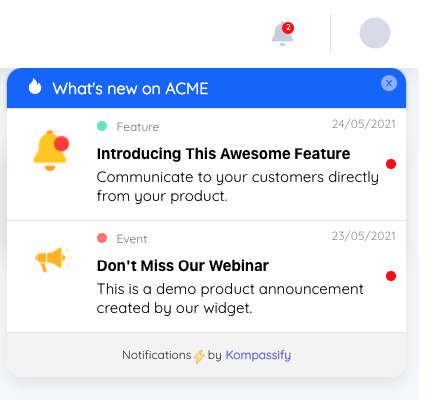
An announcement widget keeps the launch message available to users who dismiss it or log in days later; a one-off modal reaches only whoever was online that hour.
Phase 4: The first 30 days
This is where launches quietly stop, and it is where adoption is actually won. The announcement reached the users who happened to be active that day. Everyone else, often the majority, needs a second chance to encounter the feature.
- Track adoption against the phase-one threshold weekly. Proportion of the target segment that used it once, and the proportion that came back. The feature adoption guide covers how to read these. Owner: product
- Watch time-to-first-use. A long lag between announcement and first use usually means the guidance is not where the intent is. Owner: product
- Run a second-wave nudge at around day 10. Target only the users who saw the announcement and never used the feature: a different, more specific message, not a repeat of the first. Owner: product marketing
- Collect in-app feedback from users who tried it. One or two questions immediately after first use, while the experience is fresh. See in-app surveys. Owner: product
- Review support tickets by theme, not by count. Ten tickets asking the same question is a documentation problem; ten different questions is a design problem. Owner: support lead
- Talk to three users who tried it once and stopped. The most informative conversations available, and the ones teams avoid. Owner: product
- Add it to onboarding for new users. Once stable, the feature belongs in the new-user path; otherwise every future cohort arrives unaware of it. Owner: product
- Check the metric the feature was supposed to move. Not just usage of the feature, but the outcome it was prioritized for. Owner: product
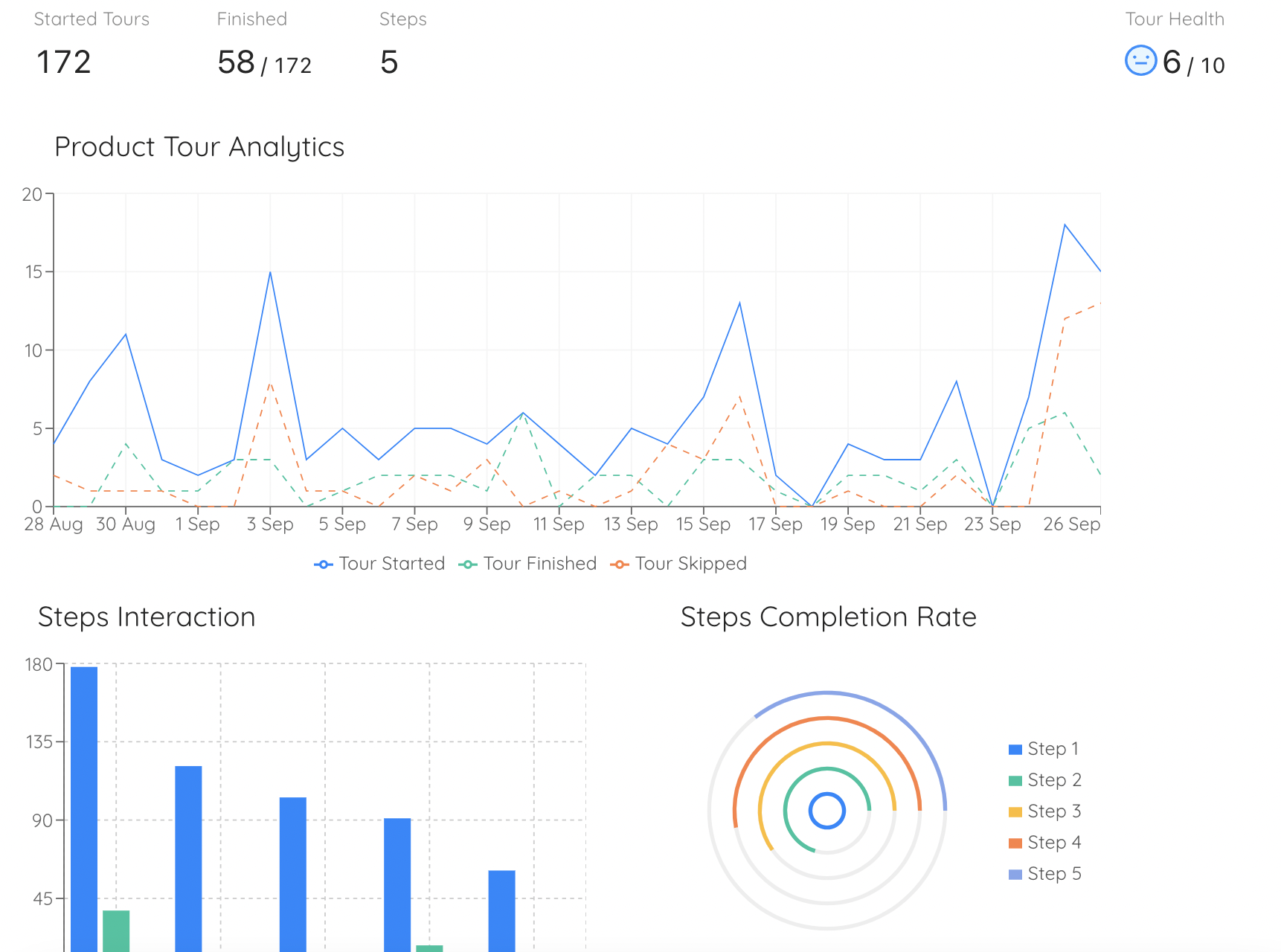
Phase four in practice: step-level completion data shows not just whether people started, but exactly where the launch guidance lost them.
The second-wave nudge is the highest-return item on this list. A single announcement reaches only the users who logged in during its display window. Contextual guidance that appears when a user later reaches the relevant screen keeps catching people for weeks, which is why in-app guidance outperforms one-off announcements on almost every launch, and why it belongs in phase two rather than being improvised in phase four.
Phase 5: The retrospective (day 30 onwards)
- Compare actual adoption to the phase-one threshold. Not "was it a success" but "did it hit the number we agreed before we knew the answer". Owner: launch owner
- Decide explicitly: invest, iterate, or retire. Features that miss badly and get quietly left in place become maintenance cost and interface clutter. Owner: product
- Record which launch activities produced the use. Announcement, in-app guidance, email, sales conversation. Over several launches this becomes a reliable model of what your channels are worth. Owner: product marketing
- Fix the checklist itself. Whatever got missed this time gets an owner and an earlier date next time. Owner: launch owner
Why good features have bad launches
Across the launches that disappoint, the same three causes recur, and none of them is about the quality of the feature.
-
The launch ended at the announcement
One message, one day, one audience: everyone who was not in the app that day never learns the feature exists. Nothing in the product catches them afterwards. This is the most common failure and the easiest to fix.
-
Support and sales learned about it from customers
A confident wrong answer in the first week does lasting damage, because early impressions of a feature harden quickly and are rarely revisited.
-
Nobody measured, so nobody learned
Without instrumentation the team has opinions instead of data, the retrospective is a conversation about vibes, and the next launch repeats the same mistakes.
Announce, guide and measure your launch in one place
Kompassify lets you ship an in-app announcement, add contextual guidance at the point of use, and track who actually adopted the feature, without writing code. Free up to 100 monthly active users, paid plans from $129/month, GDPR-compliant and EU-hosted.
Start for freeLaunch dos and don'ts
✓ Do this
- Assign the launch tier at prioritization time
- Give every item one named owner
- Agree the success threshold before launch
- Verify instrumentation in production first
- Publish documentation ahead of the announcement
- Sequence channels rather than firing them all at once
- Plan a second-wave nudge for day 10
- Fold the feature into new-user onboarding once stable
✗ Avoid this
- Running the full process on a minor release
- Leaving enablement to the week of launch
- Launching without events and adding them later
- Shipping other significant changes in launch week
- Treating email opens as an adoption metric
- Sending the same message twice as the follow-up
- Declaring success on day two
- Leaving an unused feature in place with no decision
Frequently asked questions
What should be on a product launch checklist?
A launch checklist spans five phases. Foundation sets positioning, target segment, pricing implications and the success metric. Readiness covers documentation, support and sales enablement, in-app guidance and instrumentation. Launch week handles sequencing across channels. The first thirty days track adoption and collect feedback. The retrospective decides what happens next. The items themselves matter less than having an owner and a date against each one.
How far in advance should you plan a product launch?
Size the runway to the launch tier. A major launch that needs sales enablement, pricing changes and press coordination realistically needs four to six weeks of preparation running in parallel with the build. A standard feature launch needs one to two weeks. A minor improvement needs a changelog entry and nothing more. Applying a six-week process to a small release is a common and expensive mistake.
What is a launch tier?
A launch tier is a size classification agreed in advance that determines how much launch process a release gets. A typical scheme uses three: tier one for launches that change how the product is sold or positioned, tier two for meaningful features existing users need to be told about, and tier three for improvements that only need a changelog entry. Tiering prevents both over-launching small things and under-launching significant ones.
Who owns a product launch?
One named person owns the launch end to end, usually product marketing where that function exists and the product manager where it does not. Individual items have their own owners: support enablement belongs to support, instrumentation to engineering, documentation to whoever writes it. But a launch with shared ownership reliably loses the items that sit between teams, which are usually enablement and instrumentation.
What should you measure after a product launch?
Measure adoption rather than awareness. Four numbers cover most cases: the proportion of the target segment that used the feature at least once, the proportion that came back and used it again, time from launch to first use, and the change in support volume on related topics. Announcement opens and click-through rates measure whether your message was delivered, not whether the product was adopted.
What is the difference between a product launch and a feature announcement?
A feature announcement is one component of a launch, the communication that tells people something exists. A launch is the whole cross-functional operation around it: positioning, pricing, documentation, support and sales readiness, in-app guidance, instrumentation, and the follow-up in the weeks after. Small releases need only the announcement. Larger ones fail when the announcement is the only part that gets done.
Why do product launches fail even when the feature is good?
The most common cause is that the launch ends at the announcement. The message goes out once, reaches the users who happened to be active that day, and nothing exists in the product to catch everyone else. The second most common cause is missing enablement: support and sales learn about the feature from customers, so the first questions get poor answers and early impressions harden.