Every product team has had this conversation. Someone pulls up the analytics, points at a feature that took a quarter to build, and asks why nobody is using it. The design was reviewed. The copy was polished. The rollout went out on schedule. And still, adoption is flat.
The usual response is to add more: another tooltip, another email, another line in the changelog. But the problem is often further upstream. The feature was built for a type of user rather than for a job that user was actually trying to get done.
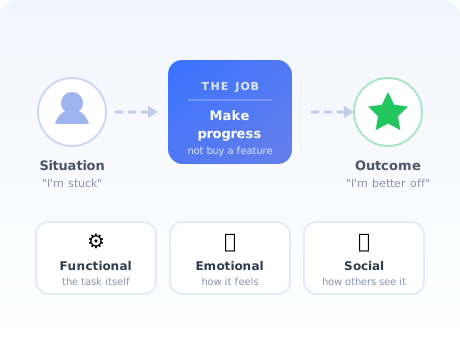
Jobs to Be Done is the framework that closes that gap. It replaces the question "who is our user?" with a sharper one: what progress is this person trying to make, and what did they hire us to do? This guide covers what JTBD means, how to write a job statement, how to run the interviews, six worked examples, and (the part most guides skip) how to turn a job into an onboarding flow that actually delivers it.
Key Takeaways
- People hire products to make progress. A job is the progress someone wants to make in a specific circumstance, not a feature, not a persona, not a demographic.
- Every job has three dimensions. Functional (the task), emotional (how the person wants to feel), and social (how they want to be seen). Products that only solve the functional dimension lose to ones that solve all three.
- Switching is governed by four forces. Push and pull move users toward you; anxiety and habit hold them back. Onboarding is mostly anxiety reduction, which is why "more benefits" rarely fixes a weak activation rate.
- Job statements are solution-free. "When [situation], I want to [motivation], so I can [outcome]." If a product, feature, or technology appears in the sentence, it is not a job statement.
- Interview switchers, not everyone. Talk to people who changed something in the last 90 days and rebuild their timeline backwards. Opinions are unreliable; recent behaviour is not.
- The payoff is in onboarding. Once you know the job, first-run experience stops being a product tour of your menu bar and becomes the shortest path to one completed instance of the job.
What is Jobs to Be Done?
Jobs to Be Done (JTBD) definition: a framework for understanding customer behaviour that describes people by the progress they are trying to make in a given circumstance, rather than by who they are. Under JTBD, customers do not buy products; they hire them to do a job, and they fire them when something else does the job better.
That reframing sounds small. In practice it changes what you build, what you measure, and who you consider a competitor.
Consider a team building a reporting feature. Framed by persona, the brief reads: "Marketing managers at mid-market companies need better dashboards." Framed by job, the same brief reads: "When my CEO asks how last month went, I want a defensible number in under five minutes, so I don't look unprepared in the leadership meeting."
The second framing tells you something the first one never could: the real competitor is not another analytics tool. It is a spreadsheet the marketing manager already trusts, and the deadline pressure of a meeting that starts in ten minutes. That is why speed-to-answer matters more than chart variety, and why an onboarding flow that starts with "connect six data sources" will lose every time.
Where the idea comes from
The framework is most associated with Clayton Christensen, whose "milkshake" study found that a fast-food chain's morning milkshake buyers were not a demographic at all; they were commuters hiring a thick drink to make a boring one-handed drive more bearable. The competition was not other milkshakes. It was bananas, bagels and boredom.
Tony Ulwick's outcome-driven innovation and Bob Moesta's "switch" interviews built the practical machinery around it: how to phrase a job, how to find one, and how to detect the forces that make somebody finally change. Modern SaaS teams tend to use a blend of all three, which is what this guide describes.
The three dimensions of a job
A job is never purely practical. Every hiring decision carries three layers, and the layers that get ignored are usually the ones that decide whether a product sticks.
-
The functional dimension: the task
The concrete thing that needs to happen: consolidate three spreadsheets, get a signature, publish a page. This is the layer product teams document well and, usually, the only one that makes it into a requirements doc.
-
The emotional dimension: how the person wants to feel
Confident instead of exposed. In control instead of behind. Calm on a Friday afternoon instead of anxious. Emotional jobs explain why a technically inferior product with a reassuring interface routinely beats a powerful one that makes people feel stupid.
-
The social dimension: how the person wants to be seen
Competent in front of a manager. Modern in front of a board. Helpful in front of a team. This is the dimension that drives internal advocacy: users champion tools that make them look good to the people whose opinion they care about.
A practical test: take any feature currently on your roadmap and write one sentence for each dimension. If the emotional and social rows come out empty, you are building a capability, not solving a job, and adoption will depend entirely on users independently figuring out why they should care.
Jobs to Be Done vs personas vs user stories
JTBD is regularly presented as a replacement for personas. It is not. The three artefacts answer different questions and break in different ways, and mature teams keep all three, just with clearer boundaries.
| Artefact | Question it answers | Best used for | How it fails |
|---|---|---|---|
| Persona | Who is this person? | Positioning, tone of voice, channel choice, sales qualification | Drifts into fiction: stock photos, invented hobbies, and demographics that never change a product decision |
| Job to Be Done | What progress are they trying to make, and when? | Roadmap prioritisation, positioning against real alternatives, onboarding design, activation definition | Written at the wrong altitude: either so broad it is useless ("manage my business") or so narrow it is a feature request in disguise |
| User story | What should we build next sprint? | Scoping and handoff to engineering | Becomes a solution ticket with an "as a user" prefix, disconnected from any job |
The clean division of labour: the job decides what deserves to exist, the persona decides how you talk about it, and the user story decides what ships this sprint. Problems start when a persona is asked to do the job's work, which is how teams end up with a roadmap full of features that fit the audience and serve nothing in particular.
How to write a job statement (with template)
The job statement is where most of the value gets created or destroyed. It is one sentence, and it has to survive contact with your roadmap for years.
The template:
When [situation: the triggering circumstance],
I want to [motivation: what I am trying to do],
so I can [expected outcome: how my life is better].
The three rules that make a job statement usable
1. Keep it solution-free
No product names, no feature names, no technology. "When I need to onboard a new client, I want to send them an automated email sequence" is not a job; it is a solution someone already picked. The job underneath is: "When I take on a new client, I want them productive in the first week without me repeating the same setup call, so I can take on more clients without adding hours."
The test: could a competitor with a completely different architecture serve this statement? If not, you have written a spec.
2. Anchor it to a circumstance, not a frequency
"When I'm doing weekly reporting" is a calendar entry. "When I'm asked for a number I don't have on hand" is a circumstance; it can happen weekly, or three times on a Tuesday, and it tells you exactly when your product needs to show up. Circumstances are what make jobs actionable for onboarding and for in-app triggers, because a circumstance can be detected in product behaviour.
3. Write the outcome in the user's language, not yours
"So I can increase team efficiency" is a phrase from your marketing site. "So I can stop being the bottleneck every time someone new joins" is what a person actually says. Outcome clauses written in vendor language are the clearest sign a job statement was invented in a meeting rather than heard in an interview.
Watch the altitude. A job pitched too high ("grow my business") cannot be designed against. A job pitched too low ("filter the table by date") is a feature. The workable altitude is usually one that a person could complete in a single sitting and would describe as having "got done"; that is also, not coincidentally, the right size for a first-session goal in onboarding.
The four forces: why users switch (and why they don't)
A job explains what someone wants. The four forces explain why they finally do something about it, or why they keep not doing anything about it, for years, while your sales team sends follow-ups.
The equation is blunt: a switch only happens when push plus pull outweighs anxiety plus habit. Marketing spends almost all of its energy on pull. Sales adds a little push. Almost nobody owns the other side of the scale, and the other side is where most of your lost activation lives.
| Force | What it sounds like | Where you address it |
|---|---|---|
| Push | "We can't keep doing it this way." | Positioning, sales discovery, problem-led content |
| Pull | "That would solve it." | Landing page, demo, free trial |
| Anxiety | "What if I get halfway and it doesn't work?" | Onboarding: sample data, undo, a visible first win, guided first run |
| Habit | "The old way is fine, honestly." | Onboarding + adoption: importers, integrations, and making the new way faster than the old one on day one |
This is the single most useful thing JTBD gives an onboarding team. If your trial-to-paid rate is weak, the instinct is to make the product sound better. The four forces suggest looking instead at what users are afraid of in the first ten minutes, a diagnosis you can act on directly, and one we cover from the metrics side in our guide to user friction and to free trial conversion.
How to run a Jobs to Be Done interview
JTBD research is not a survey and it is not a feature-request round-up. It is a structured attempt to reconstruct a decision that already happened, in order to find the forces that produced it.
Recruit recent switchers: people who signed up, upgraded, or churned in the last 90 days
Rebuild the timeline backwards from the moment of the decision
Find the first thought, the passive look, the active search, and the trigger
Map what you heard onto the four forces
Write the job statement, then validate it against product behaviour
1. Recruit recent switchers
Recency matters more than sample size. Someone who signed up eleven months ago will give you a tidy, rationalised story that has very little to do with what actually happened. Someone who signed up three weeks ago can still tell you which browser tab they had open and what their colleague said in the meeting beforehand.
Eight to twelve interviews is usually enough to see the dominant jobs repeat. Include churned users: they are the cheapest source of truth you will ever get, and the only people who can tell you what the job looked like after you failed at it.
2. Rebuild the timeline backwards
Start at the moment of purchase or signup and walk backwards. "You created the account on a Tuesday afternoon. What happened that morning?" Then keep going. Most switching decisions have a long, quiet prehistory: a first vague dissatisfaction weeks or months before, a passive look at alternatives, then an event that suddenly made the status quo unacceptable.
3. Look for the four moments
Every switch story contains the same beats. First thought ("this is getting annoying"). Passive looking (reading, noticing, half-searching, with no intent to act). Active looking (comparing, demoing, asking peers). And the trigger, the concrete event that converted intention into action. The trigger is the most valuable thing in the entire interview, because it tells your marketing exactly when to show up and your onboarding exactly what state the user arrives in.
4. Ask about behaviour, never about preferences
"What would make this better?" produces a wish list. "Walk me through the last time you tried to do that" produces evidence. Good JTBD questions are almost boringly concrete: What did you try first? Who else was in the room? What almost stopped you? What did you have to stop doing to make room for this?
The one question worth memorising: "What almost made you not do it?" That single prompt surfaces more anxiety-force material than an entire survey.
5. Validate the job against real product behaviour
Interviews tell you what the job is. Product data tells you whether your product delivers it. Once you have a candidate job, define what "job completed" looks like as an event, and check what proportion of new users reach it and how long it takes them. If nobody can name that event, the job is still too abstract. Our guides to user onboarding metrics and time to value cover how to instrument this properly.
6 Jobs to Be Done examples
Abstract job statements are easy to nod at and hard to write. These six are deliberately written at a workable altitude, with the functional, emotional, and social dimensions separated out.
Job statement: When my team is working across three tools and nobody knows what is blocked, I want one place that shows the real status without me asking, so I can stop spending my mornings collecting updates.
- Functional: see current status across work streams without manual collection
- Emotional: feel in control rather than perpetually behind
- Social: be seen as the manager who always knows where things stand
Job statement: When money moves in and out of my business every week, I want to know what I actually owe before it is due, so I can stop keeping a rough number in my head and hoping.
- Functional: an accurate, current liability figure
- Emotional: replace low-grade financial dread with certainty
- Social: look organised to an accountant, a partner, or a lender
Job statement: When I need sign-off from four people in different time zones, I want their comments attached to the actual thing they are commenting on, so I can stop reconciling contradictory feedback from a group call.
- Functional: collect contextual, attributable feedback asynchronously
- Emotional: feel that progress is possible without waiting on calendars
- Social: be the person who ships without dragging everyone into a meeting
Job statement: When the same five questions arrive every day, I want customers to find the answer before they open a ticket, so I can spend my time on the problems that actually need a person.
- Functional: deflect repetitive queries to self-service
- Emotional: feel that the work is meaningful rather than mechanical
- Social: demonstrate to leadership that the team scales without headcount
Job statement: When a new hire starts on Monday, I want everything they need ready before they log in, so I can stop apologising for missing accounts on day one.
- Functional: provision accounts, documents and tasks ahead of a start date
- Emotional: avoid the specific embarrassment of a visibly disorganised welcome
- Social: represent a company that has its act together
Job statement: When someone senior asks a question I cannot answer from memory, I want a number I am willing to defend within a few minutes, so I can contribute to the decision instead of promising to follow up.
- Functional: retrieve a trustworthy metric quickly
- Emotional: feel prepared instead of exposed
- Social: be credible in a room where credibility compounds
How to apply Jobs to Be Done to user onboarding
This is where JTBD stops being a research exercise and starts paying rent. Onboarding is the moment your product either delivers the job or asks the user to learn an interface first. Almost all bad onboarding is the second thing.
1. Define activation as job completion, not step completion
Most activation definitions are proxies for effort: profile filled, tour finished, three features clicked. None of those are progress from the user's side. Replace them with the smallest event that means the job was genuinely done once: a report shared, a client invited, an invoice reconciled.
This single change tends to reveal that a healthy-looking activation rate was measuring compliance with your tour rather than value delivered. Our guide to increasing user activation goes deeper on choosing that event, and the aha moment guide covers how to detect it in your data.
2. Cut every first-session step that does not serve the job
Take your current signup and first-run flow and mark each step: does this move the user toward one completed instance of the job, or does it serve your database? Team names, avatars, role selectors, and preference screens are almost always the second kind. They can wait; see our guide to signup flow best practices for how far this can be pushed.
3. Trigger guidance on the circumstance, not on the calendar
A job statement names a circumstance. Circumstances are detectable: a user opens the reporting section for the first time, imports a file, invites a colleague, or lands on an empty list. Guidance fired at those moments lands; guidance fired at "day 1, day 3, day 7" mostly does not, because it has no idea what the user is currently trying to do.
With Kompassify product tours you can attach a tour or a tooltip to the exact element and page where the job actually starts, and target it to the segment for whom that job is real, without asking engineering for a release.

4. Turn the job into the checklist
An onboarding checklist is the clearest place to make a job visible, because it publicly commits to what "done" means. Write each item as a step in the job, phrased as an outcome the user recognises: "Connect the account you actually report on," not "Complete integration setup."
Kompassify's onboarding checklist and progress bar exist for exactly this: showing the user how far along the job they are, rather than how far along your setup wizard.
5. Attack the anxiety force explicitly
List the three things a new user is most afraid of in the first ten minutes: usually "I'll import the wrong data," "I'll break something visible to my team," and "I'll spend an hour and get nowhere." Then design something that neutralises each: a sandbox, a visible undo, a sample dataset, or a five-minute path to a first result. Anxiety is the force onboarding is uniquely able to move.
6. Segment by job, not just by plan
Two users on the same pricing tier can arrive with completely different jobs. A JTBD-informed segmentation lets you route each to the flow that serves their job, the basis of any genuinely personalized onboarding. A short "what brought you here today?" question at signup is often enough to branch on, provided the options are jobs rather than job titles.
The compact version: find the job, define activation as the job being done once, delete anything in the first session that does not serve it, trigger help at the circumstance, and spend your remaining effort on anxiety. That sequence is most of what JTBD has to offer an onboarding team.
Common Jobs to Be Done mistakes
✅ Do
- Interview people who switched in the last 90 days
- Write job statements that name a circumstance, not a schedule
- Include the emotional and social dimensions explicitly
- Treat spreadsheets, manual processes and "doing nothing" as competitors
- Validate every job against a measurable product event
- Keep personas, for positioning and channel, not for roadmap
- Re-run interviews when your market or pricing shifts
❌ Don't
- Invent job statements in a workshop with no customer contact
- Write a feature request and call it a job ("I want bulk export")
- Pitch the job so high it cannot be designed against
- Ask users what they want instead of what they did
- Assume one product has exactly one job
- Use JTBD to justify a decision that was already made
- Stop at the research; an unused job map changes nothing
The most expensive mistake: running the interviews, producing a beautiful job map, and never changing the onboarding flow. A job that does not alter what a new user sees in their first session has cost you research time and bought you nothing. Pick one job, rebuild one flow around it, and measure the change in activation before mapping anything else.
A 30-day plan to put JTBD to work
Week 1–2: Find the job
- Pull a list of users who signed up, upgraded or churned in the last 90 days
- Run 8–12 switch interviews, rebuilding each timeline backwards
- Tag every quote as push, pull, anxiety or habit
- Draft two or three candidate job statements in the standard format
Week 3: Make it measurable
- Define the single event that means "the job was done once"
- Instrument it and measure current reach and time-to-first-completion
- Audit the existing first session step by step against the job; see our onboarding audit guide
- List the top three anxieties from the interviews
Week 4: Rebuild one flow
- Cut every first-session step that does not serve the job
- Rewrite the checklist so each item is a step of the job
- Move guidance from day-based timing to circumstance-based triggers
- Ship one anxiety-reducer: sample data, undo, or a sandbox
- Compare job-completion rate before and after
Build Onboarding Around the Job, Not the Menu
Kompassify gives you no-code product tours, onboarding checklists, tooltips, progress bars and product analytics: everything you need to get new users to a completed job in their first session. Free up to 100 monthly active users, GDPR-compliant and hosted in the EU.
Start for Free →Frequently Asked Questions
What is Jobs to Be Done (JTBD)?
Jobs to Be Done is a framework that explains customer behaviour through the progress a person is trying to make in a given situation, rather than through who they are. Instead of describing users by demographics or role, JTBD describes the job they hire a product to do: the functional task, the emotional state they want to reach, and how they want to be perceived by others. The core idea is that people do not buy products; they hire them to make progress in a specific circumstance.
What is the difference between Jobs to Be Done and user personas?
Personas describe who the user is: role, seniority, company size, tooling, goals. Jobs to Be Done describes what the user is trying to accomplish and in which circumstance. They answer different questions and work best together. A persona tells you how to talk to someone and which channel reaches them; a job tells you what your product must actually do and what your onboarding must get them to. Two very different personas can share the same job, and one persona can have several distinct jobs.
How do you write a job statement?
The standard format is: When [situation], I want to [motivation], so I can [expected outcome]. A good job statement is solution-free, stable over time, and specific about the circumstance that triggers it. For example: "When a new teammate joins mid-project, I want to get them productive without booking hours of my own time, so I can keep my own deliverables on track." Note that nothing in that sentence names a product, a feature, or a technology; that is the test.
What are the four forces of progress in JTBD?
The four forces explain why a customer switches or does not switch. Push is the frustration with the current situation. Pull is the attraction of the new solution. Anxiety is the fear of what could go wrong with the new solution. Habit is the comfort of the existing way of doing things. A switch only happens when push plus pull is stronger than anxiety plus habit. Most onboarding work is really anxiety reduction and habit displacement, not more pull.
How do you run a Jobs to Be Done interview?
Interview people who recently switched to or away from your product, ideally within the last 90 days while the memory is still sharp. Build a timeline backwards from the moment of purchase: when did they first realise something had to change, what did they try, what triggered the search, what almost stopped them from signing up. Ask about events and behaviour, never about opinions or feature wishes. Eight to twelve interviews with recent switchers usually surfaces the dominant jobs.
How does Jobs to Be Done improve user onboarding?
Most onboarding fails because it teaches the interface instead of delivering the job. Once you know the job, you can define a first session that completes one meaningful instance of it, cut every step that does not serve it, and measure activation as job completion rather than as steps finished. In practice that means a checklist whose items map to the job, product tours that appear at the moment of the job rather than on first login, and empty states that show what the finished job looks like.
Is Jobs to Be Done only useful for new products?
No. JTBD is arguably more useful on mature products, where feature lists have grown faster than clarity. It gives an established team a way to decide what to cut, which segment is actually being served, and why a well-built feature is not being adopted. Running JTBD interviews on churned users is one of the fastest ways to find out whether you lost them to a competitor, to an in-house workaround, or to the job disappearing entirely, a distinction our user churn guide explores in more detail.