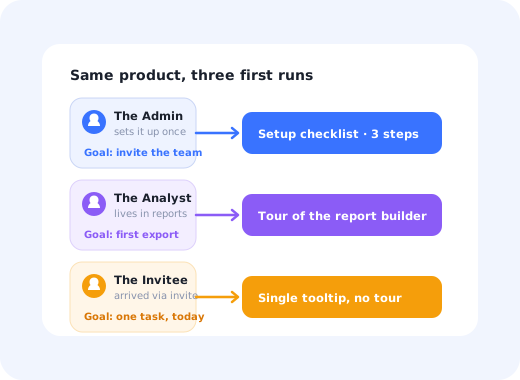
Almost every product team has a persona deck. Very few products look any different because of it.
The deck usually contains four laminated people with names like "Marketing Mary", a stock photo, an age, a list of favourite tools and a quote nobody actually said. It is presented once, admired, and then never consulted again, because at the moment a decision has to be made about what the first screen should do, it has nothing to say.
A user persona is worth writing only if it ends in a decision: this group sees a different first run, or the persona was decoration. This guide covers what a user persona is, the six fields that carry all the weight, how to build personas from behaviour you already have, four worked examples, and how to turn each one into something a new user experiences.
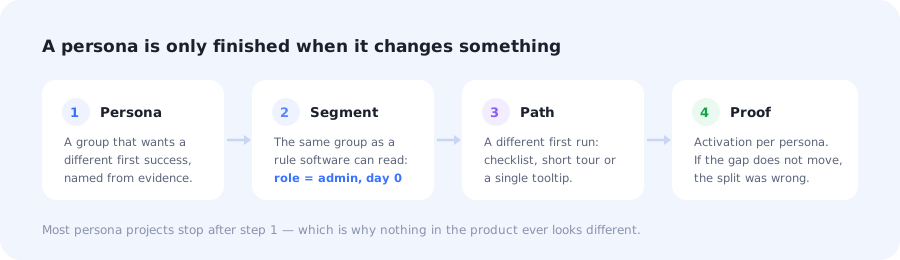
Most persona projects stop at step one, which is why nothing downstream ever changes.
Key Takeaways
- A user persona is a group that shares a job and a first success, not a demographic profile with a photograph.
- If it doesn't change a decision, it isn't a persona. Name the in-product change or delete the slide.
- Build them from behaviour first, then interview to find out why the behaviour looks like that.
- Six fields are enough: job, trigger, first success, blockers, evidence, and what changes.
- Three to five personas is the working range for most SaaS products; more usually means demographics in disguise.
- A persona reaches users only through a segment, which is the same group written as a rule software can evaluate.
What is a user persona?
User persona definition: a short, evidence-based description of a group of people who use your product for the same reason and judge it by the same first success. Its purpose is to make a decision easier: which task the first run leads with, which words the interface uses, what can wait. A description that changes none of those is a character sketch, not a persona.
The distinction matters because it changes what you put in one. Age, location and job title are only useful when they predict behaviour, and in most SaaS products they predict very little: two people with identical titles at identical companies can want completely different things from your product on the day they sign up. What predicts behaviour is the job they are trying to finish and the event that pushed them to look for a tool.
This is why persona work so often stalls. The team produces accurate descriptions of who the users are, discovers that they cannot act on any of it, and quietly stops referring to the deck.
Persona, segment, ICP and buyer persona
Four terms get used interchangeably in the same meeting, which is a reliable way to waste an hour. They answer different questions:
| Term | Answers | Who uses it |
|---|---|---|
| User persona | Why does this group behave this way, and what do they need first? | Product, design, onboarding |
| User segment | Which accounts match this group right now? | Product, growth. It is a rule, not a story |
| ICP | Which companies should we sell to at all? | Sales, marketing strategy |
| Buyer persona | Who signs, and what objections do they raise? | Marketing, sales |
The pairing that matters for product work is persona and segment. A persona explains a group; a user segment is the same group expressed as a rule software can evaluate: role is admin, account created today, invited rather than self-signed. A persona without a matching segment never reaches anybody; a segment without a persona behind it is a filter nobody in the room can explain.
The buyer is rarely the user. In B2B SaaS the person who signs the contract and the person who opens the product on a Tuesday morning are frequently different people with different incentives. Building the first-run experience around the buyer persona is a common and expensive mistake: the buyer already believes; the user has to be convinced by doing something.
What a useful persona contains
Six fields do all the work. Everything else (the photo, the age, the fictional commute) can be removed without losing information, and its absence makes the persona shorter and more likely to be read.
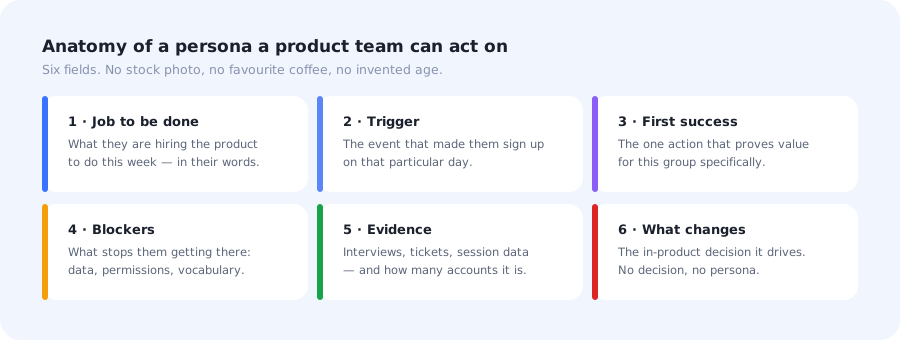
Six fields, one page. If it needs a second page, it is describing two personas.
📋 User persona template
- Job to be done
- What this person is hiring the product to do this week, phrased the way they would phrase it: "get the weekly report out without asking engineering", not "leverage analytics".
- Trigger
- The event that made them sign up on that particular day. New role, a spreadsheet that broke, a mandate from above, a colleague's invitation.
- First success
- The single action that proves value for this group. It is rarely the same action across personas, which is exactly why one onboarding flow underperforms.
- Blockers
- What stands between them and that action: missing data, permissions they don't have, vocabulary they don't share with your interface.
- Evidence
- Where this came from (interviews, support tickets, session recordings, product data) and how many accounts it covers. A percentage keeps everyone honest.
- What changes
- The in-product decision this persona drives. No decision, no persona.
The last field is the one teams skip and the only one that makes the exercise pay for itself. It also acts as a filter: if two personas produce the same answer in that field, they are one persona with two names.
How to create user personas in 5 steps
The order below starts with data you already have and uses interviews to explain it, rather than the reverse. It takes roughly two weeks of part-time work for a product with a few thousand accounts.
Start from behaviour, not opinion
Interview inside each behavioural cluster
Cluster on the job and the trigger
Write each persona in six fields
Size them, then cut to three or five
1. Start from behaviour, not opinion
Before anyone writes a name on a slide, group your accounts by what they did in their first week: which feature they touched first, whether they invited anyone, whether they imported data, whether they came back on day two. Two or three shapes usually appear immediately, and they rarely match the audiences the team assumed. This is also where you learn which groups reach their aha moment and which stall on the way.
2. Interview inside each behavioural cluster
Eight to twelve conversations per cluster is enough to hear the same story repeatedly. Ask what happened on the day they signed up, what they tried first, and what they expected to see. Do not ask people to describe themselves; ask them to walk you through the last time they had the problem. The answers give you the trigger and the vocabulary, both of which are impossible to derive from analytics alone.
3. Cluster on the job and the trigger
Now group the interviews by what people were trying to finish, not by who they were. A solo founder and an enterprise operations lead can belong to the same persona if they arrived for the same reason and need the same first success, and two people with the same title can belong to different ones. If your clusters keep reorganising themselves by company size or role, check whether that variable actually predicts what people do next, or whether it is just the easiest thing to see.
4. Write each persona in six fields
One page each, using the template above. Keep the language the users used; the phrases that come back verbatim in interviews are the phrases that belong in your empty states, tooltips and UX microcopy. Where you had to guess, mark it as a guess. A persona with two honest gaps is more useful than one with no gaps and no evidence.
5. Size them, then cut to three or five
Put a percentage of signups next to each persona. This is the step that prevents the loudest customer from shaping the default path: a group covering two per cent of new accounts can be served, but not from the first screen. Then cut. If two personas would be shown the same onboarding, the same empty state and the same tooltips, merge them.
Don't invent what you didn't hear. The moment a persona contains a detail nobody said (an age, a hobby, a "typical day") it starts being used as evidence in arguments where no evidence exists. Every line should be traceable to an interview, a ticket or a query.
User persona examples
Four examples from a hypothetical B2B analytics product, written the short way. Note that the interesting part of each is the last line, not the first.
- Job: decide within a week whether this tool can replace the spreadsheet the team currently maintains by hand.
- Trigger: the spreadsheet broke, or the person who maintained it left.
- First success: seeing their own data in a chart, not sample data.
- Blockers: import needs credentials they may not have; they will not read documentation during an evaluation.
- Evidence: 14 interviews, 31% of self-serve signups.
- Job: do the one thing they were added to do, then get back to their actual work.
- Trigger: an email from a teammate with a link in it.
- First success: completing that single task: approving, commenting, uploading.
- Blockers: no context on why the workspace exists; a full product tour reads as an obstacle.
- Evidence: 9 interviews, 38% of all new users, largest group by volume.
- Job: get thirty colleagues using the tool without running training sessions themselves.
- Trigger: the contract was signed and they were named as responsible.
- First success: the first invited teammate completing an action independently.
- Blockers: permissions, SSO, and having no idea who is stuck; their fear is a rollout that silently dies.
- Evidence: 11 interviews, 12% of signups but the majority of expansion revenue.
- Job: pick up something they set up months ago and have forgotten.
- Trigger: a deadline, a report request, or a new quarter.
- First success: finding the thing they built last time and confirming it still works.
- Blockers: the interface has changed since; their mental model is out of date.
- Evidence: support tickets and session data; 8% of monthly active accounts.
Turning a persona into a different first run
This is where the deck becomes a product change. Three mechanics cover almost every case, and none of them require a research budget to maintain.
-
Ask, don't guess
One question on the first screen, "what brings you here today?", with your personas as the answers. It self-selects better than any inference, and the answer distribution doubles as ongoing persona research.
-
Infer where you can
Invited users, admin roles, plan type and referral source are known before anyone answers anything. Use them for the personas that are already identifiable and save the question for the ones that are not.
-
Change the path, not just the copy
A different greeting on the same twelve-step tour is not personalisation. Each persona should meet a genuinely different first run: a checklist, a two-step tour, or a single tooltip and nothing else.
-
Measure per persona
Split activation by persona from the start. One blended activation number hides the case where you improved things for the largest group and made them worse for the group that pays.
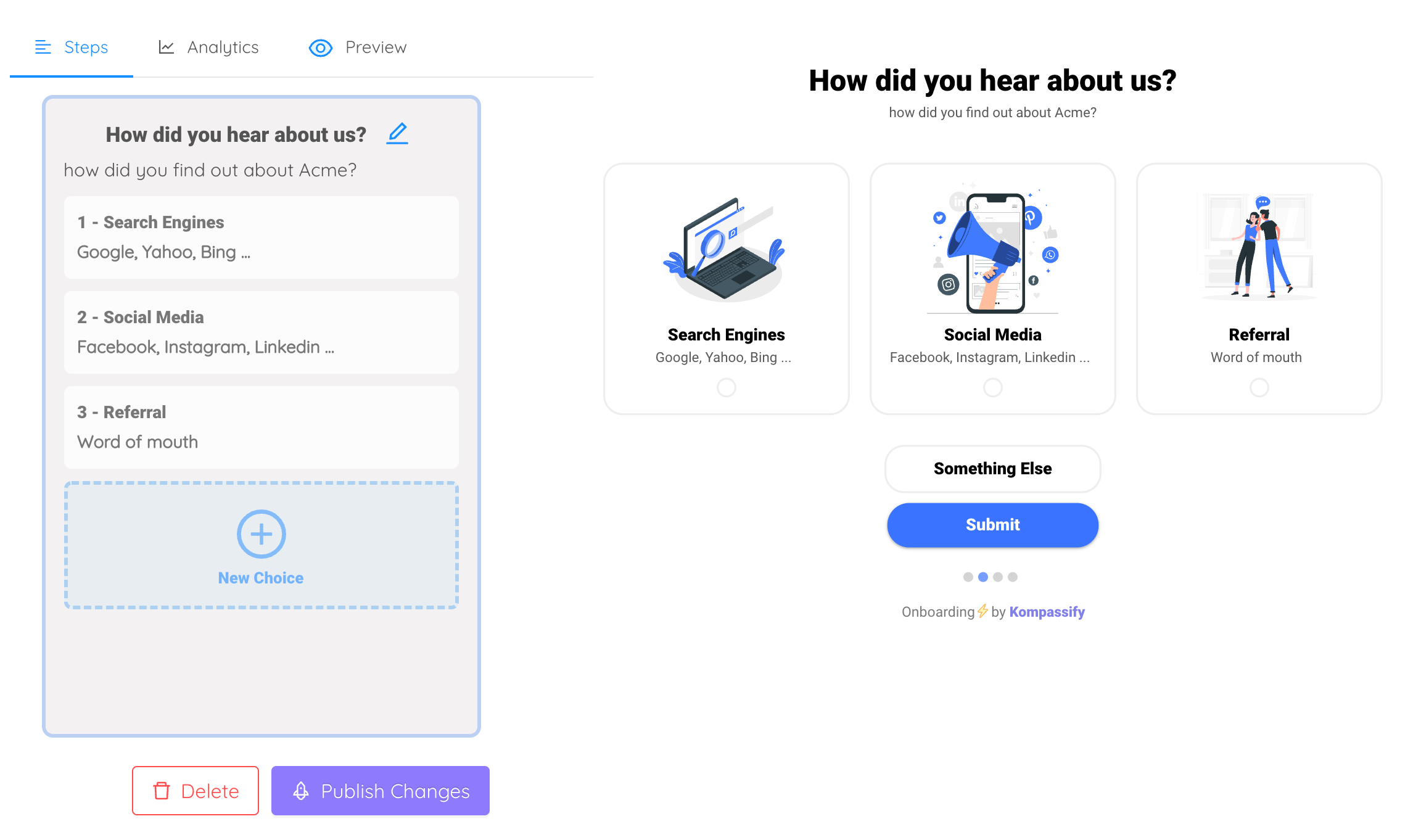
The cheapest persona research available: ask on the first screen, then route on the answer.
The path each persona takes afterwards is a sequencing decision, and the general rule is to show less than feels natural; the progressive onboarding approach introduces capability when behaviour shows it has become relevant, rather than in the first sixty seconds. For the groups you cannot identify at signup, an in-app survey a few days later fills the gap without interrupting the first session.
Do's and don'ts
✅ Do
- Start from first-week behaviour
- Group by job and trigger
- Put a percentage next to each persona
- Quote the words users actually used
- End every persona with a decision
- Give each persona a different first success
- Review them every two quarters
❌ Don't
- Invent ages, photos or hobbies
- Build the first run for the buyer
- Confuse a persona with a segment
- Keep nine personas nobody can recite
- Personalise the greeting and nothing else
- Let a 2% group own the default path
- Write them once and file them
Building persona-based onboarding with Kompassify
Once the personas exist, the work is routing, and routing does not need a sprint. Kompassify is a no-code digital adoption platform for SaaS teams, so each persona can get its own first run without shipping product code.
- Ask the question with a multi-choice onboarding step and send each answer down its own path.
- Route by what you already know using segments: role, plan, invited versus self-signed, account age.
- Give each persona its own flow: a product tour for one, a checklist for another, a single tooltip for the person who only came to do one thing.
- Fill the gaps later with an in-app survey to the groups you could not identify at signup.
- Compare activation per persona in product analytics, and keep the split only if the gap moves.
Free up to 100 monthly active users, paid plans from $129/month, GDPR-compliant with EU hosting.
Give each persona its own first run
Ask one question, route on the answer, and let every group reach the success that matters to them, without writing code.
Start for Free →Frequently Asked Questions
What is a user persona?
A user persona is a short, evidence-based description of a group of people who use your product for the same reason and judge it by the same first success. It exists to make a decision easier: which task the first run should lead with, which words the interface should use, which capability can wait. A description that does not change any of those things is a character sketch, not a persona, however well written it is.
How do you create user personas?
Five steps. Start from the behaviour you already have, grouping accounts by what they did in their first week rather than by who they are. Interview eight to twelve people per candidate group and ask what happened on the day they signed up. Cluster on the job and the trigger, not on demographics. Write each persona down in six fields: job to be done, trigger, first success, blockers, evidence and what changes in the product. Then size each group, because a persona covering two per cent of signups should not be shaping the default path.
What should a user persona include?
Six fields carry all the weight: the job the person is hiring your product to do this week, the trigger event that made them sign up on that particular day, the first success that proves value for this group specifically, the blockers standing between them and it, the evidence behind the claim including how many accounts it covers, and the in-product decision the persona changes. Age, stock photo, favourite tools and invented biography can all be removed without losing anything.
What is the difference between a user persona and a user segment?
A persona is a research artefact written for humans; a segment is the same group expressed as a rule software can evaluate, such as role equals admin and account age is under one day. Personas explain why a group behaves the way it does, segments make it possible to show that group something different. A persona with no matching segment never reaches a user, and a segment with no persona behind it is a filter nobody can explain.
How many user personas should you have?
Three to five for most SaaS products, and each one has to earn its place by changing something. The practical test is whether you can name a different first success for each: if two personas would be shown the same onboarding, the same empty state and the same tooltips, they are one persona wearing two names. Products with more than five usually have several audiences described in demographic language rather than several distinct jobs.
Is a buyer persona the same as a user persona?
No, and in B2B SaaS they are frequently different people. A buyer persona describes who signs the contract, what they are evaluated on and what objections they raise, which is a marketing and sales artefact. A user persona describes who opens the product on a Tuesday morning and what they are trying to finish. Building onboarding for the buyer is a common and expensive mistake: the buyer is rarely the person who has to reach first value.
How often should personas be updated?
Review them every two quarters and whenever the acquisition mix changes, since a new pricing tier, channel or integration can introduce a group the personas never described. The cheapest maintenance is a single onboarding question asked at signup: the answer distribution tells you when a persona is growing, shrinking or missing entirely, without commissioning a research project.
How do you use personas in product onboarding?
Ask new users which of your personas they match in the first screen, then route each answer to a different first run: a setup checklist for the person configuring the workspace, a short tour of one feature for the specialist, a single tooltip for the colleague who was invited and only needs one task. Measure activation separately for each group. If the routed experience does not move activation for at least one persona, the split was based on the wrong distinction.