Every product team knows the feeling. A feature ships after weeks of work. The release note goes out, the launch message is sent, and a month later the analytics show a thin line of usage from the same handful of accounts, while everyone else carries on exactly as before.
The reflex is to conclude the feature missed. Sometimes that is true. Far more often, the feature is fine and the adoption failed: the people it was built for never found it, never understood it, or never had a reason to switch at the moment they saw it.
This guide is about closing that gap. It covers what feature adoption actually means, the four stages every user passes through with any feature, the metrics that describe adoption honestly, the six reasons shipped features go unused, and seven strategies that raise adoption without changing a line of the feature itself.
Key Takeaways
- Feature adoption is per-feature, per-segment. A user can be a daily product user and adopted on none of your last five releases. Measure each feature against the users it was built for.
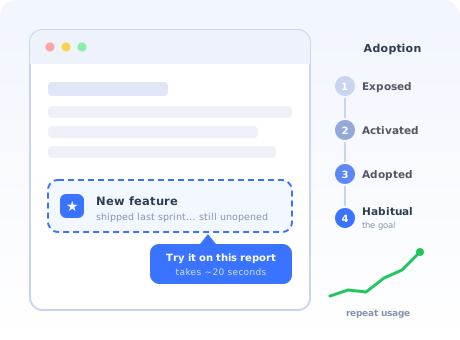
- Adoption is a funnel, not an event. Exposed → activated → adopted → habitual. Each transition fails for different reasons and needs a different fix.
- One click is trial, not adoption. Count repeat usage inside the target segment, or you will celebrate launches that changed nothing.
- Most unused features are discovery failures, not value failures. Diagnose before you rebuild; the fix is usually guidance, not code.
- Announce in-app, at the moment of relevance. An email arrives when the user is not in the product; a targeted in-app prompt arrives when they can act immediately.
- Low adoption of a niche feature can be healthy. An admin tool used by every admin and no one else is a success, not a problem.
What is feature adoption? (Definition & meaning)
Definition: Feature adoption is the process by which existing users discover a specific feature, try it, and make it part of how they regularly use the product. A feature is adopted when it has entered a user's normal workflow, not when it has been seen, clicked once, or mentioned in a release note.
The definition sounds obvious, but two words in it do the real work. Existing: feature adoption concerns people who already use your product, which makes it a fundamentally different problem from acquiring or onboarding new users. And regularly: the bar is habit, not contact. Plenty of features get a burst of curiosity clicks in launch week and are never opened again; by the definition above, their adoption is near zero.
Feature adoption is also where product value quietly compounds. Users who adopt more of the capabilities relevant to them get more done, embed the product deeper into their work, and are measurably harder to churn, the mechanics behind product stickiness. The inverse is the classic quiet failure: an account that pays for the whole product, uses a tenth of it, and one renewal cycle later asks why they are paying at all.
Feature adoption vs product adoption vs feature discovery
Three neighbouring terms that are worth keeping apart, because they call for different work:
| Term | Question it answers | Whose problem it is |
|---|---|---|
| Product adoption | Does this person become a regular user of the product at all? | Mostly an onboarding problem, see our product adoption guide |
| Feature discovery | Does the user learn that a capability exists? | The first gate of feature adoption, covered in depth in our feature discovery guide |
| Feature adoption | Does the user make the capability part of their routine? | Discovery plus first-run success plus habit, this guide |
Discovery is necessary but nowhere near sufficient. A user can know perfectly well that your reporting module exists and still never open it. Adoption is the whole journey, and it is best understood as a funnel.
The four stages of feature adoption
Every user passes through the same four stages with any given feature. Naming them matters because each transition fails for different reasons, and a raw usage chart hides which transition is failing.
1. Exposed: the user learns the feature exists
Nothing else can happen before this. Exposure comes from in-app announcements, release notes, a colleague, or simply stumbling across a button. The silent killer here is the assumption that shipping equals exposure; for most users it does not, because they log in with a task in mind and tunnel straight through the same three screens they always use.
2. Activated: the user tries it and reaches first value
The user clicks in and gets a result worth having. Both halves count. A user who opens the new dashboard, sees an empty state with no data and no guidance, and leaves has not activated; they have been inoculated. First-run experience decides this stage, the same way the aha moment decides product-level onboarding.
3. Adopted: the user returns and uses it for real work
The feature has been used more than once, on real tasks, without a prompt. This is the stage most metrics should point at. The common failure here is relevance: the user tried it, it worked, and it still lost to the old workaround because the switching cost was real and the payoff was marginal.
4. Habitual: the feature is part of the routine
The user would notice if you removed it. This is where retention value lives: habitual features are the reason accounts renew without a procurement fight. You cannot push a user here directly; habit is earned by repeated successful use, but you can protect it by not moving or redesigning the feature casually once people rely on it.
Feature adoption metrics: the four numbers that matter
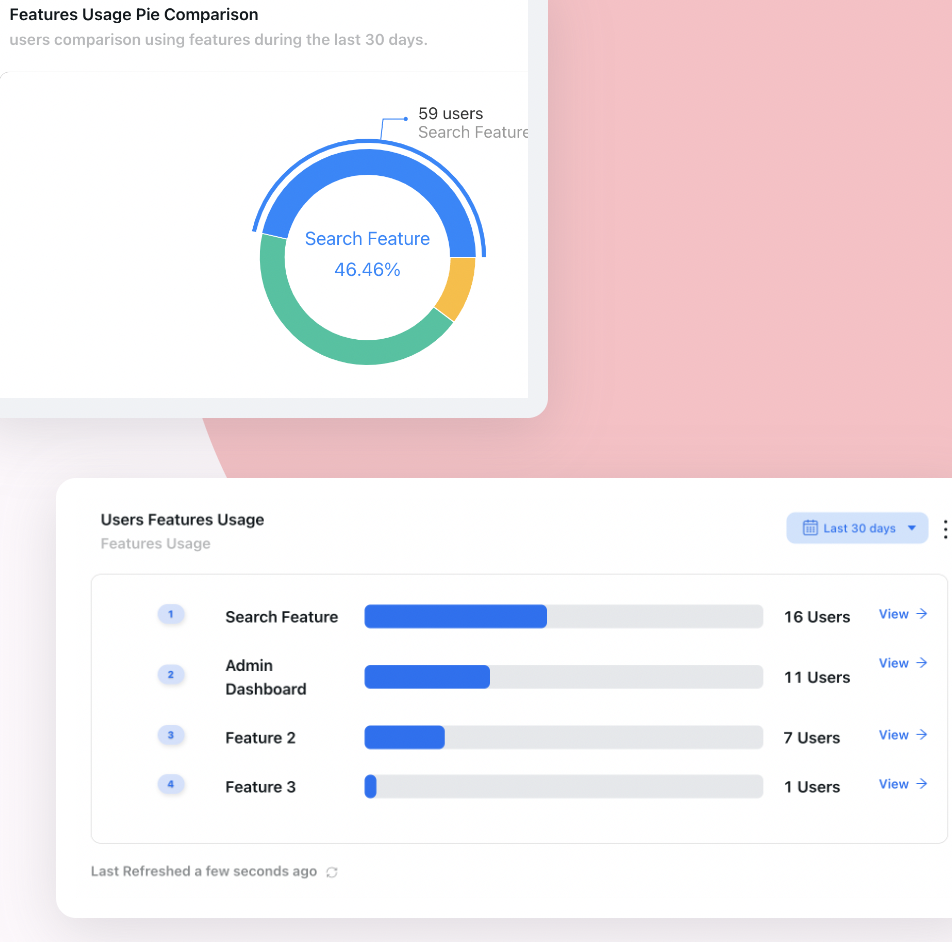
You can drown in feature analytics. Four numbers, each answering a distinct question, cover almost everything a product team needs:
| Metric | Formula | Question it answers |
|---|---|---|
| Feature adoption rate (breadth) | Users who used the feature in the period ÷ active users it is relevant to × 100 | How much of the intended audience takes it up? |
| Usage frequency (depth) | Average uses per adopter per week or month | Is it a habit or an occasional tool? |
| Time to adopt (speed) | Median time from first exposure to second real use | How much friction sits between seeing and using? |
| Feature retention (stickiness) | Share of first-time users still using it 30 days later | Does it survive contact with real work? |
The denominator trap: the fastest way to lie to yourself with an adoption rate is to divide by the wrong population. Divide by all signups and every feature looks doomed, because signups include churned users, wrong-fit users, and roles the feature was never for. Divide by active users in the target segment (the admins, for an admin feature) and the number becomes a decision-making tool. Define the segment when you define the feature, not after the launch numbers disappoint.
Notice what is not on the list: announcement views, tour completions, and launch-week clicks. Those are diagnostics for the exposed and activated stages, useful for finding where the funnel leaks, but the moment one of them becomes the success metric, teams start optimising banners instead of adoption. Our guide to onboarding metrics makes the same argument one level up.
Why shipped features go unused: the six causes
"Nobody uses it" is not a diagnosis. There are six distinct reasons a feature goes unused, and they need different fixes; three of them need no engineering at all.
-
1. Nobody knows it exists
The most common cause by far. The feature shipped, the release note was emailed, and the users it was built for never saw either. Fix with in-app announcements targeted at the relevant segment, not a banner blasted at everyone, which trains banner blindness.
-
2. The announcement arrived at the wrong moment
An email about an export feature, read on a phone during a commute, is forgotten by the time the user is back at their desk. Awareness without the ability to act immediately decays to nothing within hours.
-
3. It is buried in the interface
Three menus deep, behind a settings gear, or on a screen the target users never visit. If usage jumps every time you demo the feature on a call, discovery, not value, is the bottleneck.
-
4. The first run fails
The user clicks in and meets an empty state, a configuration form, or jargon. They gave the feature its one chance and it asked them for work before showing any value. See our guide to empty states; this is where they bite hardest.
-
5. It solves a problem this user does not have
Healthy, if it describes users outside the target segment. A signal to revisit the roadmap if it describes the segment itself: no amount of guidance fixes a feature aimed at nobody, and shipping more of these leads straight to feature bloat.
-
6. The old workaround still wins
Users already solve this with a spreadsheet, an email, or a habit. Your feature is better in the abstract but the workaround is known, and known beats better until the switching cost is paid down. The fix is to catch users at the exact moment they perform the workaround and show the shortcut.
How to tell them apart quickly: look at where the funnel leaks. Exposure low → causes 1–3. Exposure fine but first-run abandonment high → cause 4. Trial fine but no repeat use → causes 5–6. Ten minutes with feature analytics, or five user conversations, usually settles it.
How to increase feature adoption: 7 strategies
- Announce features in-app, to the right segment
- Add contextual prompts at the moment of relevance
- Give every feature a guided first run
- Kill the empty-state cold start
- Put the feature on the path users already walk
- Follow up with one-time users
- Re-launch to the users who never came
1. Announce features in-app, to the right segment
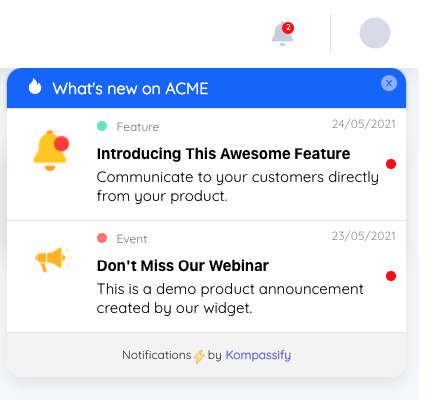
The single highest-leverage change for most teams: move feature announcements from email into the product, and target them. An in-app announcement reaches users while they are in the product and can try the feature immediately; the gap between "heard about it" and "used it" collapses from days to seconds. Targeting matters just as much: announce the admin feature to admins and spare everyone else, using user segmentation so each announcement lands only where it is relevant. Our guide on how to announce a new product feature covers the formats.
2. Add contextual prompts at the moment of relevance
A launch announcement runs once; relevance recurs forever. A small hotspot or tooltip that appears precisely where the feature helps (on the export button when a user opens a large report, on the automation tab when someone repeats the same manual action) converts steadily for months, because it catches each user at the exact moment the feature is the answer to their current problem.
3. Give every feature a guided first run
The first session with a feature decides its fate, so do not leave it to chance. A three-step product tour scoped to the feature (what it does, where to start, what success looks like) is enough. Keep it short and end it on a completed action, not on a "got it" click.
4. Kill the empty-state cold start
If the feature needs data, configuration, or imports before it shows value, seed it: sample data, a one-click template, or a pre-filled example the user can edit. The first screen should demonstrate the payoff, then ask for the setup, never the reverse.
5. Put the feature on the path users already walk
Discovery by placement beats discovery by announcement. An entry point on the screen where the need arises, a "Generate report" button inside the data view rather than a Reports section in the sidebar, gets found by every user with the need, forever, with zero messaging.
6. Follow up with one-time users
Users who tried a feature once and stopped are your richest signal. They cleared discovery, which rules out half the causes; something in the experience or the relevance lost them. A targeted in-app microsurvey ("You tried X once. What stopped you?") turns that silent drop-off into a diagnosis you can act on.
7. Re-launch to the users who never came
One announcement is not a campaign. A month after launch, pull the segment that has never touched the feature and run a second, differently-angled announcement to them alone, a concrete use case instead of a feature name. Existing adopters never see it, so there is no fatigue cost, and the second wave routinely finds users the first one missed.
Feature adoption: Do vs. Don't
✅ Do
- Define the target segment before measuring adoption
- Count repeat usage, not launch-week clicks
- Announce in-app, where users can act immediately
- Target announcements to the users the feature is for
- Guide the first run and seed the empty state
- Ask one-time users what stopped them
- Track time to adopt as friction shrinks or grows
- Accept low adoption on genuinely niche features
❌ Don't
- Divide adoption by your entire signup base
- Declare victory on announcement views or tour completions
- Blast every release to every user regardless of role
- Rely on email alone to drive in-product behaviour
- Ship a feature behind three menus and call it discoverable
- Rebuild a feature before diagnosing which funnel stage leaks
- Announce five features in one message
- Move a habitual feature's entry point without warning users
Driving feature adoption without engineering time
Almost everything in the strategy list (targeted announcements, contextual tooltips, guided first runs, follow-up surveys, re-launch campaigns) is guidance layered on top of the product, not changes to the product. That distinction decides whether your adoption work ships this week or waits three sprints for engineering capacity.
This is exactly what Kompassify is for. You build product tours, feature announcements, tooltips, hotspots and in-app surveys in a no-code editor, target each one to the segment it is relevant for, and measure who progressed from seeing a feature to using it, all without touching your codebase or waiting on a release. When the data shows a feature leaking users at the first run, you adjust the guidance the same afternoon.
Turn Shipped Features Into Used Features
Kompassify lets you announce features in-app, guide the first run with no-code product tours and tooltips, target every message by segment, and measure real adoption, free up to 100 monthly active users, GDPR-compliant and hosted in the EU.
Start for Free →Frequently Asked Questions
What is feature adoption?
Feature adoption is the process by which existing users of a product discover a specific feature, try it, and make it part of how they regularly use the product. It is measured per feature, not per product: a user can be fully adopted on the product overall while never touching half of what it can do. A feature counts as adopted when a user has incorporated it into their normal workflow, not when they have merely clicked it once.
What is the difference between feature adoption and product adoption?
Product adoption describes whether someone becomes a regular user of your product at all, and mostly concerns new users moving from signup to habit. Feature adoption describes whether existing users take up an individual capability inside the product. The two need different tactics: product adoption is largely an onboarding problem, while feature adoption is largely a discovery and relevance problem among people who already use the product every week.
How do you calculate feature adoption rate?
Feature adoption rate is the number of users who used the feature in a period divided by the number of users who were active and could have used it, multiplied by 100. The denominator matters: divide by all signups and every feature looks like a failure; divide by the users the feature is actually relevant to, and the number becomes something you can act on. Track it alongside time to adopt and repeat usage, because a single use is trial, not adoption.
What is a good feature adoption rate?
It depends entirely on the feature's intended audience. A core-workflow feature should see adoption from the large majority of active users, while a power-user or admin feature may be perfectly healthy at a small fraction. That is why the honest benchmark is your own target segment: define who the feature is for, measure adoption within that segment, and treat a wide gap between exposure and trial, or between trial and repeat use, as the signal to act on.
Why do users ignore new features?
Usually one of six reasons: they never learned the feature exists, the announcement reached them at a moment when they could not act on it, the feature is buried in navigation, its value is not obvious in the first thirty seconds, it solves a problem they do not have, or an old workaround already works well enough that switching feels like effort. Diagnosing which one applies matters, because the fixes are different: an awareness problem needs in-app announcements, while a value problem needs a better first-run experience.
How do you increase feature adoption?
Announce the feature inside the product where users can try it immediately, target the announcement to the segment the feature is for, add contextual prompts at the moment of relevance, make the first run succeed with a short guided walkthrough, remove the empty-state cold start, follow up with users who tried it once and stopped, and measure repeat usage rather than clicks. In-app guidance consistently outperforms email for this because it reaches users at the moment they can act.
Which feature adoption metrics should you track?
Four cover most needs: adoption rate within the target segment (breadth), usage frequency among adopters (depth), time to adopt after first exposure (speed), and retention of the feature after 30 days (stickiness). Together they distinguish a feature nobody finds from a feature people try and abandon, two problems that look identical in a raw click count but need opposite fixes.