Read enough onboarding advice and a single product emerges from it: sign up, see the value in five minutes, hit the aha moment, convert. It is good advice for that product. It is close to useless for the product where the first meaningful result depends on importing a year of data, learning three concepts that do not exist anywhere else, and getting a colleague to approve a setting.
Teams with complex products know this, and they respond in one of two bad ways. They try to force the five-minute playbook onto a three-week reality, and get a tour that shows an empty product. Or they decide onboarding is a sales engineer's job and send every account through a call, which works until the calls outnumber the engineers.
There is a third way, and it starts by admitting that the road to value is long and then designing it to be walked. This guide is that design: what makes a product complex, why simplifying the product is the wrong fix, six principles for staging the path, where the human belongs, and how to measure onboarding when time to value is measured in weeks.
Key Takeaways
- Complexity has four sources: concepts, configuration, collaboration and data. Each produces a different stall and needs a different pattern.
- Simplify the path, not the product. Hiding capability breaks the users who bought it for that capability.
- Find the earliest real win and stage the rest. Sample data makes a first win possible in the first session, before setup.
- Separate setup from learning. A checklist carries the mechanics; tooltips carry the concepts, where they appear.
- Design for days, not minutes. Progress that survives a logout, and a way back to the exact step.
- Spend the human hours on decisions, not on clicking through screens the product can explain itself.
What Makes a Product Complex to Onboard
Complex product onboarding: definition
A product is complex to onboard when a new user cannot reach a real result without first doing something that takes time, learning something that is new, or involving someone else. Complexity is not the same as having many features; a product with two hundred features and an instant first win is broad, not complex. Complexity is about what stands between signup and the first thing that matters.
Four things can stand there, and most complex products have at least two of them. Naming which ones is the first design step, because each one stalls users differently and each one has a different fix.
| Source of complexity | What stands between signup and value | How users stall | The pattern that fixes it |
|---|---|---|---|
| Conceptual | Ideas that do not exist elsewhere: a “segment”, an “entity”, a “workflow state” | They do the steps without understanding them, then cannot repeat them | Teach each concept on the screen where it is used, not up front |
| Configurational | Setup before anything works: integrations, permissions, mappings, rules | They leave mid-setup and never come back to an empty product | A resumable setup checklist, with sample data in the meantime |
| Collaborative | Other people: an admin to approve, a colleague to invite, a team to adopt | They are blocked on someone who has not logged in | Role-based paths, and setup steps that show who they wait on |
| Data-dependent | The product is empty until the user's own data arrives | They cannot judge the product because it shows nothing | Sample data and templates as the default first state |
The table is worth running your own product through before anything else. A product whose complexity is mostly conceptual needs a different first week from one whose complexity is mostly configurational, and the generic checklist-plus-tour will serve neither well.
The Wrong Fix: Simplifying the Product Instead of the Path
When onboarding a complex product goes badly, the first instinct is to make the product look simpler: hide the advanced settings, collapse the menu, strip the first screen down to one button. It feels like the obvious move and it fails in two ways.
First, the complexity is usually why the customer bought. A product that handles the hard cases in a hard domain cannot also be a product with three buttons, and the users who need the hidden capability will now spend their first week unable to find it. That is not a simpler onboarding; it is a longer one with a worse mood. The feature bloat guide is about removing capability nobody uses; this is different, and hiding capability people paid for is the mistake it warns against.
Second, a stripped-down first session demonstrates a product that does not exist. The user forms a model of something small and simple, then meets the real product on day three, and every assumption they made is wrong. The onboarding did not reduce the learning; it deferred it to a moment with no guidance.
Simplify the path, not the product. The product stays exactly as capable as it is. What changes is the sequence in which a new user meets it: which screen comes first, which decision each screen asks for, and when each concept arrives. Complexity that is sequenced feels like depth. Complexity that arrives all at once feels like a wall.
Principle 1: Find the Earliest Real Win, Then Stage the Rest
The five-minute playbook is wrong about the timescale and right about one thing: a user needs to see something real early. In a complex product the something real is not the full outcome. It is the smallest result that is unmistakably the product working.
For an analytics product that needs a data warehouse connection, the earliest real win is a chart on sample data that looks like the user's industry. For a workflow tool that needs approvals configured, it is one item moving through a two-step workflow the user built in a minute. For a financial product that needs a bank connection, it is the connection itself, confirmed, with one real transaction visible. None of those is the value the customer is paying for, and every one of them is proof that the value exists.
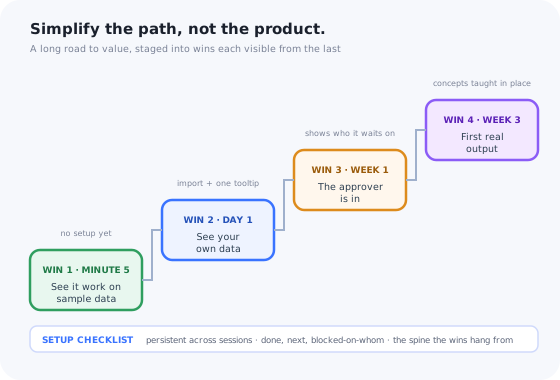
Then the rest is staged. Instead of one distant goal, the onboarding has a ladder of wins, each one reachable from the last, each one unlocking a little more of the real product. The time to value guide covers how to find the first rung; the principle here is that a complex product needs four or five of them, and that each should be visible from the one before.
Each win is reachable from the last and visible from it. The guidance under each rung is different because the source of complexity at that rung is different.
Principle 2: Separate Setup From Learning
Complex onboarding mixes two different jobs and treats them as one. Setup is mechanical: connect this, import that, set these permissions, map those fields. Learning is conceptual: what a segment is, why a workflow has states, how approval differs from review. A single product tour that tries to do both teaches concepts to someone who is trying to finish a task, and asks for tasks from someone who is trying to understand.
Give them different vehicles. Setup lives in a persistent checklist: a list of steps that is visible on every screen, shows what is done and what is next, can be left and returned to, and can be handed to a colleague. The checklist is the spine of complex onboarding because it is the only pattern that survives a logout, a weekend and a handover.
Learning lives in the interface itself: tooltips on the concept where it appears, empty states that explain what will be here and why, a short tour that introduces one stage when the user reaches it. This is progressive onboarding, and in a complex product it is not an optimisation but a necessity, because the concepts cannot all be taught before the user has seen the screens they apply to.
Principle 3: Teach Concepts Where They Appear, Not Up Front
The instinct with a conceptually complex product is to explain the concepts first: a welcome tour of the vocabulary, a glossary, a five-minute video on how the model works. The user watches, nods, and retains almost none of it, because the concepts were explained before there was anything to attach them to.
A concept taught on the screen where it is used sticks, because the screen is the example. The field called “entity” gets a tooltip that says what an entity is in this form. The empty segments page says what a segment will do once one exists, and offers to create the first. The approval state gets its explanation the first time an item enters it. This is contextual help doing the job that a glossary cannot: teaching one idea, at the moment it is needed, with the thing it describes on screen.
Two rules make it work. Each concept is explained once, at first encounter, with a way to reopen the explanation later; a tooltip that fires every time is noise by the third. And the explanation says why the concept exists, not only what it is: users tolerate complexity they understand the reason for and resent complexity that looks arbitrary. The empty states guide covers the second half of this, since in a complex product the empty state is where most concepts are met first.
Principle 4: Route by Role, Because Complex Products Have Several
Simple products have a user. Complex products have an administrator who configures, end users who work in it, an approver who signs things off, and often a sponsor who reads the reports. The administrator's onboarding is three weeks of setup; the end user's is fifteen minutes of “here is where your work is”; the approver's is one screen. Sending all four through the same flow gives the end user a tour of settings they cannot see and the administrator a tour that skips the only part they needed.
Route at the door. A one-question welcome survey, or the role the invite carried, decides which path opens. Each path is the shortest route to that role's first win, and the paths are not equally long: the administrator's checklist has twelve steps and the approver's has one. This is the specific form that personalised onboarding takes in a complex product, and it is the single change that most often moves activation, because it stops measuring the approver's fifteen-minute onboarding against the administrator's three-week one.
The collaborative source of complexity also shows up here. When the end user's first win depends on the administrator finishing setup, say so on the end user's screen: “your workspace is being set up by [admin]; here is what you can do meanwhile”. A user who knows what they are waiting on waits; a user who sees an empty product leaves.
Principle 5: Make Sample Data and Templates the Default
A data-dependent product is unjudgeable until the data arrives, and the data arrives after the import, which is the step most users abandon. The way out is to make the product legible before the import: a workspace pre-loaded with sample data that resembles the user's world, or a template that pre-configures most of the structure.
Sample data does three jobs at once. It lets the user reach the first win without any setup. It teaches the concepts by example: a sample segment, a sample workflow with items in each state, shows what those words mean better than any tooltip. And it makes the import step a replacement rather than a leap: the user is swapping sample data for their own in a product they already understand, instead of filling an empty one on faith.
Two cautions. Make the boundary obvious, so nobody mistakes the sample for their own data or acts on it. And make leaving the sample a single, prominent action: “replace with my data”, at the top of the checklist, from the first session. A product that keeps showing sample data on day ten has stalled the user and hidden it.
Principle 6: Design for Days, Not Minutes
Complex onboarding spans sessions. The user starts the import, leaves for a meeting, comes back tomorrow; invites a colleague who joins on Thursday; finishes configuration the following week. Most onboarding patterns silently assume a single sitting, and they break in specific ways when the sitting ends.
-
Progress survives a logout
The checklist shows the same state tomorrow as it did tonight, on any device. A user who returns to a reset checklist assumes their work was lost and often does not check.
-
A way back to the exact step
The reminder email, the notification, the checklist item: each one links to the screen where the step happens, not to the dashboard. Every click between the link and the step loses someone.
-
Tours do not restart
A tour that was half-finished resumes or is offered again; it does not fire from step one on the next login. The triggers guide covers the rule.
-
Steps can be handed over
“Assign this step to a colleague” on any checklist item, with the colleague receiving the link to the exact screen. In a collaborative product this is the step that unblocks the most accounts.
-
A stall triggers a nudge, once
If the next step has not moved in a few days, one message, in-app if they are there and by email if not, naming the step and linking to it. Not a sequence; one.
Where the Human Belongs
None of this removes human onboarding from a complex product. It changes what the humans do. The repeatable part, the tour of the interface, the standard setup steps, the same five questions every account asks, belongs in the product, where it reaches every account at the moment of need including the ones nobody had time to call. The hours that frees go to the decisions that genuinely differ per customer.
| Put it in the product | Keep it with a person |
|---|---|
| Introducing the interface and the vocabulary | Mapping the customer's data model onto yours |
| The standard setup sequence and its checks | Deciding which workflow to configure first, and why |
| Explaining a concept at first encounter | The unusual case that no guide anticipated |
| Reminding a stalled account of the next step | An account whose usage does not match what they bought |
| Showing who a step is waiting on | Getting the sponsor to make the approver log in |
The enterprise onboarding guide covers the multi-stakeholder version of the right-hand column, and digital customer success covers the model that results when the left-hand column is done well: fewer hours per account, and more of them where they change something.
Measuring Onboarding When Time to Value Is Weeks
A single time-to-value number is discouraging for a complex product and, worse, uninformative: it says the road is long without saying where it is blocked. Measure the milestones instead, and read three signals for each.
The share of accounts reaching each win. The largest drop between consecutive wins is the stage to work on.
A long gap after a step that most accounts eventually complete means the step is blocked, usually on data or on another person.
Within the checklist, which items are done, skipped, or stuck. The stuck item is the one to instrument next.
Which explanations get opened, reopened, or dismissed instantly. Reopened means the concept is hard; dismissed means the tooltip is in the wrong place.
Support tickets tagged with the onboarding step they concern. The step that generates them is missing an explanation on the screen.
The administrator's and the end user's activation on their own clocks. An aggregate across roles describes nobody.
Session replay on the stalled step usually turns a number into a cause within a few recordings, and it is the fastest way to tell a confusing step from a blocked one. The broader onboarding metrics guide covers the definitions.
Complex Product Onboarding: Do vs. Don't
Do
- Name which of the four sources of complexity your product has, and design for those.
- Get every user to a first real win in the first session, on sample data if necessary.
- Carry setup in a persistent, resumable, assignable checklist.
- Teach each concept once, on the screen where it is used, with the reason it exists.
- Route by role from the first screen, with paths of different lengths.
- Measure milestones and the gaps between them, by role.
Don't
- Hide capability to make the first session look simple.
- Explain all the concepts up front in a tour, a glossary or a video.
- Show an empty product while the import runs.
- Send administrators, end users and approvers through one flow.
- Restart the tour on every login, or reset the checklist.
- Spend human onboarding hours on the steps the product could explain itself.
Building It Without Engineering Time
Every principle above is a set of small in-app pieces, a checklist here, a concept tooltip there, a tour per role, and every one of them changes as the product and the stall points change. In a complex product, the onboarding is never finished, which is why it cannot live in the engineering backlog.
Kompassify gives product, onboarding and customer success teams the pieces as a no-code layer on the existing product: an onboarding checklist that persists across sessions and can lock steps until an earlier one is done, tooltips and hotspots for the concepts on each screen, product tours per role launched from a multi-choice welcome question, and analytics per flow and per step, so the stalled step is visible without a data request.
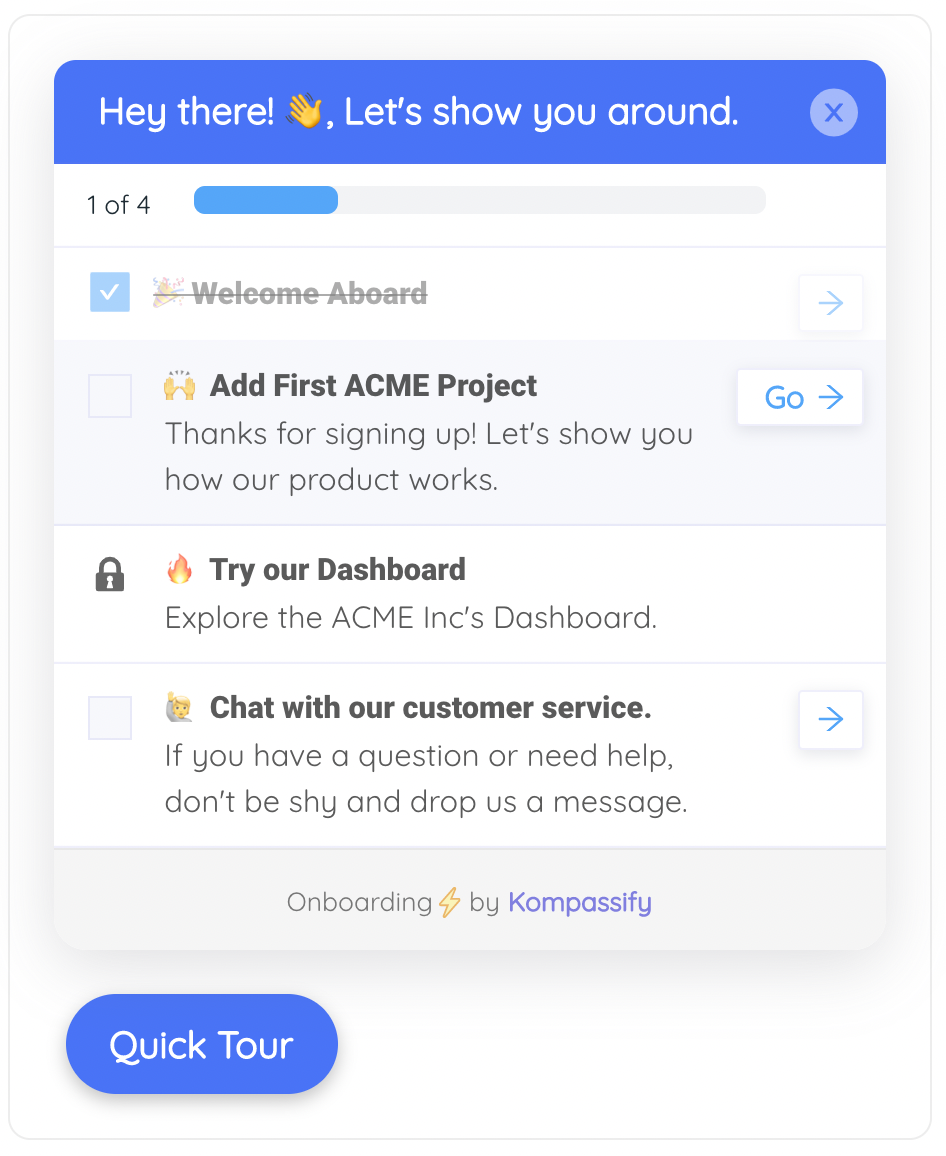
The setup spine: progress that survives a logout, the next step one click away, and a locked step that waits until the one before it is done.
Stage the road to value, without a release
Build the checklist, the concept tooltips and a tour per role in a visual editor, target them by role and stage, and watch milestone completion in the same dashboard. Free up to 100 monthly active users, plans from $129/month, GDPR-compliant and EU-hosted.
Start for free →The One-Paragraph Version
A complex product is one where something stands between signup and the first thing that matters: concepts, configuration, other people, or the user's own data. The fix is never to make the product look simpler, because the complexity is why they bought it; the fix is to sequence the path. Find the earliest real win, on sample data if necessary, and stage the rest as a ladder of wins each visible from the last. Carry setup in a persistent, resumable checklist and teach concepts on the screen where they appear, once, with the reason they exist. Route by role from the first screen, because the administrator's three weeks and the approver's one screen are different onboardings. Design for days, with progress that survives a logout and a link back to the exact step. Spend the human hours on the decisions that differ per customer, not on the tour. And measure milestones and the gaps between them, by role, because a single time-to-value number for a complex product says only that the road is long.
Frequently Asked Questions
How do you onboard users to a complex product?
By staging the road to value rather than shortening it. Find the earliest real win the product can offer, usually seeing the product work on sample data or on a small slice of the user's own, and get every new user there fast. Then separate the mechanical setup (imports, integrations, permissions) into a persistent, resumable checklist, and teach the product's concepts where they appear, in tooltips and empty states, rather than up front. Route users by role, because complex products have several, and design the whole thing to span days, with progress that survives a logout. The human onboarding that remains should be spent on configuration decisions, not on clicking through screens.
Should I simplify my product to make onboarding easier?
Usually not. The complexity is often the reason people bought it: a product that handles every case in a hard domain cannot also be a product with three buttons. Removing or hiding capability to make the first session look simpler tends to backfire twice: the users who needed the capability cannot find it, and the first session now demonstrates a product that does not exist. Simplify the path, not the product: sequence what a new user meets, so that each screen asks for one decision and each concept arrives at the moment it is needed.
How long should onboarding take for a complex product?
As long as the setup genuinely takes, which may be weeks, but with a first win inside the first session. The mistake is to measure complex product onboarding with a single time-to-value figure and then despair at it. Measure milestones instead: time to first win on sample data, time to the user's own data being visible, time to the first collaborator joining, time to the first real output. Each milestone has its own clock, and the one that stalls is the one to work on. A complex product that shows something real in the first ten minutes and finishes setup in three weeks is onboarding well.
What is the best onboarding pattern for complex software?
A persistent setup checklist as the spine, with product tours and concept tooltips hanging off it. The checklist carries the multi-session, multi-person setup: it shows what is done, what is next, what is blocked on someone else, and it is there whenever the user comes back. Tours introduce each stage when the user reaches it. Tooltips and explained empty states teach the concepts on the screen where they are used. Sample data or templates make the product legible before the user's own data arrives. No single pattern does the job; the combination does.
Do complex products need human onboarding?
Some of it, spent well. The parts of onboarding that repeat identically for every account, the tour of the interface, the standard setup steps, the same five questions, belong in the product, where they reach every account at the moment of need. The human hours belong on the decisions that differ per customer: how to map their data model, which workflow to configure first, what to do about the unusual case. Teams that move the repeatable part into the product usually end up with better human onboarding, not less, because the hours go to the accounts and moments where a person changes the outcome.
How do I know where users get stuck in a complex onboarding?
Instrument the milestones and the setup steps, then read three things together: the drop between consecutive milestones, the time between them, and the support tickets tagged by step. A step with a low completion rate is confusing or unnecessary; a step with a long gap after it is blocked, often on data or on another person; a step that generates tickets is missing an explanation on the screen. Session recordings on the stalled step usually show the specific cause in a few minutes. Fix the step that stalls most accounts first, not the one that is easiest to change.