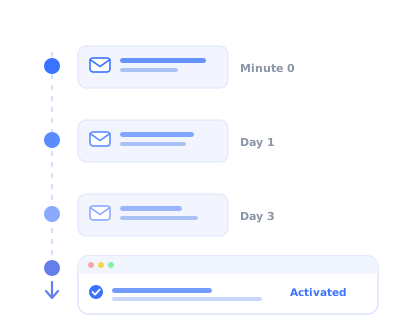
Someone signs up for your product on a Tuesday afternoon. They poke around for four minutes, get pulled into a meeting, and close the tab. Nothing about that session was a failure; it just ran out of time.
What happens over the next fourteen days decides whether that person becomes a customer or a line in your churn report. And for most SaaS products, the only channel that can reach them during those fourteen days is email.
That makes the onboarding email sequence one of the highest-leverage assets a product team owns. It is also one of the most consistently mishandled: written once during a launch sprint, never revisited, and measured by open rate instead of by the thing it is supposed to cause.
This guide covers what an onboarding email sequence is, the seven emails worth sending, how to trigger them on behaviour instead of a calendar, and (the part most guides skip) what has to happen after the click for any of it to matter.
Key Takeaways
- The sequence's job is activation, not engagement. An email that gets opened but produces no in-product action has failed. Judge every email by the behaviour it causes inside your app.
- Behaviour triggers beat calendars. Sending "here's how to create your first project" to someone who created three yesterday teaches them to stop reading you.
- One email, one job, one call to action. If you cannot state an email's purpose in a single sentence, it does not belong in the sequence.
- Email is a re-entry channel, not a teaching channel. It is excellent at getting people back into the product and poor at explaining anything, because instructions in one window and the interface in another do not mix.
- The click is the handoff. What the user lands on decides whether the email worked: a deep link into a screen with in-app guidance converts; a link to a generic dashboard does not.
- Stop sending when the user activates. A sequence that keeps firing after the goal is met is noise, and it costs you deliverability on the emails that still matter.
What is an onboarding email sequence?
An onboarding email sequence is a series of automated emails sent to a new user after signup, each designed to move them one step closer to their first real result in the product. It is not the same thing as a welcome email, and it is not a drip campaign in the marketing sense.
The distinction that matters is purpose. A marketing drip exists to keep a name warm until they are ready to buy. An onboarding sequence exists to get a specific person past a specific obstacle between signup and value. Every email in it should be traceable to a step a user has to complete, and it should stop firing the moment that step is done.
The simplest definition: an onboarding email sequence is a set of automated, conditionally-sent messages whose success is measured in product events, not email events. If your reporting stops at open and click rate, you have a newsletter with a signup trigger.
A well-built sequence has three properties. Each email has one job. Each email has a condition that can cancel it. And each email points at exactly one action, deep-linked to the screen where that action happens. Drop any of the three and the sequence degrades into announcements.
Where it sits in the wider onboarding picture
Onboarding email is one layer of a system. The welcome screen handles the first thirty seconds. The onboarding checklist holds the medium-term structure inside the product. Product tours and tooltips teach individual features in context. Email covers the gaps between sessions, the hours and days when the user is not looking at your product at all.
Teams get into trouble when they ask email to do the other layers' jobs. An eight-paragraph email explaining how to configure an integration is a symptom of missing in-app guidance, not a good email.
Calendar-based vs behaviour-triggered onboarding emails
The single biggest quality difference between onboarding sequences is what decides when an email goes out.
A calendar-based sequence sends email #3 on day three, unconditionally. It is easy to build and easy to reason about, and it is wrong for roughly half your users at any given moment: irrelevant to the ones who have already raced ahead, and irrelevant to the ones who never came back after signup.
A behaviour-triggered sequence sends email #3 when a user has done X and not yet done Y. It fires on product events: setup finished, first project created, invited a teammate, idle for 48 hours. Every message arrives because of something the user did or conspicuously did not do.
In practice, the right answer is a hybrid. Behaviour triggers are the primary logic, with a time-based fallback underneath so a completely silent user still receives something. Pure behaviour triggering has a failure mode: a user who does nothing generates no events, and a sequence listening only for events will never speak to the people who need it most.
| Aspect | Calendar-based | Behaviour-triggered |
|---|---|---|
| What fires it | Time since signup | A product event, or the absence of one |
| Setup effort | Low: no event tracking required | Medium: needs reliable event data |
| Relevance | Degrades fast as users diverge | Stays relevant across very different paths |
| Main failure mode | Tells users to do things they already did | Says nothing at all to fully inactive users |
| Best used for | Trial-expiry and deadline reminders | Everything tied to a setup step or milestone |
Before you build the triggers, check the data. A behaviour-triggered sequence is only as good as the events feeding it. If "project created" fires inconsistently, or a user's second account is tracked as a separate person, your clever branching logic will produce worse results than a plain calendar. Validate the events first, then automate on top of them.
The 7-email onboarding sequence
Seven is not a magic number; it is what you get when you list the distinct jobs a sequence has to do and refuse to send an email that does not have one. Some products need five. A complex enterprise tool with a data-import step might need nine. Use this as a structure to adapt, not a template to copy.
The welcome: confirm the account, name the one next action
The first task: get one meaningful thing done
The stall recovery: re-engage users who dropped off mid-setup
The depth email: introduce the second-order feature
The proof email: show what good looks like
The expansion nudge: invite teammates or connect a tool
The decision email: convert, or ask why not
1. The welcome email
The welcome email is the only one in the sequence that is genuinely unconditional, and the only one where speed matters more than content. Attention decays fast after signup: a welcome that lands within seconds catches a user whose mind is still on your product, while one that arrives an hour later competes with everything else in the inbox.
The mistake here is treating it as a feature tour in text form. The user just saw your product; they do not need a list of what is in it. They need a confirmation that the account exists and one unambiguous instruction about what to do next.
Hi [First name],
Your account is set up. There's one thing worth doing before anything else: [the single first action, stated as an outcome, e.g. "import a contact list so you can see your first report"]. It takes about two minutes.
[Do the first action] →
If you get stuck, just reply to this email; it comes to a real person.
Keep it plain text or close to it. A heavily designed HTML template signals "marketing" and gets skimmed; a plain message signals "someone at this company is talking to me" and gets read. And make the call to action a deep link into the exact screen where the action happens, not your dashboard root.
2. The first-task email
This is the workhorse of the sequence. Most users who fail to activate do not fail at step four; they fail at step one, because they got interrupted and never came back. The first-task email exists to bring them back to the same place they left.
The condition is what makes it work. If the user already completed the action, this email must not send. Sending it anyway is how you teach a promising new user that your emails are not worth reading, which is a surprisingly expensive lesson to teach in week one.
Anchor the email to a concrete outcome rather than a mechanic. "See which pages your visitors drop off on" is a reason to come back. "Complete your setup" is a chore.
Hi [First name],
You signed up yesterday but haven't [specific action] yet, which is the step that turns [Product] from an empty screen into something useful.
Once it's done you'll see [the concrete result: the report, the dashboard, the first automation running].
Pick up where you left off →
3. The stall-recovery email
A user who started importing data and stopped halfway is in a different situation from one who never started. They have already invested effort, which is an asset, and they hit something that stopped them, which is information.
Stall recovery works best when it is specific about where they stopped and offers a way out of the blockage rather than a repeat of the instruction. This is also the highest-value email in the sequence for product insight: if a large share of your users stall at the same step, you have a UX problem that no email will fix. Our guide to user friction covers how to find and remove those blockers at the source.
Hi [First name],
You got as far as [the exact step] and stopped. That step trips people up more often than we'd like, usually because of [the actual common cause].
Two options: [the shortcut or workaround], or reply to this email and I'll walk through it with you.
Finish [the step] →
4. The depth email
Once a user has done the first thing successfully, the sequence changes character. It stops pushing and starts widening. The depth email introduces the capability that turns a single-use tool into a repeated habit, the second feature that makes the first one worth keeping.
Pick this feature from data, not from your roadmap's favourites. Look at what your retained users do in week two that churned users never did. That behaviour is your depth email's subject.
Keep the explanation short and let the product do the teaching. This email's job is to create the intention; a product tour triggered on arrival does the rest far better than three paragraphs of prose ever will.
5. The proof email
By the middle of the first week, the useful question in a user's head has shifted from "how does this work" to "is this actually worth adopting". The proof email answers that with evidence: a short customer story, a concrete before-and-after, or a specific use case from a company that looks like theirs.
Specificity is everything here. A generic testimonial does nothing. A two-sentence account of how a team with the same job title solved the same problem does a lot. If you can segment this email by role or industry, it is the one worth segmenting.
6. The expansion nudge
For most B2B products, the strongest retention signal is not usage depth; it is whether the account has more than one person in it, or whether the product is wired into a tool the team already lives in. Both are switching costs, and both usually require a deliberate nudge.
Send this only to users who have already got value themselves. Asking someone to invite their team before they are convinced is asking them to stake their reputation on a product they have used twice.
7. The decision email
The final email closes the loop. For a trial product this is the conversion email; for a freemium product it is the upgrade prompt. Either way, it should recap what the user actually achieved rather than restate the pricing page.
The version that consistently underperforms is the one that only says "your trial ends in three days". The version that works reminds them what they built, states plainly what happens to it, and makes the next step obvious. For the wider picture on this stage, see our guide to free trial conversion.
For users who do not convert, this email doubles as your best research instrument. A single question, "what stopped you?", sent at the moment of decision returns more honest answers than any survey sent a month later.
Timing and cadence
Cadence questions are easier to answer once you stop thinking in days and start thinking in the user's activation window, the period during which they are genuinely deciding whether to adopt your product. Compress the sequence into that window and it feels attentive; stretch it beyond and it feels like spam.
| Typical timing | Send condition | Cancel if | |
|---|---|---|---|
| Welcome | Within 60 seconds | Always | Never |
| First task | +24 hours | Key action not done | Key action completed |
| Stall recovery | +48h from last activity | Setup started, not finished | Setup finished |
| Depth | +1 day after first success | Key action done | Second feature already used |
| Proof | Day 5–7 | Still in sequence | Already converted |
| Expansion | Day 7–10 | Activated, solo account | Teammate invited |
| Decision | 2–3 days pre-expiry | Not yet converted | Converted |
The "cancel if" column is the one to build first. Most teams write seven emails and zero cancellation rules, which is how a customer who upgraded on day two still receives "your trial ends soon" on day twelve.
Where onboarding emails stop working, and what takes over
Here is the uncomfortable part, and the reason so many well-written sequences produce disappointing activation numbers.
Email is fundamentally a re-entry channel. It is very good at one job: reaching a person who is not currently in your product and giving them a reason to return. It is structurally bad at teaching, because teaching requires the explanation and the interface to be in the same place. When the instructions live in a browser tab the user has to keep switching back to, comprehension drops with every step.
So the moment a user clicks an onboarding email, the email's job is over, and something else has to take the handoff. If they land on a generic dashboard with no guidance, you have spent your one re-engagement opportunity delivering them to the same confusion that made them leave.
What the landing experience should do
Every onboarding email should deep-link to the specific screen where the action happens, and that screen should greet the returning user with contextual guidance, not a blank state and a hope.
-
A product tour on arrival
The user clicked "import your contacts" and landed on the import screen. A short product tour that starts automatically for that segment finishes the job the email started, in the place where it can actually be done.
-
A checklist that survives between sessions
An onboarding checklist keeps the remaining steps visible and holds progress across visits, so a user returning from an email sees exactly where they stopped rather than reconstructing it from memory.
-
Tooltips on the specific field that confused them
If your stall-recovery email exists because users get stuck on one configuration field, the durable fix is an explanation attached to that field. See our guide to onboarding tooltips.
-
Events flowing back to the sequence
The completion has to be recorded, or your sequence cannot cancel the next email. Product analytics closes the loop between what the email asked for and what the user did.
Kompassify is built for the second half of this loop. It adds product tours, tooltips, hotspots, onboarding checklists and in-app announcements to your product without engineering work, and reports on whether users completed each step, which is exactly the event data a behaviour-triggered email sequence needs to decide what to send next. It is GDPR-compliant and EU-hosted, and you can start for free.
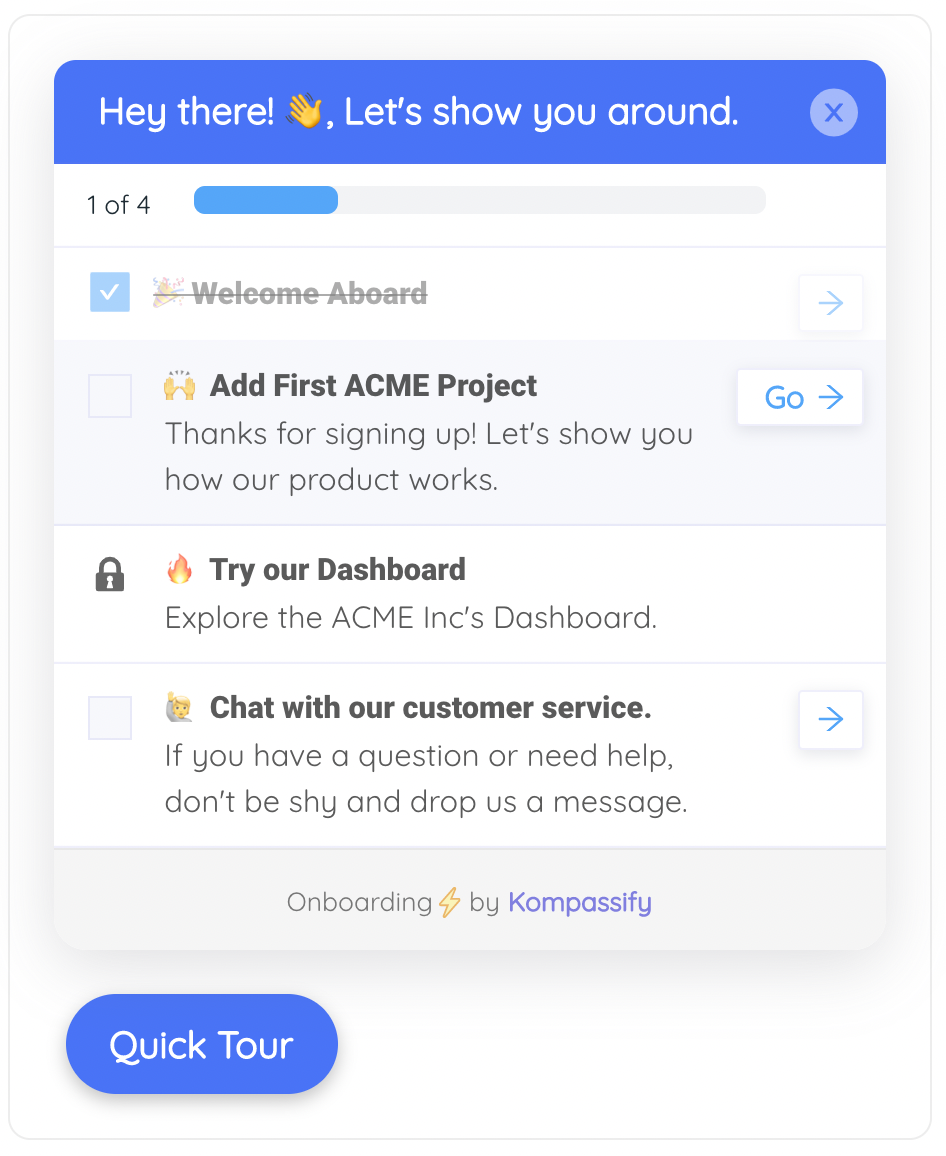
A checklist holds onboarding progress between sessions, so users arriving from an email resume instead of restarting.
How to measure an onboarding email sequence
Open rate is a diagnostic for your subject line and your deliverability. It is not a measure of whether onboarding is working. A sequence can post excellent email metrics and move activation by nothing at all.
The fix is to define, for each email, the in-product event it is supposed to cause, then measure that.
| Metric | What it tells you | What to do when it is low |
|---|---|---|
| Open rate | Subject line and deliverability health | Rewrite subjects; check sender reputation and authentication |
| Click-through rate | Whether the offer inside was compelling | Lead with the outcome, cut to one call to action |
| Click-to-action rate | Of those who clicked, how many completed the task | Fix the landing experience; this is an in-app problem, not an email one |
| Activation rate by cohort | Whether the sequence moves the number that matters | Re-examine which step you are actually asking users to take |
| Time to value | How fast users reach their first real result | Remove steps before adding emails |
| Unsubscribe rate | Whether the cadence has crossed into noise | Cut emails or tighten the cancellation rules |
Click-to-action rate is the diagnostic most teams are missing. If a high proportion of people click and then fail to complete the task, the email is doing its job perfectly and the product is dropping the handoff. No amount of copy editing will fix that; guidance on the landing screen will.
For the broader measurement picture, our guides to user onboarding metrics and time to value cover how these numbers fit together across the whole funnel.
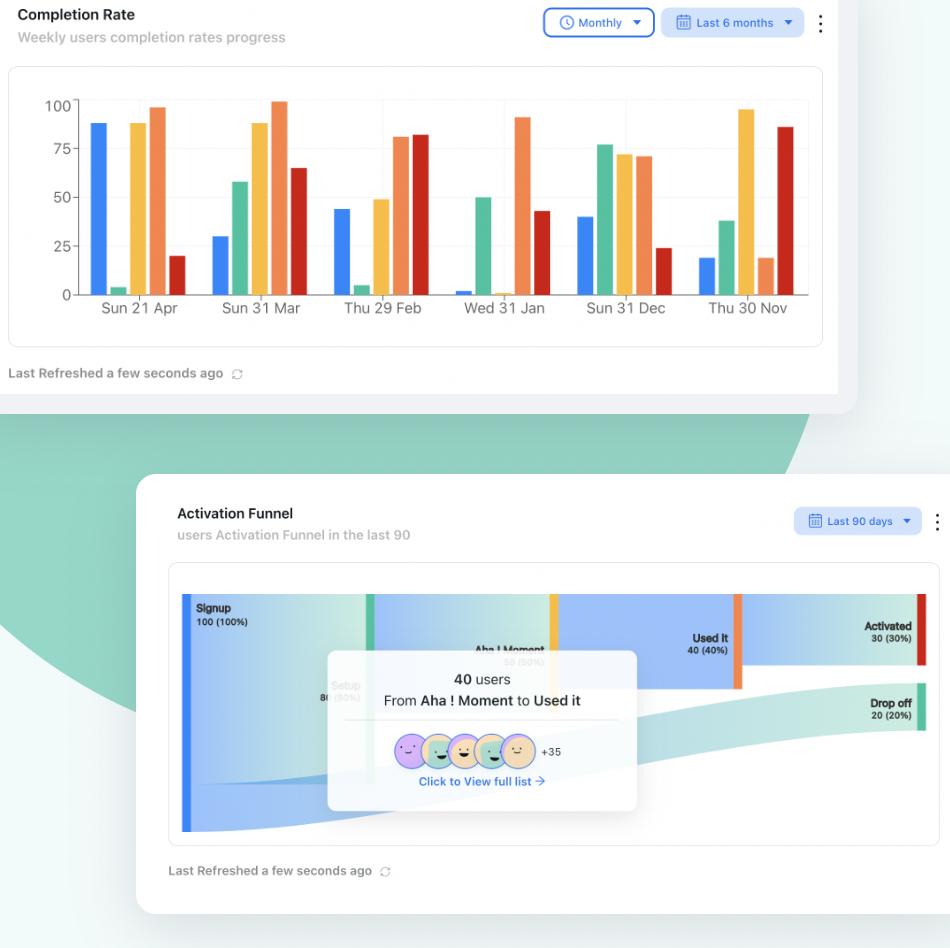
Step-level completion data is what turns an email sequence from guesswork into a system you can tune.
Onboarding email best practices
✓ Do
- Give every email one job and one call to action
- Write a cancellation rule before you write the copy
- Deep-link to the exact screen, never the dashboard root
- Lead with the outcome, not the mechanic
- Send from a real person at a replyable address
- Segment the proof email by role or industry
- Measure the product event, not the open
✕ Don't
- Explain a multi-step workflow in prose
- Send a step reminder to someone who did the step
- Bundle three features into one email
- Ask for a team invite before the user got value
- Use a heavy marketing template for the welcome
- Keep sending after activation or conversion
- Judge the sequence on open rate alone
Five mistakes that quietly kill sequences
Writing the sequence before mapping the activation path. If you cannot name the one action that separates your retained users from your churned ones, no sequence will help. Map that first; our guide to increasing user activation covers how to identify it.
Treating email as documentation. Long explanatory emails are almost always compensating for missing in-app guidance. The email should create the intention; the product should teach the mechanics.
Never revisiting it. Onboarding sequences are written during launch and then quietly outlive three product redesigns. An email referencing a screen that no longer exists actively damages trust. Review the sequence whenever the onboarding flow changes.
One sequence for every user. An admin evaluating your product for a team of forty and a solo user testing it on a Sunday need different things. Even two branches based on role or company size beats one generic path; see user segmentation for how to draw those lines.
Optimising the emails instead of the onboarding. If activation is low, the sequence is rarely the constraint. A product whose first-run experience is genuinely clear needs fewer onboarding emails, not better ones.
A practical build order
If you are starting from nothing, build in this order. Each step is useful on its own, so you get value before the full system exists.
Week one
- Name the single activation action that predicts retention in your data
- Write the welcome email and the first-task email, with the cancellation rule on the second
- Deep-link both to the exact screen where the action happens
Week two
- Add in-app guidance on those landing screens: a short tour and a persistent checklist
- Confirm the completion event fires reliably for every path a user can take
- Start recording click-to-action rate, not just click-through
Week three and beyond
- Add stall recovery once you can see where users actually stop
- Layer in depth, proof and expansion emails as separate branches
- Add the decision email with a single open question for non-converters
- Review the whole sequence every time the onboarding flow changes
Emails Bring Them Back. Kompassify Takes It From There.
Product tours, tooltips, hotspots, onboarding checklists and in-app announcements, added to your product without code, with step-level analytics that tell your email sequence what to send next. GDPR-compliant and EU-hosted.
Start for Free →Frequently Asked Questions
What is an onboarding email sequence?
An onboarding email sequence is a series of automated emails sent to a new user after signup, designed to move them from account creation to their first real result in the product. Unlike a one-off welcome email, a sequence is structured: each message has a single job, a single call to action, and a trigger that decides whether it should be sent at all. The goal is not engagement with the emails themselves; it is activation inside the product.
How many emails should an onboarding sequence have?
Most SaaS onboarding sequences land between five and eight emails spread across the first two to three weeks. The exact number matters far less than the rule behind it: send an email only when it has a distinct job that the previous email did not do. If you cannot describe an email's single purpose in one sentence, it does not belong in the sequence. Seven is a practical default because it covers welcome, first task, feature depth, social proof, a stall recovery, an expansion nudge, and a decision email.
Should onboarding emails be time-based or behaviour-triggered?
Behaviour-triggered, wherever you can. A calendar-based sequence sends the same email on day three whether the user has already completed that step or has not opened the product at all, which makes the message irrelevant in both directions. A behaviour-triggered sequence fires on product events: setup completed, first project created, no login for 48 hours. The practical approach is a hybrid: behaviour triggers as the primary logic with a time-based fallback, so a silent user who generates no events still receives something.
What should the first onboarding email say?
The first email should arrive within seconds of signup, confirm the account, and point to exactly one next action. Resist the urge to summarise every feature; the user has just seen your product and does not need an inventory of it. A welcome email that says "here is your account" plus "here is the one thing to do first" outperforms a feature tour in text form. Keep it plain text or close to it, and make the call to action a deep link into the specific screen where that first action happens.
Do onboarding emails replace in-app onboarding?
No, and treating them as interchangeable is the most common structural mistake. Email is a re-entry channel: it is good at reaching people who are not currently in your product and persuading them to come back. It is poor at teaching, because the user has to read an instruction in one window and execute it in another. In-app onboarding is a teaching channel: product tours, tooltips, checklists and hotspots explain a feature at the exact moment the user is looking at it. The sequence works when email owns the return trip and in-app guidance owns what happens after the click.
What metrics should I track for an onboarding email sequence?
Open and click rates tell you whether the email worked as an email, not whether onboarding worked. The metrics that matter are downstream: click-to-activation rate (of the users who clicked, how many completed the intended action), activation rate by cohort, time to value, and sequence-level unsubscribe rate. A sequence with a 45% open rate and no activation lift is failing at its actual job. Track the in-product outcome each email is supposed to cause, and judge the email on that.
How long should an onboarding email sequence run?
Tie the length to your product's natural activation window rather than to a fixed number of days. For a self-serve tool where users can reach value in one session, two weeks is usually enough. For a product that requires data import, teammate invitations or admin configuration, three to four weeks is more realistic. The sequence should end when the user either activates, in which case they graduate to your regular lifecycle messaging, or clearly disengages, in which case continuing to send costs you deliverability and goodwill.