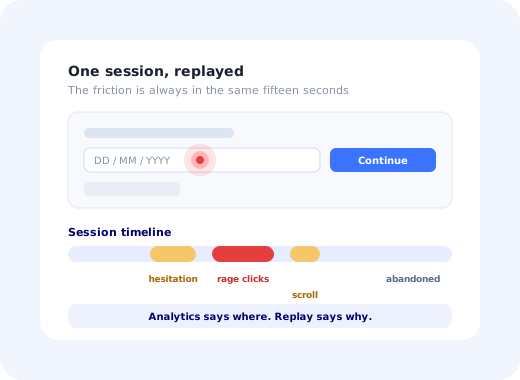
The first time a product team watches a session replay of their own onboarding, two things happen. Someone says "oh no" out loud, and someone else opens fourteen more recordings. Three hours later the team has a rich, vivid, entirely unsystematic sense that something is wrong somewhere, and no decision has been made.
Session replay is unusually good at one job, explaining a number you already have, and unusually bad at the job people instinctively use it for, which is discovering what to care about. Get that order right and it is among the fastest routes from a drop-off to a fix that exists. Get it wrong and it is the most engaging way to waste an afternoon in software.
This guide covers what replay actually records, how it fits alongside analytics and heatmaps, a six-step workflow that ends in a shipped change, the friction signals worth watching for, the masking and consent obligations that decide whether you can use it at all, and how to close the loop once you know what is breaking.
Key Takeaways
- Start from a number, never from the recordings. Replay explains a drop-off; it does not find one.
- Ten to fifteen sessions of the same failure is usually enough; causes repeat far sooner than people expect.
- Six signals carry most of the information: rage clicks, dead clicks, hesitation, scroll thrash, form abandonment, backtracking.
- Mask by default, un-mask by exception. Anything else eventually records something it should not.
- Sample by intent (new users, error sessions, the segment under investigation) rather than recording everything.
- Most findings are not bugs. They are people who did not know what to do next, which is a guidance fix, not an engineering one.
What Is Session Replay?
Session replay: definition
Session replay is a tool that reconstructs what a user did in your product so you can watch it back: cursor movement, clicks, scrolling, typing, navigation and errors, played as a video-like timeline. In most implementations it is not actually a video: the tool records changes to the page structure plus the user's inputs, and rebuilds the screen on playback.
That technical detail has a practical consequence worth knowing before any privacy conversation: because the page is reconstructed rather than filmed, individual fields can be masked at capture time. A password field, a card number or a patient name can be replaced with blocks before anything leaves the browser. Masking is the reason replay is usable at all in products handling anything sensitive, and the reason "we'll turn it on and clean it up later" is not a viable plan.
Replay, Analytics and Heatmaps
| Tool | Question it answers | Strength | Failure mode |
|---|---|---|---|
| Product analytics | What happened, to how many, how often? | Sizes the problem; can be tracked over time. Built on event tracking. | Confident guesses about causes it cannot see. |
| Session replay | Why did those people behave that way? | Reveals causes nobody would have hypothesised. | Vivid anecdotes with no idea whether they are typical. |
| Heatmaps | Where does attention and clicking concentrate? | Fast aggregate read of one screen's layout. | Averages away the specific broken journey. |
| User interviews | What were they trying to achieve? | The only source of intent. | People misremember what they actually did. |
The pairing that matters is the first two. Analytics proves that 58% abandon step three; replay shows the person typing a date that the field silently rejects. Analytics alone leads to redesigning the wrong thing with great confidence. Replay alone leads to fixing something two people did.
The Six-Step Workflow
- Quantify the drop-off first
- Filter replays to the exact failing cohort
- Watch ten to fifteen in a row, taking notes
- Group the notes into causes
- Fix the top two causes
- Re-measure the same funnel step
1. Quantify the drop-off first
Open your onboarding funnel and find the single worst step. Write down its conversion rate before you watch anything; this number is both your target and your protection against confirmation bias later, when a compelling recording tempts you to fix something that affects four people.
2. Filter replays to the exact failing cohort
Not "recent sessions": sessions that reached the failing step and did not complete it. Every replay tool supports some version of this filter, and it is the difference between research and browsing. Add segment filters if the drop-off is concentrated: one plan, one browser, one country, one role.
3. Watch ten to fifteen in a row, taking notes
Play at normal speed for the section around the failure and write one line per session: what the person was doing, what they hesitated over, what they clicked that did nothing, where they left. Resist fixing anything yet. Fifteen sessions is usually more than enough; causes repeat much sooner than teams expect, and the third repetition of the same behaviour is the finding.
4. Group the notes into causes
Sort your lines into three or four buckets. In practice two or three causes account for most of the loss, and they are usually mundane: an ambiguous label, a control that looks disabled, a required field with no visible indication, an error message rendered below the fold. Count how many sessions fall into each bucket; that count is your prioritisation.
5. Fix the top two causes
Sort by what each fix requires. Genuine bugs go to engineering. Layout and wording become design changes. And a large share, often the largest, is neither: someone who did not know what to do next on a screen working exactly as intended. That is a microcopy or guidance fix, and it can ship this week rather than next quarter.
6. Re-measure the same funnel step
Return to the number from step one. If it has not moved, you fixed something real that was not the cause, which is useful information and a reason to watch fifteen more. Skipping this step is how teams accumulate a long list of improvements and no evidence that any of them worked.
The Six Signals Worth Watching For
Almost always means nothing visibly happened. Either the control is broken, or it worked without feedback, which the user cannot distinguish from broken.
An icon, a label, a card that looks clickable. Each one is a small design promise your interface made and did not keep, and they cluster on the same elements across users.
The cheapest signal to act on. Extended hesitation before an input nearly always means the label is ambiguous or the required format is unclear, a one-line fix.
Someone is looking for something they expected to find. Either it is missing, or it is below where they looked, and error messages rendered off-screen are a classic cause.
Note exactly which field. A single question that people will not answer (salary, company size, phone number) can quietly cost more conversion than the rest of the flow combined.
Reliable evidence that the screen did not contain what its entry point promised. The fix is usually at the link, not on the page they landed on.
All six are described in more general terms in the user friction guide; replay is simply the fastest way to observe them directly rather than infer them.
Privacy, Masking and Consent
Session replay processes personal data. It can absolutely be run compliantly, and it is never compliant automatically. Treat the following as the minimum rather than as best practice:
-
Mask all inputs by default, un-mask by exception
The opposite policy, mask what you remember to mask, fails the first time someone ships a new form. Passwords and payment fields should never be capturable at all.
-
Exclude whole pages that display sensitive categories
Health, financial detail, identity documents, anything about minors. Excluding a route is far safer than masking twenty elements on it and hoping the twenty-first never appears.
-
Have a lawful basis, a retention period and a privacy notice that mentions it
Recordings should expire automatically; a short window is enough for the workflow above, and long retention is pure liability with no research value.
-
Honour consent where it is required
Where your jurisdiction and cookie policy require consent, replay must not start before it is given, and must stop when it is withdrawn.
-
Know where the recordings are stored
Data residency is a routine procurement question in Europe and a blocking one in regulated sectors. Answer it before you build a process around the tool.
Plan for replay being refused. In healthcare, financial services and public-sector software it is frequently restricted or disallowed outright; see the constraints described in the healthcare onboarding guide. A research process that only works with recordings will simply stop in those accounts. Moderated usability testing and instrumented funnels both survive without it.
Sampling: What to Record
Recording every session is expensive in storage, page weight and privacy exposure, and produces far more material than anyone watches. Sample by intent instead:
Where onboarding problems live, and the cohort whose recordings you will actually open.
Highest information density per minute watched. Tie recording to your error events.
Turn it on for the cohort you are studying this month, and off again afterwards.
Everything else can be a small random sample, or nothing at all. The volume of personal data you hold should be proportionate to the question you are answering, which is both a legal principle and, as it happens, good research hygiene.
Closing the Loop: From Finding to Fix
The uncomfortable pattern in most replay sessions is that the majority of findings are not defects. Nothing is broken. The button works, the field validates correctly, the flow is complete. The user simply did not know what to do next, or did not believe the screen was asking what it was asking.
Those findings never make it into a sprint, because there is no bug to file, and so the same behaviour is rediscovered in the next replay session six months later. The way to break that cycle is to have a channel for shipping guidance that does not require a release.
With Kompassify the three most common replay findings each have a same-week answer: an ambiguous field gets a tooltip, a flow people cannot complete gets a short walkthrough, and a screen nobody knows how to start gets a checklist, all targeted to the segment where the drop-off was measured, and all changeable the day after you watch the sessions. Kompassify is GDPR compliant and EU-hosted, free for under 100 monthly active users, with paid plans from $129/month.
✓ Do
- Open replays with a specific funnel step in mind.
- Filter to sessions that failed, not to recent ones.
- Count how many sessions share each cause.
- Mask by default and expire recordings quickly.
- Re-measure the funnel after shipping the fix.
✗ Don't
- Browse recordings hoping to spot something.
- Estimate frequency from what you happened to watch.
- Record every session because storage is cheap.
- Assume intent from behaviour; ask instead.
- Build a research process that dies without replay.
Fix What the Recordings Show This Week
Most replay findings are guidance problems, not engineering ones. Kompassify lets you add the tooltip, walkthrough or checklist that solves them, targeted to the exact segment, with no code and no release cycle. GDPR compliant, EU-hosted, and free for under 100 monthly active users.
Start for Free →Frequently Asked Questions
What is session replay?
Session replay is a tool that reconstructs what a user did in your product so you can watch it back: cursor movement, clicks, scrolling, typing, navigation and errors, replayed as a video-like timeline. Despite appearances it is usually not a video: most tools record changes to the page structure and the user's inputs, then rebuild the screen from that data on playback. That distinction matters because it is what makes selective masking of sensitive fields possible, and masking is what makes the tool usable in a regulated product.
What is the difference between session replay and product analytics?
Analytics tells you what happened and how often; session replay tells you why. Analytics can prove that 58% of users abandon step three of your setup flow, a fact you can size, prioritise and track over time. Replay shows you the person clicking a label that is not a button, waiting for a control that never appeared, or typing a date in a format the field silently rejects. Used alone, analytics produces confident guesses about causes, and replay produces vivid anecdotes with no idea whether they are typical. Used together they produce fixes.
How do you use session replay to fix onboarding drop-off?
Start from the numbers, not from the recordings. Find the step with the worst drop-off in your onboarding funnel, filter replays to sessions that reached that step and did not complete it, watch about ten to fifteen of them in a row while writing down what stopped each person, and group the notes into causes. Two or three causes almost always account for most of the loss. Fix those, then re-measure the same funnel step to confirm the drop-off actually moved. Browsing replays without a target first is the most common way teams spend hours and learn nothing.
What should you look for when watching a session replay?
Six signals carry most of the information. Rage clicks, where someone clicks the same element repeatedly because nothing happened. Dead clicks on text, icons or labels that are not interactive. Hesitation, a long pause before a field or a button, which usually means the label is ambiguous. Scroll thrash, moving up and down looking for something. Form abandonment, especially on a specific field. And backtracking, where a user reaches a screen and immediately returns, reliable evidence that the screen did not contain what its entry point promised.
Is session replay GDPR compliant?
It can be, and it is not automatically. Replay processes personal data, so it needs a lawful basis, a defined retention period, an entry in your record of processing, and it must be covered by your privacy notice. Practically, that means masking all input fields by default and un-masking only specific safe ones, never recording passwords or payment fields, excluding pages that display sensitive categories of data, honouring consent where your jurisdiction and cookie policy require it, and confirming where recordings are stored. In regulated sectors it is common for replay to be restricted or refused outright, so do not design a research process that depends on it.
Should you record every session?
Rarely. Full recording is expensive in storage, in page weight and in privacy exposure, and it produces far more material than any team will ever watch. Sampling by intent works better: record all sessions from new users during their first week, all sessions that hit an error, all sessions from a segment you are actively investigating, and a small random sample of everything else. That gives you the recordings you will actually open, and it keeps the volume of personal data you hold proportionate to the purpose.
When is session replay the wrong tool?
When you need to know how common something is: that is an analytics question and replay will systematically mislead you, because the sessions you happen to watch are not a sample. When you need to know what someone was trying to achieve, since replay shows behaviour but never intent; that requires a conversation or a survey. When the screens contain clinical or financial data that cannot be masked adequately. And when you have not yet defined what you are looking for, at which point replay becomes an absorbing way to spend an afternoon and produce nothing.
How do you fix the problems session replay reveals?
Sort them by what they require. Genuine bugs and broken states go to engineering. Layout, wording and interaction problems become design changes. But a large share of what replay reveals is neither: it is a user who did not know what to do next on a screen that works exactly as intended, and that is fixed with guidance rather than code: a tooltip on the ambiguous field, a short walkthrough of the flow, an empty state that explains the first action. Those changes can ship the same week, which is what makes the replay session worth repeating.