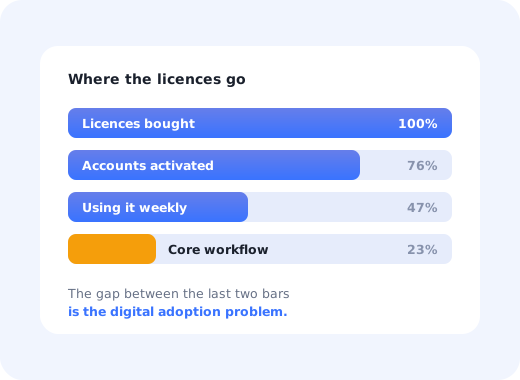
Software gets bought long before it gets used. A team signs a contract, IT provisions the accounts, an announcement goes out, and three months later, most of the licences are logging in to do one thing, the workflow the tool was purchased to replace is still running in a spreadsheet, and nobody can explain why.
Digital adoption is the discipline that closes that gap. It is not training, and it is not a launch email. It is the deliberate work of getting people to use software well enough that it produces the outcome it was bought for.
This guide covers what digital adoption actually means, how it differs from the terms it gets confused with, why it fails, how to measure it, and the six-step process that moves the number, plus what a digital adoption platform does that a help centre cannot.
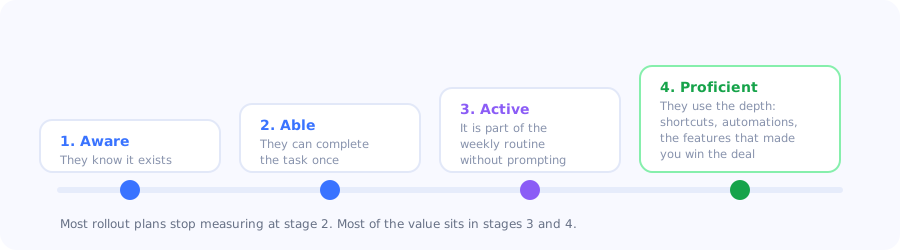
Adoption is a ladder, not a switch. Logging in is the bottom rung.
Key Takeaways
- Digital adoption is usage that produces the intended outcome, not logins, not seats provisioned, not training attendance.
- It has four stages: aware, able, active, proficient. Most rollouts measure the first two and stop.
- The failure is almost never the software. It is unexplained complexity, no reason to change, and no visible next step.
- Guidance must live inside the product. Documentation the user has to go and find is documentation most users never find.
- Measure depth, not breadth. Feature depth per account and repeat usage tell you more than active-user counts.
- A digital adoption platform adds tours, checklists, tooltips and analytics on top of software you cannot rewrite.
What is digital adoption?
Digital adoption definition: the point at which people use a digital tool fully and correctly enough to get the outcome it was introduced for. It covers both customer-facing software and the internal tools a workforce is asked to switch to, and it is measured in completed work, not in licences, logins or training hours.
The phrase "fully and correctly enough" is doing the work in that definition. A CRM where every rep logs in daily but nobody fills the fields the forecast depends on has high engagement and zero adoption. An analytics tool used by four people who genuinely run the business on it has better adoption than one opened by four hundred who glance at a dashboard.
Digital adoption vs product adoption vs user adoption
These three terms are used interchangeably and mean slightly different things. The distinction matters mostly because it tells you who owns the problem.
| Term | Scope | Question it answers | Usually owned by |
|---|---|---|---|
| Digital adoption | Any software, internal or external, across an organisation | Are people getting the outcome the technology was bought for? | Digital transformation, IT, enablement |
| Product adoption | One product and its features | Are users moving from signup to habitual, valuable use? | Product, growth |
| User adoption | One person or team | Did this individual change how they work? | Customer success, managers |
If you are a SaaS company, the version of this problem you own is the second one; our product adoption guide covers the curve, the metrics and the levers in detail. The rest of this guide takes the wider view: what to do when the software is already deployed and the usage is not there.
The four stages of digital adoption
Adoption gets discussed as a binary, adopted or not, which is why so many rollouts declare victory early. It is a ladder with four rungs, and each one fails for a different reason.
-
1. Aware
They know the tool exists and what it is for. Fails when the announcement was a single email nobody opened, or when the tool was introduced without naming the problem it solves.
-
2. Able
They have completed the core task once, successfully. Fails when the first attempt happens without guidance and ends in a support ticket, or worse, in a silent retreat to the old way.
-
3. Active
The tool is part of the weekly routine without anyone reminding them. Fails when the new way is genuinely slower than the old one for the first few weeks and nothing carries people across that dip.
-
4. Proficient
They use the depth: the automations, the integrations, the reporting that justified the purchase. Fails silently, because nothing looks broken. This is where most of the unrealised value sits.
The measurement trap: stage 2 is the easiest to measure and the least valuable to report. "94% of users have logged in and created a project" is a true sentence that tells you nothing about whether the organisation is better off. Pick one outcome metric per rollout (forecast accuracy, tickets deflected, cycle time) and hold the adoption programme to that.
Why digital adoption fails
In almost every stalled rollout, the cause is one of four things, and only the last one is a software problem.
The change has no visible reason
People do not resist new tools; they resist unexplained ones. If the only stated benefit is organisational ("better visibility for leadership"), the individual being asked to change their workflow has been handed a cost with no matching benefit. The reason has to be true at the level of the person doing the work.
The guidance is somewhere else
Documentation, recorded webinars and a Notion page are all things a user must stop working to go and find. In practice, at the moment of confusion, most people will guess, ask a colleague, or abandon the task, in that order. Guidance that is not in the interface at the moment of need is guidance for the minority who look for it.
The rollout ended at launch
Adoption programmes are usually funded as projects and behave like projects: a burst of activity, a launch, a handover, silence. But the second cohort of users (the ones who join in month four, having missed the training and the momentum) is larger than the first, and nobody is responsible for them. This is what makes self-serve onboarding the only version that survives contact with reality.
The tool genuinely does not fit the work
Sometimes the honest answer is that the software was chosen for a workflow that does not exist as described. No amount of guidance fixes this, and it is worth ruling out early: if the people who understand the tool best still route around it, the problem is not adoption.
How to measure digital adoption
Four metrics, in the order you should care about them. Each answers a different rung of the ladder.
| Metric | How to calculate | What it tells you |
|---|---|---|
| Activation rate | Accounts completing the core task ÷ accounts provisioned | Whether people can get through the first real use at all |
| Feature depth | Average distinct core features used per active account | Whether they are using the product or one corner of it |
| Repeat usage | Accounts active in week 4 ÷ accounts active in week 1 | Whether the new behaviour survived without prompting |
| Outcome metric | The business number the tool was bought to move | Whether any of the above mattered |
The first three are available in any product analytics setup; our onboarding metrics guide covers the formulas and benchmarks. The fourth one is the one nobody defines in advance, and it is the only one an executive will remember.
How to improve digital adoption in 6 steps
The sequence below assumes the software is already live and adoption is flat, the situation most teams are actually in.
Define adoption as one completed outcome
Find the step where people stop
Put the guidance inside the interface
Segment before you broadcast
Make the second cohort automatic
Re-measure the same funnel
1. Define adoption as one completed outcome
Write it as a sentence a new joiner could verify: "a sales manager has adopted the tool when they have run their weekly pipeline review inside it three weeks running." Vague definitions produce vague programmes. This sentence becomes the funnel you measure and the thing your guidance drives toward.
2. Find the step where people stop
Build the funnel from first login to that outcome and look at step-level completion. There is almost always one step with a disproportionate drop: a configuration screen, a permission request, an import. Everything else is noise until that step is fixed. The user friction guide covers how to tell whether it is a design problem or an explanation problem.
3. Put the guidance inside the interface
Replace the "see the documentation" reflex with in-product guidance: a short product tour on the first visit, tooltips on the three controls that generate the most questions, and a checklist that names the next action rather than describing the feature set. Adoption improves when the answer arrives before the user has finished forming the question.
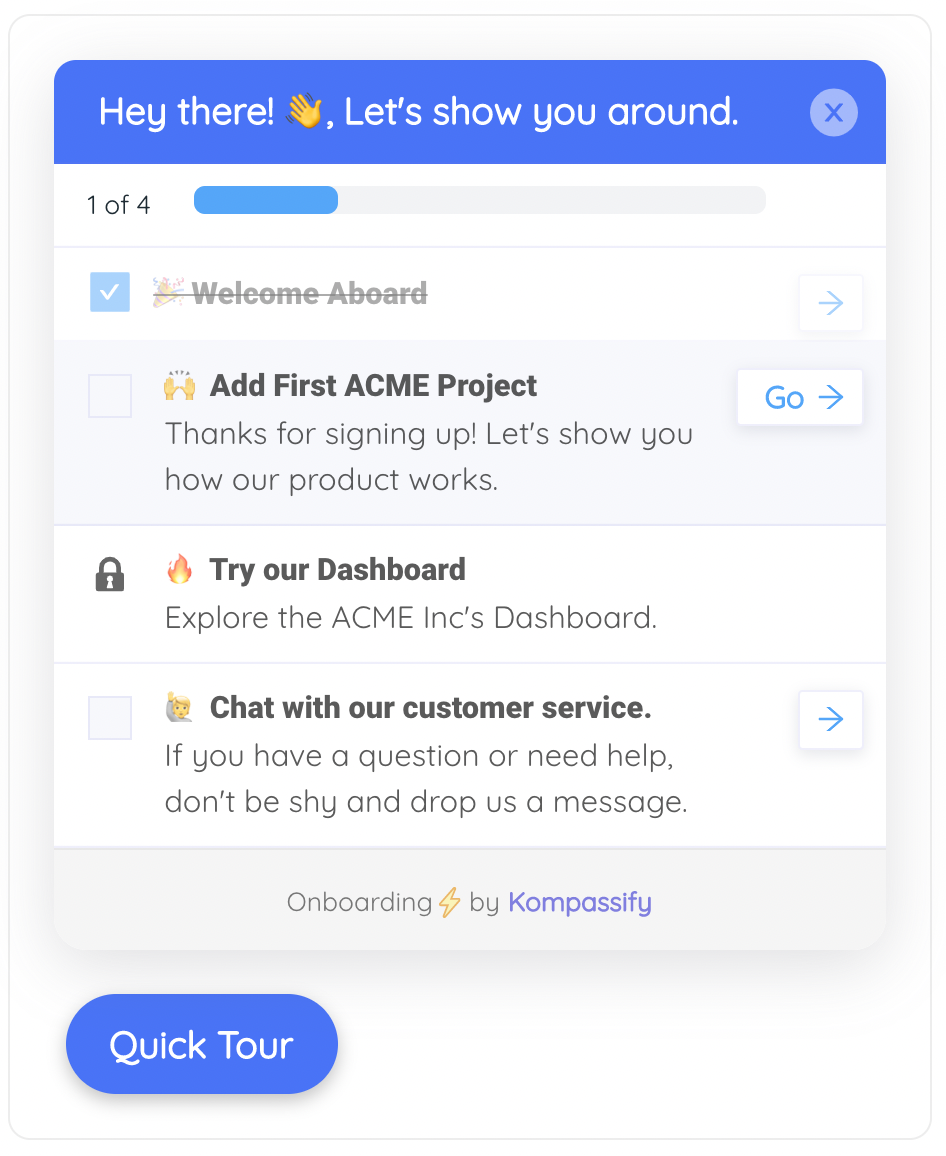
A checklist converts a rollout plan into something the user can see from inside the product.
4. Segment before you broadcast
A finance user and a field technician have nothing in common except the login screen, and a single generic walkthrough serves neither. Split guidance by role and by where someone is on the ladder; the person who has never completed the core task needs a different message from the one who completes it weekly but has never touched reporting. User segmentation is what keeps in-app guidance from becoming noise.
5. Make the second cohort automatic
Every piece of guidance you build should fire on a condition, not on a date: new user, first visit to this screen, feature never used, thirty days since last activity. Live training helps the launch cohort; conditional in-app guidance helps everyone who arrives afterwards, which over a year is most of your users.
6. Re-measure the same funnel
Compare the same step-level completion four weeks later, on the same definition, for the same segment. Adoption programmes lose funding because they report activity (guides published, sessions run) instead of movement. One funnel, measured twice, is worth more than any deck.
What a digital adoption platform does
A digital adoption platform (DAP) is a layer that sits on top of software you may not be able to change, and adds the guidance and measurement the software itself does not provide. It is installed with a snippet or an extension rather than by shipping code into the underlying application, which is what makes it useful for tools you bought rather than built.
-
Interactive guidance
Tours, walkthroughs and tooltips that run inside the real interface, on real data, instead of in a training environment nobody returns to.
-
Task orchestration
Checklists and progress indicators that turn "adopt the new system" into a visible list of next actions with a completion state.
-
In-app communication
In-app announcements that reach people where they work, so a process change does not depend on an email being read.
-
Adoption analytics
Funnels, feature usage and drop-off by segment, the evidence that tells you which rung of the ladder your population is stuck on.
-
In-product feedback
Short surveys triggered after a task, so you learn why a step is being abandoned rather than inferring it from a chart.
Digital adoption do's and don'ts
✅ Do
- Define adoption as one measurable outcome
- State the benefit at the level of the individual
- Guide inside the product, at the moment of need
- Segment guidance by role and by stage
- Trigger on behaviour, not on launch dates
- Measure feature depth, not just logins
- Budget for the users who arrive after launch
❌ Don't
- Report licences provisioned as adoption
- Rely on a launch email and a webinar
- Send everyone the same walkthrough
- Treat the rollout as finished at go-live
- Put the answer in a document users must find
- Confuse daily logins with valuable usage
- Keep pushing a tool that does not fit the work
Driving digital adoption with Kompassify
Most of what blocks adoption is not missing functionality; it is complexity that was never explained where the user was standing. That subset is fixable without engineering time.
- See where people stop with product analytics: funnel completion, feature usage and drop-off per segment.
- Guide the core task with an interactive product tour that runs on the real interface.
- Name the next action with a checklist that persists between sessions.
- Announce process changes in-app with the announcement widget instead of a broadcast email.
- Ask why with a short in-app survey on the step people abandon.
Kompassify is a no-code digital adoption platform for SaaS teams: tours, checklists, tooltips, announcements, surveys and analytics in one place. Free up to 100 monthly active users, paid plans from $129/month, GDPR-compliant with EU hosting.
Turn licences into usage
Find the step where adoption stalls, explain it inside the product, and measure whether completion moved, without an engineering ticket.
Start for Free →Frequently Asked Questions
What is digital adoption?
Digital adoption is the point at which people use a digital tool fully and correctly enough to get the outcome it was introduced for. It applies both to customer-facing software and to the internal tools a workforce is asked to switch to, and it is measured in completed work rather than in licences provisioned, logins recorded or training hours delivered. A CRM that everyone opens daily but nobody fills in correctly has high engagement and no adoption.
What is the difference between digital adoption and product adoption?
Digital adoption is the organisation-wide question: are people getting the outcome the technology was bought for, across any software, internal or external. Product adoption is narrower and applies to one product and its features: are users moving from signup to habitual, valuable use. User adoption is narrower still and describes a single person or team changing how they work. The distinction mostly tells you who owns the problem: digital transformation and IT own the first, product and growth own the second, customer success owns the third.
What are the stages of digital adoption?
Four. Aware means people know the tool exists and what it is for. Able means they have completed the core task successfully at least once. Active means the tool is part of their weekly routine without anyone reminding them. Proficient means they use the depth of the product, the automations, integrations and reporting that justified the purchase. Most rollouts measure the first two stages and declare success, while most of the unrealised value sits in the last two.
How do you measure digital adoption?
Use four metrics in order. Activation rate is accounts completing the core task divided by accounts provisioned. Feature depth is the average number of distinct core features used per active account. Repeat usage is accounts active in week four divided by accounts active in week one. The fourth is the outcome metric, the business number the tool was bought to move, and it is the only one an executive will remember. Defining it before launch is what separates an adoption programme from an activity report.
Why do digital adoption initiatives fail?
Usually for one of four reasons, and only the last is a software problem. The change has no visible reason at the level of the person being asked to change their workflow. The guidance lives somewhere the user must stop working to find, so at the moment of confusion they guess, ask a colleague or abandon the task. The rollout was funded as a project and ended at launch, leaving the larger second cohort unserved. Or the tool genuinely does not fit the work, in which case no amount of guidance helps.
What is a digital adoption platform?
A digital adoption platform, or DAP, is a layer that sits on top of software you may not be able to change and adds guidance and measurement the software does not provide itself. It is installed with a snippet or an extension rather than by shipping code into the underlying application. Typical capabilities are interactive tours and tooltips, checklists and progress indicators, in-app announcements, adoption analytics, and in-product surveys.
How long does digital adoption take?
Long enough that treating it as a launch is the core mistake. The first cohort can reach the active stage within weeks when guidance is in place, but the population that matters accumulates over months as new people join and existing users move deeper into the product. The practical implication is to build guidance that fires on conditions such as first visit to a screen or a feature never used, rather than on launch dates, so it keeps working for everyone who arrives after the launch.
Can you improve digital adoption without changing the software?
Often, yes. A large share of what teams classify as a product limitation is unexplained complexity: the flow works, and the user does not know what to do. That subset is addressable with in-app guidance layered on top of the existing interface, which is exactly what a digital adoption platform is for. The signal that you are in this case is that users who receive any help complete the step easily and never struggle with it again.