Most software gets a fair hearing. A buyer books a demo, sets aside an hour, arrives with intent. An app installed from the Shopify App Store gets none of that. The merchant found you in a list of near-identical listings, installed three of you to compare, and is now looking at your first screen between packing orders. Whatever your app does, it has to do something visible before that attention runs out.
That is why app onboarding is not simply onboarding with a different logo. The surrounding interface belongs to someone else, the merchant did not schedule time for you, the store you are configuring may be two days old or ten years old, and uninstalling costs one click and no negotiation. Every one of those constraints changes what the first session should contain.
This guide walks the gates between install and first value, the places merchants actually abandon, the patterns that fit an embedded admin page, the uninstall window almost nobody instruments, and the handful of metrics that will tell you whether any of it is working.
Key Takeaways
- Install is not adoption. The App Store measures installs; your business depends on the much smaller number that reach a visible result.
- Configuration before value is the main killer. A merchant who has seen nothing yet will not fill in a settings form for you.
- Ship a working default. If your app cannot do anything without setup, the setup is part of the product, not a prerequisite for it.
- Design for the empty store. A first screen that assumes catalogue, traffic or order history breaks for exactly the merchants who most need help.
- The first seven days decide everything: uninstalls, reviews and whether the trial converts. Instrument that window specifically.
- Onboarding you cannot change quickly is onboarding you cannot improve. Wording changes weekly in the early months; releases do not.
What Makes Shopify App Onboarding Different
Shopify app onboarding: definition
Shopify app onboarding is everything between a merchant approving your app's install and that app producing a result they can see in their store. It typically runs inside the Shopify admin, in an embedded page framed by an interface you do not control, competing for attention with the merchant's own dashboard and with the other apps they installed the same afternoon.
Four constraints follow from that context, and they shape everything else in this guide.
App-store discovery brings people who are curious, not committed. Intent has to be earned inside the app, and quickly.
Your app sits inside the admin the merchant already knows. Guidance that fights that frame reads as an intrusion; guidance that matches it reads as part of the platform.
Some stores arrive with thousands of products and years of orders; some arrive empty. Your first screen has to work for both, and the empty one is the harder case.
No contract, no offboarding call, no notice period. An uninstall is a silent verdict, usually delivered in the first week.
If your product also serves merchants directly on your own domain, it is worth reading this alongside our guide to ecommerce onboarding, which covers the other side of the problem: getting a store from signup to its first sale. This guide is about the narrower case of an app living inside someone else's admin.
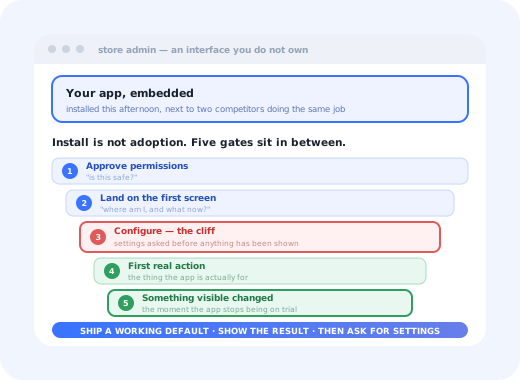
The Five Gates Between Install and Value
Every merchant who ends up loving your app passes five gates, and each gate discards some of them. Naming them is what turns a vague "our activation is low" into a specific, fixable step.
Configuration asked before value is the widest gap in most app funnels.
Where Merchants Actually Drop Off
Four failure patterns account for most of the loss between install and first result. All four are design decisions rather than merchant problems, which is the good news.
-
The app opens on settings
A form of toggles, thresholds and dropdowns, presented to someone who has not yet seen the app do anything. Every field is a request for trust you have not earned. If defaults are possible, the settings screen is not a first screen; it is a second one.
-
The plan chooser arrives too early
Asking which tier they want before showing what any tier does converts curiosity into a decision the merchant is not equipped to make. The usual result is not a downgrade; it is an uninstall, because choosing feels riskier than leaving.
-
The empty store breaks the first screen
Dashboards that render three zeroes and a blank chart tell a new merchant that the app is not for them. Empty states are onboarding surface, not error handling; our guide to empty states in UX covers how to make them do work.
-
The dependency nobody mentioned in the listing
Another app, a theme change, a third-party account, a DNS record. Anything the merchant must leave the admin to obtain will lose a large share of them permanently, and it belongs on the listing page, not on the first screen after install.
The comparison you cannot see. Merchants routinely install several apps in the same category at once and keep the one that produced a result first. That means your onboarding is not being graded against your own previous version; it is being graded against whichever competitor managed to show something on screen in ninety seconds. Speed to visible result is not a nicety here; it is the selection criterion.
Designing the First Screen After Install
The screen a merchant lands on after approving install does more work than any other page in your product. Four things belong on it, and a lot of things do not.
Not a welcome message about your mission. A plain description of what this app is about to do to their store.
Three to five concrete steps, the first already ticked because installing counted. Progress that is visible is progress people finish.
Pull a real product, a real order, a real theme name. Recognition does more for trust than any onboarding copy.
The checklist pattern earns its place here because it survives interruption, which is the normal condition of a merchant's attention. Someone who leaves halfway through comes back to a visible remainder rather than a blank page and a vague memory. The construction details (step count, ordering, what to do about the last step) are in how to create a user onboarding checklist, with real interface examples in onboarding checklist examples.
What does not belong on the first screen: a feature tour of every menu item, a video, a plan comparison, a request for a review, or a modal asking how they heard about you. Each of those is a tax collected before any value has been delivered. The welcome screen guide covers what a first screen can reasonably ask for.
How to Build Shopify App Onboarding in 7 Steps
The order matters. Most of these steps are cheap; the first one is the one teams skip and the one everything else depends on.
- Define the first visible result
- Make the app do something with zero configuration
- Build the setup checklist around the result, not the features
- Design the empty-store path deliberately
- Put help beside the step that needs it
- Plan the return visit
- Instrument the first seven days
1. Define the first visible result
One sentence, checkable in your data, phrased as something the merchant would notice: "a live badge is showing on a product page", "the first abandoned-cart message has gone out", "the first report contains this store's real numbers". "Finished setup" is not a result; it is your milestone, not theirs. Everything downstream, including your activation metric, inherits this definition, so pick the one that best separates merchants who stayed from merchants who left. Our guide to user activation covers how to find it in the data you already have.
2. Make the app do something with zero configuration
Ship opinionated defaults. Pick the most common option, apply it, show the outcome, and put "change this" next to it. A merchant who sees a working thing they want to adjust is in a completely different frame of mind from one staring at an empty form. Where a genuine decision cannot be defaulted (a currency, a market, a legal setting) ask for exactly that one and nothing else.
3. Build the setup checklist around the result, not the features
Each step should be a step toward the visible outcome, written in the merchant's vocabulary. "Choose where the widget appears" beats "Configure placement rules". Keep it to three to five steps: longer lists get read as work, and a list that cannot be finished in one sitting will mostly not be finished at all. Mark the install itself as step one so the merchant starts with progress rather than a blank bar; the psychology behind that is in onboarding progress bars.
4. Design the empty-store path deliberately
Decide what your app shows to a store with no orders, no traffic and eight products. If the honest answer is "nothing useful yet", say so and give the merchant something to do in the meantime: a preview built from sample data clearly labelled as sample, a setting they can prepare, a note about what will appear when the first order arrives. Silence and zeroes read as a broken app; an explained wait reads as a working one.
5. Put help beside the step that needs it
Documentation in a separate tab is documentation nobody reads mid-task. A short tooltip on the field that confuses people, a one-line explanation under the toggle with consequences, an inline answer to the question your support inbox receives every day. Patterns and copy examples are in onboarding tooltip examples, and the structural version, deciding what to answer in-product versus in a help centre, is in in-app support.
6. Plan the return visit
Plenty of merchants leave mid-setup for entirely ordinary reasons. The question is what happens when they come back three days later. A checklist that remembered its state, a short "you were here" line, and a single next action will recover a meaningful share of them. If your app can email, one message that links straight to the unfinished step outperforms a general nurture sequence; onboarding triggers covers how to time it without nagging.
7. Instrument the first seven days
Log install, each checklist step, the first action, the first result and the uninstall, each with a timestamp. That is enough to draw the funnel, find the gate that leaks, and see whether the merchants who uninstall got anywhere first. Without step-level events you will only ever know that activation is low, never which sentence caused it.
The Uninstall Window
Uninstalls cluster early. A merchant who has kept your app for a month rarely removes it on a whim; one who has had it for three days is still deciding. That makes the first week the only window where an intervention changes anything, and the only window most teams have no data about.
Three things are worth doing with it. First, measure early uninstalls as their own metric rather than folding them into general churn, and split them by whether the merchant ever reached first value; the two groups need completely different responses. Second, treat an uninstall that happened before the first result as a product-onboarding defect and route it to whoever owns the first screen, not to support. Third, if you ask anything on the way out, ask one question, at the moment of leaving, with options drawn from what you already suspect; exit surveys covers how to make that one question worth asking.
Reviews are onboarding output. App-store ratings are written disproportionately by people in their first week, either delighted that something worked immediately, or annoyed that it did not. Improving the first session is usually a more reliable way to raise a rating than asking more people to leave one. And if you do ask, ask after the first visible result, never before it.
Metrics for a Shopify App
App-store dashboards report installs. Installs are the least informative number you have, because they measure your listing rather than your product. These are the ones that describe onboarding.
| Metric | How to read it | What a bad number usually means |
|---|---|---|
| Install → activation rate | Share of installs reaching your defined first visible result | The gap between what the listing promised and what the first screen delivers |
| Time to first result | Median minutes or hours from install to that milestone, plus the long tail | Configuration sitting in front of value; a dependency you did not disclose |
| Checklist step completion | Completion rate per step, in order | Names the exact sentence or field that loses people |
| 7-day uninstall rate | Uninstalls within a week, split by whether first value was reached | Before value: onboarding. After value: positioning, pricing or fit |
| Return rate to session two | Share of merchants who open the app again after the first session | The first session ended without anything worth coming back to |
| Support contacts per install | Tickets in the first week ÷ installs | A specific step is unexplained, usually the same one every week |
Split all of these by store profile. A store with a mature catalogue and steady orders will sail through a flow that a brand-new store cannot complete at all, and a single blended average will hide both facts. The cohort view, this month's installs versus last month's, is what tells you whether a change actually helped; cohort analysis has the mechanics.
Shopify App Onboarding: Do vs. Don't
Do
- Deliver one visible result before asking for configuration
- Default everything that can be defaulted
- Use the merchant's real store data on the first screen
- Design the empty-store case on purpose
- Keep the setup checklist to three to five steps
- Measure uninstalls separately before and after first value
Don't
- Open on a settings form or a plan chooser
- Tour the menu before the app has done anything
- Assume catalogue, traffic or order history exists
- Hide a dependency until after install
- Ask for a review before the first result
- Report installs as if they were adoption
Changing Onboarding Without Shipping a Release
The first months after launch are the period when your onboarding is most wrong and your ability to change it matters most. The wording of a step, the order of the checklist, the hint on the field that generates every support ticket: these want to change weekly, and none of them is worth a deploy cycle.
Kompassify sits on top of an existing web app as a guidance layer, which is what makes that pace possible. Onboarding checklists, product tours, tooltips and hotspots are built in a visual editor and published without a release, so the setup sequence can be rewritten in the afternoon and targeted at a segment: new stores versus established ones, merchants who stalled at step three versus those who finished. Each guide reports its own completion rate step by step, so you can see which sentence lost people rather than guessing. In-app announcements bring returning merchants back to the unfinished step, and in-app surveys ask one question at the moment it refers to.
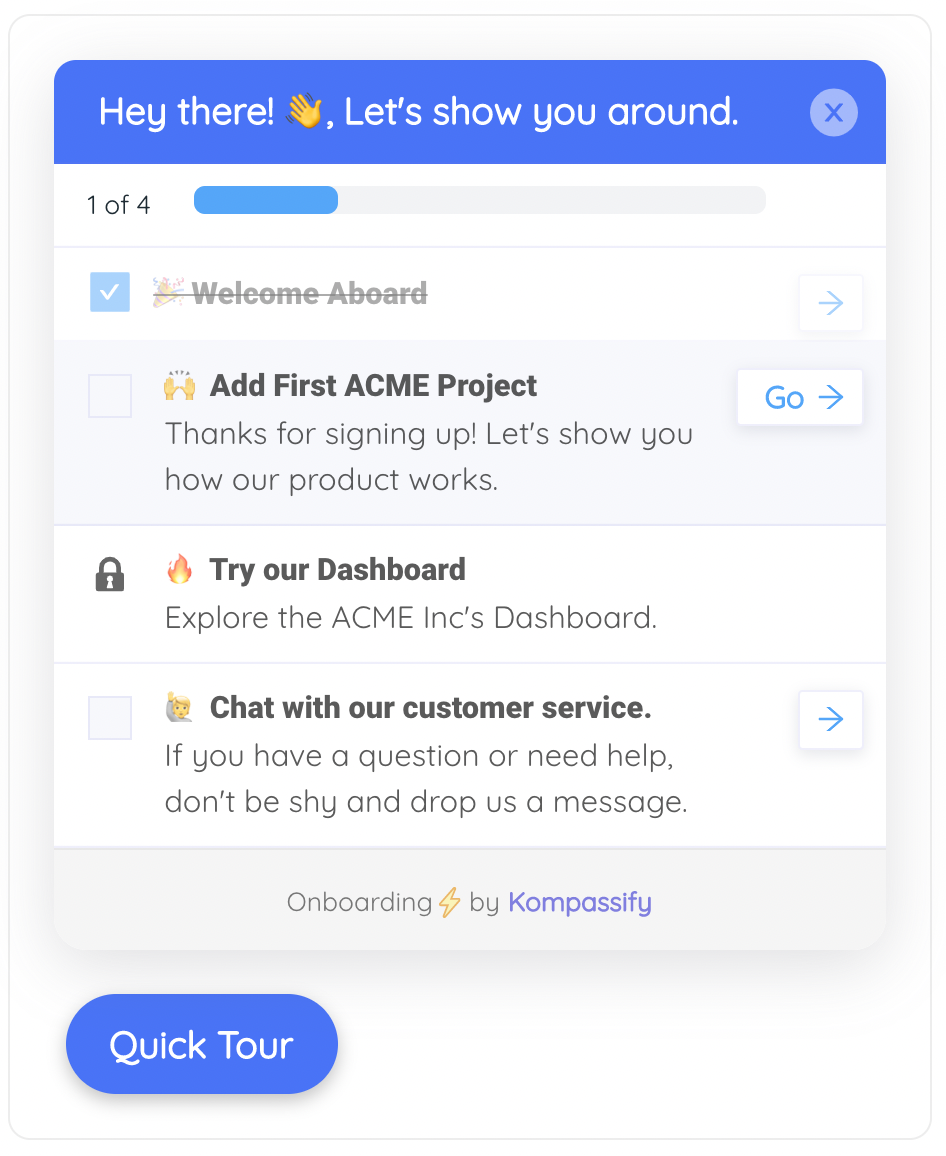
A short checklist survives interruption, the normal condition of a merchant's attention.
Get merchants to a visible result in their first session
Kompassify lets product and onboarding teams add checklists, guided tours, tooltips and in-app surveys to an existing app: no engineering ticket, with completion data on every step. Free up to 100 monthly active users, plans from $129/month, GDPR-compliant and EU-hosted.
Start for free →The One-Sentence Version
A Shopify app is chosen in the minutes after install by whichever competing app produced something visible first, so onboarding means shipping a working default, showing a real result before asking for configuration, and instrumenting the first seven days closely enough to know which step lost the merchants who left.
Frequently Asked Questions
What is Shopify app onboarding?
Shopify app onboarding is everything that happens between a merchant approving your app's install and that app producing a result they can see in their store. It usually runs inside the Shopify admin, in an embedded page you do not fully control, alongside the merchant's own dashboard and every other app they installed the same afternoon. That context is what makes it different from onboarding in a standalone SaaS product: the merchant did not set aside time for you, the surrounding interface is not yours, and abandoning costs them one click.
Why do merchants install a Shopify app and never use it?
Usually because the app asked for configuration before it showed anything. A merchant installing an app is comparison shopping, often with two or three competing apps installed at once, and the one that produces a visible result first tends to be the one that survives. Apps that open on an empty settings screen, a plan chooser, or a request to connect something else lose that comparison before they have made their case. The second common cause is a first screen that assumes catalogue, traffic or order history the store does not have yet.
What should the first screen of a Shopify app show?
The shortest path to one visible outcome, expressed in the merchant's language rather than your feature names. In practice that means a small setup checklist of three to five concrete steps with the first one already complete, real store data pulled in rather than placeholder examples, and a single primary action. Plan selection, advanced settings, integrations and feature tours belong after the first result, not before it. If your app needs configuration to do anything, ship a sensible default configuration and let the merchant change it later.
How do you measure onboarding for a Shopify app?
Three numbers carry most of the signal: install-to-activation rate, meaning the share of installs that reach your defined first value; time from install to that milestone; and early uninstall rate, typically measured within the first seven days. Add step-level completion for your setup checklist so you can see which step loses people, and split every number by store profile: a store with fifty products and steady orders behaves nothing like a store that installed your app on its first day of existence.
How long should Shopify app onboarding take?
Aim for a visible result inside the first session, and treat anything longer than a few minutes as a design problem rather than a merchant problem. Merchants evaluate apps in the gaps between other work, so a flow that requires a scheduled hour will be abandoned and resumed less often than you expect. Where the real work genuinely takes longer, importing a large catalogue, waiting on traffic before a recommendation engine has anything to show, split the journey: deliver a partial visible result immediately, and bring the merchant back with an in-app prompt when the full result is ready.
Can you change app onboarding without shipping a new release?
Yes, if the guidance layer is separate from the application code. Tools such as Kompassify add onboarding checklists, tours, tooltips and in-app announcements to an existing web app from a visual editor, so the setup checklist, the empty-state hint and the wording of a step can be changed and targeted at a segment without a deploy. That matters most in the first months after launch, when the fastest way to learn what merchants misunderstand is to change the wording weekly and watch step completion move.