A merchant signs up for your platform on a Tuesday evening with a shoebox of photos and an idea. Nothing about the account works yet. There are no products, no payment provider, no shipping rates, no domain, and no visitors. Every screen is empty. And somewhere in the next hour, that person will decide whether this is going to be their business or another tab they close and never reopen.
Ecommerce onboarding is the work of surviving that hour, and the three weeks that follow it. It is unusual among onboarding problems because the success condition is not something the user does. It is something a stranger does: a first order, placed by a customer the merchant has not met yet, on a store that did not exist on Tuesday.
This guide covers what ecommerce onboarding actually includes, the six setup gates that stand between signup and a legal, functioning checkout, why the empty-store problem makes this harder than ordinary SaaS setup, an eight-step method for designing the flow, how peak season changes the whole calculus, and the metrics worth reporting.
Key Takeaways
- The finish line is the first order, not the finished setup. A fully configured store with no sales is a support cost wearing an activation badge.
- Six gates stand between signup and a sellable store: catalogue, payments, shipping, tax, storefront and domain. Only some of them block a sale; know which.
- Start with one product, not with settings. The catalogue is the step that makes every other screen mean something.
- The empty store cannot sell itself. Your onboarding has to supply the motivation the product cannot yet demonstrate.
- Migrating merchants and first-time sellers are different species. One needs an import path, the other needs a curriculum.
- Measure median time to first order, per cohort; a mean is dominated by the few merchants who arrive with an existing business.
What Is Ecommerce Onboarding?
Ecommerce onboarding: definition
Ecommerce onboarding is the end-to-end process of taking a new merchant from signup to a store that can legally and technically accept an order, and then to the first real order itself. It spans catalogue creation, payment connection, shipping and tax configuration, storefront design, domain setup, and all the in-product guidance that carries a merchant through those steps without a support ticket.
That definition is deliberately longer than the one most teams use internally. Plenty of ecommerce platforms define onboarding as "the setup wizard", measure completion of the wizard, and report a healthy number every quarter while the share of stores that ever take money stays flat. The wizard is a means. The order is the end.
It is worth being precise about how this differs from its neighbours, because the words get used interchangeably and the design consequences are not the same:
| Term | Who is being onboarded | Success condition |
|---|---|---|
| Ecommerce onboarding | A merchant building their own store | The store's first order |
| Marketplace onboarding | Sellers and buyers on a shared platform | The first match between the two sides |
| Shopper onboarding | An end customer on someone's storefront | A completed checkout |
| Payment onboarding | A business being verified by a payment provider | An approved, payable account |
If you run a two-sided platform, the ordering problem between supply and demand dominates everything else, and the marketplace onboarding guide is the one you want. This guide is about the single-sided case: you onboard the merchant, and finding customers is the merchant's job, which, as we will see, is precisely why traffic guidance belongs inside ecommerce onboarding and almost never inside marketplace onboarding.
The uncomfortable asymmetry: your merchant's success depends on a stranger arriving and buying something. You cannot make that happen, and neither can your product. What you can do is remove every reason the store is not ready when that stranger shows up, and make sure the merchant knows that a store nobody visits will never sell, before they conclude your platform is broken.
The Six Setup Gates Before a Store Can Sell
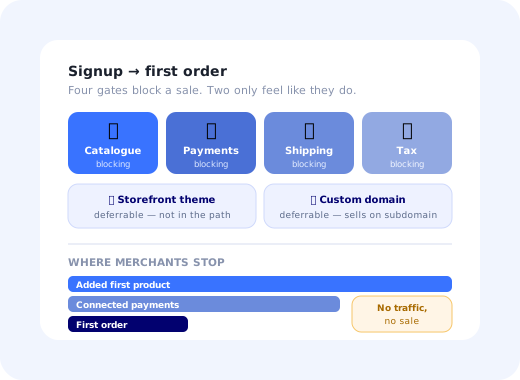
Every ecommerce platform, whatever it calls its screens, gates a first sale behind some version of the same six things. Naming them separately is useful because each one fails for a different reason, and only four of them genuinely block a transaction.
1. The catalogue
At least one purchasable product, with a price, an image and enough description to be believable. This is the step that converts an abstract account into a business, and it is the only gate that makes the other five legible: shipping rates need a weight, tax rules need a product category, and the storefront preview needs something to render. Put it first.
2. Payments
A connected, verified payment provider. This is the gate you control least: the provider runs its own identity and business checks, some of which take hours or days, and the merchant experiences that delay as your product being slow. Start it early and in parallel rather than in sequence, and design the pending state deliberately, exactly as regulated products must in fintech onboarding.
3. Shipping
At least one shipping method with a rate the checkout can quote. The failure mode here is quiet and expensive: a merchant sets a flat rate they invented, discovers three months later that they have been losing money on every heavy item, and blames the platform. A good onboarding step offers real carrier rates or a sanity check, not just an empty currency field.
4. Tax
Enough tax configuration to issue a compliant receipt in the merchant's home jurisdiction. Most first-time sellers do not know what they are being asked, so this is the gate where contextual explanation pays for itself several times over. Ask only what the first market requires, and defer cross-border rules until the store has actually sold across a border.
5. The storefront
A theme, a logo, some colour. It feels like the most important step to the merchant and it is the one that blocks nothing: a default theme sells perfectly well. This mismatch is worth managing: merchants will happily spend four evenings on fonts while the payment connection sits unfinished. Let them customise, but do not let customisation sit in the critical path.
6. The domain
A custom domain, pointed and propagated. Also non-blocking (the platform subdomain takes orders on day one) but emotionally significant, and slow for reasons nobody in the flow controls. Say plainly how long propagation takes, and make clear that the store can sell in the meantime.
Design rule: the four blocking gates belong in the guided path, in that order, with progress visible. The two deferrable ones belong in a "make it yours" section the merchant can dip into whenever they like. Mixing them produces the most common failure in ecommerce onboarding: a beautiful, unsellable shop.
The Empty-Store Problem
Most SaaS products can demonstrate their own value on day one. An analytics tool ships with sample dashboards; a project tool ships with a template board. An ecommerce platform ships a merchant an empty room and asks them to imagine a shop.
This is the sharpest version of a problem every product has (see the empty states guide for the general treatment) because here the emptiness is not one screen but the entire product, and it persists for as long as it takes the merchant to fill it. Three consequences follow, and they should shape the whole flow:
- Motivation has to come from the onboarding, not the product. Until there is a catalogue, the only thing generating momentum is the sequence itself: visible progress, a reachable next step, and a preview of what this will look like when it is done.
- The first win must be visual. Adding a product and immediately seeing it rendered on a real storefront is worth more than any number of completed settings screens. Show the shop, early and often.
- Silence reads as failure. A launched store with zero visitors looks identical to a broken store. If your onboarding does not explain that traffic is the merchant's next job, a meaningful share of new merchants will conclude the platform does not work and leave without ever asking.
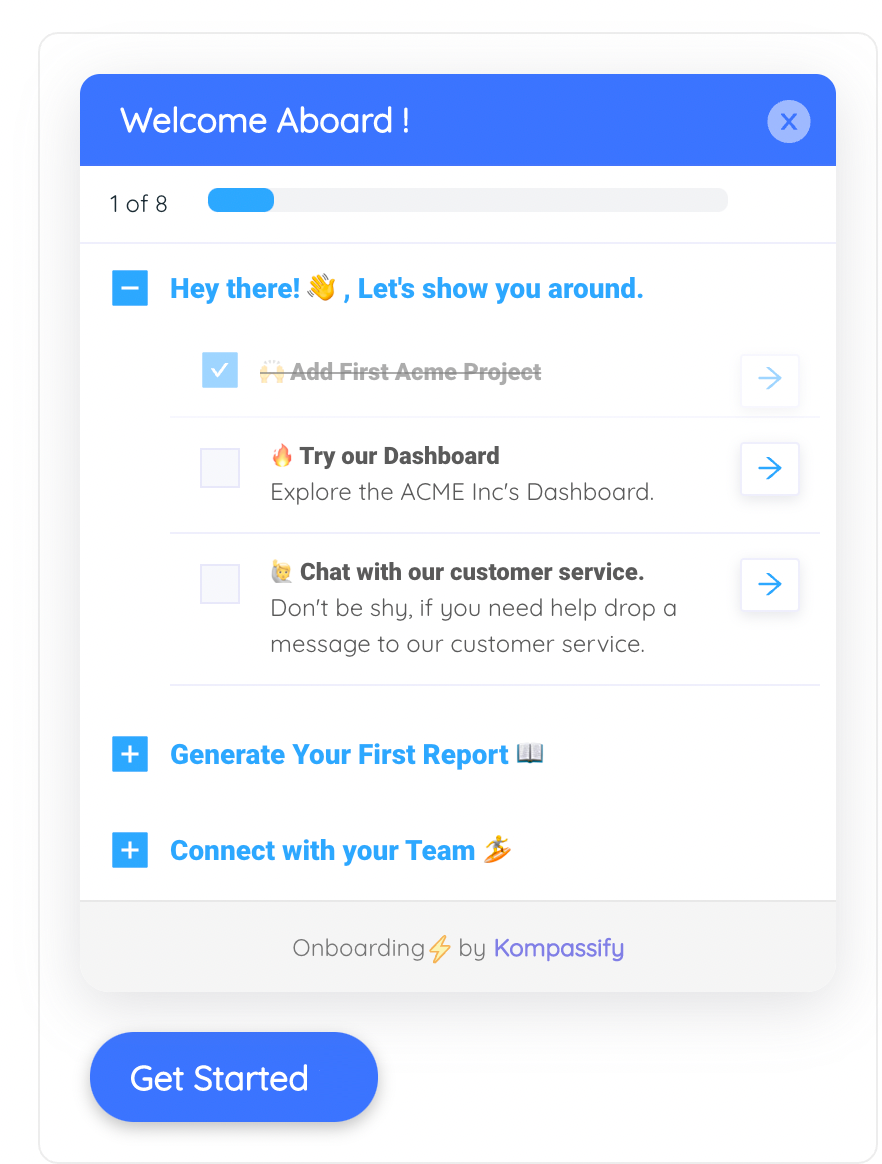
A persistent setup checklist is the standard answer to the empty-store problem: it supplies the sense of progress the empty product cannot.
Where Merchants Actually Drop Off
Aggregate signup-to-sale numbers are useless for diagnosis, because the population that leaves after ten minutes and the population that leaves after ten days are leaving for opposite reasons. Broken out by stage, the pattern is remarkably consistent across platforms:
Illustrative shape, not benchmark data: measure your own. The point is the pattern: four distinct populations, four different fixes.
Signed up to look. Nothing you build will convert most of them, and trying to will make the flow worse for everyone else. Identify them early so they do not distort your funnel.
Hit a payment verification, a document request or a rejection and stopped. Recoverable with status visibility and a clear next action, the single highest-return fix on the list.
Endlessly refining the theme instead of publishing. Recoverable with a nudge that reframes launch as reversible: you can change the font after you have customers.
A working store nobody visits. Not an onboarding bug in the usual sense, but if you ignore it your activation number will look fine while retention quietly bleeds.
Arriving with an existing catalogue and existing customers. They need an import path and a cutover plan, not a tutorial, and they will churn instantly if handed a beginner flow.
A business owner who signed up and a developer or agency who will actually build. The flow must be handable to someone else without losing progress.
Splitting these populations is a segmentation exercise before it is a design exercise. A single linear wizard that treats a migrating 50-SKU business and a first-time candle maker identically will underserve both.
How to Design Ecommerce Onboarding in 8 Steps
Here is the sequence that consistently works, in order:
- Define the finish line as the first order
- Split merchants at the door
- Open with one product, not with settings
- Start payment verification in parallel, immediately
- Make the store visible from the first minute
- Put the four blocking gates in a persistent checklist
- Teach traffic before the merchant concludes you are broken
- Instrument every gate and re-cut weekly
1. Define the finish line as the first order
Write it down, put it on the dashboard the whole team looks at, and stop reporting wizard completion as if it were the same thing. Everything downstream of this decision changes: what counts as activation, which nudges are worth building, and whether "store published" is a celebration or a halfway point. If you want the general framing, the user activation guide covers how to choose an activation event that actually predicts retention.
2. Split merchants at the door
Ask two questions on the first screen (do you already sell somewhere else? and what are you selling?) and branch. Migrators go to import; physical-goods sellers get shipping in the critical path; digital sellers should never see a shipping step at all. Two questions, asked once, remove more friction than any amount of copy polishing. This is the same multi-choice branching pattern that personalises onboarding elsewhere, applied to the highest-leverage fork you have.
3. Open with one product, not with settings
The first meaningful action should be adding a single product, ideally with an image, because the image is what makes the storefront preview feel real. Resist the urge to collect business details, invoicing addresses or store policies first. They are easier to ask for once the merchant has something to lose.
4. Start payment verification in parallel, immediately
Payment approval is the longest pole and it is not under your control, so it should start as early as the merchant is willing and run in the background while they do everything else. Surface its status persistently: a banner or a checklist row that says exactly what stage it is at and what, if anything, the merchant must do. A pending state with no explanation is the single most reliable way to lose someone who was otherwise committed.
5. Make the store visible from the first minute
A one-click "view my store" that opens the real storefront, with whatever exists so far, does more for motivation than any progress percentage. It also teaches the mental model the merchant needs (admin here, shop there) which prevents a whole category of support tickets later.
6. Put the four blocking gates in a persistent checklist
Not a modal wizard that must be finished in one sitting, and not a dismissible tip. A persistent, resumable onboarding checklist that survives logout, shows what is done, and states plainly which items block a sale. Ecommerce setup happens across evenings; the flow has to remember where the merchant was.
7. Teach traffic before the merchant concludes you are broken
The moment a store becomes reachable, the next question is where visitors come from, and if your product does not answer it, the merchant's own explanation will be "this platform doesn't work". A short, honest section on first traffic (share the link, one channel to start with, what a realistic first week looks like) is onboarding content even though it is not product instruction. It is the only part of the funnel where managing expectations is the feature.
8. Instrument every gate and re-cut weekly
Each gate needs a completion event, and each event needs to be reportable by cohort, plan and merchant type. Without that you are optimising in the dark; with it, the worst-performing gate announces itself. The event tracking guide covers naming these events so they stay usable a year from now.
Onboarding Merchants Into Peak Season
Ecommerce has a calendar, and it bends everything. A merchant who signs up in March has time to explore. A merchant who signs up six weeks before the year's biggest shopping weekend has exactly one goal, be able to take orders on the day, and every optional step in your flow now reads as an obstacle.
Three concrete adjustments are worth building once and reusing every year:
- A shortest-path variant of the flow. The four blocking gates, nothing else, with customisation explicitly labelled "after the season". Same product, different sequence.
- Explicit deadlines for the slow steps. Payment verification and domain propagation both consume real calendar time. Saying "start this today if you want to be live for the 28th" is more useful than any encouragement.
- Honesty about what will not be ready. A merchant who is told they can launch on the platform subdomain and move to a custom domain in January will do that. A merchant who discovers the constraint on the day will churn and tell people why.
Practically: this is a targeting rule, not a rebuild. If your guidance layer can switch flows based on a date range and a merchant segment, seasonal onboarding is a configuration change you make in an afternoon and revert in January.
Ecommerce Onboarding Metrics
Five numbers cover it. Anything beyond these tends to be a slice of one of them rather than a new fact.
| Metric | Definition | What it tells you |
|---|---|---|
| Gate completion rate | Share of signups completing each of the six setup gates | Which specific screen is costing you merchants |
| Store launch rate | Share of signups reaching a publicly reachable storefront | Whether setup is finishable at all |
| Time to first order | Median days from signup to the store's first paid order | The real time to value of your platform |
| 30-day first-order rate | Share of new stores with at least one order within 30 days | The single best predictor of whether a merchant stays |
| Stall point | The gate at which the largest number of merchants last acted | Where to spend next month |
Report the median, always. Time to first order has a brutal distribution: a migrating business can sell within an hour of switching over, while a first-time seller takes five weeks. A mean blends those into a number that describes nobody, and it will move for reasons that have nothing to do with your onboarding.
Cut every one of these by merchant type: migrator versus first-time, physical versus digital, self-serve versus assisted. The aggregate almost always hides a segment that is doing badly and a segment that is doing fine. The onboarding funnel guide goes deeper on building funnels that survive this kind of slicing.
Ecommerce Onboarding: Do vs. Don't
✅ Do
- Make "first order" the definition of a successfully onboarded merchant
- Ask two branching questions before anything else and use the answers
- Open with adding one product, image included
- Kick off payment verification early, in parallel, with visible status
- Give merchants a one-click view of their real storefront from minute one
- Use a persistent, resumable checklist for the four blocking gates
- Say out loud that traffic is the merchant's next job
- Report medians, cut by merchant type
❌ Don't
- Count wizard completion as activation
- Put theme customisation in the critical path
- Ask for business details before the merchant has a product
- Run payment verification as a blocking, sequential step
- Hand a migrating merchant the beginner curriculum
- Trap setup inside a modal that cannot be resumed tomorrow
- Let a silent, launched store look identical to a broken one
- Ship the same flow in March and in November
Building the Guidance Layer Without Engineering Time
The setup screens themselves are product work. The layer that decides whether merchants finish them is not, and that layer is where almost all of the recoverable drop-off lives. With Kompassify you can build it on top of the screens you already have, without a release:
- A persistent setup checklist The four blocking gates in one resumable onboarding checklist that survives logout and shows exactly what still blocks a sale.
- A branching first question A multi-choice step that asks whether the merchant already sells elsewhere and what they sell, then routes them into the import path or the beginner path.
- Contextual help on the fields people get wrong Tooltips on tax category, shipping weight and product variants: the three places first-time sellers reliably stall.
- A nudge for merchants who stopped after one product A targeted in-app message triggered by "added a product, no payment provider after 48 hours", pointing at the one step that unblocks everything.
- Gate-by-gate completion analytics Analytics on each step of the flow so the stall point is a number rather than an opinion.
- A seasonal variant you switch on The same checklist, re-ordered and re-worded for peak season, targeted at merchants who signed up inside the window: configured, not rebuilt.
Kompassify is no-code, GDPR compliant and EU-hosted, free for under 100 monthly active users, with paid plans from $129/month.
Get Your Merchants to Their First Order
Build the setup checklist, the branching first question and the payment-status nudge on top of your existing screens, no release required.
Start FreeFrequently Asked Questions
What is ecommerce onboarding?
Ecommerce onboarding is the process of taking a new merchant from signup to a store that can legally and technically accept an order, and then to the first real order itself. It covers catalogue creation, payment connection, shipping and tax configuration, storefront design, domain setup, and the guidance that gets a merchant through all of it. Unlike most SaaS onboarding, the finish line is not a configured account but a transaction between two other people, which is why teams that measure only setup completion consistently overstate how well their onboarding works.
What is the empty-store problem?
A new store is worth nothing to its owner until it has products, a working checkout and at least one visitor. Every screen a merchant sees on day one is empty, so the product cannot demonstrate its own value the way a dashboard with sample data can. The consequence is that motivation has to come from the onboarding itself: a clear sequence, visible progress, a preview of what the store will look like once populated, and a first milestone small enough to reach in one sitting. Products that solve the empty-store problem well tend to front-load one visible win, an imported catalogue or a themed storefront preview, before asking for anything administrative.
What should a merchant do first when setting up an online store?
Add one product. It is the only step that makes every later screen meaningful: the storefront preview has something to show, shipping settings have a weight and a price to attach to, and the checkout can be tested end to end. Payment connection, domain, tax rules and theme customisation all matter, but each one is easier to explain and easier to finish once a real product exists. Onboarding flows that open with account or billing configuration systematically under-perform ones that open with the catalogue.
How do you measure ecommerce onboarding?
Track five things: setup milestone completion rate for each of the six gates, store-launch rate (the share of signups that reach a publicly reachable storefront), time to first order, the share of new stores that receive a first order within thirty days, and the drop-off point where the largest number of merchants stop. Report time to first order as a median rather than a mean: a handful of merchants who migrate an existing business and sell within an hour will otherwise hide the majority who take three weeks.
How is merchant onboarding different from marketplace onboarding?
A marketplace has to onboard two populations with opposite incentives and match them to each other, so the ordering of supply and demand onboarding is the central problem. A standalone ecommerce platform onboards only the merchant; demand is the merchant's responsibility, not the platform's. That single difference changes what onboarding should teach. A marketplace teaches a seller how to be found; an ecommerce platform must additionally teach a merchant how to get anyone to arrive at all, which is why traffic guidance belongs inside ecommerce onboarding and rarely inside marketplace onboarding.
How long should ecommerce onboarding take?
The setup work that gates a first sale should be completable in a single sitting of under an hour for a small catalogue, and every step that cannot be completed in that sitting should be resumable without loss. That is a design target, not an average: merchants migrating hundreds of SKUs or waiting on payment-provider verification will take days, and the flow has to hold their progress across sessions and devices. The number worth managing is not total elapsed time but the number of separate sittings a merchant needs, because each new session is another chance to not come back.
Should you onboard new merchants during Black Friday season?
Yes, but with a different flow. A merchant signing up six weeks before a peak has one goal, be able to take orders on the day, and no appetite for optional configuration. Peak-season onboarding should cut the path down to the minimum viable store, defer everything cosmetic, make deadlines explicit (payment verification and domain propagation both take real time), and say plainly what will not be ready in time. The same flow that feels thorough in March feels obstructive in October.
Can you improve ecommerce onboarding without engineering releases?
Most of it, yes. The setup screens themselves are engineering work, but the layer that determines whether merchants finish, a persistent setup checklist, contextual tooltips on the fields people get wrong, a product tour of the catalogue editor, a nudge for merchants who stopped after adding one product, and a different sequence for migrating merchants than for first-time sellers, is guidance on top of screens you already have. With a no-code platform like Kompassify you can build, target and reorder that layer yourself and change it the same day you see the drop-off. Kompassify is GDPR compliant and EU-hosted, free for under 100 monthly active users, with paid plans from $129/month.