Open any SaaS company's churn dashboard and you will find the same chart: a bar labelled "too expensive" towering over everything else, followed by "missing features", "no longer needed", and a small "other". It is presented at the quarterly review. Everyone nods. Nothing changes, because nothing in that chart tells anybody what to do on Monday.
The problem is not that customers lie. It is that "too expensive" is the polite universal answer, the option a departing customer picks when they do not want an argument, and the one that conflates a genuine budget constraint with a failure to see enough value. Two entirely different problems, opposite fixes, same bar on the chart.
An exit survey asked properly is one of the highest-signal instruments a product team has, precisely because it catches people at the one moment they have both a strong opinion and nothing to lose. This guide covers how to build one that produces answers you can act on.
Key Takeaways
- Ask after the cancellation is confirmed, never as an obstacle in front of it.
- Three questions maximum: one closed reason, one specific open follow-up, one optional "where are you going".
- "Too expensive" is not a finding. Write reason codes in customer language, specific enough to discriminate.
- The open question carries the information. "What would have had to be different?" beats "any other comments" by a wide margin.
- Pause beats discount as a save mechanism, and does not damage your pricing.
- Route findings to named owners, with verbatim quotes. A report to everyone is read by no one.
What Is an Exit Survey?
Exit survey: definition
An exit survey is a short set of questions asked of a customer who is leaving (cancelling a subscription, downgrading, or deleting an account) to find out why. In a product context it is presented inside the cancellation flow itself, which is what distinguishes it from a general satisfaction survey: it is asked at the moment of departure, when the reason is specific, recent and unguarded.
Three variants are worth separating, because they answer different questions and deserve different wording:
| Type | Trigger | What it is good for |
|---|---|---|
| Cancellation survey | Subscription cancelled | The primary instrument: why paying customers stop paying |
| Downgrade survey | Plan reduced, not cancelled | Value-perception and packaging problems, before they become churn |
| Dormancy survey | Still paying, stopped using | The most valuable and least-used of the three: churn you can still prevent |
The term is also used in employment for the interview conducted when a staff member resigns. The principles rhyme (ask late, ask specifically, route the findings) but everything below is about the customer-facing case. And note that the exit survey sits alongside, not inside, your general in-app survey programme: different trigger, different audience, different rules about length.
Why Most Exit Survey Data Is Useless
The failure is almost always in the reason codes. Written by an internal team, they use internal categories, and they force customers with very different problems into the same bucket.
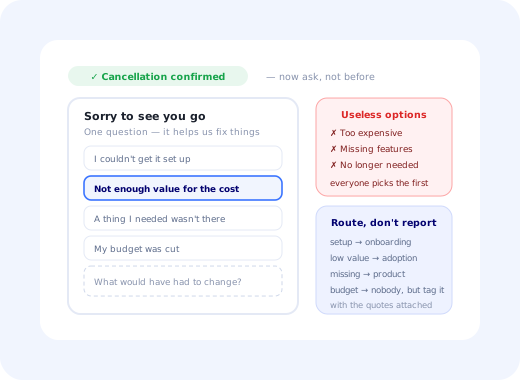
❌ Reason codes that tell you nothing
- Too expensive
- Missing features
- No longer needed
- Switched to another solution
- Other
✅ Reason codes you can act on
- I couldn't get it set up and gave up
- We use it, but not enough to justify the cost
- A specific thing I needed wasn't there
- The project it was for finished
- My budget was cut; the tool was fine
- Something else: tell us below
The right-hand list does three things the left-hand one cannot. It separates value from price: "we use it but not enough to justify the cost" is an adoption problem, "my budget was cut" is not, and both are hidden inside "too expensive". It catches the onboarding failure, which is otherwise invisible because a customer who never got started rarely volunteers that. And it uses first-person customer language, which reads as a real question rather than an internal taxonomy.
The discrimination test: if one option collects more than about half your responses, it is not an option; it is a shrug. Rewrite it into two or three specific ones and watch the distribution spread out. This is the single highest-value edit available to most exit surveys, and it takes an afternoon.
Where the Survey Belongs in the Flow
Ask after the cancellation is confirmed. This is the most commonly ignored rule and the most consequential.
A survey placed between the customer and the cancel button is experienced as an obstacle, one more thing standing between them and a decision they have already made. It produces defensive, minimal answers, and it makes people angry at a company they might otherwise have returned to. The pattern is common enough that customers recognise it on sight and click whatever is fastest.
A survey shown immediately after cancellation is confirmed costs the customer nothing. The decision is done, the reason is fresh, and the tone of the answers changes completely. Response rates are usually lower; response quality is dramatically higher, and quality is the entire point.
The one legitimate pre-cancellation step: a single, clearly-labelled offer to pause instead of cancel, on the same screen as the cancel button, with the cancel button still fully available. That is a genuine service to the meaningful share of customers whose need is seasonal or temporarily suspended. A sequence of interstitials, a chat widget popping open, or a "are you sure?" chain is not; it is a dark pattern with a churn-reduction label on it, and it converts a neutral departure into a negative review.
The Three Questions
Three is the ceiling. Every question beyond the third measurably reduces completion, at exactly the moment goodwill is at its lowest.
1. The reason (closed, single-select)
Five or six options in customer language, as above, plus an "something else" that opens a text field. Do not randomise the order; put the ones you most need to distinguish at the top, since attention is short. Do not make it mandatory.
2. The counterfactual (open)
"What would have had to be different for you to stay?" This phrasing does far more work than "any other comments", because it asks for a specific change rather than a general impression. People answer it concretely ("if the export had included attachments", "if setup hadn't needed a developer") and concrete answers are the ones that turn into tickets.
3. The destination (open, optional)
"Are you moving to something else? We won't follow up." The reassurance matters; without it most people skip the question. This is the only reliable way to learn whether you are losing to a competitor, to an in-house build, or, most often, to nothing at all, which is a completely different strategic situation.
Sorry to see you go: one quick question
Your cancellation is confirmed. This helps us fix what's broken.
One closed question, one open follow-up, shown after the cancellation is already confirmed.
Coding the Free Text Without a Research Team
The open answers hold the information, and they arrive as an unstructured pile. The way to make them countable without a dedicated researcher is a small, stable coding frame:
- Read fifty responses without categorising anything. Just read them.
- Write down the themes that recurred. There will be six to ten, not thirty.
- Code every response against that frame; anything that does not fit goes to "unclassified".
- Review "unclassified" quarterly. If a new theme has reached five or more, promote it and retire a dead one.
- Keep the frame under ten themes, permanently. A taxonomy that only grows becomes uncountable.
Attach three attributes to every coded response: plan, tenure and account size. The same sentence from a two-week trial and a three-year customer means completely different things, and an aggregate that mixes them will point you at the wrong problem. The customer feedback analysis guide covers building a taxonomy that survives contact with real feedback in more depth.
Save Offers: When They Are Legitimate
A save offer is a response to a departure: a discount, a pause, a downgrade, a call with a specialist. Used well it recovers customers who genuinely wanted to stay. Used badly it delays churn by one billing cycle and teaches customers that your list price is fiction.
Fits the largest genuine category, seasonal or suspended need, costs you nothing structural, and keeps the account and data intact.
For "we use it but not enough". A downgrade is a retained customer with a real chance of growing back; a cancellation is not.
Only when the stated reason is genuinely price, and never automatically. A discount offered to someone with a feature gap solves nothing.
The right answer to "I couldn't get it working", and a signal that your onboarding needs the fix, not this one customer.
Requiring a call, hiding the button, or making the offer a mandatory step. It converts a neutral exit into an angry public one.
If the save offer does not depend on the stated reason, it is not a save offer; it is a blanket discount with extra steps.
Whatever you offer, keep it after the survey, not before it. An offer presented first contaminates the answer: people will select whichever reason they think gets the better deal.
Routing the Findings to Someone Who Can Fix Them
The most common failure after collecting good exit data is presenting it to everybody. A monthly churn summary circulated to the whole company is read as weather, not as work. Themes have natural owners, and the owner should receive their theme with the verbatim quotes attached:
Then close the loop: next quarter, report what changed as a result. Without that, the exit survey quietly becomes an archive, and the person who has to maintain it will eventually stop.
Metrics for the Survey Itself
| Metric | Target behaviour | What it tells you |
|---|---|---|
| Response rate | Stable or rising | Whether the survey is placed and worded acceptably |
| Open-question completion | A healthy share of respondents | The real quality signal: closed answers alone are cheap |
| Reason-code spread | No option above ~50% | Whether your options discriminate or just absorb |
| Save-offer acceptance by reason | High for price, low elsewhere | Whether the offer is matched to the problem |
| Themes actioned per quarter | At least one, visibly | Whether the instrument is connected to anything |
Keep an eye on total survey load across the product too; an exit survey is the last thing a customer sees, and it should not be the fourth prompt they have received that month. The survey fatigue guide covers budgeting attention across a whole programme.
Exit Surveys: Do vs. Don't
✅ Do
- Ask after the cancellation is confirmed
- Keep it to three questions
- Write reason codes in customer language
- Ask "what would have had to be different?"
- Promise not to follow up, and mean it
- Offer a pause as the primary save option
- Code the free text against a stable, small frame
- Send each theme to a named owner with quotes
❌ Don't
- Put the survey in front of the cancel button
- Make any question mandatory
- Offer "too expensive" as a standalone option
- Present a save offer before the survey
- Require a phone call to cancel
- Let the coding taxonomy grow without limit
- Mix trial churn and multi-year churn in one chart
- Circulate a monthly summary and call it action
Building the Exit Survey Without Engineering Time
An exit survey is a small thing that never gets scheduled, because it sits at the boundary between billing, product and support and belongs to none of them. With Kompassify a product or customer-success owner can build it directly:
- Triggered on the cancellation-confirmation screen Exactly where it belongs: after the decision, not in front of it.
- A multi-choice question plus one open field The two-question shape that carries almost all of the signal, with the third question optional.
- Responses segmented by plan and tenure So trial churn and long-tenure churn never end up in the same bar.
- Reason codes you can rewrite the same day When one option starts absorbing half the responses, fix the wording immediately instead of waiting for a release.
- A dormancy survey for accounts that stopped using The same instrument aimed earlier, at customers who are still paying, where churn can still be prevented rather than explained. Pair it with re-engagement.
Kompassify is no-code, GDPR compliant and EU-hosted, free for under 100 monthly active users, with paid plans from $129/month.
Find Out Why People Actually Leave
Put a two-question exit survey on your cancellation-confirmation screen this week, and rewrite the reason codes the moment they stop telling you anything.
Start FreeFrequently Asked Questions
What is an exit survey?
An exit survey is a short set of questions asked of a customer who is leaving, cancelling a subscription, downgrading a plan or deleting an account, to find out why. In a product context it is usually presented inside the cancellation flow itself, which is what separates it from a general satisfaction survey: it is asked at the one moment when the person has both a strong opinion and nothing left to lose by sharing it. The employment world uses the same term for the interview conducted when a staff member resigns; the principles overlap, but the mechanics in this guide are the customer-facing ones.
What questions should an exit survey ask?
Three, at most. First, a single closed question on the primary reason for leaving, with options written from real customer language rather than internal categories. Second, an open follow-up phrased specifically: "what would have had to be different for you to stay?" works far better than "any other comments". Third, an optional question about where they are going, which is the only reliable way to learn whether you are losing to a competitor, to an in-house build, or to nothing at all. Anything beyond three questions measurably reduces completion at exactly the moment goodwill is lowest.
Where should the exit survey appear in the cancellation flow?
After the decision is confirmed, not before it. A survey placed between the customer and the cancel button is experienced as an obstacle, produces defensive answers and damages the relationship with someone who may well return. A survey shown immediately after cancellation is confirmed, while the reason is still fresh, gets more honest responses and costs the customer nothing. The single exception is a genuinely useful branch, such as offering to pause instead of cancel, which should be one clear option rather than a sequence of interstitials.
Why is exit survey data usually useless?
Because of the reason codes. Most exit surveys offer options like "too expensive", "missing features" and "no longer needed", and most customers pick the least confrontational one that is broadly true. "Too expensive" in particular is the polite universal answer, and it conflates a genuine budget constraint with a failure to see enough value, two problems with opposite fixes. Reason codes written in internal vocabulary produce a tidy chart that nobody can act on. The way out is fewer, more specific options in customer language, plus one well-phrased open question that carries the actual information.
Should you offer a discount to stop someone cancelling?
Only when the stated reason is genuinely price, and only once. A discount offered to someone leaving because a feature is missing does not solve their problem; it delays the cancellation by a billing cycle and teaches the customer that your list price is negotiable. A pause option is almost always the better save mechanism, because it fits the largest genuine category, people whose need is seasonal or temporarily suspended, and it does not damage pricing integrity. Whatever you offer, do not make it a condition of completing the cancellation.
How do you analyse open-text exit survey answers?
Code them into a small, stable set of themes and review the set quarterly. Read fifty responses, write down the recurring themes, and use that as your coding frame; anything that does not fit goes into a holding category that you re-examine at each review. Keep the frame under about ten themes, because a taxonomy that grows without limit becomes uncountable and stops being usable in a report. Attach the customer's plan, tenure and account size to every coded response, since the same words from a two-week trial and a three-year customer mean entirely different things.
What should you do with exit survey results?
Route them, do not just report them. Each theme has a natural owner: pricing sits with commercial, missing capability with product, "could not get it working" with onboarding, "we never used it" with adoption. A monthly summary that goes to everybody is read by nobody; five themed lines sent to five named owners, with the verbatim quotes attached, produce actual changes. Close the loop by reporting back next quarter on what moved, otherwise the survey becomes an archive rather than an instrument.
How do you build an exit survey without engineering work?
Trigger a short in-app survey on the cancellation-confirmation screen, with one closed question, one open follow-up and an optional third. A no-code platform such as Kompassify lets a product or customer-success owner build and target it, segment responses by plan and tenure, and change the reason-code wording as soon as the options stop discriminating, which is the change most teams need to make and almost never get scheduled. Kompassify is GDPR compliant and EU-hosted, free for under 100 monthly active users, with paid plans from $129/month.