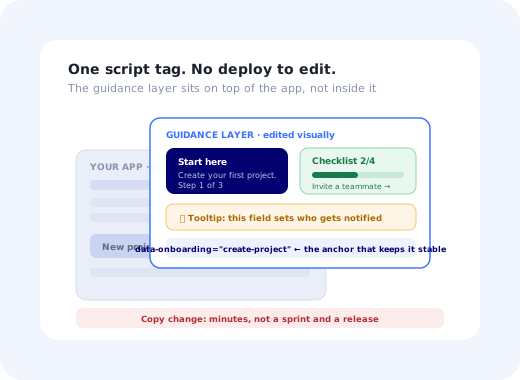
Most onboarding does not fail because somebody had a bad idea. It fails because the good idea took eleven weeks to ship. Someone in customer success notices that new accounts get stuck on the same screen. They write it up. It joins a backlog behind three revenue features. A quarter later a version of it ships, by which point the screen has been redesigned and the copy is wrong.
No-code onboarding is the response to that specific problem. Instead of building tours, tooltips and checklists into your application's source, you add a small script once and then create and edit the guidance visually (pointing at elements in your own product, writing the copy, choosing who sees it) with changes going live without a deploy.
This guide covers what that actually means in practice: how it works technically, what genuinely does not need engineering and what still does, how to build a first flow that is worth shipping, how to keep a no-code layer from decaying into clutter, and the honest limits of the approach.
Key Takeaways
- The point is not saving the build; it is saving the edit. Onboarding content changes constantly; code deploys do not.
- One script tag, then visual editing. The guidance layer runs on top of your app rather than inside its source.
- Anchoring is the technical heart. Stable target attributes are the one thing worth asking a developer for.
- You still need engineering for identity and events: who the user is, what plan they are on, what they have done.
- Start with one flow, not a programme. One drop-off point, one guide, measured, then the next.
- Governance from day one. Anything easy to create is easy to over-create; an unowned guidance layer becomes noise within a year.
What No-Code Onboarding Actually Means
The term covers a specific architectural choice. Your onboarding content (tour steps, tooltips, checklists, announcements, surveys) lives outside your codebase, in a separate layer that renders on top of your running application.
No-code onboarding is the practice of building and editing in-app guidance (product tours, tooltips, checklists, banners and surveys) through a visual editor rather than in your application's source code, so that non-engineers can create and change onboarding without a release cycle.
Mechanically it works like this: a small JavaScript snippet loads with your app, identifies the current user, fetches the guidance configured for them, and renders it over the existing interface. The guidance targets elements already on the page, so nothing about your components has to change.
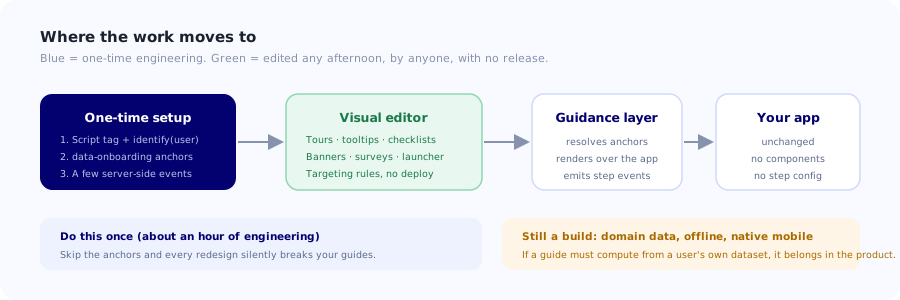
The guidance layer sits on top of the app rather than inside it, which is precisely why editing it does not require a release.
| Built into the code | No-code layer | |
|---|---|---|
| Who creates it | Engineers | Product, CS, marketing, support |
| Time to change copy | A sprint, then a release | Minutes |
| Change targeting | Code change + deploy | A rule in the editor |
| Per-step analytics | Build it yourself | Included |
| Deep product integration | Unlimited | Bounded by what the page exposes |
| Works offline / native mobile | Yes | Web-first; check platform support |
What You Can Build Without Engineering
The practical answer is: most of what onboarding actually consists of. These are the patterns that a non-technical team can create, edit and retire on their own.
Product tours and walkthroughs
Sequenced steps anchored to real elements, with a spotlight and next/back controls. The useful version is short and ends in the user completing a real action. See designing a tour that converts for the difference between a tour and a guided completion.
Tooltips and hotspots
A single explanation attached to a single control, shown on hover, click or automatically. This is the highest-yield, lowest-effort pattern available: find the field with the worst error rate, attach one sentence. Writing tooltips that work covers the copy side.
Onboarding checklists
A persistent list of the three to five things a new account needs to do, with progress that updates as they are completed. Usually the single highest-impact element of a new-user experience. The mechanics are in building an onboarding checklist.
Announcements and banners
Feature launches, maintenance notices, plan-specific messages. Being able to publish these without a release is the reason many teams adopt a no-code layer in the first place. See announcing a new feature.
In-app surveys
NPS, CSAT or a one-question micro-survey fired at a specific moment. The value comes from the timing, which is exactly the thing that is painful to change when it is hard-coded. See in-app surveys.
A help launcher
A persistent control offering short answers and re-runnable guides for the current screen. It is what keeps working for the user who joins long after your launch campaign ended. See in-app support.
What Still Needs a Developer
Being straight about this is what separates a no-code layer that works from one that gets abandoned in month three. Three things genuinely require engineering, and all three are small, one-time tasks.
1. Installing the snippet and identifying the user
One script tag, plus a call telling the layer who the current user is, an id, and the attributes you want to target on: plan, role, signup date, company size. Without identification you can only target by page, which rules out most of what makes onboarding good. This is typically an hour of work and it is the single most important thing to get right.
2. Stable anchors for the elements you will target
A visual editor picks elements by selector. If it picks up an auto-generated class like
.css-1x7f9k, the guide breaks at the next build. Ask for a small set of stable
attributes on the elements onboarding will reference:
<button data-onboarding="create-project">New project</button>
<div    data-onboarding="report-filters">…</div>
<a      data-onboarding="invite-teammate">Invite</a>
Twenty attributes covering the elements your onboarding will ever point at is enough, and it makes the difference between a guidance layer that survives redesigns and one that silently breaks after every release. It is a fifteen-minute pull request that pays for itself repeatedly.
3. Events for things that are not clicks
"Show this once the user has connected an integration" or "mark the checklist item done when the first invoice is sent" require your application to say so. Simple completions can be inferred from a click or a page visit; anything that happens on your server needs an event. Send a handful of meaningful ones rather than everything; building an event taxonomy covers how to choose them.
Where no-code genuinely runs out: guidance that has to read or write your domain data, branch on complex application state, run inside a native mobile app, or work offline. If your onboarding needs to display a calculation from a user's own dataset, or to run in a field app with no connectivity, that is a build. Being clear about this early avoids a frustrating discovery halfway through a project.
Building Your First Flow
The instinct is to map the whole onboarding programme. Resist it. A first flow that ships this week and is measured teaches you more than a plan that ships next quarter.
1. Find the single worst drop-off
Look at where new accounts stop. Not opinions: the step in your signup or setup sequence where the largest number of people stop progressing. If you cannot see it yet, that is the first thing to fix; funnel analysis covers how to find it.
2. Decide what "done" means, in one sentence
"The user has created their first project and invited one teammate." A flow without a defined completion cannot be evaluated, and unevaluated guidance accumulates forever because nobody can argue it is not working.
3. Write the copy before you build anything
Three to five steps, one instruction each, in plain sentences. If a step needs a paragraph, it is really two steps or a design problem. Writing first stops the common failure where a tour is built because the editor made it easy and the copy is filled in afterwards.
4. Anchor to stable elements and check the empty state
Point each step at a data-onboarding attribute. Then view the flow as a genuinely new
account, because the screen a new user sees is the empty one, and guidance authored against a
populated demo account routinely points at a table that does not exist yet. This is the most common
single mistake in no-code onboarding.
5. Target narrowly
New users only, one plan, one role, first session. Broad targeting is how a helpful guide becomes an interruption for the 90% of your users who already know the product, and how you train people to dismiss your guidance reflexively. Segmentation matters more here than volume.
6. Ship it, then read the per-step drop-off
Not the completion rate: completion is achievable by clicking Next until it stops. The useful signal is which step people leave on, and whether the users who saw the flow reach activation more often than a comparable group who did not.
The two-week rule. Give every new flow a review date two weeks out. Either it moved the number it was built to move, or it gets changed or removed. This one habit prevents the most common long-term failure of no-code onboarding: a product slowly accumulating guidance that nobody owns, nobody measures and everybody dismisses.
Keeping It From Turning Into Clutter
The strength of a no-code layer is that anyone can create a guide in ten minutes. That is also the risk. A product with forty tooltips, six overlapping tours and three checklists has not improved onboarding; it has added a second interface on top of the first.
✅ Governance that works
- One owner for the guidance layer, named.
- A review date on every flow, with removal as a normal outcome.
- A cap: no user sees more than one proactive guide per session.
- Narrow targeting by default; broaden only with evidence.
- A quarterly audit against the current UI: redesigns break anchors.
- Staging or an internal-only audience before anything goes live.
❌ How it decays
- Every team publishing to all users independently.
- Guides created for launches and never retired.
- Tours built because the editor is fun, without a defined outcome.
- Copy that describes the interface instead of moving the user forward.
- Nobody checking flows after a redesign.
- Measuring completion rate and nothing else.
The failure mode to watch for is banner blindness: once users learn that your in-app messages are usually irrelevant, they dismiss them without reading, including the one that mattered. Restraint is not a nice-to-have here; it is what preserves the channel's value.
Who Should Own It
Moving onboarding out of the codebase raises a question that is organisational rather than technical: whose job is this now?
| Team | Usually owns | Why it fits |
|---|---|---|
| Product | Activation flows, feature adoption, the checklist | Owns the activation metric the guidance exists to move. |
| Customer success | Deflection guides, account-specific help, surveys | Sees the questions first and can respond in hours. |
| Support | Tooltips on the fields that generate tickets | Has the ticket data that identifies exactly which fields. |
| Marketing | Launch announcements, upgrade prompts | Owns the message; no longer needs a release to send it. |
The pattern that works is distributed creation with a single owner for what actually reaches users: anyone can draft, one person decides what ships and to whom. Distributed creation with distributed publishing is how products end up with three tours competing on the same screen.
Build your first flow this afternoon
Kompassify adds product tours, tooltips, checklists, announcements and surveys to your existing product from a single script tag, built visually by your product, support or customer success team, with no deploy for a copy change and per-step analytics included. GDPR compliant, EU-hosted, free up to 100 monthly active users and from $129/mo after that.
Start for Free →The Honest Limits
No-code onboarding is the right default for onboarding content. It is not a universal answer, and pretending otherwise leads to disappointment.
- It is a layer on top, so it depends on your DOM. Stable anchor attributes are what make that dependency safe; without them, redesigns break guides.
- Deep data integration is a build. Guidance that computes something from the user's own dataset belongs in the product.
- Native mobile and offline are different problems. Check platform support rather than assuming parity with web.
- It cannot fix a confusing product. A tooltip explaining a bad interaction is a bandage; sometimes the honest answer is to change the screen. See user friction.
- It adds a script to your page. Check the performance and privacy characteristics, and where the data is hosted, before you install anything.
None of which changes the central case. The reason to move onboarding out of the codebase is not that building it is hard; it is that changing it is, and onboarding is the part of a product that needs changing most often. If you want the fuller cost comparison, it is in build vs buy user onboarding.
Frequently Asked Questions
What is no-code onboarding?
No-code onboarding is the practice of building and editing in-app guidance (product tours, tooltips, checklists, banners and surveys) through a visual editor rather than in your application's source code, so non-engineers can create and change onboarding without a release cycle. Technically it works by loading a small JavaScript snippet with your app, which identifies the current user, fetches the guidance configured for them, and renders it over the existing interface by targeting elements already on the page. Your components do not change.
What can you build without engineering?
Most of what onboarding actually consists of: product tours and walkthroughs anchored to real elements, tooltips and hotspots attached to individual controls, onboarding checklists with progress, feature announcements and banners, in-app NPS or CSAT surveys fired at a chosen moment, and a persistent help launcher offering answers for the current screen. All of these can be created, edited, targeted and retired by a product, support or customer success team without touching the codebase or waiting for a deploy.
What still requires a developer with no-code onboarding?
Three things, all small and one-time. Installing the script and identifying the user, passing an id plus the attributes you want to target on such as plan, role and signup date: without identification you can only target by page, which rules out most useful onboarding. Adding stable anchor attributes such as data-onboarding to the elements guidance will point at, so a redesign does not silently break every guide. And sending events for completions that happen server-side, such as an invoice being sent or an integration being connected, which a click cannot infer.
Why do stable anchor attributes matter so much?
Because a visual editor picks elements by selector, and if it picks up an auto-generated class name like .css-1x7f9k, the guide breaks at the next build, silently, because a missing element is not an error. Asking engineering for around twenty stable attributes covering the elements onboarding will ever reference is roughly a fifteen-minute pull request, and it is the difference between a guidance layer that survives redesigns and one that needs repairing after every release. It is the single most valuable thing to request.
How do you build your first no-code onboarding flow?
Find the single worst drop-off point for new accounts using funnel data rather than opinions. Define what "done" means in one sentence, so the flow can actually be evaluated. Write the copy first (three to five steps, one instruction each) before opening the editor. Anchor each step to a stable attribute and preview it as a genuinely new account, because guidance authored against a populated demo account routinely points at a table that does not exist yet. Target narrowly, ship, then read per-step drop-off rather than completion rate.
How do you stop no-code onboarding turning into clutter?
Governance, from day one. Name a single owner for the guidance layer. Put a review date on every flow, with removal treated as a normal outcome rather than a failure. Cap how much any user sees: no more than one proactive guide per session is a good default. Target narrowly by default and broaden only with evidence. Audit quarterly against the current interface, since redesigns break anchors. Allow anyone to draft, but let one person decide what actually ships and to whom. Without this, users learn to dismiss your messages reflexively (banner blindness) including the one that mattered.
What are the limits of no-code onboarding?
It is a layer on top of your application, so it depends on your DOM being stable, which is what anchor attributes address. Guidance that computes something from a user's own dataset, or branches on complex application state, is genuinely a build. Native mobile and offline use are different problems, so check platform support rather than assuming parity with web. It also cannot fix a confusing product; a tooltip explaining a bad interaction is a bandage, and sometimes the honest answer is to change the screen. And it adds a script to your page, so check performance, privacy and data hosting before installing.
Who should own no-code onboarding in a company?
Distributed creation with a single owner for what actually reaches users. Product typically owns activation flows and the checklist, because it owns the metric the guidance exists to move. Customer success owns deflection guides and surveys, because they see the questions first and can respond within hours. Support owns tooltips on the fields that generate tickets, because they have the data identifying which fields. Marketing owns launch announcements. Let anyone draft, but have one person decide what ships; distributed publishing is how products end up with three tours competing on the same screen.