There is a moment familiar to anyone who has inherited a product analytics account. You open the
event list looking for "the one where a user creates a project", and you find
project_created, Create Project, new_project_success and
projectCreate. Three were added by people who have left. All four have some data.
None of them has all of it.
Event tracking is easy to start and unusually hard to keep clean, and that gap is expensive in a specific way: not because you lose data, but because you lose trust in the data, at which point every decision goes back to being made from opinion while an analytics bill continues to arrive.
This guide covers what an event actually is, how events differ from properties and traits, the small number of things genuinely worth tracking, a naming convention that survives team changes, a seven-step implementation method, the tracking plan document that keeps everyone honest, how to catch silent breakages, and what clean events let you do in onboarding that page views never can.
Key Takeaways
- Start from questions, not screens. Instrument what ten specific decisions require, and nothing else.
- Object, then action, past tense, one casing.
project_created, notCreate Project. - Variations are properties, not events. The moment you create
invoice_sent_eurthe taxonomy has begun to rot. - Twenty to forty events is a healthy product. Four hundred is a dataset nobody trusts.
- Tracking breaks silently. Volume alerting catches more real problems than careful implementation does.
- Events are what make onboarding conditional, guidance triggered by behaviour instead of by page or timer.
What Is Event Tracking?
Event tracking: definition
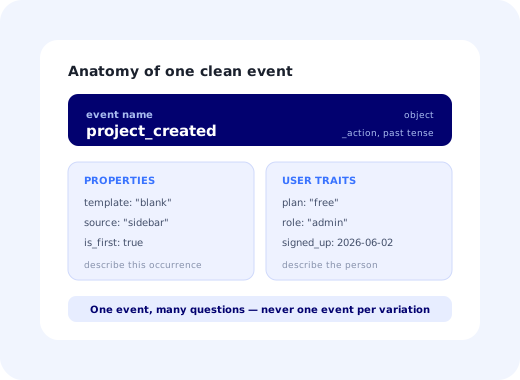
Event tracking is the practice of recording the meaningful actions users take in a product as named, structured records, each with a name describing what happened, properties describing the circumstances, and an identifier for who did it. Where page-view analytics measures where people went, event tracking measures what they accomplished, which is the only view that can answer whether a user reached value.
The distinction matters more than it sounds. "Visited /projects/new" tells you someone opened a form.
"project_created with is_first: true" tells you a person got something done
for the first time, which is the raw material of activation, retention analysis, and every piece of
behavioural targeting you might want later.
Everything downstream (funnels, cohorts, activation definitions, guidance triggers) is assembled out of records that look like this. Which is why the shape of that record deserves an afternoon of design rather than five minutes before a release.
Events, Properties and Traits
| Concept | What it describes | Example | Rule of thumb |
|---|---|---|---|
| Event | Something that happened, at a point in time. | invoice_sent |
If it has a timestamp and a verb, it is an event. |
| Event property | A detail of that specific occurrence. | amount, currency, was_scheduled |
If it varies between two occurrences, it is a property. |
| User trait | A persistent fact about the person or account. | plan, role, company_size |
If it is true between events, it is a trait. |
| Page view | Navigation, not accomplishment. | /settings/billing |
Useful context; never a substitute for an event. |
The single most damaging mistake is promoting a property to an event name. The
moment invoice_sent_eur and invoice_sent_usd exist, every funnel has to
enumerate currencies, every new currency requires a code change, and the answer to "how many
invoices were sent?" becomes a query nobody writes correctly on the first attempt. If two events
differ only by a value, they are one event with a property.
What to Actually Track
Instrumenting everything is a strategy that feels responsible and produces a dataset nobody uses. Instead, write down the decisions you want data to inform, then instrument backwards from them. For most products the list looks like this:
- Core value actions: the two or three things that, when a user does them, mean the product worked. These define activation.
- Steps of the critical flows: signup, setup, invite, first configuration. One event per step, so drop-off is visible without inference.
- Lifecycle transitions: account created, teammate invited, plan changed, integration connected, account deactivated.
- Blocking errors: validation failures, permission refusals, import errors. These are the highest-value events in most products and the least often tracked.
- Guidance interactions: walkthrough started, step completed, checklist item done, tooltip dismissed. Without these your onboarding is unmeasurable.
And a list of what not to track: every button click, every scroll, every hover, every page in the marketing site, and anything you cannot name a question for. If someone proposes an event and cannot say which decision it informs, the honest answer is not yet.
A Naming Convention That Survives Turnover
Almost no decayed tracking plan is wrong. It is inconsistent, which is worse, because inconsistency cannot be fixed by reading the code. Adopt one convention and enforce it mechanically.
project_created, project_archived, project_shared. Alphabetical listing then groups everything about the same object together, which is how people browse a catalogue.
An event is a record of something that already happened. invite_sent, not send_invite. It also stops events from being confused with API endpoints.
Lower snake case is the common choice. What matters is not which you pick but that a linter or a schema rejects anything else before it reaches production.
✓ Names that age well
project_createdinvite_acceptedreport_exportedintegration_connectedchecklist_completed
✗ Names that cause trouble
Create Project: casing and tense driftclicked_blue_button: describes the UI, not the meaninginvoice_sent_eur: a property masquerading as an eventsuccess: success at what?project_created_v2: versioning in a name is a permanent scar
The clicked_blue_button example is worth dwelling on. Events named after interface
elements break the day the interface changes, and they force every future reader to reconstruct what
the button did. Name the meaning, not the mechanism, a habit that also survives redesigns, which no
UI-shaped name ever does.
Implementing Event Tracking: 7 Steps
- Write the ten questions first
- Draft the tracking plan before any code
- Name an owner for the taxonomy
- Instrument close to the truth, not close to the button
- Add identity and traits once, properly
- Verify each event by hand before release
- Alert on volume, and review quarterly
1. Write the ten questions first
Literally ten sentences: "what share of new accounts complete setup in week one?", "which feature use predicts renewal?", "where does the invite flow lose people?". Anything you cannot trace to one of these does not get instrumented in this round. This step takes an hour and removes roughly half of the events a team would otherwise have built.
2. Draft the tracking plan before any code
One row per event: name, a plain-English description of exactly when it fires, its properties with types and allowed values, the owner, and which question it serves. A spreadsheet is entirely adequate. Its purpose is to make disagreements happen before implementation rather than during analysis six months later, when the disagreement is expensive and unresolvable.
3. Name an owner for the taxonomy
One person, usually a product analyst or a senior PM, who reviews every proposed event before it ships. Not to slow anyone down; to ask "is this the same as this existing one?", which is the single question that prevents duplicates. Tracking plans decay in exactly the products where nobody has this job.
4. Instrument close to the truth, not close to the button
Fire the event where the thing actually succeeded, after the server confirms the project was created, rather than on the click that requested it. Click-time instrumentation over-reports by counting failures as successes, and the discrepancy is invisible until someone compares analytics with the database and finds twelve per cent more projects created than exist.
5. Add identity and traits once, properly
Every event needs a stable user identifier and, in B2B, an account identifier; otherwise you can never move from user-level to account-level analysis, which is where most SaaS decisions live. Set traits such as plan, role and signup date in one place, so that segmentation works everywhere without each analysis re-deriving them.
6. Verify each event by hand before release
Perform the action; look at the payload; compare it to the plan, field by field. It takes two minutes per event and catches the errors that are otherwise found by an analyst in three months, after the wrong decision has already been made on top of them.
7. Alert on volume, and review quarterly
Tracking breaks silently: a refactor detaches a handler, an event's daily volume goes to zero, and nothing raises an error because nothing is technically wrong. Alert on any tracked event that stops arriving, on unexpected new event names appearing in production, and on properties with the wrong type. Then review the whole catalogue quarterly and delete events for features that no longer exist.
What Clean Events Let You Do in Onboarding
This is the part that justifies the discipline to anyone outside the data team. Without events, in-app guidance can only be scheduled by page or by timer, which is why so much of it appears to people who did not need it and misses the people who did. With events, guidance becomes conditional.
-
Trigger on behaviour, not on arrival
Show the walkthrough only to users who have not yet fired the core action. The mechanics are covered in onboarding triggers.
-
Tick checklist items automatically
A checklist that marks itself complete when the event fires is trusted; one that requires self-reporting is ignored.
-
Locate the leak precisely
One event per step turns a vague "onboarding is bad" into "sixty-one per cent stop at step three", which is the whole method of the onboarding funnel guide.
-
Stop talking to people who already did it
The fastest way to make in-app messaging annoying is to keep promoting a feature to users who adopted it last week. Events are what prevent that.
This is also why product adoption work tends to stall in companies with poor instrumentation: not from lack of ideas, but because no idea can be targeted or evaluated.
Keeping It Honest
✓ Do
- Review every proposed event against the existing catalogue.
- Fire events on confirmed success, not on click.
- Alert when a known event stops arriving.
- Delete events for features that no longer exist.
- Keep the plan as the authority when memory and data disagree.
✗ Don't
- Track every click "in case we need it".
- Encode values into event names.
- Name events after UI elements.
- Let each team invent its own casing.
- Put personal data in event properties.
That last item is not only a privacy obligation; it is practical hygiene. Event payloads get replicated to warehouses, dashboards and third-party tools, and every copy of a personal identifier is a copy you must later find and delete. Send identifiers, not identities.
Putting the Events to Work
Instrumentation is only half the return. The other half is acting on it in the product, quickly, without a release for every change of mind.
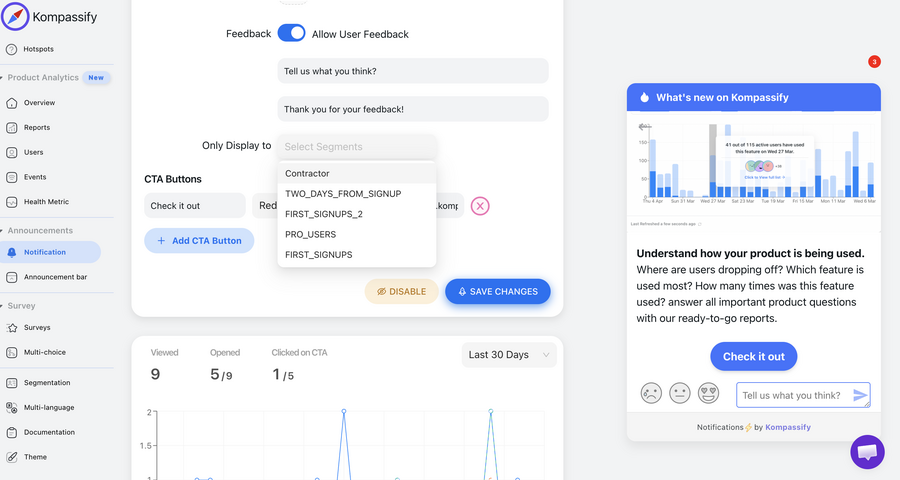
With Kompassify you can build segments from the behaviour and traits you already send, then target in-app guidance to them: show a walkthrough only to users who have not completed the core action, keep a checklist synchronised with real progress, or run an in-app survey to people who did something specific last week. Kompassify is GDPR compliant and EU-hosted, free for under 100 monthly active users, with paid plans from $129/month.
Turn Events Into Guidance That Actually Lands
Kompassify targets walkthroughs, checklists and in-app messages using your real product behaviour, so guidance reaches the people who need it and disappears for the people who don't. GDPR compliant, EU-hosted, and free for under 100 monthly active users.
Start for Free →Frequently Asked Questions
What is event tracking?
Event tracking is the practice of recording the meaningful actions users take in a product as named, structured records: "project_created", "invite_sent", "report_exported", each carrying properties that describe the circumstances and an identifier for who did it. It differs from page-view analytics in that it measures what people accomplished rather than where they went, which is the only view that answers product questions such as whether a user reached value, which step of a flow they abandoned, or which behaviours predict renewal.
What is the difference between an event and a property?
An event is the thing that happened; a property is a detail about it. "invoice_sent" is an event; the amount, the currency, the template used and whether it was scheduled are properties of that event. A user trait is different again: it describes the person or account persistently, plan, role, company size, signup date, rather than describing one occurrence. The most common instrumentation mistake is turning properties into separate events, which produces "invoice_sent_eur" and "invoice_sent_usd" and makes every future analysis harder.
What should you actually track?
Start from questions, not from screens. Write down the ten decisions you want data to inform: did this user activate, where does onboarding leak, which features predict retention, which accounts are at risk, and instrument only what those questions require. In practice that is usually twenty to forty events for a mature product: the core value actions, the steps of the critical flows, the key lifecycle transitions, and errors that block progress. Tracking every click produces a large, expensive dataset that nobody trusts enough to use.
What is a good event naming convention?
Object then action, in the past tense, lower snake case: "project_created", "invite_accepted", "report_exported". Objects come first because it groups every event about the same thing together in an alphabetical list, which is how people actually browse an event catalogue. Past tense because an event is a record of something that already happened. Pick one casing and enforce it mechanically: most decayed tracking plans are not wrong, they are simply inconsistent, and inconsistency is what makes analysts stop trusting the data.
Why do tracking plans decay?
Three reasons, in order. Nobody owns the taxonomy, so every team adds events in its own style until duplicates outnumber originals. Events are added when features ship but never removed when features die, so the catalogue fills with names nobody recognises. And there is no review step, so a renamed button quietly breaks an event that three dashboards depend on. The fix is unglamorous: a named owner, a review of any new event before it ships, and a documented plan that is the single source of truth.
What is a tracking plan?
A tracking plan is the document that defines every event you collect: its name, a plain-English description of exactly when it fires, its properties with types and allowed values, the owner, and which questions or dashboards depend on it. It exists so that the meaning of an event does not live only in the head of the engineer who added it. A spreadsheet is entirely adequate. What matters is that it is written before implementation, reviewed when anything changes, and treated as the authority when the data and someone's memory disagree.
How does event tracking improve user onboarding?
It converts onboarding from an opinion into a measurable funnel and makes guidance conditional on real behaviour. With clean events you can see exactly which step of a flow loses people, define activation as a specific event rather than a feeling, trigger a walkthrough only for users who have not yet performed the key action, and stop showing a checklist item the moment its event fires. Without events, in-app guidance can only be scheduled by time or page, which is why so much of it is shown to people who did not need it.
How do you test that event tracking is correct?
Verify each new event manually before release by performing the action and confirming the payload matches the plan, then add automated checks: alert on any event whose daily volume drops to zero, on unexpected new event names appearing in production, and on properties arriving with the wrong type or null where a value is required. Most tracking breakages are silent: a refactor detaches a handler and nobody notices until a quarterly report looks strange, so volume alerting is worth more than any amount of care at implementation time.