The conversation always starts the same way. Someone shows a product tour in a planning meeting, an engineer looks at it for four seconds, and says: that's a positioned div and a step counter, I could build it in a weekend.
They are not wrong. That is a weekend. The problem is that the thing they built on Saturday is a demo, and what the business needs is a system, one that keeps working when the UI changes, that a product marketer can edit without opening a pull request, that shows a different flow to trial users than to enterprise admins, that remembers where each individual user stopped, and that can tell you which step is losing people. That is not a weekend. That is a small internal product, with an owner, a backlog and a maintenance cost that never goes to zero.
This guide is the honest version of the build vs. buy decision for user onboarding and in-app guidance: what an in-house build really contains, how to cost it without flattering yourself, the four cases where building genuinely wins, what to check before buying, and a scorecard that turns the argument into a number.
Key Takeaways
- The tooltip is not the system. Rendering guidance is roughly a tenth of the work; targeting, segmentation, analytics, versioning and a non-engineer editor are the rest.
- Cost the build in engineer-months, then add maintenance, which is permanent: selectors break every time your own interface changes.
- The real cost is iteration speed. Onboarding in your codebase means every copy tweak becomes a ticket competing with feature work, and the flow eventually stops being updated.
- Building wins in four cases: guidance is your product, a hard compliance constraint rules out every vendor, the need is entangled with product internals, or the true scope really is one static tooltip.
- Buy first to learn the requirements. A build designed before you have per-step data is a build designed from assumptions.
- Score it, don't argue it. Seven weighted questions settle this faster than a meeting, and leave a written record of why.
Why the Build Always Looks Cheap
Estimates for in-house onboarding are wrong in a specific and predictable direction, because the part that is visible is the part that is easy. A tooltip is a positioned element. A modal is a dialog. A checklist is a list with checkmarks. All of that is genuinely a few days' work, and all of it is above the waterline.
What gets estimated
A tooltip component, a modal, a step counter, a "next" button, some CSS. Two weeks, generously.
What gets built anyway, over the following year
- Element targeting that survives UI changes
- An editor a non-engineer can actually use
- Audience targeting and segmentation rules
- Trigger conditions and frequency capping
- Per-user progress persistence across sessions
- Versioning, preview and rollback
- Per-step analytics and drop-off reporting
- Localization for every language you ship
- Keyboard navigation and screen-reader support
- Responsive and mobile behavior
- Cross-browser quirks, forever
None of those eleven items is hard in isolation. That is exactly why they get built one at a time, each as a small reasonable ticket, until eighteen months later the team owns an internal platform nobody planned to own. The estimate was not wrong about the tooltip. It was wrong about the scope of the word "onboarding".
The tell. If your build estimate does not include an editor for non-engineers, it is not an estimate for an onboarding system; it is an estimate for hard-coded onboarding. That distinction determines who can change a flow and how long it takes, which turns out to be the single most consequential property of the whole decision.
What an In-House Onboarding System Actually Contains
Below the waterline, four of the eleven components do most of the damage. They are worth understanding in detail, because they are the ones teams discover after committing:
-
Element targeting that survives your own releases
A tour step points at a button. Then a developer renames a class, wraps the button in a flex container, or renders it two hundred milliseconds later than before, and the step now points at nothing, silently, in production. Robust anchoring needs fallback selectors, waiting and retry logic, viewport and scroll handling, and a way to detect a broken step before a user does. This is the single largest source of ongoing maintenance in every in-house build, and it never finishes because your product never stops changing.
-
An editor a product marketer can use
Without one, every copy change is a pull request. With one, you are building a visual builder with element picking, live preview, drafts, and validation, which is a real product in itself. Teams reliably underestimate this because they are not the users of it; the person who needed it is in marketing or customer success, and they were not in the estimating meeting.
-
Segmentation and trigger rules
One flow for everyone is not onboarding, it is an announcement. Real guidance depends on who the user is and what they have already done: plan, role, lifecycle stage, whether they finished the previous flow. That means a rules engine, an identity payload, evaluation on the client, and a way for a non-engineer to express "trial admins who haven't invited anyone in seven days" without writing code. See segmentation and onboarding triggers for what the requirement really looks like.
-
Per-step analytics
Without step-level completion and drop-off you cannot tell a working flow from a decorative one, which means you cannot improve it; you can only rewrite it and hope. Building this properly means event schemas, an ingestion path, storage, and reporting your team will actually open. It is a data project attached to a UI project, and it is usually the component that gets deferred first and missed most.
The remaining seven (versioning, progress persistence, frequency capping, localization, accessibility, responsive behavior, browser compatibility) are individually smaller and collectively relentless. They are also the ones that generate bug reports from customers rather than from your own team, which is a materially worse category of work.
How to Cost the Build Honestly
Most build-versus-buy comparisons put a subscription price on one side and a suspiciously small number on the other. An honest comparison has three lines on the build side, and the third is usually the one that decides it:
A build is not a one-time payment. It is a subscription denominated in engineering capacity, and it renews whether or not anyone is using the feature.
The initial build is the only line most teams estimate, and it should be estimated against the eleven-component list rather than against the tooltip. Maintenance is permanent and roughly proportional to how often your own UI changes, which, for a healthy product, is constantly. Opportunity cost is the line that actually decides it: the engineers who build your onboarding platform are the engineers who would otherwise be building the thing customers pay you for. If onboarding guidance is not what you sell, you are funding an internal tools team out of your product budget.
A useful reframe for the meeting. Stop asking "can we build this?"; the answer is always yes, and it settles nothing. Ask instead: "if this took one engineer six months plus ongoing upkeep, would we still choose it over what that engineer would otherwise ship?" Most teams answer that question in about four seconds, and it is the same question, honestly stated.
When Building In-House Genuinely Wins
Buying is the default, not a universal rule. There are four situations where the in-house answer is correct, and it is worth being precise about them because each is narrower than it first appears:
1. The guidance is your product
If you sell training software, an LMS, an interactive documentation tool, or anything where the walkthrough itself is the thing customers buy, then this is core rather than supporting work and it belongs in your codebase. The test is simple: would a customer notice and care if this component were generic? If yes, build it.
2. A constraint genuinely rules out every vendor
Air-gapped deployments, on-premise-only environments, or a data-residency requirement no provider can satisfy. This is a real category, and it is also the most over-claimed one, because "we have compliance requirements" often turns out to mean "we have not yet checked whether a vendor meets them". Check first: EU hosting and GDPR compliance, for instance, are available off the shelf, and a documented answer beats an assumed blocker. Build only when a specific written requirement survives contact with an actual procurement review.
3. The requirement is entangled with product internals
Some guidance genuinely cannot be expressed as an overlay: it needs to read proprietary state deep inside a canvas application, drive a 3D editor, or participate in a rendering pipeline no external script can reach. If your product is not conventional DOM, this is worth taking seriously, though note that most teams in this position still buy for the ninety percent of guidance that is conventional, and build only the part that isn't.
4. The real scope is one tooltip that will never change
The honest small case. If the entire requirement is a single hint on a single screen, do not evaluate platforms and do not build a system. Write the tooltip and move on. The mistake here is not building; it is building a system for a need that was one component. If you later find yourself adding a second, then a targeting rule, then a "don't show this again" flag, you have discovered your scope was never one tooltip, and it is worth stopping to re-run this decision.
Outside those four, the arguments for building tend to be arguments about pride or about a subscription line item, and neither survives being costed. A useful sanity check is to look at what your onboarding actually needs to do (the flows in the complete onboarding guide are a fair baseline) and ask how many of them you would still ship if each one required a sprint.
The Cost Nobody Budgets: Iteration Speed
Suppose the build goes well. Six months in, the system works, the flows are live, and the team is pleased. Now the actual cost arrives, and it arrives as a series of small refusals.
Customer success wants the wording of step three changed, because half of support tickets are about it. That is a ticket. Marketing wants a different flow for users who arrived from a campaign. Ticket. Someone wants to know whether the checklist is helping. Ticket, plus a data request. A designer wants to try a shorter version. Ticket, and it competes for sprint capacity against a feature a customer is threatening to churn over, so it loses, correctly, every single time.
The subscription was never the expensive part. The expensive part is an onboarding layer that can only be improved by people who have better things to do.
The end state is predictable and extremely common: the in-house tour shipped, was never revised, and now walks new users through an interface that changed two releases ago. It is worse than no onboarding, because it actively misinforms, and it is one of the most reliable entries on any list of user onboarding mistakes.
What to Check Before You Buy
Buying badly is its own failure mode, and the way to avoid it is to test the five things that matter during a trial rather than during a demo. A demo is a performance; a trial is evidence.
✅ Test during the trial
- A non-engineer on your team builds a real flow, unaided
- Targeting survives an actual deploy of your product
- Segments express plan, role and in-product behavior
- Per-step completion and drop-off are visible natively
- Data residency and GDPR answers are documented
- Publishing a change takes minutes, not a release
❌ Don't decide on
- A demo run against a static sample page
- A feature list nobody on your team will use
- Whether it looks good in a screenshot
- Price alone, without counting engineer-months
- An assumed compliance blocker nobody verified
- How impressive the build sounds in a planning meeting
The first row is the one that matters most. The entire economic argument for buying rests on the premise that people who are not engineers can create and change guidance themselves, so if that turns out to be false in practice, you have bought a slower version of the build. Have your actual future user build an actual flow, on your actual product, before you sign anything.
The Build vs. Buy Scorecard
Seven questions. Answer each honestly, note which way it leans, and the pattern is usually obvious before you reach the end. If five or more lean the same way, the decision is made, and you have a written record of why, which is worth having the next time someone reopens the argument.
| Question | Leans build if… | Leans buy if… |
|---|---|---|
| Is guidance part of what you sell? | Customers pay for the walkthrough itself | It supports the product, it isn't the product |
| Who needs to edit flows? | Only engineers, and rarely | Product, marketing or CS, frequently |
| How often does the content change? | Once, then effectively never | Every release, every experiment |
| Do you need segmentation? | One flow for everyone is genuinely fine | Different roles, plans or stages need different flows |
| Do you need per-step analytics? | You already have step-level product analytics | You'd have to build the reporting too |
| Does a hard constraint block vendors? | A written, verified requirement no vendor meets | Requirements are met by available hosting and compliance |
| What else would those engineers ship? | Nothing more valuable is waiting | There is a real roadmap they'd be pulled off |
The last row is the tiebreaker, and it is the one most often left out of the conversation. Build-versus-buy is rarely a question about capability. It is a question about where a finite amount of engineering attention produces the most value, and for the large majority of software companies, that is not in maintaining a bespoke tooltip renderer.
If You Buy: What Good Looks Like
The version of "buy" that works is one where the tool removes engineering from the loop entirely, rather than relocating it. That means building guidance visually on the live product, targeting it to real segments, and reading per-step results without a data project in between.
Kompassify is built for exactly that shape of the decision:
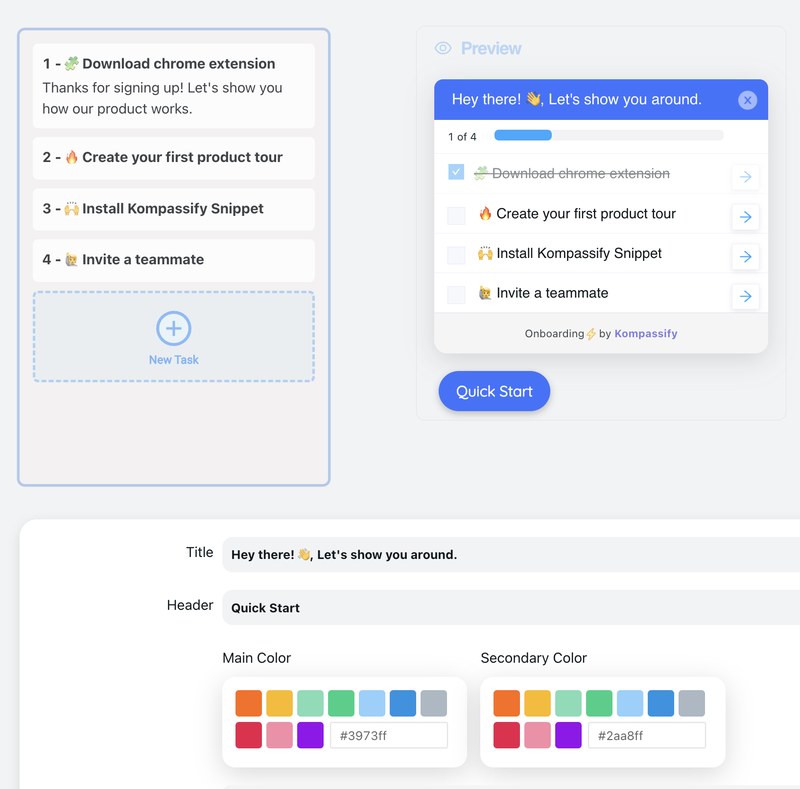
- Build on your live product, visually. Create product tours, tooltips and hotspots on top of your real interface: no code, no deploy, no release queue.
- Give onboarding a memory. An onboarding checklist tracks progress per user across sessions, one of the components in-house builds consistently defer.
- Target by segment. Show trial admins, invited members and enterprise users the flow each of them actually needs, without a rules engine of your own.
- Announce and survey in-app. Ship feature announcements and NPS surveys without touching the codebase.
- See per-step results. Built-in analytics show completion and drop-off for every step, so the next change is a decision rather than a guess.
Kompassify is GDPR compliant and EU-hosted, free for under 100 monthly active users, with paid plans from $129/month, which is the number worth putting next to your build estimate when you run the scorecard above.
Find Out What You'd Actually Be Building
Before you scope the build, spend an afternoon with the alternative. Kompassify adds product tours, onboarding checklists, tooltips and hotspots to your existing product with no code and no release cycle, so you can see which flows you'd really need, which segments behave differently, and which steps leak. GDPR compliant, EU-hosted, and free for under 100 monthly active users.
Start for Free →Frequently Asked Questions
Should you build user onboarding in-house or buy a platform?
Buy, unless onboarding guidance is itself part of what you sell, you have a hard constraint that no platform can meet, or your needs are so narrow that a single hard-coded tooltip is genuinely the whole requirement. The reason is not that the build is hard: a tooltip renderer is a weekend. It is that the tooltip renderer is roughly a tenth of the system: targeting, segmentation, versioning, analytics, a non-engineer editor, cross-browser element anchoring, localization and accessibility are the other nine tenths, and they never stop needing work. Most teams should spend that engineering capacity on the product their customers actually pay for.
How much does it cost to build user onboarding in-house?
Cost it in engineer-months, not in dollars, and count three things rather than one. The initial build, a usable editor, element targeting, segmentation, analytics and versioning, not just a tooltip component, is a multi-month project for at least one engineer. Ongoing maintenance is the part teams forget: selectors break when the UI changes, browsers change behavior, and every new flow is a ticket. And the opportunity cost is the real number, because those are the same engineers who would otherwise be building the product your customers pay for. A build that looks cheap against a subscription usually stops looking cheap once the second and third items are included.
When does building onboarding in-house actually make sense?
Four cases. When in-app guidance is part of your product rather than an aid to it, you sell the guidance. When a regulatory, air-gapped or data-residency constraint genuinely rules out every vendor, which is rarer than it is claimed. When the requirement is deeply entangled with proprietary product internals in a way an overlay cannot reach. And when the true scope is one static tooltip on one screen that will never change, in which case do not build a system, just write the tooltip.
What does an in-house onboarding system actually need to include?
Far more than the visible part. Beyond rendering tooltips, modals and checklists you need: resilient element targeting that survives UI changes, an editor a non-engineer can use, audience targeting and segmentation, trigger and frequency rules, per-user progress persistence, versioning and rollback, per-step analytics, localization, accessibility and keyboard support, mobile and responsive behavior, and cross-browser compatibility. Each is small alone. Together they are a product, and one that competes for roadmap space with the product you actually sell.
What is the hidden cost of building product tours in-house?
Iteration speed, and it compounds. Once onboarding lives in your codebase, every copy change, every new flow and every experiment becomes a ticket that competes with feature work in the same backlog. Teams that start here almost always end up in the same place: the tour shipped, it was never updated, it now describes an interface that changed six months ago, and nobody has capacity to fix it. The subscription you avoided was never the real cost: the real cost is an onboarding layer that cannot keep up with your own product.
What should you check before buying an onboarding platform?
Five things. That a non-engineer on your team can genuinely build a flow without help, tested by having them do it during the trial rather than watching a demo. That element targeting survives a real deploy of your product, not a static demo page. That segmentation can express the audiences you actually care about: plan, role, lifecycle stage, in-product behavior. That per-step analytics exist natively, so you can tell which step leaks without a data project. And that data handling matches your obligations: where data is hosted and under which regime is a procurement question, not a footnote.
Can you start with a platform and move in-house later?
Yes, and it is usually the sensible sequence. Buying first is the cheap way to learn what your onboarding actually needs to do: which flows matter, which segments behave differently, which steps leak, how often the content really changes. Teams that build first are designing a system from assumptions; teams that buy first are specifying one from evidence, and most discover the specification they would have written is far bigger than the one they had in mind. With a no-code platform like Kompassify you can have flows live in a day, no engineering time, free for under 100 monthly active users and $129/month beyond that, which makes the learning cheap either way.