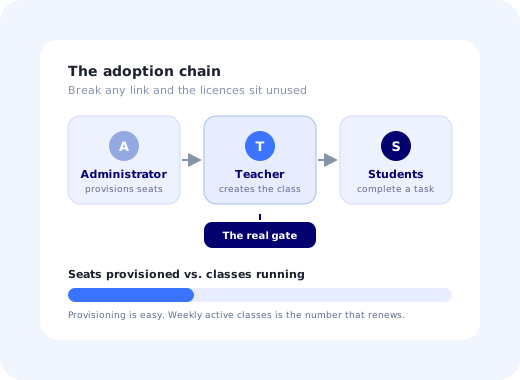
There is a report every edtech company knows and nobody enjoys: seats provisioned, 4,000. Students who completed anything this month, 190. Nothing is broken. Single sign-on works, the roster imported cleanly, the accounts exist. And the platform is barely in use, because between the purchase and the classroom there is one person, a teacher, who has to decide to put part of their course through your product, and nobody ever designed for that decision.
EdTech onboarding is the work of designing for it explicitly. It is unusual among onboarding problems because three different roles must each succeed in sequence, in a market where the calendar gives you roughly two chances a year to be relevant, and where a third of your users are teenagers who did not ask to be there.
This guide covers the three-role structure of every education account, why teacher activation is the only leading indicator worth watching, what activation actually means for a student, how the academic calendar reshapes the plan, a seven-step method, the cascade and seeding patterns that make classes stick, and the metrics a renewal conversation is really about.
Key Takeaways
- Three roles, one chain. An admin provisions, a teacher activates, students use. The chain is only as strong as the teacher link.
- Teacher activation is the leading indicator. Not seats, not logins: a teacher who has assigned real work to real students.
- Students are conscripts, not explorers. Design a single obvious action; they will read nothing optional.
- The calendar owns your roadmap. Miss the start of term and you usually wait for the next one.
- Cascade the setup. Finishing the teacher's onboarding should create the students' onboarding automatically.
- Report per institution. Aggregate averages hide the schools that never started, which are the ones that will not renew.
What EdTech Onboarding Actually Is
EdTech onboarding: definition
EdTech onboarding is the process of taking an education institution from a signed contract to real classroom use: provisioning and rostering accounts, activating teachers, getting students into a first meaningful task, and reaching the point where the platform is part of how a course actually runs. It ends not at login but at the moment the product has become part of somebody's teaching plan.
The structure is closer to a multi-stakeholder enterprise rollout than to a self-serve SaaS signup, with one important twist: the person with formal authority (the administrator) cannot compel the person with real authority (the teacher) to teach differently. Mandates produce accounts. They do not produce lessons.
The Three Roles and Which One Actually Matters
| Role | What they need in the first hour | Their definition of success | What kills them |
|---|---|---|---|
| Administrator | Rostering, single sign-on, permissions, integration with the student information system. | Everyone has an account and nothing is out of policy. | A manual CSV process that has to be repeated every term. |
| Teacher | One class created, content in it, one assignment out to real students. | A lesson that went better than it would have without the tool. | Anything that takes longer than preparing the lesson the old way. |
| Student | The one task they were told to do, and a visible way to submit it. | Done, submitted, no confusion, no email to the teacher. | A tour, a settings screen, or any choice they did not ask for. |
Look at the middle row. The teacher is the only role that can create usage, and the only one whose cost of adoption is measured against a workable alternative they already have. That asymmetry is the entire strategic problem of edtech onboarding, and it explains why platforms with excellent admin experiences and beautiful student interfaces still show flat usage curves.
Administrators create access and students follow assignments. Only the teacher turns a provisioned account into usage, which is why the teacher's first hour is the one to design.
The one question worth designing around: what does a teacher have to do, on a Sunday evening, alone, without training, to have this platform running in a lesson on Tuesday? If the honest answer involves a scheduled call, your adoption is capped at the number of calls you can staff.
The Academic Calendar Owns Your Onboarding
Most SaaS products can activate a user on any day of the year. Education software cannot. Teachers plan courses before a term begins and become effectively unavailable for change once it is running, not out of resistance, but because a course in progress has a schedule that cannot absorb a new tool in week six.
(Northern-hemisphere shape; invert for southern-hemisphere markets. The principle is the windows, not the months.)
Three consequences follow, and they are worth writing on the roadmap:
- Your onboarding must work unattended during your busiest weeks. The period when the most teachers are trying to activate is exactly the period when your team has the least capacity per account. In-product guidance is not a nice-to-have here; it is the only thing that scales.
- Mid-term is for depth, not breadth. Trying to activate new teachers in week seven has a poor return. Deepening use among teachers who already activated (a second class, a second feature) has a much better one.
- Onboarding content has to survive a year of absence. A teacher who set up a class last September will return next September having forgotten everything. Treat the returning-teacher path as a first-run experience, not as an experienced user.
A Seven-Step EdTech Onboarding Method
- Take the administrator's setup off the teacher's plate entirely
- Define teacher activation as one concrete, observable event
- Seed the empty product so the first screen is never blank
- Cascade: make finishing the teacher setup create the student experience
- Design the student's first minute for zero motivation
- Guide inside the product, because nobody is coming to your webinar
- Instrument per institution and intervene before the term ends
1. Take the administrator's setup off the teacher's plate entirely
Rostering, single sign-on and directory sync are the one part of edtech onboarding genuinely worth a human on your side, because they happen once and block everything behind them. What matters is the boundary: no teacher should ever have to import a list of students, chase account creation, or debug a login. Every minute of administrative work that leaks into a teacher's first hour comes directly out of the budget they had for deciding your product was worth it.
2. Define teacher activation as one concrete, observable event
Not "logged in", not "explored the platform". Something like: created a class, added or selected content, and assigned it to at least one real student. Write it down, instrument it, and make it the number the whole company watches. The discipline here is the same as any activation definition: the value is in the specificity, and in refusing to let a softer, flattering metric take its place.
3. Seed the empty product so the first screen is never blank
A brand-new teacher account is an empty room, and an empty room is a decision problem. Pre-populate a sample class, a ready-made assignment from their subject, and a template they can duplicate in one click. The goal is that the teacher's first action is editing something rather than creating something, a far smaller psychological ask. This is the practical application of the empty state principle to a market where the first session may be the only session you get.
4. Cascade: make finishing the teacher setup create the student experience
When a teacher completes setup, the product should produce the class, the join links, the first assignment and the student-facing instructions automatically, not present five more tasks. Every step you leave to the teacher is a step at which thirty students stall behind one busy person. The measure of a good cascade is simple: after the teacher's last click, is there anything else a human must do before a student can start? If yes, remove it.
5. Design the student's first minute for zero motivation
Students arrive because they were told to, frequently on a phone, frequently close to a deadline. They will not read a welcome message, will not complete a tour, and will not explore. Land them directly on the assigned task, make the submit action unmistakable, and place help exactly where confusion occurs rather than in a menu. Anything else is optimising for a user who does not exist. This is one of the few cases where less first-time user experience is strictly better.
6. Guide inside the product, because nobody is coming to your webinar
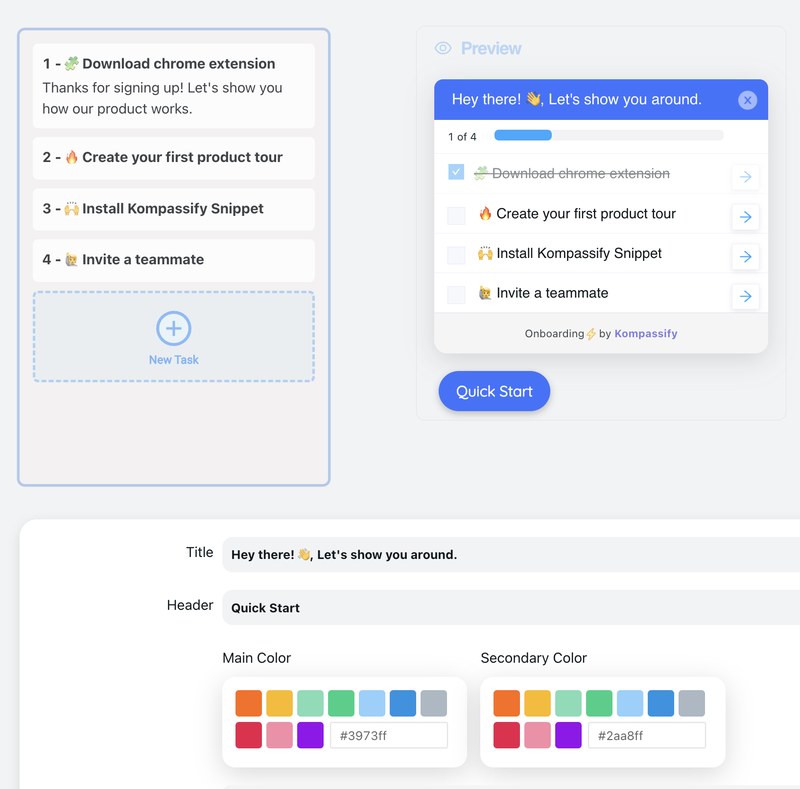
Teachers activate at unschedulable moments: a Sunday evening, the week before term, the day after a colleague mentioned it in a staffroom. Training sessions reach the teachers who can attend, which is never the teachers you need. A short in-product walkthrough of "set up your first class", a checklist that survives across sessions, and contextual help on the two screens that confuse everyone will out-activate any calendar of webinars.
7. Instrument per institution and intervene before the term ends
Aggregate metrics are actively misleading in edtech: a healthy average across forty schools routinely means twelve are thriving and twenty-eight never started. Report activation per institution, flag any school with provisioned seats and no active classes by week three of term, and act while there is still a term left to save. A school that reaches renewal having never activated is not a churn risk; it is already gone.
Patterns That Make Classrooms Stick
-
Subject-aware seeding
Ask one question during setup (what do you teach, to what age group) and use it to pick the sample content. A generic template is ignored; a ready-made lesson for their subject gets edited.
-
Duplicate-last-term
The highest-value action for a returning teacher is copying what they built last year into the new class. Make it one click and put it on the first screen in August.
-
Teacher-to-teacher visibility
Show that colleagues in the same school are using it. Peer proof from the staffroom outweighs any vendor message, and it is the mechanism by which adoption spreads within an institution.
-
Honest time estimates
"Set up your first class: about 4 minutes." Teachers are budgeting time against a workable alternative. An accurate estimate converts far better than an enthusiastic one.
-
Give the teacher a result to show
After the first assignment, surface something they can use: completion, common mistakes, who is stuck. That output is what turns a trial lesson into a habit, because it is the part they cannot get from paper.
✓ Do
- Make the teacher's first action editing, not creating.
- Ship the students' setup as a by-product of the teacher's.
- Treat returning teachers as first-time users each August.
- Give the teacher an insight they can only get from your product.
- Flag zero-activity institutions in week three of term.
✗ Don't
- Report provisioned seats as adoption.
- Run a feature tour at a student who has a deadline.
- Depend on scheduled training to activate teachers.
- Ask a teacher to import or manage student accounts.
- Launch a major change mid-term.
The Metrics That Predict Renewal
Share of provisioned teachers who created a class and assigned work. The single number that predicts everything downstream.
Classes with student activity in the last seven days, the only figure that reflects the product being part of a course rather than an account.
What the renewal conversation is actually about. Track it per school and watch the distribution, never the mean.
Add student completion of a first meaningful task (deliberately not logins, which measure obedience rather than value) and classes created per activated teacher, which tells you whether the second class is as easy as the first. Between them these five say more about next year's revenue than any satisfaction survey. The general framework is in user onboarding metrics, and the drop-off analysis method in the onboarding funnel guide.
Building the Guidance Layer Before Term Starts
The awkward timing of edtech is that the work which most affects activation (the teacher's first-run checklist, the tooltip on the confusing setting, the message that brings a half-set-up teacher back) needs to be adjusted in the exact weeks when engineering is least able to ship. September is not the month to be queuing copy changes behind a release train.
With Kompassify that layer sits on top of your existing product: build a teacher-only onboarding checklist, a short walkthrough of class creation, tooltips on the settings that generate support email, and an in-app message that returns to teachers who started setup and stopped, segmented by role so students never see a word of it. Because it is no-code, you can change any of it on the morning of the first week of term. Kompassify is GDPR compliant and EU-hosted, which for a product handling minors' data in Europe usually matters more than any feature comparison, free for under 100 monthly active users, with paid plans from $129/month.
Activate Teachers Without Booking a Single Call
Kompassify adds role-targeted checklists, walkthroughs and in-app messages to your education platform, so a teacher can go from empty account to a running class on a Sunday evening, unaided. GDPR compliant, EU-hosted, and free for under 100 monthly active users.
Start for Free →Frequently Asked Questions
What is edtech onboarding?
EdTech onboarding is the process of getting an education institution from a signed contract to real classroom use: provisioning accounts, activating teachers, getting students into their first session, and reaching the point where the platform is part of how a course actually runs. It is unusual because three different roles must each succeed in sequence: an administrator provisions, a teacher decides to use it with a class, and students use it. Failure at any one of those stages produces the same outward symptom, an account full of licences that nobody opens.
Why is teacher activation the most important metric in edtech?
Because the teacher is the only person who can create student usage. An administrator can buy licences and provision every account in the school, and none of it produces a single active student until a teacher decides to run a lesson through the platform. That makes teacher activation, a teacher who has created a class, added content and assigned something to real students, the leading indicator for everything downstream, including seat utilisation and renewal. Student counts look impressive on a dashboard and predict almost nothing on their own.
How does the academic calendar affect edtech onboarding?
It compresses the year into a few narrow windows. Teachers plan courses before a term starts and are effectively unreachable for change once it is running, so an onboarding opportunity missed at the start of term is usually a wait until the next one. Practical consequences: your onboarding has to work unattended during the busiest weeks, self-serve setup matters more than scheduled calls, and the mid-term period is better spent deepening use among already-active teachers than trying to activate new ones.
What does activation mean for a student versus a teacher?
For a teacher, activation is having set up a class, added or selected content, and assigned something to real students, the point at which they have committed part of their course to the platform. For a student, activation is completing one meaningful piece of work inside it, not logging in. Logging in is compliance with an instruction; completing something is the first evidence the product delivered value. Defining both explicitly, and measuring them separately, is what stops teams from celebrating provisioning as adoption.
How do you onboard students who have no choice about using the product?
Assume zero motivation to explore and design for a single, obvious first action. Students arrive because they were told to, often on a phone, often minutes before a deadline, and they will not read anything optional. That means no multi-step tour, no feature tour, no welcome video: land them directly on the task their teacher assigned, make the submit action unmistakable, and put help exactly where confusion happens. Everything else can be learned on the second visit, if there is one.
What is the cascade pattern in edtech onboarding?
It is designing the teacher's onboarding so that finishing it automatically creates the students' onboarding. When a teacher completes setup, the product should generate the class, the invitations, the first assignment and the student-facing instructions as a by-product rather than as five further tasks. This matters because every extra step you leave to the teacher is a step where the whole classroom stalls: one busy person is the single point of failure for thirty users, and reducing their workload converts directly into student activity.
Which metrics matter most for edtech adoption?
Five, in order: teacher activation rate among provisioned teachers; classes created per activated teacher; student completion of a first meaningful task, not logins; weekly active classes, which is the only figure that reflects the platform being part of a course; and seat utilisation at the institution level, which is what a renewal conversation will actually be about. Track them per institution rather than in aggregate: a healthy average routinely hides two schools that are thriving and four that never started.
Should edtech onboarding be self-serve or high-touch?
Both, split by role. The administrator's setup, rostering, single sign-on, integration with the student information system, is genuinely worth a human, because it happens once and blocks everything. The teacher's onboarding must be self-serve, because teachers activate at moments nobody can schedule: a Sunday evening, the week before term, the day a colleague mentioned it. Relying on a training session to activate teachers caps your adoption at the number of teachers you can book, which is never the number you need.