Most onboarding programmes start as a design conversation. Someone notices that new users stall on the third screen, a product tour is proposed, a checklist is sketched, and a tool is picked on the strength of its editor. The data question arrives much later, usually in one of two forms: a security questionnaire from a prospect that stalls a deal, or a colleague asking what exactly that script in the page is sending, and to where.
It is a fair question. An onboarding layer is, by design, the piece of software that watches every new user do everything for the first time. It knows who they are, what they clicked, where they gave up and when they came back. Under the GDPR that is processing of personal data, and the accountability for it sits with you rather than with the vendor.
The good news is that this is one of the more tractable privacy problems in a product, because almost all of the risk comes from a handful of decisions you make on day one. This guide covers what an in-app guidance layer actually touches, how the controller and processor roles divide, where lawful basis differs between guidance and analytics, the traits you should refuse to send, why hosting location decides enterprise deals, and how to answer the questions buyers send. It is written for product, onboarding and customer success teams, and it is a practitioner's guide rather than legal advice — your DPO or counsel owns the final call.
Key Takeaways
- Guidance content is not personal data; the record of who saw it is. The moment a step view is tied to a user id, everything the GDPR requires applies to it.
- You are the controller, the vendor is a processor. A compliant vendor does not make your configuration compliant.
- Separate service delivery from optional processing. Showing a checklist is not the same category of activity as recording a session, and mixing them in one paragraph of your privacy notice is what makes reviews long.
- Every trait you pass is a decision you must justify. If a trait powers no segment, it is stored risk with no benefit.
- EU hosting removes work rather than adding it. No transfer mechanism, no transfer impact assessment, and one fewer objection in procurement.
Why Onboarding Is a Data Question at All
A product tour is a piece of content. Content is not personal data, and if all your onboarding did was render the same overlay for everyone, this article would be very short. But guidance that is worth having is not the same for everyone. It is targeted, it remembers, and it reports — and each of those three properties requires knowing something about the person on the other side of the screen.
Targeting means the layer must know which segment a user belongs to, which means you send it traits. Remembering means it must store that this user finished step two, so the checklist does not restart tomorrow. Reporting means it must keep those records long enough to tell you that forty percent of trial users abandon at the same step. None of that is exotic or sinister, but all of it is processing of personal data, and it is processing you instructed.
The mistake that creates work later is treating the onboarding layer as part of the front end rather than as a system that holds records. Front-end code gets reviewed for performance and bugs. Systems that hold records get reviewed for retention, access, deletion, lawful basis and location — and onboarding tooling is squarely in the second category, whatever it looks like in the page.
The practical test. If you had to answer, in writing and within a month, the question “what do you hold about me and can you delete it,” would your onboarding data be included in the answer? If yes, it belongs in your record of processing activities. If you are unsure, that uncertainty is the finding.
The Three Tiers of Data an Onboarding Layer Touches
Vendors describe their data handling in very different vocabularies, which makes comparison hard. It gets easier if you sort everything into three tiers by how the data arrives, because the tiers have genuinely different risk profiles and genuinely different answers.
Almost every difficult privacy conversation about onboarding tooling is really a conversation about tier three.
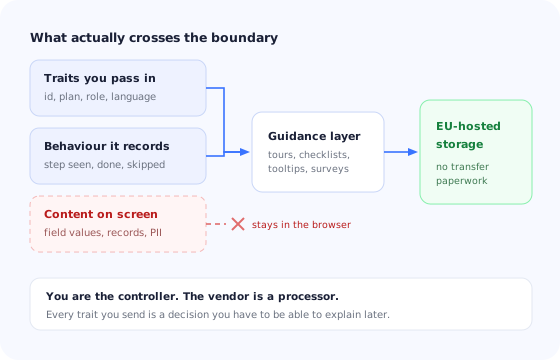
Tier one is the identity you deliberately pass. When you install a guidance layer you hand it a user identifier and a set of traits so it can decide who sees what. This tier is entirely under your control, and it is also where most avoidable exposure is created, because it is so easy to pass the whole user object “in case we need it later.”
Tier two is the behaviour the layer produces itself. A tour step was displayed, a checklist item completed, a tooltip dismissed, a survey answered. These are events about your guidance, not about your customers' work, and they are the raw material of every useful onboarding funnel analysis. They are personal data because they are tied to a user, but they are shallow and predictable.
Tier three is the content of the screen. Session recording, screenshots, heatmaps that capture text, or anything that reads the value of a field. This tier is different in kind: it can capture data neither you nor the vendor chose, including your customers' own confidential records. Whether to enable anything in this tier deserves a real decision with the DPO in the room, and our guide to session replay covers the masking and consent obligations that come with it.
Controller, Processor and the Paperwork Between Them
The division is simple and it rarely changes: you are the controller and the onboarding vendor is a processor. You decide which users receive guidance, what traits are attached to them and why the records are kept. The vendor stores and processes on your instructions.
That has three consequences worth writing down before you sign anything.
1. You need a data processing agreement, and it needs to be current
A DPA is the document that makes the vendor's obligations enforceable: what they may process, on whose instruction, what happens at the end of the contract, and what they must do if there is a breach. Most vendors publish one. The failure mode is not the absence of a DPA but a DPA nobody has read against the configuration actually running in production.
2. Sub-processors are part of your answer, not just theirs
Your vendor's hosting provider, error tracker and support desk may all touch data you sent. An enterprise buyer will ask for that list, and the honest version of it is a competitive asset. A short list in a single jurisdiction is much easier to defend than a long one spread across several.
3. A compliant vendor does not make your configuration compliant
This is the point teams miss most often. If you pass a platform your customers' full names, phone numbers and free-text account notes so that a tooltip can greet people warmly, that is your decision and your exposure. The vendor processed exactly what you instructed. Compliance is a property of the system as configured, not a badge on a pricing page.
Lawful Basis: Where Guidance, Analytics and Recording Diverge
Teams tend to look for a single answer to “do we need consent for this,” and the reason they never find one is that an onboarding platform does several different things that do not share a basis. Splitting them apart is what makes the question answerable.
| Activity | What it involves | Typical position | What to document |
|---|---|---|---|
| Showing guidance | Tours, tooltips, checklists and announcements to signed-in users | Part of providing the service the user asked for | A line in the privacy notice; no separate gate |
| Remembering progress | Storing that this user completed step two | Necessary to deliver the feature itself | Purpose and retention period |
| Adoption analytics | Aggregating step completion to find drop-off | Commonly legitimate interest, assessed and recorded | A balancing assessment and an objection route |
| Surveys and NPS | Asking users a question in-product | Service improvement; free-text answers need care | What you do with verbatim comments |
| Session recording | Reconstructing what a user saw and typed | Highest-risk tier; frequently consent-gated or refused | Masking rules, exclusions, retention, DPIA if broad |
| Marketing profiling | Feeding in-product behaviour into ad or outbound tools | A separate purpose with its own basis | Consent where required; never bundled with the above |
The pattern is that the closer an activity is to making the product work for the person in front of you, the less ceremony it needs; the closer it is to observing them for your own separate purposes, the more. Writing your own version of this table, with the row for each thing you have actually switched on, takes an afternoon and answers most of a security questionnaire in advance.
Data Minimisation in Practice: The Traits You Should Not Pass
Data minimisation sounds like a principle and behaves like a checklist. In an onboarding context it comes down to one question asked of every trait you send: which segment does this power?
Guidance needs to distinguish a trial user from a paying one, an admin from a viewer, a first-day user from a returning one, someone who has connected their data from someone who has not. Those are segments, and the traits behind them earn their place. A full name earns nothing, because “users called Sarah” is not a segment. Neither does an email address, a phone number, a billing address, a free-text CRM note or anything drawn from your customers' own records.
A trait list that covers almost every product. A stable pseudonymous user id, an account id, plan or tier, role, language, signup date, and a small number of product milestones such as “has invited a teammate” or “has connected a data source.” If a trait is not on a list like this one, the burden should be on the person adding it to name the segment.
Two refinements are worth the effort. The first is to send a pseudonymous identifier rather than the email address as the user key, so that the records held by the vendor cannot be tied to a person without your own mapping. The second is to send booleans and enums rather than raw values: the guidance layer needs to know on_trial: true and seats: 5–20, not the invoice.
The same discipline applies to what you ask users during onboarding. Every extra question in a welcome flow is data you now hold, so ask what changes what they see next and nothing else — the approach we describe in the guides to welcome surveys and progressive profiling, both of which align well with minimisation precisely because they collect at the moment of use.
Where the Data Lives, and Why Procurement Asks First
Hosting location is the question that arrives earliest in enterprise deals and the one that is hardest to fix late. There is a reason for that asymmetry: everything else on a security questionnaire is a policy you can write, while where the records physically sit is a property of the vendor you chose.
If your onboarding data is stored in the EU, an entire branch of work disappears. There is no transfer mechanism to select, no transfer impact assessment to keep current as case law moves, and no need to explain to a European buyer why records about their staff sit somewhere else. If it is stored elsewhere, none of that is fatal, but all of it becomes ongoing maintenance owned by someone.
For regulated buyers the calculus is blunter still. In healthcare, financial services and the public sector, EU hosting is often a gate rather than a preference, as the guides to healthcare software onboarding and fintech onboarding both describe. Teams selling into those markets should treat the hosting question as a sales requirement and evaluate onboarding vendors accordingly, well before the security review.
Consent Banners and the Guidance Layer
A recurring practical question: should tours and checklists wait for the cookie banner? The answer depends on which side of the login the user is on, and on what the layer stores locally.
Inside the product, for a signed-in user
Guidance here is part of the service. A user who has an account, has agreed to your terms and is logged in does not need to accept a banner before your product is allowed to explain itself. Storage used to remember that a checklist was completed is generally strictly necessary for a feature the user is actively using.
On the public site, before signup
This is different territory. Anything running for anonymous visitors on a marketing site sits alongside your analytics and advertising tags, and it should follow the same rules your banner enforces. If you run a website walkthrough for logged-out visitors, treat it as part of that estate rather than as part of the product.
The blanket-block failure
A consent tool configured to block every third-party script until acceptance will also block the onboarding layer, which means new users who decline non-essential cookies quietly receive no guidance at all. Nobody notices, because the tours still work for everyone on the team. Check this explicitly: it is one of the more common reasons a well-built onboarding programme underperforms in European markets, and it belongs on the same list as the other reasons tours silently stop appearing.
Retention, Access and Deletion Requests
The obligations that catch teams out are not the dramatic ones. They are the ordinary operational promises: to say how long you keep things, to produce what you hold when asked, and to delete it when required.
Retention
Onboarding records age badly. A record that a user completed a checklist step in 2023 supports no decision you will make in 2026, because the checklist has changed twice since. Set a retention period that matches how you actually analyse the data — commonly twelve to twenty-four months for user-level step events, with aggregate metrics kept longer — and write it down. An unbounded retention period is a finding in every review, and a real cost in nothing but stored risk.
Access requests
When someone asks what you hold about them, onboarding data is part of the answer. You need a way to find their records by identifier and export them. This is much easier when you passed a pseudonymous id you can map back, and much harder when four systems each hold a different identity key for the same person.
Deletion
Deleting an account in your product does not delete the copies held by processors. The offboarding runbook should include the onboarding platform explicitly, alongside your analytics and support tools, and should say who checks that it happened. Write it once, when you install the tool, rather than during the first request with a clock running.
The Questions an Enterprise Buyer Will Send You
If you sell to companies of any size, the onboarding layer will eventually appear in a security questionnaire. These are the items that come up repeatedly. Being able to answer them in a paragraph each, without a research project, is worth more than any policy document.
- Which third-party scripts run inside the authenticated product, and what does each one do?
- Where is the data processed and stored, and in which jurisdiction?
- Who are the sub-processors, and is the list published and versioned?
- What personal data is sent to each processor, field by field?
- What is the lawful basis for each purpose, and which are optional?
- What is the retention period, and how is deletion triggered and verified?
- Is any screen content, keystroke or field value captured, and can it be disabled?
- How are access and deletion requests handled end to end, and within what time?
- Is there a signed DPA, and does it cover the current configuration?
Two useful habits fall out of this list. Keep a one-page inventory of every script in the authenticated product with its purpose and its data, and re-read it whenever someone adds a tool. And prefer, all else equal, the vendor whose answers are short.
Six Ways Onboarding Programmes Create Privacy Debt
1. Passing the whole user object
The single most common one. An integration is written quickly, the entire profile is forwarded because it is one line of code, and eighteen months later nobody can say which fields are in use. Send the traits your segments need and nothing else.
2. Using the email address as the identifier
It is convenient and it turns every record into directly identifying data. A pseudonymous id costs nothing and materially changes what the vendor holds.
3. Turning on recording “to see what is happening”
Tier three switched on during a debugging afternoon and never switched off. If you enable it, scope it, mask by default, exclude the screens that display customer records, and set an end date.
4. Free-text survey questions with no plan
An open comment box invites users to type anything, including things about themselves and their customers you never wanted. Ask closed questions where you can, and be deliberate about who reads and where the answers land — see the in-app surveys guide for question formats that avoid this.
5. Onboarding data quietly becoming marketing data
In-product behaviour flowing into an outbound tool is a new purpose, and often a new basis. It may be entirely legitimate; it is not covered by the paragraph that covers showing a tooltip.
6. No owner
The deepest one. Onboarding tooling is usually configured by whoever built the first tour, and then inherited by nobody. Someone should own the trait list, the retention setting and the annual re-read of the DPA, and it should be a named person — the same argument that applies to owning the onboarding surface generally.
Running Privacy-Safe Onboarding With Kompassify
Kompassify is a no-code product adoption platform: product tours, onboarding checklists, in-app announcements, NPS and micro-surveys, segmentation and built-in product analytics, installed with a single script snippet. It is GDPR compliant and EU-hosted, which means the records behind your guidance stay inside the EU and the transfer paperwork simply does not arise.
The parts that matter for the decisions in this guide are the ordinary ones. You choose which traits to attach to a user, so a minimal trait list is a configuration rather than a negotiation. Targeting and step-level completion are tier-one and tier-two data by design, so the analytics that tell you where people drop out of a checklist or a tour do not require capturing what is on the screen. And because the whole layer is built visually, the person who owns the privacy answers can also see and change what is being collected, without filing a ticket to find out.
Onboarding your legal team will not have to argue with
Build product tours, checklists, announcements and surveys without code, target them by segment, and keep the data in the EU. Free up to 100 monthly active users, plans from $129/month, GDPR-compliant and EU-hosted.
Start for free →The One-Paragraph Version
Treat your onboarding layer as a system of record, not as front-end decoration. Sort everything it touches into three tiers: the traits you pass, the behaviour it generates, and the screen content it could capture — and be most careful about the third. Send a pseudonymous id and only the traits that power a real segment, because every other field is stored risk with no benefit. Split lawful basis by activity rather than by tool, so that showing a checklist and recording a session are not defended in the same sentence. Prefer EU hosting, because it deletes an entire category of ongoing work and clears the first gate in enterprise procurement. Set a retention period, put the platform in your deletion runbook, and give one named person the trait list. Do that at install time and the security questionnaire becomes an afternoon instead of a quarter.
Frequently Asked Questions
Does user onboarding software need GDPR consent?
Usually not for the guidance itself, and often yes for what sits next to it. Showing a tour, a tooltip or a checklist to a signed-in user is part of providing the service they asked for, and the step-level records needed to make a checklist remember progress are necessary for that purpose. Consent obligations attach to the extra things a guidance layer can do: recording sessions, capturing field contents, building marketing profiles, or setting cookies that are not strictly necessary. The practical rule is to separate the two in your own documentation, so that a reviewer can see which processing is service delivery and which is optional and gated.
Is a product tour personal data?
The tour content is not; the record that a particular user saw step three of it is. As soon as an event is tied to a user id, an account id, or anything else that can single a person out, it is personal data under the GDPR and it inherits the obligations that come with that: a lawful basis, a stated purpose, a retention period, an entry in your record of processing activities, and the ability to export or delete it on request. Aggregate counts of how many users completed a tour, with no identifier attached, generally are not.
What is the difference between a controller and a processor for an onboarding tool?
You are the controller: you decide which users see guidance, what is collected about them and why. The onboarding vendor is a processor acting on your instructions, which is why the relationship needs a data processing agreement, a documented list of sub-processors, and a defined route for deletion and export requests. This division matters in practice because the accountability sits with you. A vendor being compliant does not make your use of it compliant if you are passing them data you had no basis to collect.
Where should onboarding data be hosted for EU users?
In the EU, if you can choose it. Hosting inside the EU removes an entire category of work: no transfer mechanism to document, no transfer impact assessment to keep current, and no awkward conversation when a European enterprise buyer asks where the records sit. It is not the only lawful option, but it is the cheapest one to defend, and for public sector, healthcare and financial buyers it is frequently a hard procurement gate rather than a preference.
What user traits should I not send to an onboarding platform?
Anything you cannot justify targeting with. Guidance needs to know who someone is well enough to show them the right thing, which in practice means a stable identifier, plan or tier, role, language, signup date and a small number of product milestones. It does not need names, email addresses, phone numbers, addresses, free-text notes, health or financial details, or the contents of your customers' own records. The test that keeps teams out of trouble is to ask which segment each trait powers; a trait that powers no segment is data you are storing for no reason.
Is Kompassify GDPR-compliant?
Yes. Kompassify is GDPR-compliant and hosts all data within the EU, an important consideration for European teams or any company with EU-based users. It is a no-code platform for product tours, onboarding checklists, in-app announcements, surveys and product analytics, free for under 100 monthly active users, with paid plans from $129/month.