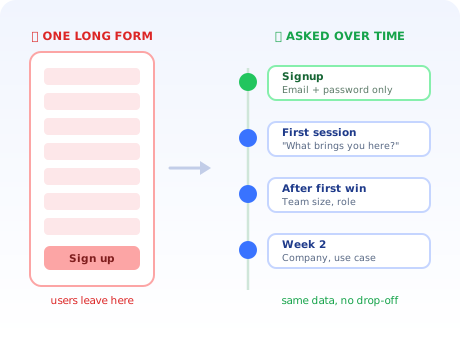
Somewhere in most SaaS companies there is a signup form that grew by accident. Sales asked for company size. Marketing wanted the industry. Someone in customer success added a "how did you hear about us?" dropdown. Each request was reasonable in isolation, each was approved without much discussion, and nobody ever measured what the accumulation cost.
What it cost is users. Not dramatically, not visibly: just a steady, invisible tax on every visitor who decided that answering seven questions to try something was more effort than closing the tab.
Progressive profiling is the fix, and it is not a compromise. You still get the data. You simply stop asking for all of it at the single worst moment in the entire customer journey. This guide covers what progressive profiling is, exactly when to ask for each field, six in-app patterns that work, how to turn the answers into onboarding that adapts, and where the privacy line sits.
Key Takeaways
- Ask less at signup, more over time. Progressive profiling collects the same data across the journey instead of extracting it in one transaction from a stranger.
- Every field costs conversion. The cost is highest at signup, where the user has invested nothing and trusts you least.
- Only account-critical fields belong on the signup form. For most SaaS products that is an email and a password, or one social button.
- Anchor each question to a moment where it pays off. Ask about team size when someone tries to invite a teammate, not on a welcome screen three days earlier.
- One question at a time. The response rate advantage disappears the moment a "quick question" becomes a five-field modal.
- Data you don't act on is friction you charged for nothing. If an answer does not change what the user sees or what you send, stop collecting it.
What is progressive profiling?
Progressive profiling definition: the practice of collecting user information gradually, across the customer journey, rather than requesting it all up front. The signup form asks only for what is strictly required to create an account; every other field is gathered later, at a moment where the question makes obvious sense to the user and the answer produces something useful for them.
The reframing is small and the consequences are not. A static form treats data collection as a toll gate: pay in personal information, receive access. Progressive profiling treats it as a conversation that accumulates alongside the relationship: you ask about team size when someone is trying to add a teammate, about their industry when it will change the template you offer, about their company when they are already talking to you about a contract.
The end state is identical. A complete profile exists either way. The difference is that in one version you have a complete profile on 3% of visitors, and in the other you have it on most of the people who stayed.
Why long signup forms quietly cost you users
Form length affects conversion for reasons that are more psychological than mechanical. It is worth being precise about them, because the precision tells you which fields to move and which to delete outright.
-
The value exchange is worst at signup
A visitor two minutes into your product has received nothing yet. Every field asks them to pay before they have any evidence the product works. Later in the journey the same question costs almost nothing, because by then they have something to lose.
-
Some fields signal a sales call
Phone number and company size are read, correctly, as qualification. A user who wants to quietly evaluate a tool will abandon rather than trigger an inbound sequence. These fields are not merely friction; for a self-serve motion they are a deterrent.
-
Every field is a decision, and decisions are tiring
"Which industry am I, exactly?" is a genuine cognitive cost. Dropdowns with fifteen near-synonymous options are especially bad, because the user has to think about your taxonomy instead of their problem.
-
Unexplained questions erode trust
A field with no visible purpose reads as data harvesting. The same question, asked at a moment where the reason is self-evident, reads as the product trying to be helpful.
The compounding version of this problem: a long form does not only reduce signups, it changes who signs up. The people willing to complete seven fields skew toward those already convinced, often through a sales conversation. Your self-serve funnel quietly stops working, and the analytics show a healthy conversion rate on a much smaller, pre-qualified population.
Progressive profiling vs progressive disclosure vs multi-step forms
Three terms that get used interchangeably in product meetings and mean genuinely different things.
| Concept | What it manages | Where it applies | Typical mistake |
|---|---|---|---|
| Progressive profiling | What you ask the user, and when | Across the whole lifecycle: signup, first session, upgrade | Collecting fields nobody ever uses |
| Progressive disclosure | What you show the user, and when | Inside the interface: advanced settings, secondary features | Hiding something users need on day one |
| Multi-step form | How one form is paginated | A single sitting: same questions, more screens | Assuming pagination alone fixes friction |
The multi-step distinction matters most in practice. Splitting eight fields across three screens with a progress bar does help: a short first screen lowers the perceived barrier and the sunk-cost effect carries people through the rest. But the user still answers all eight questions before they see the product. That is a better form, not progressive profiling.
Genuine progressive profiling means questions two through eight happen after the user has experienced something worth staying for. If you want the interface-side counterpart, our guide to progressive onboarding covers disclosure, and signup flow best practices covers the form itself.
The field-timing map: when to ask for what
This is the core of the method. Each field has a moment where the cost of asking is lowest and the usefulness of the answer is highest. Those two things usually coincide, which is convenient.
At signup: only what the account cannot exist without
Email and password. Or a single social sign-in button, which reduces the ask to one click. That is the whole list for most SaaS products.
The test for any field somebody wants to add: can the account be created and secured without it? If yes, it does not belong here. Not "is it useful": useful fields are exactly the ones that creep in.
First session: the one question that changes what they see
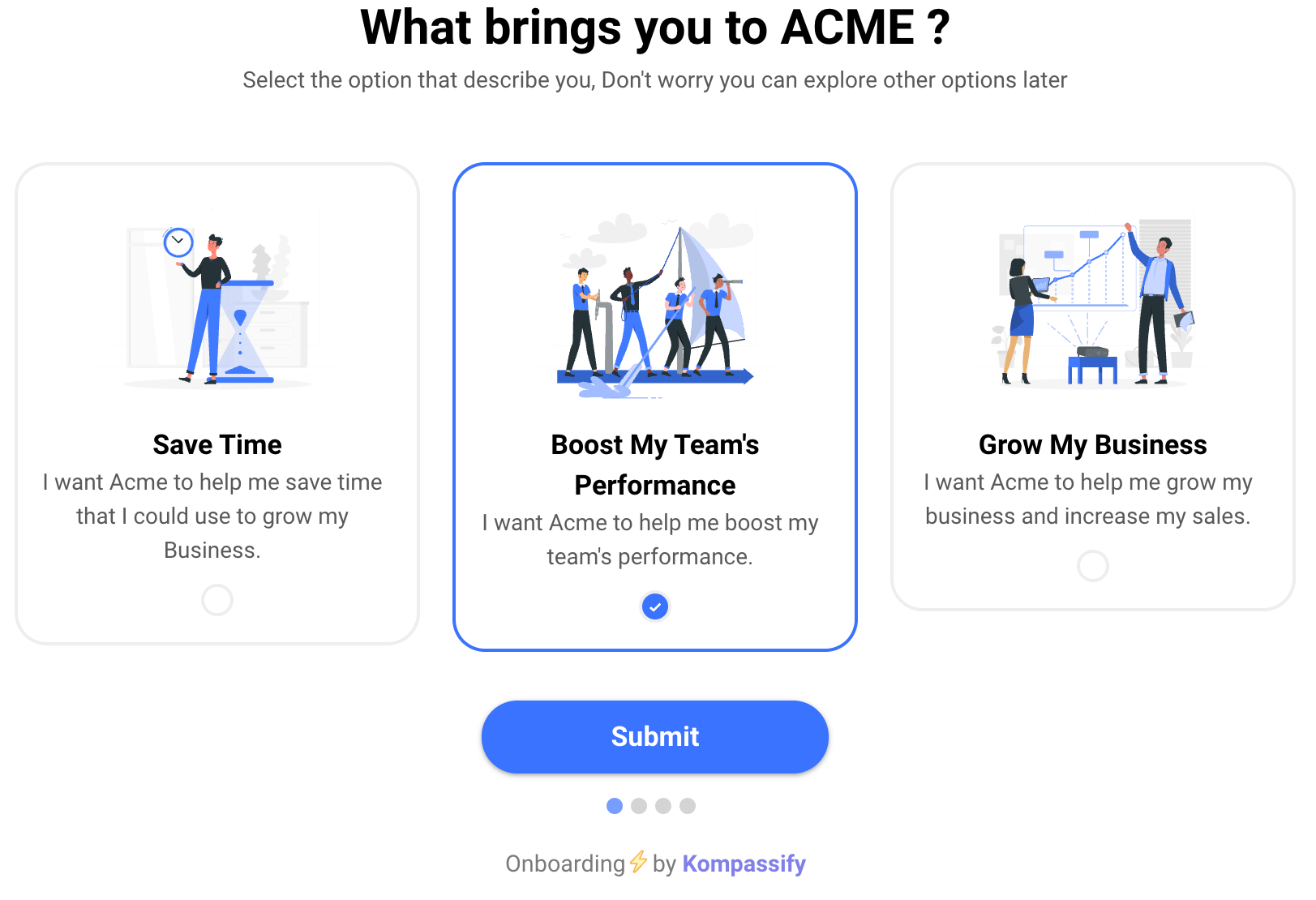
There is a single defensible question in the first session, and it is some version of "what brings you here?", as multiple choice, four to six options, with the options written as jobs rather than job titles.
It earns its interruption because the answer immediately branches the experience: different first task, different template, different tour. That is the deal. A question that changes nothing about the next screen has no business being asked at the most fragile moment of the journey. Our guides to multi-choice onboarding and welcome screens cover how to word the options.
After first value: the questions that suddenly make sense
Once a user has done the thing they came for, the relationship changes. They have something invested, they have evidence the product works, and several questions that were intrusive an hour ago are now obviously relevant.
Team size, when they open the invite dialog. Which tools they use, when they visit integrations. Notification preferences, after the first notification. Each of these is best asked inside the flow it belongs to rather than in a separate profile-completion prompt.
At upgrade: the commercial fields
Company name, billing details, phone number, procurement contact. Nobody is surprised by these at the point of payment, and nobody abandons a purchase over a company-name field. This is where the fields that would have destroyed your signup form belong.
6 in-app patterns for collecting data without friction
One multiple-choice question, four to six options, asked once, immediately after the first successful login. The answer routes the user into a different onboarding path.
Why it works: multiple choice takes under three seconds and requires no typing. Because the next screen visibly changes based on the answer, the user experiences it as configuration rather than as an interrogation.
Team size appears in the invite dialog. Industry appears when choosing a template. Timezone appears when scheduling something. The question lives where the answer is used.
Why it works: the purpose is self-evident, so no explanation and no trust-building is required. Completion rates for contextual asks are dramatically higher than for the same field on a profile page.
A one-question in-app survey triggered immediately after the user completes something meaningful: their first report, their first published page, their first successful import.
Why it works: goodwill peaks right after a success. It is the single best moment in the entire product to ask for anything, and most teams waste it on a confetti animation.
A low-priority prompt (a checklist item, a small banner, a progress indicator) that offers something concrete in exchange: "Add your team and we'll show shared activity."
Why it works: it is opt-in, it never blocks, and it names the benefit. A completion percentage on its own is a weak motivator; a completion percentage attached to an unlocked capability is not.
Derive the email domain, detect timezone and locale from the browser, infer company size from how many colleagues share the domain, infer the use case from which features get used in week one.
Why it works: the best question is one you never have to ask. Behavioural inference is also more honest than self-report: what people do beats what they say they will do.
Once a field is answered, or inferred, it never appears again, in any surface. If a user has told you their role, no survey, modal, or email should ask a second time.
Why it works: being asked twice is the fastest way to signal that nobody is listening, and it undoes the trust the whole approach depends on.
Turning the answers into onboarding that adapts
Collecting data is the easy half. The reason progressive profiling is worth doing at all is that each answer can change what the next user sees; otherwise you have simply moved friction around.
1. Branch the first-run experience on the first answer
A user who says they are here to "onboard a new team" should not see the same first task as one who is here to "test an integration". Route each to a different first step, a different template, and a different product tour.
With Kompassify you can target tours, checklists and tooltips to a segment defined by the attribute you just collected, so the branch is a targeting rule rather than an engineering project.
2. Suppress what is irrelevant
Knowing a user is a solo operator means never showing them team-management prompts. Suppression is the underrated half of personalisation: removing three irrelevant nudges improves the experience more reliably than adding one relevant one.
3. Feed segments rather than individuals
Attributes are only actionable in groups. Map each collected field onto a segment you will actually treat differently. If two segments receive identical treatment, they are one segment, and the field that separates them is not earning its keep: the discipline behind genuinely personalized onboarding.
4. Close the loop visibly
When a user answers a question, something should visibly change within seconds: a renamed section, a relevant template, a shorter checklist. Visible payoff is what makes the second and third question easy to ask.
5. Measure whether it worked
Compare activation rate and time to value between users who answered and users who skipped. If the branched path does not outperform the default, the branch is decoration and the question is pure friction. Product analytics makes that a five-minute check rather than an argument.
Progressive profiling and privacy
Collecting less data up front sits comfortably with the GDPR principle of data minimisation, but the framework is not a compliance strategy and the obligations do not change.
What still applies
- A lawful basis for every field. Spreading collection over time does not create one.
- Purpose stated at the point of collection. One short line explaining why you are asking, which also happens to raise completion.
- Optional means optional. A prompt that cannot be dismissed is a required field wearing a disguise.
- Access, export and deletion. Data assembled progressively is still a profile, subject to the same rights.
- No dark patterns. Never present a data-collection prompt as a mandatory product step, and never make the decline option deliberately hard to find.
A practical hygiene rule: if no team has used a field in the last six months, stop collecting it and delete what you hold. Unused fields are pure cost: friction for the user, obligation for you, and no upside for anyone. Kompassify itself is GDPR-compliant and hosted in the EU, which matters when your onboarding layer stores user attributes.
Common progressive profiling mistakes
✅ Do
- Cut the signup form to account-critical fields only
- Ask one question at a time
- Anchor each question to a moment where the answer is used
- Infer anything you can instead of asking
- Make every ask dismissible
- Change something visible as soon as the user answers
- Delete fields nobody has used in six months
❌ Don't
- Move a seven-field form into a seven-field modal
- Ask the same question on two different surfaces
- Interrupt a user mid-task to complete their profile
- Ask for a phone number before there is any commercial context
- Collect attributes you have no plan to act on
- Block product access until the profile is complete
- Use a completion percentage as the only motivation
The mistake that undoes everything: relocating the long form instead of dismantling it. A modal that appears immediately after signup asking for company, role, team size and phone number is not progressive profiling; it is the same toll gate, moved one screen later, now interrupting a user who was finally about to see the product. The whole method depends on questions being separated in time and attached to a moment where they make sense.
A 2-week plan to implement progressive profiling
Week 1: Audit and cut
- List every field on your signup form and name the team that uses each one
- Delete any field no team has used in six months
- Mark which remaining fields could be inferred instead of asked
- Cut the form to account-critical fields only and measure the change in signup rate
Week 2: Redistribute
- For each removed field, name the exact moment where the answer becomes useful
- Add one branching question to the first session and wire it to a segment
- Move contextual fields into the flows that need them
- Add a post-activation micro-survey for one remaining attribute
- Gate every prompt on the field being empty so nothing is asked twice
- Compare activation and trial conversion for the new cohort against the old one
Ask at the Right Moment, Without Shipping a Release
Kompassify gives you no-code in-app surveys, onboarding checklists, product tours and segment targeting, so you can collect user attributes exactly where they make sense and branch onboarding on the answer. Free up to 100 monthly active users, GDPR-compliant and hosted in the EU.
Start for Free →Frequently Asked Questions
What is progressive profiling?
Progressive profiling is the practice of collecting user information gradually across the customer journey instead of requesting it all in one form. A signup asks only for what is strictly required to create an account, and every other field is collected later, at a moment where the question makes sense to the user and where answering it produces something useful for them. The result is a full profile built over days or weeks rather than an abandoned form on day one.
Why does progressive profiling improve conversion?
Because every additional field on a signup form adds friction at the exact moment a user has the least invested and the least trust. A visitor who has been on your site for ninety seconds has no reason to disclose company size or phone number, so each extra required field gives them another reason to leave. Progressive profiling moves those questions to points where the user already has something to lose by abandoning, and where the question has an obvious purpose. Our signup flow guide covers the form-level detail.
What is the difference between progressive profiling and progressive disclosure?
They sound similar and solve different problems. Progressive profiling is about data collection: spreading questions to the user across time so no single form is overwhelming. Progressive disclosure is about interface complexity: revealing features and options gradually so a new user is not confronted with the full product at once. One manages what you ask, the other manages what you show. Most good onboarding uses both.
What fields should stay on the signup form?
Only what is technically required to create and secure an account, which in most SaaS products means an email address and a password, or a single social sign-in button. Everything else (name, company, role, team size, phone number, use case) can be collected later. A useful test for any field is whether the account can exist without it. If it can, the field does not belong on the signup form.
When should you ask progressive profiling questions?
Anchor each question to a moment where it becomes genuinely useful to the user. Ask about role or use case in the first session, where the answer can immediately branch the onboarding they receive. Ask about team size when they first try to invite someone. Ask about company details around the point of upgrade, where they are already expecting a commercial conversation. The rule is that the answer should change something the user sees within seconds.
How many questions can you ask at once?
One or two, never more, and only when they earn their place. The advantage of progressive profiling comes from each ask being small enough to answer without deliberation. A single multiple-choice question with four options placed at the right moment will get a far higher response rate than a five-field modal, and it will not damage the session it interrupts.
Does progressive profiling comply with GDPR?
It can, and in some respects it aligns well with the data minimisation principle, since you only collect what you have a current use for. The obligations do not change: you still need a lawful basis for each piece of data, a clear purpose stated at the point of collection, and the ability to export or delete it on request. The practical rules are to avoid collecting fields you have no immediate use for, to keep optional questions genuinely optional, and never to disguise a data-collection prompt as a required product step.