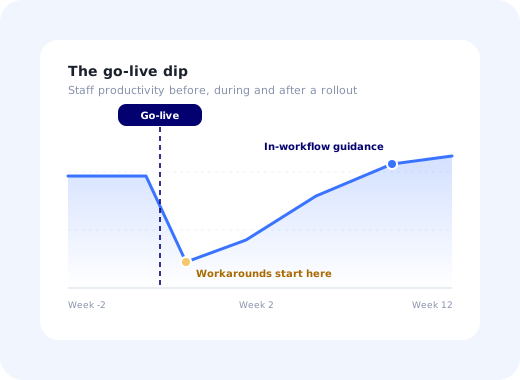
Every healthcare software project has the same optimistic slide: training in week minus two, go-live in week zero, benefits realised in week eight. And every healthcare software project discovers the same thing in week one: that the people who sat through training are now standing in front of a real patient, with a real queue behind them, using a system they last saw eleven days ago on a demo environment full of fake names.
What happens next decides the whole project. Either the software helps them right there, on the screen they are looking at, or they find a way around it. Paper. A spreadsheet. A colleague who "knows the trick". Those workarounds are extraordinarily durable, and once they set, no amount of later training removes them.
Healthcare software onboarding is the work of preventing that, not by training harder before launch, but by making the system teach itself during the shift. This guide covers why healthcare onboarding fails, the three audiences you are really onboarding, a seven-step method that runs from before go-live to months afterwards, the guidance patterns that survive a ward, what patient data changes about your tooling choices, and the metrics that show adoption rather than attendance.
Key Takeaways
- Training is an event; onboarding is a capability. The system has to help on the day someone actually uses it, which is rarely the day they were trained.
- Ninety seconds is the budget. Anything longer must be available on demand rather than pushed into a shift.
- You are onboarding at least three different jobs (clinical, administrative and IT) and the average of them serves nobody.
- Workarounds are the real failure signal, and they appear in week one, long before any adoption report does.
- Patient data limits what you may capture, not what you may show. Measure interactions, never content.
- Guidance has to outlive the project team, because the person who joins in month four gets the same first day and there is no classroom left.
What Healthcare Software Onboarding Actually Covers
Healthcare software onboarding: definition
Healthcare software onboarding is the process of getting clinical and administrative staff to use a new system correctly and habitually as part of their real working day, spanning pre-launch communication, first supervised use, the first unsupervised shift, and the weeks afterwards when established habits compete with the new system. It is distinct from training, which is one component of it, and from go-live, which is a date rather than an outcome.
The distinguishing constraint is the user. In most B2B software, an onboarding flow competes with email. In healthcare it competes with a patient. Your users are interrupted every few minutes, working shift patterns that mean the "week one support" you planned reaches perhaps 60% of them, and operating under a professional obligation that makes "let me experiment" an unacceptable strategy.
That is why generic software training advice only takes healthcare rollouts so far, and why the rollout plan needs a different centre of gravity: less classroom, more in-product.
Why Healthcare Onboarding Fails
Post-mortems on struggling rollouts land on the same handful of causes with unusual consistency.
-
Training happens too early, on the wrong system
A session two weeks before go-live, on a demo environment with invented data, teaches recognition rather than recall. By the time it matters, most of it is gone.
-
One onboarding path for very different jobs
A records clerk and a consultant do not share a first hour. Building for the average produces a path that is too long for one and too shallow for the other.
-
Shift patterns are ignored
Support that runs 9–5 on weekdays misses nights and weekends entirely, and night staff are exactly the people with nobody to ask.
-
Help lives outside the system
A PDF on an intranet, three clicks and a login away, is functionally invisible to someone mid-task. Help has to be on the screen where the confusion is.
-
The project ends and the onboarding leaves with it
Staff turnover in healthcare is significant. Whoever joins in month four faces the same first day, without any of the support the original cohort received.
The signal to watch for is workaround behaviour, not complaint volume. Paper notes re-entered in a batch at the end of a shift, one account shared across a desk, a spreadsheet "just until we're used to it": each is a precise map of a workflow the software has failed to make usable, and each will still be there in a year if nobody acts on it in week two.
The Three Audiences Behind Every Healthcare Rollout
Before designing anything, split the population. These three groups need different content, different depth and different timing, and the split is usually available from the role field you already have.
Needs: speed and certainty in three to five frequent workflows.
Time budget: seconds, interrupted.
Give them: one short walkthrough of the most frequent task, tooltips only on genuinely ambiguous fields, and an always-available help launcher for the rest.
Needs: breadth. They touch more of the product than anyone.
Time budget: longer, but the volume is relentless.
Give them: a structured checklist across several sessions, deeper walkthroughs, and searchable in-app documentation.
Needs: configuration, access control, audit and assurance, not daily tasks.
Time budget: generous, but front-loaded before go-live.
Give them: setup guidance, admin documentation, and evidence they can take to an information-governance review.
Segmenting by role is the highest-leverage decision in the whole plan, and it is unglamorous configuration work rather than design work; see user segmentation and personalized onboarding for the mechanics.
A Seven-Step Method for Healthcare Onboarding
- Map the three or four workflows that carry the clinical day
- Recruit and protect super-users before anything else
- Build role-based first-hour paths, not a single tour
- Move the help into the product, on the screen where it is needed
- Plan support around shifts, not around office hours
- Watch week one for workarounds and fix them inside the week
- Leave the guidance running after the project closes
1. Map the three or four workflows that carry the clinical day
Not all of them: the few that occur dozens of times per shift. Admitting a patient, recording an observation, ordering a test, discharging. These are where speed matters, where errors are expensive, and where a workaround will appear first if the software is slower than what it replaced. Everything else can be learned on demand. Getting this list wrong is how teams end up producing forty pieces of training material for tasks nobody performs weekly. A user flow map of each one, drawn with an actual clinician in the room, takes an afternoon and reshapes the plan.
2. Recruit and protect super-users before anything else
A super-user is a member of staff on each ward or department, trained earlier and more deeply, who becomes the first person colleagues ask. The model works because proximity beats expertise for small questions: a colleague at the next desk gets asked things nobody would ever raise a ticket for. It fails in three predictable ways: choosing people for availability rather than credibility, giving them no protected time, and leaving them without a direct line to the project team when they hit something they cannot answer. Fix all three in the plan, not in week two.
3. Build role-based first-hour paths, not a single tour
Using the audience split above, define what "ready" means for each role and build only that. For clinical staff the target is usually one workflow completed unaided. For administrative staff it is a checklist covering the working set. For IT it is a configured, audited environment. Three modest paths beat one comprehensive one every time, and they are far easier to keep current.
4. Move the help into the product, on the screen where it is needed
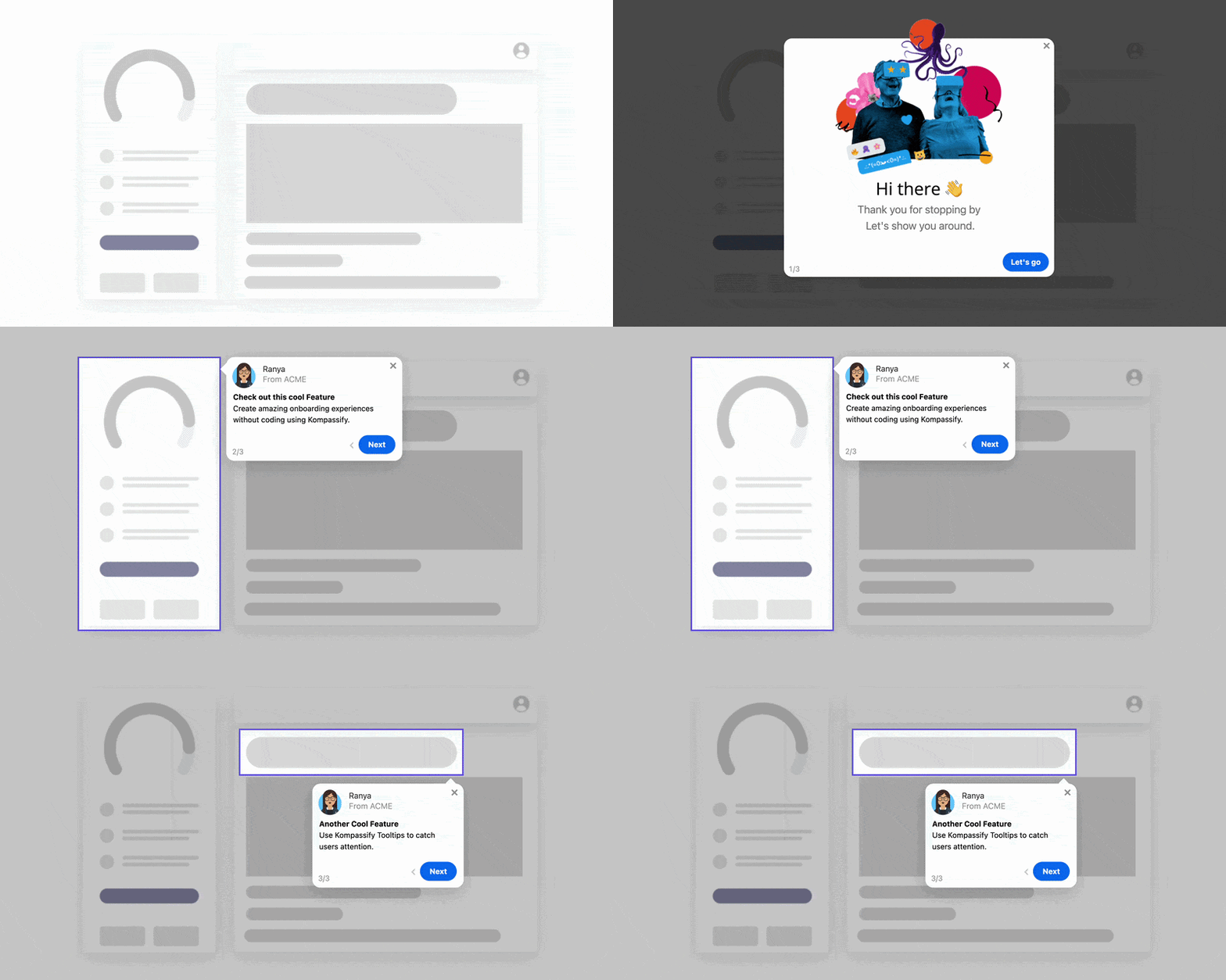
This is the step that separates rollouts that hold from rollouts that decay. Replace the intranet PDF with contextual guidance: a tooltip on the field everyone gets wrong, a short walkthrough of the frequent workflow, and a help launcher that opens the right article for the current screen. The test is simple: can someone resolve their question without leaving the page and without asking anyone? See in-app support for the pattern in full.
5. Plan support around shifts, not around office hours
Publish who is available when, cover at least one night and one weekend in the first fortnight, and make sure the in-product help is strongest precisely where human support is thinnest. Night staff are usually the most under-supported cohort in a rollout and the most likely to invent a durable workaround, purely because there was nobody to ask at 3 a.m.
6. Watch week one for workarounds and fix them inside the week
Walk the floor. Ask what people are doing outside the system and why. Then fix it fast: a clarified label, a tooltip, a reordered field, a corrected permission. A fix delivered in week one prevents a habit; the same fix in month three has to break one. This is also the argument for being able to change guidance without a release: the useful window is days wide.
7. Leave the guidance running after the project closes
The project team disbands, the classroom closes, and staff keep arriving. Whatever onboarding exists inside the product on the last day of the project is the onboarding every future joiner receives. Assign an owner, review the content each time the software changes, and treat it as part of the system rather than part of the launch.
What Patient Data Changes About Your Tooling
Information governance rarely objects to guidance itself. It objects to capture. The distinction is worth stating precisely, because it decides which tools you can use:
| Capability | Typical governance position | Practical rule |
|---|---|---|
| Showing guidance (tooltips, walkthroughs, checklists) | Generally acceptable: content is authored, not captured. | Never paste real patient data into example content. |
| Interaction analytics (step completed, guide dismissed) | Usually acceptable when no field values are collected. | Measure events and completion, never content. |
| Session recording / screen capture | Frequently restricted or refused outright. | Assume it needs explicit approval; design so you do not depend on it. |
| Free-text capture in surveys | Risky: staff will paste clinical detail into an open box. | Prefer scaled questions; warn explicitly on any open field. |
| Data residency | Often a procurement gate rather than a preference. | Confirm hosting region and GDPR position before evaluation, not after. |
The practical consequence: choose adoption tooling that is useful with analytics limited to interaction events, and be able to answer the hosting question on the first call. For European healthcare providers this is routinely the first item on the assessment, and a tool that cannot answer it does not reach the second meeting.
Measuring Adoption, Not Attendance
Training completion rates measure logistics. These measure whether the software is being used the way the business case assumed.
Share of eligible staff who completed the target workflow in the system in the last seven days, split by ward or department.
How long the core workflow takes now versus what it replaced. If it is slower after six weeks, the workaround is rational.
Corrections, duplicates and retrospective bulk entry on key forms: the fingerprint of a workflow people are fighting.
Add two more: support contacts per hundred active users, which should fall week over week and tells you where guidance is missing, and guide completion rate for your in-product content, which tells you whether the guidance itself is too long. The wider metric set is in user onboarding metrics, and the adoption framing in the digital adoption guide.
✓ Do
- Build separate paths for clinical, admin and IT roles.
- Keep any pushed guidance under ninety seconds.
- Cover a night and a weekend in the first fortnight.
- Fix week-one workarounds inside week one.
- Answer the hosting and data question before evaluation.
✗ Don't
- Train two weeks early on invented data and call it done.
- Put the help on an intranet behind another login.
- Choose super-users for availability over credibility.
- Report course completion as an adoption metric.
- Let the guidance retire with the project team.
Building the In-Product Layer
Most healthcare software, whether you build it or buy it, cannot be changed quickly. Release cycles are long for good reasons: clinical safety cases, validation, change control. Meanwhile the thing that would help a nurse tomorrow is one sentence next to a field.
That is the gap a no-code adoption layer fills. With Kompassify you can add tooltips, short walkthroughs, a persistent onboarding checklist and an in-app knowledge base over screens you do not have to modify, target each of them by role, and update the wording the same day a super-user reports that everyone is misreading a label. Analytics stay at the interaction level (which guide was shown, which step completed) so nothing about a patient record leaves the screen. Kompassify is GDPR compliant and EU-hosted, free for under 100 monthly active users, with paid plans from $129/month.
Put the Training Inside the Shift
Kompassify adds role-based walkthroughs, tooltips and checklists on top of your existing clinical screens: no code, no release cycle, no patient data captured. GDPR compliant, EU-hosted, and free for under 100 monthly active users.
Start for Free →Frequently Asked Questions
What is healthcare software onboarding?
Healthcare software onboarding is the process of getting clinical and administrative staff to use a new system correctly and habitually as part of their real working day, not just to attend a training session before go-live. It spans the pre-launch communication, the first supervised use, the first unsupervised shift, and the weeks afterwards when old habits compete with the new system. The distinguishing feature is that the users are busy, interrupted, working in shifts, and cannot afford to slow down: onboarding has to happen inside the workflow rather than beside it.
Why does healthcare software onboarding fail so often?
Usually because training is treated as an event rather than a capability. Staff are trained weeks before go-live on a demo environment, then meet the real system during a busy shift with no help on screen, forget most of what they saw, and fall back on whatever workaround gets the patient seen. Two other causes are common: onboarding designed for one generic user when a nurse, a consultant and a records clerk need entirely different first hours; and no mechanism for onboarding the people who join three months later, when the project team has moved on.
How do you train clinicians on new software without slowing them down?
Put the guidance inside the software, scoped to the task in front of them, and keep it short enough to read between two patients. In practice that means a very short walkthrough of the one workflow that person performs most, tooltips on the fields that are genuinely ambiguous, a checklist they can return to across shifts, and an always-available help launcher for everything else. Long courses do not survive contact with a ward. Anything that takes more than about ninety seconds should be available on demand rather than pushed.
Who are you actually onboarding in a healthcare rollout?
At least three groups with different needs. Clinical staff need speed and safety in a handful of frequent workflows and almost nothing else. Administrative and records staff use a wider surface area, more deeply, and are usually the heaviest daily users. IT, information governance and clinical safety teams need configuration, audit and access control rather than day-to-day tasks. A single onboarding path built for the average of these three serves none of them, which is why role-based paths matter more in healthcare than in almost any other sector.
What is the super-user model in healthcare software rollouts?
A super-user is a member of clinical staff on each ward or department, trained earlier and more deeply, who becomes the first point of help for colleagues during and after go-live. It works because proximity beats expertise for small questions: a colleague at the next desk is asked things nobody would ever raise a ticket for. The model fails when super-users are chosen for availability rather than credibility, given no protected time, or left without a direct line to the project team when they hit something they cannot answer.
How does patient data change onboarding design?
It constrains what onboarding may capture, not what it may show. Guidance content itself is generally safe, but anything that records screen contents, replays sessions, or captures free-text fields can expose patient information, so those tools need explicit information-governance review and are often restricted or disabled. Practical rules: measure interactions and completion rather than content, never take screenshots of live records for training material, keep analytics free of any field values, and confirm where the data is hosted early. For European providers, EU hosting and GDPR compliance are usually a procurement gate rather than a preference.
How do you measure adoption of healthcare software?
Ignore attendance and completion of training courses; they measure logistics. Measure the share of eligible staff who completed the target workflow in the system in the last seven days, the time taken to complete that workflow compared with the previous method, the rate of workaround behaviour such as paper capture or bulk retrospective entry, error and rework rates on key forms, and support contacts per hundred active users. Then track them per ward or department, because adoption in healthcare is almost never uniform across an organisation.
How long does healthcare software adoption take?
Longer than the project plan, and the useful framing is not a date but a curve. Expect a productivity dip immediately after go-live, a recovery over the following weeks as the frequent workflows become habitual, and a long tail of infrequent tasks that people only learn when they first meet them, sometimes months later. That tail is why in-product guidance has to outlive the launch: the person who joins in month four gets the same first day as everyone else, and no classroom is running for them.