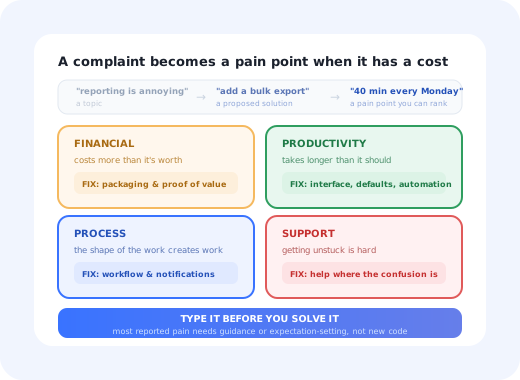
"Customers keep complaining about reporting." That sentence has ended more roadmap discussions than it has started, because it contains no problem, only a topic. Which customers? Complaining about what, exactly? What does it cost them when it happens? What were they trying to do instead?
A pain point is the version of that sentence you can act on. It names a specific problem, the people who have it, and the price they pay for it. Getting from the topic to the pain point is most of the work, and it is work that gets skipped because complaints arrive pre-packaged as feature requests, which feel like answers and are actually guesses.
This guide covers what a pain point is and what it is not, the four types and the different fixes each implies, the seven places they surface, how to separate a real problem from a preference, and a ranking method that does not collapse the moment two teams disagree.
Key Takeaways
- A pain point has a cost. Money, time, effort, risk or embarrassment. No cost, no pain point, just a preference.
- A feature request is a solution, not a problem. The pain point is whatever made the customer invent that solution.
- The type dictates the fix. Financial, productivity, process and support pain points are solved by four different kinds of change.
- One source is an anecdote; three is a pattern. Triangulate across tickets, replays, surveys and churn calls before committing.
- Rank by severity × frequency, and remember that frequent-but-small is often the best return, because it is usually fixable without engineering.
- Not every pain point needs code. A large share are caused by not knowing, not understanding, or expecting something else.
What Is a Customer Pain Point?
Customer pain point: definition
A customer pain point is a specific problem a customer experiences that carries a cost: time, money, effort, risk or frustration. The cost is what distinguishes a pain point from a dislike, and it is also what makes the pain point rankable: two problems can be compared by what they cost and how often they occur, whereas two complaints can only be compared by how loudly they were made.
Three things are routinely mistaken for pain points, and separating them is the first useful step.
| What it is | Example | What to do with it | |
|---|---|---|---|
| Pain point | A problem with a cost attached | "Every Monday I rebuild the same report by hand, and it takes forty minutes." | Work it: find the cheapest change that removes the cost |
| Feature request | The customer's proposed solution to a pain point | "Add a bulk export button." | Ask what they would do with it, then work the answer |
| Preference | A dislike with no measurable cost | "I'd prefer the sidebar on the right." | Record it; act only if it appears at volume |
| Friction | The effort a specific step in your interface demands | "The date field rejects my format without saying why." | Fix it; this is the subset you control most directly |
That last row deserves a note, because the two terms get used interchangeably. Friction is the effort your interface imposes; pain points include everything the customer brings with them: problems in their process, in their tooling, in their organisation. Every piece of friction you create is a pain point, but many pain points have nothing to do with your screens. Friction is also the category with the best effort-to-return ratio, which is why it deserves its own treatment in our guide to user friction. Use that one when the problem lives inside your product; use this one when you are trying to work out which problems are worth solving at all.
The Four Types of Customer Pain Point
The standard four categories are worth keeping, not because the taxonomy is elegant, but because each type implies a different kind of fix. Mis-typing a pain point is how teams end up building a feature to solve a communication problem.
The type you assign determines which team can even fix it.
Notice how many of these resolve to something other than "build a feature". A financial pain point is often a value-communication problem: the customer is not seeing what they are getting, which makes the price feel wrong. A support pain point is usually an information-placement problem: the answer exists but it is one tab away from the confusion. Only the productivity category reliably needs engineering, and even there, a default or a shortcut often does the job.
Where Pain Points Actually Show Up
Each source is biased in a predictable direction, which is why triangulating matters more than thoroughness in any single one.
-
Support tickets: what people could not solve alone
The richest source and the most misleading one. Tickets over-represent people willing to write to you and under-represent the ones who quietly gave up. Read the repeated ones, not the dramatic ones.
-
Funnel drop-off: where people stop without telling you
The silent majority's version of a complaint. A step where a third of accounts stall is a pain point with no ticket attached. See the onboarding funnel.
-
Session replay: the struggle you can watch
Repeated clicking, hesitation, backtracking, abandoned forms. Replay tells you where extremely well and why not at all, so use it to generate hypotheses, not conclusions. See session replay.
-
In-app surveys: asked at the moment of difficulty
A single question on the screen where people struggle catches the users who would never open a ticket. Timing is the whole trick. See in-app surveys.
-
Churn and cancellation conversations: the priced version
The only source where someone tells you what a problem was actually worth: enough to leave. Weight it heavily, but remember that people rationalise after deciding. See exit surveys.
-
Sales and renewal calls: the problems in their words
Prospects describe pain in the language of their job, before your product has taught them your vocabulary. That phrasing is worth capturing verbatim; it is also the best raw material for your own copy.
-
Interviews and usability sessions: the why behind the where
The only source that reliably explains motive. Expensive per participant, which is why it should be pointed at hypotheses the cheaper sources already produced. See user research methods.
Rule of three. A problem that appears in one source is an anecdote. The same problem appearing in tickets, in replay and in a churn call is a pattern worth putting on a roadmap. The discipline of naming which sources corroborate a pain point also settles most internal arguments about it, because the argument stops being about opinions.
Separating a Pain Point From a Preference
Four questions do most of the sorting, and they can be answered in a few minutes for any candidate on your list.
Minutes, money, a missed deadline, a risk taken. If nobody can name a cost, it is a preference.
Real pain generates workarounds: spreadsheets, copy-paste, a second tool, a recurring calendar reminder. A pain point with no workaround is often mild.
A role and a segment, not "users". Pain that belongs to one persona and one plan is still worth fixing, but it should be sized honestly.
Daily, per project, once at setup. Frequency changes the fix as much as severity: a once-ever problem is an onboarding problem.
The workaround question is the most diagnostic of the four. People do not build spreadsheets for problems they merely dislike. When you find a customer maintaining a manual process alongside your product, you have found a pain point that is already costing them enough to be worth effort, and the shape of their workaround usually tells you what the fix should do. This is also where the jobs to be done framing earns its keep: the workaround is the job, expressed in the only tool they had.
Ranking: Severity × Frequency
Two axes are enough. Severity is what it costs when it happens; frequency is how many customers hit it and how often. The quadrants imply different owners, which is the point of drawing them.
| Quadrant | What it looks like | Who should own it |
|---|---|---|
| High severity · High frequency | A daily task that fails or costs real money, hitting most of the base | Roadmap, now. These are rare and unambiguous. |
| Low severity · High frequency | A small annoyance everyone meets: a confusing label, a step nobody understands, a feature nobody finds | The best return in the table. Usually fixable with copy, defaults or in-app guidance rather than engineering. |
| High severity · Low frequency | An expensive failure affecting a handful of accounts, often the largest ones | Support playbooks and account plans, plus a targeted fix if the accounts justify it. |
| Low severity · Low frequency | Preferences and one-off requests | Record and re-check quarterly. Do not staff it. |
The quadrant teams systematically under-serve is the second one. Low-severity, high-frequency pain has no advocate: it never escalates, it rarely appears in a churn interview, and each instance is too small to justify a ticket. But it accumulates into the general sense that a product is annoying, and because the fixes are usually wording and guidance rather than architecture, it is the cheapest quadrant to clear. If you want a scoring framework to compare these against feature work, the standard options are in feature prioritization.
Mapping Pain Points to the Journey
The same problem means different things at different stages, and the stage usually determines the fix. Confusion about a permissions model on day two is an onboarding problem; the identical confusion in month eighteen is a documentation or a design problem.
Placing each pain point on the journey does two useful things. It shows you clusters: most teams discover that a disproportionate share of their pain sits in the first two weeks, which reframes the work from "fix the product" to "fix the first fortnight". And it assigns an owner, because stages have owners in a way that themes do not. The mapping method is in user journey mapping, and the specific stage-by-stage view of the early period is in customer lifecycle stages.
Beware the loudest account. A single large customer describing a problem articulately, in a meeting, to a senior person, will outrank fifty silent users hitting a worse problem every day, unless you have counted the silent ones. Volume from your data is the only reliable counterweight to volume from the room.
Three Ways to Fix a Pain Point
Once a pain point is named, typed and ranked, there is one more decision that decides how long the fix takes: which of these three it needs. Teams default to the first and are usually wrong.
1. Change the product
Necessary when the capability genuinely does not exist, or when the workflow is wrong at its root. This is the slowest and most expensive route, and the one worth reserving for pain points that clear the severity-and-frequency bar. Before committing, check whether the customer's proposed solution is actually the right one: the export button they asked for may be a worse answer than the scheduled report they did not think to ask for.
2. Change the guidance
Necessary far more often than teams assume. Three distinct problems live here: people who do not know a capability exists, people who do not understand what a control will do, and people who cannot find the answer when they are stuck. None of them requires new code; they require a tooltip beside the confusing field, a checklist that surfaces the feature nobody finds, a clearer empty state, or a short explanation at the point of hesitation. The patterns are in contextual help, and the wording craft is in UX microcopy.
3. Change the expectation
The least glamorous and most under-used option. A pain point sometimes exists because the customer expected something the product never promised: a limit they did not know about, a processing delay they assumed was instant, a feature they believed was included. Fixing the expectation means changing what you say and when: on the pricing page, in the first session, in the empty state, in the release note. This does not make the constraint disappear, but it removes the surprise, and surprise is most of what makes a constraint feel like a betrayal. Announcing changes properly is covered in how to announce a new feature.
Before writing a ticket, ask which of the three this is. A pain point routed to engineering when it was a guidance problem takes a quarter instead of an afternoon, and often does not fix the pain, because the new feature is as undiscovered as the old one.
Customer Pain Points: Do vs. Don't
Do
- Write each pain point with a cost and a named segment
- Ask what the customer is doing instead; the workaround is the evidence
- Require corroboration from more than one source
- Type the pain point before choosing a fix
- Count the silent users alongside the ones who wrote in
- Re-check the list quarterly; pain points expire
Don't
- Treat a feature request as a problem statement
- Rank by how loudly or how recently it was raised
- Send a guidance problem to the engineering backlog
- Aggregate pain across segments that do not share it
- Let one articulate account outvote your data
- Confuse a preference with a problem because it is easy to fix
The Pain Points You Can Fix This Week
Sort your list by which of the three fixes it needs, and the guidance column will usually be the longest. That column is also the only one that does not depend on a release cycle, which makes it the place to start if you want visible progress while the roadmap items are still being scoped.
Kompassify is built for exactly that column. Tooltips and hotspots explain the control that confuses everyone, placed on the field itself rather than in a help centre. Onboarding checklists and product tours surface the capability nobody discovers. In-app announcements set expectations when something changes, targeted at the segment affected rather than broadcast to everyone. And in-app NPS, CSAT and multi-choice surveys ask one question at the moment of difficulty, which is how you find the next pain point rather than the loudest one. All of it is built in a visual editor and published without an engineering ticket, so a wording fix takes an afternoon.
The users who never open a ticket will answer one question on the screen where they are stuck.
Fix the pain points that do not need a release
Kompassify lets product, onboarding and customer-success teams add contextual help, guided onboarding, in-app announcements and surveys to an existing product, no engineering ticket, with data on every one. Free up to 100 monthly active users, plans from $129/month, GDPR-compliant and EU-hosted.
Start for free →The One-Sentence Version
A customer pain point is a problem with a cost attached: find it in more than one source, type it before you solve it, rank it by severity and frequency rather than volume of complaint, and check whether it needs a product change, a guidance change or simply a better-set expectation before anyone opens a ticket.
Frequently Asked Questions
What is a customer pain point?
A customer pain point is a specific problem a customer experiences that has a cost attached to it: money, time, effort, risk or frustration. The cost is what makes it a pain point rather than a dislike. It is also distinct from a feature request: a request is the customer's proposed solution, while the pain point is the problem underneath it. Someone asking for a bulk-export button has proposed a solution; the pain point might be that they rebuild the same report by hand every Monday morning, which could equally be solved by a scheduled email.
What are the four types of customer pain point?
The four commonly used categories are financial pain points, where the customer is spending more than they think the outcome is worth; productivity pain points, where a task takes more time or steps than it should; process pain points, where the way the work is organised creates handoffs, waiting, rework or duplicated effort; and support pain points, where getting help is slow, hard to find, or does not resolve the issue. The categories matter because each one implies a different kind of fix: a pricing or packaging change, an interface change, a workflow change, or a guidance change.
What is the difference between a pain point and user friction?
Friction is the effort a specific step in your interface demands: the extra click, the confusing field, the slow page. Pain points are broader: they include the problems people had before they found your product and the problems that live in their process rather than in your screens. Every piece of friction you create is a pain point, but many pain points are not friction. In practice, friction is the subset you can fix with design and guidance, and it is where most teams should start, because it is the cheapest category to observe and to change.
How do you identify customer pain points?
Use several sources and look for the same problem appearing in more than one. Support tickets tell you what people could not resolve alone. Sales and churn conversations tell you what the problem was worth. Session replays and funnel drop-off show where people struggle without ever writing to you. In-app surveys at the moment of difficulty catch the ones who would never open a ticket. Reviews and community posts capture the pain people describe in their own words. A pain point that appears in only one source is usually a preference; one that appears in three is a pattern.
How do you prioritise customer pain points?
Score each one on severity, what it costs the customer when it happens, and frequency: how many customers hit it and how often. High severity plus high frequency goes to the roadmap immediately. High frequency but low severity is usually the best return for the effort, because these are small, repeated annoyances that are often fixable with copy, a default or a piece of in-app guidance rather than engineering. High severity but rare belongs in support playbooks. Low on both is a preference, and should be recorded rather than worked on.
Can you fix customer pain points without changing the product?
Often, yes. A surprising share of reported pain is not caused by a missing capability but by people not knowing the capability exists, not understanding what a step will do, or expecting something different from what the product does. Those three cases are fixed by guidance, wording and expectation-setting rather than code: a tooltip on the field everyone misreads, a checklist that surfaces the feature nobody finds, a clearer empty state, an announcement explaining a change. Tools such as Kompassify let a team ship those fixes without a release, which makes it practical to address them weekly instead of quarterly.