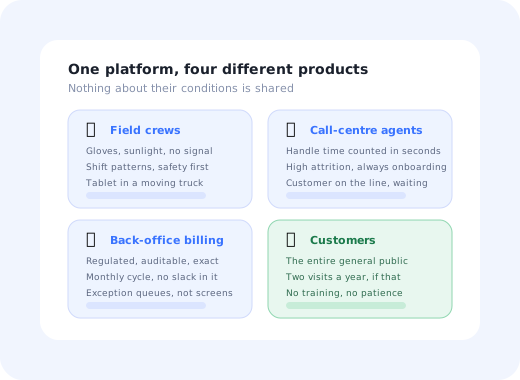
Most software rollouts have one user population with roughly shared conditions. A utility rollout has four, and the only thing they share is the database underneath.
A meter technician is standing in the rain wearing gloves, holding a tablet, with one bar of signal. A contact-centre agent has a customer on the line and a handle-time target counted in seconds. A billing analyst is inside a monthly cycle that a regulator audits and that does not move. And a customer is on the self-service portal for the second time this year, trying to submit a reading, entirely untrained and with no reason whatsoever to persevere.
One tour cannot serve those four. This guide covers what each population needs, the constraints that make utilities genuinely different from other verticals, a rollout method built around the two usable windows in a utility calendar, and the metrics that distinguish adoption from attendance. For the general change-management scaffolding around a programme like this, see our software rollout plan and the change management guide.
Key Takeaways
- Four populations, four products. Field, contact centre, back office and customers share a platform and nothing else.
- The calendar is not yours. Winter billing, summer demand and storm season leave roughly two rollout windows a year.
- Regulation removes the easy fixes. You often cannot simplify the process, only the experience of it.
- Shift work breaks the training session as a delivery mechanism: any single event reaches a minority of the workforce.
- The public gets no training at all. A portal that needs explaining generates calls, which is the cost it existed to remove.
- Measure per population. Time to first completed job, handle time, exception-queue size and per-task deflection, never a single adoption percentage.
What Utility Software Onboarding Actually Covers
In practice the term spans several systems that arrive on different timelines: the customer information and billing system, field service management and the mobile app that goes with it, meter data and outage systems, and the customer-facing portal and app. A CIS replacement is a multi-year programme; a portal redesign is a quarter. What they have in common is that the technical delivery is rarely the thing that fails.
What fails is the gap between go-live and habit. The system works, the data migrated, the integrations pass their tests, and six weeks later the exception queue is four times its old size because upstream users are entering data the way the old system let them, half the field crews are still phoning jobs in to the office, and call volumes have not fallen because customers who tried the new portal gave up and rang instead.
Four Populations, Four Different Products
| Population | Working conditions | What onboarding must achieve | Primary signal |
|---|---|---|---|
| Field crews | Outdoors, gloves, glare, moving vehicle, intermittent or no connectivity, shift rosters. | One real job type completed on the device, offline, without phoning the office. | Time to first successfully completed job; jobs closed without an office call. |
| Contact-centre agents | Customer on the line, handle time measured in seconds, high attrition so onboarding never stops. | Reach the floor average handle time on the new system as fast as possible. | Handle time versus the old system; days for a new starter to reach floor average. |
| Back office / billing | Regulated, auditable, monthly cycle with no slack, work arrives as exception queues. | Correct entry first time, because errors surface a month later and by then they are a batch. | Exception-queue size and how much of it is upstream data entry. |
| Customers | The entire general public. No training, no incentive, one or two visits a year. | Complete one task (pay, read, report, switch) without calling. | Per-task completion rate and the change in calls for that same task. |
The practical consequence is that "adoption is at 62%" is not a sentence that means anything here. It is four numbers that move independently, and one of them, the customer portal, is not a workforce metric at all.
The Five Constraints That Make Utilities Different
1. The calendar belongs to the weather
Winter billing peaks, summer demand peaks and storm season each combine high call volume with high field workload and no organisational appetite for a system behaving in an unfamiliar way. That leaves roughly two windows a year, and they are narrow.
The knock-on effect matters more than the scheduling: if your only mechanism for improving guidance is a release, and releases are frozen for half the year, then every mistake in the first week of go-live stays in place until the next window. Guidance you can edit without a deployment is worth considerably more in this sector than in most.
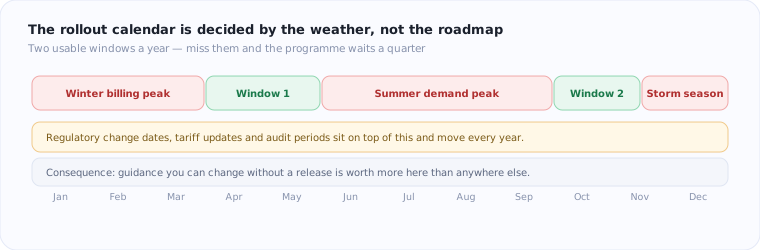
Peaks, freezes and regulatory dates leave about two usable rollout windows in a utility year.
2. Regulation removes the obvious simplifications
In most products, a step that confuses everybody gets deleted. In a regulated utility process, that step may exist because a regulator requires it, and it is not going anywhere. You cannot simplify the process, only the experience of it, which pushes almost all the available improvement into explanation, sequencing, defaults and error prevention at the point of entry.
3. Shift patterns break the training event
Crews and agents work rotating shifts, take leave, and cover across sites. Any single launch session reaches a minority of the population, and everybody else receives a second-hand summary from a colleague who attended. That is not a scheduling problem to solve with more sessions; it is a reason to make the application itself the primary teaching channel. The same argument applies to training employees on new software generally, but shift work makes it unavoidable.
4. The field has no connectivity guarantee
Anything that assumes a live connection (a guidance overlay fetched on demand, a validation call, a help article) is unavailable exactly when the technician needs it, in a basement or a rural substation. Field guidance has to survive losing signal mid-task, and data capture has to work offline and reconcile afterwards. This is the same constraint that dominates logistics software onboarding, and it is the one most often discovered after launch.
5. The customer is not a user in the normal sense
Consumer product thinking does not transfer to a utility portal. There is no engagement to grow, no habit to build, no daily active user. Someone comes to do a specific thing, twice a year, having forgotten everything since last time, so every visit is effectively a first-time experience, and the population includes every level of digital confidence there is. Designing for non-technical users is not a nice-to-have here; it is the median case.
A Seven-Step Method for a Utility Rollout
- Pick the window first, then plan backwards from it.
- Split the population before designing anything.
- Find each group's real blockage rather than assuming it is knowledge.
- Build guidance into the application, per group.
- Pilot on one district, one depot, one call-centre team.
- Instrument the tasks, not the training.
- Close the old path, deliberately, and last.
1. Pick the window, then plan backwards
The go-live date is the most constrained variable in the programme, so fix it first and let everything else negotiate around it. Leave the last four weeks before a peak clear: a system that goes live two weeks before the winter billing run will be judged on its worst fortnight.
2. Split the population before designing anything
Segment by role and by working conditions, not by department on the org chart. A meter technician and a network engineer both work in the field and need different things; two agents on different queues may need almost identical guidance. Practically this is user segmentation applied to a workforce, and it determines everything downstream.
3. Find the real blockage per group
Experienced utility staff usually know exactly what the new system is and were trained on it. What stops them is that the new way is slower for them personally, or that they have never once done the task under real conditions. Those are different problems from a knowledge gap and neither is solved by another session; the ADKAR model is a useful way to name which one you actually have before spending the training budget.
4. Build the guidance into the application
For each group, one short flow on the task they will do most on day one, not a tour of the platform. A technician needs the most common job type end to end. An agent needs the top three call reasons. A billing analyst needs the exception type that will fill the queue in week two. Everything else can wait for the moment it becomes relevant, which is what behaviour-based triggers are for.
5. Pilot narrow and real
One depot, one district, one call-centre team, with genuine work, not a rehearsal. A pilot's value is the list of things nobody predicted, and that list only appears when the work is real: the address format the field app rejects, the tariff case the guidance does not mention, the screen that is unreadable in direct sunlight.
6. Instrument the tasks, not the training
Training completion is an input. Instrument the workflow itself: which step is abandoned, how long it takes compared with a fluent user, how often the old route is still being used. Per-step completion data is what turns "adoption is slow" into "everyone stops at the meter-exception screen", which is a fixable statement.
7. Close the old path, deliberately, and last
Nothing sustains a rollout like removing the alternative, and nothing damages one like removing it too early. Wait until the new path genuinely works for the group in question, then close the old one properly: the legacy screen, the bookmark, the spreadsheet export, the phone number the crews still call. A parallel run that never ends is not a safety net, it is a permanent second process.
Patterns That Work in Each Environment
-
Field: one job type, offline, big targets
Guidance that stays available with no signal, on the single job type that fills the first week. Everything else can be learned in month two.
-
Contact centre: help that does not add seconds
Inline hints on the field being filled beat a knowledge-base search with a customer waiting. Anything that lengthens the call will be abandoned within a week, however good it is.
-
Back office: prevent at entry, not at audit
A validation hint at the moment of typing removes an exception a month before it becomes a queue item and a correction batch.
-
Customers: four tasks, plain words, visible route
Pay, read, report, switch. Anything else is secondary, and any term inherited from the billing system needs translating; the microcopy does more work here than the layout.
-
Everywhere: help on the page, not behind a menu
An in-app support layer that answers on the screen where the question arose is the difference between a deflected call and a call.
The portal test that predicts call volume: hand the self-service portal to someone who does not work in utilities and ask them to submit a meter reading. Say nothing. Every place they hesitate is a call your contact centre will take, at full cost, several thousand times a year, and each one is usually a word, not a redesign.
The Metrics Worth Reporting
From device handover to one real job closed on it, offline included. Training attendance predicts nothing; this predicts everything.
How long a new starter takes to reach the team's handle time. It measures the system, the guidance and the process together.
Completion rate for each of the four real tasks, against calls for that same task. Portal registrations are vanity.
Add one longitudinal number to those three: usage at day ninety, per group. Utility rollouts are unusually prone to a clean launch followed by a quiet return to the old way in the second month, because the old way is often still available and everybody is busy. The same feature adoption measurement you would use in a SaaS product applies directly, and digital adoption tooling is what makes it observable without a data project.
Guidance you can change without waiting for the next release window
Kompassify adds guided flows, checklists and contextual help on top of the systems you already run: different guidance for field, agents, back office and customers, edited without a deploy, with per-step analytics showing exactly where each group stops. GDPR compliant, EU-hosted, free up to 100 monthly active users and from $129/mo after that.
Start for Free →Utility Onboarding: Do vs. Don't
✅ Do
- Fix the rollout window before anything else in the plan.
- Design separately for field, agents, back office and customers.
- Make the application the primary teaching channel, not the session.
- Assume no connectivity in the field and design for it.
- Prevent billing errors at entry rather than in the audit.
- Close the old path once, deliberately, and late.
❌ Don't
- Report one adoption percentage across four populations.
- Put a multi-step welcome tour in front of a customer paying a bill.
- Train four weeks before go-live and call it done.
- Assume the day shift will brief the night shift.
- Leave billing-system jargon on customer-facing screens.
- Run a parallel process indefinitely because closing it feels risky.
The most expensive assumption in this sector is that the customer portal is a product with users. It is a cost-avoidance mechanism with visitors, and it succeeds or fails on whether a stranger can finish one task without help. Judge it on completed tasks and avoided calls; registration and session counts will look healthy in a portal nobody can actually use.
The One-Sentence Version
Utility software onboarding fails when it is planned as one programme for one audience: it is four populations with incompatible conditions, two launch windows a year, a process that regulation will not let you simplify, and a public-facing portal that has to teach itself to someone who last used it eight months ago.
Frequently Asked Questions
What makes utility software onboarding different from other industries?
Four things. The user base splits into populations with nothing in common: field crews outdoors with no signal, call-centre agents measured in seconds, back-office billing staff working to a regulated monthly cycle, and members of the public who log in twice a year. The calendar is set by weather and billing cycles rather than by the roadmap, leaving roughly two safe rollout windows a year. Much of the process is fixed by regulation, so you cannot simplify your way out of a complicated workflow. And the customer-facing half has no training, no incentive and no patience, which means the portal has to teach itself entirely.
How do you onboard field crews onto a new mobile app?
Assume gloves, sunlight, a moving vehicle and no connectivity. Practically that means large touch targets, offline capture that syncs later, guidance that survives losing signal mid-job, and a first-week experience built around one real job type rather than the whole app. Crews also work shifts, so a single launch-day training session reaches perhaps a third of them. Guidance has to live inside the app so it reaches the night shift and the crew that was on leave. The strongest early signal is time to first successfully completed job on the device, not training attendance.
How do you get customers to use a utility self-service portal?
Treat it as a task-completion problem, not an engagement problem. A utility customer visits to do one thing: pay a bill, submit a meter reading, report an outage, change a direct debit, usually a couple of times a year, and will phone the moment the screen confuses them. So the design targets are a visible route to each of the four or five real tasks within seconds of landing, no jargon from the billing system, guidance that appears at the step people abandon, and a portal that works for someone using it for the first time every time. Deflection rate per task is the honest measure; registrations are not.
When should a utility roll out new software?
Outside the peaks, which usually leaves a spring window and an autumn window. Winter billing peaks, summer demand peaks and storm season all combine high call volumes with high field workload and zero organisational tolerance for a system that behaves unexpectedly. Regulatory dates and tariff changes sit on top of that and move each year. Because the windows are narrow and immovable, anything that lets you change guidance without waiting for a release cycle is worth disproportionately more in this sector than in most others.
What metrics show that a utility software rollout is working?
Per population, and behavioural rather than attendance-based. For field crews: time to first completed job on the device, jobs completed without a call to the office, and sync failures. For call-centre agents: average handle time relative to the old system, and how long a new starter takes to reach the floor average. For back office: the size of the exception queue and how much of it is caused by upstream data entry. For customers: self-service completion rate per task and the change in call volume for those same tasks. Login counts and training completion tell you nothing useful.
Why do utility CIS and billing replacements struggle with adoption?
Because they are multi-year programmes in which the training happens long before the go-live, the workforce is experienced enough to have fluent workarounds in the old system, and the new process is often more constrained rather than simpler: regulation removed the informal handling that made the old way fast. That combination puts the blockage at ability and willingness rather than knowledge, so additional classroom sessions produce attendance without behaviour change. The interventions that move it are in-workflow guidance at the moment of the task, and closing the old path once the new one genuinely works.
How do you train a workforce that works shifts and cannot all attend a session?
Stop relying on the session as the delivery mechanism. Shift patterns, leave and field rosters mean any single event reaches a minority of the population, and whoever misses it gets a summary from a colleague. Putting the same guidance inside the application, short flows on the tasks people actually do, available at three in the morning on the night shift, reaches everyone, survives staff turnover, and updates without rebooking a room. Sessions still help for the why; they are a poor channel for the how.
Should utility customer portals use product tours?
Only very short, task-specific ones, triggered by what the person is trying to do. A multi-step welcome tour is wrong for a visitor who came to pay a bill and will leave in ninety seconds: it delays the one thing they wanted. What works is a single contextual hint at the step where people demonstrably stop, a clear explanation of any term taken from the billing system, and help that is available on the page rather than behind a menu. The test is whether the guidance shortens the visit or lengthens it.