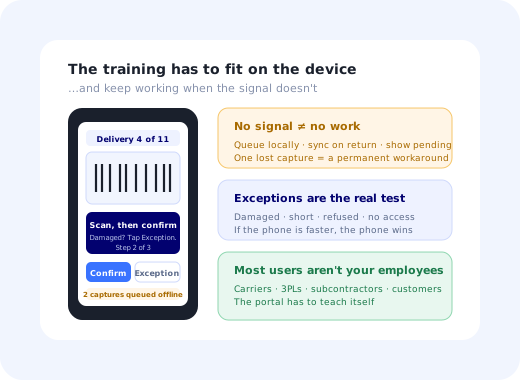
A logistics rollout has a property that makes it harder than almost any other software onboarding: a large share of your users do not work for you. The carrier's drivers, the 3PL's warehouse staff, the customer's dispatchers and the broker's back office all have to use the system, and none of them attends your training, reads your email, or particularly cares about your adoption targets.
Meanwhile the internal users are deskless, mobile, working against a clock, and frequently in places with no signal: the back of a trailer, a cold store, a yard, a tunnel. Standard SaaS onboarding assumes a person at a laptop with a spare ten minutes. In a supply chain, almost nobody is that person.
This guide covers logistics software onboarding as it actually works: the systems involved, the four audiences, a rollout method built around a single lane rather than a network, the constraints (connectivity, handhelds, gloves, turnover) that break conventional playbooks, and the adoption metrics that tell you the truth.
Key Takeaways
- Most of your users are not your employees. Carrier and 3PL staff need onboarding that works with zero mandate and zero training budget.
- Roll out by lane, not by network. One origin, one destination, one carrier, four weeks, then use the numbers to sell the next lane.
- Design for offline first. If a scan fails without signal, the workaround becomes permanent within a week.
- Guidance must be on the device, at the moment of the scan, not in a portal, not in a PDF, not in an email.
- Turnover is the constant, not the exception. Onboarding that runs once is onboarding that covers a fraction of your eventual users.
- Measure exception handling. Anyone can scan a clean load; adoption is whether people use the system when something goes wrong.
What Logistics Software Onboarding Covers
The onboarding problem changes sharply depending on which layer of the stack you are rolling out, and who touches it.
| System | Primary users | The onboarding problem |
|---|---|---|
| TMS, transport management | Dispatchers, planners, carrier back office | External users with no mandate to learn it. |
| WMS, warehouse management | Pickers, packers, receiving, supervisors | Handheld scanners, high turnover, throughput pressure. |
| Driver / ePOD apps | Drivers, owner-operators, subcontractors | Intermittent connectivity, personal devices, no training slot. |
| Yard & dock scheduling | Yard staff, carriers booking slots | Self-service by outsiders: it has to explain itself. |
| Visibility & control tower | Customer service, account teams, shippers | Nobody argues with it; nobody opens it either. Classic feature adoption. |
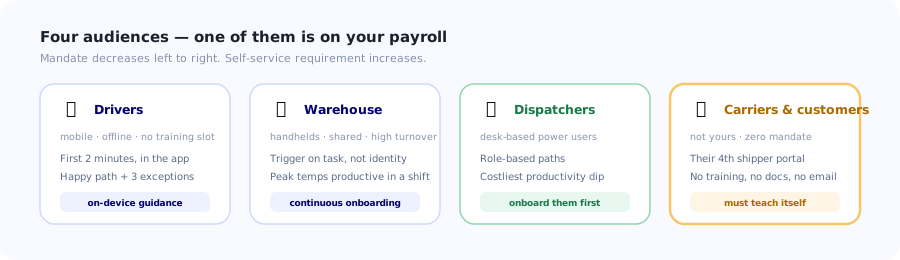
Four audiences, and only one of them is on your payroll and your training schedule.
Why Logistics Rollouts Fail
It does not work without signal
A cold store, a steel-framed warehouse, a rural delivery, an underground dock. If a scan or a proof-of-delivery capture fails when connectivity drops, the driver takes a photo on their own phone and texts it in, and that becomes the permanent process within about a week. Offline capability is not a feature request in logistics; it is the condition for adoption.
External users have no reason to comply
You can require your own staff to attend training. You cannot require a carrier's dispatcher, and they are already running three other shippers' portals. If your system takes them longer than emailing a spreadsheet, they will email the spreadsheet, and your operations team will quietly re-key it. Self-service onboarding that works with no human contact at all is mandatory here, not optional.
Onboarding was a one-time event in an industry with constant turnover
Warehouse and driver populations turn over continuously, and peak season adds a large temporary workforce who need to be productive in a day. A go-live training programme covers the people present in week one. Everyone after that gets whatever is built into the software, which, in most rollouts, is nothing.
The clock beats the process
Drivers have delivery windows, pickers have rates, dispatchers have loads to cover before cut-off. Any step that adds seconds to a task performed hundreds of times a day will be skipped or gamed: scanning one item and typing the rest, capturing a blank signature, marking an exception as "other". You get the data the interface makes cheapest.
The device is not a laptop
Rugged handhelds with small screens and physical keypads, or a driver's own phone in a cradle, in the rain, with gloves on. Interfaces and guidance designed at 1440px and reviewed on a desktop monitor routinely arrive unusable on the device where the work actually happens.
The Four Audiences
1. Drivers and field staff
Mobile, intermittently connected, often subcontracted, with no scheduled training time. Their onboarding has to happen in the first two minutes of first use, inside the app, and it must cover exactly the happy path plus the two or three exceptions they will actually hit: refused delivery, partial delivery, no one present. Assume they will never open a help centre. Assume also that a meaningful share of them will be doing this for the first time on a busy day with a customer watching.
2. Warehouse operatives
Deskless, on handhelds, frequently on shared devices, measured on rate, and in a population that changes continuously. Guidance has to be triggered by task and context rather than by user identity, the same shared-terminal problem that shapes any deskless rollout. Peak season is the stress test: if a temporary worker cannot be productive by the end of their first shift with only in-app help, the onboarding does not work.
3. Dispatchers, planners and customer service
Desk-based, high-volume power users who live in the system all day. This group is the most conventional to onboard (role-based paths, deeper reference material, keyboard efficiency) and the group whose productivity dip during a cutover costs the most. They benefit from role-based onboarding paths rather than one long generic sequence.
4. External users: carriers, 3PLs, customers
The defining feature of logistics onboarding. These users cannot be trained, mandated, or usually even emailed reliably. Their onboarding is entirely self-service and has to survive being someone's fourth portal. Everything they need must be explained inside the screen, at the point of use, in a form that does not require them to have read anything beforehand. This is essentially a self-serve onboarding problem with a multi-sided twist.
A Seven-Step Method for a Supply-Chain Rollout
1. Pick one lane, not one network
One origin, one destination, one carrier, one customer, four weeks. A lane is small enough to fix fast and complete enough to be real: it exercises dispatch, driver, warehouse and the external party in one loop. Network-wide go-lives produce a week in which everything is broken at once and nothing can be attributed.
2. Map the exceptions before the happy path
Every logistics process is ninety percent routine and ten percent exception, and the exceptions are where adoption is won or lost. Damaged goods, short delivery, refused load, wrong address, missing paperwork, late arrival. List them, then check that each one has an obvious path in the software that is faster than phoning the office. If the fastest route for an exception is a phone call, the phone call will win permanently.
3. Make it work offline before you make it pretty
Queue scans locally, sync when a connection returns, show the user clearly what is pending. Test in the actual dead zones (the cold store, the underground dock, the rural route) rather than in the office. A single lost proof-of-delivery capture creates a workaround that outlives the project.
4. Put guidance on the device, at the moment of the task
For drivers and warehouse staff this replaces training entirely. A short walkthrough on first use covering the happy path; a tooltip on each field people get wrong; a persistent help launcher for "what do I do if". Three sentences at the right moment beat a forty-page manual nobody opens.
5. Onboard external parties as if they will never speak to you
The carrier portal has to teach itself. Their first session should get them to one completed real action (book a slot, accept a load, upload a document) with in-screen guidance and no prerequisite reading. Measure how many external users complete a first real action without contacting support; that single number predicts whether your external adoption will hold.
6. Build for continuous intake, not a go-live
Design the onboarding so a driver who joins in month nine, or a temp who starts on the Monday of peak week, gets exactly the same guided first experience as the pilot group. This is the single highest-leverage difference between a rollout that decays and one that holds, because in this industry the population entirely refreshes on a timescale shorter than most projects.
7. Retire the parallel process on a published date
The emailed spreadsheet, the WhatsApp group, the paper POD book. As long as they are accepted, a share of volume flows through them and your data is incomplete. Announce the date well ahead, and make sure by then the software is genuinely faster for the frequent tasks, including the exceptions. Removing a fallback that is still quicker than the replacement damages trust that takes far longer to rebuild.
Constraints That Break Standard Playbooks
✅ What works in logistics
- Offline-first capture with a clear pending-sync indicator.
- Guidance inside the app at the moment of the scan or capture.
- Large touch targets; gloves, rain and one-handed use are the norm.
- Exception paths that are faster than calling the office.
- Self-explaining external portals with in-screen first-use guidance.
- Continuous onboarding that treats every new starter like the first cohort.
❌ What does not
- Email onboarding sequences: drivers and warehouse staff often have no work email.
- Scheduled training for subcontractors and carrier staff.
- A separate learning portal with its own login.
- "Show once per user" logic on shared handhelds.
- Anything that assumes stable connectivity.
- Desktop-designed guidance shipped unchanged to a 4-inch rugged screen.
The external-user test. Give the carrier portal to someone who has never seen it, with no explanation and no documentation, and ask them to complete one real task. If they cannot, your external adoption plan currently depends on your operations team re-keying emails, which is the cost the project was supposed to remove. Fix the portal, not the training.
Measuring Adoption, Not Attendance
| Metric | What it tells you | Warning sign |
|---|---|---|
| Exception handling rate | Share of exceptions logged in-system vs by phone or message. | High happy-path use with low exception use: the real test is failing. |
| Capture latency | Gap between the physical event and the record. | Batching at end of route or end of shift. |
| External first-action rate | Carriers/customers completing a real task unaided. | Below your support team's tolerance: you are the training. |
| Offline queue depth & failures | Whether dead zones are being handled or losing data. | Any permanent capture loss. One is enough to create a workaround. |
| Time to productive for new starters | How long a new driver or temp takes to hit standard rate. | Rising over time: onboarding decayed after go-live. |
| Parallel-channel volume | Loads still arriving by email or message. | Anything above zero after the cutover date. |
Exception handling rate is the one to watch first. Scanning a clean load is easy and everyone does it; what separates an adopted system from a tolerated one is whether a driver standing in front of a refused delivery reaches for the app or the phone. Track it separately from overall usage, because a healthy-looking aggregate hides it completely. The general principles are in measuring digital adoption.
The In-Product Guidance Layer
For every audience except dispatchers, the in-product layer is the onboarding programme. Four pieces cover most of it.
First-run walkthrough on the device
Three or four steps ending in a completed real action: one scan, one capture, one slot booking. Not a tour of the menu. It should be finishable while standing at a dock door.
Contextual help on the exception paths
The screens people reach once a week under pressure are the ones they never learn. Attach short guidance to damaged, short, refused and no-access flows specifically: that is where the phone call gets made.
A self-teaching external portal
First-visit guidance for carriers and customers, plus an always-available help launcher. Assume no training, no documentation read, and a user who is comparing you against three other shippers' portals on a Monday morning.
Continuous, not one-time
The same guided experience for everyone who ever joins, forever. Combined with a short first-week checklist for internal staff, this is what stops your onboarding quality decaying to zero three months after go-live. In an industry where the workforce refreshes constantly, this is the difference between a project and a capability.
Onboard drivers, warehouse staff and carriers inside the app
Kompassify adds walkthroughs, tooltips, checklists and announcements to your TMS, WMS, driver app or carrier portal without changing its code, so guidance reaches people at the dock, in the cab and in someone else's back office, not in a portal they will never open. Your operations team edits the content directly, and you can see which screens and which exceptions people get stuck on. GDPR compliant, EU-hosted, free up to 100 monthly active users and from $129/mo after that.
Start for Free →A Realistic Lane Rollout
- Weeks 1–2: map the lane and its exceptions. Ride along, walk the warehouse, list every case where someone currently picks up a phone.
- Weeks 3–4: offline and exception paths. Test in the real dead zones, not the office.
- Week 5: dispatchers and supervisors. They need answers before the field does.
- Weeks 6–9: run the lane live. All shifts, all parties, with in-app guidance carrying the training load.
- Week 10: instrument and fix. Tooltips onto the worst fields; check the external first-action rate.
- Weeks 11+: add lanes. Each new lane inherits working guidance and the previous lane's numbers.
- On a published date: close the parallel channels, once the software is genuinely faster, exceptions included.
The mistake that costs the most: treating external users as a phase two. Carrier and customer adoption is the hardest part of the programme and the part with the longest lead time, because you cannot compel it; you can only design for it. Start it in the pilot lane, not after the internal rollout is finished.
Frequently Asked Questions
What is logistics software onboarding?
It is the process of getting everyone who touches a transport or warehouse system (drivers, warehouse operatives, dispatchers, and the external carriers, 3PLs and customers who also use it) to work in the system rather than around it. It differs from ordinary software onboarding in two ways: a large proportion of the users are not your employees and cannot be trained or mandated, and most of the internal users are deskless, mobile and frequently working without connectivity. Adoption means the emailed spreadsheet and the phone call have stopped, not that training was delivered.
Why do TMS and WMS rollouts fail?
Five recurring causes. The software does not work without signal, so one lost capture in a cold store creates a permanent workaround. External users such as carrier dispatchers have no obligation to use it and will email a spreadsheet if that is faster. Onboarding was run as a one-time go-live event in an industry where the workforce turns over continuously. Any step that adds seconds to a high-frequency task gets skipped or gamed under time pressure. And guidance designed on a desktop arrives unusable on a rugged handheld or a phone in a cradle in the rain.
How do you onboard external carriers and customers who use your portal?
Assume they will never speak to you, never read documentation and never attend anything. The portal has to teach itself: first-visit guidance inside the screen, a clear path to one completed real action such as booking a slot or accepting a load, and an always-available help launcher. Then measure the share of external users who complete a first real action without contacting support; that single number predicts whether external adoption will hold. If it is low, your operations team is silently absorbing the gap by re-keying emails, which is exactly the cost the project was meant to remove.
How do you onboard drivers who have no training time?
Put the entire onboarding into the first two minutes of first use, inside the app, on the device. Cover the happy path plus the two or three exceptions they will genuinely hit (refused delivery, partial delivery, nobody present) and nothing else. Assume they will never open a help centre and that their first real use will be on a busy day with a customer watching. A short walkthrough ending in one completed capture beats any amount of documentation, and contextual help attached to the exception screens is where it pays off.
Why does offline capability matter so much for logistics adoption?
Because a single failure creates a permanent workaround. Cold stores, steel-framed warehouses, underground docks and rural routes all have dead zones, and when a scan or proof-of-delivery capture fails there, the driver photographs the paperwork on their own phone and texts it in. That becomes the process within about a week, and it is very hard to reverse. Queue captures locally, sync when connectivity returns, show clearly what is pending, and test in the actual dead zones rather than in the office.
What metrics show whether logistics software has been adopted?
Start with exception handling rate: the share of exceptions logged in the system rather than by phone or message. Everyone scans a clean load, so the real test is whether people use the system when something goes wrong. Then capture latency, the gap between the physical event and the record; external first-action rate for carriers and customers; offline queue failures, where any permanent loss is significant; time to productive for new starters, which reveals whether onboarding decayed after go-live; and parallel-channel volume, which should be zero after the cutover date.
Should you roll out logistics software across the network or lane by lane?
Lane by lane. One origin, one destination, one carrier, one customer, roughly four weeks. A single lane is small enough to fix quickly and complete enough to be real, because it exercises dispatch, driver, warehouse and an external party in one loop. A network-wide go-live produces a week in which everything is broken simultaneously and nothing can be attributed to a cause. Each subsequent lane then inherits working in-app guidance and the previous lane's numbers as evidence.
How do you keep onboarding working through high staff turnover?
Design it for continuous intake rather than a go-live. Warehouse and driver populations refresh constantly and peak season adds a large temporary workforce who must be productive within a shift, so any onboarding that exists only as a training event covers a small and shrinking fraction of your eventual users. Build the first-run experience into the software itself so that a driver joining in month nine, or a temp starting on the Monday of peak week, gets exactly the same guided first experience as the pilot group did.