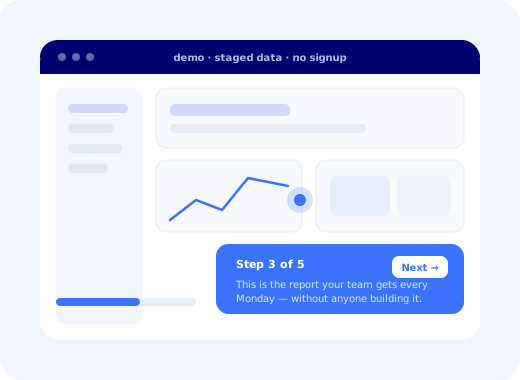
Ask a software buyer what they want to do before talking to sales and the answer has been the same for a decade: use the thing. Not read about it, not watch a marketing video, not sit through a screen-share while somebody asks about their tech stack. Click through it, for a few minutes, alone, at whatever hour they happen to be evaluating.
An interactive product demo is the asset that satisfies that, a self-guided, always-available representation of your product that answers one question before any human is involved: is this for me?
This guide covers what interactive demos are and, importantly, what they are not; they are routinely confused with in-app product tours, which serve a different audience at a different moment. Then: the four types and when each fits, the five placements that earn their keep, a seven-step build method, the scripting rules that decide completion, the metrics worth reporting, and the handover to onboarding that most funnels quietly drop.
Key Takeaways
- A demo is pre-signup, a tour is post-signup. "Is this for me?" and "how do I do this?" are different questions with different scripts.
- Five to seven steps, ending on an outcome. Twenty-step demos have completion rates that embarrass the people who commissioned them.
- Start with the cheapest type. Screenshot-based guided demos are built in a day and maintained in an hour; sandboxes are a permanent commitment.
- Don't gate the demo. Capture identity after the outcome step, when intent is highest.
- The in-product placement is underrated: demoing plan-locked features to existing customers often converts best of the five.
- Continue the story after signup. A demo of one workflow followed by a generic empty dashboard wastes every bit of intent it built.
What Is an Interactive Product Demo?
Interactive product demo: definition
An interactive product demo is a self-guided experience that lets someone click through a working representation of your product before signing up or speaking to anyone. Unlike a video, the visitor advances at their own pace and performs the actions; unlike a live demo, it is available at any hour and needs no calendar. It normally runs on a captured copy or a sandboxed instance seeded with staged data, so it is always fast, always populated, and never breaks in front of a prospect.
That last property is the quiet commercial argument. A live demo depends on a network, an environment, and an account executive not clicking the wrong tab. An interactive demo shows the product at its best, every time, to an unlimited number of people, in whatever order they choose.
Demo vs Product Tour vs Video vs Live Call
| Interactive demo | In-app product tour | Video demo | Live sales demo | |
|---|---|---|---|---|
| Audience | Prospect, pre-signup | Customer, post-signup | Anyone | Qualified prospect |
| Question answered | Is this for me? | How do I do this? | What is it? | Will it work for us specifically? |
| Data shown | Staged | The customer's own | Staged | Staged or the prospect's |
| Who controls pace | The visitor | The user | Nobody, it plays | The seller |
| Scales to | Unlimited | Unlimited | Unlimited | Headcount |
Why the confusion matters: demos and tours look identical; both are step-by-step overlays on a product screen, so teams frequently reuse one script for both. It disappoints in both directions. A demo script used as onboarding tells a paying customer why the product is good instead of helping them use it; a tour script used as a demo walks a prospect through a configuration screen they have no reason to care about. For the post-signup half, see how to create product tours that convert.
The Four Types of Interactive Demo
1. Screenshot-based guided demo
Captured screens annotated with hotspots and step text. The visitor clicks through a fixed path.
2. Click-through clone
The interface is captured as real markup, so the visitor genuinely clicks real elements along a scripted path, and can be gently redirected if they wander.
3. Sandboxed live instance
A real environment seeded with demo data, reset on a schedule. The most convincing option and by far the most expensive to keep alive.
4. Video-hybrid
A short narrated recording interrupted by moments where the visitor must click to continue.
The honest recommendation for most teams is to start at type 1 and only graduate when completion and conversion data justify the maintenance cost. A neglected sandbox that shows last quarter's interface with broken demo data does more damage than no demo at all, and neglected sandboxes are the normal end state, not the exception.
Where Interactive Demos Belong
-
Homepage or a dedicated demo page
As a peer of "book a call", not a replacement for it. A meaningful share of visitors will never book and will happily click.
-
The pricing page
Where hesitation concentrates. A demo here answers "what am I actually paying for?" at the exact moment the question is being asked.
-
As the landing page for paid campaigns
Converts attention into understanding faster than any amount of copy, and gives you a completion metric the campaign can be optimised against.
-
Outbound and follow-up email
Measurable per recipient, and far more likely to be opened than an attachment. Also the version a champion can forward internally.
-
Inside the product, for plan-locked features
The most overlooked placement and frequently the best converting: show an existing customer what a feature they cannot access actually does. See in-app upsell.
How to Build an Interactive Demo: 7 Steps
- Pick one audience and one job
- Write the outcome sentence before the script
- Script five to seven steps backwards from that outcome
- Stage the data as if it belonged to a real customer
- Decide what happens when the visitor goes off-script
- Place the capture after the outcome, not before the first step
- Instrument every step and cut whatever loses people
1. Pick one audience and one job
A demo that tries to satisfy an operations manager, a developer and a finance director will satisfy none of them. Choose the audience and the single job to be done, and build for that. If you have three important segments, build three short demos and ask one routing question at the start, which is far cheaper than it sounds and dramatically better than one long compromise.
2. Write the outcome sentence before the script
One sentence: "by the end, they will have seen ___ and understood that they no longer need to ___." Everything that does not serve that sentence is cut. This is the discipline that keeps a demo at seven steps, because every proposed addition has to earn its place against a written goal rather than against the enthusiasm of whoever suggested it.
3. Script five to seven steps backwards from that outcome
Start at the final screen (the report, the finished automation, the completed workflow) and work backwards to the minimum number of steps that make it credible. Forward-written demos always include setup; backwards-written demos skip straight to the part that matters. And the outcome step should show a result, not a feature: a prospect remembers the Monday-morning report, not the settings panel that produced it.
4. Stage the data as if it belonged to a real customer
"Acme Corp" and "test test" undermine everything around them. Use plausible company names, realistic volumes, dates near today, and numbers that look like a working account rather than a fresh install. This is the cheapest credibility available in the entire funnel and the most consistently skipped. Never use a real customer's data, and never a real person's name.
5. Decide what happens when the visitor goes off-script
Some will click elsewhere; that is a sign of interest, not a failure. The three viable answers are to let them explore freely and offer a way back, to gently nudge them to the next step, or to restrict clicks to the scripted path. Choose deliberately; the default in most tools is the restrictive one, which can make an interested prospect feel handled.
6. Place the capture after the outcome, not before the first step
Gating a demo turns a persuasion tool back into a lead form, and the visitors most worth persuading are the least willing to pay an email address for a look. Put the invitation immediately after the outcome step, when the prospect has just seen the thing they came for. If you genuinely need identity earlier, ask after two or three steps, never before the first.
7. Instrument every step and cut whatever loses people
Per-step drop-off tells you precisely which claim, screen or sentence loses attention. In practice the first cut is almost always a step someone added because a stakeholder wanted their feature represented. Treat the demo as a living asset with a completion rate, not as a project that finished.
Metrics Worth Reporting
Measures the invitation and its position, not the demo. A low number here is a page problem, not a script problem.
The honest verdict on length, and a precise pointer to the step to cut. Always read them together.
The reason the asset exists. Compare against visitors who did not run the demo, not against last quarter.
A caution on completion rate: it is easy to game by making the demo shorter, and a three-step demo that convinces nobody is not a win. Read completion alongside conversion, and be suspicious of any movement in one without the other.
The Handover Everyone Forgets
Here is the failure that costs the most and appears on nobody's dashboard. A visitor runs the demo of one specific workflow, is convinced, signs up, and lands in a generic empty dashboard that makes no reference to anything they just saw. Every bit of intent the demo built is spent re-orienting.
The product should continue the story rather than restart it: land the new user on the screen the demo ended on, pre-select the template that matches the use case they chose, and make the first onboarding step the same action the demo finished with. That continuity is worth more than any additional demo step, and it is almost entirely a matter of carrying one attribute across the signup boundary.
✓ Do
- End on a result the prospect can picture in their week.
- Stage data that looks like a real, busy account.
- Route different audiences to different short demos.
- Capture identity after the outcome step.
- Carry the demo's use case into the first session.
✗ Don't
- Demo every feature because a stakeholder asked.
- Gate the first step behind a form.
- Reuse the demo script as an onboarding tour.
- Leave a sandbox showing last quarter's interface.
- Report completion without conversion.
What Happens After They Sign Up
An interactive demo does one job extremely well and stops at the signup button. Everything after that (the first session, the first real configuration, the first moment of value in the customer's own account) is onboarding, and it is where the conversion the demo earned is either realised or lost.
Kompassify covers that second half: a walkthrough that picks up where the demo ended, an onboarding checklist matched to the use case the visitor chose, and tooltips on the screens the demo could only summarise, segmented so each new account sees the version that matches what convinced them. You can see it running on Kompassify's own live demo. Kompassify is GDPR compliant and EU-hosted, free for under 100 monthly active users, with paid plans from $129/month.
Don't Lose the Intent Your Demo Just Built
Kompassify continues the story after signup: a walkthrough that starts where the demo ended, a checklist matched to the use case, and guidance on the screens a demo can only summarise. No code, no release cycle. GDPR compliant, EU-hosted, free under 100 monthly active users.
Start for Free →Frequently Asked Questions
What is an interactive product demo?
An interactive product demo is a self-guided experience that lets someone click through a working representation of your product before they sign up or speak to anyone. Unlike a video, the visitor advances at their own pace and performs the actions themselves; unlike a live sales demo, it is available at two in the morning and requires no calendar. It normally runs on a captured copy or a sandboxed instance of the product rather than on real data, so it is always fast, always populated and never breaks.
What is the difference between an interactive demo and a product tour?
Audience and moment. An interactive demo is a pre-signup marketing and sales asset: it shows a prospect what the product does, using staged data, on your website or in an email. A product tour runs inside the real product after signup, using the customer's own account, and its job is to get them to do something rather than to see something. The two are often confused because both are step-by-step and overlaid, but they answer different questions, "is this for me?" versus "how do I do this?", and a demo script reused as an onboarding tour almost always disappoints.
What are the types of interactive product demo?
Four are common. A screenshot-based guided tour, cheapest to build and easiest to keep current, where captured screens are annotated with hotspots. A click-through clone, where the interface is captured as real markup so the visitor can genuinely click through a scripted path. A sandboxed live instance, the most convincing and the most expensive to maintain, where a real environment is seeded with demo data. And a narrated video-hybrid, where a short recording is interrupted by interactive moments. Most teams should start with the first and graduate only if completion data justifies it.
How long should an interactive demo be?
Five to seven steps, ending on a visible outcome rather than a feature. The failure mode is treating the demo as a product tour of everything, which produces twenty steps and a completion rate in the low tens. A prospect is answering a single question, could this solve my problem, and once they have an answer, every additional step is a chance to leave. If you have several audiences or use cases, build several short demos rather than one long one and route people to the right one at the start.
Where should you put an interactive demo?
Five placements earn their keep: on the homepage or a dedicated demo page as an alternative to "book a call"; on the pricing page, where hesitation concentrates; as the landing page for paid campaigns, because it converts attention into understanding faster than any copy; embedded in outbound and follow-up email, where it is measurable per recipient; and inside the product itself to show features a customer's plan does not yet include. The last one is frequently overlooked and is often the highest converting of the five.
What metrics should you track for an interactive demo?
Four, in a chain: demo start rate, which measures the placement and the invitation rather than the demo; completion rate, the honest verdict on your script length; per-step drop-off, which identifies the exact step to cut; and demo-to-signup or demo-to-meeting conversion, which is the reason the demo exists. Track the second and third together: a high completion rate on a three-step demo that convinces nobody is not a success, and per-step drop-off tells you which of your claims lost them.
Should an interactive demo require an email address?
Usually not at the start. Gating the demo converts it from a persuasion tool back into a lead-capture form, and the visitors most worth persuading are the ones least willing to pay for a look. The pattern that works is an ungated demo with the capture at the point of highest intent, after the outcome step, when the prospect has just seen the thing they wanted. If your business genuinely needs the identity earlier, ask for it after two or three steps rather than before the first, and consider progressive profiling for the rest.
What should happen after someone finishes a demo and signs up?
The product should continue the story the demo started, not restart it. Someone who has just watched a demo of one specific workflow arrives with an expectation of exactly that workflow, and dropping them into a generic empty dashboard wastes all the intent the demo built. Carry the use case across into the first session: land them on the relevant screen, pre-select the matching template, and make the first onboarding step the same action the demo ended on. This handover is the single most commonly missed part of the whole funnel.