Expansion revenue is the cheapest revenue a SaaS company can earn and the easiest to spoil. The customer is already paying, already using the product, and already reachable, which is precisely why a badly timed upgrade prompt does more damage than a badly timed ad ever could.
The difference between an upsell that converts and one that annoys is almost never the offer. It is whether the prompt arrived at a moment when the user had the problem the upgrade solves.
This guide covers what in-app upselling is, the signals worth triggering on, the five patterns that work, the copy rules, and how to measure the cost as well as the revenue.
Timing does more work than the discount ever will.
Key Takeaways
- Upsell on evidence, not on schedule. The trigger should be a behaviour that proves the user has the problem the upgrade solves.
- Never upsell before first value. A user who has not succeeded once has nothing to expand.
- Show the limit before it bites, not after. Hitting a wall mid-task converts frustration into resentment.
- Locked features should be visible and explained, not hidden; discovery is what creates demand.
- Measure the cost too: dismissal rate, repeat exposure and support complaints belong next to conversion.
- The best upsell is a usage summary, because it makes the case with the customer's own data.
What is in-app upselling?
In-app upsell definition: a prompt shown inside the product that invites an existing customer to move to a higher plan, add seats, or enable a paid capability, triggered by what the user is doing rather than by a calendar. It is distinct from cross-sell, which offers a different product, and from a renewal, which continues an existing arrangement.
| Motion | What changes | Best trigger |
|---|---|---|
| Upsell | Same product, higher tier or more capacity | A limit approaching, or usage that outgrew the plan |
| Cross-sell | An additional product or module | A workflow that repeatedly leaves the product |
| Seat expansion | More people on the same plan | Sharing, inviting or exporting to colleagues |
All three depend on the same precondition: the account is getting value already. Accounts that have not activated do not expand, they churn, which is why activation is an upsell strategy before it is an onboarding metric.
The signals worth triggering on
-
Approaching a plan limit
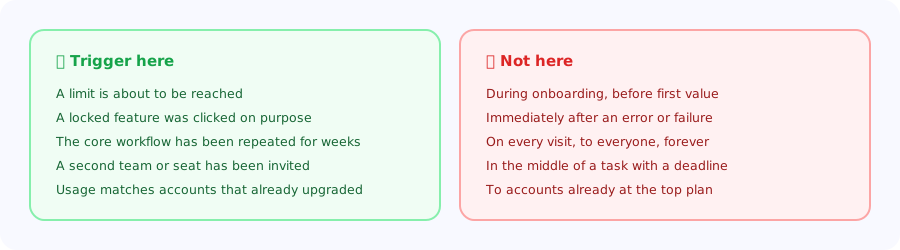
The strongest signal there is. At eighty or ninety per cent of a quota, the user has a real, imminent problem and the upgrade is the obvious answer.
-
Deliberate contact with a locked feature
Someone clicked it on purpose. That is a declared intent, and it beats any inferred score.
-
Collaboration behaviour
Inviting, sharing, exporting for someone else. The account has outgrown one person, which is the seat-expansion moment.
-
Sustained depth
The core workflow repeated over weeks. These accounts resemble the ones that already upgraded, the basis of a product qualified lead model.
-
A workaround in progress
Exporting to a spreadsheet every week, or doing manually what a paid feature automates. The prompt writes itself.
The one rule that matters most: never upsell before first value. A user who has not yet succeeded at the basic task reads an upgrade prompt as evidence that the free experience is deliberately crippled. Onboarding and monetisation compete for the same first session, and onboarding has to win it.
Five patterns that work
1. The usage summary
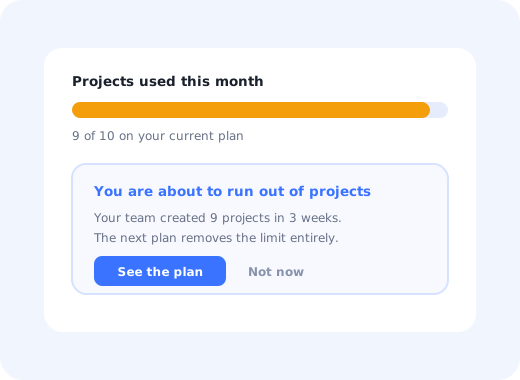
A short, factual statement of what the account did this month, ending with the constraint it is running into. "Your team created 9 projects in 3 weeks; your plan includes 10." This is the highest-converting pattern available because the argument is made entirely with the customer's own data, and it does not feel like marketing.
2. The soft limit warning
A quiet, persistent indicator as a quota fills, well before it is exhausted. Users hate discovering a wall mid-task; they do not mind seeing it approaching. A progress indicator on the quota converts an ambush into a decision.
3. The visible lock
Show paid capability in the interface, clearly marked, with one line explaining what it does. Hiding it entirely means nobody ever wants it; a lock that explains itself creates demand at the moment the user is thinking about that problem. Keep the click-through honest: explain, then let them leave.
4. The contextual offer
Attached to the workflow it improves, not to the dashboard. Someone exporting data for the fourth time this week is the right audience for automation; the same message on the home screen reaches everyone else too, which is how it becomes noise. The banner blindness guide covers why placement outperforms prominence.
5. The team-triggered prompt
Directed at the account admin when collaboration behaviour appears, since seat expansion is a decision the individual user usually cannot make. Targeting the right role matters as much as timing.
Same component as any in-app message. The difference is who sees it and when.
Copy rules
- Lead with their situation, not your tier name. "You are close to your project limit" beats "Upgrade to Business".
- Name the outcome the upgrade unlocks, in the language of the job they are doing.
- Keep it to two sentences. Anything longer is a pricing page, and there is one of those already.
- Give a real second option. "Not now" that persists is what makes the first option feel like a choice.
- Never imply the current plan is broken. The customer chose it, and they may be right.
How to measure it
| Metric | Definition | Watch for |
|---|---|---|
| Prompt-to-upgrade rate | Upgrades ÷ users who saw the prompt | The headline, but incomplete on its own |
| Expansion revenue | Additional revenue from existing accounts | The actual objective |
| Dismissal rate | Closed without interaction | Rising means the targeting is wrong |
| Repeat exposure | Times the same user saw the same prompt | Above two or three is where resentment starts |
| Downstream engagement | Usage of the segment shown the prompt | The cost side nobody measures |
The last row is the one to add if you only add one. An upsell campaign that converts three per cent and depresses engagement in the other ninety-seven is not a win, and no revenue dashboard will tell you.
Do's and don'ts
✅ Do
- Trigger on behaviour that proves the need
- Warn before a limit, not after
- Make the case with the customer's own usage
- Show locked features and explain them
- Target admins for seat decisions
- Cap how often a user sees the same prompt
- Track engagement of the segment you prompted
❌ Don't
- Upsell during onboarding
- Interrupt a task in progress
- Prompt after an error or an outage
- Re-show a prompt someone dismissed
- Hide paid capability completely
- Lead with the plan name
- Judge the campaign on conversion alone
Running in-app upsells with Kompassify
An upsell is an in-app message with strict targeting rules. The work is in the conditions, not in the component.
- Find the pattern in product analytics: what accounts that upgraded were doing in the two weeks before.
- Build the segment from that behaviour, and exclude anyone still in onboarding.
- Deliver contextually with a tooltip or modal attached to the relevant workflow.
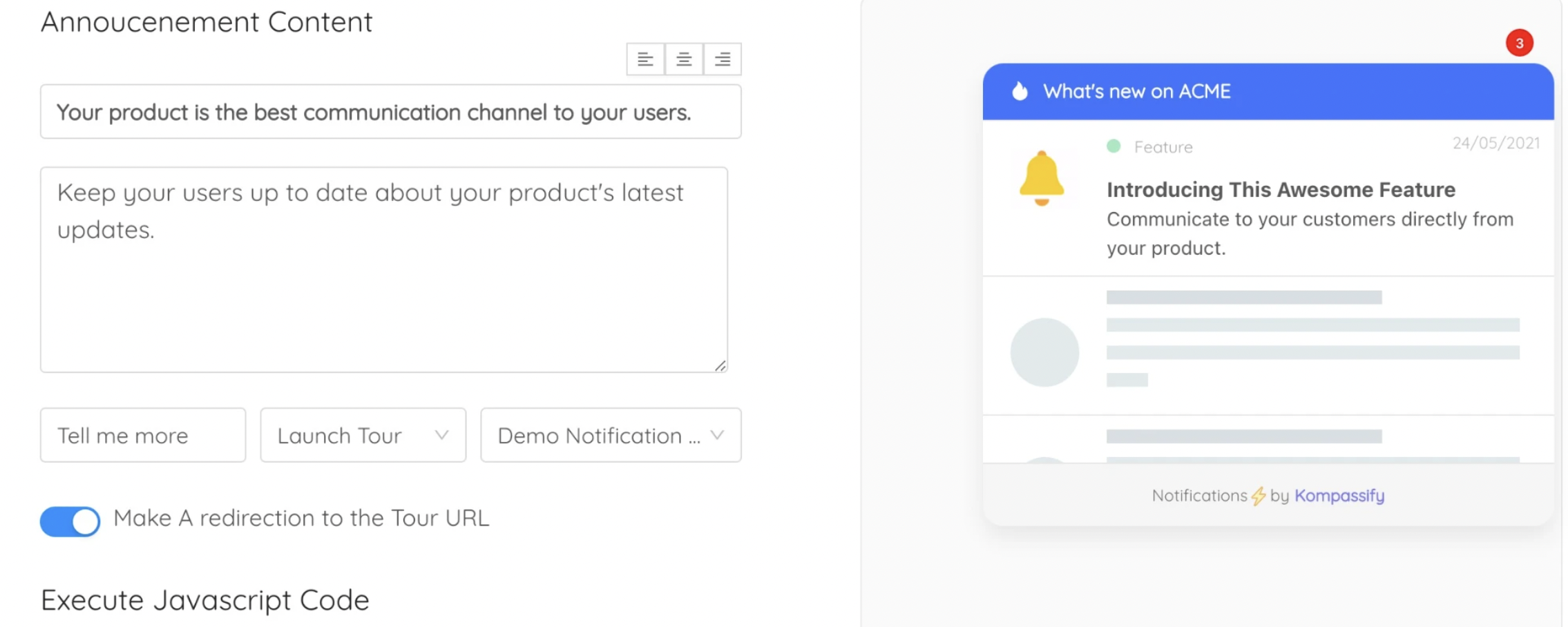
- Announce capability to eligible accounts with the announcement widget.
- Ask the ones who said no why, with a one-question in-app survey.
Kompassify is a no-code digital adoption platform for SaaS teams: tours, checklists, tooltips, announcements, surveys and analytics in one place. Free up to 100 monthly active users, paid plans from $129/month, GDPR-compliant with EU hosting.
Upsell at the moment of need
Trigger upgrade prompts on real usage signals, target the right role, and keep them out of the first session.
Start for Free →Frequently Asked Questions
What is an in-app upsell?
An in-app upsell is a prompt shown inside the product that invites an existing customer to move to a higher plan, add seats or enable a paid capability, triggered by what the user is doing rather than by a calendar. It differs from cross-sell, which offers a different product or module, and from renewal, which continues an existing arrangement. All three depend on the account already getting value, because accounts that have not activated do not expand.
When should you show an upsell prompt?
When behaviour proves the user has the problem the upgrade solves. The strongest signals are approaching a plan limit at around eighty to ninety per cent of a quota, deliberately clicking a locked feature, collaboration behaviour such as inviting or sharing, sustained depth of usage over weeks, and a visible workaround such as exporting to a spreadsheet every week. Avoid prompting during onboarding, immediately after an error, mid-task, or repeatedly to the same user.
Why should you never upsell before first value?
Because a user who has not yet succeeded at the basic task reads an upgrade prompt as evidence that the free experience is deliberately crippled. Onboarding and monetisation compete for the same first session and onboarding has to win it: the account has nothing to expand until it has something working. In practice this means excluding anyone who has not reached your activation definition from every upsell segment.
What is the highest-converting in-app upsell pattern?
The usage summary. A short factual statement of what the account did recently, ending with the constraint it is running into, makes the argument entirely with the customer's own data and does not read as marketing. Supporting patterns are a soft limit warning shown well before a quota is exhausted, a visible lock that explains what a paid feature does, a contextual offer attached to the workflow it improves, and a team-triggered prompt aimed at the admin when collaboration appears.
Should paid features be hidden from lower plans?
Generally not. Hiding capability entirely means nobody develops demand for it, while a clearly marked lock with one line explaining what it does creates that demand at the moment the user is thinking about the problem it solves. The rule is that the lock must be honest: explain the capability, make the upgrade path clear, and let the user walk away without being trapped in a loop of prompts.
How do you measure in-app upsell performance?
Prompt-to-upgrade rate and expansion revenue are the headline numbers, but they are incomplete on their own. Add dismissal rate, which rises when targeting is wrong; repeat exposure, since seeing the same prompt more than two or three times is where resentment begins; and downstream engagement of the segment that was shown the prompt. A campaign converting a few per cent while depressing engagement among everyone else is a loss that no revenue dashboard will show.
How often should you show the same upsell prompt?
Cap it, persist dismissals, and treat a high dismissal rate as a targeting problem rather than a reason to increase frequency. A reasonable operating rule is that a user should not see the same offer more than two or three times, and that a dismissed prompt should not return unless the underlying condition changes materially, such as the account crossing the limit it was warned about.
What is the difference between upsell and cross-sell?
Upsell keeps the customer on the same product and moves them to a higher tier or more capacity, and its natural trigger is a limit being approached or usage that has outgrown the plan. Cross-sell offers an additional product or module, and its natural trigger is a workflow that repeatedly leaves your product for another tool. Seat expansion is a third motion, technically an upsell, triggered by collaboration behaviour and usually decided by an admin rather than by the user who triggered the signal.