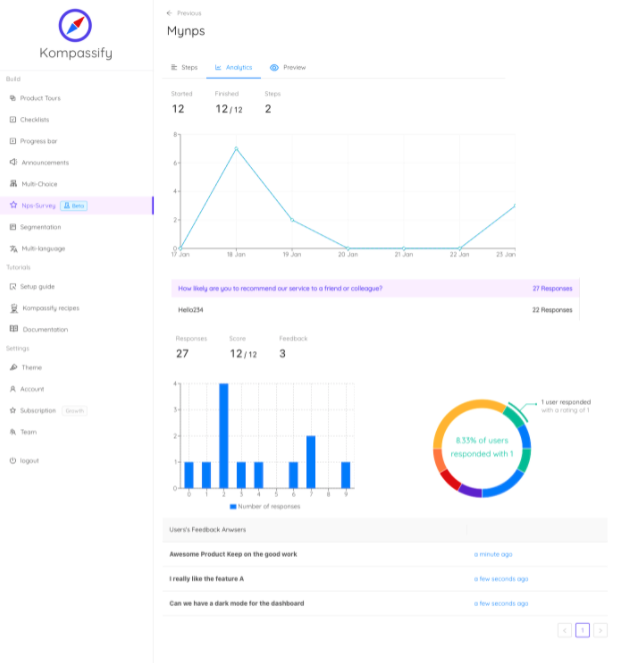
The first survey of the year gets a respectable response rate. The second, sent six weeks later by a different team, does a little worse. By the fourth, the number has halved and someone proposes a prize draw. The prize draw works, briefly, and then it doesn't, and now the only people answering are the ones who wanted the voucher.
Survey fatigue is the name for that slide. It is not caused by bad questions; a well-written survey and a sloppy one both decay if they arrive too often, at the wrong moment, and into a silence where nothing ever visibly comes of answering. And its real cost is not the missing responses. It is that the responses you still get stop representing your users, so your data keeps arriving, keeps looking usable, and quietly stops being true.
This guide covers what survey fatigue is and how the two kinds differ, the symptoms that show up before response rate moves, why over-surveying biases rather than merely thins your data, how to set and enforce a per-user frequency budget across every team that sends, and eight fixes that restore response rates without asking less often than the business genuinely needs.
Key Takeaways
- Fatigue is a frequency problem before it is a question problem. Rewriting the survey rarely fixes a rate that fell because of how often you ask.
- The damage is bias, not sample size. Late-stage respondents skew to extremes, so scores drift while the quiet majority disappears from the data.
- Two kinds: between-survey fatigue (the request gets dismissed) and within-survey fatigue (later answers get straight-lined). The second still produces data, which makes it more dangerous.
- Budget per user, not per team. Every team's "just one quick survey" is the same person's fifth this quarter.
- Micro-surveys beat forms. One question at the right moment routinely outperforms ten questions at a scheduled one.
- Silence is the most expensive mistake. Feedback that never visibly produces anything teaches people that answering is pointless, and that lesson outlives the survey.
What Is Survey Fatigue? (Meaning & Definition)
Survey fatigue is the decline in willingness and ability to give useful feedback that results from being asked too often, at poor moments, or without ever seeing a consequence. It shows up as falling response rates, but also, more insidiously, as degraded answers from people who did respond.
Survey fatigue, defined. The erosion of response quantity and quality caused by the cumulative burden of feedback requests. It has two forms: survey-taking fatigue, which happens between surveys and shows up as dismissals and non-response, and respondent fatigue, which happens inside a single survey and shows up as straight-lining, shortened free text, and abandonment partway through.
The distinction is worth keeping because the two have different tells and different fixes. Survey-taking fatigue is visible in your send logs: rates falling across successive campaigns, unsubscribes rising, dismissals coming faster. Respondent fatigue hides inside otherwise complete submissions: the person who selected "7" for every item on a matrix question, the free-text box filled with a single word, the last three questions answered in four seconds. Nothing in the response rate tells you it happened.
The rate is the symptom people notice. The composition of who is left is the problem that actually costs you decisions.
Five Symptoms That Show Up Before Response Rate Falls
By the time the headline number moves, fatigue has usually been building for a while. These five indicators appear earlier and are worth watching deliberately:
-
Time-to-dismiss is shrinking
Users used to read the prompt before closing it; now it's gone in under a second. That is recognition, not rejection: people have learned the shape of your survey and are dismissing it before reading. This moves well before response rate does.
-
Completion is falling faster than opens
People still start and increasingly don't finish. That is a length and effort signal rather than a frequency one, and it points at the survey itself: too many questions, an unexpected matrix, a mandatory free-text field two-thirds of the way through.
-
Free-text answers are getting shorter
The most sensitive early indicator, and the cheapest to measure. Average comment length falling across sends means the people still responding are spending less of themselves on it, which is the last stage before they stop entirely.
-
Score distribution is hollowing out
Watch the middle of your scale, not the average. When 6s, 7s and 8s thin out while the extremes hold, you are no longer hearing from ambivalent users, the exact group whose opinion is most decision-relevant, and the first to stop bothering.
-
The same accounts answer every time
A shrinking core of repeat respondents carrying the whole program is a warning, not a success. Their views become your roadmap by default, and they are by definition your least typical users. If you can, track the share of responses coming from people who also answered last time.
Why Over-Surveying Biases Your Data (Not Just Thins It)
The intuitive model of fatigue is that you get fewer responses of the same kind, a smaller but equally representative sample. That model is wrong, and acting on it is how teams get burned.
Non-response is not random. The people who drop out first are the ones with the least investment: the casual users, the ones for whom the product is fine but not important, the quiet majority. The people who keep answering are the ones with a reason: an unusually good experience, an unusually bad one, or a professional habit of giving feedback. So as fatigue progresses, your sample does not shrink evenly; it hollows out from the middle.
Fatigue doesn't scale your sample down; it changes who is in it. The score can move several points without a single user changing their mind.
Inside a long survey, the same distortion happens across questions rather than across people. Attention degrades, so later items collect more agreement, more mid-scale defaults and less considered text than earlier ones. This is why question order is not a cosmetic decision: whatever you put at the end will be measured under worse conditions than whatever you put at the start.
The compounding version. Fatigued data biases toward the vocal, decisions get made from it, and the resulting changes serve the vocal minority, which frustrates the quiet majority you already stopped hearing from. Two cycles of that and your feedback analysis is describing a user base that is drifting away from your actual one.
Build a Survey Frequency Budget
Almost every over-surveyed user is over-surveyed by a group of teams, none of which is individually unreasonable. Product wants to validate a feature. Customer success runs a quarterly check-in. Support fires a CSAT after every ticket. Marketing needs quotes. Research is testing a concept. Each asks once; the user is asked five times.
The fix is not to arbitrate which team deserves to ask. It is to give the user a budget, and make every sender draw from the same one:
The specific numbers are less important than three properties. The budget is per user, so it reflects the experience of the person being asked rather than the plans of the people asking. It is shared, so no team can be individually reasonable and collectively responsible for the problem. And it is enforced by the system rather than by a policy document: frequency capping in the delivery layer, not a line in a wiki that nobody checks before scheduling a send.
In-app surveys make enforcement considerably easier than email, because targeting, triggering and frequency rules all live in the same place. An in-app survey can also check what the user just did before deciding whether to appear, something an email schedule cannot do at all.
Eight Fixes for Survey Fatigue
In rough order of impact per unit of effort. The first three will do most of the work:
1. Replace forms with micro-surveys
One question, in context, immediately after the relevant moment. The trade you are offering changes from "several minutes of your time" to "five seconds", and response rates change accordingly. A single effort-score question after a task completes will tell you more about that task than a quarterly form that asks about it from memory three weeks later.
2. Trigger on behavior, not on the calendar
A survey that arrives because it is the fifteenth of the month is an interruption. The same survey arriving thirty seconds after the user finished the thing it asks about is a natural follow-up. Use in-product triggers (feature first used, flow completed, error encountered, milestone reached) so relevance is structural rather than hoped for.
3. Cap frequency in the system, not in a policy
One prompt per user per month across all senders, with a cooling-off period after any response or dismissal. If the cap lives only in a shared document, it will be broken by the first urgent request, and nobody will notice until the rates have already fallen.
4. Cut the question count to what can change a decision
For each question, ask what you would do differently depending on the answer. Questions with no such answer are costing you responses to the ones that do. "Nice to know" is where survey length comes from, and it is paid for out of the completion rate of everything after it.
5. Tell the truth about the length
"Two minutes" for a seven-minute survey does more long-term damage than the extra five minutes would have. People remember being misled and dismiss the next one on sight. Show real progress, state the real number of questions, and if the survey is long, say so and explain why it is worth it.
6. Never ask what you already know
Plan, role, company size, tenure and feature usage are already in your systems. Asking anyway signals that the survey was written without regard for the respondent's time, and it burns questions you could have spent on something you genuinely cannot observe. This is progressive profiling applied to research: collect over time, never twice.
7. Vary who you ask
Sample rather than blanket-send. Rotating cohorts keeps any individual well under the budget while giving you a continuous read at the population level, and it stops the same helpful accounts from carrying the entire program. Segmentation also lets you ask the right question of the right group instead of one generic question of everyone.
8. Close the loop, visibly
The highest-leverage fix and the one most often skipped. Tell people what changed because of the last round: in-app, in the release notes, in an email to the people who answered. "You asked for this, here it is" converts a survey from a tax into an exchange, and it is the only intervention that makes the next survey easier rather than harder. A visible feature announcement that credits the feedback behind it does more for your next response rate than any incentive.
Survey Fatigue: Do vs. Don't
✅ Do
- Budget asks per user, across every team
- Trigger on what someone just did
- Prefer one question now to ten questions later
- Enforce frequency caps in the delivery system
- Track free-text length and dismissal speed
- Watch the middle of the score distribution
- Rotate cohorts instead of blanket-sending
- Publish what changed because of the feedback
❌ Don't
- Let each team count only its own sends
- Schedule surveys by calendar date alone
- Understate how long the survey takes
- Ask for data you already hold
- Add "while we're here" questions
- Fix a falling rate with a prize draw
- Re-ask someone who just dismissed you
- Report a fatigued average as if it were stable
The prize-draw entry deserves a note, because it is the most common response to a falling rate and one of the least useful. Incentives change who answers rather than how much they care: they pull in exactly the population least invested in your product, which makes the composition problem worse while making the headline number look better. If a rate has fallen because of fatigue, an incentive hides the symptom and leaves the cause intact.
Instrumenting Survey Health
Fatigue is manageable once it is measurable, and the measurements are cheap. Four numbers, tracked per survey and over time, will catch it long before your quarterly score starts moving:
| What to track | What it tells you | What to do when it moves |
|---|---|---|
| Asks per user per period | Whether the budget is actually being respected | Enforce the cap in the system, not in a document |
| Response rate by ask number | How quickly willingness decays per user | Lower the frequency, or rotate cohorts |
| Average free-text length | Effort respondents are still willing to spend | Shorten the survey; move key questions earlier |
| Share of repeat respondents | Whether a small core is carrying the program | Sample new cohorts; exclude recent responders |
| Mid-scale share of responses | Whether the quiet middle is still represented | Treat the score as unreliable until it recovers |
Two of these are worth an alert rather than a dashboard. If asks-per-user breaches the budget, someone should hear about it the same week; that is the leading indicator of everything else. And if the mid-scale share collapses, the honest move is to stop reporting the score as a trend until the sample recovers, which is a difficult conversation and a far cheaper one than a decision made on skewed data. The wider metric context sits in the customer feedback analysis guide.
Asking In-Product, Without Wearing People Out
Most of the fixes above come down to the same capability: asking one short question, at the moment it is relevant, to a controlled slice of users, no more often than the budget allows, and being able to see what came back without a data project. Email cannot do the timing part, and a spreadsheet policy cannot do the enforcement part.
Kompassify puts that in one place:
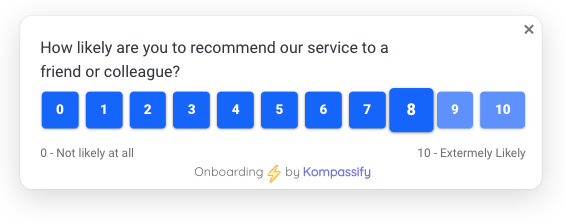
- Run surveys inside the product. NPS and micro-surveys appear in-app at the moment they are relevant, rather than in an inbox three weeks later.
- Trigger on real behavior. Fire a question after a feature is used, a flow is completed or a milestone is reached, so relevance is built in rather than hoped for.
- Target a slice, not everyone. Segment by plan, role, lifecycle stage or in-product behavior, so cohorts rotate and no group carries the whole program.
- Control how often each person is asked. Frequency and display rules live in the platform, which is where a budget has to be enforced to survive a busy quarter.
- Close the loop in the same tool. Ship an in-app announcement crediting the feedback that produced the change, the single most effective thing you can do for the next survey's response rate.
Kompassify is GDPR compliant and EU-hosted, free for under 100 monthly active users, with paid plans from $129/month.
Ask Less Often. Learn More.
Kompassify runs NPS and one-question micro-surveys inside your product, triggered by what users actually do, targeted to the segment you care about, and capped so the same people aren't asked every month. Then close the loop with an in-app announcement so answering visibly pays off. GDPR compliant, EU-hosted, and free for under 100 monthly active users.
Start for Free →Frequently Asked Questions
What is survey fatigue?
Survey fatigue is the decline in willingness to respond that sets in when people are asked for feedback too often, at the wrong moments, or without ever seeing an outcome. It comes in two forms. Survey-taking fatigue is between surveys: the fourth request this quarter gets dismissed on sight. Respondent fatigue is within a single survey: attention degrades after the first few questions, so later answers get straight-lined, shortened or skipped. Both reduce data quality, and the second is more dangerous because the responses still arrive and still look valid.
What causes survey fatigue?
Four things, roughly in order of impact. Frequency: several teams each sending "just one quick survey" with nobody counting the total per person. Length: a fifteen-question form introduced as taking two minutes. Timing: a request that interrupts a task rather than following one. And silence: surveys that never visibly produce anything, which teaches people that answering has no effect. Silence is the one most often overlooked and the one that damages future response rates the longest.
How does survey fatigue affect data quality?
It biases the data rather than merely shrinking it, which is worse. As fatigue sets in, the people who still respond stop being a cross-section of your users and become a self-selected group of enthusiasts and complainers, so your scores drift toward the extremes and the quiet middle disappears. Inside a long survey, straight-lining and rushed answers inflate agreement on later items. The result is a dataset that looks healthy by sample size and quietly misrepresents the population, which is how teams end up confidently making the wrong decision.
How often should you survey users?
Set a per-user budget rather than a per-team one, because fatigue is felt by the person, not by the department. A workable default for most SaaS products is at most one relationship survey per quarter, an NPS-style check-in, plus contextual micro-surveys tied to specific events, capped at roughly one prompt per user per month across every team combined, with a cooling-off period after anyone responds or dismisses. The exact numbers matter less than the fact that a single shared limit exists and that something enforces it.
How do you increase survey response rates?
Ask less, ask better, and show what happened. Shorten to the smallest number of questions that can change a decision: a one-question micro-survey at the right moment routinely outperforms a well-designed ten-question form. Trigger on behavior rather than on a calendar, so the request arrives just after the experience it asks about. Cap frequency per user across all teams. And close the loop visibly: tell people what changed because of the last round. Products that publish "you asked, we shipped" consistently see the next survey answered, because responding has been shown to work.
What is a micro-survey and why does it help?
A micro-survey is a one- or two-question prompt shown in context, inside the product, immediately after a relevant moment: one CSAT question after a support interaction, one reason field after a feature is used for the first time. It helps because it changes the trade the user is being offered: five seconds for a single answer instead of several minutes for a form. Response rates are typically far higher, the answers are more accurate because the experience is still fresh, and the low cost per ask means you can gather continuously rather than in disruptive quarterly waves. The in-app surveys guide covers the formats in detail.
How do you stop different teams from over-surveying the same users?
Centralize the cap rather than the surveys. Teams will keep having legitimate reasons to ask, so the fix is a shared frequency rule enforced by the delivery layer: one prompt per user per month across all senders, a cooling-off window after any response or dismissal, and a single place to see who is scheduled to be asked what. In-app surveys make this considerably easier than email, because targeting, triggering and frequency capping live in one system. With a platform like Kompassify you can run NPS and micro-surveys in-product, cap how often each user is prompted, and target by segment so the same people are not carrying the whole feedback program. Kompassify is GDPR compliant and EU-hosted, free for under 100 monthly active users, with paid plans from $129/month.