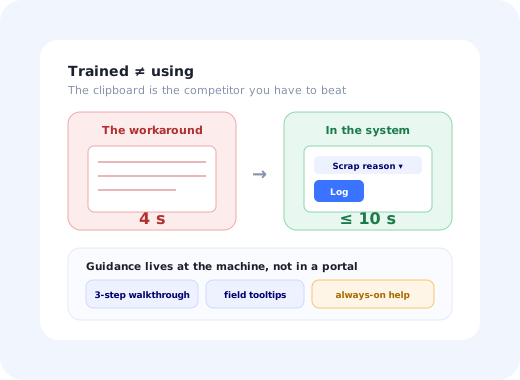
Manufacturing software rollouts fail in a way that is unusually easy to measure. The MES goes live, the training sessions are delivered, attendance is 96%, and six weeks later the shift supervisor is still keeping the real production numbers on a clipboard, entering them into the system in a batch at the end of the week. The data in the system is fiction. Everyone knows it. Nobody logged a complaint, because the workaround is faster than the software.
That gap between trained and using is the whole problem of manufacturing software onboarding. It exists because a plant is not an office. Your users are standing up, often gloved, frequently sharing a terminal, sometimes on a fifteen-year-old panel PC bolted to a machine, and they are measured on output, not on whether they filled in the scrap-reason field correctly.
This guide covers what actually changes when the users are on a shop floor: who the audiences are, the seven-step method that works, the constraints that break standard onboarding playbooks, and how to measure adoption rather than attendance.
Key Takeaways
- Attendance is not adoption. The number that matters is whether the paper workaround disappeared, not whether the training happened.
- Design for the shared terminal. Most plant software is used from a kiosk by ten people a shift; personalised email onboarding is largely useless there.
- Guidance must live at the machine. Deskless workers will not open a knowledge base; the help has to be inside the screen at the moment of the task.
- The supervisor is the real gatekeeper. If they tolerate the workaround, the rollout is already over.
- Roll out by line or cell, not by plant. One line, one shift, one week, then use its numbers to convince the next.
- Shift patterns mean three of everything. A rollout planned around days quietly excludes nights and weekends.
What Manufacturing Software Onboarding Actually Covers
"Manufacturing software" is a wide category, and the onboarding problem differs by where the software sits. It is worth being precise, because the audience and the failure mode change completely.
| System | Primary users | The onboarding problem |
|---|---|---|
| MES / shop-floor execution | Operators, line leads, shift supervisors | Deskless, shared terminals, gloves, minutes-per-task pressure. |
| ERP / production planning | Planners, buyers, finance | Deep process change; the software encodes a new way of working. |
| Quality / QMS | QA inspectors, auditors | Compliance-critical data entry that is easy to do inconsistently. |
| Maintenance / CMMS | Technicians, maintenance planners | Mobile, intermittent connectivity, work logged after the fact or not at all. |
| Analytics / OEE dashboards | Plant managers, continuous-improvement teams | Nobody argues with it; nobody opens it either. Pure feature adoption. |
The rest of this guide focuses on the hard case, software used by people who are not at a desk, because that is where standard SaaS onboarding advice breaks down most completely.
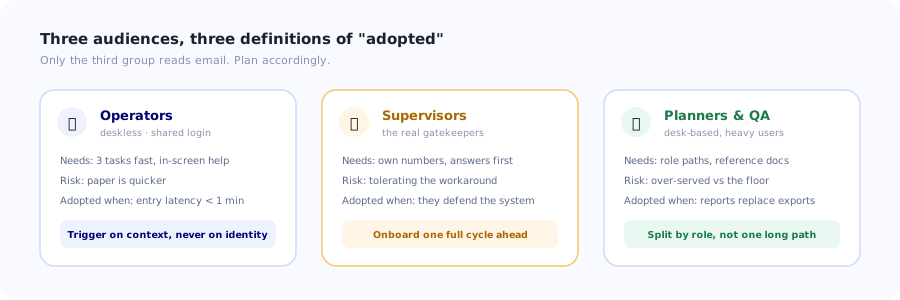
Three audiences, three different definitions of "adopted", and only one of them ever reads an email.
Why Manufacturing Rollouts Fail
The failure modes are consistent enough across plants to be worth listing plainly. If your rollout is struggling, it is almost certainly at least two of these.
The paper workaround is genuinely faster
An operator who can write "142, scrap 3, jam" on a clipboard in four seconds will not spend forty navigating three screens to record the same thing. If your software is slower than paper at the most frequent task, no amount of training changes the outcome. Time the top three tasks against the workaround before you blame adoption.
Training happened once, on day shift
A two-hour classroom session in week one, delivered to whoever was on days, is the default plan. Nights and weekends get a printed handout. New starters six weeks later get nothing at all, and in an industry with meaningful turnover, "new starters" is a large and permanent population.
Shared logins destroy your onboarding logic
When a terminal runs one LINE3 account all shift, every personalisation assumption
fails: "show this to new users once" shows it to nobody after the first person, and your usage
data cannot distinguish ten operators from one. Onboarding has to be triggered by
task and context, not by user identity.
The interface assumes a mouse and a quiet room
Gloves and resistive touchscreens mean small targets are unusable. Glare means low-contrast text is invisible. Noise means video with narration is pointless. These are not accessibility nice-to-haves in a plant; they are the difference between a usable screen and a decorative one.
Nobody is measured on using it
Operators are measured on output and quality. If entering data accurately makes their numbers look worse (reporting scrap honestly, logging genuine downtime) you have built an incentive to under-report, and you will get exactly that. This is a management problem that presents as a software problem.
The Three Audiences
Every plant rollout has three groups with different needs, different constraints and different definitions of success. Treating them as one population is the most common planning error.
1. Operators and line staff
Deskless, time-pressured, often on shared terminals, and using perhaps four screens out of a hundred. They do not need to understand the system; they need the three tasks they perform every shift to be obvious and fast. Their onboarding is in the interface, at the moment of the task: a short contextual guide the first few times a screen is used, and a persistent way to get help without leaving the screen. Anything that requires reading in advance will not happen.
2. Supervisors and line leads
The genuine gatekeepers. They decide, informally, whether the new system is "how we do it now" or "the thing corporate wants that we do at the end of the week". They need to see their own numbers early and to be able to answer their team's questions without escalating. Onboard them a full cycle ahead of their teams, and give them the reporting view first: a supervisor who has caught a real problem using the new dashboard becomes its most effective advocate.
3. Planners, quality and engineering
Desk-based, heavier users, closer to classic enterprise software onboarding: role-based paths, reference documentation, deeper configuration. This is the group standard playbooks already serve well, and the group most likely to be over-served while the shop floor is under-served. Split their onboarding by role rather than shipping one long path, the same role-based approach that works in any multi-persona product.
A Seven-Step Method That Works on a Shop Floor
This is the sequence that survives contact with a plant. It assumes you cannot stop production, that you have three shifts, and that trust has to be earned on one line before it extends to the site.
1. Time the top three tasks against the current workaround
Before any training plan, stand at the line with a stopwatch. If recording a scrap event takes 38 seconds in the system and 4 on paper, that is your entire adoption problem and it is a design fix, not a training fix. Getting the most frequent task under about ten seconds is worth more than every other item on this list combined. This is interaction friction in its purest form.
2. Pick one line, one cell, one shift
Site-wide go-lives concentrate every problem into one week with no way to learn. Choose a single line with a supervisor who is willing, run for two weeks, and fix what breaks while the blast radius is small. The output of a pilot is not "it worked"; it is a list of the twelve things that were wrong and are now fixed, plus a supervisor who will tell their peers it is fine.
3. Onboard supervisors a cycle ahead
Their questions are different from operators' questions and they need answers before their team asks them. Give them access one to two weeks early, with their own line's data in it. A supervisor who cannot answer a basic question in front of their team will side with the workaround, and they are right to.
4. Put the guidance inside the screen
This is the substitution that matters most in a deskless environment. Replace "there is a training portal" with a short in-app walkthrough on the first few uses of each screen, tooltips on the fields people get wrong, and a help launcher that never leaves the terminal. A worker standing at a machine will not open a separate system, log in again, and search a knowledge base, but they will read two sentences that appear next to the field they are stuck on. Practically this looks like a short walkthrough plus field-level tooltips, not a course.
5. Make it survive the shared terminal
If ten people use one login, "show once per user" is meaningless. Trigger guidance on context instead: the first N times a screen is opened per shift, when an unusual value is entered, when a field is left blank that is normally filled. Add a permanently available "how do I do this" entry point so the eighth operator of the shift can still get help even though the account has technically "seen" everything.
6. Cover all three shifts, deliberately
Write the rollout plan by shift, not by date. Nights and weekends need the same support presence, the same floor-walking, and the same chance to raise problems. A plan that only names day-shift dates is a plan that has excluded a third of its users without noticing, and the excluded third is usually where the workarounds take permanent root.
7. Kill the old path on a published date
Parallel running is necessary and must be finite. As long as the paper form is accepted, a portion of the floor will keep using it, and you will never get clean data. Announce a date, hold it, and make sure that by then the software is genuinely faster than the paper, because if it is not, removing the fallback creates resentment rather than adoption. Steps one and seven are the same decision viewed from both ends.
Plant Constraints That Break Standard Playbooks
A handful of environmental facts invalidate advice that works perfectly well in a SaaS product used from a laptop.
✅ What works on a shop floor
- Guidance that appears in the screen, at the moment of the task.
- Large touch targets and high contrast: gloves, glare, distance.
- Very short steps: one instruction, one action, no paragraphs.
- Images of the actual machine and the actual screen, not abstractions.
- A help entry point that is always visible on the terminal.
- Checklists for a shift-start routine that anyone can pick up mid-sequence.
❌ What does not
- Onboarding email sequences: many operators have no work email at all.
- Narrated video: too noisy, and it stops the line.
- "Show once per user" logic on shared accounts.
- A separate learning portal with its own login.
- Long reference documentation nobody will stand and read.
- Anything that assumes reliable connectivity in a metal building.
The shared-terminal rule. Assume the account is not the person. Any onboarding logic that depends on knowing who is looking at the screen will misfire in a plant. Trigger on context (screen, task, data anomaly, time since last shown) and always leave a manual way in. This one adjustment fixes more shop-floor adoption problems than any other single change.
Measuring Adoption, Not Attendance
Training completion is the metric that is easiest to collect and tells you the least. These are the numbers that actually describe whether a plant has adopted a system.
| Metric | What it tells you | Warning sign |
|---|---|---|
| Workaround elimination | Whether the paper form or spreadsheet is still in use. | Any continued use after the cutover date. |
| Entry latency | Gap between the event happening and it being recorded. | Batching: hours or a whole shift late means it is a chore, not a workflow. |
| Task completion time | Seconds to log the most frequent event. | Slower than the workaround. Fix the screen, not the training. |
| Adoption by shift | Whether nights and weekends are actually using it. | A gap between shifts is a support-coverage gap, every time. |
| Field-level error rate | Which fields get left blank or filled with a default. | A single field dominating means the field is unclear, not the user. |
| In-app help requests | Where people get stuck, by screen. | Zero requests usually means the launcher is invisible, not that nobody is stuck. |
Entry latency is the underrated one. A system where events are recorded within a minute of happening has been adopted; one where everything appears in a burst at 14:55 on a Friday has been complied with. The dashboards look identical and mean opposite things. Broader digital adoption measurement applies here too, but latency is the plant-specific tell.
Building the In-Product Guidance Layer
For deskless users the in-product layer is not a supplement to training; it is the training. Four components cover most of what a plant needs.
A short walkthrough on first use of each screen
Three to five steps, one instruction each, ending in the user completing a real entry rather than reading about it. Not a tour of the interface, a guided completion of the actual task.
Tooltips on the fields people get wrong
Let the error data choose them. Whichever field has the highest blank or default rate gets a one-sentence explanation attached to it. Repeat monthly; this is the cheapest recurring win available in an industrial interface.
A shift-start checklist
The routine sequence (confirm the work order, check the setup, log the first piece) as a visible checklist that shows progress. It doubles as a handover aid when someone picks the shift up halfway through. The general pattern is covered in building an onboarding checklist.
An always-visible help launcher
One persistent control on the terminal that opens short answers for the current screen. This is what replaces "go and ask the supervisor", and it is the piece that keeps working for the new starter who joins in month seven, long after the training sessions are over. The wider case is in in-app support.
Put the training inside the terminal
Kompassify adds walkthroughs, tooltips, checklists and announcements to your MES, ERP or quality system without touching its code, so guidance reaches operators at the machine instead of sitting in a portal nobody opens. Non-technical teams build and edit the content themselves, and you can see exactly which screens people get stuck on. GDPR compliant, EU-hosted, free up to 100 monthly active users and from $129/mo after that.
Start for Free →A Realistic Rollout Shape
For a single site, this is a shape that holds up. Adjust the durations; keep the order.
- Weeks 1–2: observe. Time the frequent tasks, list the existing workarounds, identify the supervisor who will host the pilot.
- Weeks 3–4: fix the top three interactions. Nothing else matters if the software is slower than paper.
- Week 5: supervisors. Early access with their own line's data, plus the answers to the questions their teams will ask.
- Weeks 6–7: pilot one line, all shifts. Floor presence on nights too. Collect the list of twelve broken things.
- Week 8: fix and instrument. Add tooltips to the fields with the worst error rates; confirm the help launcher is actually being found.
- Weeks 9–12: extend line by line. Each new line gets the pilot line's numbers as evidence, and its supervisor briefed by the pilot supervisor.
- Week 13: retire the workaround on a date announced in week 9, and hold it.
The one thing not to do: announce the cutover before the software is faster than the paper it is replacing. Removing a fallback from people who are measured on output, while the replacement costs them time, converts a solvable design problem into a permanent trust problem. Fix step one first, every time.
Frequently Asked Questions
What is manufacturing software onboarding?
It is the process of getting the people in a plant (operators, line leads, supervisors, planners and quality staff) to actually use a new system such as an MES, ERP, QMS or CMMS as part of their normal work, rather than merely being trained on it. The distinction matters because attendance at training is easy to achieve and tells you almost nothing. A rollout is only complete when the previous workaround, usually paper or a spreadsheet, has genuinely stopped being used and the data in the system reflects what is happening on the floor as it happens.
Why do manufacturing software rollouts fail even after training?
Most often because the software is slower than the workaround at the most frequent task. An operator who can note a scrap event on a clipboard in four seconds will not spend forty navigating three screens to record the same thing, and no amount of training changes that arithmetic. The other recurring causes are training delivered once to the day shift only, shared terminal logins that break every show-this-once assumption, interfaces designed for a mouse and a quiet room rather than gloves and glare, and incentive structures where accurate reporting makes an operator's own numbers look worse.
How do you onboard deskless workers who share a terminal?
Stop relying on user identity and trigger guidance on context instead. When ten people use one LINE3 account all shift, show-once-per-user logic shows it to nobody after the first person. Trigger on the screen being opened, on an unusual value being entered, on a normally-filled field being left blank, or on a count per shift rather than per user. Then always leave a manually available help entry point on the terminal, so the eighth operator of the shift can still get an answer even though the account has technically already seen everything.
What should in-app guidance look like on a shop floor?
Short, high-contrast, large-target and task-shaped. Three to five step walkthroughs on the first uses of each screen, ending with the user completing a real entry rather than reading about one. Tooltips attached to the specific fields your error data shows people get wrong. A shift-start checklist that someone can pick up halfway through. And a permanently visible help launcher for the current screen. Avoid narrated video, which is useless in a noisy plant, and anything requiring a second login, which deskless workers will not do.
How do you measure adoption of manufacturing software?
Track workaround elimination first: whether the paper form or spreadsheet is genuinely gone. Then entry latency, the gap between an event happening and it being recorded, which is the strongest single tell: sub-minute recording means adoption, while a burst of entries at the end of a shift means compliance. Add task completion time for the most frequent event, adoption broken out by shift so nights are not hidden inside a site average, field-level error rates to find unclear fields, and in-app help requests by screen. Training completion rate should not be on this list.
Should you roll out plant software site-wide or line by line?
Line by line, essentially always. A site-wide go-live concentrates every problem into one week with no opportunity to learn and no small blast radius. Pick one line with a willing supervisor, run for two weeks across all shifts, and treat the output of the pilot as a list of the twelve things that were wrong and are now fixed, plus a supervisor who will tell their peers it is fine. Each subsequent line then gets real numbers as evidence rather than a corporate mandate.
How do you handle three shifts in a software rollout?
Write the rollout plan by shift rather than by date, and give nights and weekends the same floor presence, the same support coverage and the same chance to raise problems as days. A plan that only names day-shift dates has silently excluded a third or more of its users, and the excluded shifts are precisely where workarounds take permanent root, because nobody was there to see the problem or fix it. Report adoption metrics split by shift for the same reason: a site average hides the gap.
When should you switch off the old paper process?
On a date announced several weeks in advance and then actually held, but only once the software is genuinely faster than the paper at the frequent tasks. Parallel running has to be finite, because as long as the paper form is accepted a portion of the floor will keep using it and the data will never be clean. However, removing the fallback while the replacement still costs people time converts a solvable design problem into a lasting trust problem, especially for staff measured on output. Fix the interaction speed first, then set the date. The wider sequencing is covered in planning a software rollout.