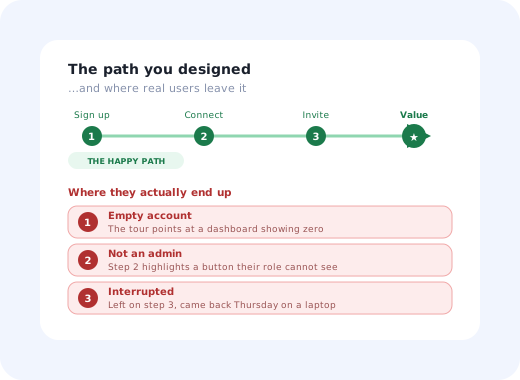
There is a version of your product where everything works. The account has data in it. The integration connects on the first attempt. The person clicking is an admin. Nothing times out, nothing is empty, and the steps happen in the order the flow expects.
That version is called the happy path, and it is the version your team sees all day. It is what the demo runs on, what the screenshots were taken from, what the onboarding tour was authored against, and what the sprint demo showed. It is also, for most products, a minority of real sessions.
This guide covers what the term means, where it came from, how it differs from the alternate and unhappy paths, the specific places new users fall off it, and what to do about it, since the answer is rarely "handle every edge case" and usually "make the guidance respond to what is actually true of this account".
Key Takeaways
- The happy path is the run where nothing goes wrong: valid input, granted permissions, available dependencies, expected order.
- It is one route; the unhappy paths are many. That asymmetry is why they get under-designed, not laziness.
- Onboarding falls off it hardest, because tours are authored on accounts that have data, permissions and teammates a new account does not.
- The empty account and the non-admin are not edge cases; in a new-user population they are close to the default.
- Recoverable beats rare. Rank states by whether the user can get out, not by how unusual they are.
- Guidance keyed to account state survives where guidance keyed to step order breaks.
What Is the Happy Path?
Happy path: definition
The happy path is the default scenario through a feature or flow in which nothing goes wrong: every input is valid, every permission is granted, every dependency is available, and the user does the expected thing in the expected order. The term comes from software testing (the happy path test is the baseline case, run before any error handling is verified) and has since become shorthand in product and UX for the version of a journey that gets designed, demoed and screenshotted.
The phrase is used slightly differently by the two disciplines that borrowed it, which is worth untangling. In testing it is a test case: the one that proves the feature can work at all. In product and design it is a critique: "that only handles the happy path" means the flow assumes conditions that will frequently not hold. Both usages share the same underlying observation: the successful run is singular and cheap to imagine, and everything else is plural and tedious.
Happy, Alternate and Unhappy Paths
Three categories are worth separating, because they call for different responses. Collapsing them into "the happy path and everything else" is how alternate paths end up being treated as errors, one of the more damaging design mistakes, since an alternate path is a user succeeding in a way you did not predict.
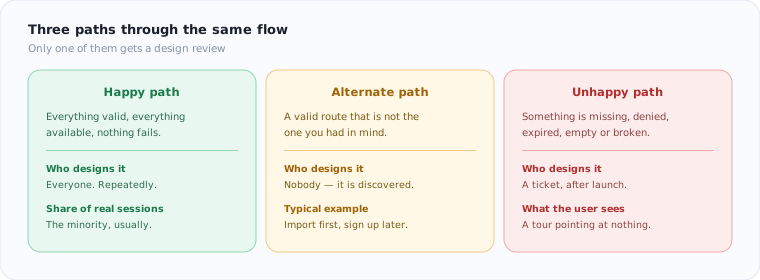
Three routes through the same flow. Only one of them usually gets a design review.
| Path | What it is | Example in onboarding | Correct response |
|---|---|---|---|
| Happy | Everything valid, available and in order. | Admin signs up, connects the integration, imports data, invites two colleagues. | Design it well, then stop assuming it. |
| Alternate | A valid route that is not the intended one. | User explores for a week, then imports; or invites the team before connecting anything. | Support it. It is not an error, and blocking it costs you the user. |
| Unhappy | Something is missing, denied, expired, empty or broken. | The connection fails; the role has no permission; the invite link expired. | Explain, and give a next action that is not "contact support". |
The distinction that actually matters is not rare versus common; it is recoverable versus terminal. An unusual state a user can back out of costs a few seconds of confusion. A state that dead-ends them costs the account, and it costs it silently: nobody files a ticket saying "your product dead-ended me", they just stop.
Six Places Onboarding Leaves the Happy Path
Onboarding is where the happy-path assumption is most expensive, for a structural reason: it is authored by people using accounts that have existed for weeks. Those accounts have data, connected services, admin rights and colleagues. A real new account has none of those, which means the tour is being written against a state no new user will ever be in.
1. The empty account
The most common unhappy path in all of SaaS, and the one most often mistaken for an edge case. A tour that says "here is your dashboard" points at zero. A tooltip highlighting the filter panel highlights a panel with nothing to filter. Every product is at its least convincing in the ten minutes when it has no data, which is precisely the ten minutes that decide whether it gets any.
The fix is not to hide the emptiness but to use it: an empty state that explains what will be here and offers the single action that fills it does more for activation than any tour running over the top of it.
2. The user who is not an admin
Half of onboarding flows assume permissions the person does not have. The tour points at Settings, the user's role cannot open Settings, and the tour either highlights a disabled control or anchors to an element that does not render at all. The user concludes the product is broken, which is a reasonable conclusion.
This one is entirely preventable with segmentation: a viewer, an editor and an account owner need three different first sessions, and the account owner's version is the only one most teams build. See onboarding personalised by role.
3. The integration that fails
Any step that depends on a third party has a failure mode you do not control: wrong credentials, an expired token, a permission the user's IT department blocks, a sandbox that is down. The happy-path version of this step is a green tick. The unhappy version is a spinner that stops, and then a five-step flow with nowhere to go.
The design requirement is a way to continue without it. If the entire onboarding depends on a connection that fails for 15% of users, 15% of users have no onboarding at all.
4. The session that gets interrupted
People sign up, get three steps in, and a meeting starts. They come back on Thursday from a different device. The happy path assumes one continuous session; real first sessions are routinely split across days.
Anything that only exists in memory (a tour position, a partially filled form, a "step 3 of 5") is lost. Persisting progress server-side and greeting a returning user where they stopped is one of the highest-return unhappy-path fixes available, and it is usually a day of work.
5. The second person on the account
Onboarding is built for user number one. User number two arrives into an account that is already set up (data present, integrations connected, structure defined) and gets the first-run experience anyway, complete with instructions to do things that have already been done. Or they get nothing at all, because onboarding was tied to account creation rather than to the individual. Both are common; the second is worse.
6. The pre-filled demo account
Sample data solves the empty-account problem and creates a subtler one: the user cannot tell what is theirs. They are reluctant to delete anything, unsure which numbers are real, and often never discover the transition point where the demo content ends and their own work begins. Sample data is worth using, but it needs to be labelled, and it needs a single obvious action that clears it.
How to Find Your Product's Unhappy Paths
You do not need a research programme. Four sources, in increasing order of effort, will surface almost everything that matters.
Tells you which step people leave at. Necessary but not sufficient: it gives you the address, never the reason.
Your unhappy paths, already written down in the user's own words. The most under-used research asset in most companies.
Watch the sessions that left, not the ones that converted. The reason is usually visible within thirty seconds.
Pair those with the fourth: deliberate hostile testing. Book two hours, create a genuinely new account, and try to break your own onboarding on purpose.
-
Run it with zero data
Not a test account someone used last month. A new one, empty, exactly as a signup arrives.
-
Run it as the lowest-privilege role
Every tour step that points at something they cannot see is a dead end you shipped.
-
Cancel the integration halfway
Then check the flow can still reach a first useful outcome without it.
-
Close the tab at step three and return tomorrow
On another device, ideally. Whatever you see is what a large share of your signups see.
-
Throttle the network to something realistic
Guidance that appears before the element it points to is a happy-path bug; see loading states.
Two hours of this typically produces more actionable findings than a month of dashboard-watching, because it puts you in the states your analytics can only count. The structured version of the same exercise is a user onboarding audit; for reading the drop-off numbers themselves, see the onboarding funnel guide and session replay.
Designing for the Paths You Did Not Plan
The goal is not to design every unhappy path; there are too many and most are rare. It is to make the product behave sensibly in states nobody anticipated. Five principles do most of the work.
1. Condition guidance on state, not on step order
A linear flow (step 1, then 2, then 3) silently assumes each step succeeded. Guidance keyed to what is actually true of the account ("no data imported yet", "integration disconnected", "role cannot invite") stays correct in every state, including ones you never listed. This is the single most important structural change, and it is what behaviour-based triggers exist to do.
2. Make every step skippable and every flow resumable
Users who cannot skip do not comply; they leave. Persist progress server-side so returning users land where they stopped rather than at the beginning, which is a far worse experience than no onboarding at all.
3. Never anchor to an element that might not exist
Tooltips attached to selectors that can fail to render are the most common cause of an onboarding flow appearing broken. Either guarantee the element, or make the step degrade to something that does not need it.
4. Write errors that contain a next action
"Something went wrong" is a terminal state expressed politely. Say what happened, whether it is the user's doing, and what to do now: the same discipline as good UX microcopy, applied where it matters most.
5. Give the flow a second route to first value
If reaching the first useful outcome requires a data import and an integration and an invited colleague, the joint probability of all three succeeding on day one is lower than anyone plans for. A sample-data route or a manual alternative keeps the first-time experience intact when one dependency fails.
Build guidance that reacts to the account, not to a script
Kompassify lets you target tours, checklists and tooltips by role, plan and account state, so a viewer, an empty account and a returning half-finished user each get guidance that makes sense, and per-step analytics show you exactly where people leave the path. No engineering, no release cycle to change a step. GDPR compliant, EU-hosted, free up to 100 monthly active users and from $129/mo after that.
Start for Free →Happy Path: Do vs. Don't
✅ Do
- Test onboarding on a genuinely empty, newly created account.
- Run every flow as your lowest-privilege role.
- Treat alternate paths as valid, not as errors.
- Persist progress so interrupted sessions resume.
- Give every error state a concrete next action.
- Rank states by recoverability before rarity.
❌ Don't
- Author a tour against a seeded internal account.
- Assume one continuous first session.
- Anchor guidance to elements that may not render.
- Make first value depend on three things all succeeding.
- Ship sample data with no way to tell it apart or clear it.
- Call the empty account an edge case.
A useful reframe: the happy path is not the common case, it is the designed case. Those are different claims, and teams routinely treat evidence for the first as if it were evidence for the second. Check which one your numbers actually support: the share of new sessions that complete the intended route, unaided, on a new account, is usually a sobering figure and always a useful one.
The One-Sentence Version
The happy path is the single route where nothing goes wrong, it is the only route your demos and tours ever run, and the difference between a product that converts trials and one that does not is mostly how it behaves on the other routes, where the account is empty, the permission is missing, the integration failed, and the user came back three days later on a different laptop.
Frequently Asked Questions
What is the happy path?
The happy path is the default scenario through a feature or flow in which nothing goes wrong: every input is valid, every permission is granted, every dependency is available, and the user does the expected thing in the expected order. The term comes from software testing, where the happy path test is the baseline case run before any error handling is checked, and it has since become shorthand in product and UX for the version of a journey that everyone designs, demos and screenshots.
What is the difference between the happy path and the unhappy path?
The happy path is the run where everything is valid and available. An unhappy path, sometimes called a sad path or exception path, is any run where something is missing, denied, expired, empty or broken: no data yet, insufficient permissions, a failed third-party connection, an expired invite link, a timeout. There is also a middle category, the alternate path, which is a perfectly valid route the user takes that simply is not the one you had in mind. The happy path is one route; the others are many, which is why they are consistently under-designed.
What is happy path testing?
Happy path testing verifies that a feature works when it is used exactly as intended, with valid data and no failures. It is the necessary first test and a poor last one: it proves the feature can work, not that it works for the population that will use it. The complement is negative or unhappy path testing, which deliberately supplies invalid input, removes permissions, empties data sets and breaks dependencies to see how the system behaves. In practice most defects that reach users live in the paths nobody wrote a test for.
Why does onboarding fall off the happy path so often?
Because onboarding is usually built on a test account that has been used for weeks and therefore has data, permissions, integrations and teammates already in place, none of which a genuinely new account has. A tour written against that account points at charts that are empty, buttons the user's role cannot see, and settings behind an admin permission they do not hold. The flow was never wrong; it was authored in a state that no real new user is ever in. Designing the empty state first is the usual correction.
How do you find the unhappy paths in your own product?
Four sources, in increasing order of effort. Funnel analysis tells you which step people leave at but not why. Session replay of the sessions that dropped shows what they saw at that moment. Support tickets and chat transcripts name the unhappy paths in the user's own words and are the most under-used source in most companies. And deliberate hostile testing, creating a genuinely empty account, using the lowest-privilege role, cancelling the integration mid-flow, closing the tab halfway and returning tomorrow, finds the rest in an afternoon.
Should you design for edge cases before shipping?
Design for the frequent ones and handle the rest gracefully. The distinction that matters is not rare versus common but recoverable versus terminal: an unusual state a user can back out of costs a moment of confusion, while a state that dead-ends them costs the account. Rank candidates by how many sessions actually hit them: in onboarding, the empty account and the wrong-role user are not edge cases at all, they are close to the default. And make sure every remaining state has a way out, an explanation, and a next action.
What does it mean when someone says a demo only shows the happy path?
It means the demo runs on a prepared account where the data is seeded, the integrations are connected and the presenter knows the exact click order, so it demonstrates that the product can work rather than that it will work for the buyer on Monday. It is not dishonest, but it is why a product can demo beautifully and stall in a trial, and why the gap between demo and first real session is one of the more reliable places to find lost conversion.
How do you design in-app guidance that survives the unhappy path?
Trigger guidance on state rather than on step order. A flow that advances step by step assumes the previous step succeeded; guidance conditioned on what is actually true of the account, no data yet, integration disconnected, role lacks the permission, stays correct in every state, including the ones you did not anticipate. Practically that means segmenting by role and account state, making every step skippable and resumable, and never anchoring a tooltip to an element that may not render.