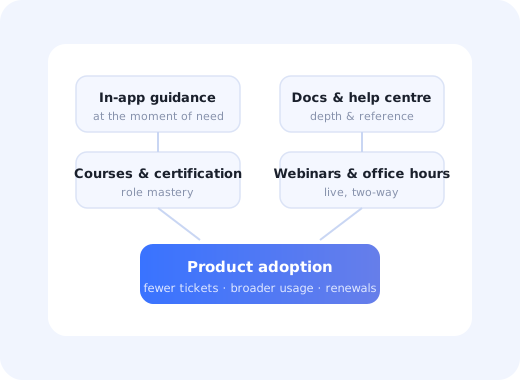
Most SaaS companies do customer education by accident. A help centre accumulates. Someone records a webinar. A CSM builds a slide deck for one account and it quietly becomes the deck for every account. None of it is planned, none of it is measured, and when adoption stalls the conclusion is usually that the product needs to be simpler.
Sometimes it does. More often the product is fine and nobody ever taught the second wave of users, the ones who joined after the original rollout, what it is for.
This guide covers what a customer education programme actually consists of, how to decide which channel teaches what, how to structure it by role rather than by feature, and how to measure whether any of it is working.
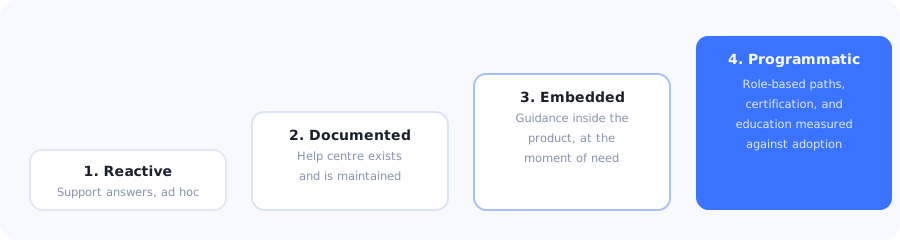
Most teams sit at stage two and try to solve adoption problems by writing more documentation.
Key Takeaways
- Customer education is an adoption function, not a content function. Its output is behaviour change, not articles published.
- Teach by role, not by feature. Feature-organised training forces every learner to filter out most of it.
- Match the channel to the moment. In-app guidance owns the moment of need; courses own depth; docs own reference.
- The second wave is where programmes fail. Users who join after the initial rollout usually get nothing.
- Support tickets are your curriculum. The questions that repeat define what to teach next, in the customer's own wording.
- Measure adoption and ticket deflection, not completions. A finished course that changes no behaviour is a cost.
What is customer education?
Customer education definition: the deliberate, structured effort to teach customers how to get value from a product (through in-app guidance, documentation, courses, certification, webinars and community) organised as a programme with owners, curriculum and success metrics rather than as a pile of content.
The word that separates a programme from a content library is deliberate. Almost every company has documentation. Far fewer can answer: who is this for, what should they be able to do afterwards, how do we know whether it worked, and what happens when it does not.
Why it earns its budget
Customer education pays back in four measurable places, and it is worth being specific about them because "educated customers are happier" does not survive a budget review:
- Support deflection. Repeated questions answered once, well, in the place people look.
- Breadth of adoption. Users cannot adopt what they were never shown; breadth is one of the strongest components of account health.
- Time to value. Faster competence means faster first outcome, which shows up directly in trial conversion and time to value.
- Renewal resilience. An account where several people know the product well survives the departure of its champion. An account where one person knew everything does not.
The channels, and what each is genuinely good at
The most common design error is asking one channel to do everything, usually documentation, occasionally a course. Each format has a narrow strength and a broad weakness.
| Channel | Strong at | Weak at | Use it for |
|---|---|---|---|
| In-app guidance | The moment of need; no context switch | Depth, nuance, theory | First-time tasks, new features, unfamiliar controls |
| Documentation | Searchability, depth, permanence | Reaching people who do not know to look | Reference, edge cases, troubleshooting |
| Courses & academies | Structured mastery of a role | Requires deliberate time investment | Admin training, power users, partners |
| Certification | Motivation, credibility, retention of knowledge | Expensive to build and maintain honestly | Ecosystems with implementers and agencies |
| Live webinars & office hours | Two-way; surfaces questions you did not anticipate | Does not scale; poor as a permanent record | Launches, migrations, high-value accounts |
| Community | Peer answers, real workflows, longevity | Slow to start; needs active moderation | Mature products with engaged power users |
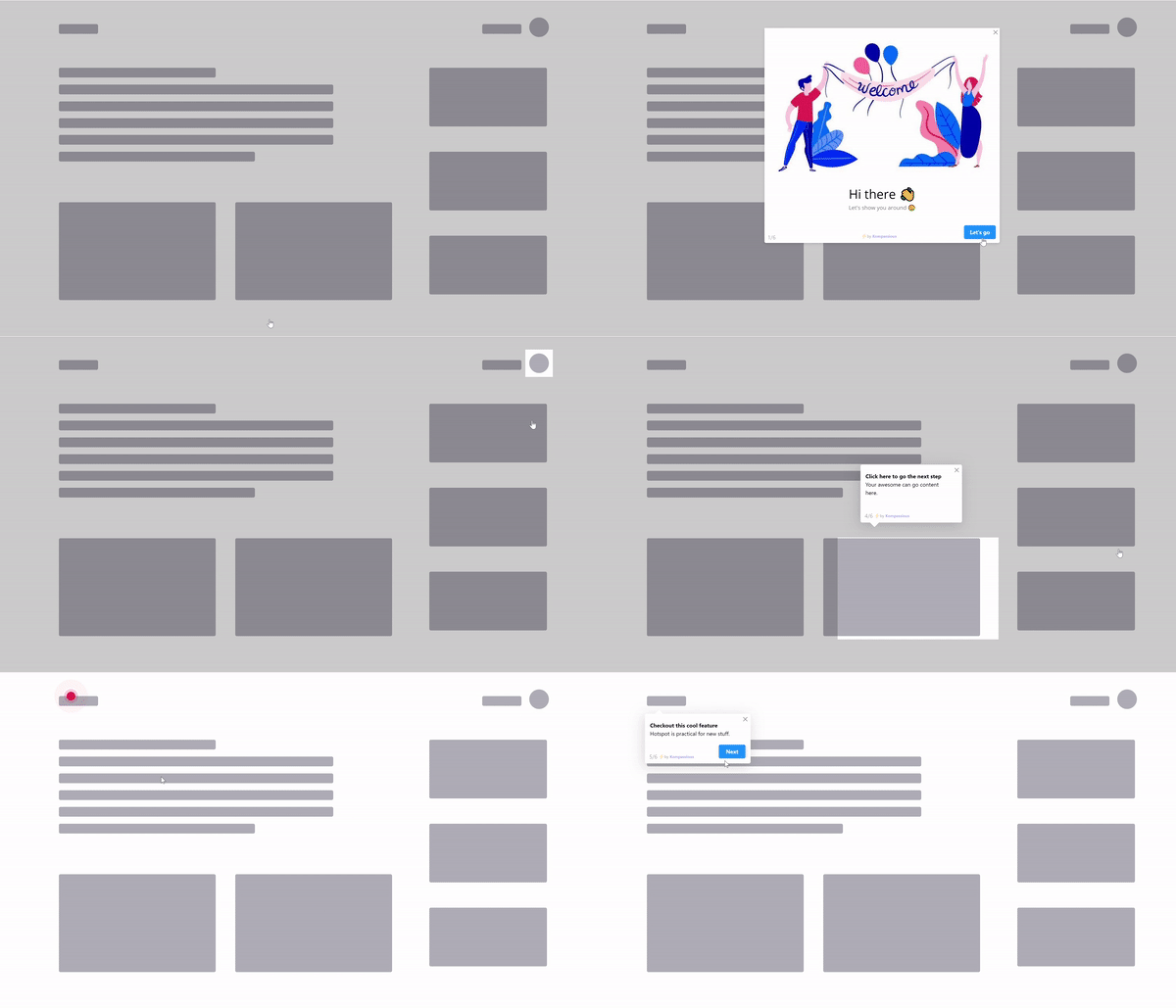
The only education channel that reaches users who will never decide to go and study.
The channel most teams underuse: in-app guidance. Documentation and courses both require the user to decide to learn: to stop working, go somewhere else, and study. In-app guidance is the only channel that reaches the large majority of users who will never do that, and it reaches them at the exact moment the knowledge is useful.
How to build a customer education programme
Define the roles you are teaching
Write the competencies for each role
Map each competency to the right channel
Build the smallest useful version and ship it
Solve the second-wave problem explicitly
Measure adoption, not completion
1. Define the roles you are teaching
Most products have three to five distinct learner types: the administrator who configures, the daily operator who lives in one or two screens, the occasional user who visits monthly, and often an executive who only ever looks at output. Their needs barely overlap.
Organising education by feature forces all four to wade through material meant for the others. Organising by role means each person sees a short, relevant path, and it makes the content dramatically easier to keep current, because a feature change only touches the roles that use it.
2. Write the competencies for each role
For each role, write five to eight statements of the form "can independently do X". Not "understands the reporting module", "can build a filtered report and schedule it to a colleague every Monday". These become your curriculum, your success criteria, and your test for whether a piece of content is needed at all.
If you cannot connect a proposed article, course or tour to a competency, it is content for its own sake.
3. Map each competency to the right channel
Work through the list and ask where each competency is best taught. The pattern is consistent: first-time procedural tasks belong in-app, conceptual understanding belongs in courses or written guides, and details nobody memorises belong in reference documentation.
A competency taught in the wrong channel fails quietly. Teaching a first-time setup task through a written page produces a page with traffic and a task with low completion, which is why written guides and interactive walkthroughs should be planned together rather than by different teams.
4. Build the smallest useful version and ship it
The failure mode of education projects is a six-month academy build that launches to an audience nobody validated. Start with the single highest-volume competency for the single most important role, ship it in one channel, and measure. A three-step in-app walkthrough that lifts a key setup completion rate is worth more than a course library nobody enrols in.
5. Solve the second-wave problem explicitly
This is the part almost everyone gets wrong, and it is the highest-leverage fix available.
Your education effort is aimed at the people present during rollout. Six months later, half of them have changed jobs. Their replacements were handed a login and nothing else, and they learn the product by copying whatever their predecessor left behind, including the workarounds.
The fix is not more content. It is automatic education triggered by seat, not by account: every new user, whenever they join, gets the same first-time experience as the first cohort did. This single change does more for long-run adoption in multi-seat products than any academy.
6. Measure adoption, not completion
Course completions, article views and webinar attendance are activity metrics. They tell you people showed up. They do not tell you anything changed.
The metrics that justify the programme: feature adoption among educated users versus a matched group, ticket volume per account in the categories you taught, time to first value for accounts that went through the path, and breadth of feature use over time. Instrument the behaviour, not the content.
What to teach first
Three sources, in order of reliability, and none of them is a feature list:
- Repeated support tickets. Group by underlying question, not by product area. The top five groups are your first five pieces of content, in the customers' own wording.
- Features with high awareness and low adoption. Users who open a screen and leave without acting are telling you the capability is discoverable but not understood, a teaching problem, not a discovery one.
- The gap between best and typical accounts. Compare what your most successful accounts do with what the median account does. The difference is your curriculum, and it is usually three or four specific workflows.
Common mistakes
✅ Do
- Organise by role and competency
- Put first-time tasks in the product
- Trigger education per seat, not per account
- Start with the top support question
- Use customers' wording, not internal names
- Refresh education when features change
- Measure adoption and ticket deflection
- Give every asset an owner and review date
❌ Don't
- Organise training around your feature list
- Expect docs to carry onboarding
- Educate only at initial rollout
- Build an academy before validating demand
- Report completions as evidence of impact
- Let recorded webinars become the reference
- Teach every feature with equal weight
- Leave content unowned after launch
The most expensive mistake: building a large education library and leaving the product itself unchanged. If users need a course to complete a routine task, the honest first response is to fix the task. Education should teach genuine complexity, not compensate for avoidable confusion that a clearer empty state or a better label would have removed.
Delivering education inside the product with Kompassify
The channel with the widest reach is the one inside the application, because it does not depend on anyone deciding to go and learn. Kompassify lets a customer education or CS team build that layer without engineering involvement.
- Role-based paths. Segment by role or plan and run a different tour and checklist for admins, operators and occasional users.
- Per-seat triggering. Every new user gets the education path, whenever they join: the second-wave fix, automated.
- Teaching at the moment of need. Tooltips and hotspots on the controls that generate the most support questions.
- Education for new features via the announcement widget, launching a short tour straight from the announcement.
- Impact measurement with product analytics: adoption among users who received the guidance versus those who did not.
Kompassify is a no-code digital adoption platform for SaaS teams. Free up to 100 monthly active users, paid plans from $129/month, GDPR-compliant with EU hosting.
Teach every user, not just the first cohort
Run role-based guidance that triggers for every new seat, and measure it against adoption instead of course completions.
Start for Free →Frequently Asked Questions
What is customer education?
Customer education is the deliberate, structured effort to teach customers how to get value from a product, delivered through in-app guidance, documentation, courses, certification, webinars and community. What separates a programme from a content library is that it has defined learner roles, stated competencies, owners, and success metrics tied to behaviour rather than to how much content exists.
Why does customer education matter for SaaS?
It pays back in four measurable places: support deflection, because repeated questions get answered once in the place people look; breadth of adoption, because users cannot adopt what they were never shown; faster time to value, which shows up in trial conversion; and renewal resilience, because an account where several people know the product survives the departure of its champion.
How should a customer education program be structured?
By role, not by feature. Most products have three to five distinct learner types: the administrator who configures, the daily operator who lives in a couple of screens, the occasional user, and often an executive who only sees output. For each, write five to eight competencies of the form 'can independently do X', then map each competency to the channel best suited to teaching it. Feature-organised training forces every learner to filter out most of the material.
Which channel should teach which content?
In-app guidance is strongest at the moment of need and should carry first-time procedural tasks, new features and unfamiliar controls. Documentation is strongest at searchability and depth, so it should carry reference, edge cases and troubleshooting. Courses and certification suit structured mastery of a role. Live webinars surface questions you did not anticipate but make poor permanent records. Teaching a first-time setup task through a written page reliably produces a page with traffic and a task with low completion.
What is the second-wave problem in customer education?
Education is usually aimed at the people present during initial rollout. Six months later many of them have moved on, and their replacements are handed a login and nothing else, learning the product by copying whatever their predecessor left behind, including the workarounds. The fix is not more content but automatic education triggered per seat rather than per account, so every new user gets the same first-time experience as the original cohort.
How do you measure customer education?
Not by course completions, article views or webinar attendance, which only show that people turned up. Measure feature adoption among educated users against a matched group, ticket volume per account in the categories you taught, time to first value for accounts that went through the path, and breadth of feature use over time. Instrument the behaviour you wanted to change, not the content you produced.
What should you teach first?
Three sources, in order of reliability. First, repeated support tickets grouped by underlying question rather than product area, using the customers' own wording. Second, features with high awareness and low adoption, where users open a screen and leave without acting, which signals a teaching problem rather than a discovery one. Third, the gap between what your most successful accounts do and what the median account does, which is usually three or four specific workflows.
Do you need a customer academy?
Not to start, and often not at all. The common failure is a six-month academy build launched to an audience nobody validated. Start with the highest-volume competency for the most important role, deliver it in one channel, and measure. A three-step in-app walkthrough that lifts a key setup completion rate is worth more than a course library nobody enrols in. Academies make most sense for products with implementers, partners or agencies who need credentials.