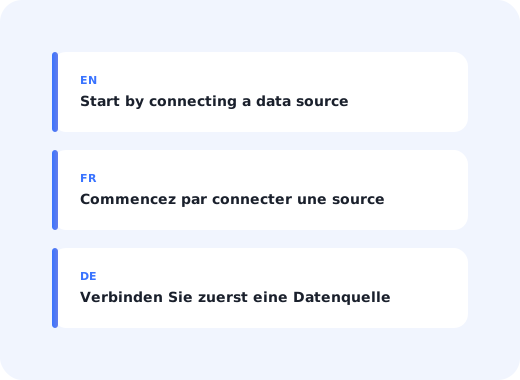
A product tour written in English and shown to a user working in German is not a partially helpful tour. It is an interruption. The user closes it, and, because most onboarding flows only fire once, they never see the guidance again, in any language.
Most SaaS products localise the interface long before they localise the onboarding layer, which produces the odd result of a fully translated application wrapped in English tooltips. It is a gap that is cheap to close and expensive to leave open, because onboarding is the one part of the product where comprehension is not optional.
This guide covers how to decide which languages to support, how to detect the right one, the specific UI problems translation creates in tooltips and modals, and how to keep localised guidance from drifting out of date.
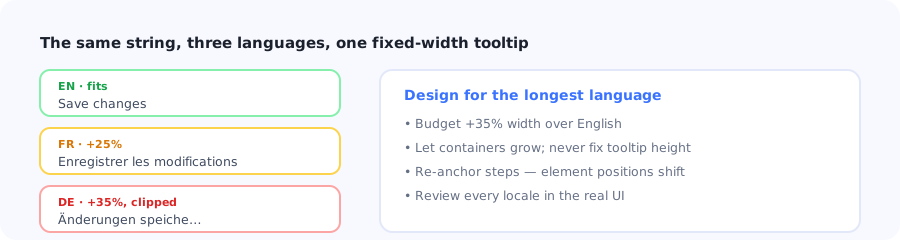
Text expansion is the failure mode that shows up in production rather than in review.
Key Takeaways
- Untranslated onboarding is worse than none. A dismissed tour usually never returns, so a bad first impression costs you the whole flow.
- Follow the user's setting, not the browser's. Explicit product language beats inferred locale every time.
- Budget 35% more width than English. German and Finnish routinely break layouts designed against English copy.
- Translate the trigger logic too. Element selectors and page URLs often differ between locales, silently breaking tours.
- Screenshots need localising as well. A translated tooltip pointing at an English screenshot is more confusing than either alone.
- Version the source, not the translations. Every English edit must invalidate its translations or your locales quietly diverge.
Why localised onboarding matters more than localised UI
An experienced user can navigate a partly-English interface by recognising layout and icons. A brand-new user cannot, because they have no model of the product yet, and onboarding is precisely the moment when every word carries the full load.
Three consequences follow, and they compound:
- Dismissal is permanent. Onboarding flows generally show once. A user who closes an incomprehensible tour has not deferred it; they have lost it.
- The support burden moves. Questions that in-app guidance would have answered arrive in a channel where they cost real money, and often in a language your support team does not cover either.
- Your activation data lies to you. Regional activation gaps get attributed to market fit or pricing when the cause is that half the market was onboarded in a language they do not work in.
The diagnostic worth running before anything else: segment activation and onboarding-completion rates by user language. If your non-English segments trail by a wide margin while their engagement in the core product is comparable, you have a localisation problem rather than a market problem, and it is a much cheaper one to fix.
Choosing which languages to support
Localising onboarding is not free: every language multiplies the maintenance cost of every flow. The decision should be driven by data, not by ambition.
| Signal | What to look at | Why it matters |
|---|---|---|
| Existing user base | Language distribution of active accounts | The cheapest wins are users you already have and are underserving. |
| Activation gap | Completion rates by language segment | Points at the language where localisation changes the most behaviour. |
| Revenue concentration | ARR by region | A small user count can carry disproportionate revenue. |
| Support load | Ticket volume per account by region | High tickets plus low guidance engagement is a translation signal. |
| Sales pipeline | Deals blocked on language requirements | Enterprise buyers in some markets treat it as a procurement requirement. |
A pragmatic sequencing rule: start with the two languages where you already have users, not the ten where you hope to. Onboarding localisation compounds in maintenance cost, and a well-maintained pair beats six that fall out of date within a quarter.
How to detect the right language
Getting detection wrong undoes the translation work entirely; a French user shown German guidance is worse off than one shown English. Use this order of precedence:
An explicit language preference in the user's profile
The language the application interface is currently rendering
An account or workspace-level default
Browser language, as a last resort
A defined fallback language, never a blank screen
Why browser language is a poor primary signal
Browser locale reflects where the machine was configured, not how the person works. Developers and multinational employees routinely run English operating systems while working in another language, and shared or corporate-imaged machines report a locale nobody chose. If your product already has a language setting, that setting is the answer: it is an explicit statement of preference rather than an inference.
Always define a fallback
A user whose language has no translation must see the fallback language, not an empty tooltip or a raw translation key. Decide the fallback deliberately and make sure a missing string can never render as nothing; a silent blank is far harder to notice in testing than a visibly English string in a French flow.
The UI problems translation creates
Localising onboarding is not only a content task. Guidance overlays are anchored to a live interface, and translation changes that interface.
1. Text expansion breaks fixed layouts
Translated from English, German and Finnish commonly run 30–35% longer, French around 20–25%. A tooltip sized to fit "Save changes" will clip "Änderungen speichern".
Design onboarding copy against your longest language, allow containers to grow vertically, and never fix the height of a tooltip. The related discipline is simply writing shorter source copy: the same microcopy rules that make English guidance good make it survivable in translation.
2. Element positions and selectors shift
This is the failure that most often goes unnoticed. Tours anchor to specific elements, and if a selector depends on visible text (a button label, an ARIA label, a data attribute derived from copy) it will not match in another locale. The tour then either points at nothing or silently fails to start.
Anchor to stable, language-independent attributes such as IDs or dedicated data attributes, and test every tour in every locale rather than assuming a translated string is the only difference.
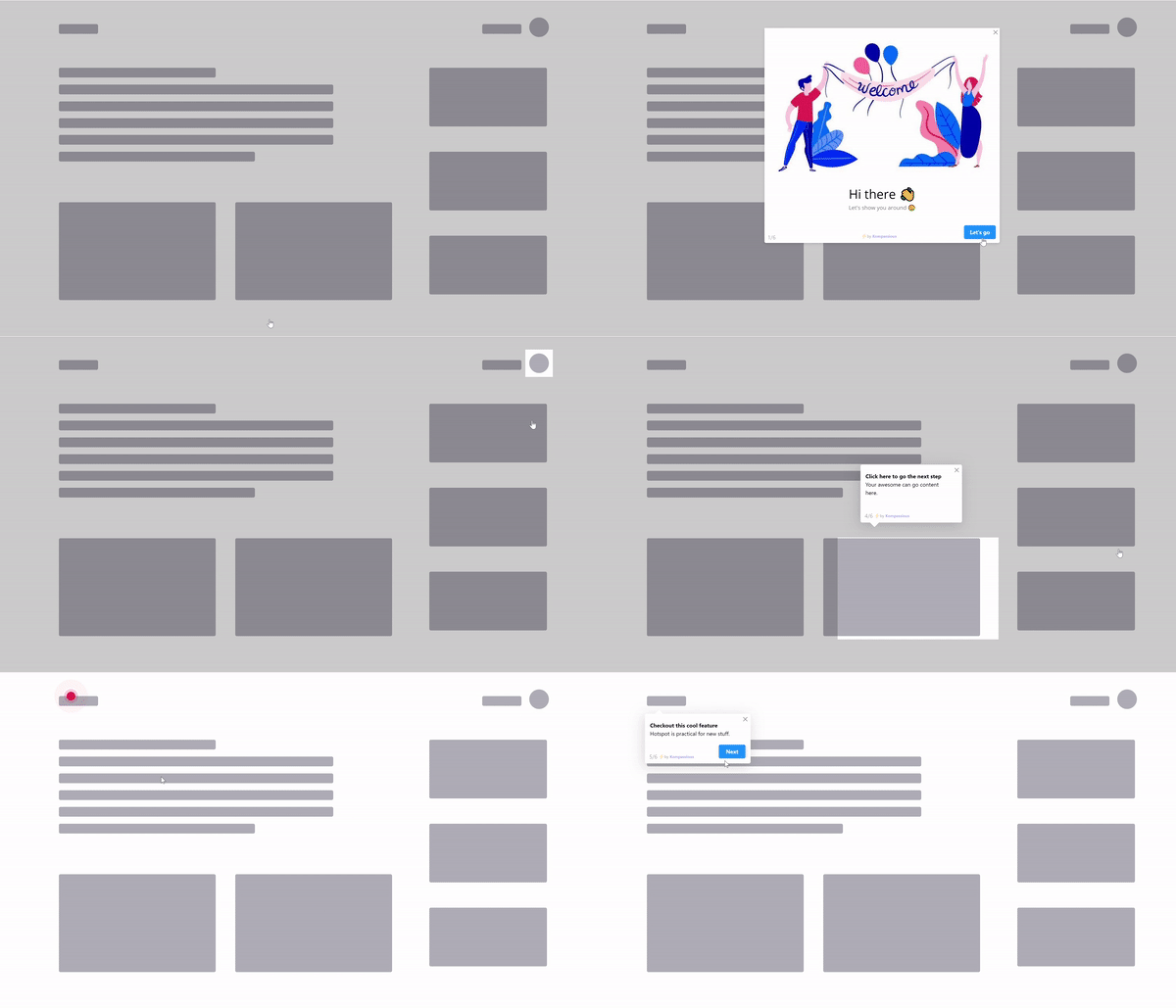
Every step of a tour is anchored to a live element, which is exactly what translation moves.
3. Screenshots and video need localising too
A translated tooltip pointing at an English screenshot is more confusing than an English tooltip pointing at an English screenshot, because the two now disagree. Either localise the images or design guidance that does not depend on them; for first-time tasks, an interactive walkthrough of the real, already-translated interface sidesteps the problem entirely.
4. Formats and conventions differ
Dates, numbers, currencies and name order all vary. Onboarding copy that says "enter your date as MM/DD/YYYY" is wrong in most of the world. Reference the format the product actually displays for that locale rather than hard-coding an example.
5. Right-to-left is a layout change, not a translation
Arabic and Hebrew mirror the entire layout: tooltip anchors, arrow directions, progress indicators and the meaning of "next". If RTL is on your roadmap, verify that your guidance layer supports direction switching before committing; retrofitting it is substantially harder than translating.
Keeping translated onboarding from rotting
The predictable failure is not the initial translation. It is month seven, when the English flow has been edited four times and the German version still describes a screen that no longer exists.
The four habits that prevent drift
- Treat one language as the source of truth. All edits happen there; translations derive from it. Editing locales independently guarantees divergence.
- Version the source string. When the source changes, its translations are automatically marked stale; this single mechanism prevents most drift.
- Make localisation part of the release checklist. A feature is not shipped when the English tour is live; it is shipped when every supported locale is.
- Review in the real UI, not in a spreadsheet. Translators working from a string list cannot see that a button is now 40 pixels too narrow.
What to translate, and what not to
✅ Translate
- All tooltip, modal and checklist copy
- Button and CTA labels
- Survey questions and answer options
- Announcement titles and bodies
- Empty-state text
- Error and validation messages in guided flows
❌ Leave alone
- Product and feature names you have not localised in the UI
- Element selectors and internal identifiers
- Segment names and internal flow labels
- Anything referencing an untranslated UI string
- Code samples and API references
The consistency rule: guidance copy must use exactly the words the interface uses in that language. If your German UI labels a button "Speichern", the German tooltip must say "Speichern", not a synonym a translator preferred. Guidance that names a control differently from the control itself is worse than no guidance, because the user now searches for something that does not exist.
Running multi-language onboarding with Kompassify
The reason onboarding localisation gets deferred is usually that it means another engineering project. A no-code guidance layer changes that: the flows and their translations live outside the codebase, so adding a language does not require a release.
- One flow, several languages. Build a product tour once and maintain its translations alongside it, so the logic never diverges between locales.
- Language-aware targeting. Serve the right version based on the user's product language rather than guessing from the browser.
- Localised checklists and tooltips so the whole onboarding layer speaks one language, not most of it.
- Translated announcements so feature launches land in every market at once.
- Per-language analytics to confirm that the localised flow actually closed the completion gap.
Kompassify is a no-code digital adoption platform for SaaS teams. Free up to 100 monthly active users, paid plans from $129/month, GDPR-compliant with EU hosting.
Onboard every user in their own language
Build the flow once, maintain its translations alongside it, and serve the right version automatically, without a release.
Start for Free →Frequently Asked Questions
Why does onboarding need to be localized if the UI already is?
Because onboarding is the moment when every word carries the full load. An experienced user can navigate a partly-English interface by recognising layout and icons, but a brand-new user has no model of the product yet. Worse, onboarding flows usually show only once, so a user who dismisses an incomprehensible tour has not deferred it, they have lost it permanently.
Which languages should I localize my onboarding into first?
Start with the languages where you already have users rather than the markets you hope to enter. Look at the language distribution of active accounts, the activation gap by language segment, revenue concentration by region, and support ticket volume. Each additional language multiplies maintenance cost, so two well-maintained locales beat six that fall out of date within a quarter.
How should I detect which language to show?
Use this order of precedence: an explicit language preference in the user's profile, then the language the application interface is currently rendering, then an account or workspace default, and only then the browser language. Browser locale is a poor primary signal because it reflects how the machine was configured, not how the person works. Always define a fallback so a missing translation renders readable text rather than a blank tooltip or a raw key.
What breaks when you translate in-app guidance?
Five things. Text expansion, since German and Finnish typically run 30-35% longer than English and clip fixed-width tooltips. Element selectors that depend on visible text, which stop matching in other locales and silently break tours. Screenshots that still show the English interface. Date, number and currency conventions referenced in copy. And right-to-left languages, which mirror the entire layout rather than just changing the words.
How much extra space should I allow for translated onboarding copy?
Budget roughly 35% more width than the English version, which covers German and Finnish, the languages that expand most. French typically runs 20-25% longer. Design the copy against your longest supported language, let containers grow vertically, and never fix the height of a tooltip. Writing shorter source copy is the cheapest mitigation available.
How do you stop translated onboarding from going out of date?
Four habits prevent almost all drift. Treat one language as the source of truth so all edits happen there. Version the source string so that changing it automatically marks its translations stale. Make localisation part of the release checklist, so a feature is not shipped until every supported locale is live. And review translations in the real interface rather than in a spreadsheet, because a translator working from a string list cannot see that a button is now too narrow.
What should not be translated in onboarding flows?
Product and feature names you have not localised in the interface, element selectors and internal identifiers, segment names and internal flow labels, code samples and API references, and anything that refers to a UI string which itself remains untranslated. The governing rule is consistency: guidance copy must use exactly the words the interface uses in that language, because a tooltip naming a control differently from the control itself sends users looking for something that does not exist.
Do I need engineering work to localize product tours?
Not if the guidance layer lives outside your codebase. The usual reason onboarding localisation gets deferred is that it is treated as another engineering project. With a no-code digital adoption platform, the flows and their translations are maintained alongside each other, so adding a language does not require a release and the logic cannot diverge between locales.