There is a version of a beta program that looks exactly right and teaches nothing. A feature is finished enough to demo, a label is added, a few friendly customers are invited, and everyone is asked what they think. The friendly customers say kind things, because they are friendly and because you asked directly. Two of them use it once. The feature ships. Six months later it has the usage numbers of something nobody wanted, and the beta is remembered as a formality.
The version that works is narrower and less comfortable. It starts with a question the team cannot answer internally, selects people likely to give an unwelcome answer, gives them enough guidance that their confusion is about the idea rather than the interface, and ends in a decision that is announced out loud.
This guide covers the three beta shapes and when each fits, how to pick and recruit a cohort inside the product, why unfinished features need more guidance than finished ones, a six-week timeline, and how to graduate without stranding the people who helped.
Key Takeaways
- Name the question first. A beta with no question is a soft launch, and it will produce agreement rather than information.
- Recruit in-product, in context. Invite the people who are doing the thing the feature changes, not the people who open newsletters.
- Size the cohort by feedback you can read, not by a target headcount.
- Unfinished features need more guidance. Otherwise you learn about your labels, not your idea.
- Behaviour beats opinion. Second-week usage tells you more than any survey answer collected in week one.
- End it out loud. Ship, iterate or kill, announced explicitly, with beta users' work preserved.
What a Beta Is Actually For
Beta program: definition
A beta program is a limited release of an unfinished feature to selected real users, run to answer questions that cannot be answered internally. Its output is not praise or bug reports. Its output is a decision: ship it, change it, or stop.
There are exactly three questions a beta answers better than anything else, and it is worth writing down which one you are asking before you invite anybody.
1. Will people use it when nobody is watching?
Interest expressed in a call and use in an ordinary Tuesday are different phenomena. The only reliable test is putting the feature in the product and looking at whether it is opened again in week two by people who were not reminded. This is the question most betas should be asking, and the one most often replaced by a satisfaction survey.
2. Does it survive real data?
Internal test accounts are tidy in ways that customer accounts never are: fewer records, cleaner names, sensible permissions, no five-year-old configuration nobody understands. Betas surface the shapes of real accounts, and the surprises are almost always in the configurations you would not have thought to create.
3. Is it worth maintaining?
Every shipped feature has a permanent cost: support, documentation, migration, and the surface it adds to every future change. A beta is the last cheap moment to decide that a feature is a good idea nobody actually needs. Killing something after a beta is a success, and teams that never do it are not really running betas. The compounding cost of shipping everything is covered in our guide to feature bloat.
Closed, Open and Rolling
| Closed beta | Open beta | Rolling beta | |
|---|---|---|---|
| Who gets in | A cohort you selected | Anyone who opts in | Waves, widening over time |
| Best for | Behaviour and fit questions | Scale, breadth, stability | Risky changes to core flows |
| Feedback volume | Readable, followable | High, mostly unread | Controlled by wave size |
| Main risk | A cohort too friendly to be useful | Noise mistaken for validation | Slow, and easy to abandon midway |
| Support load | Predictable | Spiky and hard to staff | Smoothed across waves |
Most teams default to closed and then quietly widen it because recruitment was slow, which produces the worst of both: a self-selected group too small to see scale problems and too broad to follow up with. Deciding the shape from the question, and holding it, is most of the discipline.
Choosing a Cohort That Will Tell You the Truth
The cohort determines the answer. Invite the wrong people and you will get a confident, well-evidenced conclusion that is wrong, which is considerably worse than no beta at all.
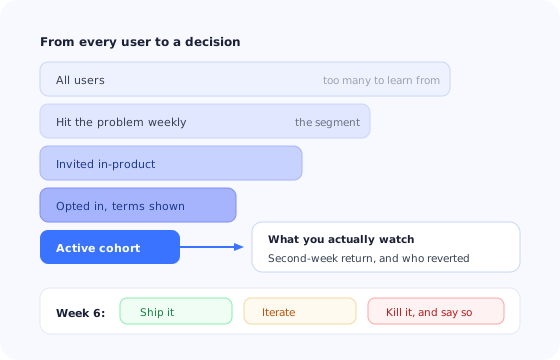
The useful quadrant is the uncomfortable one: frequent exposure to the problem, and willingness to say the new thing is worse.
Two additions improve almost any cohort. Include at least one account with messy, long-lived data, since that is where the interesting failures live. And include at least one user who currently solves the problem with a workaround they are proud of, because they will tell you precisely what the feature has to beat. Finding them is a segmentation exercise, not a popularity contest.
Recruiting Inside the Product
Email recruitment selects for people who read email. In-product recruitment selects for people who use the product, which is a much better proxy for the behaviour you want to observe. The mechanic is simple: show an invitation to the segment that already performs the task the feature changes, at the moment they are performing it.
A good invitation does four things in about thirty words: says what the feature does, says plainly that it is unfinished, says what you want from them, and makes leaving easy. That last part matters more than it seems, because a visible exit is what makes people willing to enter.
Set expectations in the opt-in, not after it. “This is an early version. Some of it will change and some of it will break. You can turn it off at any time from settings.” Users who accept those terms behave differently from users who discover them: they report problems rather than escalate them, and they stay when something goes wrong.
For sensitive or high-visibility features, a two-step opt-in works better than a single click: an in-app banner for awareness and a short confirmation that repeats the terms. It costs a few percent of your recruitment and removes almost all of the “I did not realise I had signed up for this” conversations.
Unfinished Features Need More Guidance, Not Less
This is the most common structural mistake in beta programs, and it is understandable: the feature is temporary, so investing in explaining it feels wasteful. The result is that the beta measures the wrong thing.
A finished feature can lean on convention. It has a settled label, an obvious entry point, empty states, error messages and a help article. A beta feature usually has none of that, so a user who does not understand it has nothing to fall back on. What comes back is feedback about the interface being confusing, which is true, unfixable in this release, and tells you nothing about whether the idea is good.
The minimum that makes beta feedback interpretable:
- A short walkthrough on first use, framed as what this is for rather than where to click.
- Contextual hints on the parts that are visibly unfinished, saying so explicitly.
- One sentence naming what is deliberately missing, so nobody reports it repeatedly.
- An always-available way back to the old way of doing it, until the beta ends.
That last point does double duty. It removes the risk of being stuck, and the rate at which people use it is itself a measurement: a beta whose users keep reverting to the old path has already answered your first question. The general principle, that guidance belongs where the work happens rather than in a document, is covered in our guide to contextual help.
Collecting Feedback Worth Reading
Beta feedback fails in two directions. Open-ended requests for thoughts produce a small number of long, contradictory essays. Standardised satisfaction scores produce a number that cannot be acted on. The useful middle is short, in-context and tied to a specific moment.
-
Ask at the moment, not at the end
A one-question prompt immediately after the user completes the new flow beats a weekly digest email. Memory of the friction fades within minutes, and what survives is a general impression rather than the detail you needed.
-
Ask about the task, not the feature
“Did this do what you needed?” produces more usable answers than “How do you like the new view?”, which invites design opinions from people who are not designing anything.
-
Ask the people who stopped
The users who tried it twice and went back are the most informative group in the whole beta and the least likely to volunteer anything. A single targeted question to that segment is usually the highest-value thing you will send.
-
Weigh behaviour above opinion
Second-week usage, repeat rate and reversion rate outrank every survey answer. People are unreliable narrators of their own future behaviour, particularly when they like you. See in-app surveys for question design that limits the damage.
A Six-Week Beta Timeline
Betas without an end date drift into permanence, and a permanently beta feature is a feature nobody owns. Six weeks is a workable default for a feature-level beta: long enough for a second and third use, short enough that the team is still paying attention.
Week 0: write the question and the exit criteria
One sentence on what you are trying to learn, and the observations that would mean ship, iterate or kill. Written before any data exists, because afterwards everyone can find a reading that justifies shipping.
Week 1: recruit and set expectations
Invitations go to the target segment in-product. Track opt-in rate by segment; a low rate from the people who hit the problem most often is itself an early answer worth pausing for.
Weeks 2 to 3: first use and immediate friction
Guidance is live, prompts fire after first completion, and the team reads everything. Most interface problems surface here and most of them are not the point; note them and keep the focus on whether people are getting through at all.
Weeks 4 to 5: the second-week question
The real signal arrives now: who came back without being reminded, who reverted to the old way, and which accounts have made the feature part of a routine. Ask the revert group directly.
Week 6: decide, and say it out loud
Compare what happened against the exit criteria from week 0, make the call, and communicate it to every participant regardless of which way it went. This is the week that determines whether your next beta can recruit.
Graduating to General Availability
Graduation is an onboarding event, not just an announcement. Three groups need different things on the same day.
- Beta users need continuity above all: whatever they built during the beta must survive, and any change in behaviour between the beta and the final version has to be spelled out. Losing their work at graduation is the single fastest way to guarantee your next beta cannot recruit.
- Everyone else meets the feature for the first time and needs a normal launch: announcement, a short walkthrough at the point of use, and a place to read more. Our feature announcement playbook covers the sequencing.
- Support and success teams need the known gaps, the workarounds and the questions the beta produced most often, before the launch rather than after it.
If the decision was to kill the feature, the same principle applies with more care: say it directly, explain the reasoning, give a route for anything created inside it, and thank the people who told you. Teams that do this well find that their next recruitment is easier, not harder, because participants learn that their time produces decisions.
What to Measure
- Opt-in rate by segment. Low uptake among people who hit the problem weekly is an early and unwelcome answer.
- First-completion rate. The share of enrolled users who finish the new flow once. Below about half, guidance is the problem, not the idea.
- Second-week return without prompting. The closest thing a beta has to a verdict.
- Reversion rate. How often users go back to the old path when both are available.
- Feedback per active user. Not volume for its own sake: a beta producing more input than the team reads is not producing validation, and the fix is a smaller cohort.
- Post-GA retention of the beta cohort. Whether the people who helped are still using it three months after launch, which our feature adoption guide puts in context.
Beta Programs: Do vs. Don't
Do
- Write the question and the exit criteria before recruiting.
- Recruit in-product, in the moment the problem occurs.
- Include accounts with messy, long-lived data.
- Guide the unfinished parts more than the finished ones.
- Ask the people who stopped using it.
- Announce the decision, including when it is no.
Don't
- Fill the cohort with people who like you.
- Widen a closed beta because recruitment was slow.
- Let a satisfaction score stand in for behaviour.
- Collect more feedback than the team will read.
- Leave a feature in beta indefinitely.
- Discard what beta users built when the feature ships.
Running a Beta With Kompassify
Nearly every operational part of a beta is in-product messaging, targeting and measurement, which is exactly the work that stalls when it needs an engineering ticket for each step.
With Kompassify you can target the invitation to the segment that performs the relevant task, gate entry behind a two-step opt-in, and run a short guided walkthrough the first time an enrolled user opens the feature. Contextual tooltips can mark the parts that are deliberately unfinished so those never reach your feedback queue again. A one-question in-app survey fires right after the first completion, and a different one goes to the users who stopped. At the end, the same tools handle graduation: an announcement for everyone else, a targeted message for the beta cohort about what changed, and a checklist for support teams.
Because all of it is built in a visual editor and targeted by segment, a product manager can start, widen, narrow or end a beta in an afternoon, which is the difference between a beta program you run once and one you run for every significant feature.
Recruit, guide and graduate beta users without an engineering ticket
Target invitations by segment, walk beta users through unfinished features, ask one question at the right moment, and announce the result when it ships. Free up to 100 monthly active users, plans from $129/month, GDPR-compliant and EU-hosted.
Start for free →The One-Paragraph Version
A beta exists to answer a question you cannot answer internally, so write the question and the exit criteria before you invite anyone. Choose the shape from the question: closed for behaviour, open for scale, rolling for risky changes to core flows. Recruit inside the product among people who hit the problem often and will tell you when something is worse, not among the people who like you most. Guide the unfinished parts heavily, or you will learn about your labels instead of your idea. Weigh second-week behaviour above every survey answer, keep the cohort small enough that you read everything, and end on a date with a decision announced out loud, with beta users' work carried across intact. Done this way, a beta costs a release cycle and occasionally saves you a feature you would have maintained forever.
Frequently Asked Questions
What is a beta program?
A beta program is a limited release of an unfinished feature to a selected group of real users, run to answer specific questions before a general launch. The three questions a beta answers that a demo or an internal test cannot are whether people use the feature when nobody is watching, whether it survives real data and real edge cases, and whether it is worth the ongoing cost of maintaining it. If you cannot name which of those you are trying to answer, you are running a soft launch, not a beta.
What is the difference between a closed beta and an open beta?
A closed beta is invitation-only with a fixed cohort you selected, which gives you a comparable group, a manageable feedback volume and the ability to follow up individually. An open beta lets any user opt in, which gives you volume, load and edge cases you would never have picked. Closed is right when the questions are about behaviour and fit; open is right when the questions are about scale, breadth of configuration and stability. A rolling beta sits between them, adding users in waves so problems are found by a small group before the next wave arrives.
How many users should a beta have?
Enough to see a pattern, few enough to read every piece of feedback. For behavioural questions, a closed beta of a few dozen active accounts is usually more informative than several hundred, because you can follow up on every surprising session. Size the cohort by how much feedback you can genuinely process rather than by a target number. A beta that generates more input than the team can read produces the illusion of validation and no decisions.
How do I recruit beta users?
Recruit inside the product, where the relevant behaviour already happens. An in-app invitation shown to users who are currently doing the thing the new feature improves will out-recruit an email blast every time, because it reaches people in context rather than people who read newsletters. Target the segment first, invite second, and make opting in a single click that also sets expectations: what it is, what is unfinished, and how to leave.
Do beta users need onboarding?
More than users of a finished feature, not less. A beta feature is usually incomplete, unlabelled, and missing the affordances the rest of the product has, so the user cannot rely on convention to work out what it does. Without guidance the feedback you get will be about confusion rather than about the idea, which is the most common way a beta wastes a release cycle. A short in-product walkthrough at first use, plus contextual hints on the unfinished parts, is the minimum.
How do we end a beta properly?
Decide, tell everyone, and change the product accordingly. If it ships, announce it as generally available and make sure beta users keep what they built during the beta, since data loss at graduation is the fastest way to lose the people most willing to help you next time. If it is being iterated, say what changed and what the next window is. If it is being killed, say so directly, explain why, and give a route for anything they created. Silence after a beta is the reason most second beta programs struggle to recruit.