Angular has the best form primitives of any mainstream framework, and multi-step forms are still
where Angular applications leak the most. The reason is structural: the obvious design puts the
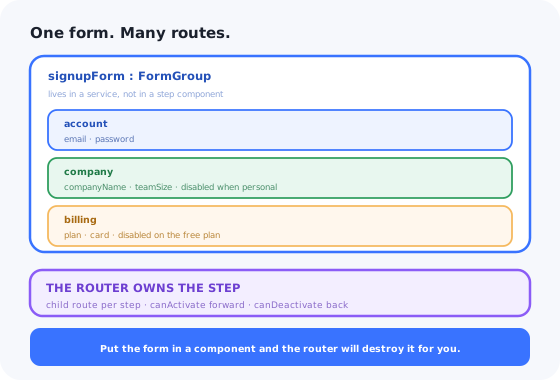
FormGroup in a component, and the router destroys components. Navigate to step two and
step one's answers are gone.
So people avoid the router, hold the step in a plain number, and render the steps with
@switch. Now the back button leaves the form entirely, a refresh restarts it, and
nobody can be sent a link to the step they are stuck on.
The resolution is to separate the two concerns properly: one form that outlives every step, and a router that owns which step is visible. This guide builds that, then covers slice validation, resume, the accessibility of a step change, and what stays hard afterwards.
Key Takeaways
- The form lives in a service. One root
FormGroupwith a nested group per step, injected by every step component. - The router owns the step. Child routes give you the back button, refresh and deep links for free.
- Validate the slice, not the form.
form.get('billing')is the step; the root is the submit check. - Use
disable()for skipped steps, not conditional validators; a disabled group drops out ofvalueand out of validity. - Guards are the navigation logic.
canActivatestops deep links;canDeactivatestops forward moves from an invalid step. - A multi-step form is not an onboarding wizard. One collects a payload; the other teaches a product.
What a Multi-Step Form Actually Has to Do
Before any Angular, the specification. A multi-step form that ships into a real product has to:
- know which steps exist for this user, because half of them are conditional;
- refuse to advance past invalid input, without flagging fields nobody has reached yet;
- survive the back button, a refresh, and a link straight to step three;
- still hold the answers tomorrow;
- show where the user is and how much is left;
- move focus on each step change and announce it to assistive technology;
- submit once, and cope when the server rejects a step-one field while the user is on step four.
1. One Form, in a Service
Build the whole form once, as a root group of per-step groups, and put it somewhere the router cannot destroy. Provided on the parent route, it lives exactly as long as the flow does.
updateOn: 'blur' is doing quiet work there. The default revalidates on every keystroke,
which is how a user gets told their email is invalid after typing the first letter. Blur-time
validation matches how people actually fill forms.
Conditional steps: disable, do not delete
The temptation with a skipped step is to swap validators in and out at runtime. That path leads to a
form whose validity depends on the order the user visited things in. Use disable()
instead: a disabled group is excluded from form.value and from
form.valid, which is exactly the semantics a skipped step needs.
The emitEvent: false is not optional. Without it,
enable() and disable() emit on valueChanges, and a listener
that persists the draft on every change will loop. This is the most common cause of an Angular form
that pegs a CPU core.
2. The Router Owns the Step
With the form outside the components, child routes become the natural way to express steps, and they hand you the back button, refresh survival and deep links without writing any of them.
The two guards carry the whole navigation policy, and they read as prose.
canDeactivate stops a forward move out of an invalid step, and must let
backward moves through, or the user is trapped:
markAllAsTouched() is the key line. It is what lets you keep errors hidden until the user
has either touched a field or tried to move on, which is the behaviour people expect, and the
reason you should never disable the Next button. A disabled button with no visible
explanation is the most-reported complaint about multi-step forms; a button that can be pressed and
then explains itself is not.
Step components are disposable. The form is not.
3. Validate the Slice, Not the Form
Because each step is a nested group, "is this step valid" is already answered:
form.get('company').valid. The root group's validity is the submit check, and it is
automatically correct because disabled groups do not count.
Cross-step rules go on the root group, where they belong; a validator there can see everything:
Server-side errors come back the same way, mapped onto the controls that own them so they appear on the right step rather than as a banner nobody can act on:
4. Resume: The Users Who Leave
People abandon long forms to find a VAT number or a card. The ones who return are your most motivated users, and losing their answers is the most expensive defect this component can have.
patchValue rather than setValue, because a stored draft is allowed to be
incomplete. getRawValue() rather than value, because value
silently omits disabled groups, so a user who picks a paid plan, fills the card step, then
switches to free and back would otherwise find it emptied. And a visible "we kept your answers from
Tuesday, start over?" notice, because silently pre-filled fields read as a privacy problem.
If the flow needs to resume across devices, persist server-side against the account. And if the real problem is that the form is long, the deeper fix is progressive profiling, asking for less now and the rest later.
5. The Step Change Is the Accessibility Problem
On navigation, Angular swaps the routed component. Visually everything is fine. For a keyboard user,
focus has just fallen back to <body>; for a screen reader user, nothing was
announced at all, because a client-side route change is not a page load.
In the template, <router-outlet (activate)="onActivate($event)"> gives you the hook.
Every error message needs aria-describedby pointing at it from its input, and every
invalid control needs [attr.aria-invalid]. Pair the whole thing with a visible
progress indicator: knowing how
much is left is the strongest single predictor of whether someone finishes.
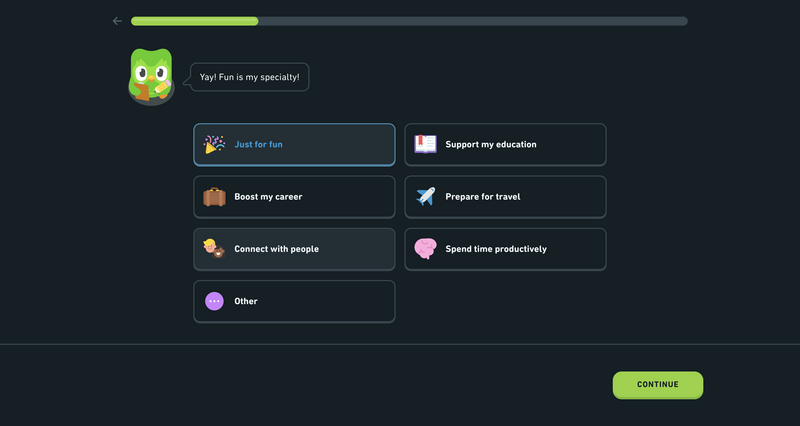
One question per step, a visible progress bar, and one clear way forward.
What Stays Hard After It Works
The vanishing step
The user is standing on the billing step when a change on an earlier step disables it. The route is now pointing at a step that should not exist. Something has to notice and redirect, usually an effect on the shell that re-derives the visible steps and compares them with the active route.
Autofill across steps
Password managers fill controls that are not currently rendered, and destroying a step component
discards what they filled unless the value already reached the service. Keep
autocomplete tokens correct and test with a real manager, not in isolation.
Analytics per step
"Where do people drop off" needs an event on step entry, exit and validation failure, emitted from the guards and the shell, where every transition passes, rather than sprinkled through step components. Read it as a funnel.
FormArray steps
"Add another team member" turns a step into a FormArray with its own add and remove
focus management, and error paths like members.2.email that naive server-error mapping
will not resolve.
A Multi-Step Form Is Not an Onboarding Wizard
They share a silhouette (steps, a progress bar, a Next button) and teams routinely try to build the second out of the first. Underneath they have almost nothing in common.
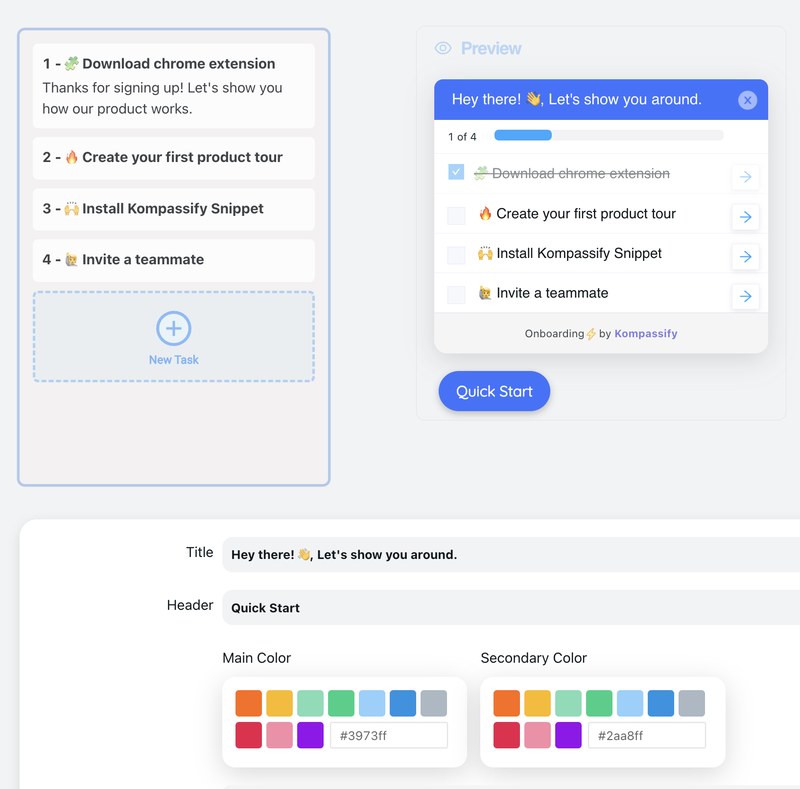
The wizard’s steps are configured, not compiled, and they point at the product’s own UI.
| Multi-step form (what you just built) | Onboarding wizard | |
|---|---|---|
| Purpose | Collect data the product needs | Get the user to a first success |
| Owns | Its own fields | Nothing: it points at the real product UI |
| Audience | Everyone who signs up | A segment: role, plan, what they have not done |
| Ends when | A valid payload is submitted | The user did the thing, maybe days later |
| Changes | When the data model changes | Weekly, by a PM, with no release |
| Measured by | Completion rate | Activation, and the retention after it |
If the requirement is a sequence that overlays the product instead of replacing it, remembers per user which step they reached, targets a segment, and is edited by someone who does not deploy code, that is an onboarding wizard. Building it on your form means rebuilding targeting, per-user persistence and per-step analytics from nothing.
Keep the form. Skip the onboarding platform.
Kompassify lets product and onboarding teams add checklists, guided tours, tooltips and hotspots to an Angular app without shipping a release for every copy change, targeted by segment, resumable per user, with completion data on every step. Free up to 100 monthly active users, plans from $129/month, GDPR-compliant and EU-hosted.
Start for free →Build It, or Configure It?
Build the form
- Signup, checkout, KYC, applications, anything producing a payload.
- Anything with server rules you must mirror exactly.
- Anything that must obey your design system and work offline.
Configure the guidance
- Checklists and tours that point at the product's own UI.
- Anything aimed at a segment rather than everyone.
- Anything whose steps a PM will reorder next month.
A Pre-Ship Checklist
- The
FormGroupis provided on the parent route, not inside a step component. - Each step is a child route; back, refresh and deep links all behave.
canActivateredirects deep links to the furthest reachable step.canDeactivateblocks forward moves from an invalid step and always allows backward ones.- Skipped steps are
disable()d, not stripped of validators. - Every
enable()/disable()call passesemitEvent: false. - Next is never disabled without a visible reason; failure marks touched and focuses the first error.
- Drafts use
getRawValue(), exclude secrets, are versioned, and expire. - Restoration is announced to the user, not silent.
- Route changes move focus to the heading and announce via
LiveAnnouncer. - Server errors are mapped to controls and navigate to the owning step.
The One-Sentence Version
Build an Angular multi-step form as one root FormGroup in a route-provided service so no
navigation can destroy it, let child routes and two guards own which step is visible and whether the
user may leave it, validate the nested group rather than the whole form, disable skipped steps instead
of juggling validators, and treat every step change as a focus-and-announcement event, then
notice that when the sequence is about teaching the product rather than collecting a payload, you
needed a wizard, not a form.
Related reading: SaaS signup flows for how much to ask and when, and the same component in React and Vue 3.
Frequently Asked Questions
How do you build a multi-step form in Angular?
Build one root FormGroup containing a nested FormGroup per step, and provide it from a service on the parent route rather than inside any step component. Otherwise the router destroys the form every time the user advances. Then make each step a child route, so the browser back button, a refresh and deep links all work without you implementing them. Use a canActivate guard to redirect deep links back to the furthest step the current data makes reachable, and a canDeactivate guard to block forward navigation out of an invalid step while always allowing backward navigation. Validate the current step with form.get('stepName').valid, and let the root group's validity be the submit check.
Where should the FormGroup live in an Angular multi-step form?
In a service provided on the parent route of the flow, not in a component. Step components are created and destroyed by the router as the user moves, so a FormGroup owned by a step component takes that step's answers with it when it is destroyed. Providing the service in the route's providers array gives it exactly the lifetime of the flow: it is created when the user enters /signup and destroyed when they leave, and every step component injects the same instance. Providing it in root instead would make it a singleton that survives between unrelated visits, which brings its own stale-data problems.
How do you skip a step in an Angular multi-step form?
Disable the step's FormGroup rather than removing or swapping its validators. A disabled group is excluded from form.value and from form.valid, which is exactly the semantics a skipped step needs, and it keeps the form's validity independent of the order in which the user visited things. Subscribe to whichever control decides the branch and call enable() or disable() on the affected group, always passing emitEvent: false, because otherwise those calls emit on valueChanges and any listener that persists the draft on change will loop. When persisting, use getRawValue() rather than value, since value omits disabled groups and would silently discard a step the user might re-enable.
Should the Next button be disabled when the step is invalid?
No. A disabled Next button with no visible explanation is the single most-reported complaint about multi-step forms: the user cannot tell which field is wrong, or even that anything is wrong. Let the button be pressed. In the canDeactivate guard, check the current step's group; if it is invalid, call markAllAsTouched() so the error messages become visible, move focus to the first invalid control, and return false. Combine that with updateOn: 'blur' on the form so fields are not validated on every keystroke, and the user gets errors at the two moments they expect them: when they leave a field, and when they try to move on.
How do you make an Angular multi-step form accessible?
A client-side route change is not a page load, so nothing happens for assistive technology unless you make it happen. Hook router-outlet's (activate) event: move focus to the new step's heading, which carries tabindex="-1" so it can receive focus without joining the tab order, and announce the change with the CDK's LiveAnnouncer, something like "Step 2 of 5: Company" at polite politeness. On the fields themselves, point aria-describedby at each error message and bind [attr.aria-invalid] on invalid controls. Add a visible progress indicator, and honour prefers-reduced-motion in any step transition.
What is the difference between a multi-step form and an onboarding wizard?
A multi-step form collects data the product needs: it owns its own fields, shows the same steps to everyone who signs up, ends when a valid payload is submitted, and is measured by completion rate. An onboarding wizard exists to get a user to a first success: it owns no fields and instead points at the real product interface, it is targeted at a segment by role or plan or by what the user has not done yet, it may finish days later, its steps get reordered by a product manager without a release, and it is measured by activation and the retention that follows. Building the second on top of the first means rebuilding segment targeting, per-user persistence and per-step analytics from scratch, which is why in-app guidance is usually configured in a dedicated tool rather than shipped through the front-end release cycle.