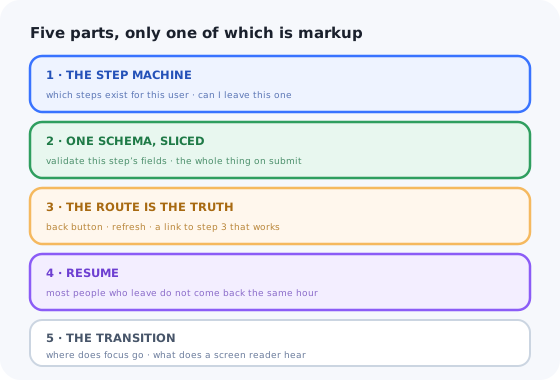
A multi-step form is the most deceptive component in a product. Visually it is one panel with a Next button. Structurally it is a state machine, a validation strategy, a routing decision and a persistence layer, and if you only build the panel you discover the other four one support ticket at a time.
In Vue the first version is nearly always const step = ref(0) and a chain of
v-ifs. It demos beautifully. Then someone presses the browser back button and loses
eleven fields, refreshes and starts over, or gets to step four and finds the Next button disabled
with no visible reason.
This guide builds the version that survives real users: a step machine that is data rather than conditionals, one schema validated a slice at a time, the route as the source of truth, resumable state, and a transition that does not strand keyboard and screen-reader users.
Key Takeaways
- The steps are data, not
v-ifs. An array you can filter is how conditional steps stay sane. - One schema, validated in slices. Per-step schemas drift; a single schema with per-step field lists does not.
- The route is the state. If the URL does not name the step, the back button destroys the form.
- Assume they leave. Persist on change, restore on mount, and expire it deliberately.
- Moving between steps is an accessibility event. Focus has to go somewhere, and something has to be announced.
- A multi-step form is not an onboarding wizard. One collects data; the other teaches a product.
What a Multi-Step Form Actually Has to Do
Before any Vue, the specification. A multi-step form that ships into a real product has to:
- know which steps exist for this user, since half of them are conditional;
- refuse to advance past invalid input, without validating fields nobody has reached yet;
- survive the browser back button, a refresh, and a shared link to step three;
- come back tomorrow with the answers still in it;
- tell the user where they are and how much is left;
- move focus sensibly and announce the change to assistive technology;
- submit once, and behave when the server rejects a field from step one while the user is on step four.
Seven requirements. Exactly one of them is solved by v-if.
1. The Step Machine: Steps Are Data
The moment a step becomes conditional ("skip billing for the free plan", "only ask about team
size if they said company") a chain of v-ifs becomes unmaintainable, because
"next" is no longer "index plus one". Model the steps as an array and derive everything from it.
Because visible is computed from the data, a user who changes their plan on step one and
walks forward gets a different set of steps, and the progress indicator, which reads
index and total from the same source, updates with it. Hard-coding "step 2
of 5" is how you end up promising a step that never arrives.
Watch the vanishing step. If the user is standing on a step whose when
just became false, index goes to -1. Guard the navigation: when the current
step disappears, redirect to the nearest earlier visible one rather than rendering nothing.
2. One Schema, Validated a Slice at a Time
The instinct is a schema per step. It works until a rule spans two steps, "billing country must match the company country", and until the server wants to validate the whole object and you now have two definitions of the truth that drift apart.
Define the schema once for the whole form. Validate only the current step's fields on Next, and the
entire schema on submit. The step's fields array you already wrote is the slice.
Two rules keep this honest. Do not disable the Next button because the step is invalid: a disabled button with no visible reason is the single most common complaint about multi-step forms. Let it be pressed, validate, then show the errors and move focus to the first one. And do not validate a field before it has been touched: a form that turns red as you arrive reads as an accusation. Validate on blur, and on the attempt to advance.
The step owns a list of field names, not its own copy of the rules.
3. The URL Is the Source of Truth
A ref holding the step index is invisible to the browser. Back goes to the previous
page, refresh resets to step one, and a support agent cannot send anyone a link to the step
they are stuck on. Put the step in the route and read it from there.
Use push going forward so each step is a history entry, and let the browser's own back
button be the back button. Then add a guard so nobody can deep-link into step four of an empty form:
4. Resume: The Users Who Leave
People abandon long forms to go and find a VAT number, a card, or a colleague. The ones who come back are your most motivated users, and losing their answers is the most expensive bug in the component.
Persist on every change, restore on mount, clear on success. In Vue this is about six lines; the care goes into what you persist, not how.
Three details are worth arguing about in review. Never persist passwords or card details: destructure them out, do not rely on remembering. Version the key, because a stored shape from last month will otherwise be spread into this month's component. And tell the user you restored something: silently pre-filled fields read as a privacy problem, while "We kept your answers from Tuesday. Start over" reads as a courtesy.
For a form that spans devices, or where abandonment is the metric you are actually trying to move, persist server-side against the account instead, and see progressive profiling for the deeper fix, which is asking for less up front.
5. The Transition Is the Accessibility Problem
Swapping the step is where keyboard and screen-reader users get stranded. The visible panel changes;
focus does not. It stays on the Next button, which may now be a different button, or falls back to
<body> when the old panel unmounts, and nothing is announced, so a screen
reader user has no idea the page changed at all.
Four things are doing work there. mode="out-in" stops the two panels from overlapping
mid-animation. The :key forces a real remount, so stale field state cannot leak between
steps. @after-enter moves focus to the new heading (tabindex="-1"
makes it focusable without adding it to the tab order) which is the standard pattern for a
route change. And the polite live region announces the move without interrupting whatever is being
read.
Honour prefers-reduced-motion in the transition CSS, and pair this with a visible
progress indicator: knowing
how much is left is the single strongest predictor of whether someone finishes a long form.
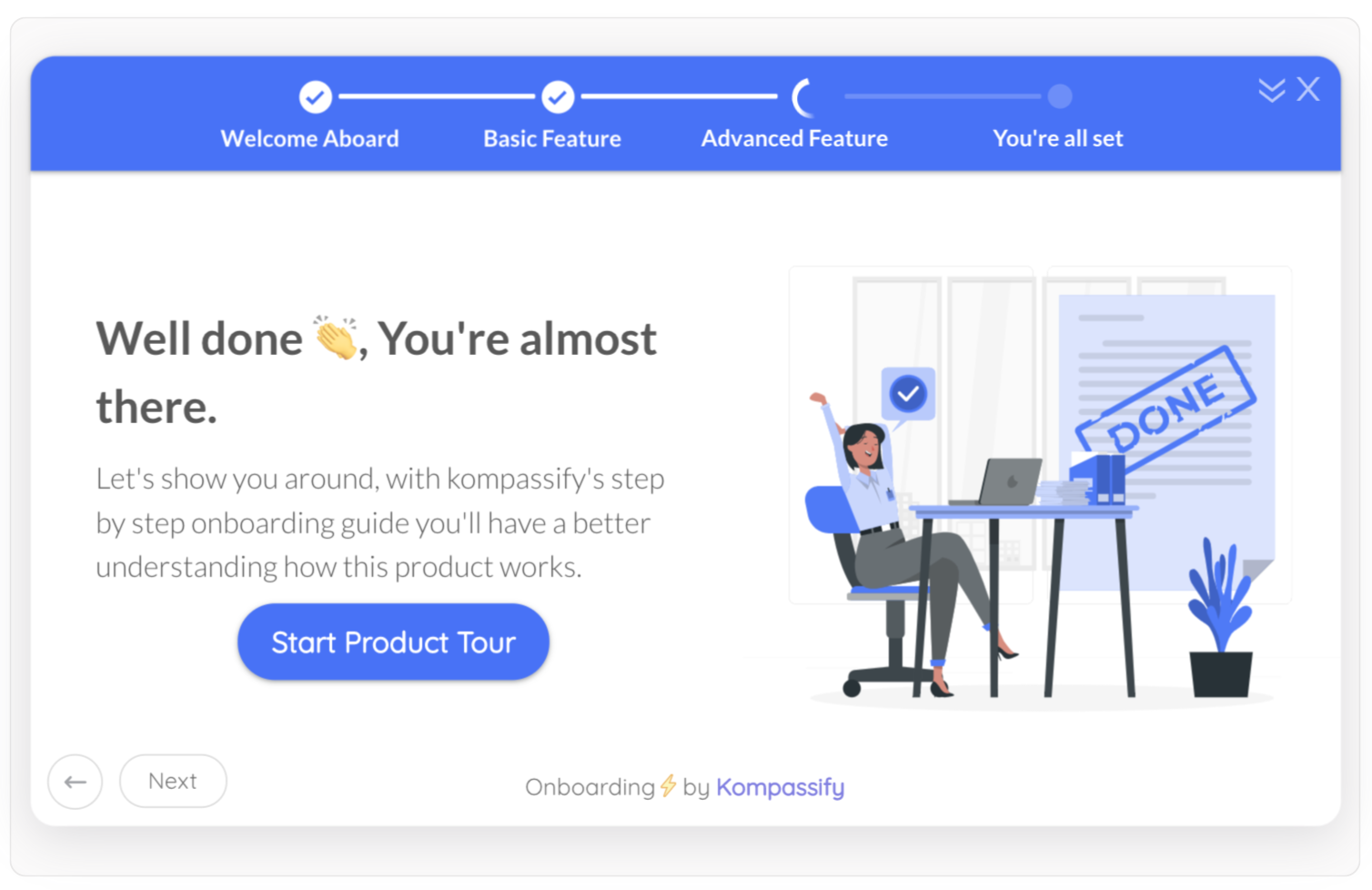
Named steps beat a percentage: the user can see what is left, not just how much.
What Stays Hard After It Works
Server errors on a past step
Submit from step five; the API rejects the email from step one. You need to map field errors back to the step that owns them, navigate there, and explain why, without losing anything the user typed in between. This is the case that gets skipped and then filed as a bug.
Autofill across steps
Password managers fill fields that are not currently mounted, and unmounting a step throws away
what they filled. Keep autocomplete tokens correct on every input, and expect to test
with a real manager rather than in isolation.
Analytics per step
The question is always "where do people drop off". That needs an event per step entry, exit and error (instrumented at the machine, not sprinkled through templates) and a funnel to read it in.
Nested and repeating fields
"Add another team member" turns one step into a sub-form with its own validation and its own
focus management. Vue's reactivity handles the array; the error paths
(members.2.email) are what break naive error mapping.
A Multi-Step Form Is Not an Onboarding Wizard
They look alike (steps, a progress bar, Next) and teams routinely try to build the second out of the first. They have almost nothing in common underneath.
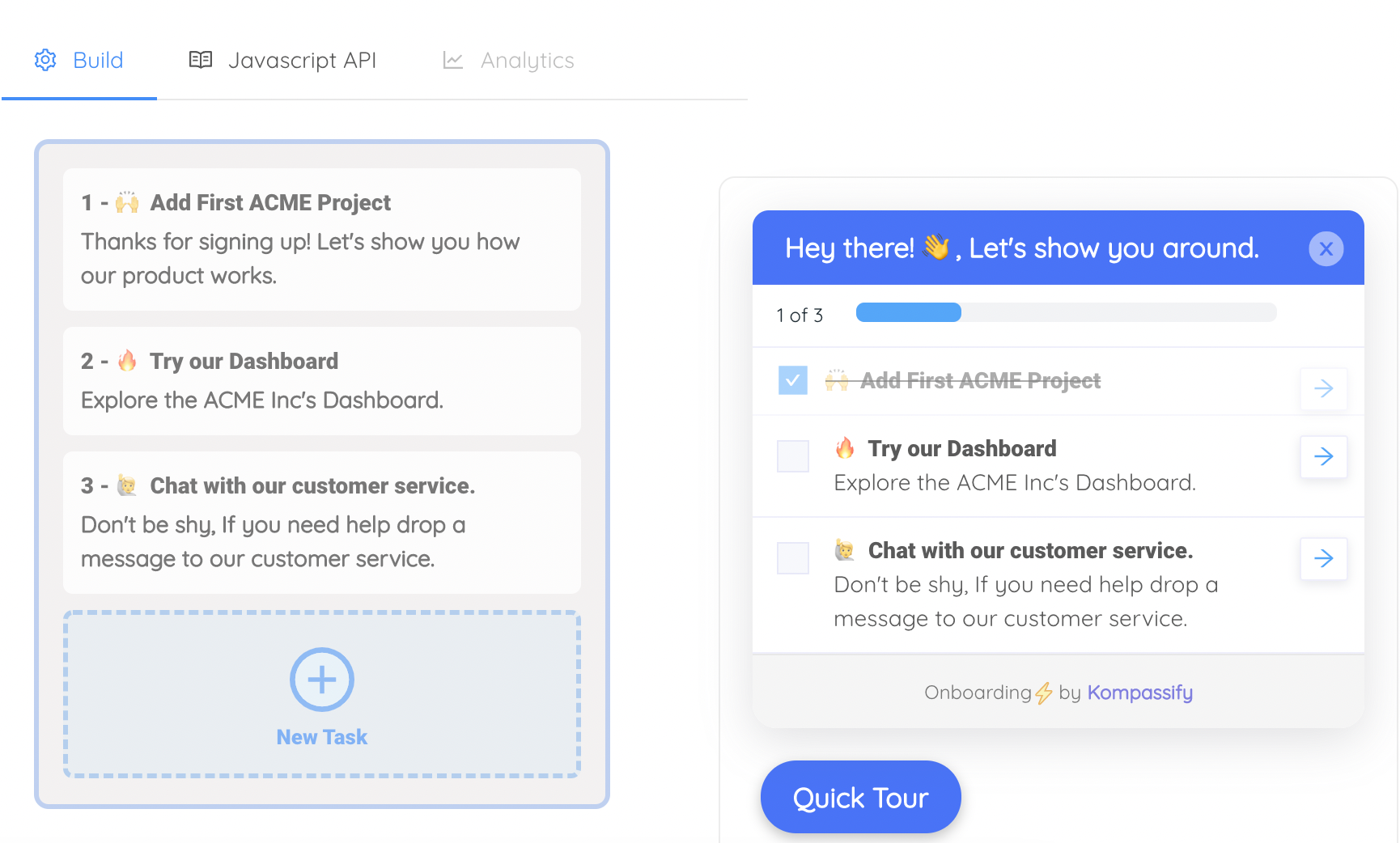
A wizard’s steps point at the product and remember, per user, which ones are done.
| Multi-step form (what you just built) | Onboarding wizard | |
|---|---|---|
| Purpose | Collect data the product needs | Get the user to a first success |
| Owns | Its own fields | Nothing: it points at the real product UI |
| Audience | Everyone who signs up | A segment: role, plan, what they have not done yet |
| Ends when | The payload is valid and submitted | The user did the thing, possibly days later |
| Changes | When the data model changes | Weekly, by a PM, without a release |
| Measured by | Completion rate | Activation, and retention after it |
If what you need is a sequence of steps that overlays the product rather than replacing it, remembers per user which step they reached, is targeted at a segment, and gets edited by someone who does not deploy code, that is an onboarding wizard, and building it on your form component means rebuilding targeting, persistence and analytics from scratch.
Keep the form. Skip the onboarding platform.
Kompassify lets product and onboarding teams add checklists, guided tours, tooltips and hotspots to a Vue app without shipping a release for every copy change, targeted by segment, resumable per user, with completion data on every step. Free up to 100 monthly active users, plans from $129/month, GDPR-compliant and EU-hosted.
Start for free →Build It, or Configure It?
Build the form
- Signup, checkout, KYC, application flows, anything that produces a payload.
- Anything with server-side validation rules you must mirror.
- Anything that has to work with your design system and offline.
Configure the guidance
- Checklists and tours that point at the product's own UI.
- Anything targeted at a segment rather than everyone.
- Anything whose steps a PM will reorder next month.
A Pre-Ship Checklist
- Steps are data; conditional steps use a predicate, not a template branch.
- The step is in the URL, and the browser's back button works.
- Deep-linking to a later step redirects to the furthest reachable one.
- One schema; the step validates only its own fields.
- Next is never disabled without a visible reason.
- Errors move focus to the first invalid field, with the message associated by
aria-describedby. - Draft state persists and restores, and never contains a password or card number.
- Restoration is announced to the user, not silent.
- Step changes move focus to the new heading and announce it in a live region.
- A server error on step one navigates back to step one and explains itself.
- Transitions respect
prefers-reduced-motion.
The One-Sentence Version
Build a Vue 3 multi-step form as a step machine made of data rather than v-ifs, validate
one schema in slices, keep the current step in the URL so the back button and refresh behave, assume
every user leaves and comes back, and treat each step change as an accessibility event; then
notice that the moment the sequence is about teaching the product rather than collecting a payload,
you needed a wizard, not a form.
Related reading: SaaS signup flows for how much to ask and when, and the same component in React.
Frequently Asked Questions
How do you build a multi-step form in Vue 3?
Model the steps as data rather than a chain of v-ifs: an array of objects, each with an id, a title, the list of schema fields it owns, and an optional predicate for conditional steps. A composable filters that array against the current form data and derives the current step, the index, the total and the next and previous ids, so the progress indicator and the navigation always agree. Keep the current step id in the route so the browser back button and a refresh behave. Define one schema for the whole form and validate only the current step's fields when the user tries to advance. Persist the draft on change and restore it on mount. Finally, on each step change, move focus to the new step's heading and announce the change in a polite live region.
How do you validate each step of a Vue multi-step form?
Use one schema for the entire form, not a schema per step. Per-step schemas drift apart from each other and from the server's definition, and they cannot express a rule that spans two steps. Instead, give each step a list of the field names it owns, run the full schema on the current data when the user tries to advance, and keep only the issues whose path starts with one of that step's fields. Validate on blur and on the attempt to move forward, never on arrival: a form that turns red before you have typed anything reads as an accusation. And do not disable the Next button when the step is invalid: let it be pressed, show the errors, and move focus to the first one, because a disabled button with no visible reason is the most common complaint about these forms.
How do you make the browser back button work in a Vue multi-step form?
Put the step in the URL. A ref holding a step index is invisible to the browser, so back navigates away from the whole form and a refresh resets it to step one. Define a route like /signup/:step, derive the current step id from route.params, and navigate forward with router.push so each step becomes a history entry. Then the browser's own back button is your back button and you do not implement one. Add a navigation guard that compares the requested step against the furthest step the current data actually makes reachable, and redirect to that step instead, so nobody can deep-link into step four of an empty form.
How do you save and restore a partially completed Vue form?
Watch the form data deeply and write it to localStorage on change, then read it back in onMounted and merge it into the reactive data. Three details matter more than the mechanism. Never persist passwords or card details: destructure them out explicitly rather than relying on remembering not to include them. Version the storage key, because a draft shaped by last month's code will otherwise be spread into this month's component and crash it. And tell the user you restored something instead of silently pre-filling the fields: a visible note with a way to start over reads as a courtesy, while silent pre-fill reads as a privacy problem. If the form must resume across devices, persist server-side against the account instead.
How do you make a multi-step form accessible in Vue?
The step change is the risky moment. When the panel swaps, focus stays on the old Next button or falls back to the body, and nothing is announced, so a screen reader user does not know the page changed. Wrap the step in a Transition with mode="out-in" and a key on the step id, then use the after-enter hook to move focus to the new step's heading, which carries tabindex="-1" so it can receive focus without joining the tab order. Add a visually hidden aria-live="polite" element that reads "Step 2 of 5: Company". Associate every error message with its input via aria-describedby, move focus to the first invalid field when validation fails, and honour prefers-reduced-motion in the transition CSS.
What is the difference between a multi-step form and an onboarding wizard?
A multi-step form collects data the product needs: it owns its fields, it shows the same steps to everyone who signs up, it ends when a valid payload is submitted, and it is measured by completion rate. An onboarding wizard exists to get a user to a first success: it owns no fields of its own and instead points at the real product interface, it is targeted at a segment by role or plan or what the user has not done yet, it may end days later, its steps get reordered by a product manager without a release, and it is measured by activation and the retention that follows. Building the second on top of the first means rebuilding segment targeting, per-user persistence and per-step analytics from scratch, which is why in-app guidance is usually configured in a dedicated tool rather than shipped through the front-end release cycle.