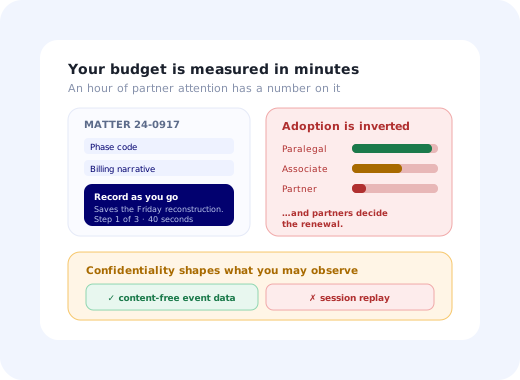
Legal software onboarding has one constraint that reorganises everything else: your most senior users bill their time by the six-minute unit, and every minute they spend learning your product is a minute they are not billing. A partner at a firm has a precise, defensible number for what an hour of their attention costs. That number is the budget for your entire onboarding, and it is smaller than you would like.
This is why legal rollouts have such a distinctive failure signature. Adoption is high among paralegals and legal assistants, moderate among associates, and close to zero among the partners who decide whether the firm renews. The system fills with data entered by everyone except the people whose behaviour the project was meant to change, and at renewal, the partner who never used it is the person asked whether it was worth it.
This guide covers legal software onboarding as it works in practice: the systems and who uses them, why firms resist, the seniority-inverted approach that works, the confidentiality constraints that shape your tooling, and how to measure adoption in an environment where nobody will fill in a survey.
Key Takeaways
- The billable hour is your budget. Onboarding a fee earner has a defensible per-minute cost. Design as if you have five minutes, not fifty.
- Adoption is inverted by seniority. Paralegals adopt, partners do not, and partners decide renewals.
- Never train the partner; remove work from them. The only compelling argument at that level is time returned, demonstrated on their own matter.
- Matter-centric, not user-centric. Legal work is organised around matters; onboarding that ignores that shape feels foreign immediately.
- Confidentiality limits your tooling. Session replay and screenshots can capture privileged material. Plan for that before you install anything.
- Practice groups are separate rollouts. Litigation, corporate and private client work differently enough to need different paths.
What Legal Software Onboarding Covers
| System | Primary users | The onboarding problem |
|---|---|---|
| Practice management | Fee earners, paralegals, finance | Touches everyone; changes how matters are opened and run. |
| Time recording & e-billing | Every fee earner, billing team | Universally disliked, universally required. Friction here is expensive. |
| Document & matter management | Fee earners, secretaries, knowledge teams | Competes with a folder structure people have used for a decade. |
| CLM: contract lifecycle | In-house counsel, sales, procurement | Half the users are not lawyers and are the ones you must not slow down. |
| eDiscovery & review platforms | Review teams, litigation support | Intense, project-based use by people who must be productive on day one. |
| Client portals | Clients, opposing parties | External users with zero training and low tolerance. Pure self-service. |
The pattern that matters across all of them: a small number of screens carry almost all of the value, and a small number of senior people decide whether the firm keeps paying. Everything below follows from those two facts.
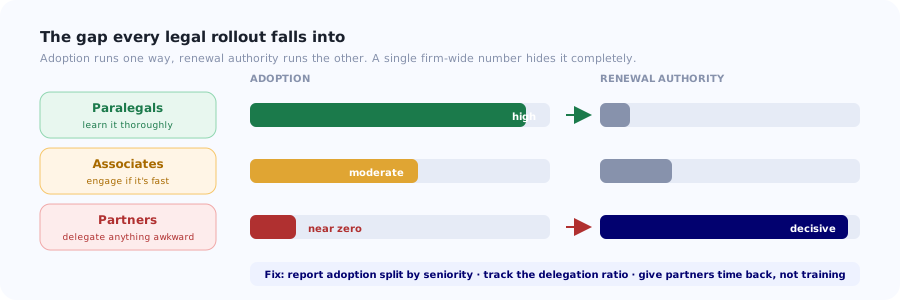
Adoption falls as seniority rises, and renewal authority runs the other way. Most legal rollouts fail in that gap.
Why Legal Rollouts Stall
Learning time is measurably expensive
In most industries the cost of an hour of training is vague. In a law firm it is a number on a rate card, and everyone involved knows it. A two-hour training session for thirty fee earners has a price the managing partner can calculate during the meeting where you propose it. Assume that calculation is being made, and design onboarding that survives it: minutes inside the work, not hours outside it.
Delegation hides the adoption gap
When a partner finds the system awkward, they do not raise a ticket. They ask their assistant or a junior to do it. Usage looks fine in aggregate, and the actual behaviour change (the partner recording time contemporaneously, or reviewing in the platform) never happens. You cannot see this in a login count; you can only see it by looking at usage split by seniority.
The old system is a folder structure and twenty years of habit
You are not competing with nothing. You are competing with a naming convention, a shared drive and a set of precedents that a team has used since before you existed, and which currently works. "It is better once you learn it" is not an argument that lands on someone billing at their rate.
Practice groups are genuinely different firms
Litigation runs on deadlines, bundles and disclosure. Corporate runs on transactions, checklists and closings. Private client runs on long-lived relationships and sensitive personal data. One onboarding path for all three will feel wrong to at least two of them, and "this was not built for how we work" is the most durable objection in legal software.
Confidentiality restricts how you can even observe
The tools you would normally reach for to diagnose an adoption problem (session recordings, screenshots, support screen-shares) can capture privileged client material. Many firms will simply refuse them, and they are right to. Your visibility has to come from event data with no content in it, which is a real constraint on how you diagnose problems.
The Four Audiences
1. Partners and senior fee earners
The smallest group, the least available, and the ones who decide renewal. They will not attend training, will not read documentation, and will delegate anything awkward. The only viable approach is to give them one thing that removes work from their day, demonstrated on a matter that is actually theirs, in under ten minutes. Everything else about the product can wait. A partner who has personally experienced getting time back becomes an internal champion of a kind no rollout plan can manufacture.
2. Associates and junior fee earners
Higher volume, more system-tolerant, still billing. They will engage if it is fast and if it is clear what is expected of them. This group responds well to short in-context guidance and a first-week checklist that states plainly what "using this properly" means, because in a firm, "what am I supposed to be doing" is a genuine and rarely answered question.
3. Paralegals, secretaries and legal assistants
Your highest-adoption group and often the real operators of the system. They will learn it thoroughly and become the informal support desk for everyone else. Two implications: invest in them because it multiplies, and do not mistake their strong usage numbers for firm-wide adoption; the aggregate they create can conceal a partner cohort that has never logged in.
4. Legal operations and IT
In larger firms and in-house teams, the people who own the rollout. They need configuration depth, reporting they can take to the partnership, and evidence for a renewal conversation. Give them adoption data split by practice group and by seniority; that is the report that actually gets used, because it is the one that survives contact with a management committee.
A Seven-Step Method for a Firm Rollout
1. Pick one practice group, not the firm
Choose the group with the clearest pain and a willing senior sponsor. Litigation during a heavy disclosure exercise and corporate during a transaction both create moments where a new system solves something visible. A firm-wide launch produces a firm-wide shrug.
2. Find the one task that removes work from a fee earner
Not the most impressive feature, the most annoying chore. Contemporaneous time capture instead of Friday reconstruction. Automatic matter filing instead of manual saving. Conflict checks that take seconds. Lead with that single thing and let the rest of the product be discovered later. The principle is the same first-value moment that governs any product, but the tolerance for delay is far lower.
3. Onboard senior people individually, on their own matter
This does not scale and does not need to; there are not many of them. Ten minutes, their real matter, one outcome they can feel. Never a demo environment: a partner shown sample data concludes, correctly, that they are watching a sales presentation rather than doing their job.
4. Put everything else in the interface
For the other ninety percent of the product, in-app guidance replaces training entirely. Short walkthroughs on the first use of each key screen, tooltips on the fields that get filled in inconsistently, and a help launcher for "how do I" questions. A fee earner will read two sentences beside the field they are stuck on. They will not open a portal.
5. Give each practice group its own path
Same product, different first tasks, different vocabulary, different examples. A litigator's onboarding should mention bundles and deadlines; a corporate lawyer's should mention closings and checklists. This is straightforward segmentation, and it removes the single most common objection in legal software: that the system was clearly built for somebody else's practice.
6. Onboard continuously, because intake is continuous
Firms take in trainees and newly qualified lawyers on a cycle, and lateral hires all year. Any onboarding that exists only as a launch event covers one cohort. Build it into the software so the associate who joins in month eight gets the same guided first experience as the pilot group.
7. Report adoption by seniority and practice group
Not a single firm-wide number. The report that matters shows partner adoption separately, because that is where the risk lives and where the aggregate lies. Bring it to the sponsor monthly; it is also the report that makes the renewal conversation short.
What Confidentiality Changes About Your Tooling
Legal is one of the few verticals where the standard adoption toolkit has to be adjusted for reasons that are professional rather than technical. Client confidentiality and legal professional privilege are not policies the firm can waive for your convenience.
✅ Generally acceptable
- Event data with no content: screen viewed, action completed, step abandoned.
- In-app guidance that runs client-side and transmits no document content.
- Aggregate adoption reporting by role, practice group and seniority.
- EU or regionally hosted infrastructure with a clear data-processing position.
- Help content the firm authors and controls itself.
⚠️ Expect resistance
- Session replay that captures document contents or client names.
- Screenshot-based support tooling on matter screens.
- Anything sending matter data to a third-party analytics provider.
- Support processes requiring a screen-share of live client work.
- Free-text feedback widgets where users may paste privileged material.
Design your diagnosis around event data from the start. If you plan an adoption programme that depends on watching recordings, you will reach the point where the firm says no and have no fallback. Structured events (which screen, which step, completed or abandoned, by role) tell you where people get stuck without ever touching content, and they are the only observability you can rely on having. The general approach is in building an event taxonomy.
Measuring Adoption in a Firm
| Metric | What it tells you | Warning sign |
|---|---|---|
| Adoption by seniority | Whether partners use it, separately from everyone else. | A healthy aggregate with a partner cohort near zero. |
| Delegation ratio | Actions taken on a fee earner's matters by someone else. | Rising: the partner has quietly opted out. |
| Contemporaneous entry rate | Time recorded same-day vs reconstructed later. | Friday spikes. The behaviour change did not happen. |
| Adoption by practice group | Whether the system fits how each group actually works. | One group far behind: usually a fit problem, not a training one. |
| Workaround persistence | Documents still saved to the shared drive; time still in a spreadsheet. | Any meaningful volume after the cutover date. |
| Time to first value for new joiners | Whether onboarding still works months after launch. | Rising: the launch-event effect has worn off. |
The delegation ratio is the metric most firms do not think to build and the one that most reliably predicts a difficult renewal. It is the difference between a system the firm uses and a system the firm's support staff use on the firm's behalf, and those two situations look identical on a usage dashboard while having completely different outcomes at renewal.
The In-Product Guidance Layer
Given that training time is the scarcest resource in the building, in-app guidance is not a supplement in legal; it is the delivery mechanism.
A first-use walkthrough per key screen
Three to five steps ending in a completed real action on a real matter. Short enough to finish between two calls, and never a tour of the navigation.
Tooltips on the fields that get filled in inconsistently
Matter type, phase codes, billing narratives, conflict fields. Let the data pick them: whichever field has the highest blank or default rate gets one sentence of explanation attached to it. This is the cheapest recurring improvement available.
Practice-group-specific paths
The same product with a different first task and different vocabulary per group. It costs little and it neutralises the "this was not built for how we work" objection before it forms.
An always-available help launcher
Short answers for the current screen, without leaving the matter. This is what replaces "ask the paralegal", and it is what keeps working for the lateral hire who arrives long after the launch. The broader case is in in-app support.
Onboarding that costs a fee earner minutes, not hours
Kompassify adds walkthroughs, tooltips, checklists and announcements to your practice management, document or contract platform without changing its code, so guidance appears inside the matter instead of in a training portal nobody has time for. Content is authored by your own team, paths can differ by practice group and role, and adoption is reported by segment. GDPR compliant, EU-hosted, free up to 100 monthly active users and from $129/mo after that.
Start for Free →A Realistic Firm Rollout
- Weeks 1–2: pick the group and find the chore. Sit with fee earners; identify the single task everyone complains about.
- Weeks 3–4: build the practice-group paths and the in-app guidance for the top five screens.
- Week 5: senior sponsors, individually, on their own matters. Ten minutes each, real data, one outcome.
- Weeks 6–9: the practice group runs live, with guidance in the interface carrying the training load.
- Week 10: instrument and fix. Tooltips onto the worst fields; check adoption split by seniority.
- Weeks 11+: extend group by group, each inheriting working guidance and the previous group's numbers.
- On a published date: close the shared-drive route, once the system is genuinely faster for the frequent tasks.
The mistake that ends legal rollouts: reporting one firm-wide adoption number. It will look acceptable, because paralegals and assistants generate a lot of usage, and it will conceal the fact that the partners deciding your renewal have never completed a task in the system. Split by seniority from week one, and if the partner number is low, treat that as the project's only real problem, because at renewal it will be.
Frequently Asked Questions
What is legal software onboarding?
It is the process of getting the people in a law firm or in-house legal team (partners, associates, paralegals, secretaries and legal operations staff) to actually work in a new system such as practice management, time recording, document management or contract lifecycle software, rather than around it. It differs from ordinary software onboarding because the users with the least available time and the most resistance are also the ones who decide whether the firm renews, and because client confidentiality restricts the tools you can use to observe and diagnose adoption problems.
Why do law firm software rollouts fail?
The dominant reason is that learning time in a firm has an explicit, calculable cost, so any onboarding requiring hours of a fee earner's attention is rejected on arithmetic before it is judged on merit. Beyond that: partners delegate anything awkward to assistants, which hides the adoption gap behind healthy-looking aggregate usage; the incumbent process is a shared drive and twenty years of habit that currently works; practice groups such as litigation, corporate and private client work differently enough that a single onboarding path feels wrong to most of them; and confidentiality rules out much of the standard diagnostic toolkit.
How do you get partners to adopt new legal software?
Do not train them; remove work from them. Give a partner one thing that visibly saves them time, demonstrated on a matter that is genuinely theirs, in under ten minutes, and let the rest of the product be discovered later. Never use a demo environment: a senior lawyer shown sample data correctly concludes they are watching a sales presentation rather than doing their job. This approach does not scale, and it does not need to, because there are not many partners. One who has personally experienced getting time back becomes an internal champion no rollout plan can manufacture.
Why is adoption inverted by seniority in law firms?
Because the cost of learning rises with the rate the person bills, while the availability of time falls. Paralegals and legal assistants adopt readily, learn the system thoroughly and often become its informal support desk. Associates engage if it is fast. Partners have the least time, the strongest existing habits, and the ability to delegate anything awkward to somebody else. The problem is that renewal authority runs in the opposite direction, so the group least likely to have used the system is the group asked whether it was worth the money.
How does client confidentiality affect legal software onboarding?
It restricts the tooling you can use to diagnose adoption problems. Session replay, screenshot-based support and live screen-shares can all capture privileged client material, and many firms will refuse them outright. Free-text feedback widgets are risky for the same reason, because users may paste matter content into them. Plan from the start to diagnose from structured event data with no content in it (which screen was viewed, which step was completed or abandoned, by role) because that is the observability you can rely on actually being permitted.
Should each practice group get its own onboarding?
Yes, and it costs less than it sounds. Litigation runs on deadlines, bundles and disclosure; corporate runs on transactions, checklists and closings; private client runs on long relationships and sensitive personal data. The same product with a different first task, different vocabulary and different examples per group neutralises the single most durable objection in legal software: that the system was obviously built for somebody else's practice. One generic path will feel wrong to at least two of the three groups.
What metrics show whether a law firm has adopted new software?
Never report a single firm-wide number, because paralegal and assistant usage will make it look acceptable while concealing a partner cohort that has never completed a task. Report adoption split by seniority and by practice group. Add the delegation ratio (actions taken on a fee earner's matters by somebody else, which rises when a partner has quietly opted out) and the contemporaneous entry rate, where Friday spikes reveal that time is still being reconstructed rather than recorded as it happens. Then track workaround persistence on the shared drive.
How do you keep legal onboarding working after launch?
Build it into the software rather than delivering it as an event. Firms take in trainees and newly qualified lawyers on a cycle and lateral hires all year round, so onboarding that exists only as a launch programme covers exactly one cohort and then decays. In-app walkthroughs on first use of each key screen, tooltips on the fields that get filled in inconsistently, and an always-available help launcher mean the associate who joins in month eight gets the same guided first experience as the pilot group did.