Six months after a successful HRIS rollout, the HR team is fluent, the configuration is finished, and the support queue is still full of the same three questions: how do I book leave, where is my payslip, who approves this. Nobody was badly trained. The employees simply have not opened the system since March.
HR software onboarding is unusual because one product has to work for three populations with wildly different usage frequencies, and the largest population, by an order of magnitude, is the one that uses it least. Any plan that treats "the users" as a single group will produce a system that works beautifully for the twelve people in HR and remains permanently unfamiliar to the other twelve hundred.
This guide covers what HR software onboarding actually includes, the three-audience problem, the frequency trap, the org-chart migration that has to be right on day one, the immovable deadlines that dictate your go-live date, an eight-step rollout method, and how to measure adoption separately for each audience.
Key Takeaways
- Three audiences, three problems. Admins need depth, managers need speed, employees need to be reminded how everything works every single time.
- Frequency is the core constraint. If an employee uses a screen four times a year, every visit is a first visit, so training them once at rollout trains them for nothing.
- The org chart is the load-bearing migration. Nearly every workflow routes on reporting lines; get them wrong and approvals land on the wrong desks for weeks.
- Pick the go-live date backwards from payroll. HR has deadlines that are legally immovable, and your rollout will lose every collision.
- Managers churn quietly. If HR keeps a manual back channel open, managers will use it and the system will never take.
- Measure inbound HR tickets. It is the one number that captures whether self-service is real.
What Is HR Software Onboarding?
HR software onboarding: definition
HR software onboarding is the process of getting an organisation from a purchased HR system to one that administrators, managers and employees all use correctly. It covers employee-data and org-chart migration, policy and workflow configuration, payroll and calendar integration, and three separate adoption problems, one per audience.
Not to be confused with employee onboarding. Bringing a new hire into a company (paperwork, equipment, introductions, the first ninety days) is a different project that happens to share a word. It is covered in the employee onboarding guide. The two intersect at exactly one point: a good HRIS runs part of the new-hire process, so how well you roll out the software determines how smooth new-hire onboarding feels afterwards. Confusing them produces project plans that budget carefully for data migration and forget the workforce entirely.
As with any internal system, there is a rollout mechanics layer (pilot groups, comms, IT sequencing) that is common to all software deployments and is covered in the software rollout guide. What follows is what is specific to HR.
The Three-Audience Problem
The same HRIS presents three effectively different products. Designing one onboarding for all three is the root cause of most disappointing adoption numbers.
The HR administrator
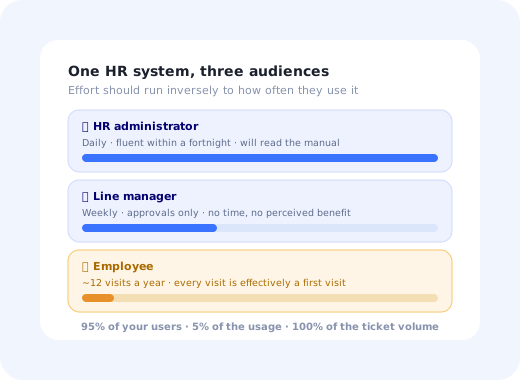
Daily · deep usageConfigures policies, runs payroll exports, fixes everyone else's mistakes. Becomes fluent within a fortnight and will happily read documentation. Needs depth, an implementation checklist and a fast route to support, not simplification.
The line manager
Weekly · narrow usageApproves leave, signs off expenses, runs reviews once or twice a year. Has no time and sees little personal benefit. Needs approvals brought to where they already are, and a landing screen showing only their team.
The employee
A few times a yearBooks leave, checks a payslip, updates a bank detail. Ten to fifteen visits a year, each one effectively a first visit. Needs in-context guidance every time, not training once.
The counter-intuitive part is that effort should be allocated almost inversely to how much each group uses the system. The admins will figure it out. The employees, who represent 95% of your user base and 5% of the usage, will not, and their failure shows up as HR ticket volume, which is the cost the project was supposed to remove.
The Frequency Trap
Here is the arithmetic that breaks conventional rollout training. An employee books leave maybe four times a year, changes a personal detail once, downloads documents twice, and completes one review cycle. That is roughly a dozen interactions annually, spread months apart, each one a different task.
Nothing is retained across a four-month gap. The employee who was walked through leave booking in the January rollout session will approach it in May as a stranger, except now they are slightly embarrassed about it, so instead of exploring, they email HR. That email is the failure, and it is entirely predictable from the frequency alone.
The design consequence: for the employee audience, guidance cannot be an event. It has to be a property of the screen. A short walkthrough that appears on first visit and again after a long absence, field-level tooltips that are always there, and an in-product answer to "what happens after I submit this" do more than any launch-week training programme, because they are present at the only moment the employee is paying attention.
This is the same problem non-technical users face in any internal tool, amplified: infrequent use plus low confidence plus a task that has a real consequence if you get it wrong. The software training guide covers why classroom knowledge decays so fast; HR software is the extreme case.
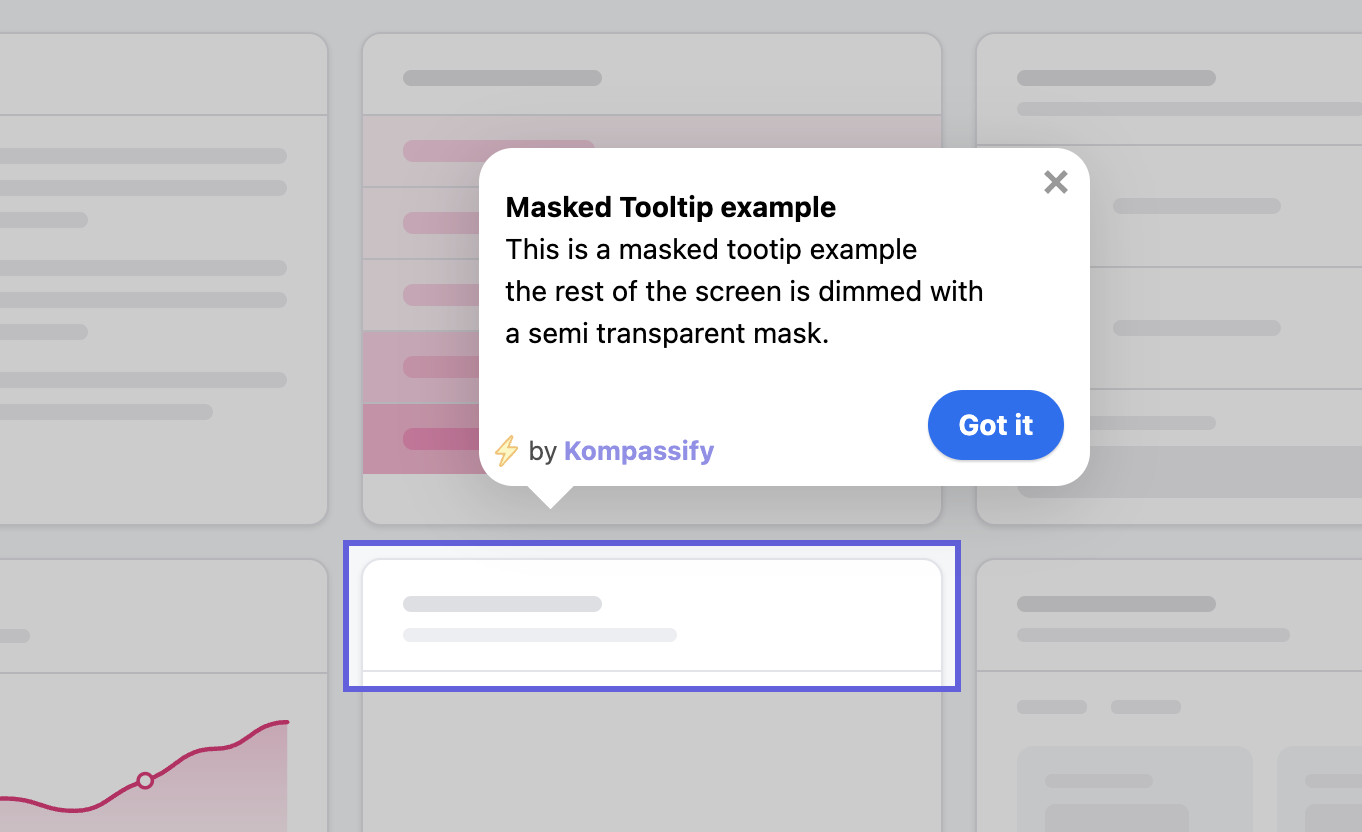
Because employees use HR software a few times a year, guidance has to sit on the screen itself, not be delivered once at rollout.
The Org Chart Is the Load-Bearing Migration
HR data migration has an unusual property: one table matters more than all the others combined. Reporting lines drive leave approvals, expense sign-off, performance-review pairings, document visibility and access permissions. An org chart that is 5% wrong produces a steady trickle of approvals landing on the wrong desk, and each one costs you a small amount of organisational trust in the system.
Migrate in this order, and validate each layer before moving on:
1. Reporting lines
Export the current structure, have every department head confirm their own team in writing, and resolve the disagreements before load; there will be disagreements, and they are usually about dotted lines and matrix reporting the HR system may not model at all.
2. Employee master data
Names, contact details, contract types, start dates, cost centres. Boring, and the place where a legacy system's twenty years of free-text fields will hurt you. Standardise before loading, not after.
3. Leave balances
The riskiest number in the migration, because every employee knows their own balance and will check it in the first week. Reconcile against the old system, load, then spot-check a sample of employees with unusual histories: long absences, part-time changes, carry-over from a previous year.
4. Historical records
Past absences, previous contracts, old reviews. Needed for continuity and legal retention, rarely urgent. Load after go-live if it buys you an earlier launch, but agree the retention policy first; HR data has statutory rules that ordinary system migrations do not.
Data-protection note: HR records are among the most sensitive personal data an organisation holds. Migration test files, sandbox copies and support exports all contain real salary and health-related information. Agree with your data-protection officer how those artefacts are handled and destroyed before the first test load, not during the post-mortem.
Immovable Deadlines Decide Your Go-Live Date
Most software rollouts can slip a fortnight. HR rollouts often cannot, because the surrounding calendar is set by law and by the fact that people expect to be paid correctly on a specific day.
Choose the go-live date backwards from these, not forwards from when the configuration will be ready. The best window is usually the few days immediately after a payroll cycle closes, giving the maximum runway before the next immovable date. And do not run the first review cycle in the new system in the same quarter as the migration if you can possibly avoid it; a company-wide process is the wrong thing to attempt while everyone is still finding the menus.
The 8-Step HR Software Rollout
- Pick the date backwards from payroll and statutory deadlines
- Validate the org chart with department heads, in writing
- Configure for the policies you have, not the ones you are planning
- Build a separate guidance path for each of the three audiences
- Pilot with one department that has a real leave request pending
- Close the manual back channel on a named date
- Staff the first two weeks heavily, then measure ticket volume
- Re-teach seasonally, before each peak
1. Pick the date backwards from payroll and statutory deadlines
Map the immovable dates for the next twelve months first. The go-live date is whatever survives that map, not whatever the project plan wanted.
2. Validate the org chart with department heads, in writing
Send each head their own subtree and require an explicit confirmation. This surfaces the matrix-reporting arguments early, while they are a data question rather than a broken approval.
3. Configure for the policies you have, not the ones you are planning
A rollout is a terrible moment to also reform your leave policy. Encode current rules, launch, then change policy deliberately once the system is trusted, with an in-app announcement so people find out from the product rather than from a rejected request.
4. Build a separate guidance path for each of the three audiences
An implementation checklist for admins. A two-step approval walkthrough for managers. For employees, a short task-shaped tour on the two or three things they will ever do, available on every visit. Same product, three flows, targeted by role.
5. Pilot with one department that has a real leave request pending
Pilots on synthetic data prove nothing. You want a genuine request, going to a genuine manager, affecting a genuine balance; that is what surfaces the routing errors and the policy edge cases while they are still cheap.
6. Close the manual back channel on a named date
The single most decisive step, and the one most often skipped. As long as an employee can email HR to book leave, a meaningful share always will, and managers will follow. Announce the date, hold it, and redirect requests with a link rather than an answer.
7. Staff the first two weeks heavily, then measure ticket volume
Expect a spike; plan for it. The useful signal is the shape of the curve after week three: a decline means self-service is taking, a plateau means the guidance layer is not doing its job and needs a second pass at the specific tasks generating the tickets.
8. Re-teach seasonally, before each peak
Two weeks before the summer leave rush and before the review window, re-surface the relevant walkthrough to everyone. This is not repetition for its own sake; it is the direct answer to the frequency trap, and it costs one targeting rule.
Measuring HR Software Adoption
Measure each audience separately, and one number for the whole system.
| Audience | Metric | Why it is the right one |
|---|---|---|
| Employees | Self-service completion rate | Share of leave requests, detail changes and document downloads done in-system rather than by email |
| Managers | Approval turnaround, and % without a reminder | Managers who need chasing are managers who have not adopted, whatever the login count says |
| Administrators | Processes in-system vs. in a spreadsheet | Shadow spreadsheets in HR are where configuration gaps hide |
| Whole system | Inbound HR tickets for supported tasks | The cost the project existed to remove, and the hardest number to fake |
| New joiners | Time to first self-service action | Tells you whether onboarding works for people who arrive after the rollout |
That last row matters more than it looks. Every rollout plan focuses on the population present at launch, and within a year a substantial share of the workforce joined afterwards and never saw any of it. The in-product guidance layer is what serves them; see user onboarding metrics for how to keep these measurements honest over time.
HR Software Onboarding: Do vs. Don't
✅ Do
- Build three guidance paths, one per audience
- Validate the org chart with department heads before load
- Choose the go-live date backwards from payroll deadlines
- Reconcile leave balances and spot-check unusual histories
- Bring manager approvals to where managers already are
- Close the email back channel on a named, announced date
- Re-surface guidance seasonally, before each peak
- Track inbound HR tickets as the headline number
❌ Don't
- Train employees once and call it adoption
- Treat "the users" as one group
- Go live in the week before a payroll run
- Reform policy and migrate systems in the same month
- Run the first review cycle during the migration quarter
- Pilot on synthetic data only
- Let sandbox copies of HR data live unmanaged
- Report adoption from admin usage
Delivering the Guidance Layer Without Engineering Time
For the employee audience in particular, the guidance layer is the onboarding, and it has to keep working long after the project team has moved on. With Kompassify an HR operations or enablement owner can build it on the HRIS screens you already have:
- Role-targeted flows Separate tours for administrators, managers and employees on the same product, shown to the right people via segmentation.
- Guidance that returns after an absence The answer to the frequency trap: re-show the leave-booking walkthrough to anyone who has not used it in three months, instead of assuming they remember.
- Field-level tooltips that never expire One sentence next to "carry-over", "cost centre" and "absence type", permanently, because the employee reading it has not seen the screen since spring.
- An implementation checklist for the admin A resumable checklist covering org chart, policies, integrations and invitations, surviving the weeks a real HR rollout takes.
- Policy-change announcements in the product When the leave policy changes, an in-app announcement reaches people at the moment they are booking, which the all-staff email did not.
- Adoption analytics per audience Analytics that separate employee self-service from admin activity, so one fluent HR team cannot hide a workforce that never logged in.
Kompassify is no-code, GDPR compliant and EU-hosted, free for under 100 monthly active users, with paid plans from $129/month.
Make the HR System Usable on the Fourth Visit of the Year
Build role-targeted walkthroughs, permanent field help and seasonal re-teaching on top of your existing HR screens, without an engineering release.
Start FreeFrequently Asked Questions
What is HR software onboarding?
HR software onboarding is the process of getting an organisation from a purchased HR system to one that admins, managers and employees all use correctly. It is distinct from employee onboarding, which is about welcoming a new hire into a company. HR software onboarding covers employee-data and org-chart migration, policy and workflow configuration, payroll and calendar integration, and three separate adoption problems, because the HR administrator, the line manager and the ordinary employee use completely different parts of the same product at completely different frequencies.
Why is employee adoption of HR software so low?
Because of frequency. An HR administrator is in the system daily and becomes fluent in a week. A line manager visits a handful of times a month. An ordinary employee books leave, submits an expense or reads a payslip perhaps a dozen times a year, which means every visit is effectively a first visit. Training an employee once, at rollout, is training them for a task they will next perform four months later. The only reliable fix is guidance that lives inside the product and appears at the moment of the task, rather than knowledge the employee is expected to retain.
What should be migrated first when implementing an HRIS?
The org chart, the reporting lines, before anything else, because almost every workflow in an HR system routes on it. Leave approvals, expense sign-off, performance reviews and access permissions all follow reporting relationships, so an org chart that is wrong on day one produces a stream of approvals landing on the wrong desk, which erodes trust faster than any missing feature. Employee master data, contract and salary records, leave balances and historical absence follow, with leave balances requiring particular care because employees check them and will spot an error immediately.
How do you get managers to use HR software?
Managers are the hardest of the three audiences because they have the least time and the least perceived benefit. Three things work: route approvals to where they already are, so an approval can be completed from email or chat without a separate login; put the small number of things a manager genuinely wants, their team's absences this month, who is due a review, on the first screen they land on; and make sure HR does not maintain a parallel manual process, because the moment a manager can get something done by messaging HR directly, they will.
When is the best time to roll out a new HR system?
Immediately after a payroll cycle closes and well away from any statutory reporting deadline, annual leave-balance reset or performance-review window. HR systems are unusual in that several of their deadlines are legally immovable, so the go-live date should be chosen backwards from those dates rather than from project convenience. A rollout that lands in the same fortnight as a year-end payroll run competes with the one activity the HR team cannot postpone, and it will lose.
How do you measure HR software adoption?
Measure each audience on its own terms. For employees, self-service completion rate: the share of leave requests, address changes and document downloads done in the system rather than by emailing HR. For managers, approval turnaround time and the share of approvals completed without a reminder. For administrators, the share of processes running in the system versus in a spreadsheet. Then track the single number that summarises all three: inbound HR tickets for tasks the system already supports, which should fall steadily after go-live and is the clearest evidence that adoption is real.
How is HR software onboarding different from employee onboarding?
They are two different projects that share a word. Employee onboarding is the human process of bringing a new hire into an organisation: paperwork, equipment, introductions, the first ninety days. HR software onboarding is getting an entire workforce to use an HR system correctly. They intersect at exactly one point: a good HRIS runs part of the employee-onboarding process, so the quality of your software rollout determines how smooth new-hire onboarding feels afterwards. Confusing the two leads to project plans that budget for data migration and forget the workforce entirely.
Can you improve HR software adoption without engineering work?
Yes, and for the employee audience it is the only approach that survives the frequency problem. A short tour that appears on the first visit and again after a long absence, tooltips on the fields employees get wrong, a checklist for the administrator's configuration work, and an in-app announcement when a policy changes are all guidance layered on screens that already exist. With a no-code platform like Kompassify, an HR operations or enablement owner can build and update that layer themselves, target it separately at employees, managers and admins, and change it the day a policy changes. Kompassify is GDPR compliant and EU-hosted, free for under 100 monthly active users, with paid plans from $129/month.