Three weeks after go-live, a sales director opens the pipeline report and sees €400,000 of forecast. Then they open the shared drive and find a spreadsheet, last edited yesterday, that says something different. Everybody was trained. Every field was configured. The migration completed without errors. And the team is still running the business somewhere else.
This is the characteristic failure of CRM onboarding, and it is almost never a software problem. A CRM is one of the few tools where the person doing the data entry is not the person who benefits from it (the rep types, the manager reports) and any onboarding that does not solve that asymmetry produces exactly the outcome above, no matter how good the configuration was.
This guide covers what CRM onboarding actually includes, the four workstreams that have to run at once, why migrated data determines whether the system is trusted, how to configure a pipeline that matches the process the team really runs, the daily-habit problem behind week-three abandonment, an eight-step plan, and the metrics that cannot be gamed.
Key Takeaways
- The finish line is a forecast a manager believes, not a configured system or a completed training session.
- Four workstreams run in parallel: data, configuration, integrations and adoption. Sequencing them kills the timeline.
- Bad migrated data breaks trust in days, and trust is much harder to rebuild than a field mapping.
- Configure the process the team runs, not the one the deck describes. Customise after four weeks of real use, not before.
- The rep has to get something personally. Logging activity must be the shortest path to something they already want.
- Ask how many spreadsheets are still in use. It is the only adoption metric that mandatory fields cannot fake.
What Is CRM Onboarding?
CRM onboarding: definition
CRM onboarding is the process of taking a sales organisation from a signed contract to a system their reps use every day without being asked. It covers migrating existing customer and deal data, configuring the pipeline and fields, connecting the surrounding tools, and building the habit in the team, and it ends when a manager can run a forecast off the system and believe the number.
Two different jobs hide behind the same phrase, and it is worth saying which one you are doing. If you sell a CRM, onboarding is your activation problem: new accounts that never finish migration churn at renewal. If you are rolling one out internally, onboarding is a change-management problem with a software component. Most of this guide applies to both, because the failure modes are identical, but the internal-rollout mechanics (pilot groups, comms plan, IT sequencing) are covered separately in the software rollout guide, and the human side in the change management guide.
The asymmetry that defines the problem: in most products, the person doing the work is the person who gets the benefit. In a CRM, the rep enters the data and the manager reads the report. Every design decision in your onboarding either narrows that gap or widens it, and nothing else matters as much.
The Four Workstreams of CRM Onboarding
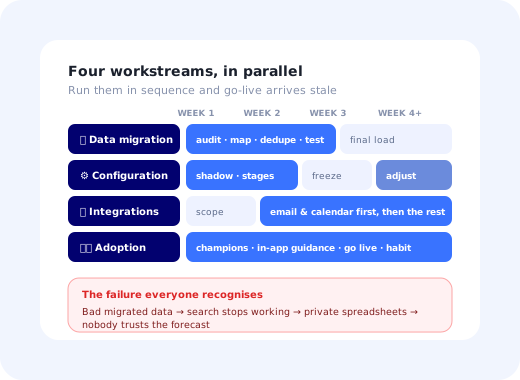
These run in parallel. Teams that run them in sequence (migrate, then configure, then integrate, then train) spend two months getting to a go-live where the training has gone stale and the migrated data is already out of date.
Notice where adoption sits. It is not a training session bolted on at the end; it starts in week one, when you choose which reps will be the ones other reps ask, and it continues long after go-live, when the real habits form. Treating adoption as the last lane is the most common planning error in CRM onboarding and the hardest to recover from.
Data Migration: The Part Everyone Underestimates
Migration is usually scoped as a technical task and is actually a trust task. Reps form a judgment about the new system in the first ten minutes, and that judgment is based on one thing: did their accounts come across correctly? A rep who searches for their biggest customer and gets three duplicate records with a misspelled name has already decided, and no amount of later polish will fully undo it.
Four rules keep you out of that spiral:
- Migrate less than you think you should Open opportunities, active accounts and contacts, and twelve to twenty-four months of closed history for reporting continuity. Archive the rest somewhere retrievable. Every dead record you carry over is a small tax on every search anyone ever runs.
- Agree deduplication rules before the load, in writing What makes two accounts the same? Domain, registered name, or a human decision? Deciding this after the load means deciding it a record at a time, forever.
- Have a rep sign off on a sample, not an admin Load fifty accounts into a sandbox and ask the person who owns them whether it looks right. They will spot in five minutes what a field-mapping review misses entirely.
- Freeze the old system on a named date Two live systems is not a safety net, it is a guarantee that neither is complete. Pick the date early, say it often, and make sure the new system can actually take the load first.
Configuring the Pipeline Without Recreating the Old Mess
The second workstream is where good intentions do the most damage. Given a blank CRM, most teams configure the sales process they wish they ran: eleven stages, mandatory next-step fields, a qualification framework nobody has been trained on. Reps then do what reps always do: they pick whichever stage lets them save the record and move on, and within a month the stage data is fiction.
Three principles, in order of importance:
1. Shadow before you configure
Sit with three reps for an hour each and watch them work a deal. Write down the stages they actually describe out loud. That list (usually five or six items, not eleven) is your pipeline. Configuration derived from observation survives contact with the team; configuration derived from a strategy document does not.
2. Every mandatory field needs a named beneficiary
For each required field, answer: who reads this, and what decision changes because of it? If the honest answer is "nobody, but it might be useful later", make it optional. Mandatory fields without a beneficiary are the single largest source of deliberate garbage data in CRMs, because a rep in a hurry will always type something rather than lose the record.
3. Freeze configuration for the first four weeks after go-live
Then reopen it deliberately, with a list of the workarounds you observed. Teams that keep tinkering during the first month train their users to expect the ground to move, and users who expect the ground to move do not build habits. Teams that never reopen it end up with a system that fits nobody. Freeze, watch, then adjust, in that order.
The eleven-stage trap: a pipeline with more stages than the team can name from memory does not produce better forecasting. It produces stage data that reflects which stage was least effortful to select, which is worse than no stage data at all because it looks credible in a report.
Getting Reps to Actually Use It
Here is the whole problem in one sentence: a rep will use the CRM when using it is the shortest path to something they already want. Everything below is a way of arranging that.
Activity capture from inbox, calendar and phone beats any form. Every context switch you remove converts directly into logged activity.
Their pipeline, their quota attainment, their commission-relevant deals, on the first screen they see. A dashboard built for management gives the rep no reason to look.
If a manager coaches off a spreadsheet, the spreadsheet is the real system and everyone knows it. This is the highest-leverage change available and it costs nothing.
Run the beneficiary test on every mandatory field a quarter after go-live. The list of fields that survive is always shorter than the original.
A tooltip on the field being filled in beats a training session three weeks earlier. See the software training guide for why classroom-only training decays so fast.
Reps ask the colleague next to them, not the enablement mailbox. One respected user per pod does more than any central programme.
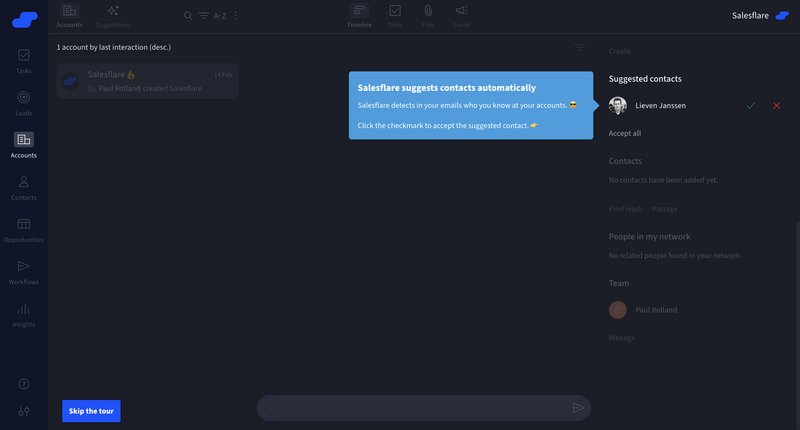
Guidance delivered inside the CRM, at the moment of the task, is what converts a trained rep into a using rep.
The 8-Step CRM Onboarding Plan
- Define done as a forecast the manager believes
- Shadow three reps before touching configuration
- Scope the migration down, and write the dedupe rules
- Connect email and calendar before anything else
- Build the in-app guidance layer while configuration is still moving
- Go live with a hard freeze date on the old system
- Coach from the CRM in week one, visibly
- Re-open configuration in week five, against observed workarounds
1. Define done as a forecast the manager believes
Not "configured", not "trained", not "migrated". Write the success condition down and put a date on it. It changes every later argument about scope, because it makes clear that a feature nobody uses is not progress.
2. Shadow three reps before touching configuration
One senior, one new, one who is known to be sceptical. The sceptic is the most valuable hour you will spend, because they will tell you precisely which parts of the old process were theatre and which were load-bearing.
3. Scope the migration down, and write the dedupe rules
Decide what is coming across and what is being archived, get a rep to sign off on a sample load, and agree in writing what makes two records the same. Do this before the first test load, not after the third.
4. Connect email and calendar before anything else
These two integrations do more for adoption than the rest combined, because they turn logging from a task into a by-product. Everything else (marketing automation, support, billing) can follow after go-live without hurting anyone.
5. Build the in-app guidance layer while configuration is still moving
A short first-session product tour, a setup checklist for admins, and tooltips on the three fields you already know people will get wrong. Because this layer sits on top of the CRM rather than inside it, you can build it in parallel and adjust it the day configuration changes.
6. Go live with a hard freeze date on the old system
Announce it, hold it, and make sure support is heavier in that week than anyone thinks is necessary. A go-live week with a fast answer to every question buys more adoption than a month of preparation.
7. Coach from the CRM in week one, visibly
Every manager runs every pipeline review in the new system, on a shared screen, in week one. If a deal is not in the CRM it does not get discussed. This is uncomfortable for one week and it settles the question permanently.
8. Re-open configuration in week five, against observed workarounds
Collect the notes-in-the-description-field, the stage everyone skips, the field everyone fills with a dot. Each one is a design instruction. Fix them in a single batch, announce the changes in-app, and freeze again.
CRM Onboarding Metrics
| Metric | Definition | What it tells you |
|---|---|---|
| Weekly active reps | Distinct reps taking an action, over licences issued | Whether the system is in the daily workflow at all |
| Activity coverage | Open deals with an activity logged in the last 7 days | Whether the pipeline data is alive or decorative |
| Pipeline hygiene | Open deals whose close date is in the past | How much of the forecast is fiction |
| Time to first logged deal | Days from account creation to a new rep's first deal | Whether onboarding works for people who join later |
| Shadow systems in use | Asked, not measured: how many private trackers survive | The truth, unspun by mandatory fields |
Note that the first four can all be inflated by making fields mandatory and the fifth cannot. Ask it in a one-question in-app survey thirty days after go-live, anonymously, and treat the answer as the real score. For the wider picture of measuring adoption over time, the digital adoption guide covers how these numbers behave across a whole tool portfolio.
CRM Onboarding: Do vs. Don't
✅ Do
- Run data, configuration, integrations and adoption in parallel
- Shadow real reps before designing the pipeline
- Migrate open deals and recent history; archive the rest
- Get a rep, not an admin, to sign off on a sample load
- Connect email and calendar first
- Put the rep's own numbers on the first screen they see
- Run every pipeline review in the CRM from week one
- Ask, anonymously, how many spreadsheets survive
❌ Don't
- Treat training as the adoption workstream
- Configure eleven stages nobody can name
- Make a field mandatory without a named beneficiary
- Migrate everything "just in case"
- Run the old system and the new one indefinitely
- Keep changing configuration during the first month
- Report adoption from licence counts
- Let managers coach from a spreadsheet
Building the Guidance Layer Without Engineering Time
Whether you sell the CRM or are rolling one out, the guidance layer is the part you can change weekly, and it is where the adoption gap actually closes. With Kompassify you build it on top of the CRM's existing screens, no release required:
- A role-aware first-session tour One path for admins configuring the pipeline, another for reps logging their first activity: different flows, same product, targeted by role.
- An implementation checklist for the admin A persistent checklist covering migration, stages, integrations and user invites, resumable across the weeks a real rollout takes.
- Tooltips on the fields people fill in wrongly One sentence at the point of entry on stage definitions, close dates and deal source, the three fields responsible for most bad CRM data.
- In-app announcements when the process changes When stages are renamed in week five, an in-app announcement reaches the people who actually use the system, unlike the email nobody opened.
- A nudge for reps whose deals have gone quiet Triggered on "open deal, no activity in 14 days", pointing at the one-click way to log the call they already made.
- Adoption analytics by team Analytics showing which teams completed the guidance and which quietly skipped it, the earliest warning you will get.
Kompassify is no-code, GDPR compliant and EU-hosted, free for under 100 monthly active users, with paid plans from $129/month.
Close the Gap Between Configured and Used
Build the admin checklist, the rep-first tour and the quiet-deal nudge on top of your CRM's existing screens, and change them the same week the process changes.
Start FreeFrequently Asked Questions
What is CRM onboarding?
CRM onboarding is the process of taking a sales organisation from a signed contract to a system their reps use every day without being asked. It runs four workstreams in parallel: migrating existing customer and deal data, configuring the pipeline and fields, connecting the surrounding tools such as email and calendar, and building the daily habit in the team, and it is finished not when the system is configured but when a manager can run a forecast off it and believe the number.
How long does CRM onboarding take?
For a small team with clean data and standard requirements, a workable CRM can be live in one to two weeks. For a mid-market organisation with a legacy system, custom fields and integrations, six to twelve weeks is realistic, and most of that time is data and process decisions rather than software configuration. The number that actually predicts success is not elapsed weeks but how many days pass between go-live and the first week in which every rep logged an activity. If that gap stretches past a month, the rollout is drifting toward the parallel-spreadsheet failure mode.
Why do CRM implementations fail?
Rarely for technical reasons. The three usual causes are bad migrated data, which destroys trust in the system within days; configuration that reproduces someone's idealised sales process rather than the one the team actually runs; and no answer to the question of what the rep personally gets out of updating a record. The pattern is always the same: reps keep a private spreadsheet, managers stop trusting the pipeline report, and the CRM degrades into an expensive archive of stale deals.
How do you get sales reps to actually use the CRM?
Make the CRM the shortest path to something the rep already wants. That means logging activity from where they work: inbox, calendar, phone, rather than in a separate form; showing the rep their own pipeline and commission-relevant numbers on the screen they open first; removing every required field that exists only for management reporting; and having managers run their one-to-ones from the CRM so the data has a consequence. Training helps, but a rep who cannot see a personal payoff will revert to their spreadsheet the first busy week, whatever they were taught.
What should you migrate into a new CRM?
Migrate open opportunities, active accounts and contacts, and enough closed history for reporting continuity: typically the last twelve to twenty-four months. Do not migrate everything by default. Every dead record you carry over is one more thing that makes search results untrustworthy, and untrustworthy search is the fastest route to reps working outside the system. Archive the rest somewhere retrievable, agree the deduplication rules before the load rather than after, and have a named person from the sales team sign off on a sample before the full run.
What metrics show whether CRM onboarding worked?
Five: weekly active reps as a share of licences, activity logging coverage (the share of open deals with an activity in the last seven days), pipeline hygiene (the share of open deals with a close date in the past), time to first logged deal per new rep, and the number of parallel spreadsheets still in use, which you can only learn by asking. The last one is the most honest indicator on the list, and the only one that cannot be gamed by making fields mandatory.
Should you customise the CRM during onboarding?
As little as possible in the first month, and never in ways that encode a process the team has not run yet. The productive sequence is to go live close to standard, watch where people work around the system, and customise against those observations. Teams that front-load heavy customisation usually end up encoding the sales process they wished they had; teams that customise after four weeks of real use end up encoding the one they have, which is the one reps will follow.
Can you improve CRM onboarding without engineering work?
Yes, and this is where most of the recoverable adoption sits. A setup checklist for admins, a first-week product tour for reps, tooltips on the fields people fill in wrongly, an in-app announcement when the pipeline stages change, and a nudge for reps whose deals have gone quiet are all guidance on top of screens that already exist. With a no-code platform like Kompassify an enablement or customer-success owner can build and change that layer themselves, segment it by role, and update it the same week the process changes. Kompassify is GDPR compliant and EU-hosted, free for under 100 monthly active users, with paid plans from $129/month.