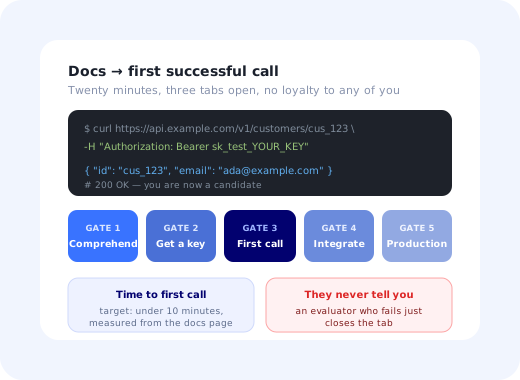
Somebody is evaluating your API right now. They have your documentation open in one tab and two alternatives in others. They have about twenty minutes before a meeting, and they are going to spend it finding out which of the three can be made to work.
They will not read your positioning. They will not watch a video. They will scan for a code
block, copy it, run it, and judge you entirely on what comes back. If it is a working
response, you are a candidate. If it is a 401 with a message that says
invalid_request and nothing else, you are a closed tab, and no support ticket,
no NPS response and no churn analysis will ever tell you it happened.
Developer onboarding is the discipline of winning those twenty minutes. This guide covers the five gates from documentation to production, the metric that summarises them, why developer churn is invisible, what a quickstart must contain, the sandbox question, an eight-step method, and where, carefully, in-product guidance belongs.
Key Takeaways
- Time to first successful call is the metric. It compresses docs, signup, credentials, SDKs and error messages into one number.
- Developers churn silently. They are evaluating, not committed, so support volume tells you nothing about who left.
- The quickstart is not documentation, it is a product surface. One page, one working response, one next step.
- Error messages are onboarding. The message a developer sees on their first failed call does more work than any tutorial.
- A test mode should differ from production in exactly one way: nothing real happens, and in no other.
- Guide in the console, stay out of the terminal. The dashboard is a normal SaaS product; the code path is not.
What Is Developer Onboarding?
Developer onboarding: definition
Developer onboarding is the process of taking a developer from landing on your documentation to running your product in their own production system. It spans documentation, signup, credential issuance, the first successful call, a real integration, and the move to live traffic, most of which happens in a terminal and an editor you cannot see.
That last clause is the structural difference from ordinary user onboarding. In a normal SaaS product you can watch someone struggle and intervene. In a developer product, the struggle happens in someone else's IDE, against your documentation, and the only telemetry you get is a stream of 4xx responses with no name attached.
Three consequences follow, and they shape everything below:
- Documentation carries the load a product tour carries elsewhere. For most of the journey, the docs are the product experience.
- Interruption is expensive. A modal that a marketing user tolerates, a developer resents, and resentment in this audience becomes a comment on a forum thread.
- The last mile is errors, not encouragement. Nobody needs a congratulatory confetti animation; they need to know why the signature check failed.
The Five Gates of Developer Onboarding
Gate 1: Comprehension
A developer needs to know, within about fifteen seconds, what your product does and whether it solves their problem. This is a writing problem, not a design problem. One sentence at the top of the docs, in the vocabulary of the thing being built rather than the vocabulary of your company, settles it. Diagrams help; taglines do not.
Gate 2: Credentials
Every step between "I want to try this" and "I have a working key" is pure loss. Email verification before a test key, a mandatory company-size field, a sales call before sandbox access: each one costs you evaluators, and the ones you lose are disproportionately the ones just exploring on a Thursday, who are also the ones who become champions later.
Gate 3: The first call
This is the evaluation. Everything before it was setup and everything after it is commitment. The goal is a copy-pasteable request that returns something real, with the developer's own key already in it if your docs can do that safely.
Gate 4: A real integration
Now the interesting failures start: pagination, rate limits, webhook signature verification, idempotency, timezone handling. This gate is won or lost on error messages and on how quickly a developer can find the one page that explains the thing that just went wrong.
Gate 5: Production
Live keys, real limits, monitoring, and someone on call. Products that make this transition ceremonious (a checklist of what changes between test and live, and an explicit warning about the three things that behave differently) avoid a category of incident that otherwise happens on everyone's first weekend.
Time to First Successful Call
If you measure one thing, measure this: the median elapsed time from a developer arriving at your docs to receiving their first non-error response. It is the developer-product equivalent of time to value, and it is unusually informative because so many separate failures show up in it: a slow signup, a key that takes a minute to propagate, an SDK that will not install, a code sample with an outdated parameter, an error message that does not name the problem.
A useful target: under ten minutes for a simple endpoint, measured from first docs visit and not from key creation. Measuring from key creation is the standard way teams make this number look good while the real problem, everything before the key, goes unexamined.
When the number is bad, the fix is almost always removing a step rather than explaining one better. The most common wins, in rough order of frequency: issue a test key immediately at signup rather than after email verification; put the key directly into the docs code sample for signed-in developers; delete the "concepts" page standing between the landing page and the quickstart; and make the first example a single request with no SDK installation required.
The Quickstart Is a Product Surface
A quickstart is not the first chapter of your documentation. It is a single page whose only job is to produce a working response, and it should be edited with the ruthlessness you would apply to a signup form.
Everything it needs, and nothing else:
- One sentence saying what they are about to build "In two minutes you will retrieve a customer record." Not a description of your platform.
- A copy-pasteable request Complete, runnable, with no placeholder the developer must go and find. If you can inject their real test key, do it.
- The exact response they should see So the developer can compare, character by character, and know instantly whether it worked.
- One obvious next step A single link, not a menu of nine. The choice itself is friction at this moment.
The shape a quickstart should have: one request, one response, nothing to assemble.
What does not belong: an architecture overview, an authentication deep-dive, a table of every parameter, a note about enterprise SSO. All of that is reference material and all of it is valuable, on a different page. A quickstart that requires scrolling past prose has stopped being a quickstart.
Test your own quickstart quarterly, from a clean machine, with a stopwatch. Almost every API team that does this for the first time discovers a step that has been broken for months: a stale version number, a removed parameter, an SDK that no longer installs on a current runtime. Nobody reported it, because the people who hit it were evaluating and left.
Error Messages Are Onboarding
The first call a developer makes usually fails. That is normal and it is not the problem; the problem is what the failure says. Compare:
Three additions (a specific code, a human sentence, and a deep link) turn a dead end into a next step.
A practical exercise: pull the top ten error codes returned to keys less than an hour old. That list is your onboarding backlog, ranked, and it is usually short. In most API products, three or four errors account for the large majority of first-hour failures, and each one has an obvious fix: a clearer message, a better default, or a validation that catches the mistake earlier.
The Sandbox Question
Should you build a separate sandbox environment? The honest answer is: offer test credentials, be very careful about offering a whole parallel world.
✅ Test mode done well
- Works the instant the developer signs up
- Same endpoints, same shapes, same errors as production
- Differs in exactly one respect: nothing real happens
- Has realistic seeded data to work against
- Documented switch-to-live checklist
❌ Sandbox done badly
- Requires a separate signup or a sales conversation
- Has its own data model and its own bugs
- Returns responses production would never return
- Silently lags behind the live API version
- Is where developers spend their day debugging you
Where a full sandbox is genuinely unavoidable (payments, regulated data, anything with an irreversible side effect) invest in the realism of its data and behaviour. An unrealistic sandbox does not remove problems; it postpones all of them to the day of the go-live, which is the most expensive possible moment to find them.
How to Improve Developer Onboarding in 8 Steps
- Time your own quickstart from a clean machine
- Issue a working test key at signup, before verification
- Cut the path from landing page to first code block to one click
- Rewrite the top three first-hour error messages
- Make the first example runnable without installing anything
- Instrument the funnel from docs visit to first successful call
- Add console guidance where the product is a web app, and nowhere else
- Publish a switch-to-production checklist
1. Time your own quickstart from a clean machine
No cached credentials, no internal knowledge, a stopwatch running. Write down every second spent on something that is not your product. That list is the work.
2. Issue a working test key at signup, before verification
Scoped to test data, rate-limited, revocable, but working. Every product that has moved verification after first-call has seen the funnel improve, and the abuse risk is manageable with limits rather than with gates.
3. Cut the path from landing page to first code block to one click
Count the clicks today. If a "concepts" or "overview" page sits in the middle, move it after the quickstart. Developers who want the concepts will find them; developers who wanted to try something will have left.
4. Rewrite the top three first-hour error messages
Specific code, human sentence, deep link. This is a day of work with an outsized effect, and it is measurable: the same error codes should fall in frequency within a fortnight.
5. Make the first example runnable without installing anything
A single HTTP request beats an SDK for the first call, because dependency installation is a category of failure entirely outside your control. Introduce the SDK at gate four, where it genuinely pays for itself.
6. Instrument the funnel from docs visit to first successful call
Docs visit, signup, key created, first request, first success. Five events, joined by an anonymous identifier. Naming them well now saves a rewrite later; the event tracking guide covers the conventions.
7. Add console guidance where the product is a web app, and nowhere else
Key management, webhook configuration, usage dashboards and team permissions are ordinary SaaS screens and developers stall on them like everyone else. Guide there. Do not put a walkthrough in front of someone's terminal.
8. Publish a switch-to-production checklist
What changes between test and live, what limits apply, what to monitor, what to do at 3am. It is a short page that prevents the class of incident that turns a new integration into a bad first impression of your reliability.
Developer Onboarding Metrics
| Metric | Definition | What it tells you |
|---|---|---|
| Time to first successful call | Median minutes from docs visit to first 2xx | The health of the whole path, in one number |
| Signup → first call rate | Share of new keys that ever make a successful request | How many evaluators you lose after handing them credentials |
| First-hour error mix | Top error codes on keys under one hour old | Your onboarding backlog, pre-ranked |
| Integration → production rate | New integrations reaching live traffic within 30 days | Whether gate four and five are survivable |
| Empty doc searches | Search terms returning nothing useful | The cheapest roadmap input you already own |
Note what is absent: registered developers, documentation pageviews and SDK downloads. All three move for reasons unconnected to whether anyone successfully built anything, and all three are reliably quoted in decks about developer growth.
Developer Onboarding: Do vs. Don't
✅ Do
- Measure time to first successful call from the docs, not the key
- Issue a working test key immediately
- Put a complete, runnable request on the first page
- Make error messages specific, human and deep-linked
- Keep test mode identical to production except for effects
- Guide inside the console, dismissibly
- Read your empty documentation searches
- Re-time your quickstart every quarter
❌ Don't
- Gate a test key behind email verification or a sales call
- Put a concepts page between the developer and the first call
- Require an SDK installation for the first example
- Return
invalid_requestand nothing else - Ship a sandbox that behaves unlike production
- Interrupt the code path with a modal
- Report developer signups as adoption
- Assume silence means everything works
Where In-Product Guidance Belongs
Half of a developer product is not a developer product. The console, the key manager, the webhook configuration screen, the usage dashboard, the billing and team pages: these are ordinary web applications, used by the same person who was fluent in the terminal ten minutes earlier and is now hunting for where to rotate a secret.
That is where Kompassify fits, without touching your API or your docs:
- A short first-visit console tour Where keys live, where logs live, where webhooks are configured. Three steps, dismissible, never repeated.
- A setup checklist across sessions A checklist covering key created, first call made, webhook verified, production key issued: visible progress across the days a real integration takes.
- Deprecation and version announcements An in-app announcement in the console reaches the integrator who filtered your developer newsletter into a folder two years ago.
- Tooltips on the console fields people get wrong Scopes, environments, webhook secrets and IP allow-lists: the settings that generate support tickets in every API product ever built.
- Console funnel analytics Analytics on where integrators stall inside the dashboard, which is the half of the journey you can actually see.
The discipline is restraint. A developer audience punishes over-guidance harder than any other, so keep it short, keep it dismissible, and keep it out of the code path. If you are also building guided flows into your own front-end, the React product tour guide covers doing it in code.
Kompassify is no-code, GDPR compliant and EU-hosted, free for under 100 monthly active users, with paid plans from $129/month.
Fix the Half of Developer Onboarding You Can See
Add a console tour, an integration checklist and deprecation announcements to your developer dashboard, without an engineering release.
Start FreeFrequently Asked Questions
What is developer onboarding?
Developer onboarding is the process of taking a developer from landing on your documentation to running your product in their own production system. It has five gates: understanding what the product does, obtaining credentials, making a first successful call, building a real integration, and going live. And it is different from ordinary user onboarding in one important way: most of it happens outside your product, in documentation, a terminal and an editor you cannot instrument. The developer's experience of your product is largely an experience of your docs.
What is time to first successful call?
Time to first successful call, sometimes written as time to first hello world, is the elapsed time from a developer arriving at your documentation to receiving their first non-error response from your API. It is the single best summary metric in developer onboarding because it captures documentation quality, signup friction, credential issuance, SDK ergonomics and error-message clarity in one number. Anything above about ten minutes for a simple endpoint should be treated as a defect, and the fix is almost always removing a step rather than explaining one better.
Why do developers abandon an API without saying anything?
Because they are usually evaluating rather than committed. A developer trying three options on a Thursday afternoon has no relationship with any of them and no reason to file a ticket about the one that did not work. They simply pick another. That makes developer churn almost invisible in support data, and it is why instrumentation of the signup-to-first-call path matters so much: the people you most need to hear from are exactly the ones who will never tell you anything.
What should an API quickstart contain?
One page that gets a developer to a working response, containing: a one-sentence statement of what they are about to build, a copy-pasteable request with a real key already substituted where possible, the exact response they should see, and one obvious next step. It should not contain an architecture overview, a concepts section, an authentication deep-dive or a list of every parameter. Those belong in the reference. A quickstart that cannot be completed in one screen without scrolling into prose has stopped being a quickstart.
Should an API product offer a sandbox?
Offer test credentials that work immediately and behave identically to production, yes. A separate sandbox environment with its own data model, its own quirks and its own outages is often worse than none, because developers end up debugging the sandbox rather than their integration. The practical rule is that a test mode should differ from production in exactly one respect: nothing real happens, and in no other way. Where a full sandbox is genuinely required, such as in payments or regulated data, invest in making its behaviour and its data realistic, because an unrealistic sandbox postpones every real problem to the day of the go-live.
How do you measure developer onboarding?
Track five: time to first successful call, measured as a median from signup; the signup-to-first-call conversion rate; the first-call error rate and the top three error codes new keys generate; the share of new integrations that reach production traffic within thirty days; and documentation search terms that return nothing useful, which is the cheapest source of roadmap information most API teams already own and never read.
How is developer onboarding different from user onboarding?
Three differences change the design. Most of the journey happens outside your product, so documentation carries the load that a product tour would carry elsewhere. The audience is unusually intolerant of interruption: a modal in a developer console is resented in a way the same modal in a marketing tool is not. And the success condition is not a completed setup but working code in someone else's system, which means the last mile is error messages and edge cases rather than encouragement. What does transfer is the fundamentals: reduce steps, show progress, and instrument everything.
Where does in-product guidance belong in a developer tool?
In the console and dashboard, not in the code path, and always dismissible. The parts of a developer product that are genuinely a web application (key management, webhook configuration, usage dashboards, team permissions, billing) benefit from the same guidance as any other SaaS, and developers stall there just like everyone else. With a no-code platform such as Kompassify you can add a first-visit console tour, a setup checklist covering key, webhook and first call, and announcements for version deprecations, without touching the API itself. The rule is restraint: guide in the console, stay out of the terminal. Kompassify is GDPR compliant and EU-hosted, free for under 100 monthly active users, with paid plans from $129/month.