There is no single tool that works for every team's product adoption needs. What matters is finding the right balance of
features, pricing, and flexibility for where your product is right now.
The product adoption market is crowded with dozens of tools and there are plenty of good reasons to explore what else is
out there.
In this article we will cover the top 5 UserGuiding alternatives with a complete comparison of their features and
pricing to help you make the right choice.
Key Takeaways:
- UserGuiding's main limitations: Pricing starts at $249/month for only 2,000 MAU, analytics are basic on lower plans, no mobile native-apps support, and customization is more constrained than most alternatives. There is a free plan, but it only offers the Resource Center and it excludes all the product adoption features like product tours and checklists.
- Kompassify is the best value alternative: It matches UserGuiding's core feature set, product tours, onboarding checklists, NPS surveys, segmentation, multi-language support, no-code builder, at a lower price point. Free plan available; paid plans start at $129/month (Pro) and $249/month (Business).
- Appcues is the best choice for mobile: It is the only alternative on this list with native iOS and Android support, though it is also the most expensive, starting at $750/month billed annually.
- Userpilot leads on analytics: It is the only tool with native product analytics, funnels, and session replay built in, though advanced features require higher-tier plans. Starter plan from $299/month.
- Pendo is built for enterprise: Powerful analytics and roadmapping capabilities make it a strong fit for large organizations, but pricing is custom, opaque, and generally out of reach for SMBs.
- Chameleon is the most developer-friendly: Highly customizable, with robust A/B testing and advanced targeting. Starter plan from $279/month, requires more technical setup than other options.
Just before diving deeper, here is a table that summarizes the listed competitors, their features and their pricing:
| UserGuiding | Kompassify | Appcues | Userpilot | Pendo | Chameleon | |
|---|---|---|---|---|---|---|
Capterra Rating |
4.6 |
4.7 |
4.5 |
4.8 |
4.7 |
N/A |
G2 Score |
4.7 |
4.8 |
4.6 |
4.6 |
4.4 |
4.4 |
|
Capterra Score |
4.7 |
4.7 |
4.6 |
4.7 |
4.6 |
4.5 |
Starting Price |
$249/mo |
Free |
$750/mo |
$299/mo |
Custom |
$279/mo |
Free Plan |
✅ (no tours) |
✅ |
❌ |
❌ |
❌ |
❌ |
Product Tours |
✅ |
✅ |
✅ |
✅ |
✅ |
✅ |
Onboarding Checklists |
✅ |
✅ |
✅ |
✅ |
✅ |
✅ |
Tooltips & Hotspots |
✅ |
✅ |
✅ |
✅ |
✅ |
✅ |
NPS & Surveys |
✅ |
✅ |
✅ |
✅ |
✅ |
✅ |
In-App Announcements |
✅ |
✅ |
✅ |
✅ |
✅ |
✅ |
Resource Center |
✅ |
❌ |
✅ |
✅ |
✅ |
✅ |
Knowledge Base |
✅ |
✅ |
❌ |
❌ |
❌ |
❌ |
Product Analytics |
❌ |
✅ |
❌ |
✅ |
✅ |
❌ |
Session Replay |
❌ |
❌ |
❌ |
✅ |
✅ |
❌ |
A/B Testing |
✅ (Growth+) |
❌ |
✅ |
✅ |
✅ |
✅ |
Segmentation |
✅ |
✅ |
✅ |
✅ |
✅ |
✅ |
In-App Localization |
✅ |
✅ |
✅ |
✅ |
✅ |
✅ |
Mobile App Support |
❌ |
❌ |
✅ |
⚠️ Add-on |
✅ |
❌ |
No-Code Builder |
✅ |
✅ |
✅ |
✅ |
✅ |
⚠️ Partial |
What is UserGuiding?
UserGuiding is a no-code product adoption platform founded in 2017, used primarily by SaaS teams to onboard new users and drive feature adoption. It lets product managers and growth teams build in-app experiences without writing code. Some of the core features of the product include:
- In-app product tours and interactive guides
- Onboarding checklists
- Tooltips and hotspots
- NPS and custom in-app surveys
- In-app announcements and modals
- Resource center
- Standalone knowledge base and product updates page
- AI assistant for self-serve support
Product teams choose UserGuiding for:
- No-code simplicity: A Chrome extension-based visual builder makes it easy for non-technical teams to create onboarding flows without engineering involvement.
- All-in-one content hub: Beyond product tours, UserGuiding bundles a knowledge base, product updates page, and AI assistant, useful for teams looking to reduce support volume.
- SMB and mid-market fit: Positioned for SaaS companies that want a solid foundation of onboarding features without enterprise complexity.
- A/B testing: Available on higher-tier plans, allowing teams to test different onboarding flows and optimize for completion rates.
Why Consider an Alternative to UserGuiding in 2026?
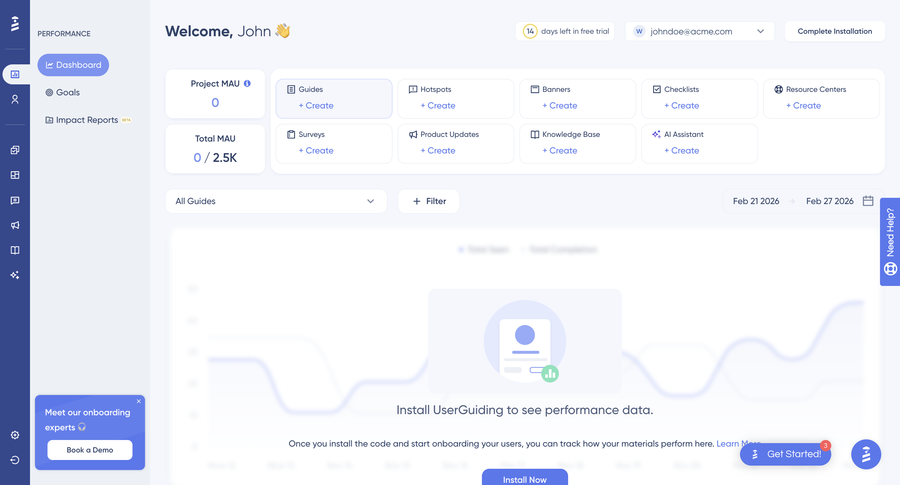
UserGuiding is a capable tool that helps product teams build and launch user onboarding experiences
without the need of developers. It covers the basic features like: product tours , checklists, NPS surveys, and a resource center.
But as teams grow, the cracks start to show. Analytics are surface-level on lower plans. The pricing jumps quickly
with MAU. And if your needs go beyond the standard feature set, you'll find the platform more rigid than you'd like.
UserGuiding Pricing in 2026: It Scales Quickly
UserGuiding's Starter plan starts at $249/month billed monthly for up to 2,000 MAU. That sounds reasonable until you factor in that most growing SaaS products cross that MAU threshold quickly. Scaling to 5,000 MAU pushes the Starter plan to $349/month, and growth-tier features like A/B testing and advanced analytics require moving to the $699/month Growth plan. For smaller teams or early-stage startups, that pricing can be hard to justify.
| UserGuiding Plan | Price | What You Get |
|---|---|---|
| Free ("Support Essentials") | $0 | Resource center only: no product tours, no checklists |
| Starter | $249/month (up to 2,000 MAU) | Core onboarding features; rises to $349/month at 5,000 MAU |
| Growth | $699/month | Adds A/B testing and advanced analytics |
For comparison: Kompassify's free plan includes actual product tours and a checklist, and its Pro plan starts at $129/month, roughly half of UserGuiding's entry price.
Analytics Are Limited on Lower Plans
Out of the box, UserGuiding provides basic reporting on guide completions and survey responses. But if you want deeper funnel analysis, user paths, retention data, or cohort comparisons, you'll need to integrate with a separate analytics tool, or upgrade to a platform that has them built in. Teams that want to connect the dots between onboarding engagement and downstream product behavior tend to find UserGuiding's analytics too surface-level.
Limited Customization Flexibility
UserGuiding's visual builder is fast and accessible, but it keeps you within guardrails. Custom CSS is only available on higher-tier plans, and fine-grained control over the look and feel of your onboarding flows can be harder to achieve than with more developer-friendly platforms like Chameleon. For product teams with specific brand requirements, this is a meaningful constraint.
No Mobile App Support
UserGuiding is a web-only platform. If your product includes a native iOS or Android app and you want consistent onboarding experiences across platforms, you will need a different solution, or a separate tool layered on top.
What Are the Best UserGuiding Alternatives in 2026?
The five best UserGuiding alternatives in 2026 are Kompassify, Appcues, Userpilot, Pendo, and Chameleon, ranked below by value, feature coverage, and pricing. Whether it's the pricing, the limited analytics, or the lack of customization flexibility pushing you to switch, each one covers the core onboarding feature set and fixes at least one of UserGuiding's gaps:
- Kompassify
- Appcues
- Userpilot
- Pendo
- Chameleon
#1 Kompassify
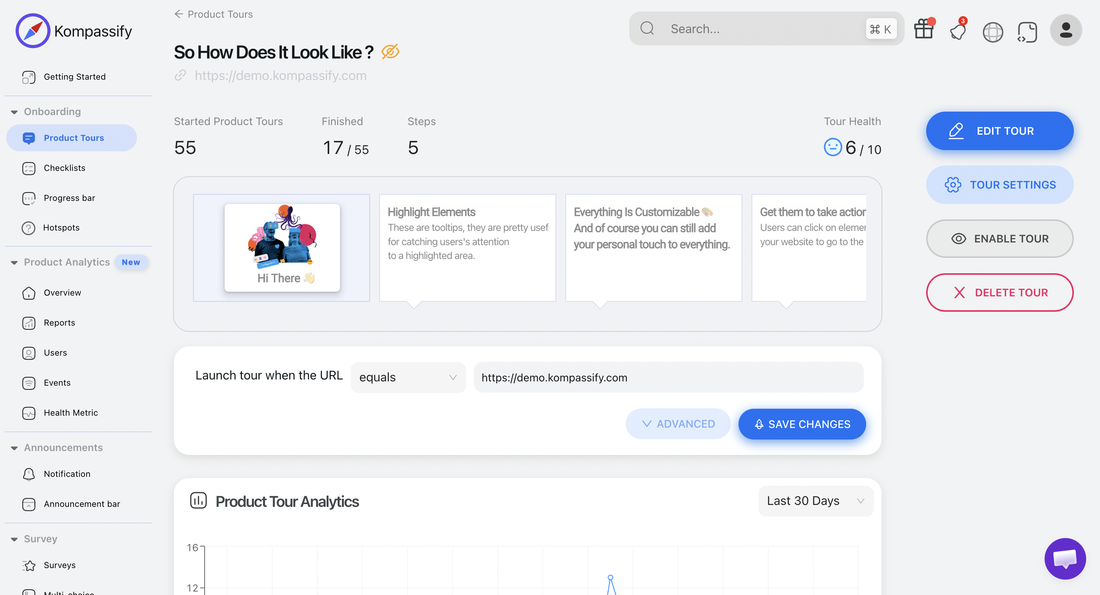
Kompassify's in-app messages improve user experience and streamline customer journeys, whether you're trying to drive new users straight to that pivotal moment of value or giving quiet context to complex features. Building these experiences requires no coding and can be customized to look just like they originated from your app, not a third-party tool.
Kompassify is best for teams that want a comprehensive product adoption platform, with an intuitive no-code builder, diverse in-app features, and built-in product analytics, at a price point that doesn't punish growth. Its lack of native mobile app support can be a drawback for some companies, but for web-based SaaS products it covers the full adoption stack.
-
Interactive Product Tours
Create engaging step-by-step product tours and walkthroughs that guide users through your product features with tooltips, modals, and hotspots. Unlimited tours on all paid plans.
-
User Onboarding Checklists
Progressive checklists that help users complete key actions and reach their "aha moment" faster. Track completion rates in real-time.
-
NPS Surveys
Measure user satisfaction and gather feedback at critical moments in the user journey with Net Promoter Score and CSAT surveys.
-
No-Code Builder
Intuitive visual editor that requires zero coding knowledge. Average setup time: 2–3 hours. Non-technical teams can launch their first onboarding flow the same day they sign up.
-
No-Code Product Analytics
Track how users interact with your onboarding flows in real time. Monitor tour completion rates, checklist progress, and survey responses from a single analytics dashboard, no additional setup required.
-
Segmentation & Multi-language Support
Target specific user groups with tailored onboarding flows and serve experiences in the user's preferred language, both available on Pro and Business plans.
Kompassify Pricing
Kompassify offers a free plan and two paid tiers (Pro and Business), with pricing based on Monthly Active Users (MAU). A 14-day free trial is available, no credit card required.
Free
- Up to 100 MAUs
- 1 team member
- Up to 2 Product Tours
- Onboarding checklist
- Notifications widget
- Kompassify branding
Pro
- Up to 5 team members
- Up to 20 Product Tours
- Multi-choice Onboarding
- Notifications widget
- Onboarding Progress bar
- Onboarding checklist
- Segmentation
- Multi-language Onboarding
- No Kompassify branding
Business
- Unlimited team members
- Unlimited Product Tours
- Multi-choice Onboarding
- Notifications widget
- Multiple Onboarding Progress bars
- Multiple Onboarding checklists
- Segmentation
- Multi-language Onboarding
- No Kompassify branding
- Product Analytics
Kompassify vs UserGuiding: Complete Feature Comparison
Feature-by-feature analysis: Kompassify covers the same core digital adoption features as UserGuiding, and goes further with built-in product analytics on the Business plan, at a more accessible price point:
| Feature | Kompassify | UserGuiding |
|---|---|---|
| Product Tours | ✓ Up to 20 (Pro) · Unlimited (Business) | ✓ All plans, step-by-step guides |
| User Onboarding Checklists | ✓ 1 checklist (Pro) · Multiple (Business) | ✓ Interactive checklists, all plans |
| NPS & Surveys | ✓ Built-in NPS & survey tools | ✓ NPS + custom surveys, all plans |
| No-Code Builder | ✓ Visual no-code editor (Chrome extension) | ✓ Visual builder (Chrome extension) |
| In-App Announcements | ✓ Notifications widget, all plans | ✓ Announcement modals |
| User Segmentation | ✓ Pro & Business plans | ✓ Attribute + behavior-based targeting |
| Multi-language Support | ✓ Pro & Business plans | ✓ In-app localization |
| Product Analytics | ✓ Business plan (built-in, no-code) | ✗ Not included, requires integration |
| Knowledge Base | ✓ Included | ✓ Standalone knowledge base |
| Resource Center | ✗ Not available | ✓ In-app hub with guides & materials |
| A/B Testing | ✗ Not available | ✓ Growth plan and above |
| Mobile App Support | ✗ Web only | ✗ Web only |
| Free Plan | ✓ Free plan with tours & checklist | ⚠ Free plan (no tours or checklists) |
| Starting Price | ✓ $129/month (Pro, scales with MAU) | ⚠ $249/month (Starter, up to 2,000 MAU) |
#2 Appcues
Appcues is a multi-channel user engagement platform built for teams that need to deliver onboarding experiences across both web and mobile. It is the most feature-complete option on this list in terms of channel coverage, and the most expensive. If your product lives on iOS or Android (or both), Appcues is the only tool here that has you genuinely covered out of the box.
Appcues is best for mid-market and enterprise teams that need a single platform for web and mobile engagement. However, at $750/month on its Grow plan (the entry point for most serious use cases), it is a significant investment, and the total cost climbs quickly once you factor in MAU overages and add-ons.
-
Flows & Walkthroughs
Step-by-step product tours, tooltips, modals, and slideouts to guide users through your product. A no-code builder makes creation accessible to non-technical teams.
-
Native Mobile Support
Native iOS and Android SDKs let you build onboarding flows directly inside your mobile app, not a web view. This is Appcues' biggest differentiator on this list.
-
NPS, Surveys & Banners
Collect feedback with NPS and custom surveys. Banners and persistent in-app notifications can also be used to drive feature announcements and prompt user action.
-
A/B Testing
Test different onboarding experiences and optimize based on real engagement data. A/B testing is available on the Grow plan and above.
-
Email & Push Notifications
Go beyond in-app and reach users via email and push notifications from the same platform. A useful channel for re-engaging users who have gone quiet.
Appcues Pricing
Appcues does not publish a free plan or a trial-without-demo option. Pricing is based on Monthly Active Users (MAU) and billed annually.
Grow
Billed annually from 1,000 MAU
- Up to 50,000 MAU
- Up to 15 user licenses
- 100 published experiences
- All experience types
- Resource center & NPS
- All integrations (Salesforce, Slack, etc.)
- Appcues AI
- Email & push notifications (add-on)
- Mobile support (add-on)
Rises to $850/mo at 2,000 MAU
Enterprise
- Everything in Grow
- Custom MAU limits
- SSO & advanced security
- Dedicated success manager
- Custom SLAs
Appcues vs UserGuiding: Feature Comparison
Feature-by-feature analysis: Appcues and UserGuiding share a lot of common ground on core onboarding features, where Appcues wins decisively is mobile support and multi-channel reach. UserGuiding edges ahead on pricing for pure web use cases:
| Feature | Appcues | UserGuiding |
|---|---|---|
| Product Tours | ✓ Flows, walkthroughs, all plans | ✓ Step-by-step guides, all plans |
| Onboarding Checklists | ✓ Included | ✓ Interactive checklists |
| NPS & Surveys | ✓ NPS, custom surveys | ✓ NPS + custom surveys |
| Native Mobile Support | ✓ iOS & Android SDK (Grow+) | ✗ Web only |
| A/B Testing | ✓ Grow plan and above | ✓ Growth plan and above |
| Email & Push Notifications | ✓ Grow plan | ✗ Not available |
| Resource Center | ✓ Grow plan | ✓ All plans |
| Knowledge Base | ✗ Not available | ✓ Standalone knowledge base |
| Product Analytics | ✗ Not built-in | ✗ Not built-in |
| Free Plan | ✗ No free plan | ⚠ Free (no tours or checklists) |
| Starting Price | ⚠ $750/month (Grow, 2,500 MAU) | ✓ $249/month (Starter, 2,000 MAU) |
#3 Userpilot
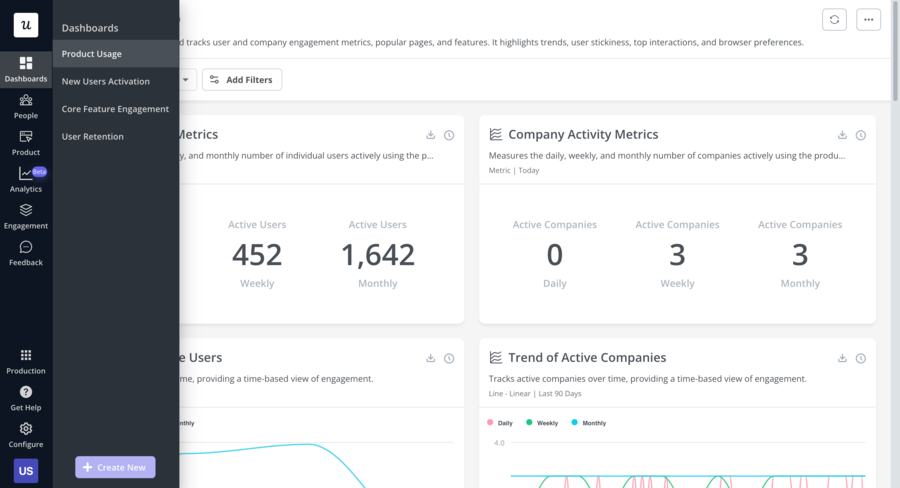
Userpilot is a product growth platform that goes beyond basic onboarding, it combines in-app guidance with robust product analytics, session replay, and event tracking in a single tool. If you're a product team that wants to both guide users and deeply understand their behavior, Userpilot is worth looking at.
Userpilot is best for teams that want event tracking, session recording, and native analytics alongside their onboarding toolset. However, the cheaper plans do not include many of the features that make it stand out, you'll need to upgrade or buy add-ons to use the product to its fullest potential.
-
In-App Engagement
Flows, walkthroughs, tooltips, hotspots, and checklists to guide users through your product. The no-code builder makes it accessible to non-technical teams, though some advanced customization still requires developer involvement.
-
Product Analytics
Funnels, paths, trends, retention, and cohort analysis, all natively built in. Userpilot also supports no-code event tagging, so you can track user interactions without writing custom tracking code.
-
Session Replay
Session recording is available on Growth and Enterprise plans, letting you watch exactly how users navigate your product and identify friction points.
-
NPS and Custom Surveys
Collect user feedback with NPS, CSAT, and fully custom surveys. Userpilot offers 30+ survey templates and a separate analytics dashboard to track results.
-
Resource Center
A self-serve in-app help hub where users can find guides, checklists, and support materials without leaving your product.
Userpilot Pricing
Userpilot pricing is based on Monthly Active Users and billed annually. There is no free plan, but a demo is available on request.
Starter
Billed annually, up to 2,000 MAU
- Product tours & flows
- Checklists & hotspots
- NPS & surveys
- In-app announcements
- Basic analytics
- Segmentation
Session replay and resource center not included
Growth
Billed annually, up to 10,000 MAU
- Everything in Starter
- Native product analytics
- Session replay
- Resource center
- A/B testing
- Advanced segmentation
- Custom dashboards
Enterprise
- Everything in Growth
- Custom MAU limits
- SAML SSO
- Custom roles & permissions
- Dedicated success manager
Userpilot vs UserGuiding: Feature Comparison
Feature-by-feature analysis: Userpilot and UserGuiding share a strong core onboarding feature set. The key differentiators are Userpilot's native product analytics and session replay, and UserGuiding's lower entry-level price:
| Feature | Userpilot | UserGuiding |
|---|---|---|
| Product Tours | ✓ Flows & walkthroughs, all plans | ✓ Step-by-step guides, all plans |
| Onboarding Checklists | ✓ Included | ✓ Interactive checklists |
| NPS & Surveys | ✓ 30+ templates, custom surveys | ✓ NPS + custom surveys |
| Product Analytics | ✓ Native, funnels, paths, retention | ✗ Not built-in |
| Session Replay | ✓ Growth plan and above | ✗ Not available |
| A/B Testing | ✓ Growth plan | ✓ Growth plan |
| Resource Center | ✓ Growth plan | ✓ All plans |
| Knowledge Base | ✗ Not available | ✓ Standalone knowledge base |
| Mobile App Support | ⚠ Add-on only | ✗ Web only |
| Free Plan | ✗ No free plan | ⚠ Free (no tours or checklists) |
| Starting Price | ⚠ $299/month (Starter, 2,000 MAU) | ✓ $249/month (Starter, 2,000 MAU) |
#4 Pendo
Pendo is a product experience platform that has been in the market since 2013, built primarily for enterprise teams. It combines in-app guidance with powerful analytics, product roadmapping, and NPS, all in a single platform. If your organization is large, data-driven, and willing to invest in a comprehensive solution, Pendo is worth evaluating.
Pendo is best for enterprise product teams that need deep behavioral analytics and roadmap tooling alongside their in-app guidance. The trade-off is significant complexity and pricing that is simply not accessible to most SMBs or early-stage startups, Pendo does not publish its pricing publicly, and contracts are typically five-figure annually.
-
In-App Guides
Tooltips, walkthroughs, modals, and banners to guide users through your product. A no-code visual designer makes guide creation accessible to non-technical users.
-
Product Analytics
Pendo's analytics are among the most powerful on this list. Feature adoption tracking, funnel analysis, user paths, retention cohorts, and session replay give product teams a full picture of user behavior.
-
Roadmapping & Feedback
Pendo includes a product roadmap module and in-app feedback collection tools, letting teams connect user sentiment directly to product planning, something none of the other alternatives on this list offer.
-
NPS & In-App Surveys
Collect qualitative feedback at scale with NPS, CSAT, and custom survey tools. Pendo's feedback module goes deeper than most competitors, with the ability to tie responses directly to user segments and behavior.
-
Mobile App Support
Native iOS and Android support lets teams deliver consistent in-app guidance experiences across web and mobile, without needing a separate tool.
Pendo Pricing
Pendo does not publish pricing publicly. Plans are custom-quoted based on MAU and feature requirements. A free plan is available for very small teams with limited features, and a 30-day trial is offered. Based on publicly available information, annual contracts typically start in the range of $7,000–$25,000+ depending on team size and feature tier.
Free
- Up to 500 MAU
- Basic in-app guides
- Basic analytics
- NPS surveys
- Limited integrations
Growth
- Advanced in-app guides
- Full product analytics suite
- Session replay
- Resource center
- A/B testing
- Roadmapping module
- Premium integrations
Portfolio
- Everything in Growth
- Multi-app support
- Cross-app analytics
- Enterprise security
- Custom onboarding
Pendo vs UserGuiding: Feature Comparison
Feature-by-feature analysis: Pendo is more powerful than UserGuiding on almost every dimension , but it comes at a significantly higher price and is aimed at a different buyer:
| Feature | Pendo | UserGuiding |
|---|---|---|
| Product Tours | ✓ In-app guides & walkthroughs | ✓ Step-by-step guides |
| Onboarding Checklists | ✓ Included | ✓ Interactive checklists |
| Product Analytics | ✓ Native, full suite | ✗ Not built-in |
| Session Replay | ✓ Growth plan | ✗ Not available |
| Roadmapping & Feedback | ✓ Included | ✗ Not available |
| A/B Testing | ✓ Growth plan | ✓ Growth plan |
| Mobile App Support | ✓ Native iOS & Android | ✗ Web only |
| Knowledge Base | ✗ Not available | ✓ Standalone |
| Starting Price | ⚠ Custom, typically $7,000+/year | ✓ $249/month |
| Free Plan | ✓ Up to 500 MAU (limited) | ⚠ Free (no tours or checklists) |
#5 Chameleon
Chameleon is a product adoption platform built for teams that want maximum flexibility and control over their in-app experiences. Unlike UserGuiding's more constrained visual builder, Chameleon is designed with developers in mind, offering extensive customization options, robust A/B testing, and a highly configurable launcher for surfacing onboarding content at the right moment.
Chameleon is best for product-led growth teams at mid-market and enterprise SaaS companies that have developer resources available and a strong need for branded, fully customized onboarding. The tradeoff: it has a steeper learning curve than UserGuiding, and the pricing starts at $279/month, with more advanced capabilities requiring higher tiers.
-
Highly Customizable Tours & Tooltips
Chameleon supports the same core format as other tools, step-by-step tours, tooltips, modals, but with far greater control over styling, positioning, and interaction logic. For teams where brand consistency matters, this is a meaningful advantage.
-
Launchers
Chameleon's Launcher feature lets you surface onboarding content as a persistent in-app widget, giving users on-demand access to guides and help content without interrupting their workflow.
-
A/B Testing & Advanced Targeting
Run experiments on your onboarding flows and use advanced segmentation logic to deliver the right experience to the right user at the right time. A/B testing is available on all paid plans.
-
NPS & Microsurveys
In-app feedback collection with NPS, CSAT, and custom microsurveys. Chameleon's survey targeting is particularly strong, you can trigger surveys based on specific user behavior or journey stage.
-
HelpBar
A command-bar style search widget that lets users find guides, documentation, and actions from anywhere in your product, a distinctive feature not found in most alternatives.
Chameleon Pricing
Chameleon offers three paid tiers based on Monthly Active Users. There is no free plan, but a 14-day trial is available.
Starter
Billed annually, up to 2,000 MAU
- Product tours & tooltips
- Checklists & launchers
- NPS & microsurveys
- HelpBar
- A/B testing
- Basic segmentation
Growth
Billed annually, up to 2,000 MAU
- Everything in Starter
- Advanced segmentation
- Custom CSS & JS
- Rate limiting & frequency capping
- Priority support
Enterprise
- Everything in Growth
- Custom MAU limits
- SSO & advanced security
- Dedicated customer success
- Custom onboarding
Chameleon vs UserGuiding: Feature Comparison
Feature-by-feature analysis: Chameleon and UserGuiding are broadly comparable on core onboarding features. Chameleon wins on customization flexibility and A/B testing access. UserGuiding wins on price, knowledge base, and ease of setup for non-technical teams:
| Feature | Chameleon | UserGuiding |
|---|---|---|
| Product Tours | ✓ Highly customizable tours | ✓ Step-by-step guides |
| Onboarding Checklists | ✓ Included | ✓ Interactive checklists |
| NPS & Surveys | ✓ NPS & microsurveys | ✓ NPS + custom surveys |
| A/B Testing | ✓ All paid plans | ✓ Growth plan only |
| Customization (CSS/JS) | ✓ Growth plan and above | ✓ Growth plan and above |
| HelpBar | ✓ Included | ✗ Not available |
| Knowledge Base | ✗ Not available | ✓ Standalone |
| Product Analytics | ✗ Not built-in | ✗ Not built-in |
| Mobile App Support | ✗ Web only | ✗ Web only |
| No-Code Builder | ⚠ Some dev setup required | ✓ Fully no-code |
| Free Plan | ✗ No free plan | ⚠ Free (no tours or checklists) |
| Starting Price | ⚠ $279/month (Starter, 2,000 MAU) | ✓ $249/month (Starter, 2,000 MAU) |
How to Choose the Right UserGuiding Alternative
The right tool depends entirely on what you need beyond what UserGuiding provides. Here's a quick decision framework to help you narrow it down:
Best value for web SaaS teams
Kompassify. It covers the same core adoption features as UserGuiding, product tours, checklists, NPS, segmentation, multi-language, at a lower price point, with built-in analytics on the Business plan. The free plan is also more generous than UserGuiding's, including actual product tours.
Best for mobile app onboarding
Appcues. The only option on this list with native iOS and Android SDK support. If your product lives on mobile, this is your most natural upgrade path, though budget for $750/month at minimum.
Best for teams that want analytics built in
Userpilot or Pendo. If you're frustrated by having to stitch together a separate analytics tool on top of UserGuiding, these are your best options. Userpilot is more accessible; Pendo is more powerful but priced for enterprise.
Best for developer-forward teams
Chameleon. If your product team has engineering resources and wants maximum control over the look, feel, and logic of your onboarding flows, Chameleon's customization depth is hard to match.
Frequently Asked Questions
What are the best UserGuiding alternatives in 2026?
The five best UserGuiding alternatives in 2026 are Kompassify (best overall value, with a free plan up to 100 MAU and paid plans from $129/month), Appcues (best for native mobile app onboarding), Userpilot (best for built-in product analytics), Pendo (best for enterprise analytics and roadmapping), and Chameleon (best for developer-forward customization). Kompassify is the closest match to UserGuiding on features while costing less as you scale; see the full comparison above.
What is the best free alternative to UserGuiding?
Kompassify offers a free plan supporting up to 100 Monthly Active Users, and unlike UserGuiding's free "Support Essentials" tier, it actually includes product tours and an onboarding checklist, the core features most teams need. It is the most functional free option for teams getting started with product adoption.
Why do teams look for a UserGuiding alternative?
The most common reasons are pricing (the Starter plan starts at $249/month for only 2,000 MAU, and scales quickly), limited built-in analytics on lower plans, constrained customization options, and the absence of native mobile app support. Teams that are growing fast or have more specific requirements tend to hit these limits before long.
How much does UserGuiding cost in 2026?
UserGuiding's paid plans start at $249/month for the Basic tier, which covers up to 2,000 monthly active users, and pricing scales up quickly as your MAU count and feature needs grow, with higher tiers reaching into four figures per month. There is no permanently free plan that includes product tours or checklists. If UserGuiding's pricing is the reason you're looking for an alternative, Kompassify offers a free plan for up to 100 MAU and paid plans from $129/month; see the full pricing breakdown above.
Which UserGuiding alternative is closest in price and features?
Kompassify is the closest alternative in terms of feature parity and value for money. It covers the same core feature set as UserGuiding, tours, checklists, NPS, segmentation, multi-language support, no-code builder, with paid plans starting at $129/month (Pro) and $249/month (Business). The Business plan also includes built-in product analytics, which UserGuiding requires a separate integration to achieve.
Which UserGuiding alternative is best for mobile apps?
Appcues is the only alternative on this list with native iOS and Android mobile app support built into its platform. Most other tools, including Kompassify, UserGuiding, and Chameleon, are web-only. Userpilot also offers mobile support, but only as an add-on on higher-tier plans.
Which UserGuiding alternative is best for product analytics?
Userpilot is the strongest option for built-in product analytics, offering native funnels, user paths, trends, retention analysis, and cohort reports alongside its in-app guidance features. Pendo also has deep analytics capabilities and adds roadmapping on top. Kompassify includes product analytics on its Business plan, a good starting point for teams that don't need the full analytics suite Userpilot or Pendo provide.
Is UserGuiding worth the price?
It depends on your use case. UserGuiding's combination of product tours, checklists, a knowledge base, resource center, and AI assistant at $249/month is genuinely solid for SMB and mid-market SaaS teams. Where it starts to feel expensive is when you need more MAU capacity, deeper analytics, or better customization, and you realize those features are either locked behind higher plans or require bolting on another tool.
Who are UserGuiding's main competitors in 2026?
UserGuiding's main competitors in 2026 are the five tools compared above: Kompassify, Appcues, Userpilot, Pendo, and Chameleon. Kompassify is the closest competitor on features while staying the most affordable as you scale (free up to 100 MAU, paid plans from $129/month). Appcues leads on native mobile app onboarding, Userpilot and Pendo compete on built-in product analytics, and Chameleon competes on customization depth for developer-forward teams. Which competitor is the best fit depends on whether you're optimizing for price, analytics, mobile, or customization; the comparison tables above break down each one against UserGuiding.
What features should I look for in a UserGuiding replacement?
At a minimum, look for product tours, onboarding checklists, tooltips and hotspots, user segmentation, and a no-code builder. If you want to go further, NPS surveys, in-app announcements, multi-language support, and built-in analytics will give you considerably more leverage over your onboarding and product adoption efforts. All five alternatives covered in this article include the core features, where they differ is in pricing, analytics depth, mobile support, and extras like A/B testing or session replay.
Which platforms are most similar to UserGuiding for in-product experiences?
If you want a platform similar to UserGuiding for in-product experiences, product tours, onboarding checklists, tooltips, and hotspots delivered without code, Kompassify is the closest match: it covers the same core in-app guidance feature set with a free plan up to 100 MAU and paid plans from $129/month. Appcues, Userpilot, Pendo, and Chameleon are the other most comparable platforms, each stronger on a specific dimension (mobile, analytics, enterprise, or customization). All five deliver the same fundamental in-product experience layer UserGuiding is known for.
Related comparisons
Evaluating other onboarding tools? See our 2026 side-by-side breakdowns:
- 5 Best Pendo Alternatives in 2026, cheaper options with transparent pricing.
- 5 Best Userpilot Alternatives in 2026, picks under $299/mo.
- 5 Best Product Fruits Alternatives in 2026, with deeper analytics and triggers.
- 5 Best Usetiful Alternatives in 2026, after the FullStory acquisition.